

Mijia Smart Air Purifier 6 Plus FAQ
Overview
Q1: What are the product introductions and selling points of the Mijia Smart Air Purifier 6 Plus?
A: The Mijia Smart Air Purifier 6 Plus adopts the design of a single motor and double fans. Its nominal parameters are an ultra-high PCADR (particulate matter) of 760 m³/h. The cumulative purification capacity (CCM) reaches 18,000 mg for particulate matter (PCCM, cumulative particulate matter purification capacity), suitable for an area of 53-91 m².
The device can display air quality indicators such as PM1, PM2.5 (particulate matter less than or equal to 2.5 microns), dust (PM10, particulate matter less than or equal to 10 microns), temperature, and relative humidity. It can also display working status such as UV, operating levels, and current operating mode.
Q2: What is the difference between the Mijia Smart Air Purifier 6 Plus and the Mijia Smart Air Purifier Max?
A: Compared with the Mijia Smart Air Purifier Max, the Mijia Smart Air Purifier 6 Plus has a more compact design and occupies less floor space, making it more suitable for smaller rooms.
Product Introduction and Usage
Q1: What functions do the buttons of the Mijia Smart Air Purifier 6 Plus have?
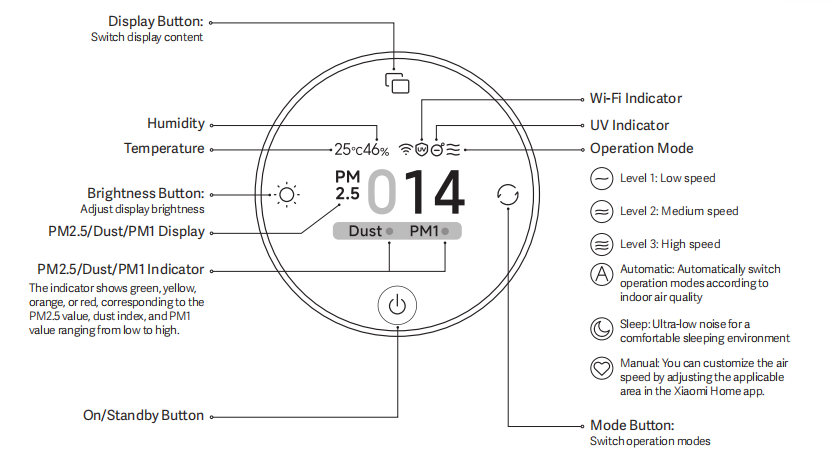
A: The buttons and functions of the Mijia Smart Air Purifier 6 Plus are shown below:
1. The device is equipped with an On/Standby button. Tap the on/standby button to turn on the air purifier or set it to standby.
2. The device is equipped with a Mode button. Tap the Mode button to cycle through the operation modes:
Level 1, level 2, level 3, automatic, sleep, and manual.
3. The device is equipped with a Brightness button. Tap the Brightness button to cycle through display brightness: Bright, medium, dim, and off.
4. The device is equipped with a Display button. Tap the Display button to cycle through display content:
PM2.5 value, dust index, and PM1 value.
Q2: What type of motor does the Mijia Smart Air Purifier 6 Plus use, and what is the noise level?
A: The Mijia Smart Air Purifier 6 Plus uses a DC brushless motor, which supports stepless speed control, resulting in low noise and a long lifespan. The maximum noise level of the entire unit is ≤ 66 dB(A), and a sleep mode is available for use during sleep, with noise levels as low as 33 dB(A).
Q3: What is the device on the back of the Mijia Smart Air Purifier 6 Plus?
A: The device on the back of the Mijia Smart Air Purifier 6 Plus is a laser particle sensor, primarily used to monitor the concentration of particulate matter in the ambient air. The other is a temperature and humidity sensor.
Q4: Which settings will be lost after resetting the Wi-Fi on the Mijia Smart Air Purifier 6 Plus?
A: After resetting the Wi-Fi on the Mijia Smart Air Purifier 6 Plus, your App settings and scheduled on/off times will be lost.
Q5: Can multiple people control one Mijia Smart Air Purifier 6 Plus simultaneously?
A: Yes, multiple people can control one Mijia Smart Air Purifier 6 Plus simultaneously by sharing it with designated Xiaomi accounts via the Xiaomi Home App.
Q6: After sharing the Mijia Smart Air Purifier 6 Plus with others, can the shared person upgrade the firmware?
A: Currently, a shared person cannot upgrade the firmware.
Q7: What is the Manual mode for the Mijia Smart Air Purifier 6 Plus?
A: The Manual mode allows you to set the fan speed of the Mijia Smart Air Purifier 6 Plus according to your needs via the Xiaomi Home App. The speed can be adjusted steplessly to achieve the optimal purification effect for your specific area.
Q8: Will a humidifier affect the PM2.5 reading of the Mijia Smart Air Purifier 6 Plus?
A: Yes. Ultrasonic humidifiers atomize water into tiny water droplets at a high concentration. The highly sensitive sensor in the Mijia Smart Air Purifier 6 Plus will detect these tiny water droplets, resulting in a higher-than-normal reading or even a reading that exceeds the maximum limit. The reading will gradually return to normal after the humidifier is turned off. This is a normal phenomenon.
Q9: Will an electric heater affect the PM2.5 reading of the Mijia Smart Air Purifier 6 Plus?
A: Yes. Because electric heaters promote air convection in the room and make the air relatively dry, it becomes easier for tiny particles to float in the air and spread. This causes the Mijia Smart Air Purifier 6 Plus's particle sensor to register a higher reading.
Q10: How to turn on/off the display screen of the Mijia Smart Air Purifier 6 Plus, and how to adjust the screen brightness?
A: The Mijia Smart Air Purifier 6 Plus has a Brightness button. Each press of the button cycles the screen between bright, medium, dim, and off. If connected to the Xiaomi Home App, find and tap the device, tap the three dots in the upper-right corner to open Settings, then find and tap Light to turn the display on or off.
Note:
After the screen is turned off, the display buttons will not completely turn off, making it convenient to control the device in dark environments.
Q11: What kind of filter does the Mijia Smart Air Purifier 6 Plus come with?
A: The Mijia Smart Air Purifier 6 Plus comes standard with a high-quality antibacterial and antiviral filter and a modified activated carbon filter combination, which is an integrated high-quality filter.
Q12: How to replace the filter in the Mijia Smart Air Purifier 6 Plus?
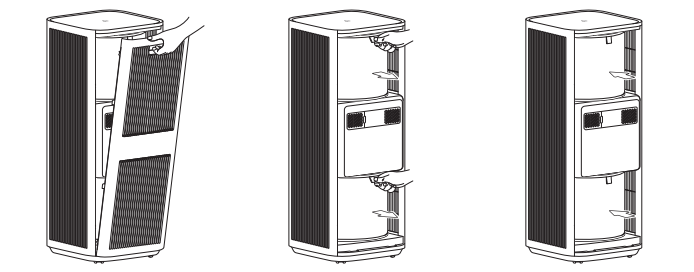
A: Ensure that the Mijia Smart Air Purifier 6 Plus is in standby mode and disconnected from the power supply before performing the following operations. Be sure to remove the packaging bags of new filters before installing them.
Open the filter compartment cover, grasp the handle, and remove the old filters. Insert the new filters while keeping the handle upward and outward, and close the filter compartment cover.
Note:
1. Replace both filters at a time to avoid compromising the purification performance. Please purchase genuine and compatible filters from official channels.
2. Be sure to use the Mijia Smart Air Purifier 6 Plus Filter that is compatible with the Mijia Smart Air Purifier 6 Plus (Model: AFEP7TFM35, Dimensions: φ245 × H200 mm).
Q13: What is the HEPA filtration grade of the filter in the Mijia Smart Air Purifier 6 Plus?
A: The Mijia Smart Air Purifier 6 Plus uses a HEPA H12 filter.
Q14: How is the filter lifespan calculated for the Mijia Smart Air Purifier 6 Plus, and how often should it be replaced?
A: The Mijia Smart Air Purifier 6 Plus automatically calculates the filter lifespan based on the air quality of the usage environment, the purifier's operating mode, speed, and running time. If the air quality is poor, the filter lifespan will be consumed faster; if the air quality is good, the filter lifespan will be consumed more slowly. Generally, the filter lifespan is approximately 6-12 months. When the purifier detects that the filter lifespan is ≤5%, it will remind you to replace the filter via the display screen and the App. It is recommended to clean the outermost pre-filter of the filter every month.
Note:
The above replacement time suggestions are based on tests conducted in a laboratory environment. The actual replacement time can vary depending on the actual usage environment and system reminders.
Q15: Does the Mijia Smart Air Purifier 6 Plus require resetting the filter lifespan after replacing the filter?
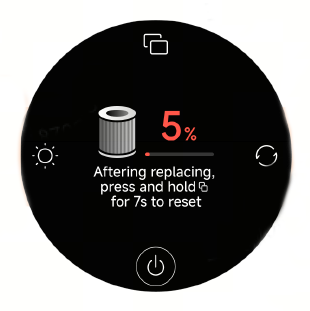
A: The Mijia Smart Air Purifier 6 Plus does not have an RFID tag module. After replacing the filter, you need to manually reset the filter lifespan. On the filter-related page, press and hold the Display button for 7 seconds to reset the filter. After the reset is complete, the screen will display the filter lifespan.
Q16: Why are the PM2.5 readings high on the Mijia Smart Air Purifier 6 Plus, and why are the indoor readings higher than the outdoor readings?
A: The water vapor and oil fumes generated indoors from using humidifiers, smoking, and cooking can affect the Mijia Smart Air Purifier 6 Plus's assessment of pollution levels. Additionally, the outdoor readings displayed in the app can differ from the actual values in your specific location.
Q17: Will the filter life decrease if the Mijia Smart Air Purifier 6 Plus is used without a filter?
A: The Mijia Smart Air Purifier 6 Plus cannot start and operate normally without a filter installed.
Q18: Can the upper and lower filters of the Mijia Smart Air Purifier 6 Plus be reset separately?
A: No, the upper and lower filters of the Mijia Smart Air Purifier 6 Plus cannot be reset separately. They are sold as a set and need to be replaced together to ensure the purification effect is not affected.
Q19: Will the room humidity decrease if the Mijia Smart Air Purifier 6 Plus is turned on for a long time?
A: Yes, because the Mijia Smart Air Purifier 6 Plus filters out particulate matter in the air, it also filters out water vapor, which will reduce the humidity of the ambient air. This is normal. Water molecules will attach to the filter and activated carbon, causing a decrease in humidity and also interfering with the performance of the air purifier, and causing deviations in the displayed particulate matter values.
Q20: Can the Mijia Smart Air Purifier 6 Plus remove odors such as cooking fumes?
A: The Mijia Smart Air Purifier 6 Plus can remove odors such as cooking fumes, but depending on the environment, it takes a longer time to achieve the desired effect. The amount of activated carbon in the filter and the length of time the filter has been used will also affect the effectiveness of odor removal.
Q21: Does the Mijia Smart Air Purifier 6 Plus have an ion function?
A: The Mijia Smart Air Purifier 6 Plus has a negative ion function.
Q22: Can the Mijia Smart Air Purifier 6 Plus be modified for use?
A: The Mijia Smart Air Purifier 6 Plus can't be modified for use. There are third-party accessories available online that change the original usage of air purifiers, but they should not be used together with this product. For example, connecting outdoor air to the filter through ducts or adding a humidification device to the air outlet. Any such modifications can affect the product’s performance, stability, and safety. Therefore, changing the original operating mode of the air purifier is prohibited.
Q23: Does the Mijia Smart Air Purifier 6 Plus have a UV sterilization function?
A: The Mijia Smart Air Purifier 6 Plus is equipped with a UV sterilization function, which is enabled by default. You can turn the UV sterilization function on or off via the Xiaomi Home App. The UV LED helps effectively eliminate bacteria and viruses on the filter as well as in the air circulation area.
Q24: Which UV band does the UV sterilization light of the Mijia Smart Air Purifier 6 Plus belong to?
A: The UV sterilization light of the Mijia Smart Air Purifier 6 Plus belongs to the UV-C band, with a wavelength range of 100 to 280 nanometers.
Q25: Is the UV sterilization light of the Mijia Smart Air Purifier 6 Plus harmful to the human body?
A: The Mijia Smart Air Purifier 6 Plus is designed with safety protection features. The UVC lamp is fully enclosed inside the device and is completely blocked within the device, so it does not pose any harm to you.
Q26: Can the UV sterilization light of the Mijia Smart Air Purifier 6 Plus be observed with the naked eye to see if it is on?
A: The UV sterilization light of the Mijia Smart Air Purifier 6 Plus is installed in the middle of the top of the lower filter compartment. The UV sterilization function will only start after the device is working normally. It cannot be observed during normal use, so the working status of the sterilization lamp cannot be directly observed. However, you can determine whether the sterilization lamp is working normally by checking if the UV indicator on the screen is on (ultraviolet light has a sterilizing effect, and staring at it for a long time can cause irreversible damage to the eyes).
Q27: How does the Mijia Smart Air Purifier 6 Plus disinfect and sterilize?
A: Particles containing germs in the air move with the airflow through inertial motion, irregular Brownian motion, or under the influence of certain field forces. The high-efficiency filter uses interception effect, inertial effect, diffusion effect, and electrostatic effect to make the particles containing germs adhere to the fiber surface. At the same time, the antibacterial coating of the filter element destroys the cell wall of the germs, inactivating them. Combined with ultraviolet light sterilization, this achieves the effect of disinfection and purification.
Q28: How to clean and store the Mijia Smart Air Purifier 6 Plus?
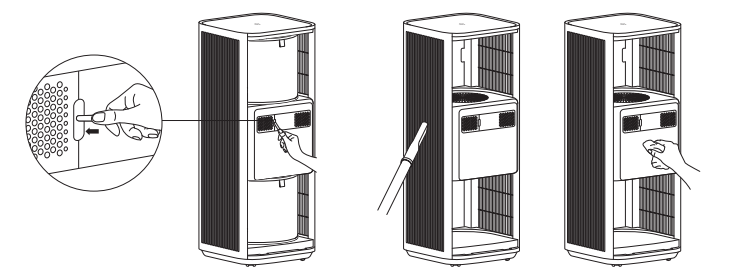
A: When the Mijia Smart Air Purifier 6 Plus needs cleaning, please unplug the power cord before cleaning. For surface dirt, gently wipe the device surface with a damp soft cloth. After prolonged use, you can open the filter compartment, remove the filter, and gently wipe the inner surface of the device with a damp soft cloth. Dry the filter in a well-ventilated area. The laser particle sensor compartment cover can be removed and rinsed with water. After everything is dehydrated, reassemble the parts and use the device. If the air purifier is not used for an extended period, it is recommended to use the original non-woven fabric bag to cover it from top to bottom and seal it for storage.
Q29: Why does the air feel a bit dry after the Mijia Smart Air Purifier 6 Plus is turned on?
A: The basic working principle of the Mijia Smart Air Purifier 6 Plus is to circulate air through the filter to achieve filtration. While filtering pollutants in the air, it also filters out moisture in the air, causing a decrease in air humidity, which makes you feel that the air is a bit dry.
Q30: Why does the packaging of the Mijia Smart Air Purifier 6 Plus have an odor?
A: The shock-absorbing protective foam in the packaging has a slight inherent material odor. Because the Mijia Smart Air Purifier 6 Plus is in contact with the foam for a long time, it will also absorb some of the foam's odor. The odor will naturally dissipate after the packaging is opened for a while and is harmless to the human body.
Q31: Can pregnant women and young children use the Mijia Smart Air Purifier 6 Plus?
A: The Mijia Smart Air Purifier 6 Plus has been certified by relevant authorities, so it is safe for pregnant women and young children to use.
Q32: How to view the historical air quality curve on the Mijia Smart Air Purifier 6 Plus?
A: When the Mijia Smart Air Purifier 6 Plus is powered on, press the Display button to switch between current data modes. Then press and hold the Display button for 2 seconds to switch to the curve display of the current mode.
You can also view the historical air quality curve in the Xiaomi Home App.
App Related
Q1: How to connect the Mijia Smart Air Purifier 6 Plus to the Xiaomi Home App?
A: To connect the Mijia Smart Air Purifier 6 Plus to the Xiaomi Home App, scan the QR code on the instruction manual or install the Xiaomi Home App from the Play Store and bind your Xiaomi account. Ensure your home Wi-Fi is working properly and that your phone is connected to the Wi-Fi. Turn on the air purifier, open the Xiaomi Home App, and the App will automatically search for nearby Xiaomi Home smart devices and provide prompts.
Alternatively, you can manually add the device by tapping the plus sign in the upper-right corner. After adding the Mijia Smart Air Purifier 6 Plus according to the prompts, you can control the air purifier's power on/off, switch operating modes, and view current indoor air quality, temperature, and humidity through the Xiaomi Home App.
Q2: What are the features of the Mijia Smart Air Purifier 6 Plus App interface?
A: You can remotely control the Mijia Smart Air Purifier 6 Plus's operating modes, view indoor air quality changes, check the remaining filter life, and set up linkages with other smart products through the Xiaomi Home App.
Q3: Does the Mijia Smart Air Purifier 6 Plus support voice control?
A: Yes, the Mijia Smart Air Purifier 6 Plus supports voice control via Google and Alexa smart speakers.
Q4: What are the network connection requirements for the Mijia Smart Air Purifier 6 Plus?
A: The Mijia Smart Air Purifier 6 Plus supports network control and is compatible with most personal routers on the market.
Please note the following requirements for your router's wireless network:
1. The Mijia Smart Air Purifier 6 Plus can only connect to 2.4 GHz Wi-Fi networks; 5GHz Wi-Fi is not currently supported.
2. The Wi-Fi encryption method must be WPA or WPA2; WEP is not supported.
3. The router must have DHCP enabled; static IP addresses are not currently supported, nor are web authentication or enterprise-level 802.1X.
Note:
To control the Mijia Smart Air Purifier 6 Plus, you need to download the Xiaomi Home App.
Q5: Does the Mijia Smart Air Purifier 6 Plus support HomeKit?
A: No, the Mijia Smart Air Purifier 6 Plus does not support HomeKit.
Q6: Can the Mijia Smart Air Purifier 6 Plus be used as a fan?
A: Yes, you can use the side air outlet facing your body to use it as a fan.
Q7: Is it okay to smoke near the Mijia Smart Air Purifier 6 Plus?
A: It is not recommended to smoke near the air intake of the Mijia Smart Air Purifier 6 Plus, as the filter and other materials inside the device are easily flammable. Sparks being drawn into the device can cause a fire.
FAQ
Q1: What to do if the Mijia Smart Air Purifier 6 Plus frequently shuts down/stops automatically?
A: If the Mijia Smart Air Purifier 6 Plus frequently shuts down/stops automatically, please follow the steps below to troubleshoot:
1. Check if any smart scenes are set up in the Xiaomi Home App for automatic on/off control. If the conditions for these scenes are met, the device will automatically turn on or off.
2. If the issue persists, please contact the after-sales service center for assistance.
Q2: What to do if the Mijia Smart Air Purifier 6 Plus shows inaccurate environmental readings?
A: Please clean the sensor port of the Mijia Smart Air Purifier 6 Plus as follows:
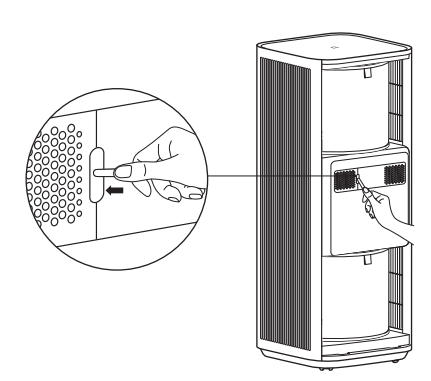
As shown in the figure, use a blunt tool to open the laser particle sensor's compartment cover, and use an air gun or blower to clean the compartment cover filter and sensor.
Note:
Do not use hot air.
Q3: What to do if the Mijia Smart Air Purifier 6 Plus can't turn on?
A: If the Mijia Smart Air Purifier 6 Plus can't turn on, please follow the steps below to troubleshoot:
1. Confirm that the power outlet is working and that the power cord is properly connected.
2. Check if the filter is installed correctly and evenly, and ensure the main unit and filter compartment door are properly installed without any gaps.
3. If the above are normal, the device will emit a beeping sound after being plugged in, and the screen will display the Mijia logo before turning off. Pressing the On/Standby button should then turn the device on normally.
4. If the device beeps and the screen displays door not closed, it means the device is powered on correctly, but the filter compartment door needs to be reinstalled.
5. If the device does not respond at all when the On/Standby button is pressed, please contact the after-sales service center.
Q4: What to do if there are vertical lines on the display screen of the Mijia Smart Air Purifier 6 Plus?
A: If the problem persists after unplugging the Mijia Smart Air Purifier 6 Plus for more than 10 seconds and then plugging it back in, the display screen has a performance fault and requires service. Please contact the after-sales service center.
Q5: What to do if the Mijia Smart Air Purifier 6 Plus makes unusual noises?
A: If the Mijia Smart Air Purifier 6 Plus makes unusual noises, please follow the steps below to troubleshoot:
1. Check if the filter is installed correctly and if the filter's packaging bag has been removed.
2. Check if any foreign objects have entered the air purifier. If so, open the filter compartment and remove the foreign object.
3. Check if any foreign objects have entered the laser particle sensor.
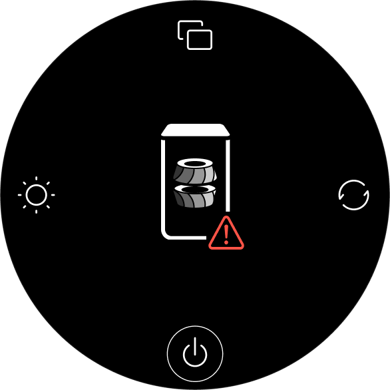
Q6: What to do if the screen displays motor malfunction on the Mijia Smart Air Purifier 6 Plus?
A: If the screen displays motor malfunction on the Mijia Smart Air Purifier 6 Plus, please follow the steps below to troubleshoot:
1. Check whether the filter is properly installed, and make sure the packaging bag has been removed before reinstalling the filter.
2. Check if there are any foreign objects in the fan area causing the motor to stall or malfunction.
3. Unplug the device for 10 seconds and restart it.
4. If the above steps are ineffective, please contact the after-sales service center for inspection.
Q7: Why does the Mijia Smart Air Purifier 6 Plus have an unpleasant odor?
A: If the Mijia Smart Air Purifier 6 Plus has an unpleasant odor, please refer to the following aspects:
New device:
The air purifier can have some harmless odors when new. Due to the use of a composite filter, there can be some residual odors from the main materials and auxiliary materials used in the manufacturing process when the new unit is first used. This odor will gradually decrease after a period of use. This new device odor is normal and will not have any negative impact on your health. To accelerate the removal of the initial odor, it is recommended to run the device at the highest setting in a well-ventilated area for a period of time. Please use it with confidence.
After more than one month of use:
If you still notice an odor after more than a month of use, this is because the filter absorbs pollutants during use, which can produce a slight odor. Also, prolonged use and relatively humid environments can contribute to this odor. People sensitive to odors can notice this smell. Running the device at the highest setting for a period of time will reduce the odor. This odor will not harm your health.
To avoid the risk of the filter becoming damp and producing a sour smell, it is recommended that in areas with high humidity, the air purifier be kept running continuously for 24 hours, and the Primary filter be cleaned every two weeks or so.
Q8: What to do if the filter life of my Mijia Smart Air Purifier 6 Plus still shows as sufficient, but there is an odor?
A: During use, the filter of the Mijia Smart Air Purifier 6 Plus can absorb a large amount of pollutants and produce a slight odor. Over time, or in humid environments, odor may also occur. If you are sensitive to smells, you may notice this more. It is recommended to run the device at the highest fan speed for a period of time, which can help reduce the odor. This smell is not harmful to human health.
To prevent moisture-related odors from the filter in areas with high humidity, it is recommended to keep the Mijia Smart Air Purifier 6 Plus running continuously for 24 hours and clean the Primary filter approximately every two weeks.
If the issue persists, the filter of the Mijia Smart Air Purifier 6 Plus should be replaced, as it is a consumable part.
Q9: Does the filter for the Mijia Smart Air Purifier 6 Plus come with packaging?
A: The filter for the Mijia Smart Air Purifier 6 Plus comes with sealed plastic packaging from the factory. This is to prevent secondary contamination of the filter during storage and transportation. The filter can have a slight odor when first opened, but this will diminish after a period of use and is not an abnormal phenomenon. It will not have any negative impact on your health.
Q10: Why is the purification effect of the Mijia Smart Air Purifier 6 Plus poor?
A: Please check if the area of the room matches the Mijia Smart Air Purifier 6 Plus's recommended coverage area and setting. The airtightness and height of the room will also affect the purification effect.
Q11: What to do if the Mijia Smart Air Purifier 6 Plus's PM2.5 reading is abnormal or inaccurate?
A: If the Mijia Smart Air Purifier 6 Plus's PM2.5 reading is abnormal or inaccurate, please follow the steps below to troubleshoot:
1. If you encounter inaccurate or abnormal PM2.5 readings, check if the laser particle sensor compartment cover on the back of the device is dirty or blocked. If it is dirty or blocked, you can use a non-sharp tool to open the laser particle sensor compartment cover and clean the filter and sensor with an air gun or hairdryer (do not use hot air). Gently brush the filter of the laser particle sensor compartment cover with a used toothbrush dipped in water, clean it thoroughly, and let it dry before reassembling and testing. If cleaning does not resolve the issue, please contact after-sales service for assistance.
2. Different readings in the same environment for multiple air purifiers and different environmental factors, such as altitude, can also cause different readings. You can test them all in sleep mode and with different levels of smoke. If the error value increases linearly, it indicates a malfunction of the laser particle sensor. If the error value is within a certain range, it is considered normal.
Q12: Why does the Mijia Smart Air Purifier 6 Plus make a current noise when it is powered off?
A: This sound originates from the inductor in the DC-DC circuit of the Mijia Smart Air Purifier 6 Plus. Because the circuit board and various functional modules require different operating voltages, the circuit needs to convert a constant voltage into different voltage values for the load circuit. During voltage transformation, the inductor needs to be switched at a high frequency. The inductor continuously converts electrical energy into magnetic field energy, and then converts magnetic field energy back into electrical energy. This energy conversion will cause the inductor to produce a slight current sound, which is a normal phenomenon.
Q13: Why does the laser particle sensor fan on the Mijia Smart Air Purifier 6 Plus sometimes stop rotating?
A: When the Mijia Smart Air Purifier 6 Plus is powered on, the screen displays normally, and the sensor works continuously, displaying real-time values. When the screen is off, to reduce sensor usage time and increase its lifespan, the sensor activates every 2 minutes and operates for 12-15 seconds. The sensor also works continuously when the Xiaomi Home App is open. After closing the Xiaomi Home App and turning off the screen for 5 minutes, the sensor will also operate intermittently.
Q14: Why are the buttons on the Mijia Smart Air Purifier 6 Plus unresponsive?
A: The Mijia Smart Air Purifier 6 Plus has a child lock function. If the child lock is enabled, the buttons on the air purifier will be unresponsive. You need to disable the child lock function to operate the buttons on the air purifier. You can enable or disable the child lock by pressing and holding the Mode button for 7 seconds or through the Xiaomi Home App.
Q15: What to do if the Mijia Smart Air Purifier 6 Plus is always showing offline or is unable to connect to Wi-Fi?
A: If the Mijia Smart Air Purifier 6 Plus is always showing offline or unable to connect to Wi-Fi, please follow the steps below to troubleshoot:
1. Confirm that the Mijia Smart Air Purifier 6 Plus is powered on and operating normally.
2. Confirm that the Wi-Fi is working properly.
3. Please unplug the power cord, wait 10 seconds, and then plug it back in (the power supply needs some time to discharge). Try resetting the Wi-Fi of the Mijia Smart Air Purifier 6 Plus and reconnecting to Wi-Fi.
Q16: What do the different colors of the air quality indicator on the Mijia Smart Air Purifier 6 Plus display mean? Why does it sometimes change colors abruptly?
A: The air quality indicator on the Mijia Smart Air Purifier 6 Plus is a visual representation of PM2.5, PM1, and dust, and its color changes according to changes in air quality data. When the value fluctuates around a critical point, the indicator color will also change accordingly.
The indicator color changes in response to changes in air quality data, as shown below:
1. When the PM2.5 concentration is 1-20 µg/m³, the indicator is green, indicating excellent air quality. When the PM2.5 concentration is 21-35 µg/m³, the indicator is yellow, indicating good air quality. When the PM2.5 concentration is 36-75 µg/m³, the indicator is orange, indicating moderate air quality. When the PM2.5 concentration is 76-91 µg/m³, the indicator is red, indicating poor air quality.
2. When the PM1 concentration is 1-15 µg/m³, the indicator is green, indicating excellent air quality. When the PM1 concentration is 16-26 µg/m³, the indicator is yellow, indicating good air quality. When the PM1 concentration is 27-55 µg/m³, the indicator is orange, indicating moderate air quality. When the PM1 concentration is 56-79 µg/m³, the indicator is red, indicating poor air quality.
3. When the dust index is 1-5, the indicator is green, indicating excellent air quality. When the dust index is 6-12, the indicator is yellow, indicating good air quality. When the dust index is 13-24, the indicator is orange, indicating moderate air quality. When the dust index is 25-36, the indicator is red, indicating poor air quality.
Q17: Why do multiple Mijia Smart Air Purifier 6 Plus units show different PM2.5 levels and air quality indicator colors under the same environment?
A: First, in real environments, dust moves with airflow, and even within the same room, it is difficult to ensure identical dust levels at different locations. The Mijia Smart Air Purifier 6 Plus features highly sensitive sensors, so slight differences in readings may occur. A PM2.5 deviation between two Mijia Smart Air Purifier 6 Plus units (calculated as: (average value − reading) / average value) within 10% is considered normal.
Second, all electronic components have tolerances, which can cause slight differences in sensor voltage and therefore result in variations in sensor output readings. If the PM2.5 readings differ significantly between two units, it may be due to dust accumulation in the sensor compartment. In this case, remove and clean the sensor cover of the Mijia Smart Air Purifier 6 Plus.
When two units show different air quality indicator colors in the same environment, it is usually because their PM2.5 readings are close to the threshold value, so one is slightly above and the other slightly below, resulting in different air quality indicator colors.
The allowable error range for PM10 is ±20%.
Q18: What to do if the Sleep mode noise is high on the Mijia Smart Air Purifier 6 Plus?
A: The Sleep mode of the Mijia Smart Air Purifier 6 Plus is designed to balance purification performance and low noise. In this mode, the noise level is reduced to 29 dB(A), while maintaining a purification rate of up to 120 m³/h. Please use it with confidence.
Q19: Why are there black powder particles falling out of the newly unpacked filter of the Mijia Smart Air Purifier 6 Plus, and is it harmful to the human body?
A: During transportation, the filter of the Mijia Smart Air Purifier 6 Plus can experience slight powder shedding due to vibration and friction. This is normal. If you find black powder on the filter after opening the device or the new filter packaging, it could be activated carbon powder. Please wipe it clean with a damp soft cloth before re-installing. After the device is running, there will be no further continuous powder shedding. Please use it with confidence.
Q20: What is the fan speed adjustment logic in the Auto mode of the Mijia Smart Air Purifier 6 Plus?
A: When the Mijia Smart Air Purifier 6 Plus is set to Auto mode, it will automatically adjust the fan speed based on the air quality status detected by the sensor.
The air quality indicator corresponds to the Auto mode fan speed as follows:
1. Green corresponds to sleep mode engine speed.
2. Yellow corresponds to the engine speed in Level 1.
3. Orange corresponds to the engine speed between Level 1 and Level 2.
4. Red corresponds to the engine speed between Level 2 and the Manual mode.
Q21: What does the dust index on the Mijia Smart Air Purifier 6 Plus represent?
A: The dust index on the Mijia Smart Air Purifier 6 Plus, also known as PM10, represents the concentration of particulate matter with a diameter less than or equal to 10 micrometers detected by the device. The dust number displayed on the air purifier represents a level, not a numerical value, with levels ranging from 1 to 100, from low to high concentration.
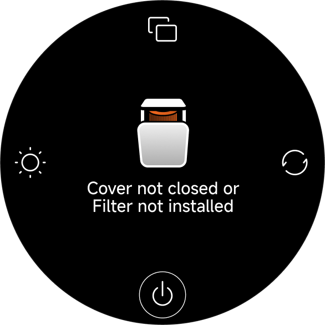
Q22: What to do if the Mijia Smart Air Purifier 6 Plus display shows that the cover is not closed or the filter is not installed?
A: If the Mijia Smart Air Purifier 6 Plus display shows that the cover is not closed or the filter is not installed, please follow the steps below to troubleshoot:
1. Check if the filter compartment cover on the main unit is closed tightly and reassemble it.
2. Properly install both the upper and lower filters, then close the compartment cover.
3. If the filters are already installed and the compartment cover is closed, but the display still shows that they are not properly installed, please unplug the power cord for 10 seconds and then plug it back in.
4. If the above steps are ineffective, please contact the after-sales service center for inspection.
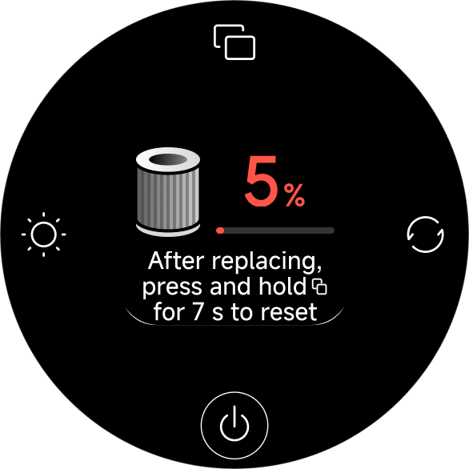
Q23: What to do if the Mijia Smart Air Purifier 6 Plus's display shows that the filter life is less than 5%?
A: This indicates that the filter life of the Mijia Smart Air Purifier 6 Plus is almost depleted. Please replace the filter promptly. After replacement, press and hold the Display button for 7 seconds to reset the filter life.
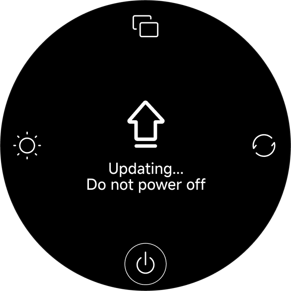
Q24: What to do if the display screen of the Mijia Smart Air Purifier 6 Plus shows "Updating... Do not power off"?
A: If the display screen of the Mijia Smart Air Purifier 6 Plus shows "Updating... Do not power off", this indicates that the device is currently undergoing a firmware upgrade process. Please wait patiently for the update to complete. The device will be ready for normal use after the update is finished and the device restarts.
Note:
Do not power off the device during the update process.
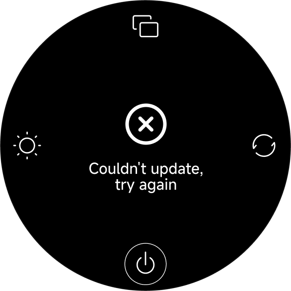
Q25: What to do if the display screen of the Mijia Smart Air Purifier 6 Plus shows "Couldn't update, try again"?
A: If the display screen of the Mijia Smart Air Purifier 6 Plus shows "Couldn't update, try again", the buzzer will sound “beep beep beep.” The device will automatically restart after 2 seconds and return to its previous state. If the upgrade is performed while the device is in standby mode, there will be no buzzer sound.
Does it help?
Yes
No