

What to do if a feature removed after update on the Redmi Note 10S?
If you've noticed that a particular feature has been removed from your Redmi Note 10S after a system update, there are a few steps you can take to understand and potentially address the situation:
1. Check Release Notes:
Look for release notes or update announcements provided by Xiaomi for the specific update that you installed. Xiaomi often details the changes, additions, and removals in these notes.
2. Community Forums:
Check Xiaomi’s official community forums. Other users might have experienced similar issues or changes and could share their insights or solutions.
3. Wait for Updates:
Xiaomi sometimes releases follow-up updates to address issues, restore features, or provide improvements based on user feedback. Keep an eye on subsequent updates and release notes to see if the removed feature is reintroduced.
4. Send Feedback:
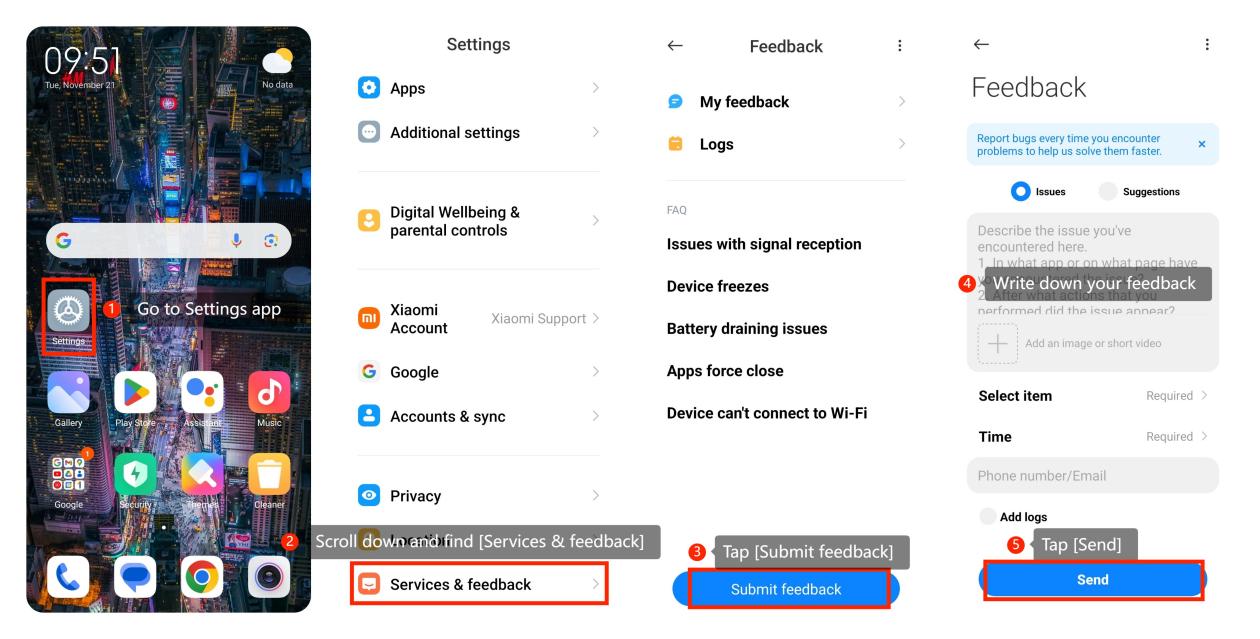
You can send your feedback by going to Settings app >> scroll down and find [Services & feedback] >> [Submit feedback] >> write down your feedback >> [Send].
1. Check Release Notes:
Look for release notes or update announcements provided by Xiaomi for the specific update that you installed. Xiaomi often details the changes, additions, and removals in these notes.
2. Community Forums:
Check Xiaomi’s official community forums. Other users might have experienced similar issues or changes and could share their insights or solutions.
3. Wait for Updates:
Xiaomi sometimes releases follow-up updates to address issues, restore features, or provide improvements based on user feedback. Keep an eye on subsequent updates and release notes to see if the removed feature is reintroduced.
4. Send Feedback:
You can send your feedback by going to Settings app >> scroll down and find [Services & feedback] >> [Submit feedback] >> write down your feedback >> [Send].
Does it help?
Yes
No