

Xiaomi Buds 6 FAQ
Overview
Q1: Why does the Xiaomi Buds 6 sometimes play two connection prompt sounds after reconnecting when moving back within range?
A: After Low Energy Bluetooth is enabled on a Xiaomi phone, if the Xiaomi Buds 6 disconnects from both the LEA and BR connections due to distance and then reconnects when brought back within range, the BR connection may reconnect first and play one connection prompt sound, followed by the LEA connection reconnecting and playing another prompt sound.
If the LEA connection reconnects first after returning within range, followed by the BR connection, the Xiaomi Buds 6 will normally play only one connection prompt sound. Please feel free to use the device normally.
Q2: Why can the Xiaomi Buds 6 not be found in Google's Find Hub App if no earbud is added within 10 minutes?
A: If pairing is not completed within 10 minutes, the Xiaomi Buds 6 will stop broadcasting the pairing signal to prevent continuous broadcasting, which helps avoid increased power consumption and the rapid depletion of battery power.
Q3: How do Google's Find Hub and Apple Find My work on the Xiaomi Buds 6, and how to switch between them?
A: The Xiaomi Buds 6 supports both Google’s Find Hub and Apple Find My, but it can only be bound to one App at a time. Once the earbuds are successfully added to one App, the pairing function for the other App will be automatically disabled, meaning the same pair of earbuds cannot be added to both Google’s Find Hub and Apple Find My simultaneously.
To switch between Apps, you can remove the earbuds from the currently connected App. If you are using Google’s Find Hub, press and hold the earbuds for about 10 seconds to re-enable pairing mode. If you were previously using Apple Find My, the pairing broadcast will usually restart automatically after removing the device from the App.
Q4: Does the Xiaomi Buds 6 support Xiaomi Find?
A: The Xiaomi Buds 6 does not support the Xiaomi Find feature.
Q5: Why can't the Xiaomi Buds 6 connect to the Xiaomi Earbuds App on third-party phones when LEA is enabled?
A: The Xiaomi Earbuds App currently does not support LEA mode on third-party phones. Please use the Xiaomi Earbuds App in classic Bluetooth mode.
Q6: What features does the Google Fast Pair pop-up support on the Xiaomi Buds 6?
A: The Google Fast Pair pop-up on the Xiaomi Buds 6 can display battery levels of both the earbuds and the charging case, charging status, and enable quick connection. To use this feature, place the Xiaomi Buds 6 in the charging case, open the lid, and bring them close to a phone that supports Google Fast Pair.
Note:
1. For first-time use, the phone must be connected to Wi-Fi (mobile hotspot is not supported). This is required because the Google Fast Pair function needs to download earbud animation data via Wi-Fi during initial recognition. After this, the pop-up will work normally without an internet connection when using the same Xiaomi Buds 6 again.
2. Keep the Xiaomi Buds 6 and the phone within 30 cm. Slowly open and close the case 3–5 times (do not open/close quickly). The initial pop-up may show a default image; the animation will appear after a short time under a Wi-Fi connection (loading time depends on network speed).
Q7: How to connect the Xiaomi Buds 6 to a phone?
A: To connect the Xiaomi Buds 6 to a phone, please refer to the following information:
1. Open the charging case with the new Xiaomi Buds 6, take out the earbuds, and remove the protective film. Put the earbuds back into the charging case. The earbuds will automatically enter Bluetooth pairing mode, indicated by a flashing white light. Turn on Bluetooth on your phone and connect.
2. Connect to a new device:
(1). Place the Xiaomi Buds 6 in the charging case, then open the lid and press and hold the function button for 2 seconds. The indicator on the charging case will flash in white, and the earbuds will enter pairing mode (if no connection is made within 1 minute, the earbuds will enter sleep mode and the indicator will turn off).
(2). Enable Bluetooth on your phone, search for and connect to “Xiaomi Buds 6” (if a pairing code is required, enter “0000”).
Note:
If the connection fails, place the Xiaomi Buds 6 back into the charging case and repeat the steps above.
3. Connection interruption:
When the device turns off Bluetooth or moves out of range, the connection will be disconnected. The Xiaomi Buds 6 will play a disconnection prompt tone and then enter pairing standby mode. If no device is connected within 10 minutes, the earbuds will become undiscoverable and unconnectable. Wearing the earbuds again will wake them up and return them to pairing standby mode.
4. Auto reconnection:
When the Xiaomi Buds 6 are in the charging case and the lid is opened, they will automatically reconnect to the most recently paired device. If reconnection fails, the earbuds will become discoverable and connectable after 1 minute, and will become undiscoverable and unconnectable after 1 hour.
Note:
If auto reconnection fails, manually reconnect from the Bluetooth settings on your device. If the issue persists, reset the earbuds and pair again: place both earbuds in the charging case with the lid open, press and hold the function button for 10 seconds until the orange indicator flashes continuously for 3 seconds to confirm reset. Release the button, and the earbuds will enter pairing mode with a white flashing light until successfully connected to the phone.
Q8: What are the key features of the Xiaomi Buds 6?
A: The Xiaomi Buds 6 offers the following features:
1. It features custom triple-magnetic gold-plated drivers with lossless audio transmission, tuned by the Harman Golden Ear team and certified with Hi-Res Audio.
2. It delivers an immersive, cross-device sound experience with support for head tracking for dynamic audio positioning.
3. Equipped with three built-in microphones and AI noise reduction algorithms, supporting AI-based wind noise suppression during calls.
4. The earbuds dynamically adjust noise cancellation depth based on wearing conditions, balancing ear pressure and comfort with noise reduction performance.
5. Up to 6 hours of playback on a single charge, and up to 35 hours with the charging case.
Note:
The battery life test refers to music playback time. It is tested under the following conditions: AAC Bluetooth connection, 50% volume, ANC off, and default settings. Data is based on Xiaomi Laboratory tests. Actual performance varies depending on environment, software version, and device model.
6. It supports standalone recording with local storage and allows uploads to the Xiaomi Earbuds App for interaction.
7. It supports iOS Find My, dual connection, and IP54 dust and water resistance for the earbuds.
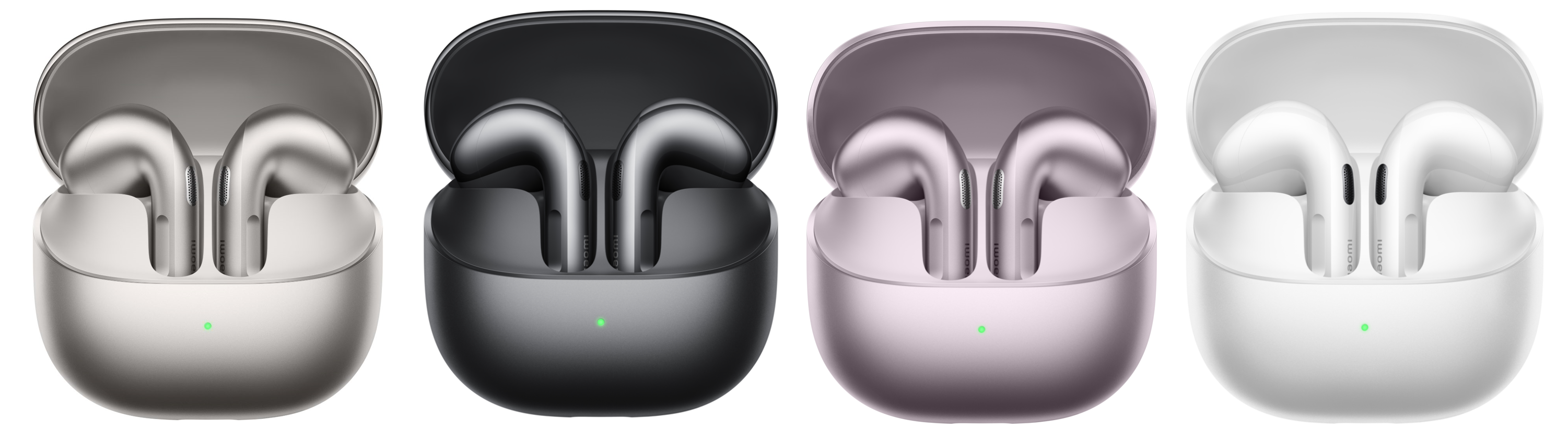
Q9: What is the appearance of the Xiaomi Buds 6?
A: The Xiaomi Buds 6 features a compact and refined appearance, as shown in the image below:
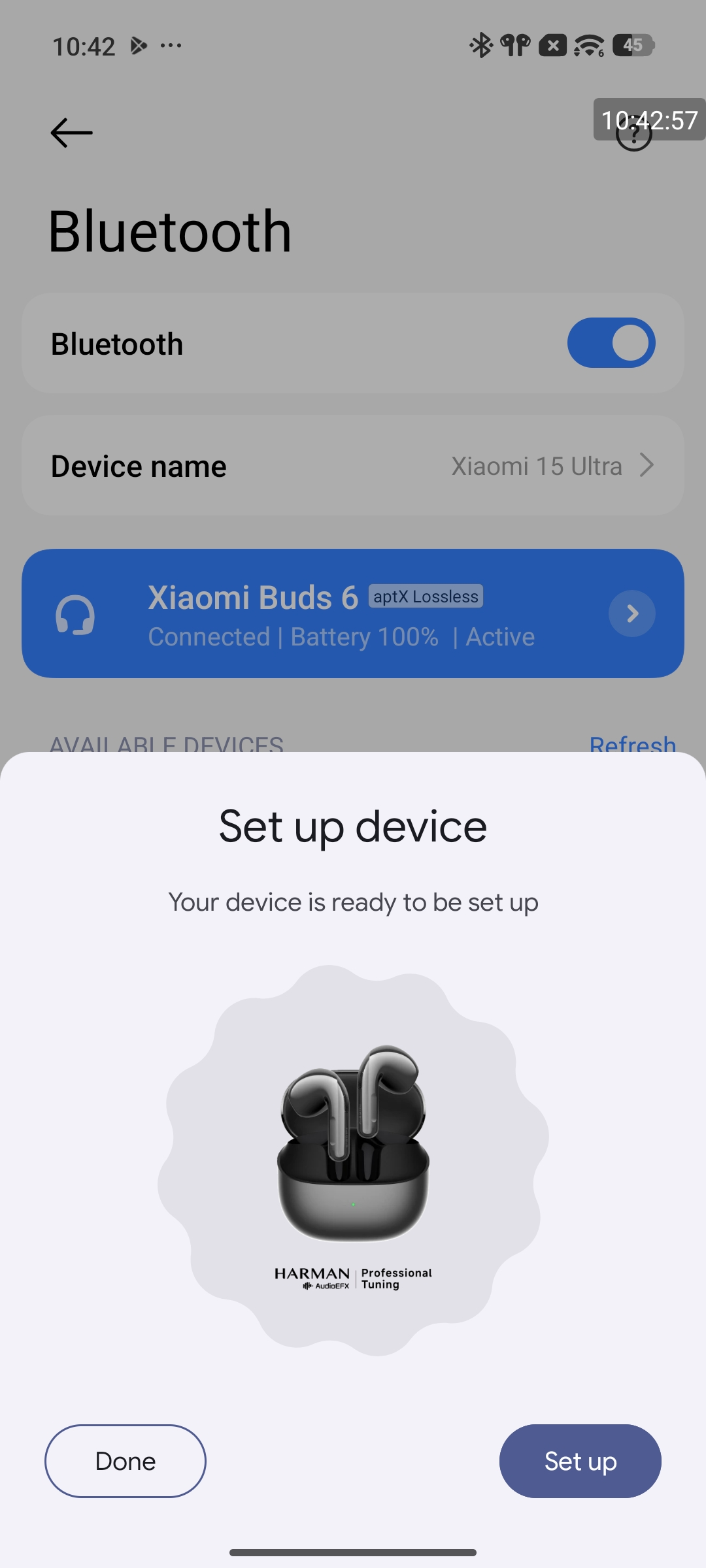
Q10: What is the Bluetooth name of the Xiaomi Buds 6 shown in the phone’s Bluetooth device list?
A: The Xiaomi Buds 6 appears in the Bluetooth device list as "Xiaomi Buds 6".
Note:
The pop-up image color varies depending on the earbud color. The black version is shown as an example (see image below).
Q11: What is the Bluetooth version of the Xiaomi Buds 6?
A: The Xiaomi Buds 6 supports Bluetooth 5.4.
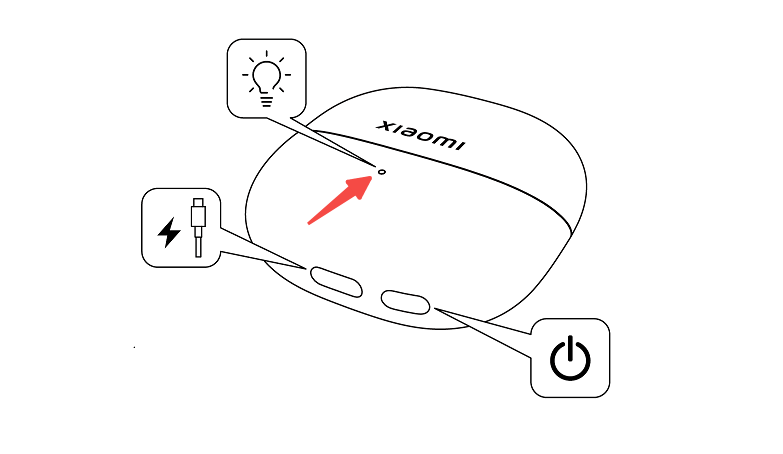
Q12: What do the different indicator colors on the Xiaomi Buds 6 charging case mean?
A: The indicator on the Xiaomi Buds 6 charging case shows different statuses as follows:
1. Charging status: When charging, the indicator stays in green if the battery level is above 90%. Otherwise, it stays in orange.
2. Connection status: With the earbuds placed inside the charging case and the case open, press and hold the function button for 2 seconds. The indicator will flash in white, indicating that the earbuds are ready to pair. If no connection is established within 1 minute, the earbuds enter sleep mode, and the indicator turns off.
3. Battery level check: With the case closed, press the function button once. If the battery level of the charging case is above 40%, the indicator stays in green for 5 seconds and then turns off. If the battery level of the charging case is 40% or below, the indicator stays in orange for 5 seconds and then turns off.
4. In case detection status: When the earbuds are placed into the case, the indicator first shows the earbud battery level within the first second (green if above 60%, otherwise orange). After 1 second, it displays the charging case battery level. If the case battery is above 40%, the green light stays on for 8 seconds. If 40% or below, the orange light stays on for 8 seconds, then turns off.
Q13: How long is the battery life of the Xiaomi Buds 6?
A: The Xiaomi Buds 6 delivers the following battery performance:
With ANC turned off, the earbuds provide up to 6 hours of music playback on a single charge, and up to 35 hours with the charging case.
Testing conditions for music playback:
1. Fully charged earbuds, ANC off, 50% volume, AAC codec. Under these conditions, music playback lasts up to 6 hours, and up to 35 hours with a fully charged case.
2. Fully charged earbuds, ANC off, 50% volume, aptX Adaptive codec (48 kHz sampling rate). Under these conditions, music playback lasts up to 5 hours, and up to 28 hours with a fully charged case.
Q14: Does the Xiaomi Buds 6 support single earbud replacement and left/right earbud re-pairing?
A: Yes, the Xiaomi Buds 6 supports single earbud replacement and left/right earbud re-pairing.
Please refer to the following steps:
1. After replacing a single earbud, place both earbuds into the charging case and close the lid.
2. Open the lid, then press and hold the function button on the charging case for 20 seconds while the earbuds remain in the case. The earbuds will automatically re-pair and form a stereo set.
Q15: What are the hardware specifications of the Xiaomi Buds 6?
A: Please refer to the official Xiaomi website for full specifications of the Xiaomi Buds 6.
Key information is as follows:
1. Platform: Qualcomm QCC3091.
2. Earbud battery capacity: 35 mAh.
3. Charging case battery capacity: 475 mAh.
Q16: Is the Xiaomi Buds 6 dust and water-resistant?
A: The earbuds are rated IP54 for dust and water resistance, while the charging case is rated IPX2.
The Xiaomi Buds 6 earbuds feature an IP54-rated dust and water-resistant design, protecting against splashes from any direction. They can be used during workouts such as fitness training or in light rain while walking or cycling. It is recommended to wipe the earbuds dry after sweating.
Note:
1. Splash, water, and dust resistance are not permanent and can decrease over time due to normal wear and tear. Do not charge earbuds when they are wet. Do not wear earbuds while swimming. Damage caused by liquid immersion is not covered under warranty.
2. The earbuds are not resistant to hot water or steam and should not be used while showering.
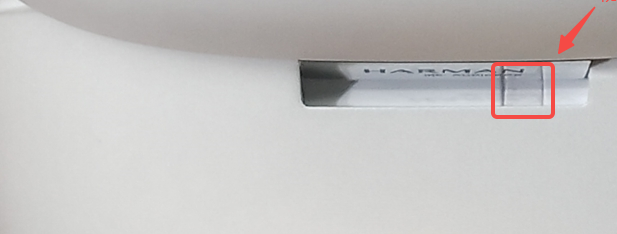
3. The water-resistance indicator sticker on the charging case is located near the hinge on the back. It is white under normal conditions and turns red when exposed to water.
Frequently Asked Questions
Settings
Q1: How to use the Record audio function on the Xiaomi Buds 6?
A: Each earbud of the Xiaomi Buds 6 supports up to 60 minutes of recording time. The audio is encoded in the Opus codec, and recordings are saved in .m4a format.
To use the Record audio function on the Xiaomi Buds 6, please refer to the following methods:
Method 1:
Triple-press either earbud to start recording, and triple-press again to stop recording.
1. By default, triple-press is set to start/stop recording. This function can be changed in the phone’s Bluetooth settings or in the Xiaomi Earbuds App gesture settings.
2. Triple-press either earbud to start recording. The recording scenario will be automatically recognized.
Note:
Recording is independent for the left and right earbuds, and the pressed earbud will start recording.
3. Triple-press the earbud again to stop recording. Recordings can be saved to the phone in the app’s recording settings.
Note:
Each earbud supports up to 60 minutes of recording per session. When the limit is reached, recording will automatically switch to the other earbud or upload stored content to the phone.
4. Recorded audio files can be played, shared, or deleted.
Method 2:
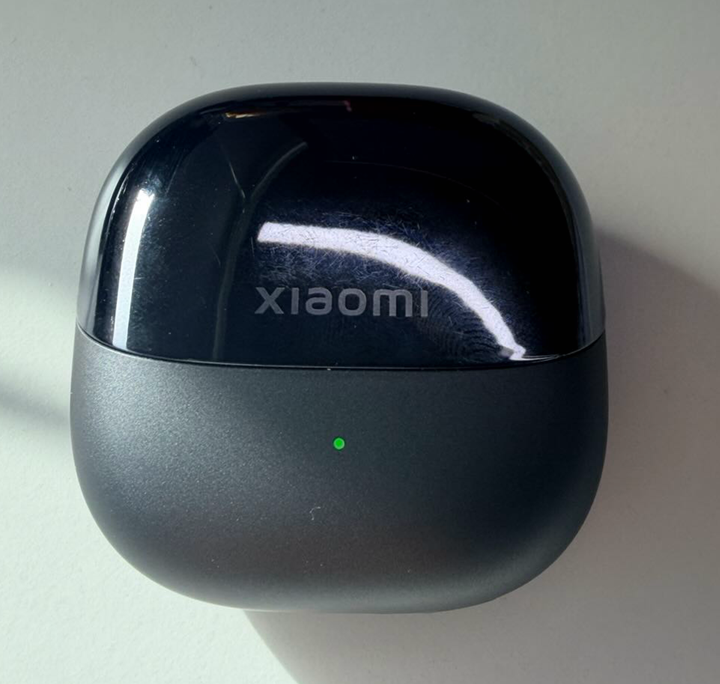
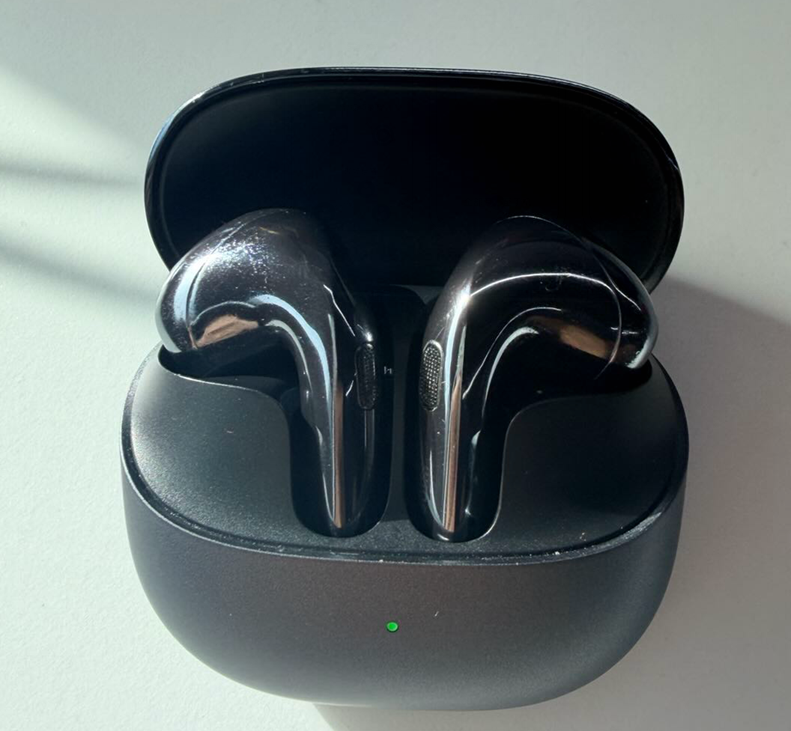
When the earbuds are placed in the charging case (lid open or closed), triple-press the function button on the charging case to start recording. The same operation applies to stop recording.
During recording, the charging case indicator will remain on (as shown below):
To export recordings, they can be saved to the phone via the recording settings in the Xiaomi Earbuds App.
Method 3:
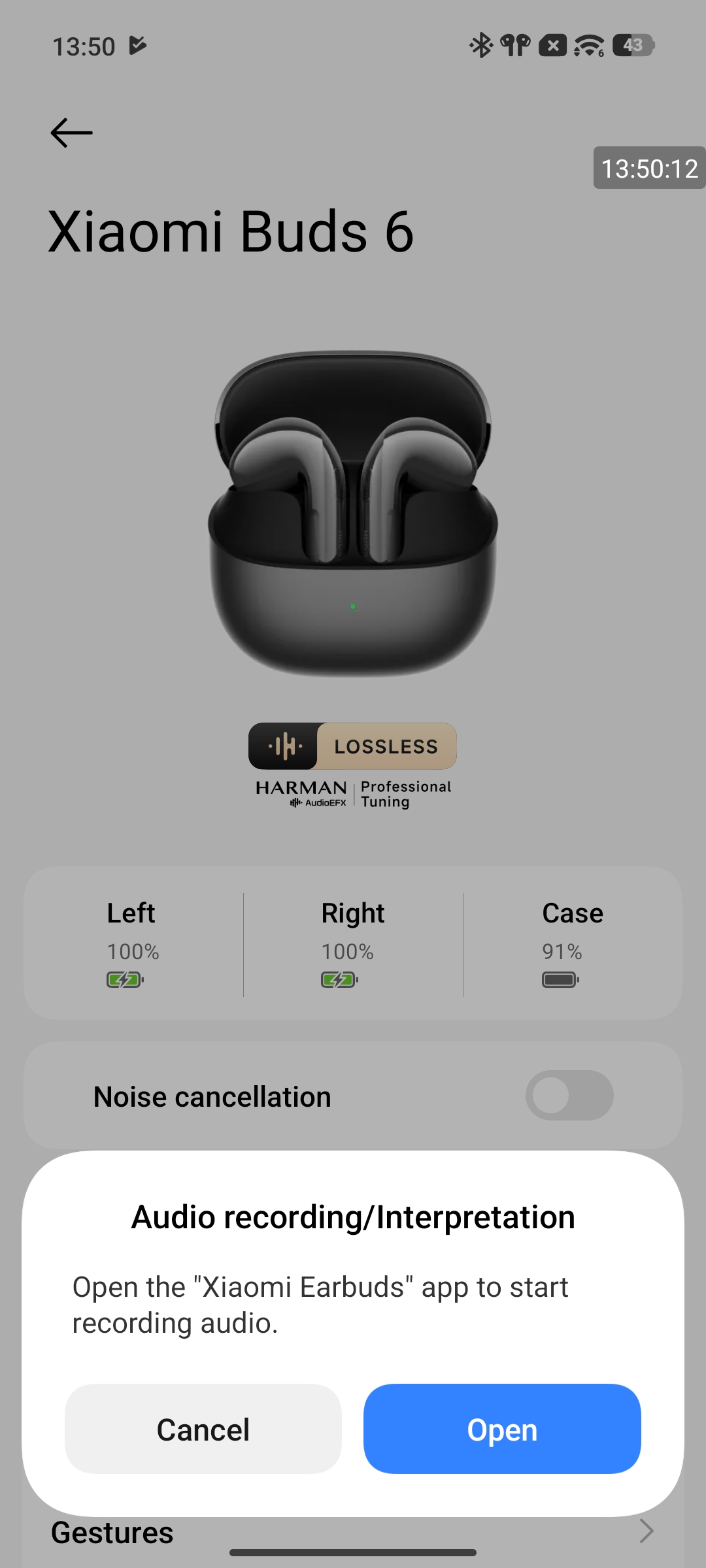
Tap the [Record audio] in the Xiaomi Earbuds App.
Note:
You can also go to [Settings] >> [Bluetooth] >> [Xiaomi Buds 6] >> [Record audio]. A pop-up window will appear, then tap [Open] to enter the recording interface in the Xiaomi Earbuds App.
Q2: When recording videos or audio on a phone, does it use the Xiaomi Buds 6 or the phone’s microphone?
A: It depends on the phone model, operating system, and the specific App being used. The microphone source varies based on different usage scenarios when using the Xiaomi Buds 6.
1. During calls, music playback, and third-party App voice or video calls, the microphone of the Xiaomi Buds 6 is used. However, when recording videos or audio, the system may switch to the phone’s built-in microphone.
Note:
On iOS 17.5.1, audio recordings use the Xiaomi Buds 6 microphone, while video recordings use the phone’s built-in microphone. Android devices from different brands can behave differently, and the actual behavior can be verified using the test method below.
2. You can test it using the following method:
After connecting the Xiaomi Buds 6 to the phone, open a recording App. Move a few meters away from the phone (about 3–5 meters) and start recording. After stopping the recording, check the audio or video. If there is no sound or the volume is very low, it indicates the phone’s built-in microphone is being used. If the sound is clear, it indicates the Xiaomi Buds 6 microphone is being used.
Q3: What to do if recorded files cannot be played in the App on my Xiaomi phone when using the Xiaomi Buds 6?
A: If recorded files cannot be played in the App on my Xiaomi phone when using the Xiaomi Buds 6, try using a third-party music player to play the audio file.
Q4: Will music be recorded when playing music during live recording with the Xiaomi Buds 6?
A: During live recording, the recording will continue normally even if music is playing on the mobile phone. The recording function primarily captures ambient sounds and does not easily pick up music currently playing on the phone. The microphone will only likely pick up and record the music if the playback volume is set to a relatively high level (exceeding 10 bars/steps).
Q5: What to do if recording uploads fail in the Xiaomi Earbuds App when using the Xiaomi Buds 6?
A: If recording uploads fail in the Xiaomi Earbuds app when using the Xiaomi Buds 6, please refer to the following troubleshooting steps:
1. Update the Xiaomi Earbuds App to the latest version.
2. Clear the Xiaomi Earbuds App’s background data and try uploading again.
On Xiaomi phones: Go to [Settings] >> [Apps] >> Xiaomi Earbuds App >> [Clear data], then reopen the App and retry the upload.
Q6: How to set up Custom sound on the Xiaomi Buds 6?
A: To set up Custom sound on the Xiaomi Buds 6, go to [Settings] >> [Bluetooth] >> [Audio] >> [Custom sound] on the phone.
Note:
This feature is only available on certain Xiaomi phones in the Bluetooth settings interface. You need to go to [Settings] >> [Sound & vibration] >> [Sound effects] >> tap [Sound effects] to choose [Xiaomi Sound].
Currently, the [Custom sound] option in Bluetooth settings is supported on the following devices when using the Xiaomi Buds 6, with more models being gradually added:
1. Xiaomi 15, Xiaomi 15 Ultra, Xiaomi 15T
2. Xiaomi 14, Xiaomi 14 Ultra, Xiaomi 14T Pro
3. Xiaomi 13, Xiaomi 13 Ultra, Xiaomi 13T
4. POCO F8 Ultra, POCO F8 Pro, POCO F7 Ultra, POCO F7 Pro, POCO X7 Pro, POCO F6 Pro, POCO F5 Pro, POCO F6
5. REDMI Note 14 Pro+ 5G, REDMI Note 13 Pro 5G, REDMI Note 13 5G, REDMI Note 12 Pro 5G
6. Xiaomi Pad Mini, Xiaomi Pad 7 Pro, Xiaomi Pad 7, Xiaomi Pad 6S Pro 12.4
7. Xiaomi MIX Flip
Q7: How to control the Xiaomi Buds 6?
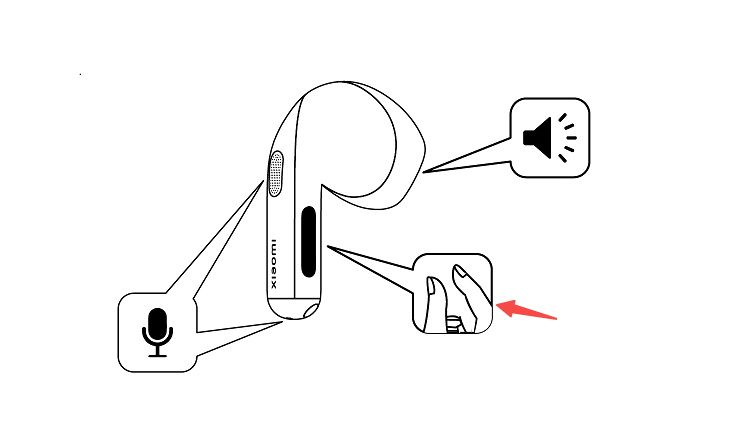
A: The Xiaomi Buds 6 use a press-and-slide control design. After wearing the earbuds properly, gently squeeze or slide the groove area on the side of the earbud stem. You will hear an operation tone, and then you can perform functions according to the user guide. If there is no response after squeezing or sliding, try readjusting the wearing position or re-wearing the earbuds.
Note:
You can customize the left and right earbud press gestures in the Xiaomi Earbuds App. After resetting the earbuds, the left and right controls will be restored to default settings.
Q8: How to update the firmware of the Xiaomi Buds 6?
A: To update the firmware of the Xiaomi Buds 6, please refer to the following methods:
Method 1:
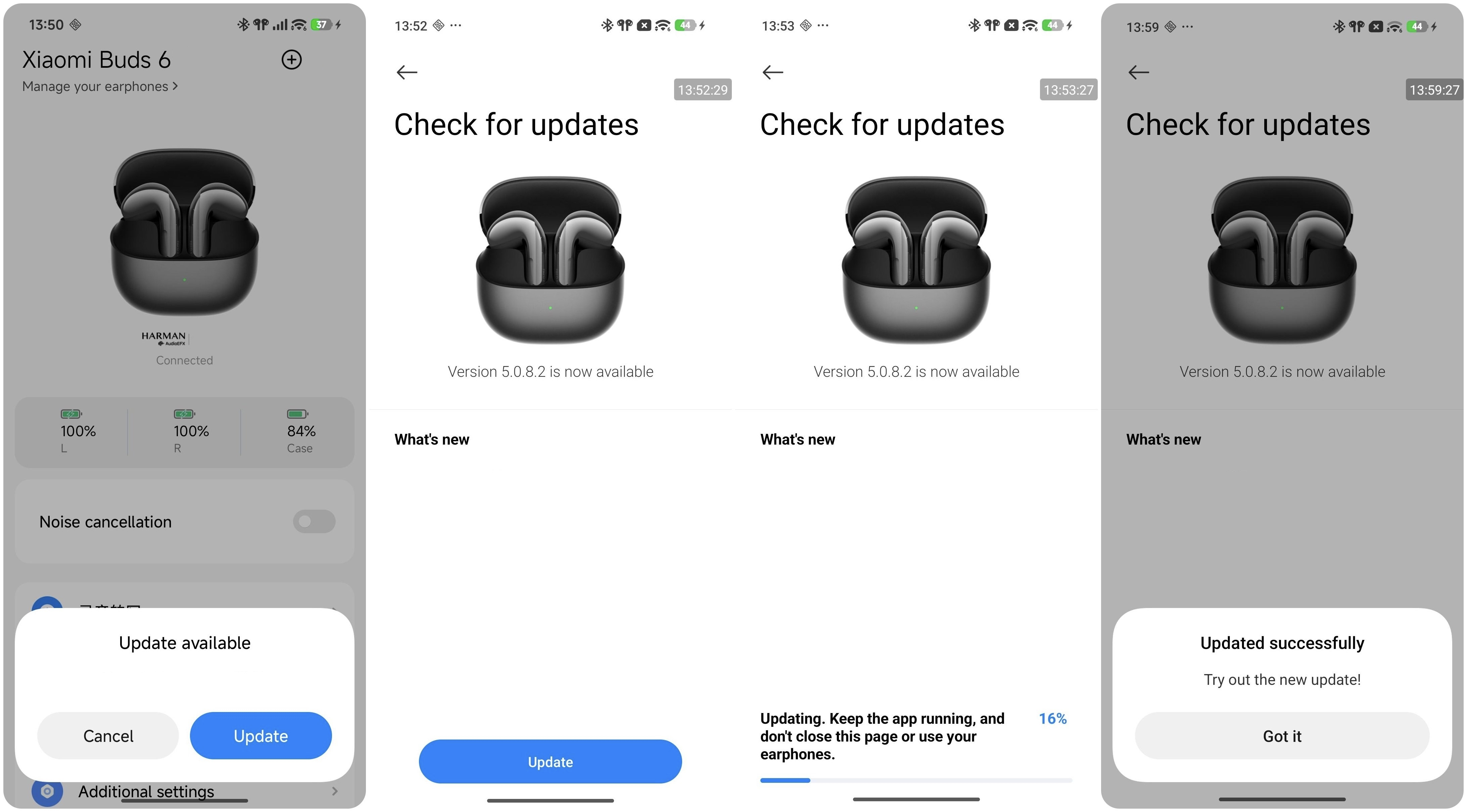
1. Make sure the Xiaomi Buds 6 are connected to your phone. Open the Xiaomi Earbuds App.
2. If a new version is available, a firmware update prompt will appear. Tap to enter the update page, then tap [Update].
3. The system will start the upgrade process. Please wait until the progress reaches 100%, after which the firmware will be updated automatically.
Note:
If the update fails in the Xiaomi Earbuds App, try the following:
1. The firmware package download may have failed. Ensure a stable network connection or switch to another network and try again.
2. The connection between the phone and the Xiaomi Buds 6 may be unstable. Reconnect the earbuds or try again in a less-interfered wireless environment.
Method 2:
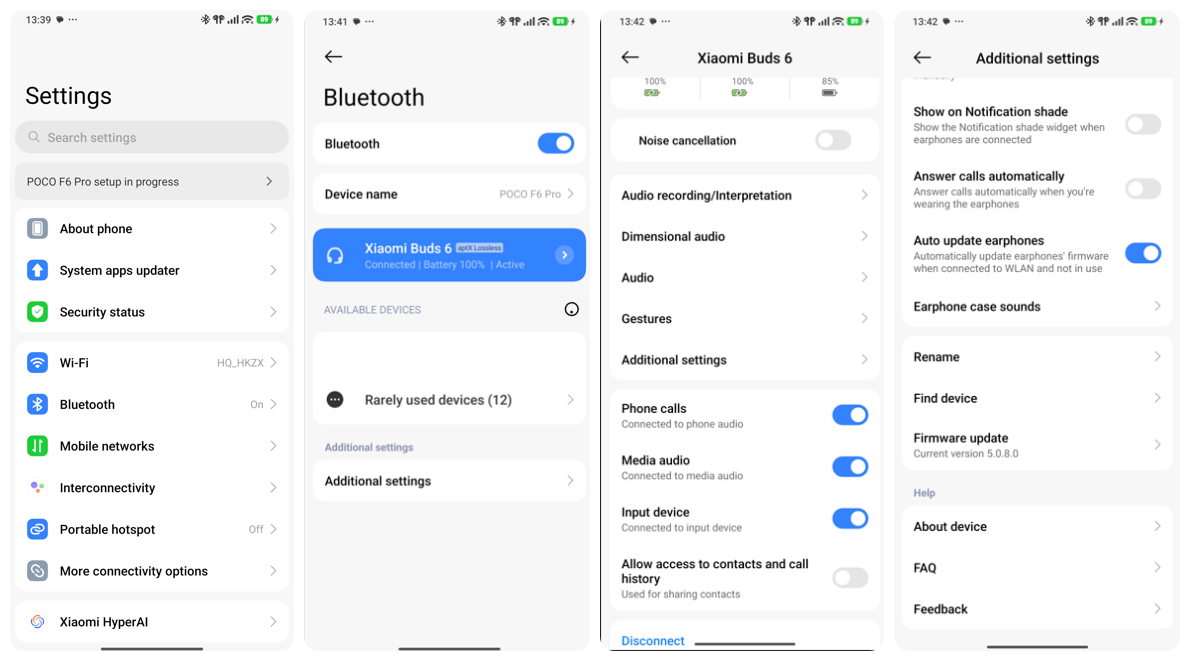
1. Ensure the Xiaomi Buds 6 are connected.
2. Go to [Settings] >> [Bluetooth] >> enter [Xiaomi Buds 6] >> [Additional settings] >> [Firmware update]. Tap to start the update and wait until it reaches 100% to complete the process.
Method 3:
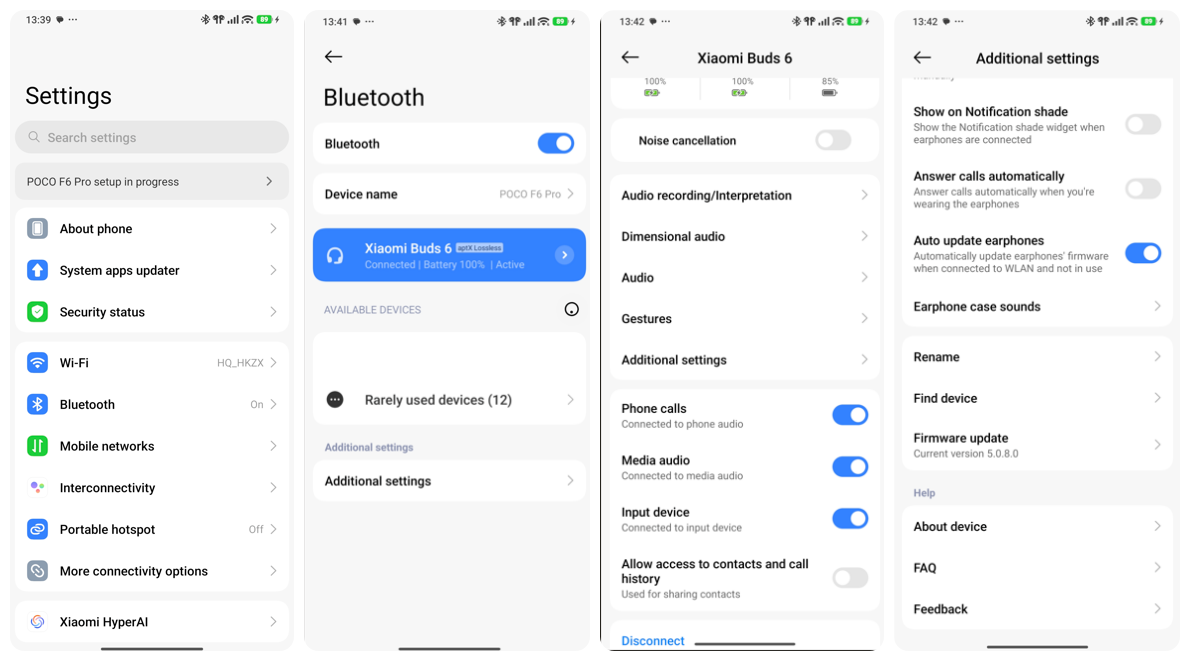
1. Ensure the Xiaomi Buds 6 are connected.
2. Go to [Settings] >> [Bluetooth] >> enter [Xiaomi Buds 6] >> [Additional settings] >> enable [Auto update earphones]. When the earbuds are placed inside the charging case, and the case is closed, and a new version is available, the update will be triggered automatically.
Note:
OTA updates may be affected in the following situations:
1. Firmware cannot be updated if the battery of the charging case and earbuds is below 20%.
2. Opening the case, removing earbuds, or pressing buttons can pause the update process.
Connection Related
Q1: How to connect the Xiaomi Buds 6 to the Xiaomi Earbuds App?
A: To connect the Xiaomi Buds 6 to the Xiaomi Earbuds App, please refer to the following steps:
1. Scan the QR code to download and install the Xiaomi Earbuds App.

2. Open the Xiaomi Earbuds App.
3. Tap [Add earphones] or the plus icon in the upper right corner.
4. Open the charging case lid and keep it open with both earbuds inside. Press and hold the bottom button of the charging case for 2 seconds until the indicator flashes. The earbuds then enter pairing mode. Select [Xiaomi Buds 6].
5. After connecting successfully, you can set the earbuds in the Xiaomi Earbuds App.
Note:
1. During the connection process, please make sure that the smartphone’s Bluetooth is enabled. Put the earbuds into the charging case, open the lid, and ensure that your smartphone is near the charging case.
2. The Xiaomi Earbuds App supports mobile phones with Android 6.0 and above and iOS 14.0 and above. Please upgrade the App to the latest version.
Q2: What basic functions are available after connecting the Xiaomi Buds 6 to the Xiaomi Earbuds App?
A: By connecting the Xiaomi Buds 6 to the Xiaomi Earbuds App, you can customize earbud settings and access related functions. The specific functions are as follows:
1. You can check for new firmware versions and update the earbuds online. Firmware update only supports updating from an older version to a newer version; downgrading to an earlier version is not supported.
2. On the Xiaomi Earbuds App home page, you can configure [Noise cancellation] or [Off] modes, as well as switch between noise cancellation levels.
3. In the Xiaomi Earbuds App >> [Record audio], you can record audio.
4. In the Xiaomi Earbuds App >> [Gestures], you can customize the gesture functions for the left and right earbuds.
5. In the Xiaomi Earbuds App >> [Audio effects], you can configure [Dimensional audio], [Adaptive sound], and [Audio balance].
6. In the Xiaomi Earbuds App >> [Additional settings], you can configure functions such as [In-ear detection], [Earphone case sounds], [Dual connection], [Take calls automatically], and [Rename earphones].
7. In the Xiaomi Earbuds App >> [Find your earphones], you can locate your earbuds.
8. You can check the battery level of the earbuds and charging case. In the Xiaomi Earbuds App >> [About earphones], you can also check the current firmware version of the earbuds.
Q3: How to clear the pairing records and reset the Xiaomi Buds 6?
A: The method for clearing phone pairing records and performing a reset is as follows:
Clearing pairing records between Xiaomi Buds 6 and a device:
1. For Android phones: [Settings] >> [Bluetooth] >> tap the [>] icon on the right side of [Xiaomi Buds 6] >> choose [Unpair].
2. For iPhone: [Settings] >> [Bluetooth] >> tap the [i] icon on the right side of [Xiaomi Buds 6] >> [Forget This Device].
Resetting the earbuds:
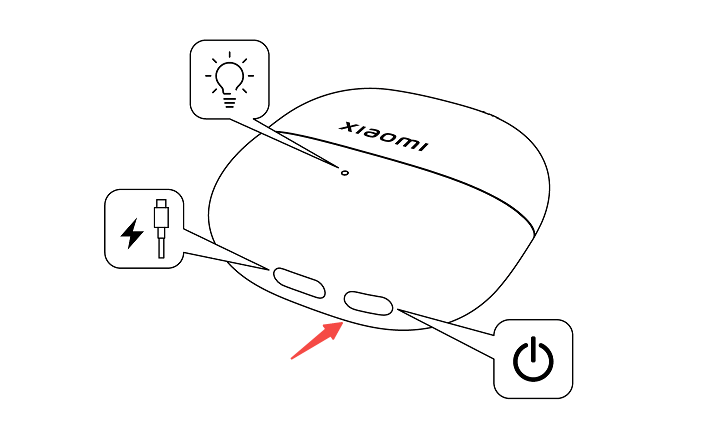
1. Place the earbuds into the charging case.
2. Open the charging case lid, then press and hold the function button on the bottom of the charging case for more than 10 seconds. When the orange indicator on the charging case flashes continuously, release the button. The earbuds will be reset, previous connection records will be cleared, and the earbuds will automatically re-enter pairing mode.
Q4: What is the effective usage range of the Xiaomi Buds 6?
A: In an unobstructed environment, the effective Bluetooth connection range between the Xiaomi Buds 6 and a phone is approximately 10 meters. If there are walls or other obstacles, the effective range may be reduced. For example, if there are multiple walls at home, leaving your phone in the living room and walking to the bedroom with the earbuds may result in audio lag or Bluetooth disconnection.
Note:
1. When used in environments with minimal signal interference, such as open spaces, offices, coffee shops, or at home, the earbuds generally provide a stable connection without lagging issues.
2. Due to the nature of Bluetooth connectivity, strong interference environments may affect signal quality and cause audio stuttering or interruptions. In places such as subways, trains, or airports, varying degrees of wireless interference may occur, which can result in occasional lagging or intermittent audio playback.
Q5: Why can’t the Xiaomi Buds 6 be recognized by the phone?
A: If the Xiaomi Buds 6 can't be recognized by the phone, please refer to the following aspects:
1. When searching for Bluetooth earbuds on your phone, make sure the Xiaomi Buds 6 are in pairing mode.
2. Ensure the earbuds have sufficient battery power.
3. Open the charging case lid and keep it open with both earbuds inside, then press and hold the function button for 2 seconds. The indicator will flash continuously, indicating that the earbuds are in pairing mode. Search for the Xiaomi Buds 6 via Bluetooth on the device to complete pairing.
4. Ensure the pairing steps are performed correctly. The earbuds remain in pairing mode while waiting for a connection. If no connection is established within 1 minute, the earbuds will automatically enter sleep mode, and the indicator will turn off.
5. Environmental interference may affect Bluetooth connectivity. Please try moving to a different location. Due to the characteristics of Bluetooth technology, electromagnetic interference in your surroundings may disrupt the connection, causing issues such as no sound, audio interruptions, or disconnections even after pairing.
6. If none of the above methods work, restore the Xiaomi Buds 6 to factory settings. Place the earbuds in the charging case with the lid open. Press and hold the button at the bottom of the charging case for 10 seconds until the indicator flashes rapidly. The earbuds will reset to factory settings and enter pairing mode. After resetting, follow the steps above to pair again.
Note:
1. If the earbuds have already been paired with one phone and you want to connect them to a new phone, place them back in the charging case and keep the lid open. Press and hold the button on the bottom of the case for 2 seconds until the indicator blinks to enter pairing mode for a second device. Once pairing is complete, the earbuds will automatically connect to both devices.
2. When using the Dual connection function, the earbuds can only connect to the Xiaomi Earbuds App on one device at a time.
Q6: What to do if the phone can find the Xiaomi Buds 6 but cannot connect?
A: If the device can detect the Xiaomi Buds 6 but cannot connect, it can be due to abnormal Bluetooth data on the phone. Please try deleting the previous connection record on the device and restoring the earbuds to factory settings. Place the earbuds back into the charging case with the lid open, then press and hold the button on the bottom of the charging case for 10 seconds until the indicator on the case flashes rapidly. The earbuds will be restored to factory settings and enter pairing mode. After the factory reset is complete, please follow the steps above to pair the earbuds again.
To delete the Bluetooth record on the phone:
1. For Android phones: [Settings] >> [Bluetooth] >> tap the [>] icon on the right side of [Xiaomi Buds 6] >> choose [Unpair].
2. For iPhone: [Settings] >> [Bluetooth] >> tap the [i] icon on the right side of [Xiaomi Buds 6] >> [Forget This Device].
Q7: What to do if the Xiaomi Buds 6 frequently disconnects?
A: If the Xiaomi Buds 6 frequently disconnects, please refer to the following aspects:
1. When multiple routers or Bluetooth devices are being used nearby, wireless interference may occur to varying degrees, which can cause audio lag, interruptions, or disconnections.
2. Low or depleted battery power in the earbuds can result in disconnection. Charge the earbuds and ensure they have sufficient battery power.
3. If the phone is too far away from the earbuds, exceeding the effective transmission range (approximately 10 meters), or if there are obstacles between the phone and the earbuds, the connection may be interrupted or disconnected. Please keep the earbuds and the phone close together, within the effective transmission range (about 10 meters), and reconnect them.
4. Electromagnetic interference in the surrounding environment may affect Bluetooth connectivity due to the nature of Bluetooth technology. Check for strong interference sources nearby. Keep the earbuds away from devices that may cause electromagnetic interference, such as microwaves, surveillance equipment, or other high-interference electronics. If interference is suspected, try using the earbuds in an open space or a normal indoor environment.
5. If the issue persists, place the earbuds into the charging case, close the lid for 5 seconds, then reopen the case and reconnect.
6. If none of the above methods work, restore the Xiaomi Buds 6 to factory settings. Place the earbuds in the charging case with the lid open. Press and hold the button at the bottom of the charging case for 10 seconds until the orange indicator on the charging case flashes continuously, and release the button. The earbuds will reset to factory settings and enter pairing mode, and the white indicator will flash until successfully paired with the mobile phone.
7. Please update the firmware to the latest version via the Xiaomi Earbuds App to enjoy the full experience.
Q8: Can the Xiaomi Buds 6 automatically reconnect to the phone after being disconnected due to being too far away?
A: The reconnection logic and steps of the Xiaomi Buds 6 are as follows:
1. If you return within 10 minutes after disconnection, the earbuds will automatically reconnect. If more than 10 minutes have passed, the earbuds enter sleep mode. In this case, wearing the earbuds will trigger automatic reconnection again.
2. If the earbuds do not automatically reconnect to the phone, please place them back into the charging case, close the lid for 5 seconds, then open it again, and try reconnecting via the phone’s Bluetooth settings.
3. If none of the above methods work, restart Bluetooth on the phone. Open the charging case lid and keep it open with both earbuds inside, then press and hold the function button on the charging case for 2 seconds until the white indicator flashes, indicating the earbuds have entered pairing mode, and reconnect the earbuds to the phone.
Q9: Will the Xiaomi Buds 6 automatically disconnect when placed in the charging case?
A: The disconnection logic when placing the Xiaomi Buds 6 in the charging case is as follows:
1. If the earbuds are placed in the charging case and the lid is not closed, they will remain connected and will not automatically disconnect from the phone.
2. If the earbuds are placed in the charging case and the lid is closed, they will automatically disconnect from the phone after 5 seconds.
Q10: What to do if the Xiaomi Buds 6 cannot reconnect after disconnecting from the phone?
A: If the Xiaomi Buds 6 cannot reconnect after disconnecting from the phone, the following factors can be involved:
1. The Xiaomi Buds 6 will automatically attempt to reconnect to the last paired device. If the most recently connected device is not your current phone, you need to reset the earbuds and reconnect them to the correct phone.
2. The phone may be too far from the earbuds, exceeding the effective transmission range (approximately 10 meters), or there may be obstacles between the phone and the earbuds.
3. Please check whether Bluetooth is enabled on your phone. If it is turned off, manually enable Bluetooth.
4. Due to the nature of Bluetooth devices, electromagnetic interference in your area may affect the connection, causing disconnections or preventing timely automatic reconnection. Please try moving to a different location and reconnecting.
Q11: Why does the phone show “Connected” (no phone or media audio) after the Xiaomi Buds 6 are placed in the case and the lid is closed, and then later show “Disconnected”?
A: This happens because the earbuds and the phone use different Bluetooth connection profiles (A2DP and HFP). These two profiles disconnect at different times, which causes the observed behavior. This does not affect the normal disconnection function of the earbuds, and please feel free to use them with confidence.
Q12: What to do if the Xiaomi Buds 6 disconnect and reconnect to the phone automatically without any operation after being connected?
A: In this case, the Xiaomi Buds 6 may have restarted unexpectedly. Please restore the earbuds to factory settings and try again.
Place both earbuds into the charging case and keep the lid open. Press and hold the function button for 10 seconds until the orange indicator flashes. When the indicator changes from orange to white, the factory reset is complete. After the factory reset is completed, please pair the earbuds with your phone again.
Please also update the firmware to the latest version through the Xiaomi Earbuds App for the best experience.
Q13: What to do if the Xiaomi Buds 6 cannot enter pairing mode by pressing and holding the charging case function button when the lid is opened?
A: If the Xiaomi Buds 6 cannot enter pairing mode by pressing and holding the charging case function button when the charging case is opened, and the white indicator of the charging case does not flash continuously, please close the lid for 5 seconds, then open it again and try again.
Q14: What is the difference between auto connection and dual connection on the Xiaomi Buds 6?
A: The difference between auto connection and dual connection on Xiaomi Buds 6 is as follows:
1. Auto connection: The earbuds automatically connect to the current device or to devices under the same account with this function enabled. Multiple devices must be signed in to the same Xiaomi account.
2. Dual connection: The earbuds can connect to two phones or other devices at the same time, allowing seamless switching of audio sources between the two devices without disconnecting or re-pairing. The two devices can be logged into different Xiaomi accounts.
Q15: Does the Xiaomi Buds 6 support connecting to a Xiaomi Smart Band/Xiaomi Watch?
A: The Xiaomi Buds 6 supports connection with Xiaomi Watch, but does not support connection with Xiaomi Smart Band.
Q16: Can the Xiaomi Buds 6 connect to two phones at the same time?
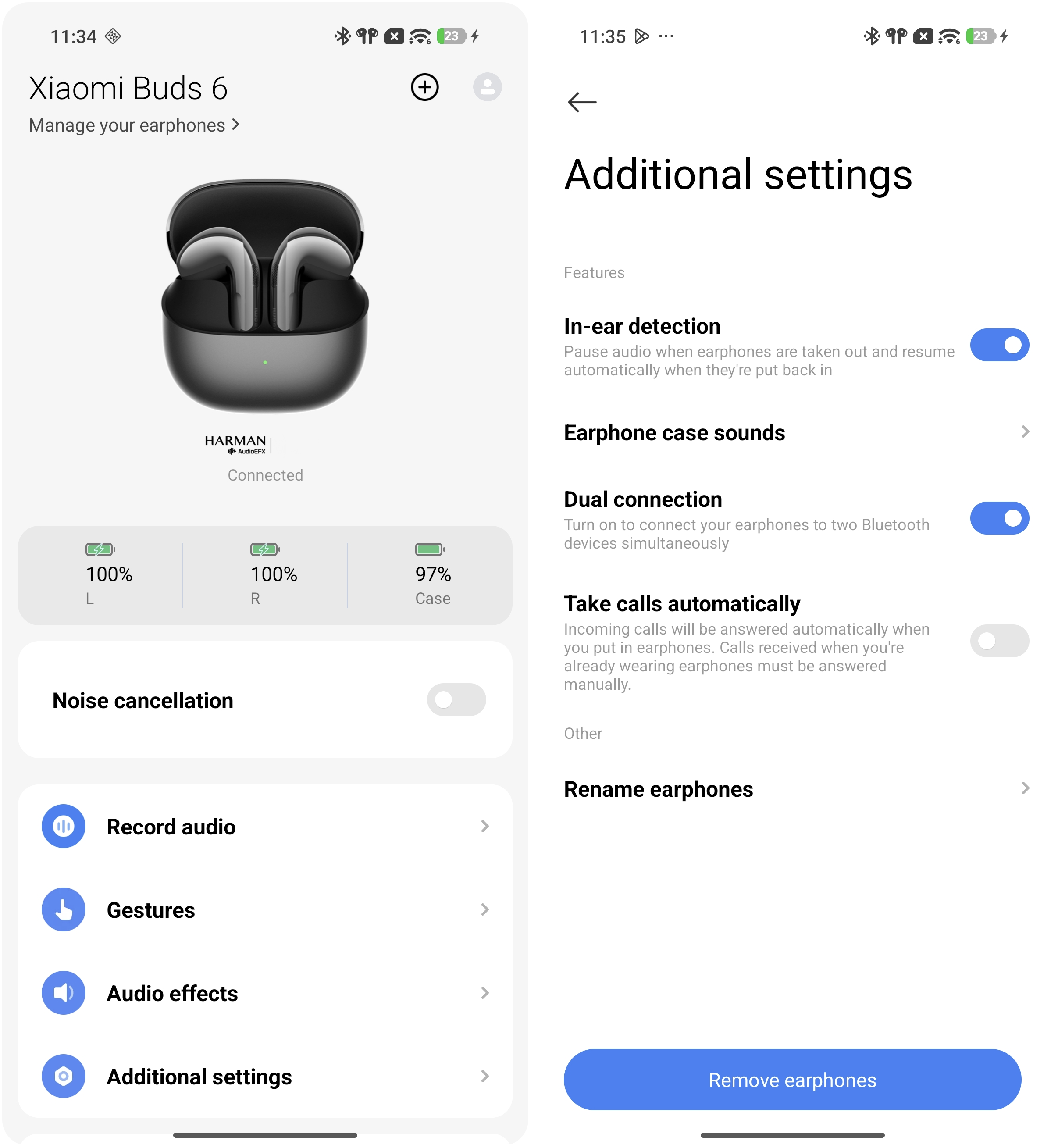
A: The Xiaomi Buds 6 supports Dual connection, and this function is enabled by default.
The methods for setting up [Dual connection]:
Go to the Bluetooth settings interface on a Xiaomi phone or open the Xiaomi Earbuds App >> select [Xiaomi Buds 6] >> [Additional settings] >> enable or disable [Dual connection].
Connection methods:
After connecting to the first Bluetooth device, place the earbuds in the charging case and keep the lid open. Press and hold the function button for 2 seconds until the white indicator flashes. The earbuds then enter pairing mode for a second device. After pairing, the earbuds will automatically connect to both devices.
Note:
The Dual connection function is supported when using classic Bluetooth and BLE connections, but it is not supported in LE Audio mode.
Q17: Why is there a difference in volume levels when the Xiaomi Buds 6 are connected to different devices?
A: These are normal behaviors, so please use the earbuds with confidence. The following situations may cause automatic volume adjustment:
1. When connected to Xiaomi devices, Xiaomi’s volume protection mechanism can automatically adjust the volume to a moderate level.
2. When connected to the iPhone, the earbuds will automatically synchronize with the volume level previously set on the iPhone.
3. When connected to other Android devices, some phones may not have Absolute volume enabled. It is recommended to enable volume synchronization between the earbuds and the phone in the Bluetooth settings.
Note:
After the earbuds are successfully paired with a phone, the volume will synchronize to the last moderate volume level set on the phone when reconnecting.
Q18: When music is playing on an iPhone, and a Xiaomi phone connects through Dual connection, why do the left and right Xiaomi Buds 6 mute at different times after connection?
A: When the earbuds connect to the Xiaomi phone, the Xiaomi HyperIsland silent data may temporarily take priority over the music playback. Since the left earbud acts as the secondary earbud and needs to synchronize data from the right earbud, its response is slightly slower. As a result, the right earbud becomes silent first, and the left earbud follows about 0.5 seconds later, causing a brief difference in synchronization between the two earbuds.
Q19: Why doesn’t the phone call remain on hold when the Xiaomi Buds 6 are connected to both a phone and PC, and a virtual voice call comes in on the PC during a phone call?
A: This happens because the Bluetooth protocols used for PC virtual voice calls and phone calls are different. A virtual incoming call on the PC is not communicated to the phone, so the phone call will not enter hold mode during the call.
Q20: Why does the voice assistant sometimes fail to correctly recognize voice commands when activated via the Xiaomi Buds 6?
A: This depends on how different phones are designed. On some devices, the earbuds' microphone is used for voice pickup, and there may be a short delay (about 0.5 seconds) when the voice assistant starts. During this brief period, speech may not be fully captured, leading to recognition issues.
To improve accuracy, it is recommended to wait about half a second after the voice assistant interface appears before speaking.
Q21: Does the Xiaomi Buds 6 support using the left and right earbuds separately, each connected to a different phone or device as two independent single earbuds?
A: No, the Xiaomi Buds 6 does not support this function.
Q22: Do the Xiaomi Buds 6 support single-earbud replacement or recombining left and right earbuds?
A: Yes. The Xiaomi Buds 6 support single-earbud replacement or recombining left and right earbuds. Place the remaining left and right earbuds into the charging case, keep the case lid open, then press and hold the function button on the charging case for 20 seconds to complete the re-pairing process.
Q23: Why do both the phone and the Xiaomi Buds 6 play the ringtone at the same time during an incoming call when connected to an iPhone or Android phone?
A: This happens because the iPhone or Android phone automatically chooses the ringtone output path based on whether the Silent mode is enabled. When the Silent mode is off, both the phone and the earbuds will play the ringtone during an incoming call. When the Silent mode is on, only the earbuds will play the ringtone.
Q24: Does the Xiaomi Buds 6 support Low latency mode, and how to enable it?
A: The Xiaomi Buds 6 supports the Low latency mode on selected Xiaomi phones. This function is enabled by default on supported models and can be found in the Bluetooth settings interface. You can go to the phone [Settings] >> [Bluetooth] >> tap the [>] icon on the right side of [Xiaomi Buds 6] >> [Audio] >> [Low latency].
The following models now support enabling [Low latency] within the Bluetooth settings interface; support for additional models is currently being rolled out:
Xiaomi 15, Xiaomi 15 Ultra, Xiaomi 15T.
Xiaomi 14, Xiaomi 14 Ultra, Xiaomi 14T Pro, Xiaomi 14T.
Xiaomi 13, Xiaomi 13 Pro, Xiaomi 13 Ultra, Xiaomi 13T.
Xiaomi MIX Flip
POCO F7 Ultra, POCO F7 Pro.
POCO F6 Pro, POCO X6 Pro 5G, POCO F6.
POCO F5 Pro.
POCO X7 Pro.
REDMI Note 13 Pro 5G, REDMI Note 13.
Xiaomi Pad Mini, Xiaomi Pad 7 Pro, Xiaomi Pad 7, REDMI Pad Pro, Xiaomi Pad 6S Pro 12.4.
Q25: Why is there latency when using the Xiaomi Buds 6 to play games on an iPhone?
A: Due to the iPhone’s system ecosystem limitations, the Xiaomi Buds 6 does not currently support Low latency mode on iPhones. However, Xiaomi series smartphones support the full-link Low latency function.
Q26: Why does the initial image displayed in the connection pop-up for the Xiaomi Buds 6 differ from the subsequent animation?
A: On Xiaomi phones, the first pop-up is a simple image because it is part of the App’s initial setup. Since there are many earbud models, not all animation files are pre-downloaded to the device to save storage space. The animated pop-up is downloaded from the cloud. Normally, after the earbuds are connected a second time, the animation will appear.
Note:
1. When connecting to a different phone, the same situation may occur. Placing the earbuds back into the charging case and reconnecting can resolve it.
2. If you are using the device for the first time, the loading speed of the dynamic pop-up window may be affected by interference from the surrounding network environment. If the pop-up remains in the static mode during subsequent use, please place the earbuds back into the charging case, close and reopen the lid. The animated pop-up should then display correctly.
Q27: What to do if the pop-up connection for the Xiaomi Buds 6 fails?
A: If the pop-up connection for the Xiaomi Buds 6 fails, please try the following steps:
1. Due to potential interference or other factors, please close the lid, wait 5 seconds, and then open it again to attempt the connection.
2. Please close and reopen the lid, then press and hold the function button on the charging case for 2 seconds until the white indicator flashes continuously. The earbuds will enter pairing mode and reconnect to your mobile phone.
3. Please update the firmware to the latest version through the Xiaomi Earbuds App for the best experience.
Q28: Why does controlling the Xiaomi Buds 6 trigger the camera to take photos on the phone?
A: When the Xiaomi Buds 6 are operated, they send corresponding control events to the phone. On some phones, the Camera App may interpret these events as shutter commands. For example, volume up or volume down events can be used as a trigger to take photos in certain camera applications.
Q29: What to do if the press and hold gesture on the Xiaomi Buds 6 cannot trigger the shutter function in the Camera App?
A: If the press and hold gesture on the Xiaomi Buds 6 cannot trigger the shutter function in the Camera App, please refer to the following troubleshooting steps:
1. Check whether Dual connection is enabled. When Dual connection is active, the photo shutter function cannot be used.
2. Delete any unused paired devices on the phone. If the phone has more than 7 paired Bluetooth devices, the photo shutter function will fail to trigger.
Q30: Does the iPhone support the take photo gesture control function of the Xiaomi Buds 6?
A: No. The iPhone does not support the take photo gesture control function. This function is only available when the Xiaomi Buds 6 is connected to a Xiaomi phone running HyperOS.
Q31: Why does the Camera not respond even though there is a prompt sound after setting a single press on the left/right earbud for take photo on Xiaomi Buds 6?
A: Please refer to the following troubleshooting steps:
1. Check whether Dual connection is enabled. When Dual connection is active, the photo shutter function cannot be used.
2. Delete any unused paired devices on the phone. If the phone has more than 7 paired Bluetooth devices, the photo shutter function will fail to trigger.
Q32: Why can the Xiaomi Buds 6 sometimes reconnect when tapping the connection history even after both earbuds are placed in the case, and the lid is closed?
A: This is normal behavior. When the earbuds meet the conditions for [Auto update earphones], tapping the connection record may reconnect the earbuds.
Conditions for [Auto update earphones]:
1. [Auto update earphones] is enabled.
2. The phone detects that a firmware update is available after the earbuds are connected.
3. Both the earbuds and the charging case have at least 20% battery.
4. Both earbuds are placed in the case with the lid closed, and the earbuds had remained connected to the phone for more than 30 seconds before being returned to the charging case.
Q33: When receiving a call and using Xiaomi Buds 6 to answer, is it necessary to open the charging case and wait for the connection to complete before taking out and wearing the earbuds?
A: Yes. Please open the charging case and wait about 4 seconds for the earbuds to connect before answering the call.
If you need to answer immediately, it is recommended to answer the call on the phone first. After opening the charging case and wearing the earbuds, the call audio will automatically switch to the earbuds.
Q34: Why does music sometimes resume automatically and sometimes not after enabling In-ear detection and taking the Xiaomi Buds 6 out of the case to wear again?
A: Whether music resumes automatically depends on how long the charging case remains closed.
If the lid is closed for 10-15 seconds, the earbuds will restart. In this case, when you reopen the lid and wear the earbuds, music playback will not automatically resume. If the lid is reopened within 10 seconds and the earbuds reconnect, music will automatically resume.
Q35: Why does the Xiaomi Buds 6 fail to automatically reconnect after manually tapping "Disconnect" on the phone and putting them back on?
A: The Xiaomi Buds 6 supports auto-reconnection after a manual disconnect. If reconnection is successful, you will hear a prompt sound.
If the earbuds do not reconnect automatically due to a phone-side issue, please go to the Bluetooth settings on the phone and reconnect the earbuds manually.
Q36: Does the Xiaomi Buds 6 support Find My on the iPhone?
A: The Xiaomi Buds 6 only supports Apple Find My for the charging case. The left and right earbuds are not supported by Find My tracking.
Q37: Why does the Xiaomi Buds 6 update get stuck on “Syncing”?
A: Please check whether the earbuds are connected to two devices at the same time (Dual connection). When updating firmware in a Dual connection scenario, this issue may occur.
In this case, the earbuds' firmware has usually already been updated successfully, but the Xiaomi Earbuds App fails to sync the status. You can close and reopen the Xiaomi Earbuds App to refresh the information.
Q38: How can two phones with the same account both make the Xiaomi Buds 6 ring after dual connection?
A: Currently, the earbuds' find and ring functions can only establish a control connection with one mobile phone at a time, so two mobile phones under the same account cannot ring the earbuds at the same time. If you wish to use a different phone to locate the earbuds, you must first disconnect the current phone.
Q39: Why does the phone disconnect and the Dual connection stop working when connecting the Xiaomi Buds 6 to a computer after enabling it on the phone?
A: Low Energy Bluetooth (LE Audio) does not support the Dual connection function.
To ensure proper Dual connection use between a computer and a phone, enable Dual connection on the phone, then go to the computer settings interface >> [Bluetooth & devices] >> [Devices] >> [Device settings], and turn off [Use LE Audio when available].
Q40: Why does the Xiaomi Earbuds App keep showing “Not connected” after using the Xiaomi Buds 6 with one phone and then connecting them to another phone?
A: Please refer to the following aspects:
1. During the connection process, please make sure that the smartphone’s Bluetooth is enabled. Put the earbuds into the charging case, open the lid, and ensure that your smartphone is near the case.
2. If the earbuds are still connected to the Xiaomi Earbuds App on another device, the current phone's Xiaomi Earbuds App may continue showing “Not connected.” To use the Xiaomi Earbuds App on the current phone, please manually disconnect the earbuds from the other phone first.
Note:
The Xiaomi Earbuds App supports mobile phones with Android 6.0 and above and iOS 14.0 and above. Please upgrade the App to the latest version.
Q41: Why is accurate navigation to the Xiaomi Buds 6 not possible even in outdoor environments?
A: The location information is provided by the paired phone, not the earbuds themselves, as the earbuds do not have built-in GPS or positioning hardware. Therefore, the location shown is only an approximate area, not the exact position of the lost earbuds.
Once you reach the indicated area, you can use the Find your earphones function to help locate the earbuds more precisely.
Q42: Why is there no pop-up when the Xiaomi Buds 6 is connected to a computer?
A: When the PC is not connected to a power source, it may enter the power saver mode. In this mode, pop-up notifications are disabled, which is normal behavior.
To enable pop-ups, connect the PC to a power source or turn off the power saver mode.
Q43: Why does the Xiaomi Buds 6 disconnect from the phone when Dual connection is turned off on the phone?
A: Turning off the Dual connection function on the Xiaomi Buds 6 will keep the connection with the device that was last active, disconnecting the other device, rather than maintaining a connection with your phone directly. This is normal behavior.
Q44: Does the Xiaomi Buds 6 support Dual connection in LE Audio mode?
A: No, the Xiaomi Buds 6 does not support Dual connection in LE Audio mode.
Q45: Why does Dual connection on the Xiaomi Buds 6 sometimes turn off automatically during use?
A: Dual connection on the Xiaomi Buds 6 is incompatible with LE Audio (LEA). When LEA is enabled on a connected device, Dual connection will be automatically disabled. Please check whether a connected device has LE Audio enabled.
To re-enable Dual connection, please refer to the following methods:
1. You can go to the phone [Settings] >> [Bluetooth] >> tap the arrow icon on the right of the [Xiaomi Buds 6] >> [Additional settings] >> turn on [Dual connection].
2. You can go to the Xiaomi Earbuds App >> select [Xiaomi Buds 6] >> [Additional settings] >> turn on [Dual connection].
Q46: Why does Xiaomi Buds 6 show connected via Google Fast Pair after factory reset but play no sound on original Android phone?
A: If your Xiaomi Buds 6 show connected via Google Fast Pair after factory reset but play no sound on original Android phone, please refer to the following troubleshooting steps:
1. Go to your phone’s Bluetooth settings, delete the existing pairing record of Xiaomi Buds 6, toggle Bluetooth off and back on, then rescan for Bluetooth devices.
2. Press and hold the earbud function key for 2 seconds to enter pairing mode, then tap to complete the connection.
3. Install the Xiaomi Earbuds App and upgrade the earbuds firmware to the latest version 5.0.9.3.
4. After the earbuds firmware upgrade is completed, place both earbuds into the charging case, close the lid, and leave them static for 10 minutes to ensure the charging case finishes the synchronous upgrade successfully.
5. Re-enter the phone’s Bluetooth settings, delete the earbuds pairing record again, toggle Bluetooth off and back on, and rescan for devices.
6. Press and hold the earbud function button for 2 seconds to enter pairing mode again, then tap to complete pairing.
7. If the issue persists after performing all the above steps, please contact your local after-sales service center for further assistance.
Q47: How to use Google Find My on the Xiaomi Buds 6?
A: To use the Google Find My to find the Xiaomi Buds 6, please refer to the following information:
1. Verify that your earbuds are running the latest firmware version. If the version is older, please perform an OTA update first.
2. You can view your connected devices and initiate an audible search via the Google Find Hub (Go to device Settings App >> [Google] >> Select [Find Hub]).
For more information regarding the Find My feature, please refer to the details below:
1. How to put the device into pairing mode: With the case lid open, press and hold the case button for 10 seconds.
2. How to disable the device's Finder function: Open and close the case lid twice, then immediately press the button once.
3. How to stop the device from ringing: Open or close the case lid, or press the button once.
4. How to re-enable the Finder function: With the case lid open, press and hold for 10 seconds.
5. How to perform a factory reset: With the case lid open and both earbuds placed inside, press and hold the case button for 10 seconds; the red indicator light will flash, and the device will re-enter pairing mode.
6. How to put the device into identify mode (Learn more*): Open and close the case lid once, then immediately press the button once.
A: If your Xiaomi Buds 6 show connected via Google Fast Pair after factory reset but play no sound on original Android phone, please refer to the following troubleshooting steps:
1. Go to your phone’s Bluetooth settings, delete the existing pairing record of Xiaomi Buds 6, toggle Bluetooth off and back on, then rescan for Bluetooth devices.
2. Press and hold the earbud function key for 2 seconds to enter pairing mode, then tap to complete the connection.
3. Install the Xiaomi Earbuds App and upgrade the earbuds firmware to the latest version 5.0.9.3.
4. After the earbuds firmware upgrade is completed, place both earbuds into the charging case, close the lid, and leave them static for 10 minutes to ensure the charging case finishes the synchronous upgrade successfully.
5. Re-enter the phone’s Bluetooth settings, delete the earbuds pairing record again, toggle Bluetooth off and back on, and rescan for devices.
6. Press and hold the earbud function button for 2 seconds to enter pairing mode again, then tap to complete pairing.
7. If the issue persists after performing all the above steps, please contact your local after-sales service center for further assistance.
Q47: How to use Google Find My on the Xiaomi Buds 6?
A: To use the Google Find My to find the Xiaomi Buds 6, please refer to the following information:
1. Verify that your earbuds are running the latest firmware version. If the version is older, please perform an OTA update first.
2. You can view your connected devices and initiate an audible search via the Google Find Hub (Go to device Settings App >> [Google] >> Select [Find Hub]).
For more information regarding the Find My feature, please refer to the details below:
1. How to put the device into pairing mode: With the case lid open, press and hold the case button for 10 seconds.
2. How to disable the device's Finder function: Open and close the case lid twice, then immediately press the button once.
3. How to stop the device from ringing: Open or close the case lid, or press the button once.
4. How to re-enable the Finder function: With the case lid open, press and hold for 10 seconds.
5. How to perform a factory reset: With the case lid open and both earbuds placed inside, press and hold the case button for 10 seconds; the red indicator light will flash, and the device will re-enter pairing mode.
6. How to put the device into identify mode (Learn more*): Open and close the case lid once, then immediately press the button once.
Battery endurance
Q1: How to check the battery level of the Xiaomi Buds 6?
A: To check the battery level of the Xiaomi Buds 6, please refer to the following methods:
1. On Xiaomi pop-up supported Xiaomi phones, battery levels for both earbuds and the charging case can be displayed via the Xiaomi pop-up window or in the Bluetooth settings interface.
2. After connecting the earbuds to a phone, the battery status of both the earbuds and the charging case can be viewed in the Xiaomi Earbuds App, which is supported on both Android devices and iPhones.
Q2: Why doesn’t the battery level appear in the notification bar after connecting the Xiaomi Buds 6 to the phone?
A: The setup and reasons are as follows:
1. Go to [Settings] on the phone >> [Bluetooth] >> Xiaomi Buds 6 >> [Additional settings] >> enable [Show on Notification shade].
2. Not all phones support displaying the battery level in the notification bar. If your phone doesn’t support it, the battery level will not appear.
Q3: Why does the Xiaomi Earbuds App sometimes not display the charging case battery level of the Xiaomi Buds 6?
A: When the Xiaomi Buds 6 is out of the charging case, only the earbuds’ battery level is shown on the phone. When the earbuds are in the case, the Xiaomi Earbuds App displays the battery levels of both the earbuds and the charging case.
Q4: Why does the battery level of the Xiaomi Buds 6 sometimes fluctuate on the phone?
A: The battery level displayed on the phone can fluctuate slightly based on the working status of the Xiaomi Buds 6. This is normal.
Note:
Note:
While charging or in active use, the battery level of the earbuds will be updated in real-time on the phone.
Q5: How to charge the Xiaomi Buds 6? Does the charging case support wireless charging?
A: To charge the Xiaomi Buds 6, please place the earbuds into the charging case. The charging case only supports wired charging and does not support wireless charging.
Place the earbuds into the charging case, then connect the charging case to a power source using a Type-C cable to charge.
When the charging case has power, placing the earbuds inside will charge them directly, regardless of whether the lid is open or closed.
Note:
1. During charging, when the earbuds' battery level is between 0% and 90%, the orange indicator turns on and turns green when nearly fully charged.
2. Extremely high or low temperatures can affect charging efficiency. A fully charged charging case can recharge the earbuds about 4.5 times.
3. Charging is supported even when the charging case lid is open.
Q6: Why does the charging case of the Xiaomi Buds 6 charge slowly or fail to charge fully?
A: If the charging case of the Xiaomi Buds 6 charges slowly or occasionally fails to reach a full charge, this is a protective measure designed to safeguard the battery.
Please refer to the following information:
1. Charging will stop if the temperature is below 0 °C or above 45 °C.
2. In low-temperature environments (0 °C–15 °C), charging speed will be reduced.
3. Please check whether the charging cable is properly connected, or try unplugging and replugging the cable.
4. Try using a higher-power charging adapter to charge the charging case.
Q7: What are the precautions when charging the Xiaomi Buds 6?
A: For your reference, the precautions when charging the Xiaomi Buds 6 are as follows:
1. It is recommended to use a reputable 5 V brand charger.
2. Avoid charging in high temperatures (above 45 ℃), high humidity (above 85%), or low temperatures (below 0 ℃).
3. If the product is not used for a long period, it is recommended to charge it once a month (fully charging the earbuds and case) to prevent battery damage due to low power, which could affect product lifespan.
Q8: Can a power bank be used to charge the Xiaomi Buds 6?
A: It is not recommended to use a power bank to charge the Xiaomi Buds 6.
Note:
Note:
Most power banks on the market do not support low-current output, and the charging current for the charging case is lower than that for devices like phones. The current could be below the minimum load current of the power bank, which will cause it to detect a full battery and automatically stop charging, leading to incomplete or unsuccessful charging for the earbuds.
Q9: Can all Type-C charging cables be used to charge the charging case of the Xiaomi Buds 6?
A: All Type-C charging cables can be used to charge the charging case of the Xiaomi Buds 6. However, it is recommended to use a branded power adapter. The adapter’s output power should be at least 5 V 1 A.
Q10: Can the Xiaomi Buds 6 charging case be charged via a computer USB port?
A: The Xiaomi Buds 6 can be charged through a computer USB port. Connect the charging case with a Type-C cable to the computer’s USB port to charge.
Q11: Does the charging case of the Xiaomi Buds 6 support reverse charging from a phone?
A: The Xiaomi Buds 6 charging case supports wired charging via Type-C, including being powered by a phone through a USB cable. However, it does not support wireless charging.
Q12: Does the lack of power in the charging case affect the usage of the Xiaomi Buds 6?
A: If the Xiaomi Buds 6 has already been paired and connected to a phone, and the earbuds have sufficient battery, the lack of power in the charging case will not affect normal use of the earbuds. However, keeping the charging case at a low battery level for a long time can lead to reduced battery performance. It is recommended to charge the charging case promptly.
Q13: What happens when the Xiaomi Buds 6 charging case powers off due to low battery?
A: If the charging case of the Xiaomi Buds 6 powers off due to low battery, the following issues will occur:
1. The LED light won’t turn on when the charging case is opened.
2. Unable to connect a second phone by pressing the function button.
3. The charging case can not detect the earbuds when placed inside
4. The factory reset function will not be available.
5. The earbuds’ firmware cannot be upgraded via OTA.
6. The phone cannot display the charging case's battery level.
Q14: Can the Xiaomi Buds 6 be used without carrying the charging case when going out?
A: If your phone has already been connected to the Xiaomi Buds 6 and the earbuds have sufficient battery to meet your usage needs while you are out, you can go out without carrying the charging case.
Note:
It is recommended to bring the charging case when going out, as it can extend the earbuds’ overall battery life and help reduce the risk of losing the earbuds.
Q15: Why is the actual battery endurance of the Xiaomi Buds 6 shorter than advertised?
A: The battery endurance of the Xiaomi Buds 6 is closely related to usage habits and scenarios. The advertised battery endurance corresponds to specific testing conditions.
Factors that affect battery endurance:
1. Low earbud battery level or not fully charged.
2. High volume, which drains the battery faster.
3. Presence of strong electromagnetic interference or physical obstacles like walls between the earbuds and phone.
4. Use of higher-quality audio codecs, enabling Noise cancellation, or Dimensional audio, which can reduce battery endurance.
5. Long-term battery capacity degradation over time affects battery life.
Tips to improve battery endurance:
1. Ensure earbuds are fully charged before use.
2. Lower the volume to check if usage time improves.
3. Avoid strong interference sources such as microwave ovens and ensure no obstacles between the earbuds and phone during use.
4. Turn off infrequently used functions such as active noise cancellation and track head movement.
5. Use audio codecs with better battery efficiency, like AAC.
6. Avoid keeping the battery in a discharged state for extended periods.
Note:
Testing data is obtained in Xiaomi's lab, and differences in real environments due to signal and electromagnetic interference are normal. For example, battery endurance during music playback was tested with earbuds fully charged, active noise cancellation and track head movement off, 50% volume, and AAC format, achieving up to 6 hours of playback.
Q16: Why does the Xiaomi Buds 6 sometimes last less than 3 hours when listening to music, while other times it can reach 6 hours?
A: This is mainly because when functions such as Noise cancellation and Dimensional audio on the Xiaomi Buds 6 are enabled at the same time, power consumption reaches the highest level, resulting in a battery life of about 3 hours. It is recommended to turn off functions that are not frequently used, as this can improve the overall battery life of the earbuds.
Q17: Why does the Xiaomi Buds 6 show about 10 minutes less battery life than the standard time when connected to the REDMI Note 14 Pro?
A: This is because the REDMI Note 14 Pro uses a fixed maximum Bluetooth transmission power. When connected to this type of device, the Xiaomi Buds 6 consumes more battery power compared with devices that do not use a fixed maximum transmission power. There is no issue with the earbuds, and they can be used normally.
Q18: Why is there a difference in battery level or battery endurance between the left and right earbuds of the Xiaomi Buds 6?
A: During use of the Xiaomi Buds 6, the earbuds operate with one as the primary earbud and the other as the secondary. The primary earbud not only performs the same functions as the secondary but also handles data transmission to the secondary and connection to the phone, resulting in slightly higher power consumption.
When the battery difference between the two earbuds reaches 5%, they will seamlessly switch roles to balance the power, gradually equalizing the remaining battery level of both. Therefore, a slight difference in battery level between the earbuds is normal.
Q19: What to do if the Xiaomi Buds 6 cannot be charged by the charging case after the earbuds run out of power following an update?
A: Place the Xiaomi Buds 6 inside the charging case and wait for approximately 10 minutes. Once the earbuds have recharged and reactivated, remove and use them again. If the charging case itself is also out of power, you can place the earbuds inside the charging case and charge the charging case to restore functionality.
Q20: Why does the Xiaomi Buds 6 sometimes fail to reconnect after a firmware update?
A: If Dual connection is enabled during the firmware update, after the update is completed, the Xiaomi Buds 6 may reconnect to the Xiaomi Earbuds App on another device. This is normal behavior.
If the earbuds are connected to another device, you can exit the update screen and manually connect the earbuds from the Bluetooth settings on the current device.
Other Functions
Q1: Does the Xiaomi Buds 6 support displaying information in the notification shade?
A: The Xiaomi Buds 6 supports this feature on Xiaomi phones. You can configure it in the Bluetooth settings. After enabling it, you can view the battery level and access some function shortcuts from the phone’s notification shade.
Set up path on your phone: [Settings] >> [Bluetooth] >> [Xiaomi Buds 6] >> [Additional settings] >> enable or disable [Show on Notification shade].
Q2: How can the Xiaomi Buds 6 be used to record call content?
A: If you want to record call content using the Xiaomi Buds 6, please enable the recording function after the call has been answered.
Q3: How to answer or end calls with the Xiaomi Buds 6?
A: By default, while wearing the Xiaomi Buds 6, double-press the force sensor on either earbud to reject, end, or answer calls.
For customized gestures, you can configure the call answer/end gesture functions in the Xiaomi Earbuds App or in the Bluetooth settings interface of supported Xiaomi phones.
Q4: Does the Xiaomi Buds 6 support Answer calls automatically function?
A: The Xiaomi Buds 6 supports automatic call answering. Calls will only be answered automatically when the earbuds are worn after the incoming call arrives. Android phones and iPhones can enable this function through the Xiaomi Earbuds App.
1. Xiaomi Earbuds App: [Additional settings] >> enable or disable [Take calls automatically].
2. Bluetooth settings on the phone: [Settings] >> [Bluetooth] >> [Xiaomi Buds 6] >> [Additional settings] >> enable or disable [Answer calls automatically].
Note:
1. The automatic answering function only works when the earbuds and phone have already established a Bluetooth connection while the earbuds are not being worn. If you wear the earbuds immediately after opening the charging case, the Bluetooth connection process may not yet be completed. Please wait about 3 seconds before wearing them, or answer the call manually on the phone.
2. Incoming calls received while the earbuds are already being worn must be answered manually.
Q5: Does the Xiaomi Buds 6 support announcing contact names automatically?
A: The Xiaomi Buds 6 does not support automatically announcing contact names.
Note:
If the phone itself supports announcement functions and the function is enabled, you can still hear the announcement while wearing the Xiaomi Buds 6.
Q6: Does the Xiaomi Buds 6 support in-ear detection?
A: The Xiaomi Buds 6 supports in-ear detection, and the function is enabled by default. The earbuds automatically resume music playback when worn, and music pauses automatically when the earbuds are removed during playback.
Note:
1. The Xiaomi Earbuds App currently provides an in-ear detection option, allowing the function to be enabled or disabled manually in the App.
2. On supported Xiaomi phones, this option can also be enabled or disabled from the Bluetooth settings interface.
3. If music does not pause after removing the earbuds or does not resume after wearing them again, please clean the earbuds carefully. Sweat or moisture may affect the in-ear detection function.
Q7: Why does the in-ear detection function of the Xiaomi Buds 6 sometimes not work properly?
A: If the in-ear detection function of the Xiaomi Buds 6 occasionally does not work properly, please refer to the following possible causes:
1. During music playback, if the earbuds are removed for more than 2 minutes, music will not resume automatically after wearing them again. This is normal by design.
2. During music playback, if music is paused manually using the force sensor, music will not resume automatically after wearing the earbuds again. This is normal by design.
3. Please clean the earbuds carefully. Sweat or moisture may affect the in-ear detection function.
If the in-ear detection function occasionally does not work properly, you can try the following methods:
1. Place the earbuds into the charging case, close the lid for 5 seconds, then reopen the case, reconnect, and wear the earbuds again.
2. If the issue still persists, try restoring factory settings: place both earbuds into the charging case with the lid open, then press and hold the function button for 10 seconds. When the orange indicator flashes, the factory reset is complete.
Q8: Why does the Xiaomi Buds 6 automatically detect a wearing status when moving from a low-temperature environment to a high-temperature environment?
A: Moving from a low-temperature environment to a high-temperature environment creates temperature differences, which can cause condensation or mist to form on the earbud surface. This may cause the Xiaomi Buds 6 to detect a wearing status automatically.
If condensation or mist is found on the earbuds, please wipe them dry carefully. Sweat or moisture may affect the in-ear detection function.
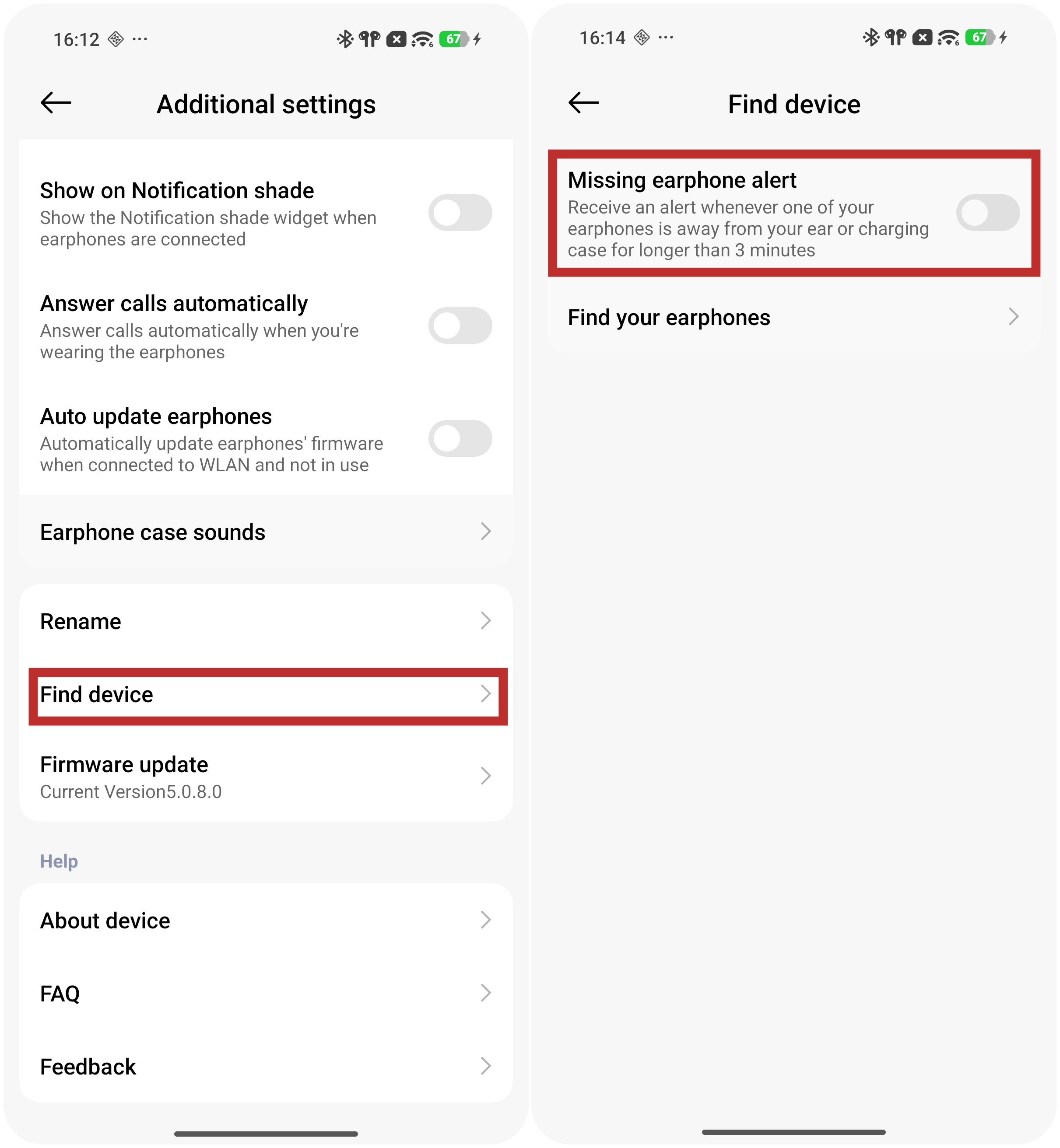
Q9: Does the Xiaomi Buds 6 support missing earphone alert?
A: Only some Xiaomi phones support the missing earphone alert function in the Bluetooth settings interface.
To enable the Missing earphone alert function for the Xiaomi Buds 6: Go to the [Settings] App on your phone >> [Bluetooth] >> [Xiaomi Buds 6] >> [Additional settings] >> [Find device] >> enable [Missing earphone alert].
Note:
The Xiaomi Earbuds App does not support this function.
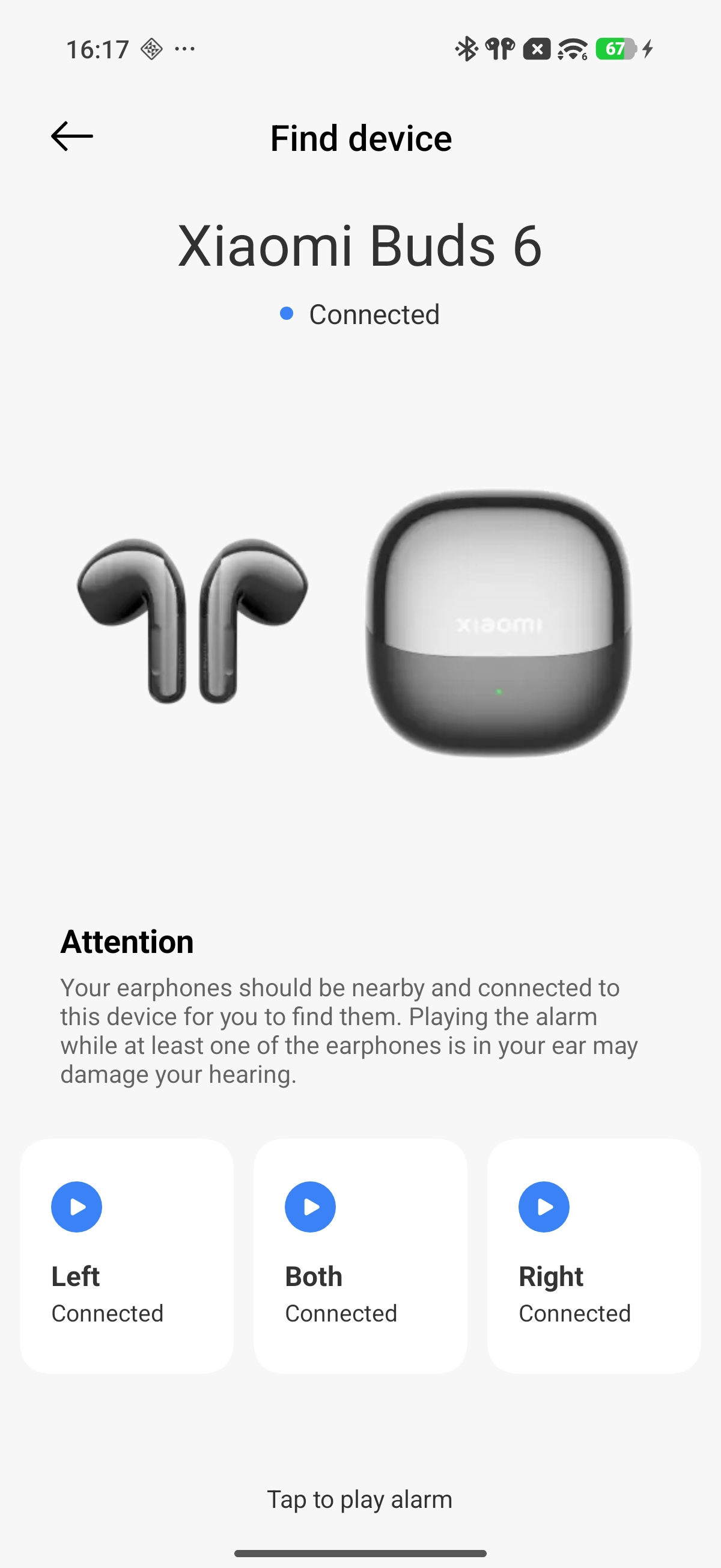
Q10: How to use the Find device function of the Xiaomi Buds 6?
A: You can configure the Find device function in the Xiaomi Earbuds App. The setup path is as follows: Xiaomi Earbuds App >> [Find your earphones] >> select the lost earbud (left, right, or both). The selected earbud will emit a high-frequency beeping sound.
Note:
1. This function is intended for situations where the earbuds are nearby but their exact location is unknown. If the earbuds are too far away, the ringing sound may not be audible.
2. The effective hearing distance depends on individual hearing ability and is estimated to be within 1–2 meters. Noisy surroundings can also affect the ability to locate the earbuds.
Q11: How to maintain the Xiaomi Buds 6?
A: Please refer to the following maintenance suggestions for the Xiaomi Buds 6:
1. Do not expose the earbuds to liquids or humid environments.
2. Do not use abrasive solvents to clean the earbuds.
3. Avoid storing the earbuds for extended periods in environments below 0 °C, above 45 °C, or in places with large temperature differences, as these conditions may damage battery performance.
4. Do not expose the earbuds to open flames to avoid explosion risks.
5. Avoid contact between the earbuds and sharp objects to prevent scratches or damage.
6. Do not insert any objects into the earbuds, as this may damage internal components.
7. Do not attempt to disassemble the earbuds.
8. If the Xiaomi Buds 6 will not be used for an extended period, please store them in a dry place. If stored for more than one month, recharge them periodically to maintain battery and earbud performance.
Q12: Why does the missing earphone alert remain active after one Xiaomi Buds 6 earbud is placed into the case while the other earbud remains outside?
A: When one Xiaomi Buds 6 earbud is placed inside the charging case with the lid closed while the other earbud remains outside the case, it is normal for the missing earphone alert to remain active. This is designed to remind you to confirm the status of the earbuds. Once the charging case is opened and both earbuds reconnect successfully, the missing earphone alert will disappear.
Q13: Why is there no settings interface in the Bluetooth plugin for the Xiaomi Buds 6?
A: This issue is caused by incompatibility with older plugin versions. Please update the plugin and phone system to the latest versions.
Q14: Does the Bluetooth settings interface of the Xiaomi Buds 6 support adaptive noise cancellation?
A: The Xiaomi Buds 6 doesn't support adaptive noise cancellation.
Q15: Why is there 1–2 seconds of no sound when opening the third-party App for the first time with the Xiaomi Buds 6?
A: When the Xiaomi Buds 6 does not play audio for a period of time, the earbuds automatically enter a low-power standby state to reduce power consumption and extend battery life. In this state, the data transmission speed between the earbuds and the phone temporarily slows down. When you open a third-party App and start playing a video for the first time, the earbuds require a short time to return to normal working status, so there can be about 1–2 seconds with no sound. This is a normal phenomenon, and audio playback usually returns to normal afterward.
Q16: Does the Xiaomi Buds 6 support Apple Find My?
A: Only the charging case of the Xiaomi Buds 6 supports Apple Find My. The earbuds themselves do not support this function.
After unboxing, the Apple Find My function of the charging case must first be activated using one of the following methods:
1. Connect a charger to charge the charging case.
2. Press and hold the function button for 10 seconds to restore factory settings.
Q17: Why does Apple Find My not work after the Xiaomi Buds 6 are removed and paired successfully with a device?
A: After unboxing, the Xiaomi Buds 6 must remain inside the charging case while successfully connecting to a phone, tablet, computer, or other device. This allows the information to be transferred to the charging case so that Apple Find My can be activated.
If the earbuds are removed from the charging case before pairing successfully with a device, you need to place the earbuds back into the charging case in order to activate the Apple Find My function for the charging case.
Q18: Why does adding the Xiaomi Buds 6 to Apple Find My fail or remain stuck in the adding process?
A: The Apple Find My function works by having the charging case send information to the device, after which the device communicates with Apple servers. Environmental factors or server-related issues may cause the adding process to time out. This is considered normal behavior. Please try adding the Xiaomi Buds 6 again.
Q19: Why can the in-case recording function of the Xiaomi Buds 6 not be started after the charging case has been closed for 1 minute?
A: To reduce power consumption, the charging case of the Xiaomi Buds 6 automatically disables some functions 1 minute after the lid is closed. At this time, the in-case recording function becomes unavailable.
If you need to use the in-case recording function, please connect a USB cable. In addition, if the charging case powers off due to low battery, the in-case recording function will also be unavailable.
Audio
Q1: How many microphones does the Xiaomi Buds 6 have?
A: The Xiaomi Buds 6 has 3 microphones on each earbud (6 microphones total for both earbuds).
Q2: Is the Xiaomi Buds 6 stereo?
A: Yes, when worn in both ears, the Xiaomi Buds 6 provides stereo sound.
Q3: Does the Xiaomi Buds 6 support single-earbud mode?
A: The Xiaomi Buds 6 supports single-earbud use (the other earbuds should be kept in the charging case with the lid closed).
Note:
If you want to switch from single-earbud use to dual-earbud use after some time, simply put on the other earbud, and they will automatically connect.
Q4: Does the Xiaomi Buds 6 support volume adjustment?
A: Yes, the Xiaomi Buds 6 supports independent volume adjustment.
Here’s how to adjust the earbuds' volume:
1. By default, you can swipe up/down on the force sensor to adjust the volume.
2. In the Xiaomi Earbuds App, you can customize gestures for the earbuds. For example, set “double tap” to “volume up” (to increase the phone volume), etc.
Q5: Does the Xiaomi Buds 6 support Absolute volume?
A: By default, the earbud volume is synchronized with the device volume.
To enable absolute volume, please refer to the following steps:
Go to [Settings] on the phone >> [Bluetooth] >> Xiaomi Buds 6 >> [Audio] >> enable [Absolute volume].
Q6: How to use Dimensional audio with the Xiaomi Buds 6?
A: To use Dimensional audio with the Xiaomi Buds 6, please refer to the steps below:
Open the Xiaomi Earbuds App >> [Audio effects] >> [Dimensional audio] >> turn on/off [Immersive sound].
Note:
1. After enabling Dimensional audio in the system settings, you can experience the effect in supported music and video applications.
2. The following models already support Dimensional audio, and support for more models is being added continuously:
(1). Xiaomi 15, Xiaomi 15 Ultra, Xiaomi 15T.
(2). Xiaomi 14, Xiaomi 14 Ultra, Xiaomi 14T Pro, Xiaomi 14T.
(3). Xiaomi 13, Xiaomi 13 Ultra, Xiaomi 13T.
(4). Xiaomi MIX Flip.
(5). POCO F8 Ultra, POCO F8 Pro.
(6). POCO F7 Ultra, POCO F7 Pro, POCO X7 Pro.
(7). POCO F6 Pro, POCO X6 Pro 5G, POCO F6.
(8). POCO F5 Pro.
(9). REDMI Note 14 Pro+ 5G, REDMI Note 13 Pro 5G, REDMI Note 13 5G.
(10). REDMI Pad Pro, REDMI Pad SE.
(11). Xiaomi Pad Mini, Xiaomi Pad 7 Pro, Xiaomi Pad 7, Xiaomi Pad 6S Pro 12.4.
Q7: In which scenario is Dimensional audio not supported on the Xiaomi Buds 6?
A: When the Low Energy (LE) audio is enabled on the Xiaomi Buds 6, the Dimensional audio cannot be enabled. When entering the Dimensional audio menu, the option will appear grayed out.
Q8: Does the Xiaomi Buds 6 support audio sharing?
A: The Xiaomi Buds 6 supports audio sharing.
The following models already support audio sharing, and support for more models is being added continuously.
(1). POCO F8 Ultra, POCO F8 Pro.
(2). POCO F7 Ultra, POCO F7 Pro.
(3). POCO F6 Pro, POCO X6 Pro 5G.
(4). REDMI Note 14 Pro+ 5G, REDMI Note 13.
(5). POCO X7 Pro, POCO F6.
(6). Xiaomi 15 Ultra, Xiaomi 15.
(7). Xiaomi 14, Xiaomi 14 Ultra, Xiaomi 14T Pro.
(8). Xiaomi 13, Xiaomi 13 Ultra.
(9). Xiaomi MIX Flip.
(10). Xiaomi Pad 6S Pro 12.4, Xiaomi Pad Mini, Xiaomi Pad 7 Pro, Xiaomi Pad 7.
Q9: Why is there a "puffing" sound on the Xiaomi Buds 6 when ringing the bell while biking?
A: On the Xiaomi Buds 6, when ANC is enabled, it can cancel out part of the bicycle bell sound, making the perceived sound less natural and resulting in a “puffing” noise. For your safety, it is not recommended to use noise cancellation mode while riding a bicycle.
Q10: Why is the sound quality of the Xiaomi Buds 6 poor?
A: If the sound quality of the Xiaomi Buds 6 is poor, please refer to the following information:
1. Please confirm in which scenario the sound quality is poor. If it occurs during calls or while watching videos with music playing, this is normal because the bandwidth is limited to 100 Hz–8000 Hz in these cases.
2. If the sound quality is poor during normal music playback, you can select different sound effects in the Xiaomi Earbuds App or adjust the equalizer in the custom sound settings to match your preferred listening style.
Q11: Why is the volume of the Xiaomi Buds 6 low?
A: The low volume of the Xiaomi Buds 6 is due to the phone's absolute volume setting.
Please follow the steps below to check whether it returns to normal:
1. On the Xiaomi/REDMI phones, please go to [Settings] >> [Bluetooth] >> tap the arrow icon at the right of the Xiaomi Buds 6 >> [Audio] >> enable [Absolute volume].
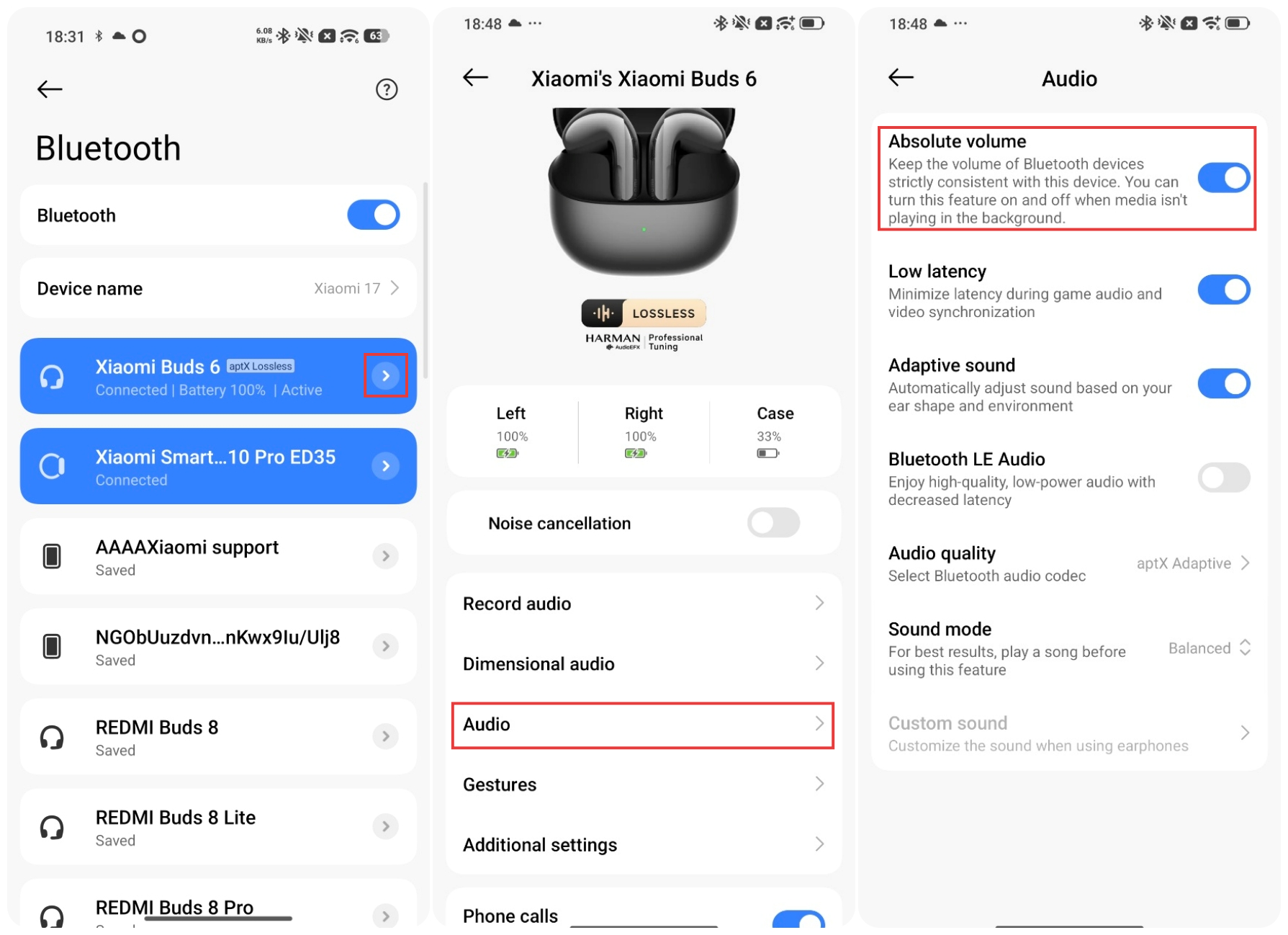
2. On the HUAWEI/HONOR phones, please go to [Settings] >> [Bluetooth] >> tap the settings icon at the right of the Xiaomi Buds 6 >> enable [Sync volume with phone].
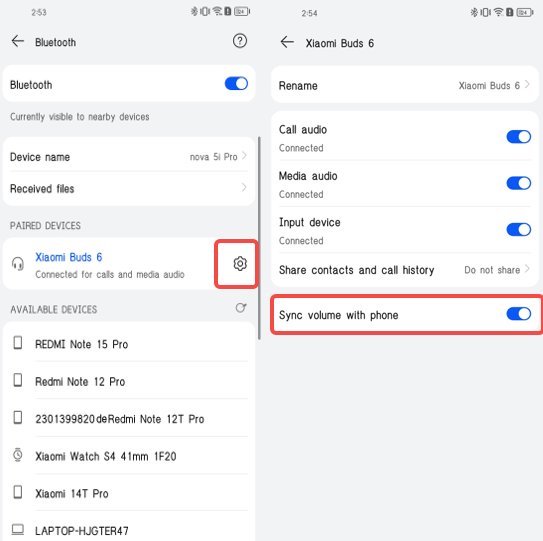
3. On the iPhone, please go to [Settings] >> [Sounds & Haptics] >> [Headphone Safety] >> disable [Reduce Loud Audio].
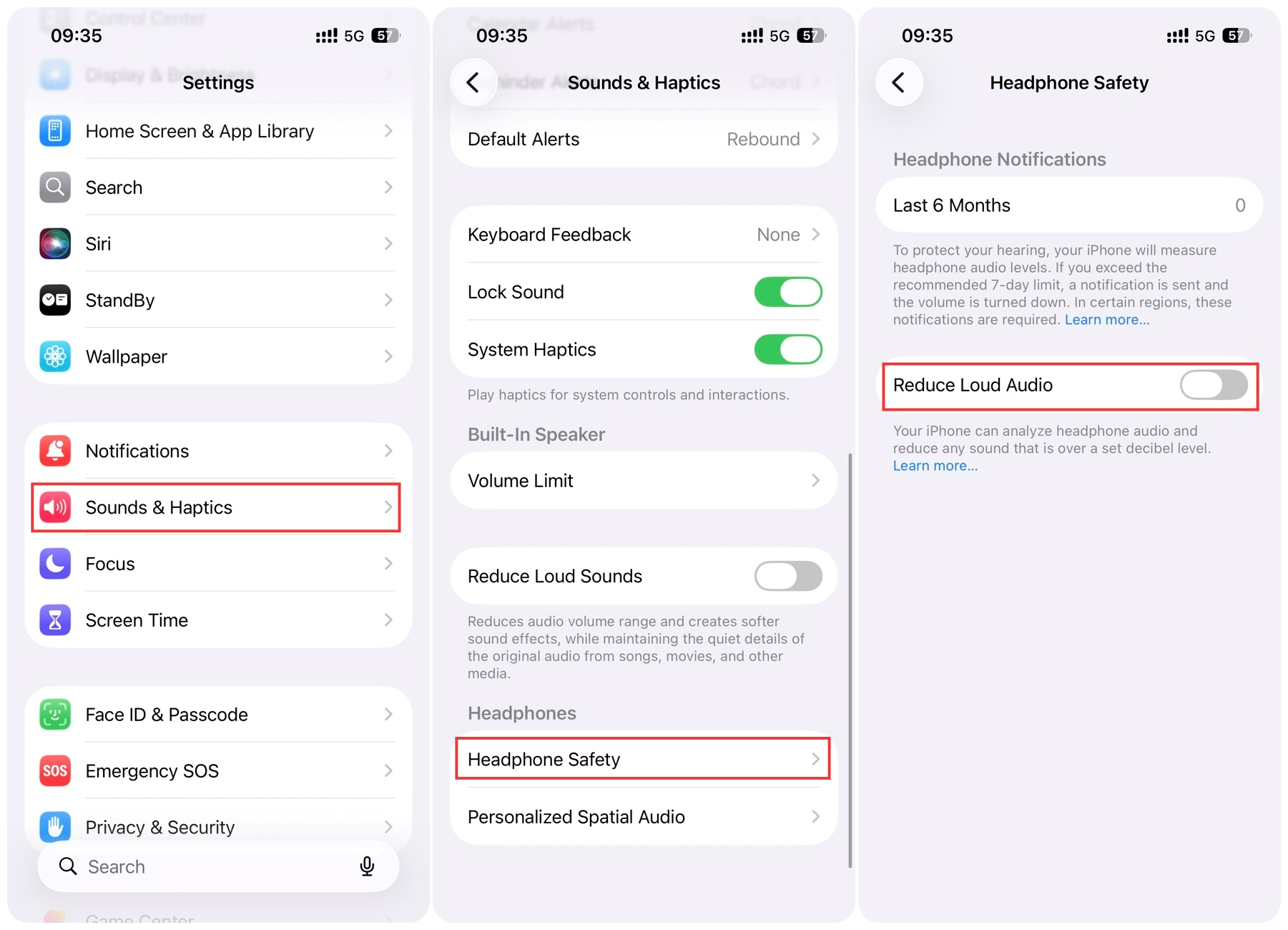
4. On the OPPO phones: please go to [Bluetooth] >> tap the [i] icon on the right side of the Xiaomi Buds 6 >> enable [Device volume sync].
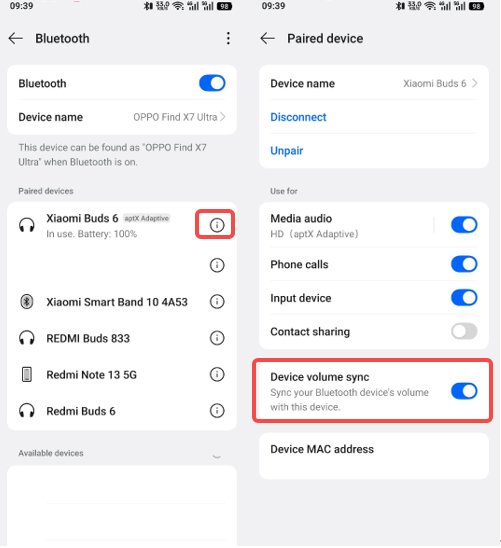
Q12: Why is the volume of both earbuds of the Xiaomi Buds 6 different?
A: If the volume of both earbuds of the Xiaomi Buds 6 is different, please refer to the following information:
1. It can be caused by inconsistent wearing of left and right earbuds. It is recommended to adjust the fit so that both ears have a similar listening experience.
2. Try turning on/off the Adaptive sound. Go to the Xiaomi Earbuds App >> [Audio effects] >> [Adaptive sound].
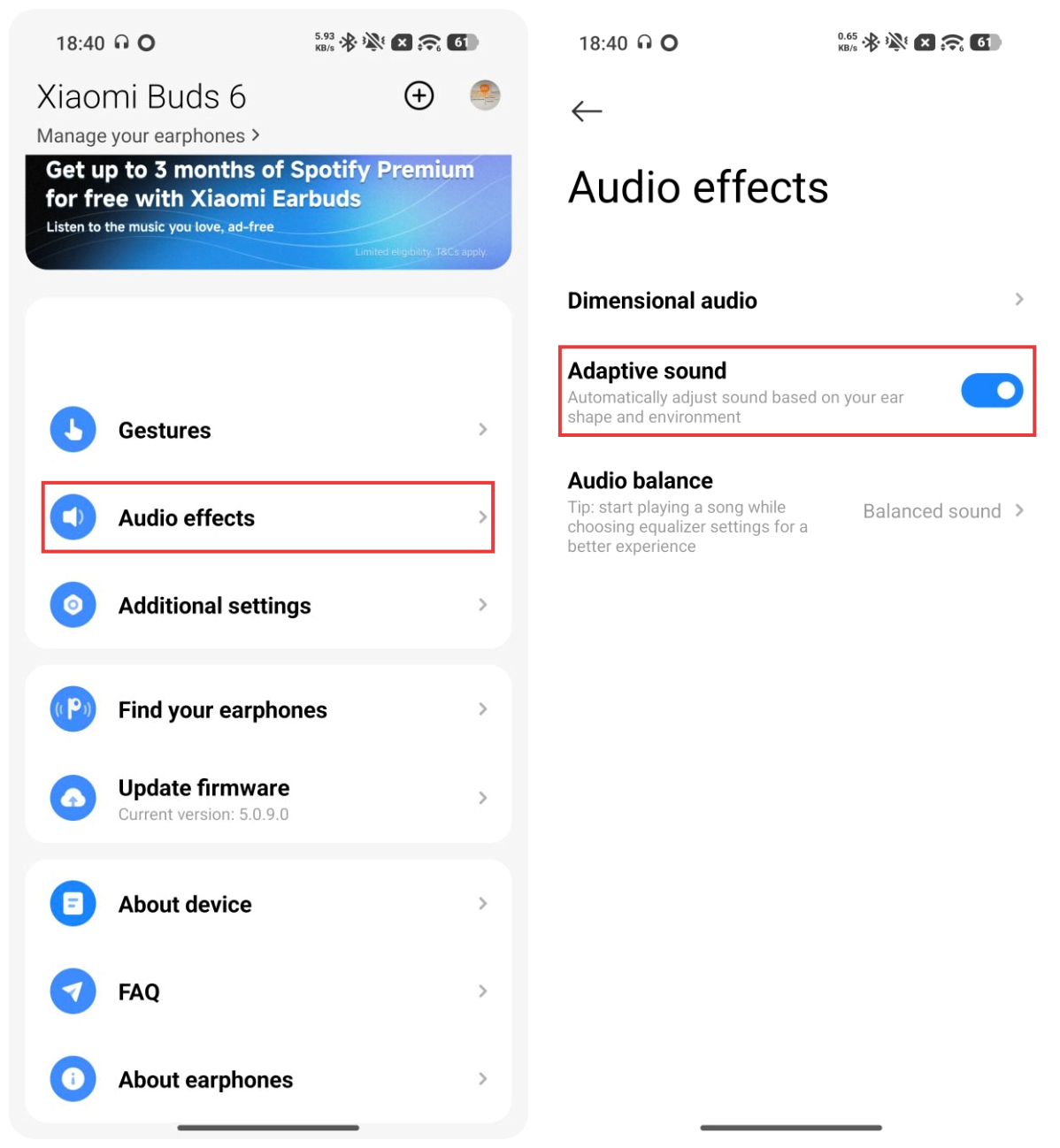
Q13: Why does music stutter during audio recording uploads on the Xiaomi Buds 6?
A: Music stuttering during the audio recording upload process occurs because both audio uploading and music playback on the Xiaomi Buds 6 use Bluetooth transmission bandwidth. In this scenario, there is a small chance of audio stuttering.
It is recommended to upload recordings when not actively using other audio-related functions, and resume other audio/video activities after the upload is completed.
Q14: Why does music stutter or become silent when entering a game while listening to music on the Xiaomi Buds 6?
A: On Xiaomi Buds 6, when certain games are launched on Xiaomi phones, the system enters Game Mode. Switching between normal mode and Game mode requires reconfiguring related parameters, which may cause brief stuttering or no sound. This is a system-level design on the phone side and is not an issue with the earbuds.
Q15: Why does switching codecs fail when the Xiaomi Buds 6 is connected to a phone and playing music in both ears?
A: This issue mainly occurs when a new codec switching action is triggered before the previous switching process is fully completed on the Xiaomi Buds 6. After each codec switch, please wait 8-10 seconds for the previous operation to finish before initiating the next switch.
Q15: Why is there about 1 second of silence when switching between different sound effects on the Xiaomi Buds 6?
A: This is normal behavior. When switching sound effects on the Xiaomi Buds 6, the software calls different parameters for adjustment. To prevent issues during parameter switching, the system briefly mutes the audio for about 300 ms during the transition.
Q16: How to deal with noise in recordings caused by friction with the charging case when using the case recording function of the Xiaomi Buds 6?
A: The charging case recording function works by using the Xiaomi Buds 6’s microphones inside the charging case to capture sound. Since the friction noise from the charging case is close to the microphone, it can be recorded in the audio file. It is recommended to avoid touching the charging case excessively, handle it gently, and avoid fully covering it with the palm when using this function.
Noise Cancellation
Q1: Does the Xiaomi Buds 6 support active noise cancellation technology?
A: Yes, the Xiaomi Buds 6 supports both ENC call noise cancellation and ANC active noise cancellation technology.
Both ENC and ANC are designed to reduce environmental noise, but the beneficiaries are different.
About the differences between ENC call noise cancellation and ANC active noise cancellation, please refer to the following information:
1. ENC reduces the impact of environmental noise on audio quality by optimizing audio signal processing algorithms and introducing additional processing steps between audio input and output. This improves call quality and audio clarity. The effectiveness of ENC noise reduction requires acoustic verification.
2. ANC (Active Noise Control) works by using microphones to collect external environmental noise. The system then generates inverse sound waves and plays them through the speaker. The final sound heard by the human ear becomes: environmental noise and inverse environmental noise. These two sound waves cancel each other out, creating the perception of reduced noise. The beneficiary of ANC is the wearer. The beneficiary of ENC noise reduction is the person on the other side of the call.
Q2: How to adjust the noise cancellation levels of the Xiaomi Buds 6?
A: The Xiaomi Buds 6 supports two noise cancellation levels: Deep and Balanced. Deep noise cancellation is enabled by default.
You can adjust the settings through the Xiaomi Earbuds App >> [Noise cancellation] >> [Deep] or [Balanced] or enter the phone Settings App >> [Bluetooth] >> [Noise cancellation] >> [Deep] or [Balanced].
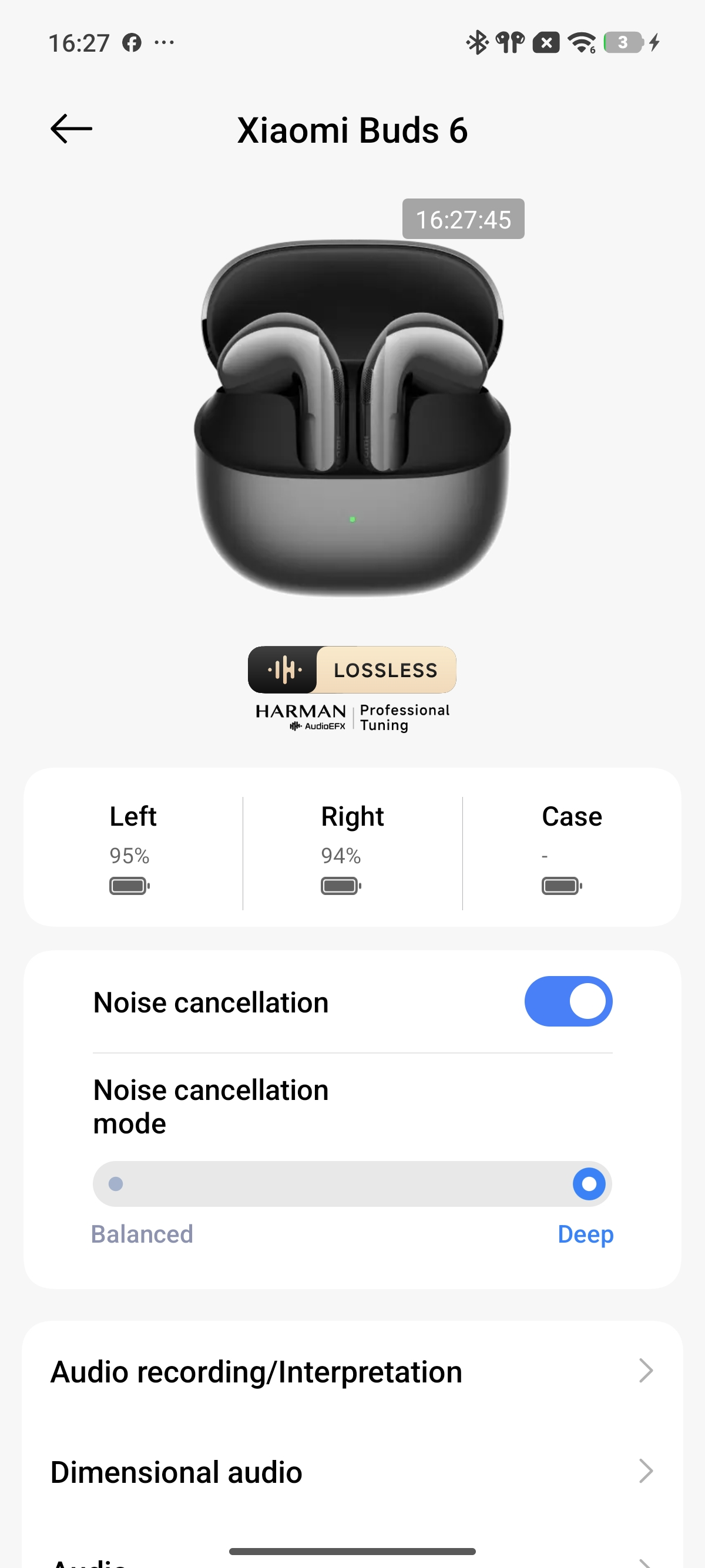
Q3: Why does switching noise cancellation have no response after wearing the Xiaomi Buds 6?
A: If switching noise cancellation does not respond after the Xiaomi Buds 6 are worn, the earbuds may have become loose during use, causing the earbuds to fail to switch noise cancellation modes properly. Please adjust and wear the earbuds securely again, then try switching the noise cancellation mode once more.
Q4: Why does the noise cancellation effect of the Xiaomi Buds 6 sometimes appear weak?
A: If the noise cancellation effect of the Xiaomi Buds 6 sometimes appears weak, please refer to the following information:
1. First, the effectiveness of active noise cancellation (ANC) is based on good passive noise isolation. Therefore, wearing the earbuds securely and tightly can improve the overall noise cancellation effect.
2. Second, ANC performs especially well with low-frequency noise, but its effect on high-frequency sounds is limited. It is particularly suitable for reducing noise on airplanes, trains, and subways. For safety reasons, high-frequency sounds such as car horns and human voices are not completely filtered out. If the surrounding noise reduction effect does not feel obvious during use, please adjust the wearing angle and ensure the Xiaomi Buds 6 fits securely in your ears for a better experience.
Q5: Why does the bass performance of the Xiaomi Buds 6 appear weak?
A: The bass performance of the Xiaomi Buds 6 is related to how tightly the earbuds fit in your ears.
If you want to improve the bass effect, the following suggestions are recommended:
1. Adjust the fit of the earbuds so they seal closely against your ears.
2. Adjust the sound effects in the Xiaomi Earbuds App and select your preferred music style.
Q6: Does the Xiaomi Buds 6 support noise cancellation during recording?
A: The Xiaomi Buds 6 supports noise cancellation during recording. The recording noise cancellation function is mainly optimized for meeting scenarios and reduces background and white noise while retaining your voice and surrounding voices.
If voice-related background noise is present during recording, it is recommended to record in a quieter environment with fewer nearby conversations.
Q7: Why is the noise cancellation effect different between the left and right Xiaomi Buds 6 in subway or bus environments?
A: If the left and right noise cancellation effects of the Xiaomi Buds 6 are inconsistent in subway or bus environments, please refer to the following reasons:
1. This issue is mainly caused by the earbuds becoming loose during bumpy or shaking situations such as subway or bus rides.
2. If this issue occurs, please remove and wear the earbuds again, adjust the wearing angle, and ensure both earbuds fit your ears evenly. After wearing them properly, toggle the noise cancellation function again in the Xiaomi Earbuds App.
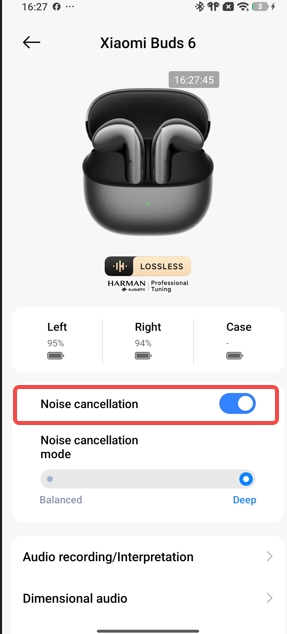
3. Please update the Xiaomi Buds 6 to the latest firmware version for an improved experience:
(1). Upgrade through the Xiaomi Earbuds App: Ensure the earbuds are connected to the phone. Open the Xiaomi Earbuds App. If a new firmware version is available, a firmware update notification will appear. Tap [Update] to enter the update interface, then tap [Update] again. Wait patiently until the progress reaches 100%, and the firmware update will complete automatically.
(2). Upgrade through the Bluetooth settings interface: Ensure the earbuds are connected to the phone. Open the phone Settings App, enter [Bluetooth], tap [Additional settings], then tap [Firmware update]. Wait patiently until the progress reaches 100%, and the firmware update will complete automatically.
Q8: Why does the Xiaomi Buds 6 produce continuous “thumping,” “clicking,” or “rumbling” sounds while riding in a car with the windows open?
A: This issue is mainly caused by changes in wind noise generated when car windows are open or by rumbling sounds produced while driving on bumpy roads, which affect the noise cancellation system of the Xiaomi Buds 6.
Q9: Why does the ANC performance become weaker after the Xiaomi Buds 6 enters wind noise resistance mode?
A: The Xiaomi Buds 6 includes a wind noise resistance algorithm. When strong and continuous wind affects the earbuds, the earbuds enter wind noise resistance mode after approximately 4 seconds in order to reduce the impact of wind noise. At this point, the wind noise disappears.
ANC performance becomes slightly weaker because the earbuds adjust the microphone algorithms while reducing wind noise. Compared with the slight reduction in ANC performance, strong wind noise would have a greater impact on the listening experience.
The wind noise resistance performance of the Xiaomi Buds 6 will continue to be optimized. It is recommended to update the Xiaomi Buds 6 to the latest firmware version.
Q10: Why is the wind noise resistance performance of the Xiaomi Buds 6 unstable?
A: The Xiaomi Buds 6 uses algorithm logic based on wind continuity and intensity. This prevents the earbuds from entering wind noise resistance mode too easily during brief gusts of wind or light indoor airflow such as air conditioning. This design avoids unnecessary impact on ANC performance in non-windy environments.
After the Xiaomi Buds 6 enters wind noise resistance mode, approximately 15 seconds are required before exiting the mode. During this period, ANC performance may feel slightly weaker. The wind noise resistance performance of the Xiaomi Buds 6 will continue to be optimized. It is recommended to update the Xiaomi Buds 6 to the latest firmware version.
Note:
The current wind noise resistance function is mainly designed for outdoor scenarios such as strong outdoor winds, cycling, riding bicycles, or driving with open car windows.
Q11: Why does music sometimes pause automatically on the Xiaomi Buds 6?
A: This issue may occur if the Xiaomi Buds 6 becomes loose during use and the earbuds fail to detect a wearing status, causing music to pause automatically. It is recommended to wear the earbuds securely again and restart music playback.
The latest software versions also include in-ear detection optimizations. Please update the Xiaomi Buds 6 to the latest version.
Q12: Why does music pause or voice prompts start when removing or wearing the Xiaomi Buds 6?
A: The Xiaomi Buds 6 detects wearing status through built-in sensors. If the sensor area is covered while holding the earbuds, the earbuds may mistakenly detect that they are being worn.
If the in-ear detection function is not needed, it can be disabled through: Xiaomi Earbuds App >> [Additional settings] >> [In-ear detection].
Note:
When holding the Xiaomi Buds 6, avoid covering the force sensor area with your fingers.
Q13: Will music resume automatically after removing and wearing one Xiaomi Buds 6 earbud during music playback?
A: When the in-ear detection function is enabled, removing the Xiaomi Buds 6 during music playback will automatically pause the music. If the earbud is worn again within 2 minutes, music playback will resume automatically, regardless of whether the removed earbud was placed into the charging case.
During video playback, whether the video resumes automatically after re-wearing the Xiaomi Buds 6 depends on the video App itself. Some video Apps do not support automatic playback resumption.
Q14: Why does music continue playing while the Xiaomi Buds 6 are inside the charging case?
A: This issue occurs because the charging case of the Xiaomi Buds 6 has powered off due to low battery. Please charge the charging case promptly.
Note:
If the charging case powers off because of low battery, communication between the Xiaomi Buds 6 and the charging case becomes unavailable. The earbuds will assume they are not inside the charging case and will continue maintaining the Bluetooth connection with the phone, allowing music playback to continue.
Q15: Why does rotating the Xiaomi Buds 6 cause music playback to pause?
A: The in-ear detection sensors of the Xiaomi Buds 6 are located on the same surface. Rotating the earbuds may cause the sensor area to lose contact with the ear, which can occasionally trigger playback pause detection.
Q16: Why does audio stutter on the Xiaomi Buds 6 when reconnecting after manually disconnecting the earbuds while Xiaomi HyperIsland appears on the phone?
A: This issue is related to certain phone models. Xiaomi HyperIsland contains audio data, and audio switching may occasionally produce stuttering or noise during transitions. It is recommended to connect the Xiaomi Buds 6 to the phone before starting music playback.
Q17: Why does music not pause immediately after removing the Xiaomi Buds 6 and placing them on a table or into the charging case?
A: 1. When the Xiaomi Buds 6 is removed during music playback, music pauses after approximately 1–2 seconds to avoid an abrupt interruption. During this time, you can place the earbuds on a table or into the charging case.
2. When placing the Xiaomi Buds 6 down, it is recommended to lay the earbud stems flat so the stems fully contact the surface while keeping the speaker openings facing upward without touching objects.
Q18: Why does music resume again after removing one Xiaomi Buds 6 earbud?
A: The in-ear detection function of the Xiaomi Buds 6 relies on sensor components positioned above and below the acoustic chamber to collect data. If your fingers or palm happen to cover these sensor areas while removing the earbuds, the earbuds may mistakenly detect a wearing status and trigger music playback again.
Q19: Will the Xiaomi Buds 6 experience audio crosstalk?
A: The Xiaomi Buds 6 will not experience audio crosstalk.
Note:
The Xiaomi Buds 6 can only connect to one device at a time by default, so audio interference with other devices will not occur. Other people also cannot hear your conversation content during calls.
Q20: Does the Xiaomi Buds 6 support voice calls and voice input in third-party software?
A: Yes, the Xiaomi Buds 6 supports third-party voice calls and voice input. Usage may vary depending on the operating system.
Both iOS and Android systems support voice calls and voice input. Windows devices with Bluetooth support can make voice calls after proper connection and configuration. Voice input depends on support from third-party software.
Note:
1. If third-party software does not provide sound input or output options, input and output devices can be configured in the Windows sound settings.
2. If third-party software includes audio input and output channels, select the Xiaomi Buds 6 as the headset device.
Q21: Will audio switch to speaker output when pressing the force sensor of the Xiaomi Buds 6 during third-party App voice calls?
A: During third-party App voice calls, pressing the force sensor of the Xiaomi Buds 6 will not switch audio to the phone speaker.
Q22: Why does the Xiaomi Buds 6 sound fine while listening to music but sound quality becomes worse during gaming?
A: Music playback and gaming use different Bluetooth protocols. When listening to music, the Xiaomi Buds 6 uses the A2DP protocol. During gaming, game Apps will activate the HFP call protocol. Since the HFP protocol has a narrower audio bandwidth, sound quality becomes relatively lower.
Q23: Why does the Xiaomi Buds 6 sound fine while listening to music but sound quality becomes worse during third-party App calls?
A: Music playback and third-party App calls use different Bluetooth protocols. Third-party App calls will activate the HFP call protocol. Since the HFP protocol has a narrower audio bandwidth, sound quality becomes relatively lower.
Q24: Why are two consecutive prompt tones heard when wearing the Xiaomi Buds 6?
A: If the Xiaomi Buds 6 is worn immediately after opening the charging case, two prompt tones may sometimes be heard. This is normal behavior.
If the earbuds are already connected to the phone when worn, only the noise cancellation prompt tone will play. If the earbuds are not connected to the phone when worn, the noise cancellation prompt tone will play first, followed by the reconnection prompt tone after the connection is established.
Q25: Does the Xiaomi Buds 6 support voice commands and wake words?
A: The Xiaomi Buds 6 does not support voice commands or wake words.
Q26: Does Xiaomi Buds 6 support seamless audio switching between a phone and a computer?
A: No, the Xiaomi Buds 6 does not support seamless audio switching between a phone and a computer.
Q27: Why can echoes sometimes be heard during calls on the Xiaomi Buds 6?
A: The following situations may cause echoes while using the Xiaomi Buds 6 during calls:
1. The other party’s phone may not handle call echo cancellation properly. Please ask the other party to use another phone for testing.
2. The other party may have speaker mode enabled at a high volume, or the surrounding environment may contain echoes, causing your own voice to echo through the Xiaomi Buds 6.
Q28: Why does the Xiaomi Buds 6 sometimes produce static noise?
A: Please rest assured that the Xiaomi Buds 6 undergoes multiple strict testing procedures before leaving the factory to minimize static noise issues and provide a pure, natural listening experience.
In normal office environments, occasional noise such as buzzing sounds, popping sounds, or static sounds may briefly occur when the earbuds or phone performs certain operations. These sounds are generally related to environmental interference. Please pay attention to environmental changes and the distance between the Xiaomi Buds 6 and the phone.
Continuous optimizations are also being made for sound quality and experience. Please keep the Xiaomi Buds 6 updated through the Xiaomi Earbuds App.
Q29: Why does the noise cancellation effect of the Xiaomi Buds 6 change in windy environments?
A: When entering windy environments, the Xiaomi Buds 6 can intelligently detect wind noise. To reduce wind interference, the earbuds dynamically adjust the noise cancellation effect to improve the overall experience. The normal noise cancellation effect will return automatically in light wind or windless environments.
Q30: Why is wind noise still obvious while cycling with noise cancellation enabled on the Xiaomi Buds 6?
A: Wind noise resistance performance varies depending on wind strength, wearing style, and usage scenarios. The following optimization methods are recommended:
1. Wearing check: Ensure the Xiaomi Buds 6 fits tightly in the ear canal or adjust the wearing angle to reduce wind leakage.
2. In extreme high-wind or high-speed cycling scenarios, it is recommended not to enable noise cancellation so surrounding traffic conditions can be heard clearly for safer riding.
Q31: Why is there no obvious sound effect change when switching EQ modes after enabling dimensional audio on the Xiaomi Buds 6?
A: This is normal behavior. To ensure an immersive dimensional audio experience, the system automatically filters EQ adjustments while spatial audio is enabled. Therefore, switching EQ modes will not change sound effects in real time. However, the selected EQ mode is saved in the background and will take effect immediately after spatial audio is disabled.
Q32: Why does environmental noise sometimes feel amplified when switching noise cancellation on or off or while wearing the Xiaomi Buds 6?
A: When switching noise cancellation on or off or immediately after wearing the Xiaomi Buds 6, the earbud algorithms adjust noise cancellation effects according to different ear canal shapes and wearing conditions. If the earbuds are not worn properly, the algorithm calculations may become inaccurate, causing environmental noise to feel amplified.
It is recommended to wear the Xiaomi Buds 6 securely so the earbuds fit closely against the ears. Then disable and re-enable noise cancellation in the Xiaomi Earbuds App. The algorithm will resolve the issue after restarting.
Q33: Why does the Xiaomi Buds 6 produce slight noise when switching noise cancellation modes?
A: When switching noise cancellation modes, the Xiaomi Buds 6 microphones collect environmental noise and the speakers generate inverse sound waves to cancel the noise. At the moment the function activates, very slight background noise may occasionally be heard.
This only occurs briefly in very quiet environments and does not affect the noise cancellation effect or normal daily use.
Q34: Why does the Xiaomi Buds 6 produce noise during music or video playback?
A: First, please confirm whether the noise only occurs in a specific section of music or video content. Some short videos or recordings created with non-professional equipment or in noisy environments may already contain background noise in the original content. You can test the same content with another pair of earbuds to confirm whether the issue comes from the audio source itself.
Environmental interference may also cause noise. Places with heavy wireless interference, such as areas with many Wi-Fi signals, microwave ovens, neon lights, or traffic lights, can affect Bluetooth transmission stability.
In interference-heavy environments, it is recommended to use lower bitrate codecs such as AAC or SBC. Higher bitrate codecs, including aptX Adaptive, 48 kHz, or 96 kHz modes, are more likely to experience transmission instability and noise.
Q35: Why is the noise cancellation effect of the Xiaomi Buds 6 less obvious in office environments?
A: Most office noise mainly consists of human voices or other relatively high-frequency sounds. The semi-in-ear noise cancellation design of the Xiaomi Buds 6 mainly targets mid- and low-frequency noise, while high-frequency noise reduction is relatively weaker compared with in-ear earbuds.
Q36: How is the noise cancellation performance of the Xiaomi Buds 6?
Note:
1. For safety reasons, it is recommended not to wear the Xiaomi Buds 6 while cycling, crossing roads, or in situations where awareness of the surrounding environment is required.
2. The Xiaomi Buds 6 supports two noise cancellation levels, Deep and Balanced, which can be switched manually according to your needs.
Appearance and Wearing
Q1: Will the Xiaomi Buds 6 easily fall out while being worn?
A: The Xiaomi Buds 6 is not easy to fall out during use. The earbuds are designed according to ergonomic principles and fit securely in the outer ear canal for stable wearing.
1. If the Xiaomi Buds 6 is unstable while being worn, please check whether the earbuds are being worn correctly.
2. Before wearing the Xiaomi Buds 6, it is recommended to clean the earbud surface with alcohol wipes to remove dirt or oil and improve wearing stability.
Q2: Will wearing the Xiaomi Buds 6 cause allergic reactions? What to do if discomfort or inflammation occurs?
A: The parts of the Xiaomi Buds 6 that come into contact with the skin have passed strict hazardous substance testing and will not affect your body. During use, please avoid wearing the Xiaomi Buds 6 continuously for extended periods, such as while sleeping. Keep the earbuds clean to avoid discomfort, inflammation, or suspected allergic reactions caused by sweat or dirt buildup.
Possible causes of suspected allergic symptoms:
1. Wearing the Xiaomi Buds 6 for extended periods, such as while sleeping, which reduces ventilation and allows sweat residue to remain on the earbuds.
2. Dirt accumulation caused by the infrequent cleaning of the Xiaomi Buds 6.
3. If severe discomfort, inflammation, or allergic reactions occur after wearing the Xiaomi Buds 6, discontinue use immediately and consult a medical professional promptly.
The following wearing suggestions are recommended:
1. After exercising while wearing the Xiaomi Buds 6, check whether sweat remains on the earbuds. If sweat is present, wipe the earbuds clean before placing them back into the charging case.
2. During daily use, regularly check whether dirt is present on the Xiaomi Buds 6 or inside the charging case and clean them promptly if necessary.
3. After wearing the Xiaomi Buds 6 continuously for a long time, remove the earbuds and allow your ears to rest for approximately 30 minutes to reduce ear fatigue.
4. After showering, if water droplets remain inside the ears, dry the ears completely before wearing the Xiaomi Buds 6 again.
Troubleshooting
Q1: What to do if the Xiaomi Buds 6 cannot be charged, powered on, or the indicator is off?
The Xiaomi Buds 6 can not charge or charge unstably due to long-term storage without use, or poor contact between the earbuds and the charging case (such as dirt on the charging contacts).
Please refer to the following steps for troubleshooting:
1. Charge the earbuds for at least 5 minutes to ensure they are activated.
2. Check whether the earbud charging contacts are dirty, recessed, or damaged. Clean any dirt in time and ensure good contact between the earbuds and the charging case.
Note:
Insert and remove the earbuds from the charging case 3 times. If the connection is normal, the LED indicator will light up for 1 second when the earbuds are placed into the case. (If the battery level of the earbuds is above 60%, the light will be green. Otherwise, it will be orange.)
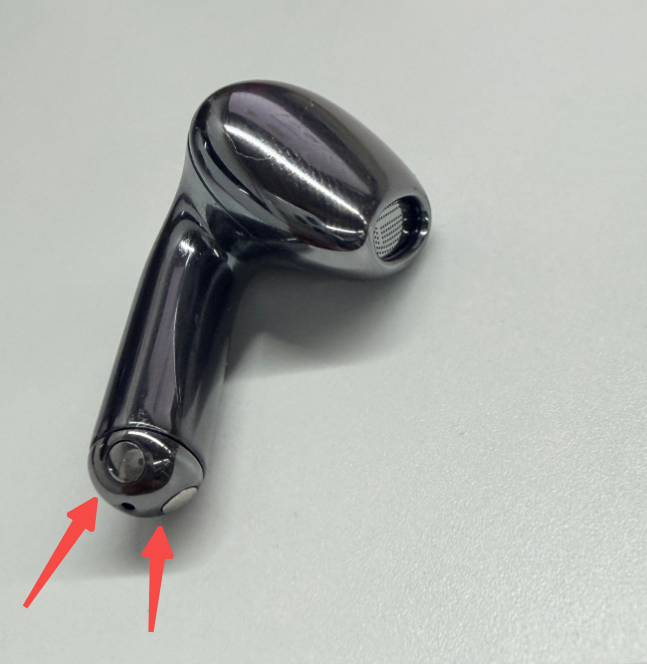
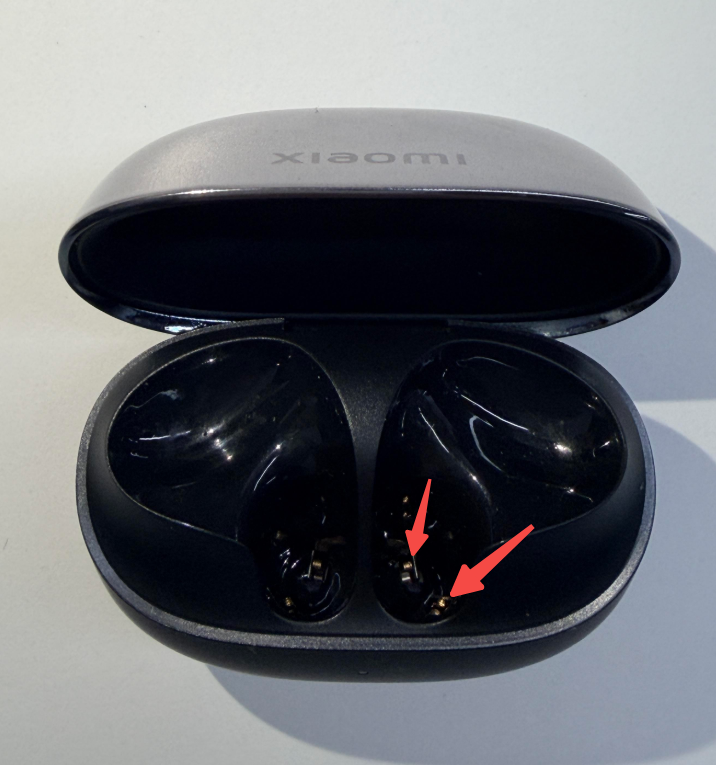
3. Place both earbuds in the charging case, keep the lid open, and connect to your phone. In the pop-up window or the Xiaomi Earbuds App interface, check if the battery icon shows a lightning bolt. (As shown in the figures below)
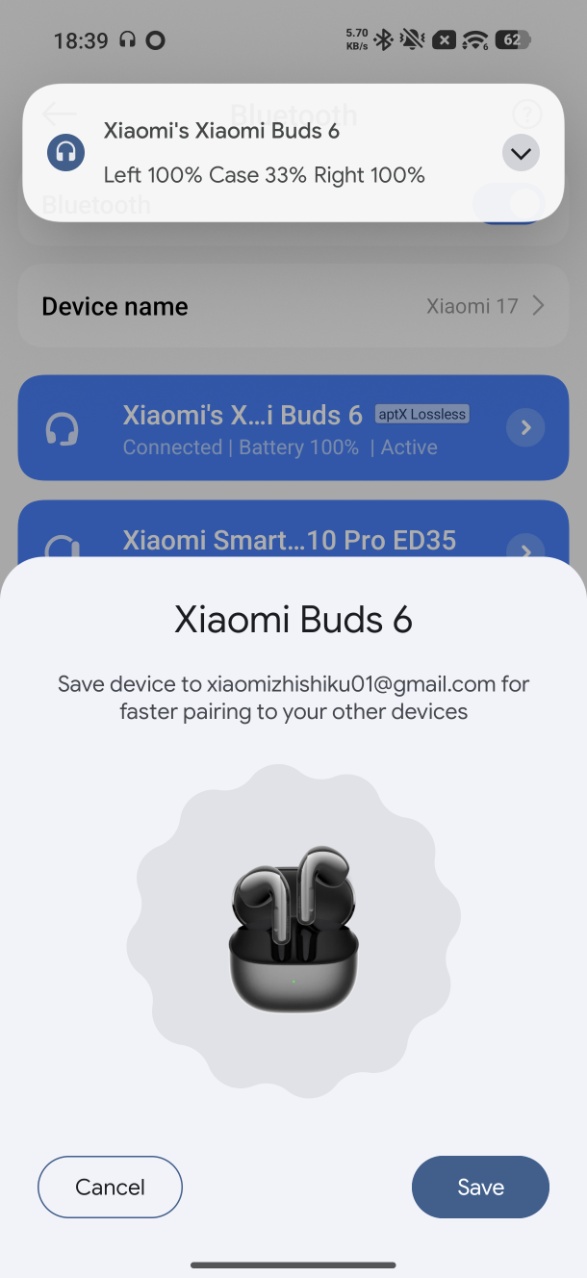
(1) If there is no lightning bolt icon, please contact the after-sales service center.
(2) Check whether the charging case has power. If the charging case is out of battery, charge the case first, then place the earbuds back into the charging case to charge. After the earbuds are charged, try turning them on again. If the earbuds have not been used for a long time and the battery is very low, it can take some time before the indicator turns on after charging begins.
Q2: What to do if the charging case of the Xiaomi Buds 6 cannot be charged?
A: If the charging case of the Xiaomi Buds 6 cannot be charged, please refer to the following steps to troubleshoot:
1. Try using a different charging cable and charger to see whether the charging case can be charged. If it works with the new equipment, the charging cable or charger can be faulty.
2. Use the same cable and charger to charge another device to verify whether they are working properly. If they can charge other devices properly, please charge the charging case for about 30 minutes and then check again. If it still cannot be charged, please contact the after-sales service center for inspection.
Note:
The issue can also be caused by charger incompatibility.
Q3: What to do if the sound is too low when using the Xiaomi Buds 6?
A: If the sound is too low when using the Xiaomi Buds 6, please refer to the following troubleshooting steps:
1. Slide up on the force sensor to adjust the volume individually.
2. In your phone's settings, enable Absolute volume (or keep volume consistent) and adjust the volume using the phone's volume buttons.
3. Alternatively, in the Xiaomi Earbuds App settings interface >> [Gestures] >> set double-tap to increase volume, then press the earbuds to adjust the volume.
4. It can be due to the low battery on your phone or earbuds. Charge them fully and check again.
5. Reset the earbuds and pair them again.
6. Test with another phone. If the problem persists, please contact the after-sales service center for inspection.
7. Check if the sound outlet of the earbuds is blocked or if there are foreign objects. Clean them promptly.
Note:
Sound will be reduced in high wind conditions or noisy environments like subways, which is normal.
Q4: What to do if the sound from the Xiaomi Buds 6 is intermittent or has noise?
A: This can be due to music or hardware issues. For hardware issues, it is necessary to determine whether the cause is in the phone or the Xiaomi Buds 6.
Please refer to the following troubleshooting steps:
1. If the distance between the phone and earbuds or between two earbuds is too far or if there is an obstruction (like a wall), it will cause intermittent sound or noise. Keep the phone and earbuds or two earbuds close together and avoid obstructions.
2. If there is signal interference in your environment or if the phone's signal is weak, try using them in a different environment or a location with a better phone signal to see if the problem persists.
3. If there are large electromagnetic interference sources nearby, it can cause low sound or noise for others. Keep away from objects like microwaves or Wi-Fi routers that have large electromagnetic interference.
4. If you’re using a Xiaomi smartphone and hear occasional buzzing or electrical noise while playing music, and it goes away when you pause the music or put the earbuds back in the charging case and wear them again, please update your phone’s system to the latest version. (Steps: Open the [Settings] interface on your phone >> tap [About phone] >> tap [Xiaomi HyperOS], and the interface will automatically check for updates).
5. Reset the earbuds and restart your phone, then pair them again to see if the issue resolves.
6. Ensure the earbuds are sufficiently charged (above 30%), test with another phone, and if the problem persists, please contact the after-sales service center for inspection.
Q5: Why is there no sound or stuttering when the Xiaomi Buds 6 is connected?
A: If there is no sound or stuttering when the Xiaomi Buds 6 is connected, please refer to the following troubleshooting steps:
Analysis of causes:
1. Due to the special nature of Bluetooth earbuds, the electromagnetic waves in your area interfere with the Bluetooth connection, leading to no sound.
2. Check your phone's volume settings to ensure that the volume is turned on and not in silent mode.
3. The phone is too far from the earbuds (beyond 10 m), or there is an obstruction between the earbuds and the phone.
4. If the phone is simultaneously connected to two Bluetooth devices, the sound can come from the second device, leaving the first device silent.
Solutions:
1. Check if your earbuds are in an environment with large interference. Keep away from microwaves or other strong electromagnetic sources.
2. Unmute your phone and try increasing the volume of your phone to see if the sound returns.
3. Keep the phone and earbuds close together or reconnect them.
4. Disconnect the earbuds, place them back in the charging case, close the lid for 5 seconds, then open the lid and reconnect to the phone. Or disconnect the phone from the other Bluetooth device.
5. If none of the above works, try restoring factory settings: place both earbuds in the charging case, open the lid, then press and hold the function button for 10 seconds until the orange indicator flashes continuously, indicating a factory reset.
Q6: Why is the sound still playing from the phone even though the Xiaomi Buds 6 is connected?
A: If the Xiaomi Buds 6 and phone are connected while music, video, or call audio is still playing from the phone, it is due to disabling the Media audio and Phone call options.
Solution: After connecting the earbuds to the phone, go to [Settings] on the phone >> [Bluetooth] >> find [Xiaomi Buds 6] and tap the [>] icon to enable [Media audio] and [Phone call].
Then please refer to the following steps:
1. On the phone’s Bluetooth settings interface, disconnect the earbuds and reconnect them.
2. Turn off Bluetooth on the phone and then turn it back on. The earbuds will reconnect automatically.
3. Place both earbuds in the charging case, and keep the charging case open. Press and hold the function button for 2 seconds, and re-pair the Bluetooth connection.
4. If none of the above works, try restoring factory settings: place both earbuds in the charging case, open the lid, then press and hold the function button for 10 seconds until the orange indicator flashes continuously, indicating a factory reset.
Q7: What to do if the sound from the left and right earbuds of the Xiaomi Buds 6 is out of sync?
A: If the sound from the left and right earbuds of the Xiaomi Buds 6 is out of sync, please refer to the following troubleshooting steps:
1. Reconnect the earbuds (place them back in the charging case, close the charging case, then reopen it) and test if the sound is in sync.
2. Bind the earbuds with the Xiaomi Earbuds App to check for firmware updates (you can view the current version at the bottom of the device details interface).
3. Reset the earbuds, then reconnect and test if the sound is in sync.
Q8: What to do if one earbud has no sound after connecting the Xiaomi Buds 6 to the phone?
A: If one earbud has no sound after connecting the Xiaomi Buds 6 to the phone, please refer to the following troubleshooting steps:
Analysis of causes:
1. One earbud does not make good contact, causing only one side to pair.
2. One earbud has a low battery and shuts down.
3. Check if the sound outlet of the earbud is blocked or dirty.
4. Check if the earbud has been exposed to water or sweat, causing a short circuit.
Solution:
1. Place the earbuds back in the case, ensure the indicator on the charging case lights up when placed inside, then re-pair them.
2. If the battery is low, after ensuring good contact, place the earbuds in the case to charge for 10 minutes, then pair them again.
3. Check and clean any dirt from the earbuds
4. Reset the earbuds. Place both earbuds in the charging case, open the lid, then press and hold the function button for 10 seconds until the orange indicator flashes continuously, indicating a factory reset.
5. Please contact the after-sales service center for inspection.
Q9: Why is the sound uneven when listening to music or watching videos, leaning towards the left or right earbud of the Xiaomi Buds 6?
A: The reasons are as follows:
1. You need to adjust the angle of the earbuds during initial wear to achieve an even fit for both ears.
2. The Xiaomi Buds 6 supports Dimensional audio. Please ensure the Immersive sound feature is turned off.
3. It is recommended to try a different song or switch videos to rule out issues with the audio source.
4. Check if there is any dirt blocking the speaker holes. You can use a brush to clean out any debris and check if the earbud volume returns to normal.
Q10: Why does the sound of one earbud become smaller after using the Xiaomi Buds 6 for a while?
A: If the sound of one earbud becomes smaller after using the Xiaomi Buds 6 for a while, please refer to the following steps to troubleshoot:
1. Please check in the Xiaomi Earbuds App to confirm whether both earbuds are connected via Bluetooth.
2. Check if there is any dirt blocking the speaker holes. Clean out any debris using a brush and check if the earbuds’ volume returns to normal.
3. The earbuds support Dimensional audio. Please ensure the Immersive sound feature is turned off.
Q11: Why is the volume still half of before on the Xiaomi Buds 6 even after the phone volume is set to maximum?
A: If the volume is still half of before on the Xiaomi Buds 6 even after the phone volume is set to maximum, please refer to the following steps to troubleshoot:
1. Unpair the Bluetooth earbuds, search again, and reconnect.
2. If the sound is still low after reconnecting, slide up on the force sensor to increase the volume.
3. Some phones have the Absolute volume feature. It is recommended to enable synchronization between the earbuds and the phone in the Bluetooth settings interface.
Q12: What to do if connecting two pairs of the Xiaomi Buds 6 to one phone, and one pair can't hear the audio when broadcasting?
A: Please try deleting the Bluetooth records in the phone's Bluetooth settings and then reconnecting the pair of earbuds that can't hear the music.
The steps to delete Bluetooth records on the phone are as follows:
Android phones: Go to [Settings] >> [Bluetooth] >> [Xiaomi Buds 6] >> tap the [>] icon >> [Unpair] (using a Xiaomi smartphone as an example).
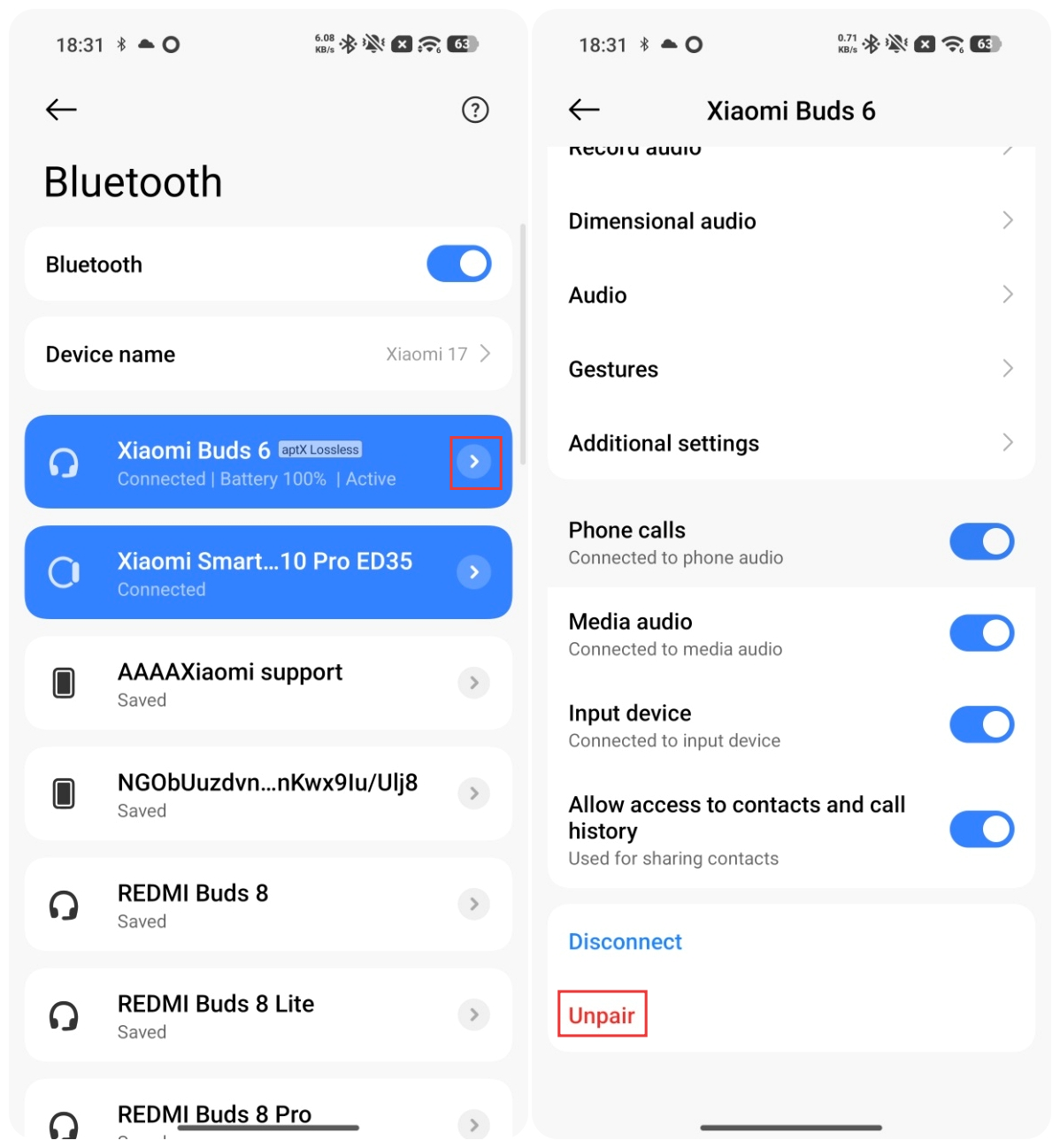
iPhones: Go to [Settings] >> [Bluetooth] >> find [Xiaomi Buds 6] and tap the [i] icon on the right >> [Forget This Device] (using an iPhone 15 as an example).
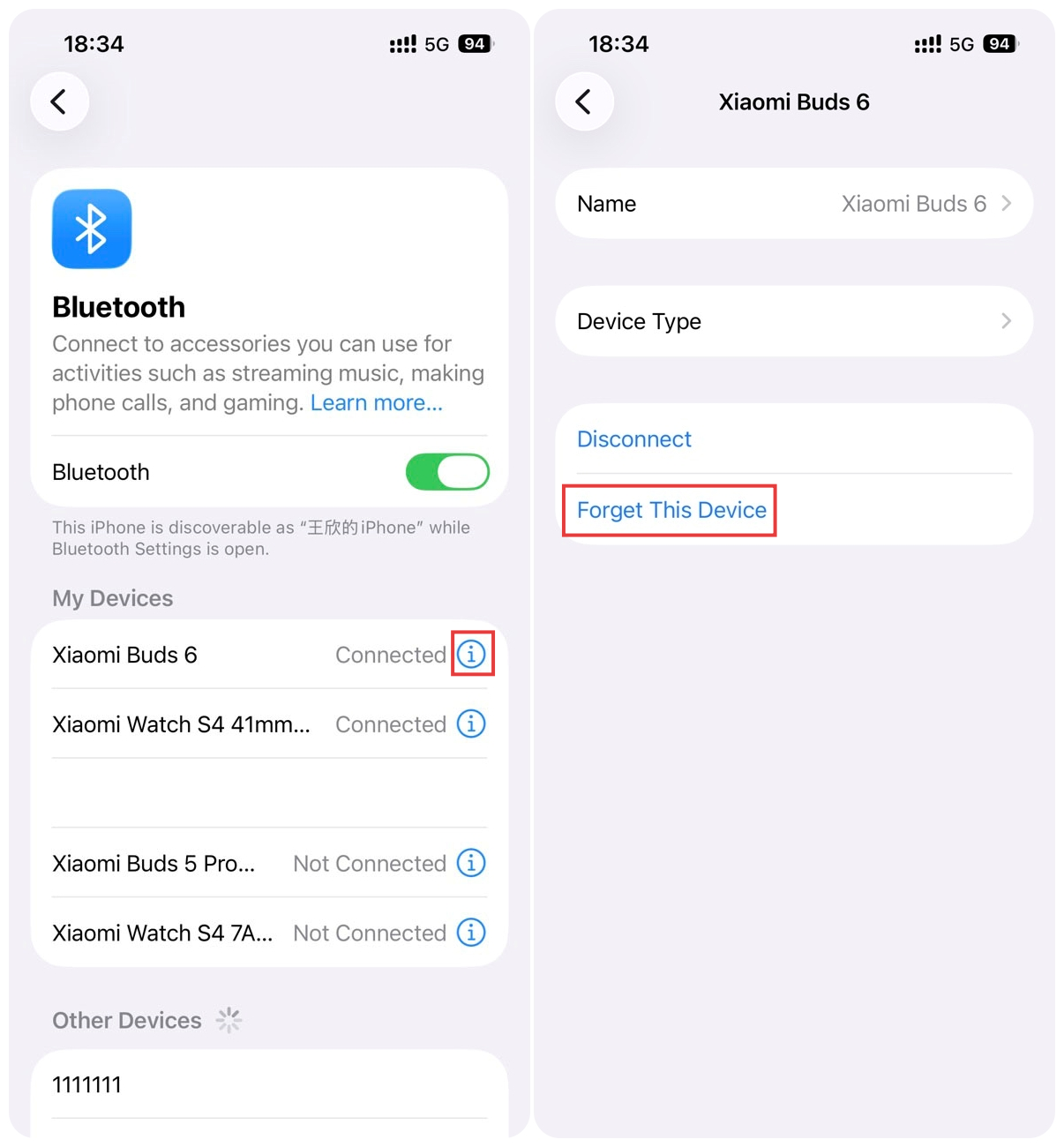
Q13: What to do if the firmware update menu for the Xiaomi Buds 6 appears grayed out in the Xiaomi Earbuds App?
A: When Low Energy Bluetooth is enabled on the Xiaomi Buds 6, the firmware update menu in the Xiaomi Earbuds App will be grayed out. Please turn off Low Energy Bluetooth before attempting the firmware upgrade.
To turn off Bluetooth LE Audio: Go to [Settings] on the phone >> [Bluetooth] >> [Audio] >> turn off [Bluetooth LE Audio].
Q14: What to do if the "Noise cancellation/Off" option is not shown and the left/right earbud and charging case battery levels are not displayed when tapping the Xiaomi Buds 6 in the Xiaomi Smart Hub on the phone?
A: On the Xiaomi Buds 6, this issue can occur because “Bluetooth LE Audio” is enabled. Please turn off “Bluetooth LE Audio” and try again.
To turn off Bluetooth LE Audio: Go to [Settings] on the phone >> [Bluetooth] >> [Audio] >> turn off [Bluetooth LE Audio].
Q15: What to do if encountering issues, such as failing to automatically reconnect upon opening the case or hearing static when using the Xiaomi Buds 6 with a laptop?
A: If you encounter issues, such as failing to automatically reconnect upon opening the case or hearing static when using the Xiaomi Buds 6 with a laptop, it is because the device has Low Energy Bluetooth enabled, which can be incompatible with the earbuds in some cases.
It is recommended to turn off Low Energy Bluetooth and try again. The method to disable it can vary depending on the laptop, but it is found under the following settings: [Bluetooth & devices] >> [Device].
Q16: If the "Bluetooth LE Audio" feature is enabled, what to do if the Xiaomi Buds 6 fails to automatically reconnect when the charging case is opened?
A: When Low Energy Bluetooth is enabled on the Xiaomi Buds 6, if the phone actively disconnects from the earbuds, they can fail to reconnect automatically when the charging case is opened. In this case, please try manually reconnecting the earbuds from the phone’s Bluetooth settings after opening the charging case.
Q17: What to do if the audio quality is poor or the soundstage is unstable after enabling Track head movement on the Xiaomi Buds 6?
A: On the Xiaomi Buds 6, the head tracking algorithm requires a few seconds to calibrate. After enabling the Track head movement feature, please keep your head still for about 5 seconds before using it to ensure proper calibration and a better audio experience.
Q18: What to do if the recording stops within 1 second after starting recording by pressing the force sensor of Xiaomi Buds 6?
A: On the Xiaomi Buds 6, the recording can automatically stop due to the wearing detection prompt sound. It is recommended to ensure the earbuds are properly and stably worn, then wait for about 2 seconds before starting the recording again.
Q19: Why can the Xiaomi Buds 6 not be found in the Xiaomi Earbuds App?
A: This issue could occur because the version of the Xiaomi Earbuds App you are using is not yet compatible with the Xiaomi Buds 6. Please update the app to the latest version and try again.
Please ensure that the Xiaomi Earbuds App version is 1.25.0 or higher on Android, and 1.17.0 or higher on iOS.
To check and update the Xiaomi Earbuds App version:
1. Ensure your phone is connected to the internet.
2. Open Xiaomi Earbuds App >> [Profile] >> [Current app version]. Check whether there is an update prompt and upgrade to the latest version.
3. After the update is completed, log in again and reconnect the earbuds.
Q20: Why can’t music resume playback through the Xiaomi Buds 6 touch controls or by re-wearing the earbuds after the music is paused on the phone??
A: If a game is currently running on the phone, this behavior is normal. Please try exiting the game and then attempting to resume playback of the Xiaomi Buds 6 again.
Q21: What to do if there is no sound when using the Xiaomi Buds 6 on a computer?
A: Please update the computer’s Bluetooth driver and try again.
Q22: Why is there no incoming call notification sound on the Xiaomi Buds 6 when a computer receives a call while the earbuds are connected to both phone and laptop (dual connection)?
A: The call mechanism on computers is different from that on phones. On a computer, call notifications use the same audio channel as media playback. If the Xiaomi Buds 6 is already playing music, they will not play the computer’s call ringtone. This is normal behavior. In this case, please manually switch the audio routing on the laptop to answer the call. After switching, both input and output audio will go through the earbuds.
Q23: What to do if the Xiaomi Buds 6 fails to record the conversation when making voice calls on a PC?
A: During voice calls on the Xiaomi Buds 6, please select the Hands-Free audio channel on the PC for recording. The default Stereo channel is used for music and video playback and does not support call audio recording.
Q24: What to do if the firmware versions of the left and right earbuds on the Xiaomi Buds 6 are inconsistent?
A: If the firmware versions of the left and right earbuds on the Xiaomi Buds 6 are inconsistent, please update both earbuds using the following method:
Ensure the earbuds are connected to the phone and open the Xiaomi Earbuds App. If a new version is available, a firmware update prompt will appear. When the left and right earbuds have different firmware versions, the app will prompt a forced update. Tap [Update] to proceed. After the update is completed, both earbuds will have the same firmware version.
Note:
On iPhones, automatic version detection prompts are not supported. If you are using an iPhone or the update fails, please update the lower-version earbud separately.
Check the firmware versions of the left and right earbuds to identify the one with the lower version:
1. With both earbuds inside the charging case, remove only the left earbud and put it on. Close the lid and wait for 30 seconds. On your phone, force-close the Xiaomi Earbuds App running in the background, then reopen the app to check the firmware version information.
2. With both earbuds inside the charging case, remove only the right earbud and put it on. Close the lid and wait for 30 seconds. On your phone, force-close the Xiaomi Earbuds App running in the background, then reopen the app to check the firmware version information.
Upgrade the lower-version earbuds individually:
1. With both earbuds inside the charging case and successfully connected to your phone, remove only the earbud with the higher firmware version.
2. Keep the lower-version earbud inside the charging case. Take the charging case (containing the lower-version earbud) and your phone, and move them away from the higher-version earbud until the connection to the higher-version earbud is lost.
3. The Xiaomi Earbuds App should now indicate that only the lower-version earbud is connected. Tap [Update] within the app and wait for the upgrade to complete successfully.
4. Once the lower-version earbud has been successfully upgraded, it will automatically reconnect to your phone. Verify that the earbud's firmware version number is now correct.
5. Place both earbuds back into the charging case, close the lid, and wait for 1 minute. Then, open the lid to reconnect the earbuds to your phone and resume normal use.
Q25: Why do the Xiaomi Buds 6 and the charging case have different protective film configurations across different colors?
A: The reasons are as follows:
1. The inner lining of the charging case is a glossy surface. All four color variants of the charging case include a protective film on the inner lining to ensure surface protection during transportation and storage, as shown in the diagram.
2. Due to the large curvature of the inner lining, applying a protective film may cause wrinkling, which can slightly lift the earbuds. In addition, the Xiaomi Buds 6 in white and black use a high-gloss surface material that is more prone to scratches, so these versions include an additional protective film on the middle shell to prevent surface abrasion. The gray and purple earbuds use a matte sprayed finish that is more scratch-resistant, so they do not require an earbud protective film.
3. The glossy inner lining of the charging case can show slight shiny marks caused by friction when placing or removing the earbuds. This is normal and does not affect product performance or protection.
4. To reduce the risk of scratches, it is recommended to avoid storing the earbuds together with hard objects (such as keys or coins) and to place them back into the original charging case after use to maintain their appearance.
5. If slight noise or stiffness occurs when opening or closing the case, please first remove all protective films on both the earbuds and charging case to rule out interference caused by the films.
The protective film configurations for earbuds of different colors are as follows:
1. The white earbuds come with a middle-shell protective film and an inner lining protective film.
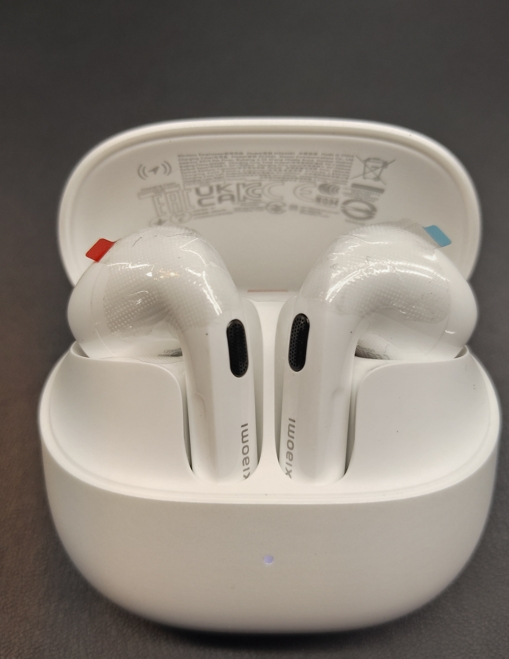
2. The black earbuds come with a middle-shell protective film and an inner lining protective film.
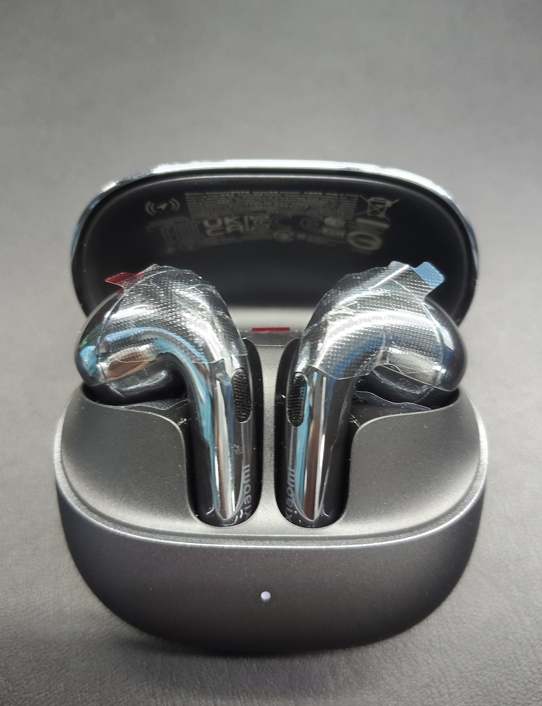
3. The gray earbuds come with an inner lining protective film.

4. The purple earbuds come with an inner lining protective film.

Q26: Why is there a visible gap on the back of the Xiaomi Buds 6 charging case?
A: If there is a gap on the back of the Xiaomi Buds 6 charging case, please refer to the following information:
1. This is a normal design feature of the Xiaomi Buds 6 charging case, intended to ensure smooth opening and closing of the lid and prevent sticking or jamming.
2. Similar gaps are also commonly found in charging case designs of other products in the market. This is not a product quality issue.
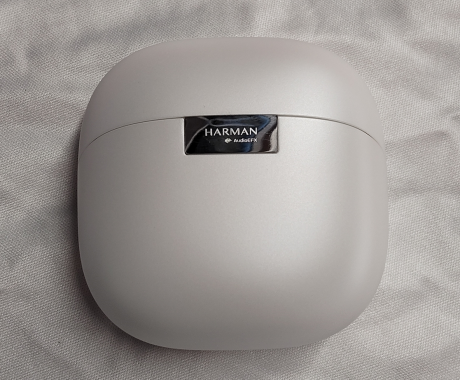
Q27: Why does the rear vent hole of the Xiaomi Buds 6 appear slightly recessed?
A: The slightly recessed appearance of the rear vent hole on the Xiaomi Buds 6 can be explained as follows:
1. To meet the acoustic impedance requirements of the rear vent, a recessed groove design is used.
2. Due to the special coating process applied to the metal mesh, slight color variation may appear under certain lighting conditions. This can make the recessed structure of the mesh appear more pronounced. This is a normal manufacturing characteristic and not a structural issue.
3. Structural accuracy and assembly quality are normal and do not affect using experience.
Illustration of the recessed groove design of the rear vent hole of the Xiaomi Buds 6:
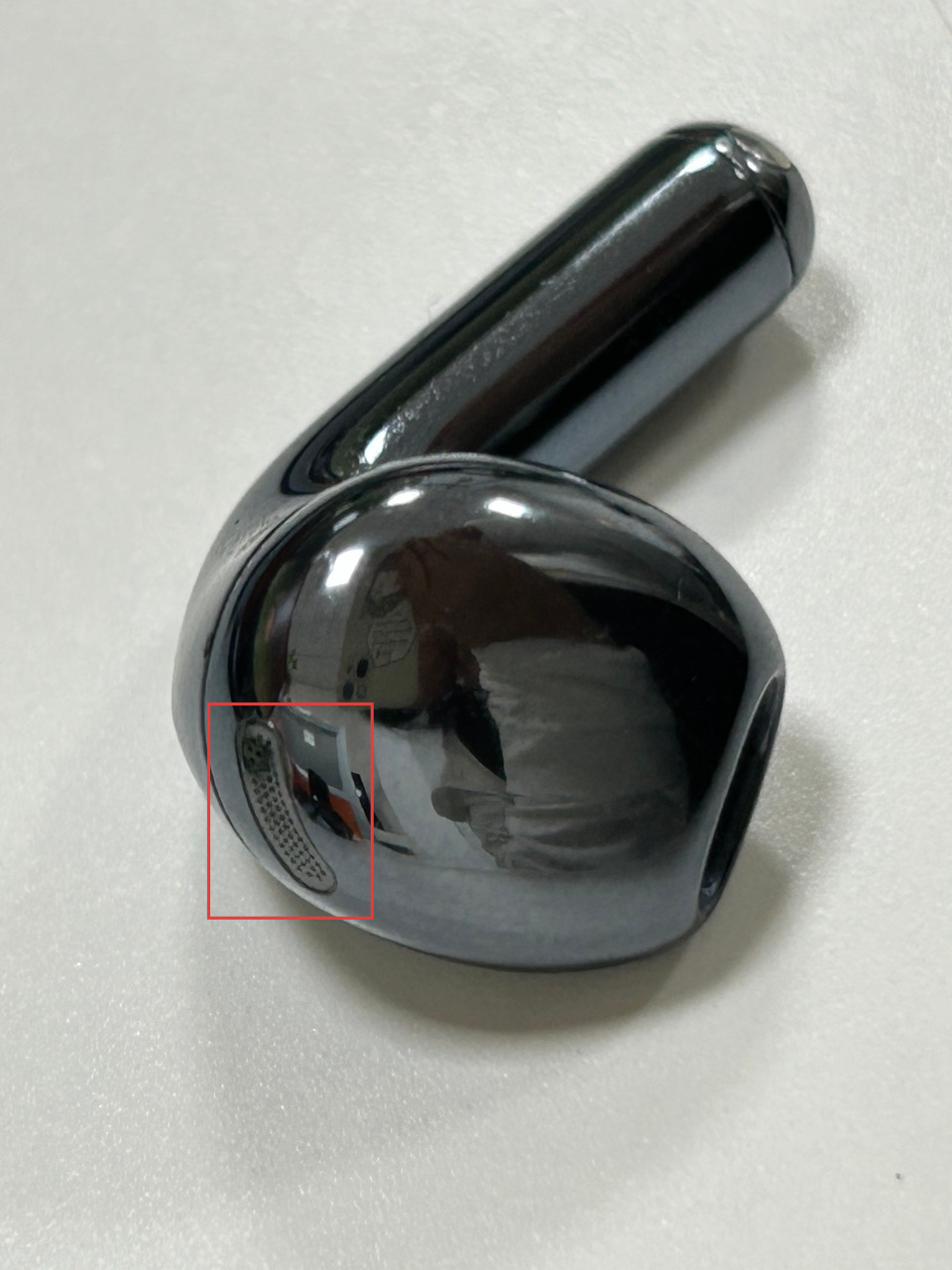
Q28: Why is there a slight noise when pressing or shaking the charging case of the Xiaomi Buds 6?
A: If there is a slight noise when pressing or shaking the charging case of the Xiaomi Buds 6, please refer to the following information:
1. Slight noise when shaking the charging case: When the charging case is shaken forcefully, the earbuds can briefly lose contact with the charging pins due to inertia. After shaking stops, they will automatically realign through magnetic attraction. During this process, slight contact with the inner case could produce a faint sound.
2. Noise when pressing the charging case: The charging case of the Xiaomi Buds 6 uses a “space capsule” style design. When the outer shell is pressed firmly, slight movement at contact points could occur, producing a faint sound. This is normal under extreme pressure and does not occur during normal use. It does not affect sealing or durability.
Note:
If there is slight noise or stiffness when opening or closing the lid, please first remove any protective films on the earbuds and charging case, as they can cause such issues.
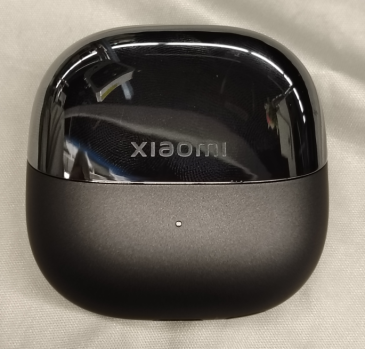
Q29: Why is the earbud stem resting above the inner positioning groove when placing the Xiaomi Buds 6 in the charging case?
A: For placing the Xiaomi Buds 6 into the charging case, please refer to the following information regarding the earbud stem position:
1. The charging method of the Xiaomi Buds 6 is spring-contact based, and the earbud stem needs to be aligned with the positioning groove to ensure proper charging.
2. When placing the earbuds into the charging case, make sure the stem is correctly seated in the positioning groove to ensure normal charging and safe use.
Correct placement example shown:
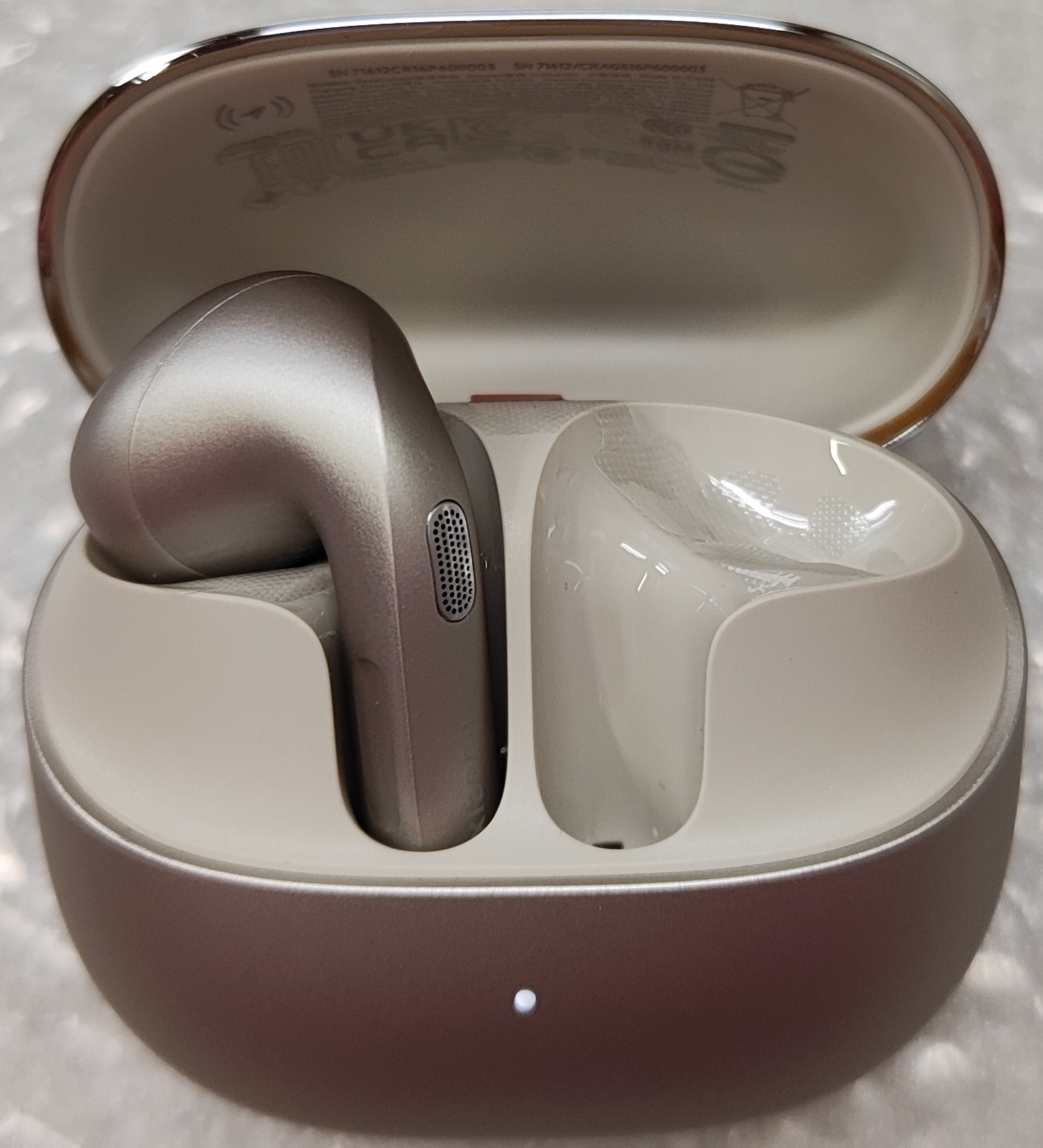
Q30: Why is there exposed metal at the edge of the decorative part on the Xiaomi Buds 6 charging case?
A: This is a normal design feature of the Xiaomi Buds 6 charging case. To ensure smooth opening and closing of the case lid, the decorative part and the lower shell are designed with a clearance fit. The “exposed metal” you can notice is actually the silver-colored metal surface of the internal hinge shaft, visible only from certain angles through this gap. It is not a product quality issue, so you can use it with confidence.
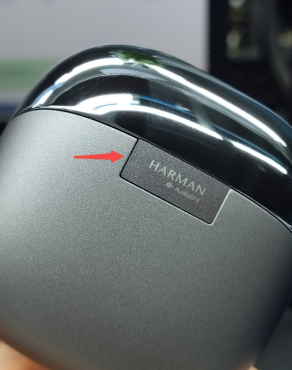
Q31: What to do if the firmware version of the Xiaomi Buds 6 does not update after opening the case when the automatic firmware transfer has completed?
A: If the firmware version of the Xiaomi Buds 6 does not update after opening the charging case when the automatic firmware transfer has completed, please refer to the following steps to troubleshoot:
1. Ensure both the earbuds and the phone meet the silent update requirements.
2. The phone could have actively triggered an OTA exit command abnormally. Please close the charging case again, leave it idle for 10 seconds, and re-enter silent update mode.
3. If the silent update still fails, please perform a manual update via the Xiaomi Earbuds App or the system settings page.
Note:
Silent update requirements:
1. Ensure that the [Auto update earphones] switch is enabled.
2. After the earbuds connect to the phone, the phone detects that a firmware update is available.
3. Both earbuds and the charging case battery are ≥ 20%.
4. The earbuds have been connected to the phone for more than 30 seconds before being placed into the charging case, and the lid is closed.
Manual update via Xiaomi Earbuds App:
Ensure the earbuds are connected >> open Xiaomi Earbuds App >> if a new version is available, a firmware update prompt will appear >> tap to enter the update page >> select [Update] >> wait until progress reaches 100%.
Manual update via system settings:
Ensure earbuds are connected >> open [Settings] on the phone >> [Bluetooth] >> [Additional settings] >> [Firmware update] >> start update and wait until completion (100%).
Q32: Why does the MacBook disconnect when the Xiaomi Buds 6 is connected to both a MacBook and a phone
A: In the dual connection mode of the Xiaomi Buds 6, MacBook disconnection issues can be related to the connection environment or device compatibility.
Please try the following troubleshooting steps:
1. Ensure the devices are within the effective transmission range: Keep the earbuds and the MacBook close to each other, within the effective Bluetooth range (about 10 meters), and reconnect them.
2. Stay away from strong electromagnetic interference sources: Please check whether earbuds are being used in an environment with strong interference. Keep them away from objects with significant electromagnetic interference, such as microwave ovens or surveillance equipment. If interference is suspected, try using them in an open area or a normal indoor environment.
3. Try another computer model: Some MacBook chips can experience intermittent audio issues when paired with non-Apple Bluetooth earbuds.
Q33: What to do if the sound is unclear or intermittent when the Xiaomi Buds 6 is connected to a MacBook?
A: This issue could be related to the connection environment or device compatibility.
Please try the following troubleshooting steps for the Xiaomi Buds 6:
1. Ensure the devices are within the effective transmission range: Keep the earbuds and the MacBook close to each other, within the effective Bluetooth range (about 10 meters), and reconnect them.
2. Stay away from strong electromagnetic interference sources: Please check whether earbuds are being used in an environment with strong interference. Keep them away from objects with significant electromagnetic interference, such as microwave ovens or surveillance equipment. If interference is suspected, try using them in an open area or a normal indoor environment.
3. Try another computer model: Some MacBook chips can experience intermittent audio issues when paired with non-Apple Bluetooth earbuds.
Q34: Why are the left and right earbuds out of sync when resuming local music playback after pausing while the watch is connected to the Xiaomi Buds 6?
A: This issue could occur because when the music pause duration is too short, some watches can not be able to fully send the complete “stop-restart” command to the Xiaomi Buds 6. As a result, the primary and secondary earbuds can receive different data states, causing unsynchronized playback between the left and right earbuds. It is recommended to wait about 10 seconds after pausing the music before pressing play again.
Q35: Why does music play through the computer speakers instead of the Xiaomi Buds 6 after connecting to a computer?
A: Please make sure the Xiaomi Buds 6 is properly connected to the computer and that the earbuds are selected as the media playback device. If the issue persists, try updating the computer system, using another computer, restarting the computer, or fully closing the Music App in the background and reopening it.
Q36: Why does music stutter when the Xiaomi Buds 6 is used with the Xiaomi 15 series under the aptX adaptive codec?
A: When the Xiaomi Buds 6 is used with the Xiaomi 15 series under the aptX Adaptive codec, the connection environment requirements are more demanding. To ensure stable performance, it is recommended to switch to a different codec. You can also follow future phone software updates for further optimization.
Does it help?
Yes
No