

Mijia Smart Servo-oscillation Electric Toothbrush Pro FAQ
Overview
Q1: What is a servo-oscillation electric toothbrush?
A: A servo-oscillation electric toothbrush is an electric toothbrush that combines servo motor control technology with an integrated oscillation design. By precisely controlling the brush head's motion path and frequency, it delivers more efficient, gentler cleaning.
Q2: What is the difference between the Mijia Smart Servo-oscillation Electric Toothbrush Pro and the Xiaomi Oscillation Electric Toothbrush Pro?
A: The differences between the Mijia Smart Servo-oscillation Electric Toothbrush Pro and the Xiaomi Oscillation Electric Toothbrush Pro are as follows:
1. The Xiaomi Oscillation Electric Toothbrush Pro does not support the Xiaomi Home App, whereas the Mijia Smart Servo-oscillation Electric Toothbrush Pro does support the Xiaomi Home App.
2. The Xiaomi Oscillation Electric Toothbrush Pro has a fixed brushing duration of 2 minutes, whereas the Mijia Smart Servo-oscillation Electric Toothbrush Pro supports a customizable brushing duration (selectable within a range of 2 to 4 minutes).
3. The Xiaomi Oscillation Electric Toothbrush Pro features a sweeping oscillation amplitude of 20°, whereas the Mijia Smart Servo-oscillation Electric Toothbrush Pro features a sweeping oscillation amplitude that can reach up to 60°.
4. The Xiaomi Oscillation Electric Toothbrush Pro does not offer a Personalized mode, whereas the Mijia Smart Servo-oscillation Electric Toothbrush Pro does support a Personalized mode, allowing you to freely adjust functional parameters to discover your ideal, comfortable brushing experience.
Q3: Do the bristles of the Mijia Smart Servo-oscillation Electric Toothbrush Pro use copper-free bristle planting?
A: The toothbrush adopts advanced copper-free bristle planting technology. Compared with conventional toothbrush heads with copper-anchored bristles, it eliminates the risk of copper rust. In addition, the copper-free bristle planting process secures the bristles more firmly, reducing bristle shedding and avoiding accidental ingestion, so you can use it with greater peace of mind.
Copper-free bristle planting technology:
A new high-density bristle planting process that uses no rust and no metal. The bottom of the bristles is fused into a single piece by hot melting, and a separate component on the upper part of the brush head is then used to secure the bristles to the brush head.
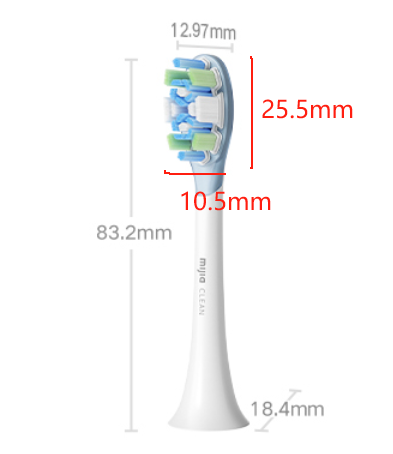
Q4: What is the brush head size of the Mijia Smart Servo-oscillation Electric Toothbrush Pro?
A: The Mijia Smart Servo-oscillation Electric Toothbrush Pro utilizes two types of brush heads: the Cleaning head and the Soft head.
Both brush heads have the same dimensions. Brush head height is 83.2 mm. Brush head width is 12.97 mm. Bottom diameter is 18.4 mm. Bristle height is 25.5 mm. Bristle width is 10.5 mm.
Frequently Asked Questions
Q1: Who is the Mijia Smart Servo-oscillation Electric Toothbrush Pro suitable for, and how should it be used?
A: The Mijia Smart Servo-oscillation Electric Toothbrush Pro is recommended for adults aged 18 and above.
To use the Mijia Smart Servo-oscillation Electric Toothbrush Pro, please refer to the following steps:
1. Insert the brush head into the Shaft, leaving a small gap. This is necessary for proper oscillation.
2. Apply a small amount of toothpaste to the brush head.
3. Wet the brush head, place it in your mouth, and then turn on the toothbrush.
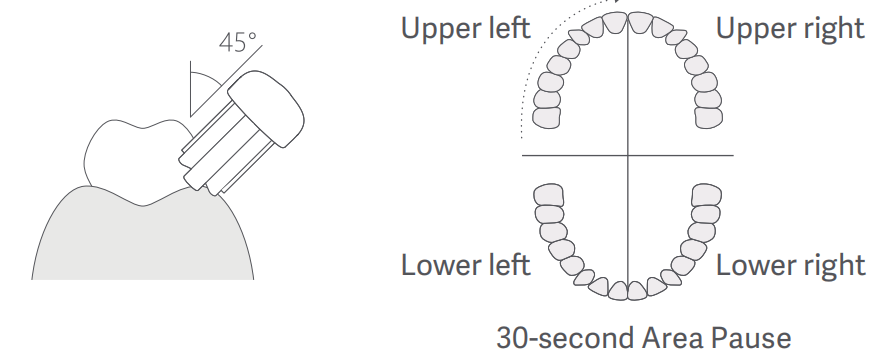
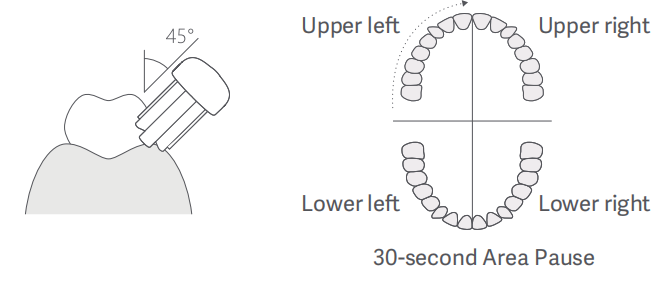
4. Hold the bristles at a 45-degree angle to the gums and gently move the brush slowly.
5. A 30-second vibration reminder will prompt you to switch to a different brushing zone.
6. After brushing, rinse your mouth with clean water.
To maintain the Mijia Smart Servo-oscillation Electric Toothbrush Pro, after brushing, rinse the toothbrush under running water and let it air-dry in a well-ventilated place.
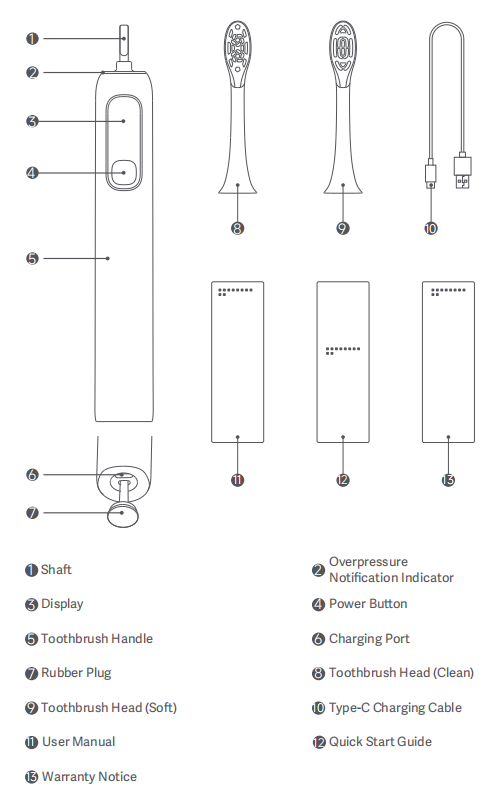
Q2: What is the appearance of the Mijia Smart Servo-oscillation Electric Toothbrush Pro?
A: The Mijia Smart Servo-oscillation Electric Toothbrush Pro includes a shaft at the top for attaching the brush head, a clear digital display for showing brushing modes and battery status, and a conveniently placed Power Button for easy operation.
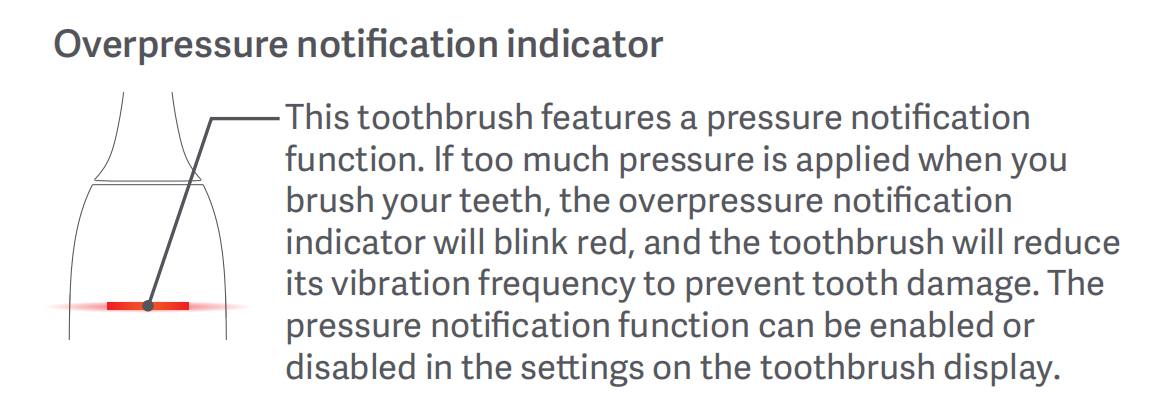
The Overpressure Notification Indicator lights up when excessive force is applied, helping protect your gums during brushing. At the bottom of the handle is a rubber plug that seals the Type-C charging port, ensuring water resistance.
The toothbrush comes with two interchangeable heads: a clean head for daily oral care and a soft head for sensitive oral care.
Q3: Is the Mijia Smart Servo-oscillation Electric Toothbrush Pro loud?
A: This is the sound of the motor during the vibration of the internal mechanism. The product operates below 55 decibels (noise tested at a distance of 1 m) and does not affect normal use.
Q4: What is the battery type and capacity of the Mijia Smart Servo-oscillation Electric Toothbrush Pro?
A: It has a built-in non-replaceable lithium-ion battery, with a rated capacity of 2600 mAh and a rated voltage of 3.7 Vdc.
Q5: Does the Mijia Smart Servo-oscillation Electric Toothbrush Pro have a mode memory feature?
A: The toothbrush has a mode memory feature. Whichever mode you used last time will remain selected the next time you turn it on.
Q6: How long does it take to charge the Mijia Smart Servo-oscillation Electric Toothbrush Pro fully?
A: It takes about 5 hours to charge from empty to fully charged.
Q7: What is the IP rating of the Mijia Smart Servo-oscillation Electric Toothbrush Pro?
A: The Mijia Smart Servo-oscillation Electric Toothbrush Pro has an IPX8 waterproof rating.
Q8: Which systems and connection methods does the Mijia Smart Servo-oscillation Electric Toothbrush Pro support?
A: It supports Android™ 9 or iOS 14.0 and above, connecting via Bluetooth Low Energy (BLE) 5.4, with an operating frequency of 2400–2483.5 MHz and a maximum transmission power of 7.32 dBm.
Q9: What are the specifications of the Mijia Smart Servo-oscillation Electric Toothbrush Pro power adapter?
A: The Mijia Smart Servo-oscillation Electric Toothbrush Pro power adapter accepts an input of 100–240 V~ at 50/60 Hz, 0.2 A and provides an output of 5.0 V ⎓ 1.0 A, 5.0 W.
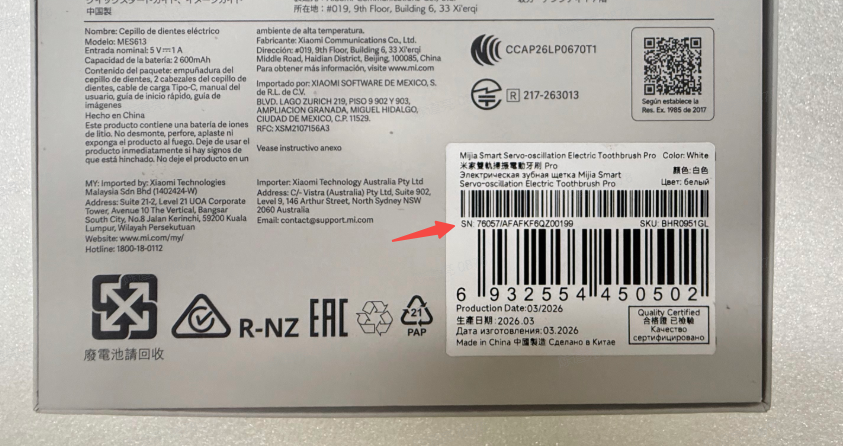
Q10: How to find the SN of the Mijia Smart Servo-oscillation Electric Toothbrush Pro?
A: The SN can be found on the back of the packaging box.
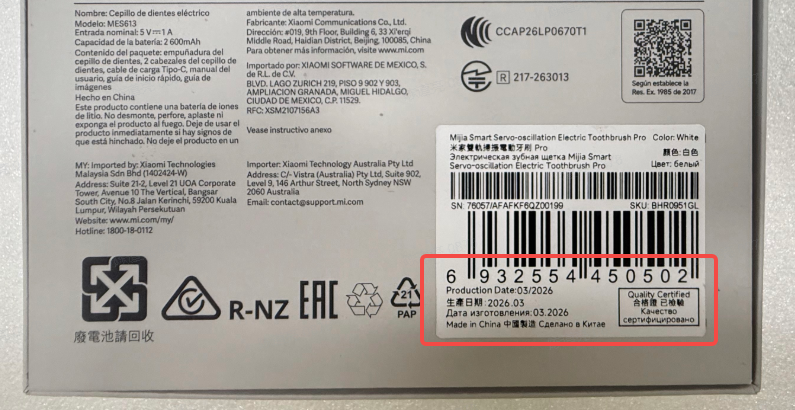
Q11: How to find the certificate of conformity for the Mijia Smart Servo-oscillation Electric Toothbrush Pro?
A: It can be found on the back of the packaging box.
Q12: What states does the Mijia Smart Servo-oscillation Electric Toothbrush Pro show when turned on, turned off, or paused?
A: The Mijia Smart Servo-oscillation Electric Toothbrush Pro shows the following states:
1. On state: the motor vibrates, and the screen displays the current mode and starts the brushing timer.
2. Pause state: the motor stops, and the screen displays a pause reminder.
3. Off state: the motor stops, and the screen turns off.
Q13: How to use the buttons on the Mijia Smart Servo-oscillation Electric Toothbrush Pro?
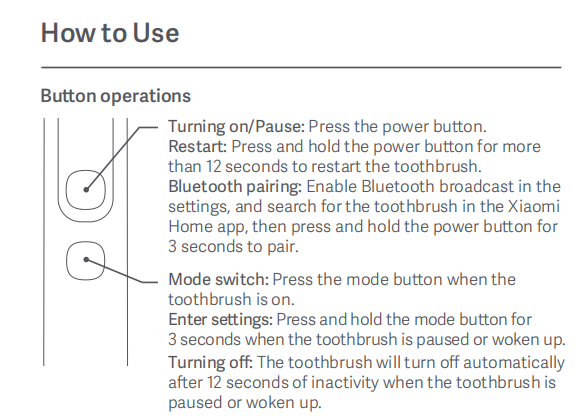
A: To use the buttons on the Mijia Smart Servo-oscillation Electric Toothbrush Pro, please refer to the following information:
1. Turning on/Pause: Press the Power Button.
2. Restart: Press and hold the Power Button for more than 12 seconds to restart the toothbrush.
3. Bluetooth pairing: Enable Bluetooth broadcast in the settings, and search for the toothbrush in Xiaomi Home App, then press and hold the Power Button for 3 seconds to pair.
4. Mode switch: Press the Mode Button when the toothbrush is on.
5. Enter settings: Press and hold the Mode Button for 3 seconds when the toothbrush is paused or woken up.
6. Turning off: The toothbrush will turn off automatically after 12 seconds of inactivity when the toothbrush is paused or woken up.
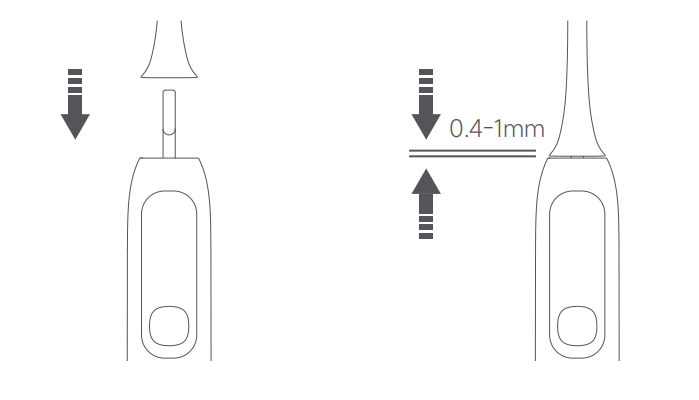
Q14: Why is there a gap between the handle and the brush head on the Mijia Smart Servo-oscillation Electric Toothbrush Pro?
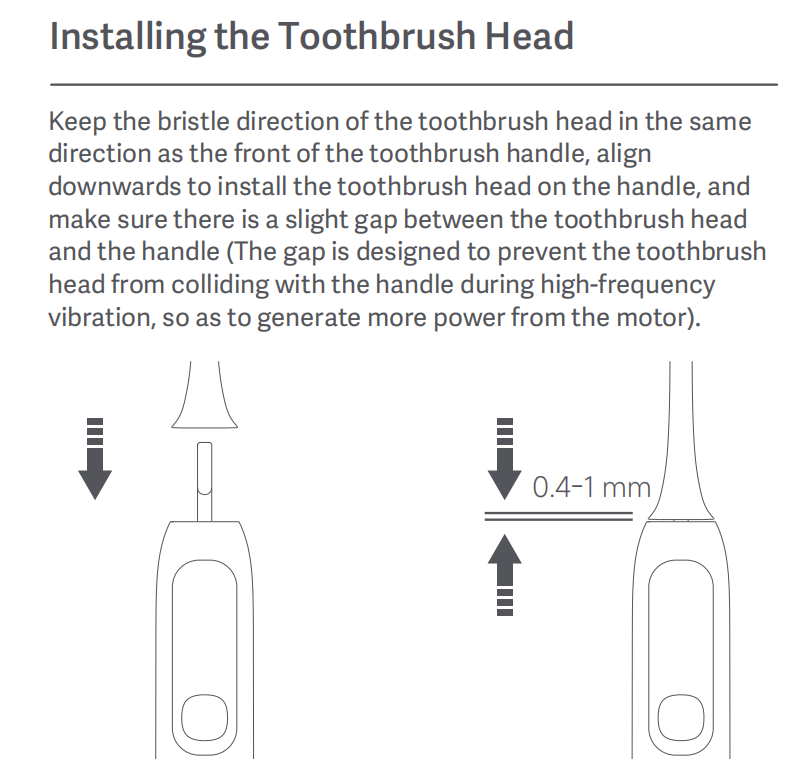
A: To allow the motor to better transmit power to the brush head, there is a 0.4–1 mm gap between the brush head and the handle.
Q15: Does the Mijia Smart Servo-oscillation Electric Toothbrush Pro have a charging disabled feature?
A: It supports the charging disabled feature. If you plug in the charger while the toothbrush is on, it will be forced to turn off and switch to charging mode.
Q16: What type of charging port does the Mijia Smart Servo-oscillation Electric Toothbrush Pro have?
A: The Mijia Smart Servo-oscillation Electric Toothbrush Pro uses a standard Type-C charging port.
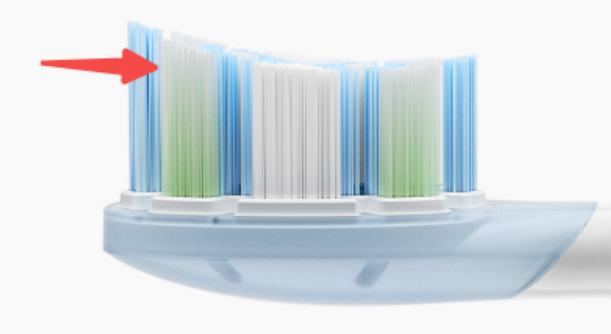
Q17: Does the Mijia Smart Servo-oscillation Electric Toothbrush Pro brush head have a color-fading reminder?
A: The standard brush head supports the color-fading reminder. When the green bristles fade, the brush head should be replaced promptly. We recommend replacing it every three months.
Q18: Does the Mijia Smart Servo-oscillation Electric Toothbrush Pro use a true Servo-oscillation motor?
A: The Mijia Smart Servo-oscillation Electric Toothbrush Pro uses a true Servo-oscillation motor.
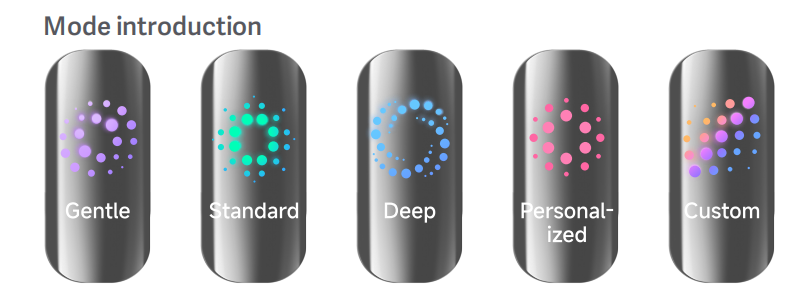
Q19: How many modes does the Mijia Smart Servo-oscillation Electric Toothbrush Pro have? What are the differences?
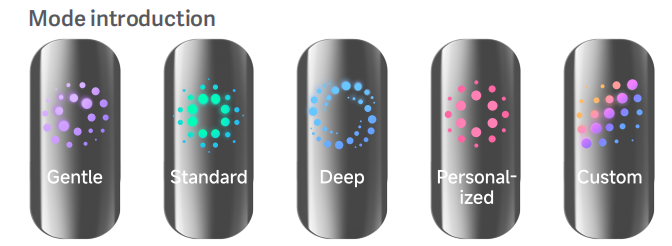
A: The Mijia Smart Servo-oscillation Electric Toothbrush Pro has 5 modes in total:
1. Gentle mode: suitable for beginners or sensitive gums.
2. Standard mode: suitable for daily oral cleaning.
3. Deep mode: targeted at hard-to-clean areas such as the gaps between teeth.
4. Personalized mode: allows you to adjust the intensity, oscillation amplitude, and speed via the Xiaomi Home App (App function).
5. Custom mode: allows you to set a targeted cleaning plan via the Xiaomi Home App, with real-time progress monitoring (App function).
Q20: What type of screen does the Mijia Smart Servo-oscillation Electric Toothbrush Pro have, and what is its resolution?
A: The Mijia Smart Servo-oscillation Electric Toothbrush Pro features an LCD screen with a resolution of 80 × 160.
Q21: Which mode is recommended when first starting to use the Mijia Smart Servo-oscillation Electric Toothbrush Pro?
A: We recommend starting with the Gentle mode. After the toothbrush is turned on, it has a 3-second gradual acceleration feature, during which the vibration gradually increases.
Q22: How does the 30-second area change reminder on the Mijia Smart Servo-oscillation Electric Toothbrush Pro work?
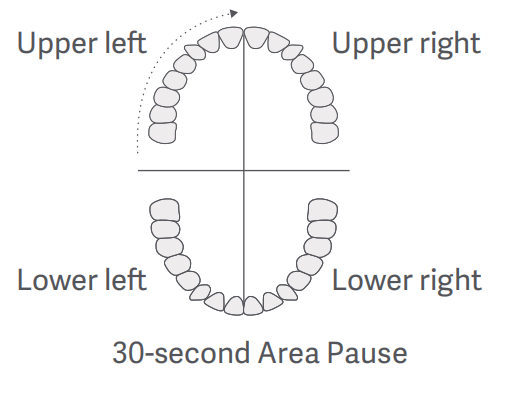
A: The toothbrush briefly pauses every 30 seconds to remind you to switch to the next brushing area in the order of upper left, upper right, lower left, then lower right, helping you achieve even cleaning across the entire mouth.
Q23: What does the Mijia Smart Servo-oscillation Electric Toothbrush Pro do when too much pressure is applied?
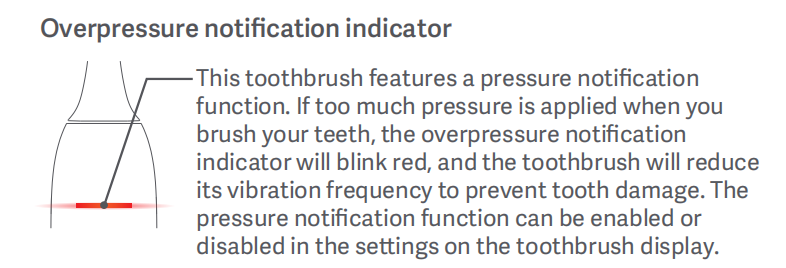
A: The Overpressure notification indicator flashes red, and the vibration frequency is automatically reduced. This can be turned on or off in settings mode.
Q24: What does "Near-term Dental Plaque Risk" on the Mijia Smart Servo-oscillation Electric Toothbrush Pro display mean?
A: The system's built-in algorithm analyzes recent brushing behavior and, after the toothbrush is woken up, displays recent brushing information, including: Near-term Dental Plaque Risk, Last Brushing Coverage, and Recent Brushing Pressure.
Note:
It will not be displayed during the first use. The Dental Plaque Risk result is calculated based on factors such as recent brushing coverage and brushing intervals, and is for reference only.
Q25: What is the missed area reminder feature on the Mijia Smart Servo-oscillation Electric Toothbrush Pro?
A: After brushing is paused or completed, the display uses color coding to provide feedback on the brushing situation:
White indicates cleaned areas, and orange indicates missed areas. Continuing to brush the orange areas can improve coverage. Once all missed areas have been cleaned, the toothbrush will automatically pause and display the brushing results.
Friendly tips:
While brushing, please keep your head steady and look straight ahead for more accurate evaluation results.
Q26: What information is shown on the brushing results screen of the Mijia Smart Servo-oscillation Electric Toothbrush Pro?
A: After brushing is paused or finished, the display shows the brushing coverage, brushing evaluation, and brushing duration.
Q27: Can the Mijia Smart Servo-oscillation Electric Toothbrush Pro be used while bathing or showering?
A: No. Although the product has an IPX8 waterproof rating, it is not recommended for use while bathing or showering.
Q28: How often should the brush head of the Mijia Smart Servo-oscillation Electric Toothbrush Pro be replaced?
A: We recommend replacing the brush head every 3 months.
Q29: Can the brush head of the Mijia Smart Servo-oscillation Electric Toothbrush Pro be shared with others?
A: No. Please do not share the brush head with others.
Q30: What to pay attention to when the Mijia Smart Servo-oscillation Electric Toothbrush Pro is not in use?
A: Securely close the charging port rubber plug, clean the body and the brush head, allow them to dry, and then store the Mijia Smart Servo-oscillation Electric Toothbrush Pro in a dry environment.
Q31: Which group of people should consult a doctor before using the Mijia Smart Servo-oscillation Electric Toothbrush Pro?
A: The following groups should consult a doctor before using the Mijia Smart Servo-oscillation Electric Toothbrush Pro:
1. If you wear orthodontic braces, dentures, or dental implants.
2. If you have a cardiac pacemaker or other implanted device.
3. Children under 8 years old must not play with the toothbrush. Teenagers should use it under the supervision of a guardian.
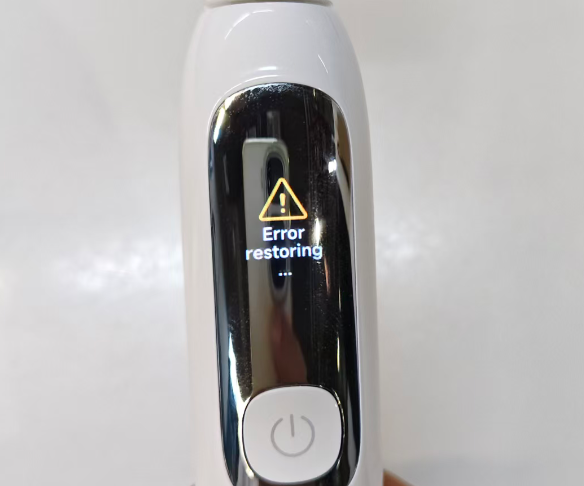
Q32: What does the Operation error on the Mijia Smart Servo-oscillation Electric Toothbrush Pro display mean?
A: This indicates that the brush head has encountered significant external resistance and the blockage protection feature has been triggered. Place the toothbrush horizontally and wait for it to recover.
Q33: How should the battery of the Mijia Smart Servo-oscillation Electric Toothbrush Pro be handled when disposing of the product?
A: Please remove, dispose of, and recycle the built-in battery in accordance with local laws and regulations. Please refer to the following removal steps:
1. Use a flathead screwdriver to pry open the bottom cover.
2. Use the screwdriver to pry open the internal clips inward and push out the internal components.
3. Use diagonal cutters to cut the battery connection wires, then remove the battery and send it to an official recycling site.
Warning:
Do not throw the battery into fire or short-circuit it. The power must be disconnected before removing the battery.
Q34: What brushing method is recommended for the Mijia Smart Servo-oscillation Electric Toothbrush Pro?
A: We recommend using the Bass brushing method: hold the bristles at a 45° angle to the gum line and gently move the toothbrush. The toothbrush pauses every 30 seconds to remind you to change areas. Clean in the order of upper left, upper right, lower left, then lower right.
Q35: Does the Mijia Smart Servo-oscillation Electric Toothbrush Pro have a gradual start-up feature?
A: The toothbrush has a 3-second gradual power ramp-up feature when turned on, during which the vibration gradually increases over 3 seconds.
Note:
The toothbrush remembers the mode used in the previous brushing session by default. There is a 3-second gradual ramp-up feature when turning on the toothbrush, but switching modes after start-up does not trigger the 3-second gradual ramp-up.
Usage-Related
Q1: How to switch the language on the Mijia Smart Servo-oscillation Electric Toothbrush Pro?
A: When the toothbrush is paused or woken up, press and hold the Mode Button for 3 seconds to enter [Settings], scroll to [Language], and press the Power Button to confirm and switch.
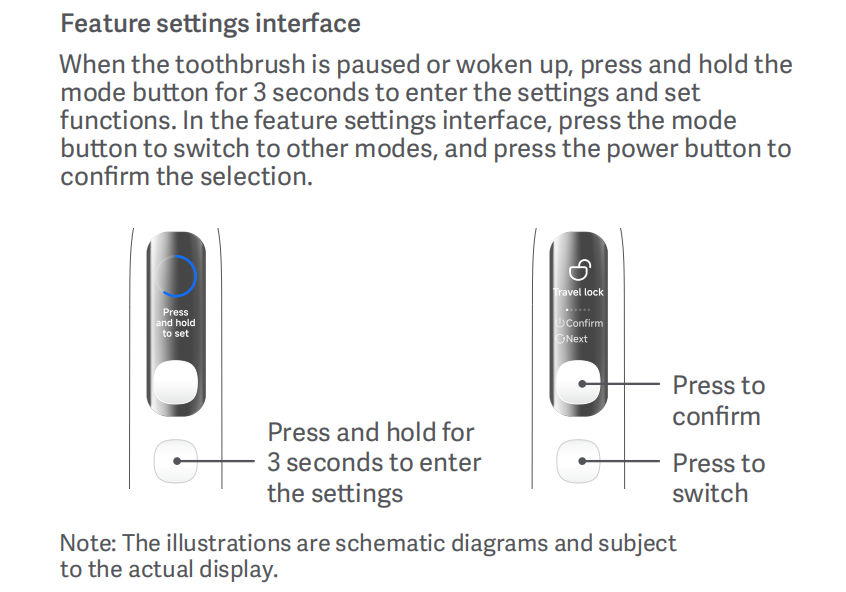
Q2: How to enable the Travel lock on the Mijia Smart Servo-oscillation Electric Toothbrush Pro?
A: To enable Travel lock, press and hold the Mode Button for 3 seconds, navigate to [Settings], then to [Travel lock], and press the Power Button to confirm. Please refer to the following picture:
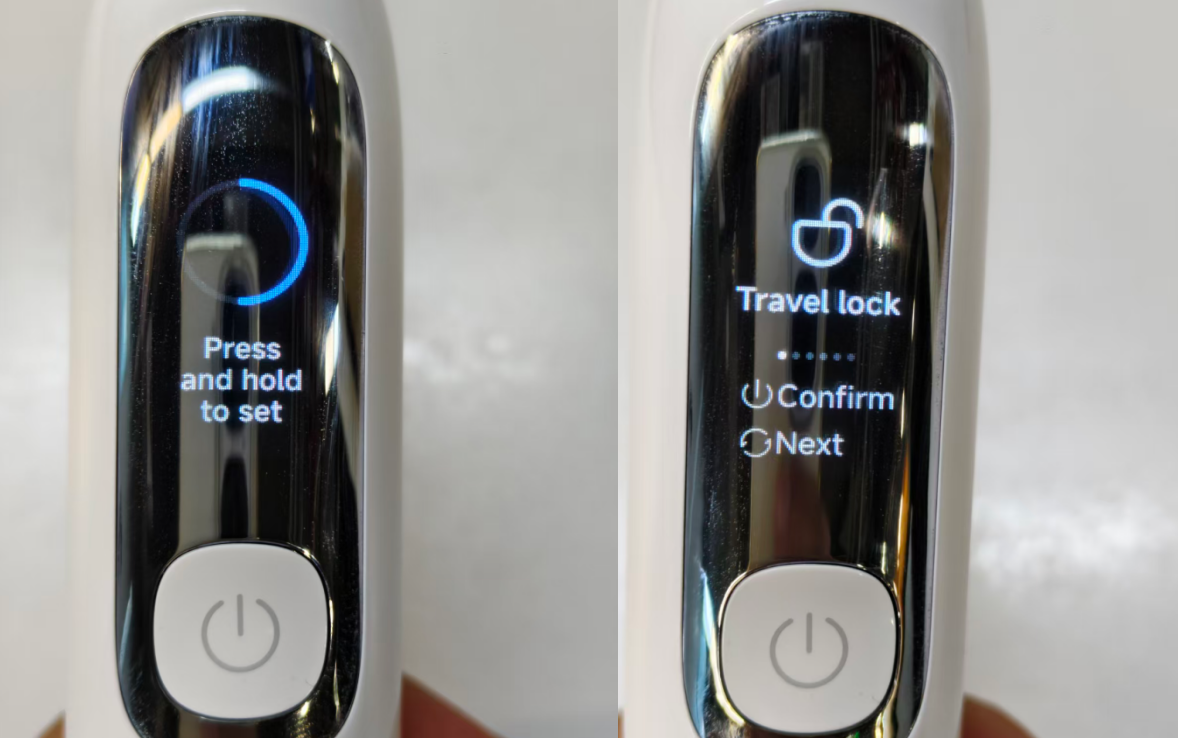
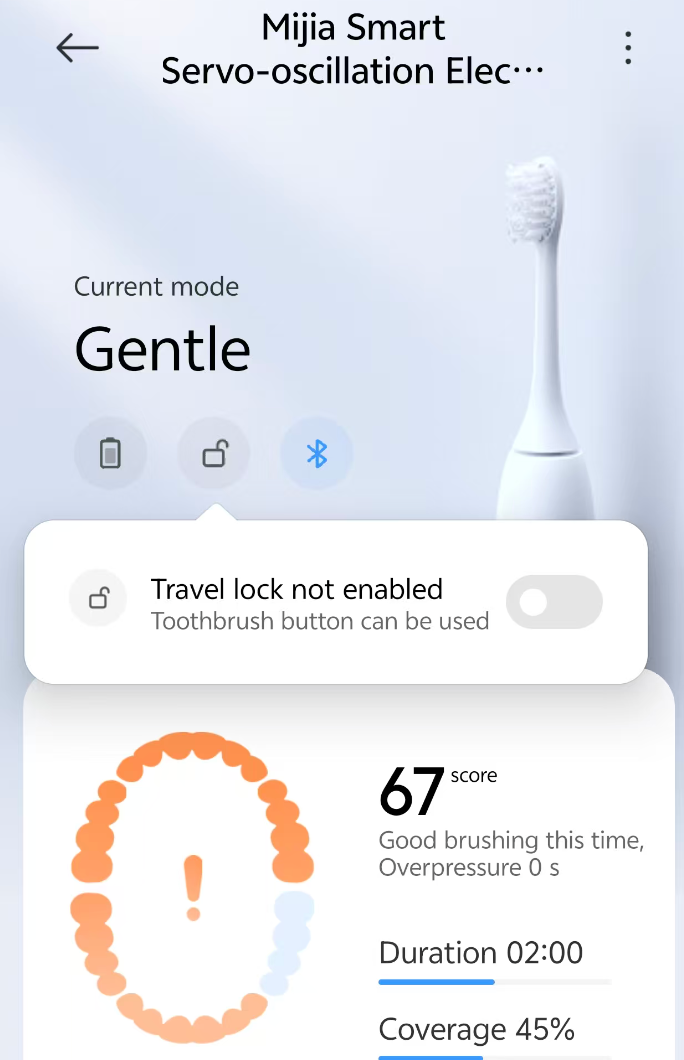
To disable, press and hold the Power Button on the toothbrush, or tap the lock icon in the Xiaomi Home App to turn it off. Please refer to the following picture:
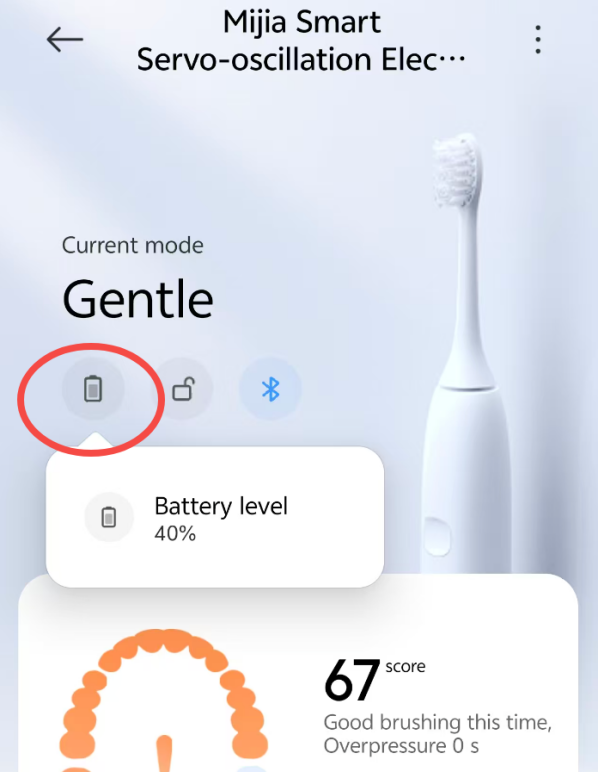
Q3: How to check the battery level on the Mijia Smart Servo-oscillation Electric Toothbrush Pro?
A: To check the battery level on the Mijia Smart Servo-oscillation Electric Toothbrush Pro, you can use the following methods:
1. The screen displays the battery level while charging.
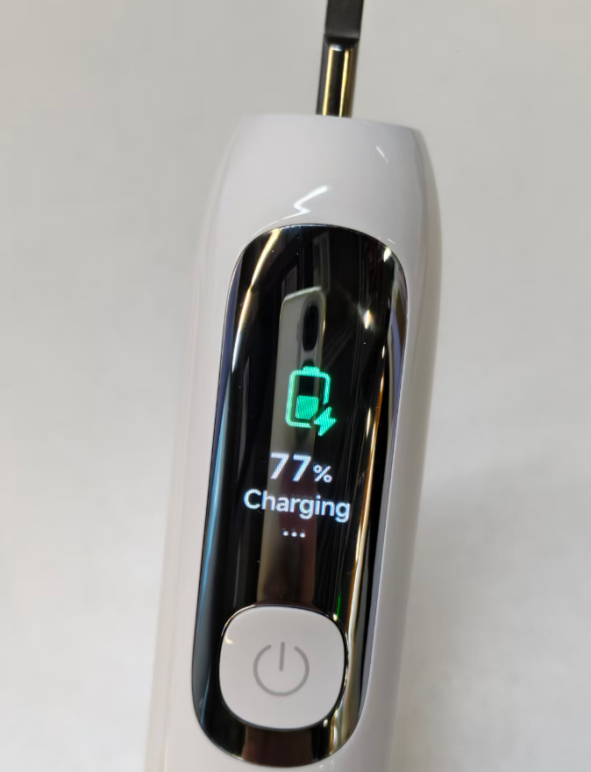
2. View the real-time battery level in the Xiaomi Home App.
Q4: How to turn the Mijia Smart Servo-oscillation Electric Toothbrush Pro on/off?
A: To turn on or pause, press the Power Button.
To turn off, when the toothbrush is in pause or wake up state, it will automatically turn off (screen off) after 12 seconds of inactivity.
Q5: How to restart the Mijia Smart Servo-oscillation Electric Toothbrush Pro?
A: Press and hold the Power Button for more than 12 seconds to restart.
Q6: How to switch modes on the Mijia Smart Servo-oscillation Electric Toothbrush Pro?
A: To switch modes on the Mijia Smart Servo-oscillation Electric Toothbrush Pro, press the Mode Button.
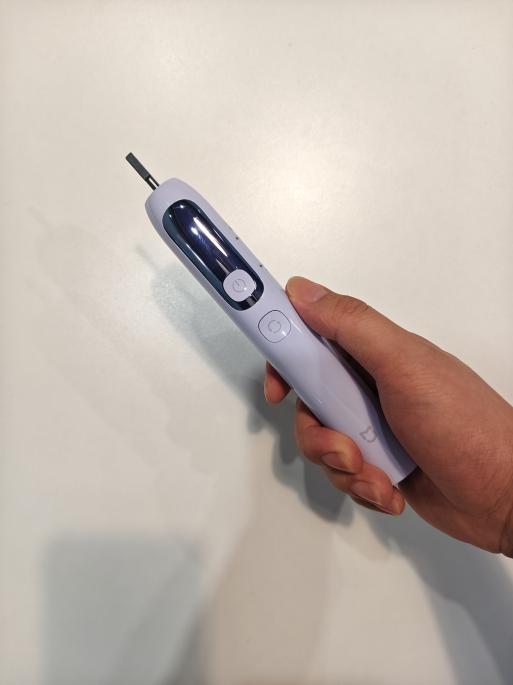
Q7: How to prevent the Mijia Smart Servo-oscillation Electric Toothbrush Pro from slipping during use?
A: It is recommended to hold the toothbrush in the middle-to-lower section (refer to the grip position shown in the illustration). This area is designed to better fit the curve of the hand, enhancing grip stability and reducing slipping during brushing. After each brushing, thoroughly rinse the body with clean water, paying special attention to removing water droplets and toothpaste residue from the handle surface. When storing, choose a well-ventilated, dry rack (such as a wall-mounted draining rack) to keep the handle dry.
Q8: How to replace the brush head on the Mijia Smart Servo-oscillation Electric Toothbrush Pro?
A: Align the bristles with the front of the handle and push down to install, leaving a 0.4–1 mm gap.
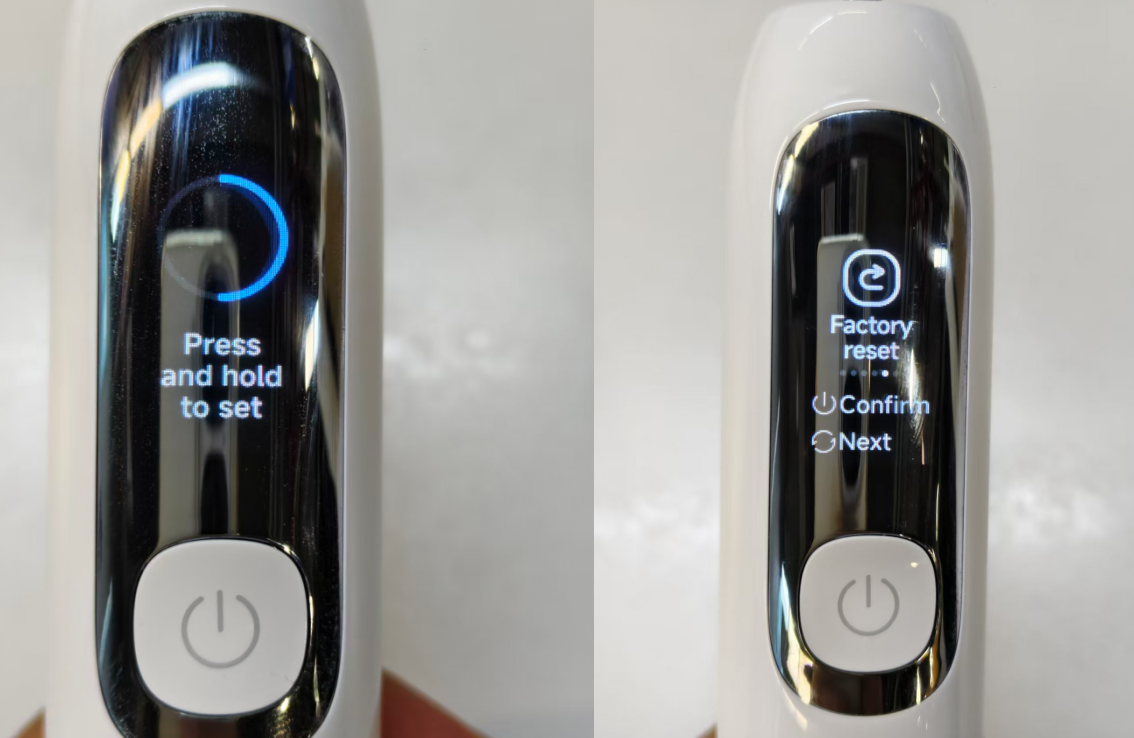
Q9: How to factory reset the Mijia Smart Servo-oscillation Electric Toothbrush Pro?
A: To factory reset the Mijia Smart Servo-oscillation Electric Toothbrush Pro, press and hold the Mode Button for 3 seconds, navigate to [Settings], then to [Factory reset], and press the Power Button to confirm.
Note:
After the factory reset, the toothbrush data will be deleted.
Q10: How to enter the Settings menu on the Mijia Smart Servo-oscillation Electric Toothbrush Pro?
A: In Pause or Wake-up state, press and hold the Mode Button for 3 seconds to enter the Settings menu.
Q11: How to charge the Mijia Smart Servo-oscillation Electric Toothbrush Pro?
A: Open the Charging port rubber plug at the bottom and use the charging cable that came with the product to connect to a power source. Place the product on a stable, dry surface while charging.
Note:
Before charging, make sure the charging port and the charging cable connector are dry. Please use the original charging cable to charge the product, and disconnect promptly after the battery is fully charged.
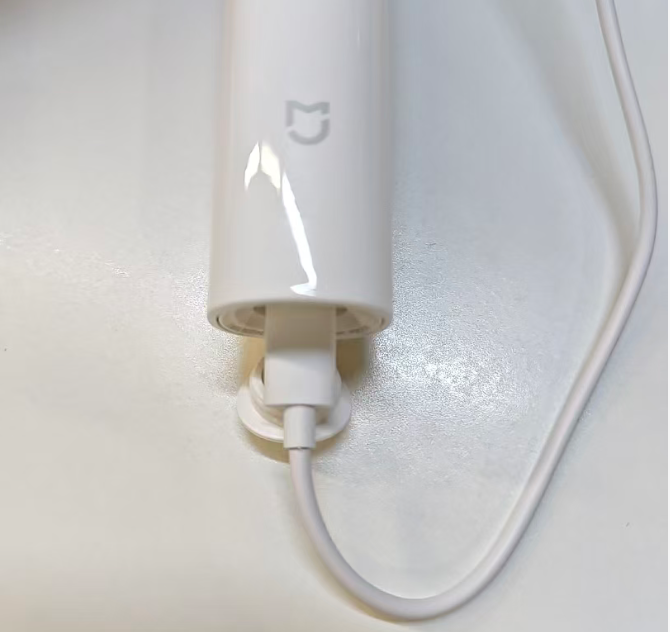
Q12: What is the charging temperature range for the Mijia Smart Servo-oscillation Electric Toothbrush Pro?
A: The Mijia Smart Servo-oscillation Electric Toothbrush Pro can be charged and used only at temperatures between 10 °C and 35 °C.
Q13: What are the battery level display rules for the Mijia Smart Servo-oscillation Electric Toothbrush Pro?
A: The battery level display rules for the Mijia Smart Servo-oscillation Electric Toothbrush Pro are as follows:
1. When using the Mijia Smart Servo-oscillation Electric Toothbrush Pro, if the battery level is between 20% and 100%, no indicator is displayed. If the battery level is between 5% and 19%, a low battery warning is displayed (the toothbrush can still be powered on). If the battery level is below 5%, a low battery warning is displayed (the toothbrush cannot be powered on).
2. During charging: The battery level is displayed during the first 20 seconds of charging, after which the screen turns off.
Q14: Is it normal for the gums to bleed when first using the Mijia Smart Servo-oscillation Electric Toothbrush Pro?
A: When using it for the first time, your gums have not yet adapted to the high-efficiency cleaning, and slight tingling or bleeding can occur. This is normal. It is recommended to start with the Gentle mode. This symptom typically resolves within 1–2 weeks. If symptoms persist for more than 2 weeks, stop using the product immediately and consult a dentist.
Q15: Can the Mijia Smart Servo-oscillation Electric Toothbrush Pro still be used after it is damaged?
A: No. If the product shows visible damage or has been damaged after a serious drop, please stop using it.
Q16: Can the Mijia Smart Servo-oscillation Electric Toothbrush Pro be disassembled or modified on my own?
A: No. Please do not modify, disassemble, or attempt to repair the toothbrush yourself.
Q17: How to clean the brush head of the Mijia Smart Servo-oscillation Electric Toothbrush Pro?
A: After brushing, rinse the brush head under running water, shake off excess water, and place it in a dry, well-ventilated area to air-dry naturally.
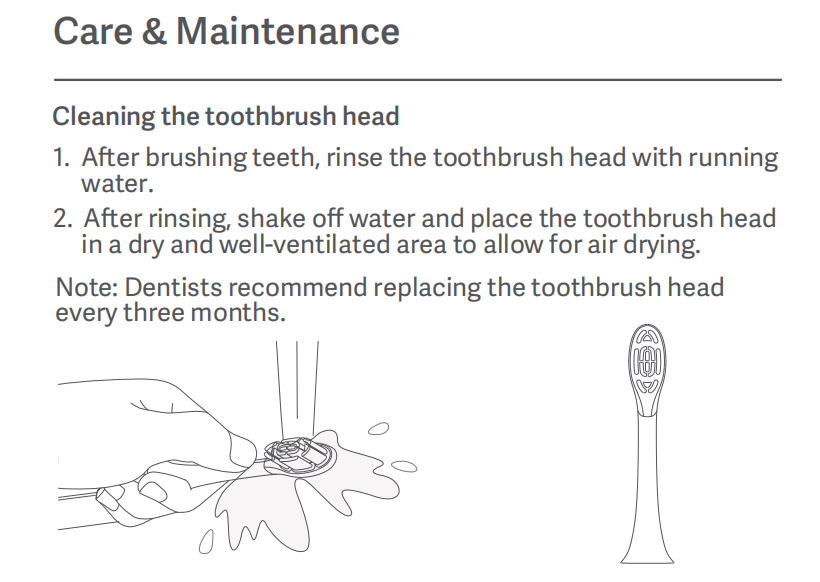
Q18: What to do if the bristles of the Mijia Smart Servo-oscillation Electric Toothbrush Pro are a bit hard?
A: The Mijia Smart Servo-oscillation Electric Toothbrush Pro comes with 2 types of brush heads. For initial use, choose the softer Toothbrush Head (Soft). Brush gently for a period of time to get used to it, or soak the brush head in warm water before use.
Note:
Do not apply too much pressure when brushing to avoid injuring your gums.
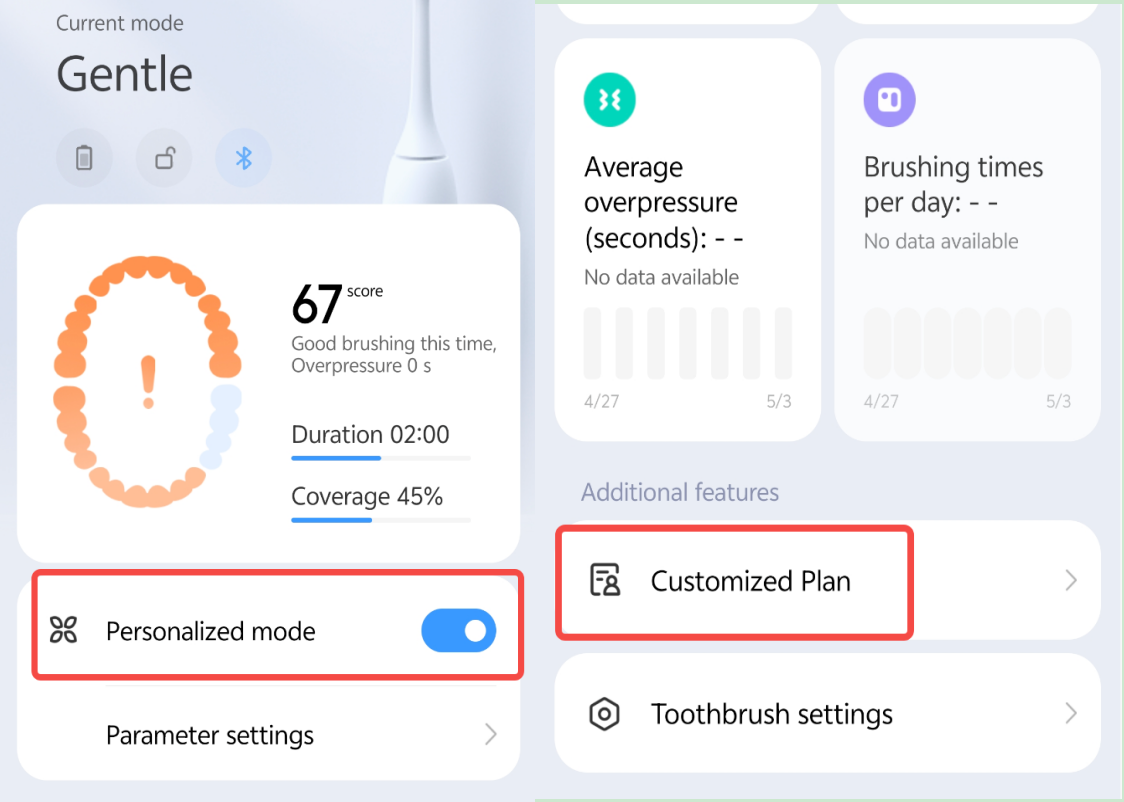
Q19: How to enable Personalized mode and Customized Plan mode on the Mijia Smart Servo-oscillation Electric Toothbrush Pro?
A: After connecting to the Xiaomi Home App, select the [Mijia Smart Servo-oscillation Electric Toothbrush Pro] plugin to configure the Personalized or Customized Plan modes. Once configured, you can switch modes on the toothbrush to select Personalized mode or Customized Plan mode, as shown in the following picture.
App-Related
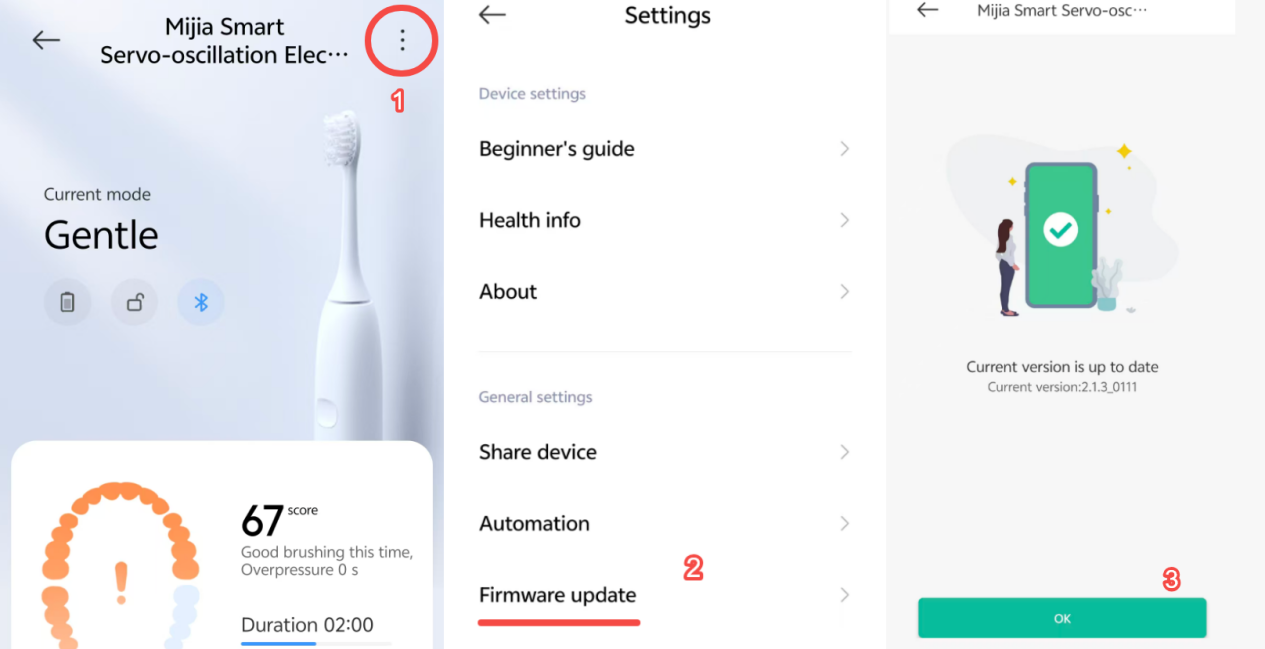
Q1: How to update the firmware of the Mijia Smart Servo-oscillation Electric Toothbrush Pro?
A: Open the Xiaomi Home App, navigate to the [Mijia Smart Servo-oscillation Electric Toothbrush Pro] device card, then tap the three-dot icon to enter Settings, select [Firmware update], follow the on-screen instructions to complete the process, and tap [OK].
Q2: What to do if the Mijia Smart Servo-oscillation Electric Toothbrush Pro cannot connect to the Xiaomi Home App after performing a factory reset?
A: After the product has been "factory reset", when re-binding it to the original account, you need to delete the Mijia Smart Servo-oscillation Electric Toothbrush Pro plugin from the Xiaomi Home App on which it was originally bound before you can reconnect and re-bind it.
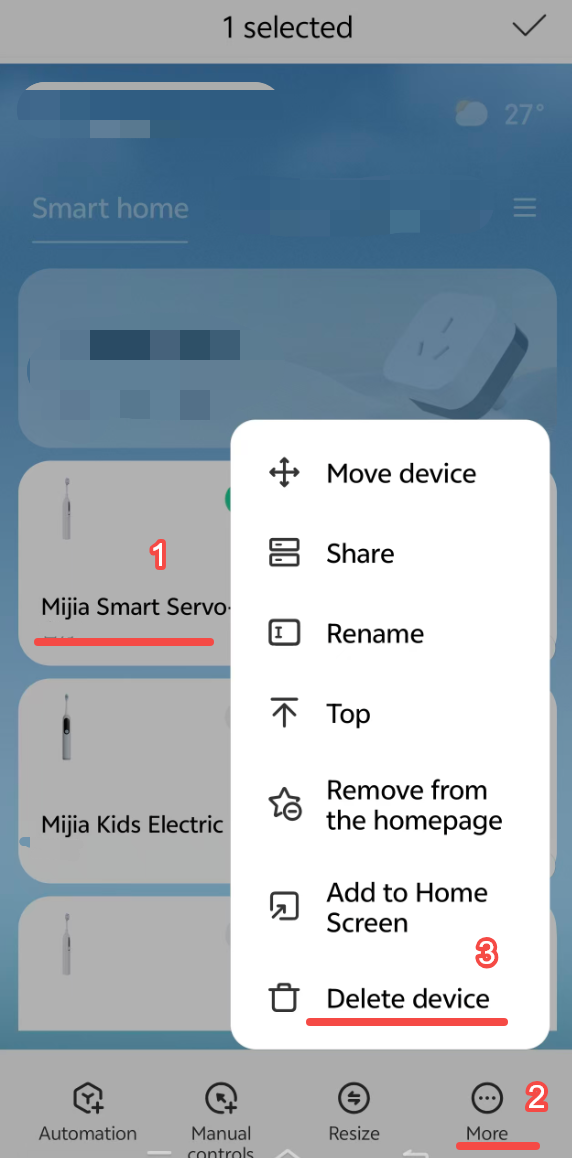
To delete the Mijia Smart Servo-oscillation Electric Toothbrush Pro plugin from the Xiaomi Home App, please refer to the following steps:
1. Press and hold the [Mijia Smart Servo-oscillation Electric Toothbrush Pro] device card.
2. Select [More].
3. Select [Delete device].
Notes:
1. If the plugin cannot be deleted from the originally bound phone (or if you do not know which account it is bound to), switch to a new Xiaomi account to reconnect and re-bind the device.
2. If the toothbrush has not been factory reset, you can connect to it directly through the plugin in the Xiaomi Home App.
Q3: Can the Mijia Smart Servo-oscillation Electric Toothbrush Pro be bound to multiple Xiaomi accounts at the same time?
A: Each Mijia Smart Servo-oscillation Electric Toothbrush Pro can only be bound to one Xiaomi account. To switch the bound account, perform a factory reset and remove the toothbrush from the Xiaomi Home App to unbind it. However, one Xiaomi account can be bound to multiple electric toothbrushes.
Q4: Does the Mijia Smart Servo-oscillation Electric Toothbrush Pro support message notifications?
A: Yes. When the battery level falls below 20%, or the remaining usage count of the toothbrush head drops below 6, a notification is automatically triggered to remind you to charge the device or replace the brush head in time, ensuring a better experience. Notifications for other scenarios require a connection to a Bluetooth gateway.
Note:
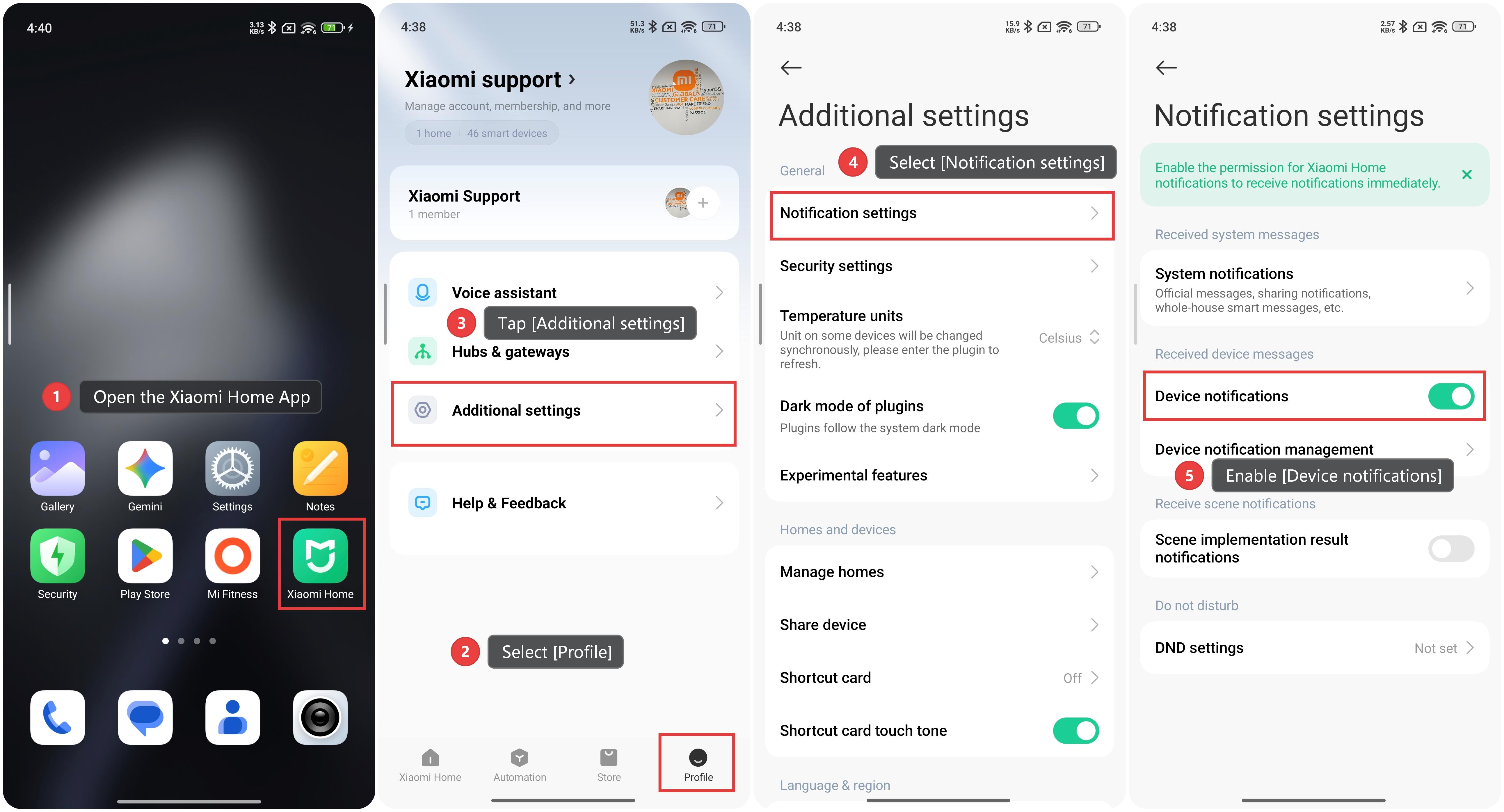
Xiaomi Home App permissions must be enabled. Path to enable: Open the Xiaomi Home App >> select [Profile] >> tap [Additional settings] >> select [Notification settings] >> enable [Device notifications].
Q5: How many sets of brushing data can the Mijia Smart Servo-oscillation Electric Toothbrush Pro store?
A: The toothbrush itself can store up to 60 sets of brushing data. Records beyond 60 will not be saved, and new data will automatically overwrite the older entries. You can periodically connect via Bluetooth to sync brushing data to the Xiaomi Home App (only brushing sessions longer than 30 seconds are recorded).
Q6: How to connect the Mijia Smart Servo-oscillation Electric Toothbrush Pro to the Xiaomi Home App?
A: To connect the Mijia Smart Servo-oscillation Electric Toothbrush Pro to the Xiaomi Home App, follow these steps:
1. Scan the QR code in the User Manual or search for "Xiaomi Home" in the App store to download and install the App, then update it to the latest version.
Note:
The version of the App might have been updated. Please follow the instructions based on the current App version.
2. Please enable Bluetooth on your phone.
3. Open the App, tap the [+] icon in the upper-right corner, and follow the prompts to add the device.
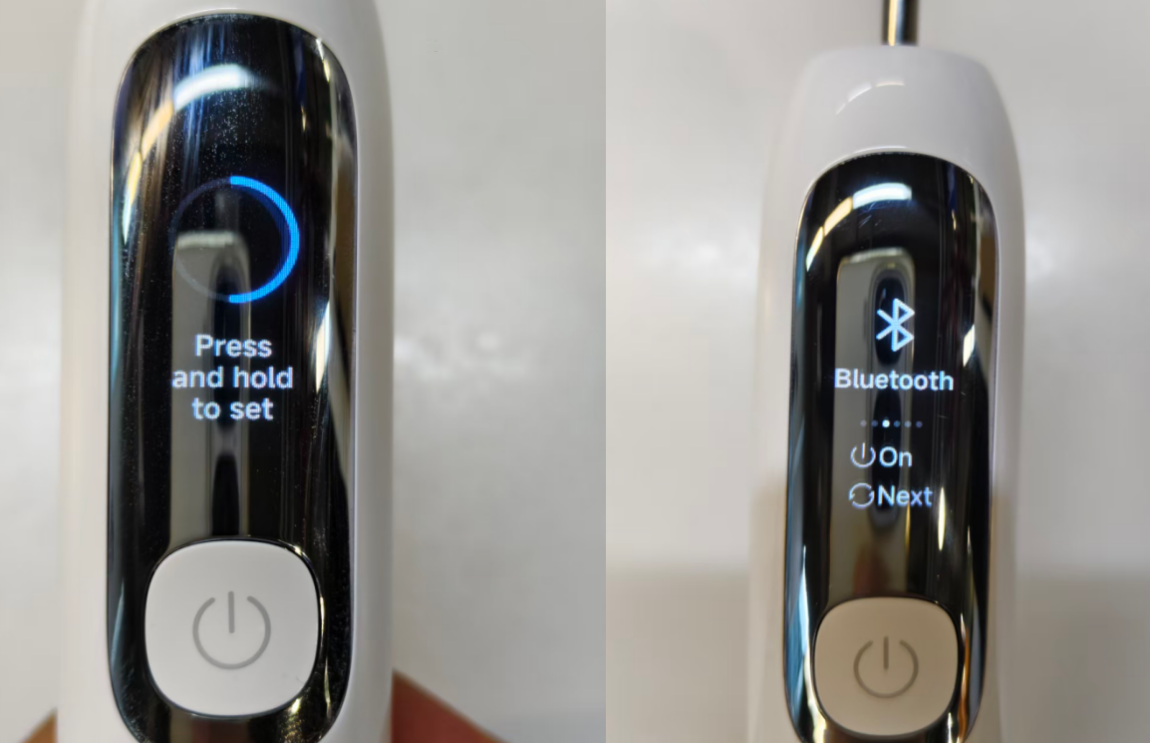
4. Enable Bluetooth broadcast in the toothbrush settings. Once the toothbrush appears in the App, press and hold the Power Button for 3 seconds to pair.
Q7: What are the main features available when the Mijia Smart Servo-oscillation Electric Toothbrush Pro is connected to the App?
A: The main features available when connected to the App are as follows:
1. Personalized mode settings: Adjust brushing intensity, oscillation amplitude, and speed.
2. Customized Plan mode settings: Create targeted cleaning programs.
3. Brushing report: Provides multi-dimensional data such as cleaning score, coverage, dental plaque risk, and brushing pressure, with daily, weekly, and monthly reports.
Q8: What to do if the Mijia Smart Servo-oscillation Electric Toothbrush Pro features change after the App is updated?
A: The App is updated periodically. Please refer to the operating instructions for the current App version.
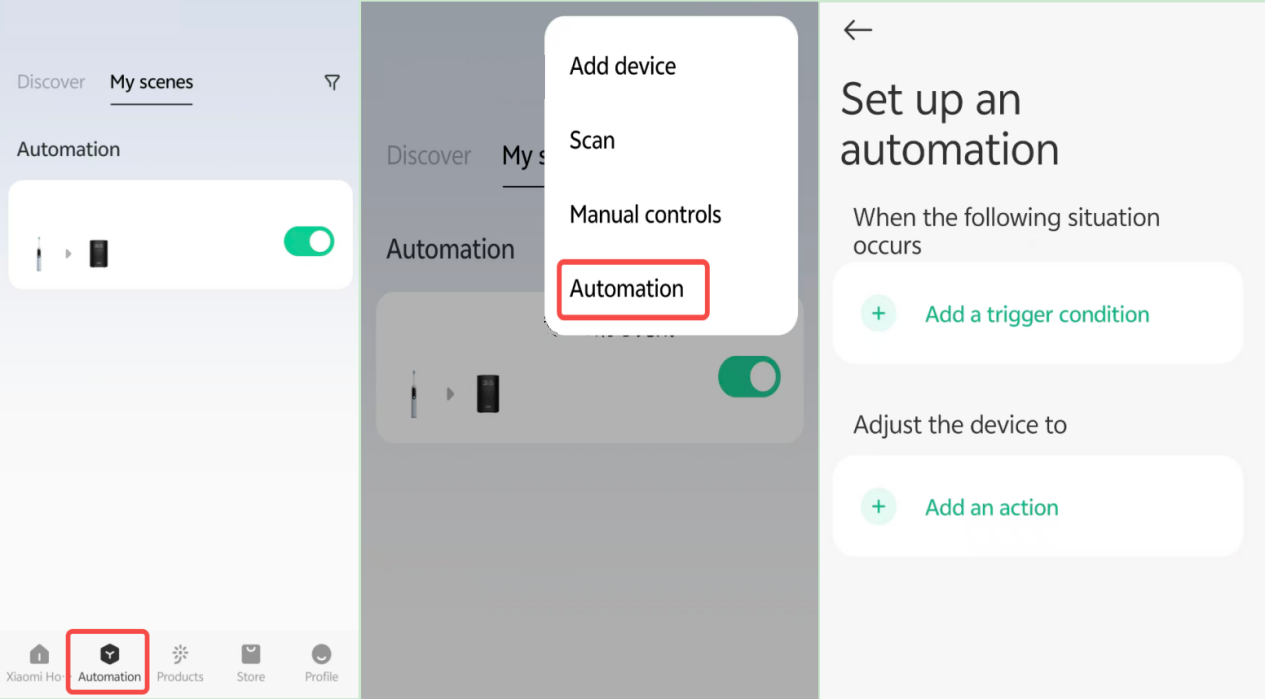
Q9: Does the Mijia Smart Servo-oscillation Electric Toothbrush Pro support Smart scenes (Device automation)?
A: The Mijia Smart Servo-oscillation Electric Toothbrush Pro supports the Smart scenes (Device automation) feature, but it can only serve as a trigger condition (i.e., as the trigger device in an automation scene) and cannot be controlled by other linked devices.
To create device automation, please refer to the following information:
1. To set up Device automation, you must connect a Bluetooth gateway, and the Bluetooth gateway and the electric toothbrush must be bound to the same Xiaomi account.
2. Enter Xiaomi Home App home page >> [Automation] >> the plus icon in the upper-right corner >> [Automation] >> Add a trigger condition >> Add an action >> Create.
Troubleshooting
Q1: What to do if the Mijia Smart Servo-oscillation Electric Toothbrush Pro cannot power on?
A: If the Mijia Smart Servo-oscillation Electric Toothbrush Pro cannot power on, please refer to the following steps:
1. Check whether the toothbrush is being charged. If the toothbrush is currently charging, please unplug the charging cable first and then try to turn it on again.
2. Check whether the battery level is insufficient. If the battery is too low, please charge the toothbrush sufficiently.
3. Check whether the ambient temperature is too high or too low. If the ambient temperature is too high or too low, please use the toothbrush at room temperature.
4. Check whether the device system crashes or freezes. If the device system crashes or freezes, please press and hold the Power Button for over 12 seconds to force a restart.
5. If it persists, please contact the after-sales service for further assistance.
Q2: What to do if the brush head cannot be installed on the Mijia Smart Servo-oscillation Electric Toothbrush Pro?
A: If the brush head cannot be installed on the Mijia Smart Servo-oscillation Electric Toothbrush Pro, please refer to the following steps:
1. Check whether there is foreign matter stuck between the brush head and the handle. If such a situation exists, please remove the brush head and clean up all foreign objects.
2. Check whether there is foreign matter on the rotating shaft. If such a situation exists, please clean up the foreign matter completely.
3. Check whether you are using a non-original brush head. If such a situation exists, please replace it with an official original brush head.
4. If it persists, please contact the after-sales service for further assistance.
Q3: What to do if the Mijia Smart Servo-oscillation Electric Toothbrush Pro brush head vibration becomes weak?
A: If the Mijia Smart Servo-oscillation Electric Toothbrush Pro brush head vibration becomes weak, please refer to the following steps:
1. Check whether the brush head is installed in place. If not, please reinstall the brush head firmly.
2. Check whether there is foreign matter between the brush head and the handle. If any are present, remove the brush head and clear the foreign matter.
3. If the issue persists, the toothbrush motor may be damaged. Please contact the after-sales service for further assistance.
Q4: What to do if the Mijia Smart Servo-oscillation Electric Toothbrush Pro brush head stops vibrating?
A: If the Mijia Smart Servo-oscillation Electric Toothbrush Pro brush head stops vibrating, please refer to the following information:
1. The motor stalling may cause the brush head to stop vibrating. Please enter Settings mode and perform a factory reset.
2. If the issue persists, please contact the after-sales service for further assistance.
Q5: Why does the newly received brush head for the Mijia Smart Servo-oscillation Electric Toothbrush Pro have splayed bristles?
A: The toothbrush bristles use copper-free bristle planting. The manufacturing process involves polishing the bristles first, then implanting them. During the planting process, the bristles are subjected to force, so slight splaying is normal and will not affect the brushing performance. Please feel free to use it.
Q6: Why does the Mijia Smart Servo-oscillation Electric Toothbrush Pro make abnormal vibration sounds when running?
A: Noise produced by the motor while operating is normal. The sound standard is controlled below 55 decibels. If the noise is clearly abnormal, please contact the after-sales service for further assistance.
Q7: What to do if the Mijia Smart Servo-oscillation Electric Toothbrush Pro vibrates weakly while brushing and does not clean thoroughly?
A: If the Mijia Smart Servo-oscillation Electric Toothbrush Pro vibrates weakly while brushing and does not clean thoroughly, please refer to the following information:
1. The electric toothbrush has 5 modes, and you can choose the one that suits you. Among them, the Personalized mode allows you to customize the vibration intensity.
Gentle mode: Suitable for beginners or those with sensitive gums.
Standard mode: Suitable for daily oral hygiene.
Deep mode: Targets hard-to-reach areas such as gaps between teeth.
Personalized mode: Mode parameters can be customized (App function).
Customized Plan mode: Provides customized cleaning solutions (App function).
Friendly tips:
We recommend that beginners start with the Gentle mode. When the toothbrush is turned on, there is a 3-second gradual power increase function, during which the vibration gradually intensifies within 3 seconds.
2. Maintain a healthy brushing routine. For better brushing results, we recommend using the Bass brushing method—position the bristles at a 45° angle to the gumline and move the toothbrush slowly.
Note:
The toothbrush vibration will pause briefly every 30 seconds to remind you to switch brushing areas. This is normal.
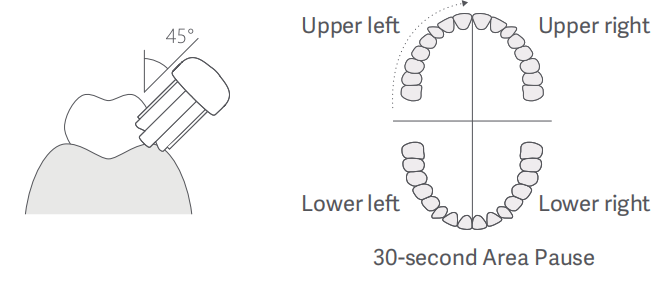
3. This toothbrush is equipped with a pressure notification feature. When you brush with too much force, the Overpressure Notification Indicator will flash red, and the toothbrush will reduce its vibration frequency to prevent damage to your teeth. The pressure notification feature can be turned on or off in the settings interface on the toothbrush display.
4. A low battery level can also reduce brushing vibration power. Please charge the toothbrush promptly. A full charge takes approximately 5 hours.
Q8: What to do if the Mijia Smart Servo-oscillation Electric Toothbrush Pro cannot connect to Bluetooth when turned on?
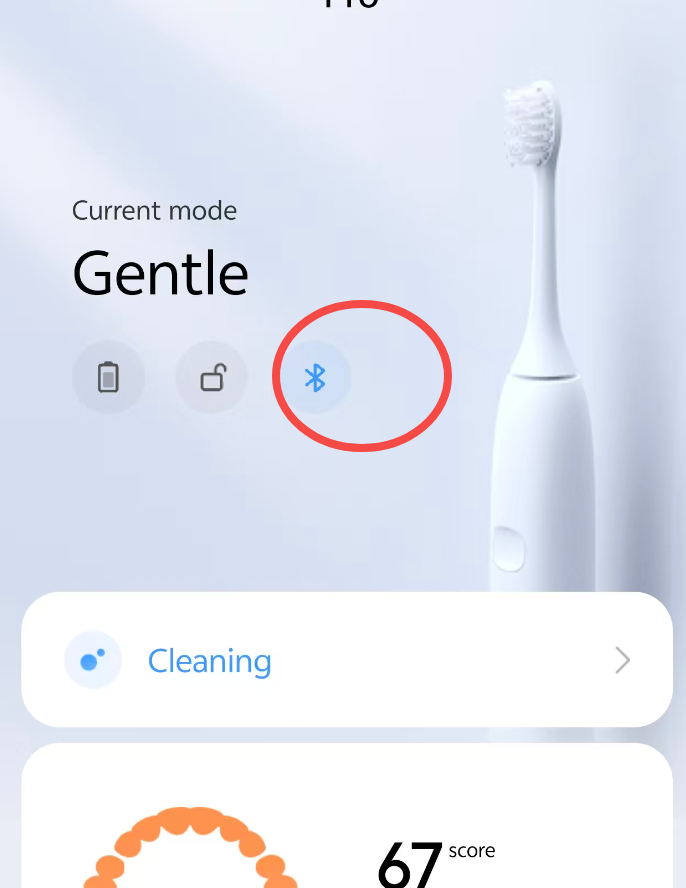
A: Please turn on Bluetooth on your phone, open the Xiaomi Home App, and bring it close to the toothbrush handle. Make sure the product is woken up before attempting to connect again. The Bluetooth icon will light up when the connection is successful (see illustration).
Q9: What to do if the Mijia Smart Servo-oscillation Electric Toothbrush Pro vibrates too strongly?
A: You can first try Gentle mode. The Personalized mode also allows you to customize the vibration intensity. If you find the vibration too strong, you can adjust it in Personalized mode within the Xiaomi Home App.
Q10: What to do if the pressure notification feature on the Mijia Smart Servo-oscillation Electric Toothbrush Pro cannot be triggered?
A: If the pressure notification feature is not working on the Mijia Smart Servo-oscillation Electric Toothbrush Pro, please refer to the following troubleshooting steps:
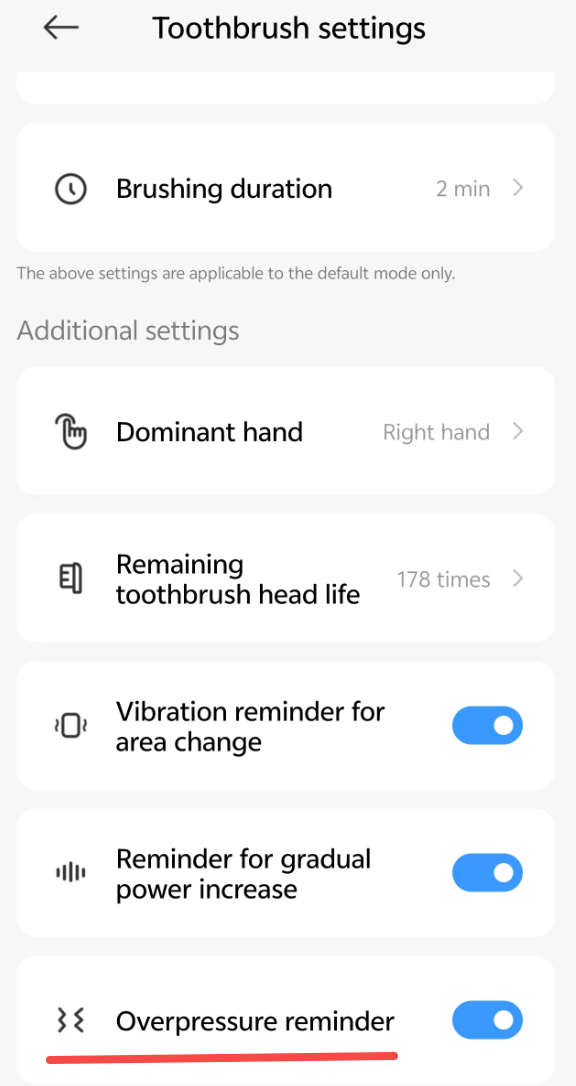
1. Check whether this feature has been turned off. Enable this feature in the toothbrush settings or within the Xiaomi Home App settings.
2. If it persists, the pressure sensor may be damaged. Please contact the after-sales service for further assistance.
Note:
If too much pressure is applied while brushing your teeth, the Overpressure notification indicator will blink red, and the toothbrush will reduce its vibration frequency to prevent damage to your teeth.
Q11: What to do if the Overpressure reminder on the Mijia Smart Servo-oscillation Electric Toothbrush Pro is triggered too easily (red light flashing)?
A: If the Overpressure reminder on the Mijia Smart Servo-oscillation Electric Toothbrush Pro is triggered too easily, please refer to the following steps:
1. We recommend using the Bass brushing method to reduce brushing pressure. Please refer to the following picture:
2. If frequent triggering of the Overpressure reminder is bothering you, we recommend turning off [Overpressure reminder]. Please refer to the following picture:
Q12: What to do if the Mijia Smart Servo-oscillation Electric Toothbrush Pro cannot connect to the Xiaomi Home App properly?
A: If the Mijia Smart Servo-oscillation Electric Toothbrush Pro cannot connect to the Xiaomi Home App, please troubleshoot as follows:
1. Check if your phone's Bluetooth is not turned on. Turn on your phone Bluetooth, then connect.
2. Check if the toothbrush is not placed near the phone. Bring the phone close to the toothbrush.
3. Ensure the toothbrush is in the woken-up or powered-on state.
4. Check if the Xiaomi Home App is lagging or outdated. Exit the Xiaomi Home App, update it to the latest version, then reopen and reconnect.
5. The electric toothbrush has crashed. Perform a factory reset (press and hold the Mode Button, then select Restore factory settings through the settings interface. Toothbrush data will be deleted after the factory reset).
6. If it persists, please contact the after-sales service for further assistance.
Q13: What to do if the missed area detection on the Mijia Smart Servo-oscillation Electric Toothbrush Pro is not accurate?
A: The recognition principle of the missed area detection on the Mijia Smart Servo-oscillation Electric Toothbrush Pro is based on a combination of factors such as the angle and position of the toothbrush handle and the running duration. Specific brushing results vary depending on different usage habits. To improve recognition accuracy, brush in the following ways for relatively accurate results:
1. Refer to the Bass brushing method—position the bristles at a 45° angle to the gumline and move the toothbrush slowly.
2. Follow the 30-second area change reminder, and switch areas after brushing each area for 30 seconds.
3. For relatively accurate brushing results, we recommend keeping your head as steady and level as possible during brushing.
Q14: What to do if the standby time of the Mijia Smart Servo-oscillation Electric Toothbrush Pro is too short?
A: The Mijia Smart Servo-oscillation Electric Toothbrush Pro can be used for 100 days in Standard cleaning mode and 180 days in Gentle mode (based on brushing twice a day for 2 minutes each time). The above figures are based on a full charge and are laboratory test data. Actual usage time varies depending on the environment and brushing pressure.
Q15: What to do if the brush head of the Mijia Smart Servo-oscillation Electric Toothbrush Pro stops when force is applied during operation?
A: If the brush head of the Mijia Smart Servo-oscillation Electric Toothbrush Pro stops when force is applied during operation, please refer to the following information:
1. The toothbrush vibration pauses briefly every 30 seconds to remind you to switch brushing areas. This is normal.
2. When brushing pressure is too high, the toothbrush will trigger the overpressure vibration notification and automatically reduce frequency for protection. We recommend controlling your brushing pressure, as long-term excessive pressure can easily cause issues such as wedge-shaped damage to the teeth and gum injury.
3. Improper force during brushing easily affects the brushing vibration. Brush with appropriate force and amplitude, and avoid pressing the brush head sideways during brushing, since this bends the bristles and affects brushing performance.
4. We recommend using the Bass brushing method—position the bristles at a 45° angle to the gumline and move the toothbrush slowly. Avoid pressing the bristles sideways at excessive angles, brushing with excessive force, and brushing with excessive or overly fast amplitude, in order to protect your teeth and gums from damage.
Q16: What to do if the Xiaomi Home App fails to sync brushing data immediately after using the Mijia Smart Servo-oscillation Electric Toothbrush Pro?
A: The brushing data of the Mijia Smart Servo-oscillation Electric Toothbrush Pro needs to be transmitted via Bluetooth to the Xiaomi Home App on your phone, and there is a time delay in data transmission. Please check the previous brushing data after the screen turns off when brushing is finished. If the data is still not synced, please wait 10 seconds before reconnecting to the Xiaomi Home App to view the brushing record.
Note:
Only when the brushing duration is longer than 30 seconds will valid data be generated. Auto-sync will complete 10 seconds after brushing ends (after the screen turns off).
Q17: What to do if the supplemental brushing time on the Mijia Smart Servo-oscillation Electric Toothbrush Pro is too short?
A: The default brushing duration is 2 minutes. The supplemental brushing time that begins after 2 minutes will vary depending on the current brushing coverage. If all areas are supplementally brushed before the supplemental brushing period ends, the toothbrush will enter the pause state earlier and indicate that the brushing area is completed.
Note:
If you wish to continue brushing, simply restart the toothbrush within 12 seconds of it being paused.
Q18: What to do if the Mijia Smart Servo-oscillation Electric Toothbrush Pro displays "Damp charging port" on the screen?
A: If the screen shows that the port is moist when you connect the charging cable to the electric toothbrush, this means there is liquid in the charging port. Charging at this time poses a short-circuit risk, so please make sure the charging port is dry before charging.
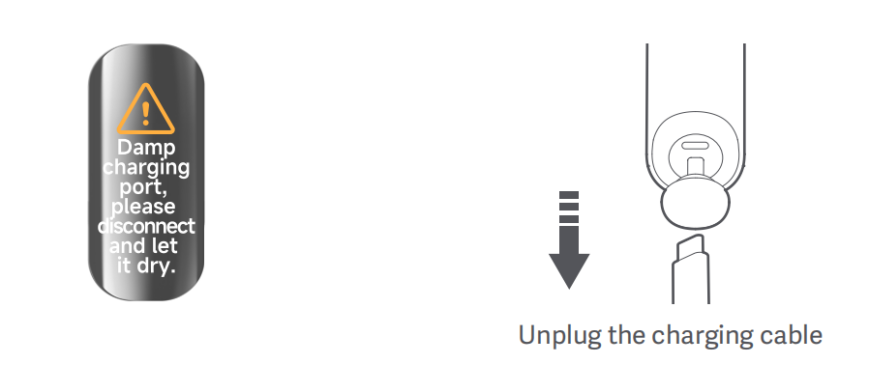
If there is liquid in the charging port, please clean it as follows:
1. Unplug the charging cable.
2. Turn the charging port downward and shake gently to expel excess liquid as shown in the following picture.
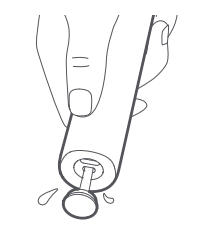
3. Place the toothbrush and charging cable in a well-ventilated, dry area to dry. After the toothbrush is completely dry, charge it again using the standard charging cable that came with the product. If the screen still shows that the charging port is moist, please contact the after-sales service for further assistance.
Note:
Do not use tissues, cotton swabs, or similar items to wipe the charging port, to prevent foreign objects from entering.
Q19: Why does the Mijia Smart Servo-oscillation Electric Toothbrush Pro sometimes have no change in power when switching tooth surfaces?
A: The intelligent tooth surface recognition feature uses a six-axis gyroscope to identify the orientation and angle of the toothbrush for area recognition, distinguishing the power between the chewing surface and the side surface of the teeth. Occasionally encountering no change when switching tooth surfaces is related to your current brushing posture.
For more accurate recognition, we recommend keeping your head as steady and level as possible during brushing.
Q20: Is it normal for the brush head of the Mijia Smart Servo-oscillation Electric Toothbrush Pro to rotate freely 360°?
A: It is normal for the brush head of the Mijia Smart Servo-oscillation Electric Toothbrush Pro to rotate freely 360° in the standby state.
After being woken up, the brush head will automatically return to its forward position. If the brush head does not return to the forward position after being woken up, this indicates a product malfunction. Please contact the after-sales service for further assistance.
Q21: Why is the brushing count incorrect on the Mijia Smart Servo-oscillation Electric Toothbrush Pro?
A: Only brushing sessions longer than 30 seconds will be recorded, and a maximum of the 60 most recent brushing data sets will be retained.
Brushing records need to be synced with the Xiaomi Home App via Bluetooth, and there is a time delay in data transmission (if there is no data, please wait a moment, then connect Bluetooth on your phone and open the Xiaomi Home App to view the brushing record).
Q22: Does the Mijia Smart Servo-oscillation Electric Toothbrush Pro support offline settings?
A: The Mijia Smart Servo-oscillation Electric Toothbrush Pro does not support offline settings. The toothbrush must be connected to the Xiaomi Home App via Bluetooth to configure parameters for the Personalized and Customized Plan modes.
Q23: What to do if the display on the Mijia Smart Servo-oscillation Electric Toothbrush Pro does not light up?
A: When the Mijia Smart Servo-oscillation Electric Toothbrush Pro is left idle for 12 seconds without being activated, it will enter sleep mode, and the screen turning off is normal. When the battery is depleted, the screen will turn off. Please charge the toothbrush promptly and try again. If the screen does not light up or shows screen distortion when the toothbrush is started, please contact after-sales service for further assistance.
Q24: What to do if the charging port rubber plug on the Mijia Smart Servo-oscillation Electric Toothbrush Pro comes off?
A: To reattach the charging port rubber plug on the Mijia Smart Servo-oscillation Electric Toothbrush Pro, follow these steps:
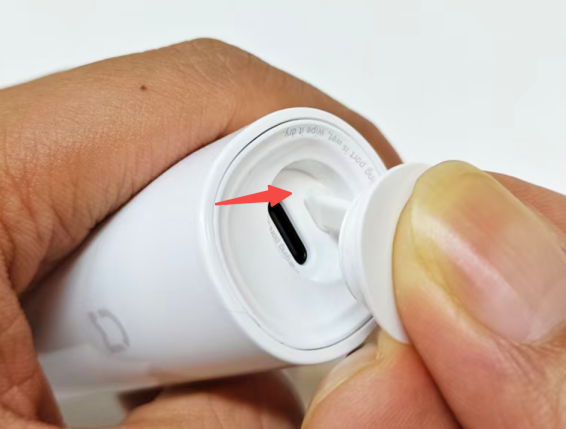
1. Align with the hole. Tilt the pin of the charging port rubber plug appropriately and align it with the installation hole on the device, as shown in the following figure.
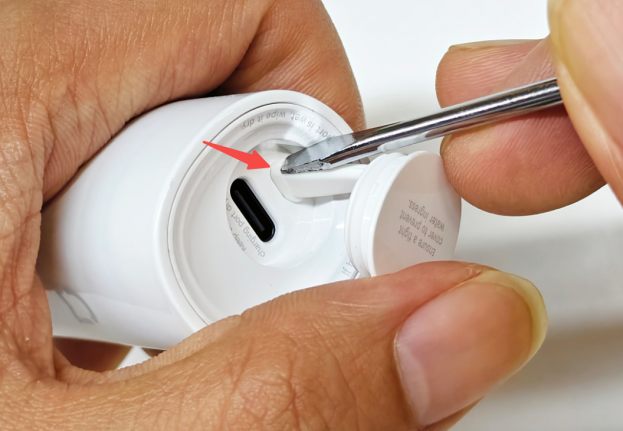
2. Press into place. After aligning with the hole, press down on the dust plug pin. Use a 3 mm flat-head screwdriver to assist in pressing the plug pin into the hole, as shown in the following figure. Make sure the dust plug pin is fully inserted into the hole and will not come off.
Q25: What to do if the charging port rubber plug on the Mijia Smart Servo-oscillation Electric Toothbrush Pro does not close tightly?
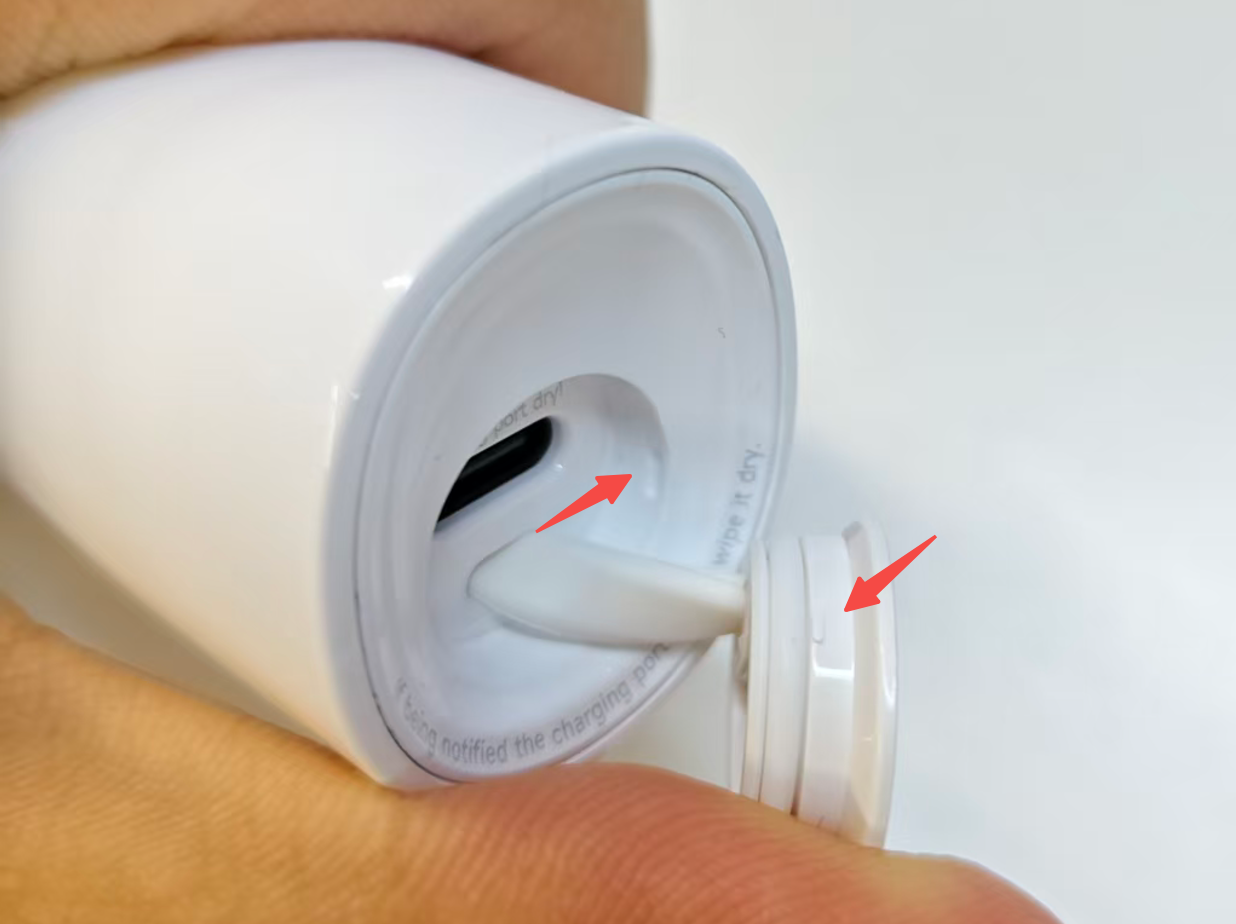
A: There may be dirt at the charging port and rubber plug. Use a brush to clean the dirt at the charging port and rubber plug, align the rubber plug with the alignment point on the end cap, and reattach the end cap.
Does it help?
Yes
No