

What to do if the App lock password has been forgotten on the Xiaomi 12T Pro?
If you forget the password for App Lock on your Xiaomi 12T Pro, there are several general steps you can take to reset the App Lock password:
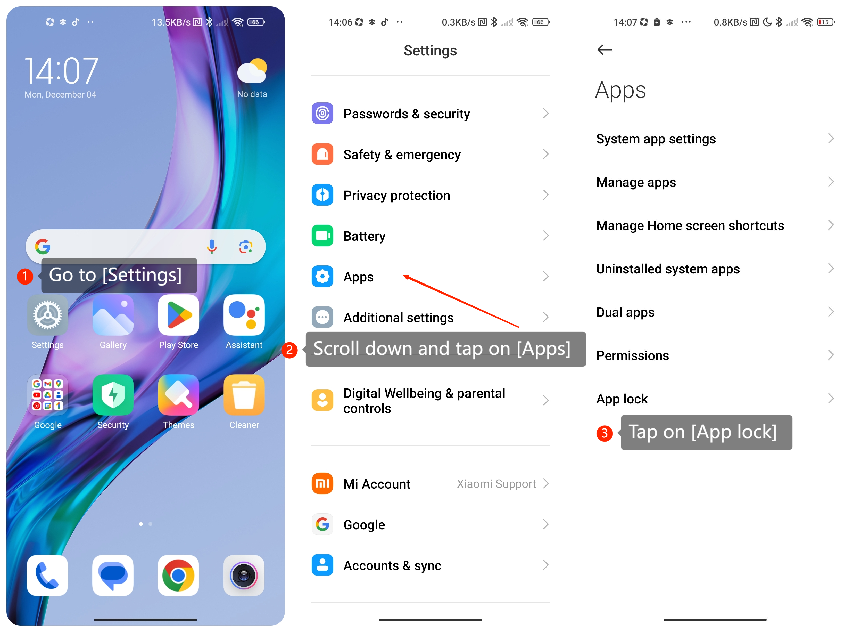
1. Go to [Settings];
1. Go to [Settings];
2. Scroll down and tap on [Apps];
3. Tap on [App lock] in the menu;
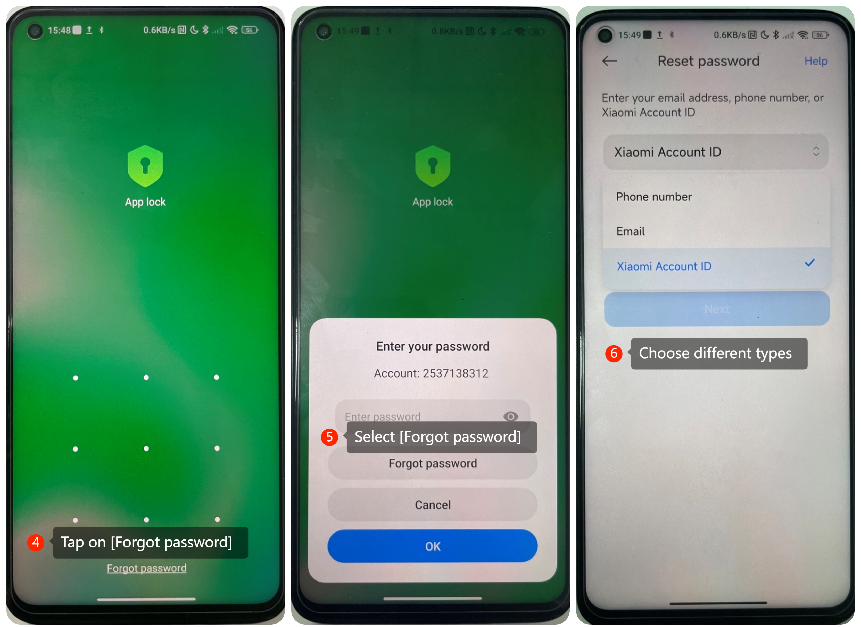
4. Tap on [Forgot password] at the bottom of the screen;
5. Select [Forgot password];
6. Tap this option to choose different types of identity verification methods, such as Email, Phone number, or Xiaomi Account ID;
7. Follow the on-screen instructions to reset the password.
Note:
Be aware that this method will erase all App Lock data, including the locked apps and their settings.
3. Tap on [App lock] in the menu;
4. Tap on [Forgot password] at the bottom of the screen;
5. Select [Forgot password];
6. Tap this option to choose different types of identity verification methods, such as Email, Phone number, or Xiaomi Account ID;
7. Follow the on-screen instructions to reset the password.
Note:
Be aware that this method will erase all App Lock data, including the locked apps and their settings.
Does it help?
Yes
No