

Mijia Smart Steam Air Fryer 7L FAQ
Oversight
Q1: What are the differences between the Mijia Smart Steam Air Fryer 7L and a regular air fryer?
A: The differences between the Mijia Smart Steam Air Fryer 7L and ordinary air fryers are as follows:
1. The temperature range of the Mijia Smart Steam Air Fryer 7L is 30-230 ℃. The temperature range of a regular air fryer is 40-220 ℃.
2. The Mijia Smart Steam Air Fryer 7L offers a wide range of functions. It offers multiple cooking functions in one product and excels in every aspect. It features 10 cooking functions, including Air fry, Steam, Steam & air fry, Bake, Sous vide cooking, Max crisp, Ferment, Dehydrate, Defrost, and Reheat. It is equipped with a 1.5 L water tank, supporting Steam, Steam & air fry, and Sous vide cooking. A regular air fryer can only satisfy the production of air-fried food.
3. The Mijia Smart Steam Air Fryer 7L comes with a frying plate, grill rack, and a 1.5 L top-mounted water tank. A regular air fryer only comes with a frying plate and grill rack.
4. The Mijia Smart Steam Air Fryer 7L adopts a visible design. Equipped with a transparent sight window, it allows you to clearly monitor the cooking process.
Q2: What are the selling points of the Mijia Smart Steam Air Fryer 7L?
A: For your reference, here are the selling points of the Mijia Smart Steam Air Fryer 7L:
1. Hybrid steam and air fry cooking achieves crispy and tender results at the same time. The Steam & air fry mode works alternately with steaming first, followed by air frying. For instance, a 10-minute cooking cycle includes 7 minutes of steaming and 3 minutes of air frying. It effectively improves the overly dry texture of traditional air-fried food and prevents dry, tough meals.
2. 130 °C high-temperature fast steam cooking finishes steamed dishes in just 8 minutes.
3. It delivers drier steamed food without requiring a wastewater tank. The heating tube provides high-temperature auxiliary heat to fully evaporate moisture. The cooking basket and upper internal unit are fully sealed to enable internal circulation of condensed water, producing no wastewater. No extra wastewater tank is needed for easier cleaning.
4. 10 versatile cooking functions: Air fry, Steam, Steam & air fry, Bake, Sous vide, Max crisp, Ferment, Dehydrate, Defrost, and Reheat.
5. Support smart APP control and voice control, with over 100 digital recipes classified into 9 categories, such as staple foods, snacks, and seafood—additional practical functions: Schedule, Dry, Waterline cleaning, Deodorize.
6. Equipped with a wide temperature range of 30 °C to 230 °C and a dual-speed fan. It supports high-temperature frying and roasting, as well as low-temperature defrosting, fruit and meat drying, and constant-temperature fermentation. It integrates multiple household appliances in one, including a reheater, food dehydrator, and oven.
7. 24-hour long-delay preset function allows you to schedule cooking overnight, so you can enjoy freshly cooked, delicious food when you get up in the morning.
8. Built-in visual cooking window lets you clearly check the cooking progress anytime without opening the device.
9. The cooking basket adopts food-contact safe non-stick coating, which is stain-resistant and easy to clean with just a quick rinse.
10. Built with a large 1.5 L water tank, compatible with Steam, Steam & air fry, and Sous vide modes.
Q3: What are the advantages of the Mijia Smart Steam Air Fryer 7L?
A: The advantages of the Mijia Smart Steam Air Fryer 7L are as follows:
1. It offers a wider temperature control range, including a low-temperature range from 30 °C to 80 °C, and it supports longer cooking durations, which allows more cooking possibilities such as defrosting, reheating, and dehydrating.
2. It supports mobile app connectivity and smart scenarios, and it provides more than 100 cloud recipes, which makes it easier for beginners to cook a variety of dishes.
3. It heats up quickly, consumes less energy, and maintains stable and even temperatures, which allows food to be cooked efficiently and evenly.
4. It is equipped with an LCD screen, which provides clearer and more intuitive operation.
5. It uses a durable food-grade non-stick coating on the basket, which is resistant to wear and easy to clean.
6. When it is used together with the grill rack, it can cook more food within the same capacity.
Q4: What are the differences between the Mijia Smart Steam Air Fryer 7L and the Mi Smart Air Fryer 3.5L?
A: For your reference, the differences between the Mijia Smart Steam Air Fryer 7L and the Mi Smart Air Fryer 3.5L are mainly as follows:
1. The two air fryers have different capacities.
2. The heating methods are different. The Mijia Smart Steam Air Fryer 7L uses dual heating sources, including an 1800 W stainless steel heating tube and a 900 W steam generator. The Mi Smart Air Fryer 3.5L features a stainless steel heating tube.
3. The display screens are different. The Mijia Smart Steam Air Fryer 7L features an LCD screen with touch buttons. The Mi Smart Air Fryer 3.5L features an OLED screen.
4. The temperature ranges are different. The Mijia Smart Steam Air Fryer 7L supports 30-230 °C, while the Mi Smart Air Fryer 3.5L supports 40-200 °C.
5. The Mijia Smart Steam Air Fryer 7L is equipped with a 1.5 L water tank and supports Steam, Steam & air fry, and Sous vide.
Q5: What are the differences between the Mijia Smart Steam Air Fryer 7L and the Xiaomi Smart Air Fryer Pro 4L?
A: For your reference, the differences between the Mijia Smart Steam Air Fryer 7L and the Xiaomi Smart Air Fryer Pro 4L are mainly as follows:
1. The two air fryers have different capacities.
2. The heating methods are different. The Mijia Smart Steam Air Fryer 7L uses a dual heat source consisting of an 1800 W heating tube and a 900 W steam generator, while the Xiaomi Smart Air Fryer Pro 4L has a 1600 W heating element.
3. The display screens are different. The Mijia Smart Steam Air Fryer 7L features an LCD screen with touch buttons. The Xiaomi Smart Air Fryer Pro 4L features an OLED screen.
4. The Mijia Smart Steam Air Fryer 7L is equipped with a 1.5 L water tank and supports Steam, Steam & air fry, and Sous vide.
Q6: What are the differences between the Mijia Smart Steam Air Fryer 7L and the Xiaomi Smart Air Fryer 4.5L?
A: For your reference, the differences between the Mijia Smart Steam Air Fryer 7L and the Xiaomi Smart Air Fryer 4.5L are mainly as follows:
1. The two air fryers have different capacities.
2. The heating methods are different. The Mijia Smart Steam Air Fryer 7L uses dual heating sources, including an 1800 W stainless steel heating tube and a 900 W steam generator. The Xiaomi Smart Air Fryer 4.5L has a 1500 W heating element.
3. The display screens are different. The Mijia Smart Steam Air Fryer 7L features an LCD screen with touch buttons. The Xiaomi Smart Air Fryer 4.5L uses a Control knob and LCD screen.
4. The Mijia Smart Steam Air Fryer 7L is equipped with a 1.5 L water tank and supports Steam, Steam & air fry, and Sous vide.
Q7: What are the differences between the Mijia Smart Steam Air Fryer 7L and the Xiaomi Smart Air Fryer 5.5L?
A: For your reference, the differences between the Mijia Smart Steam Air Fryer 7L and the Xiaomi Smart Air Fryer 5.5L are mainly as follows:
1. The two air fryers have different capacities.
2. The heating methods are different. The Mijia Smart Steam Air Fryer 7L uses dual heating sources, including an 1800 W stainless steel heating tube and a 900 W steam generator. The Xiaomi Smart Air Fryer 5.5L has a 1600 W heating element.
3. The temperature ranges are different. The temperature control range of the Mijia Smart Steam Air Fryer 7L is 30-230 °C. The temperature control range of the Xiaomi Smart Air Fryer 5.5L is 40-220 °C.
4. The Mijia Smart Steam Air Fryer 7L is equipped with a 1.5 L water tank and supports Steam, Steam & air fry, and Sous vide.
Q8: What are the differences between the Mijia Smart Steam Air Fryer 7L and the Xiaomi Smart Air Fryer 6.5L?
A: For your reference, the differences between the Mijia Smart Steam Air Fryer 7L and the Xiaomi Smart Air Fryer 6.5L are mainly as follows:
1. The heating methods are different. The Mijia Smart Steam Air Fryer 7L uses dual heating sources, including an 1800 W stainless steel heating tube and a 900 W steam generator. The Xiaomi Smart Air Fryer 6.5L has an 1800 W heating tube.
2. The Mijia Smart Steam Air Fryer 7L is equipped with a 1.5 L water tank and supports Steam, Steam & air fry, and Sous vide.
Q9: What is Mijia Smart Steam Air Fryer 7L's operation panel?
A: The Mijia Smart Steam Air Fryer 7L uses an LCD screen, control knob, and touch buttons. Through operations such as [Press] and [Press and hold on], you can realize various functions and modes.
Q10: What is the Steam & air fry mode of the Mijia Smart Steam Air Fryer 7L?
A: The Steam & air fry mode is a feature that distinguishes the Mijia Smart Steam Air Fryer 7L from other air fryers. The device is equipped with a water tank that enables food steaming. Fill the top-mounted tank with purified water before cooking, and a built-in steam generator heats the water to produce the steam necessary for steaming dishes.
Q11: What preparations are required before using the Mijia Smart Steam Air Fryer 7L for steaming and baking cooking?
A: Currently, the Mijia Smart Steam Air Fryer 7L supports steaming and baking, which include 4 local presets: Steam, Steam & air fry, Sous vide, and Reheat. Before initiating any of these modes, it is recommended to fill the water tank with 1.5 liters of purified water.
FAQs
Q1: What is the rated power of the Mijia Smart Steam Air Fryer 7L?
A: The rated power of the Mijia Smart Steam Air Fryer 7L is 1850 W.
Q2: How to clean the Mijia Smart Steam Air Fryer 7L daily?
A: To clean the Mijia Smart Steam Air Fryer 7L daily, please refer to the following methods:
1. After each use of the air fryer, wait for the product to cool down, and then just take out the pot basket, frying plate, and grill and put them in the dishwasher for cleaning. There is no need to clean the body and heating tube.
2. When cleaning, please do not use sharp tools such as steel wool to avoid damaging the non-stick coating.
3. After cleaning, wipe the surface clean with a soft dry cloth.
4. If you're not using the air fryer for an extended period, it's recommended to cover the top of the fryer to prevent dust from entering the air inlet.
Q3: What is the appearance of the Mijia Smart Steam Air Fryer 7L?
A: The appearance of the Mijia Smart Steam Air Fryer 7L is as follows:
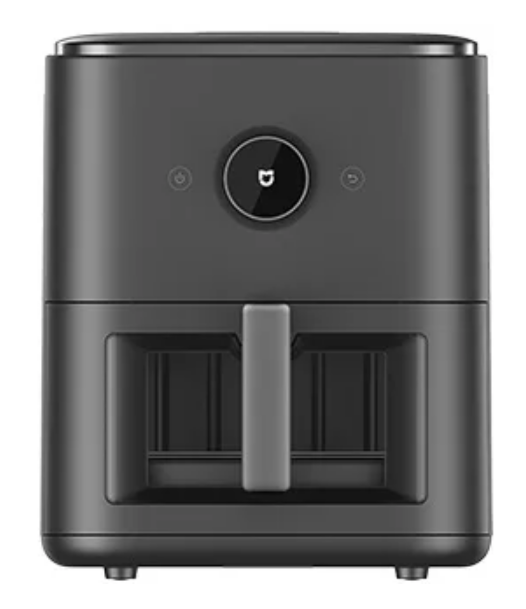
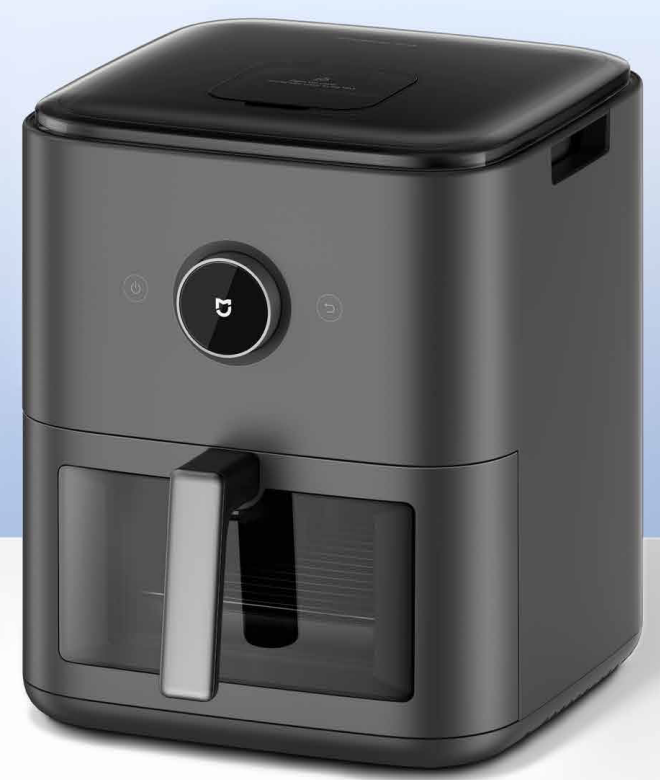
The Mijia Smart Steam Air Fryer 7L has a square-shaped main body with rounded edges. The entire exterior is black. The front of the unit features a central circular control knob, flanked by two touch-sensitive buttons (power and cancel buttons). Below the controls is a fryer basket compartment with a transparent sight window and a long handle.
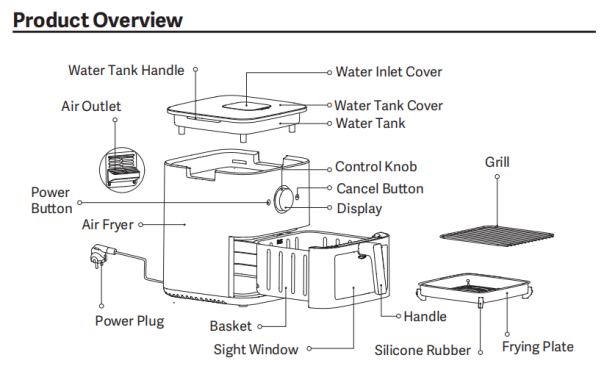
The product overview of the Mijia Smart Steam Air Fryer 7L is as follows:
1. Top Water Tank Assembly: Includes the water tank handle, water inlet cover, water tank cover, and water tank.
2. Main Air Fryer Body: Features an air outlet, power button, control knob, cancel button, display, and power plug.
3. Pull-Out Basket Unit: Equipped with a sight window and handle.
4. Accessories: A grill rack and a frying plate with silicone rubber supports.
Q4: Does the Mijia Smart Steam Air Fryer 7L require a dedicated outlet?
A: No, the Mijia Smart Steam Air Fryer 7L can be powered by a standard outlet, but it must be securely grounded.
Q5: How long is the Mijia Smart Steam Air Fryer 7L power cord?
A: The total length of the Mijia Smart Steam Air Fryer 7L power cord is approximately 1 m.
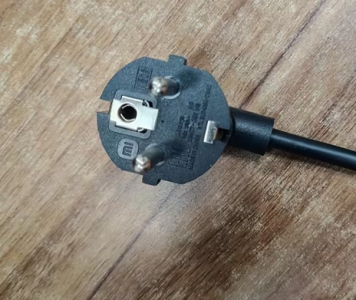
Q6: What type of power plug does the Mijia Smart Steam Air Fryer 7L have?
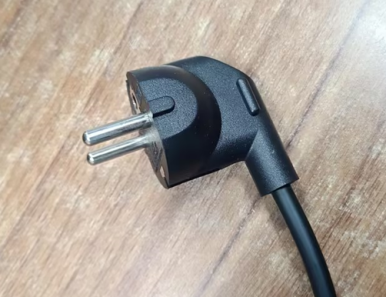
A: The power plug of the Mijia Smart Steam Air Fryer 7L power cord is a two-round plug.
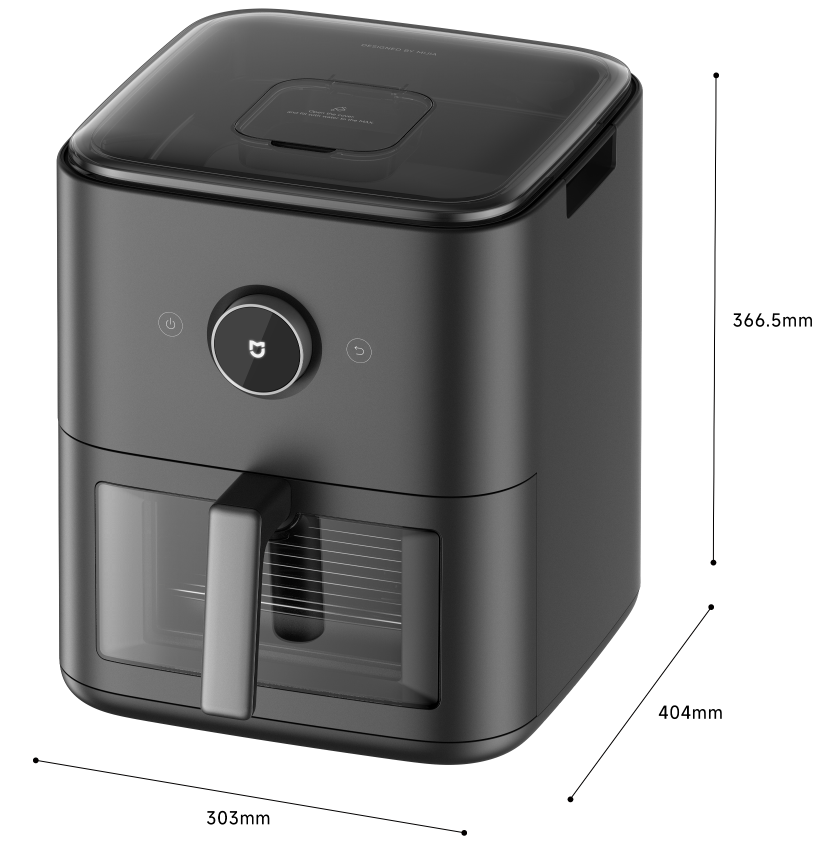
Q7: What are the dimensions of the Mijia Smart Steam Air Fryer 7L?
A: The dimensions of the Mijia Smart Steam Air Fryer 7L are approximately 404 mm × 303 mm × 366.5 mm.
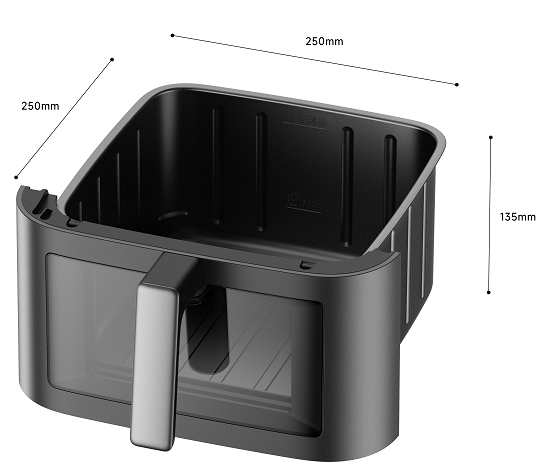
Q8: What are the component dimensions of the Mijia Smart Steam Air Fryer 7L?
A: The component dimensions of the Mijia Smart Steam Air Fryer 7L are as follows:
1. The outer dimensions of the Mijia Smart Steam Air Fryer 7L basket are approximately 250 mm × 250 mm × 135 mm (L × W × H).
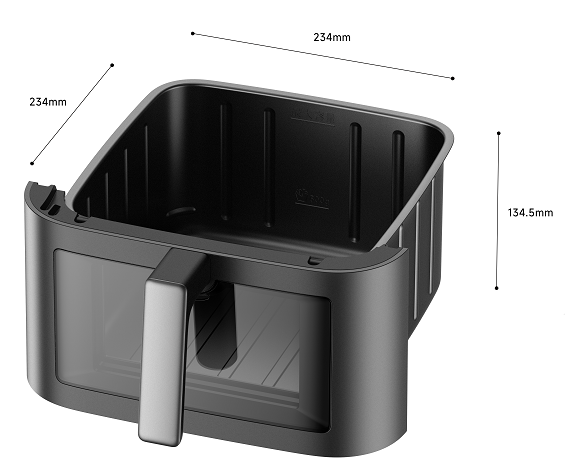
2. The inner diameter of the Mijia Smart Steam Air Fryer 7L basket is approximately 234 mm × 234 mm × 134.5 mm (L × W × H).
3. The outer dimensions of the Mijia Smart Steam Air Fryer 7L frying plate, including silicone rubber, are approximately 220.5 mm × 220.5 mm × 42 mm (L × W × H).
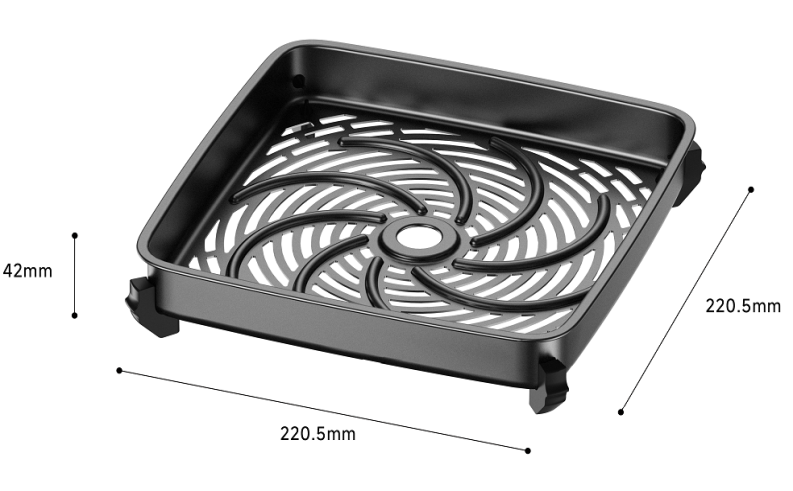
4. The inner dimensions of the Mijia Smart Steam Air Fryer 7L frying plate are approximately 208.5 mm × 208.5 mm × 29 mm (L × W × H).
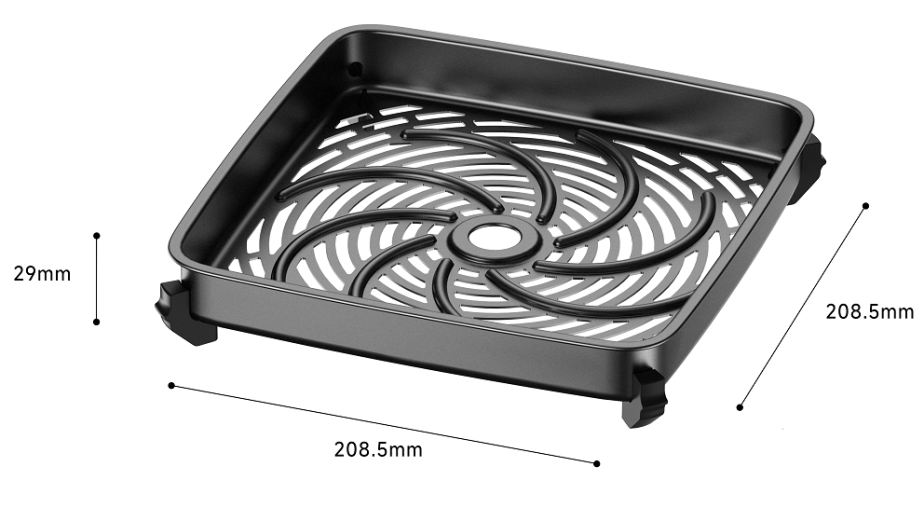
5. The dimensions of the Mijia Smart Steam Air Fryer 7L grill are approximately 222.5 mm × 222.5 mm × 5 mm.
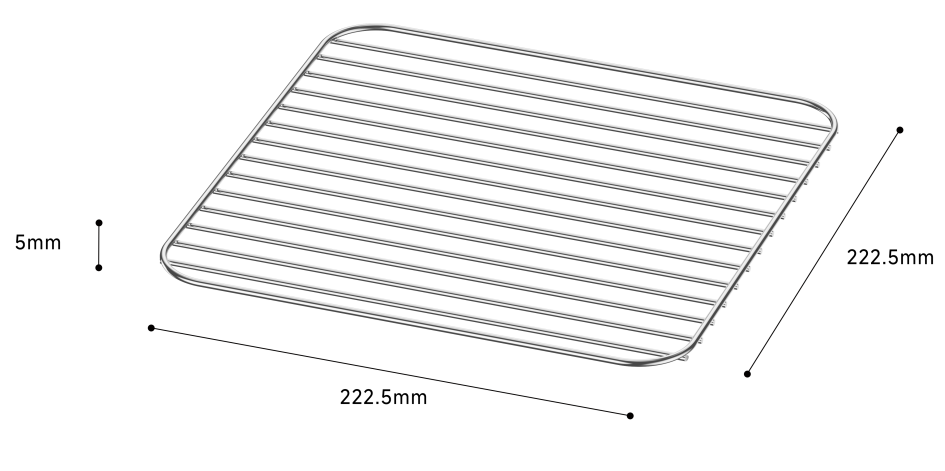
6. The dimensions of the Mijia Smart Steam Air Fryer 7L sight window (external) are approximately 215 mm × 115 mm.
7. The dimensions of the Mijia Smart Steam Air Fryer 7L sight window (internal) are approximately 160 mm × 90 mm.
8. The dimensions of the Mijia Smart Steam Air Fryer 7L water tank assembly are approximately 284 mm × 296 mm × 73 mm.
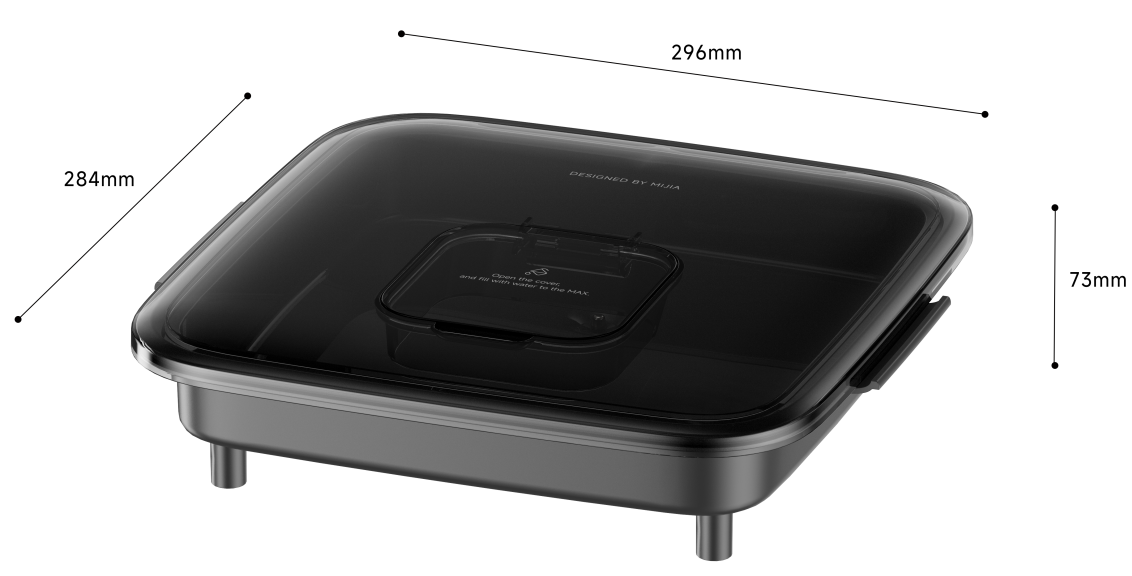
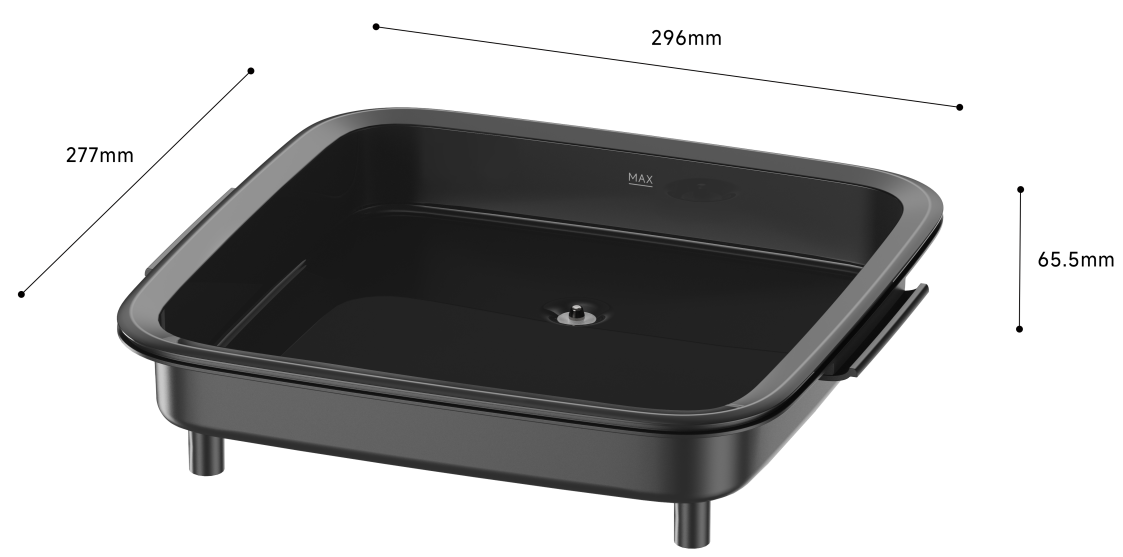
9. The dimensions of the Mijia Smart Steam Air Fryer 7L water tank are approximately 277 mm × 296 mm × 65.5 mm.
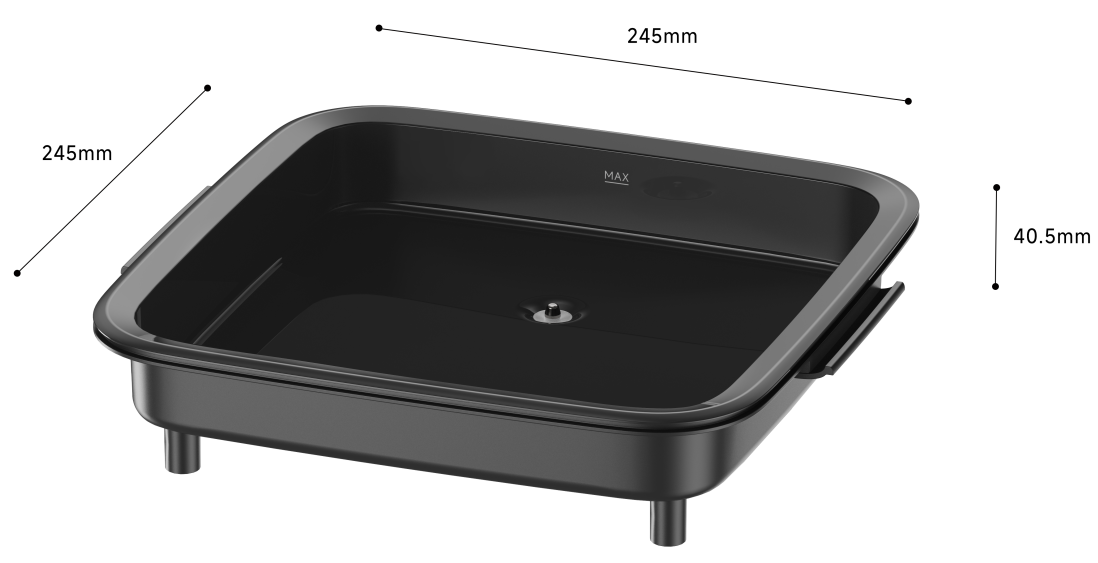
10. The inner dimensions of the Mijia Smart Steam Air Fryer 7L water tank assembly are approximately 245 mm × 245 mm × 40.5 mm.
11. The weight of the Mijia Smart Steam Air Fryer 7L water tank is approximately 570 g.
Q9: What is the product weight of the Mijia Smart Steam Air Fryer 7L?
A: The product weight of the Mijia Smart Steam Air Fryer 7L is as follows:
The gross weight of the Mijia Smart Steam Air Fryer 7L is 9.5 kg.
The net weight of the Mijia Smart Steam Air Fryer 7L is 7.8 kg.
Q10: Why does the Mijia Smart Steam Air Fryer 7L have an odor right after being received?
A: Before leaving the factory and during transportation, the product is sealed to maintain freshness, which will result in residual normal odors. Upon receiving the product, please wash the frying plate and pot basket, then place them in a ventilated area to dry.
Tip:
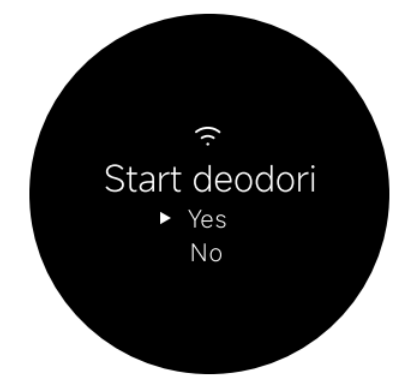
When powering on the device for the first time, it will ask whether to initiate the "Start deodorizing the new appliance" function on the display. Select [Yes] and press the control knob to confirm. The device will then begin the deodorization process.
Note:
Please ensure that you remove all packaging materials and accessories from inside the basket before starting the machine to avoid a fire hazard or a machine malfunction.
Q11: What precautions should be taken when using the Mijia Smart Steam Air Fryer 7L for the first time?
A: For your reference, here are four precautions when using the Mijia Smart Steam Air Fryer 7L for the first time:
1. Upon receiving it, you can first run the empty air fryer at 200°C for approximately 5 minutes using fresh lemon slices, cut garlic, sliced onions, or fresh orange peels to help eliminate odors.
2. When the air fryer is in operation, the air outlet generates high-temperature hot air or steam. Do not place any objects behind the air outlet while the unit is in use. Maintain a safe distance between the air outlet and any walls—ideally, keep it well clear of the wall. Additionally, ensure the power cord is not positioned near the air outlet while the air fryer is operating.
3. When cleaning the air fryer, avoid using abrasive cleaning tools (such as steel wool), as they will damage the non-stick coating.
4. During the first use, the device can emit a small amount of white smoke or odor, which is normal. Please use the product with confidence.
Q12: Is the Mijia Smart Steam Air Fryer 7L waterproof?
A: The Mijia Smart Steam Air Fryer 7L is not waterproof. Please do not splash or soak it with water to avoid product damage.
Q13: What is the display of the Mijia Smart Steam Air Fryer 7L?
A: The Mijia Smart Steam Air Fryer 7L uses an LCD screen.
Q14: What heating principle does the Mijia Smart Steam Air Fryer 7L use?
A: The Mijia Smart Steam Air Fryer 7L uses a stainless steel heating element combined with a steam generator, along with a shaded-pole asynchronous motor, to achieve 360° hot air circulation heating.
Q15: Does the Mijia Smart Steam Air Fryer 7L have voice prompts?
A: The Mijia Smart Steam Air Fryer 7L does not have voice prompts. However, it provides an audible beep and on-screen text notifications to confirm every operation.
Q16: What is the standby power consumption of the Mijia Smart Steam Air Fryer 7L?
A: In standby mode, the power consumption of the Mijia Smart Steam Air Fryer 7L is approximately 2 W.
Q17: Why is the food cooked burnt according to the recipe of the Mijia Smart Steam Air Fryer 7L?
A: The time and temperature settings provided in the recipes are for reference only. You can manually adjust the temperature and cooking time based on the origin, size, shape, and weight of your specific ingredients. During cooking, you can check the food's progress through the transparent sight window or by pulling out the fryer basket. You can then increase or decrease the temperature and time as needed based on the actual condition of the food.
Q18: How to turn the Mijia Smart Steam Air Fryer 7L on and off?
A: The operation for turning the Mijia Smart Steam Air Fryer 7L on and off is as follows:
1. Power on:
For first-time use, the air fryer will automatically enter Air fry mode 1 second after being powered on. For subsequent uses, the air fryer will automatically enter recipe selection mode corresponding to the last recipe used after being plugged in.
2. Standby mode:
When not in operation, if no actions are performed for more than 5 minutes, the air fryer will automatically enter standby mode. While in standby mode, tap the Power button to access the recipe selection interface.
Note:
After entering standby mode, the screen will automatically turn off after 5 minutes of inactivity. Press the Power button to wake up the screen.
Q19: How many recipes does the Mijia Smart Steam Air Fryer 7L come with at the factory?
A: The Mijia Smart Steam Air Fryer 7L has 25 preset recipes and over 100 cloud recipes.
Note:
You can save the official recipes in the Xiaomi Home App.
Q20: How to select the function of the Mijia Smart Steam Air Fryer 7L?
A: To select the function of the Mijia Smart Steam Air Fryer 7L, please refer to the following information:
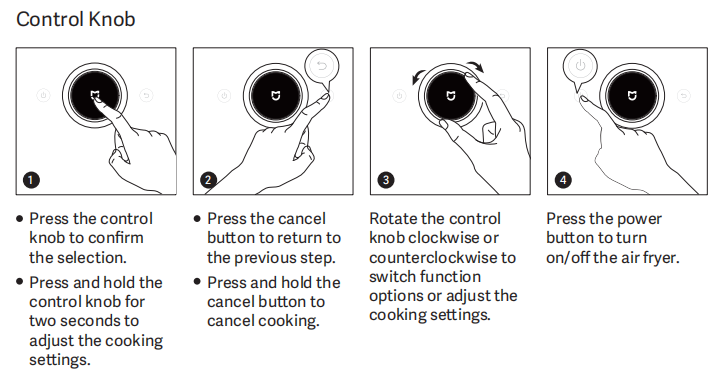
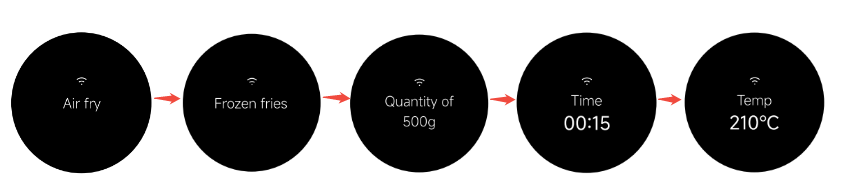
1. Press and hold the control knob on the Mijia Smart Steam Air Fryer 7L to power it on. By default, it enters Air fry mode. Rotate the control knob to the right to select various function modes in the following order: Air fry, Steam, Steam & air fry, Bake, Sous vide, Max crisp, Dehydrate, Ferment, Defrost, Reheat, Schedule, and Additional functions.
2. After selecting a mode, press the control knob to enter the function selection, then press it again to start cooking with the selected function.
Q21: How to adjust the temperature of the Mijia Smart Steam Air Fryer 7L?
A: To adjust the temperature of the Mijia Smart Steam Air Fryer 7L, please refer to the following information:
1. After connecting the Mijia Smart Steam Air Fryer 7L to a power source and turning it on, it defaults to the Air fry mode.
2. Press the control knob to enter the Frozen fries option with a default temperature of 200 ℃. Rotate the knob right or left to increase or decrease the temperature.
Q22: What kind of food can be made with the Mijia Smart Steam Air Fryer 7L?
A: The Mijia Smart Steam Air Fryer 7L supports frying, roasting, baking, fermenting, reheating, and more cooking methods to make a variety of delicious food, including egg tarts, cakes, bread, cookies, dried fruits, chicken chops, chicken strips, chicken legs, steak, ribs, baked sweet potatoes, French fries, grilled fish, vegetables, skewers, and other dishes. More than 100 built-in smart recipes are available in the Xiaomi Home APP for reference.
Q23: Does the Mijia Smart Steam Air Fryer 7L support Shake reminder?
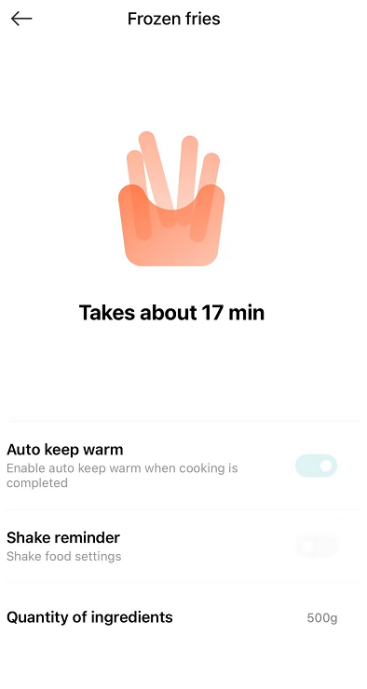
A: The Mijia Smart Steam Air Fryer 7L supports Shake reminder in Frozen fries mode. Please refer to the following information:
1. The air fryer will only remind you to flip food in Frozen Fries mode when the quantity of ingredients is set at 500 g. When the quantity is 600g, it will prompt to pull out the basket and flip the food every 8 minutes with beep sound and on-screen text. When the quantity is 700 g and 800 g, the first reminder is at 10 minutes, followed by reminders every 6 minutes thereafter.
2. If you are cooking a large quantity of ingredients or items with significant volume, we recommend flipping the food manually based on your actual cooking observations, which will result in better cooking outcomes.
For some cloud recipes within the Xiaomi Home App that require flipping, the accompanying tutorials provide detailed instructions on when and how to flip the food. It is recommended to refer to the recipes for flipping instructions.
Q24: Why can't the Mijia Smart Steam Air Fryer 7L fry French fries thoroughly?
A: The Mijia Smart Steam Air Fryer 7L's firmware recipes for French fries default to frozen French fries. This is because fresh potatoes have a higher starch content, and the thickness of the cuts varies, requiring different cooking times.
If using fresh potatoes, it's recommended to soak them in water to remove the starch, then drain them before cooking. For better results, it's recommended to purchase pre-cooked French fries from the supermarket.
Note:
When cooking fries, please follow the air fryer's prompts to flip or stir the food to ensure even heating; this prevents some pieces from becoming scorched while others remain undercooked.
Q25: Can the frying plate in the Mijia Smart Steam Air Fryer 7L be removed?
A: It is recommended to use the frying plate every time you use the device. The frying plate can heat the food more evenly and can also filter out excess oil in the food.
Q26: Does the Mijia Smart Steam Air Fryer 7L have a screen-off mode?
A: The Mijia Smart Steam Air Fryer 7L has a standby screen-off mode. By default, if there is no interaction for 10 minutes, the device will enter a power-saving screen-off mode. You can wake the screen by pressing any button.
Q27: What are the features of the Mijia Smart Steam Air Fryer 7L screen?
A: The Mijia Smart Steam Air Fryer 7L uses an LCD screen that can display the names of various recipes in real time or prompt the operations that need to be performed.
Q28: How to use Schedule mode on the Mijia Smart Steam Air Fryer 7L?
A: To use the Schedule mode on the Mijia Smart Steam Air Fryer 7L, please refer to the following information:
In the function selection state before cooking, press [Schedule] to enter Schedule mode. Set the reservation duration and the corresponding cooking parameters for your chosen recipe, then press the control knob to confirm to initiate the scheduled task. After the reservation duration ends, the air fryer will automatically execute and complete the selected cooking recipe.
Note:
1. The reservation duration refers to the time when cooking is completed. For example, a "6‑hour reservation duration" means cooking will be completed in 6 hours.
2. Additionally, the reservation duration cannot be shorter than the actual cooking time required for the recipe.
Q29: Can the Mijia Smart Steam Air Fryer 7L be paused during the cooking process?
A: The Mijia Smart Steam Air Fryer 7L can pause during the cooking process.
During cooking, press the Cancel button to pause, and press the control knob again to resume cooking.
While cooking, you can directly pull out the basket to check the food; this will automatically pause the cooking process. Insert the basket back into the device to resume operation.
Q30: How to reset the Wi-Fi on the Mijia Smart Steam Air Fryer 7L?
A: In standby mode, rotate the control knob to go to [Settings], press the control knob to enter [Wi-Fi settings], and press the control knob again to confirm whether to enable [Reset Wi-Fi?] to reset Wi-Fi.
Note:
Resetting the Wi-Fi will unbind the device from the App and clear all cloud-based data, including your saved cloud recipes.
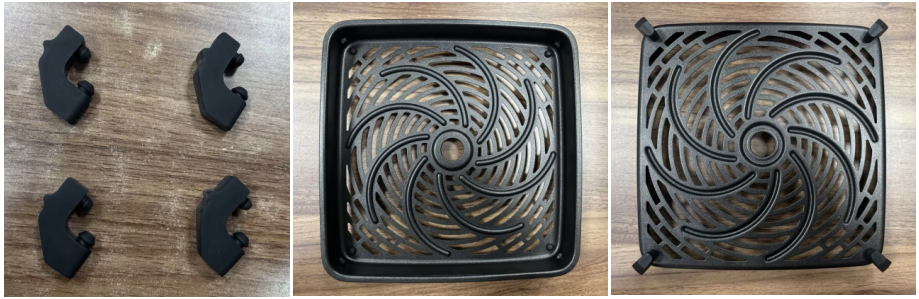
Q31: Can the four black silicone rubbers on the frying plate of the Mijia Smart Steam Air Fryer 7L be removed?
A: The four black silicone rubbers on the frying plate of the Mijia Smart Steam Air Fryer 7L can’t be removed. This is the foot pad of the frying plate, which is used to fix the frying plate. They are made of high-temperature-resistant silicone material, which is non-toxic and harmless. So you can use it with confidence.
Q32: Does the Mijia Smart Steam Air Fryer 7L need to brush oil onto the food when using it?
A: If the ingredients naturally contain oil—such as meat, seafood, or frozen fries—you do not need to add any oil to achieve a delicious texture. If the ingredients do not contain oil—such as vegetables or fresh-cut fries—adding just one spoonful or brushing on a thin layer of oil is sufficient to achieve a delicious texture comparable to traditional deep-frying. For specific instructions, please also refer to the accompanying recipes.
Q33: What are the differences between the Mijia Smart Steam Air Fryer 7L and an oven?
A: The differences between the Mijia Smart Steam Air Fryer 7L and an oven are as follows:
1. The air fryer can force out most of the grease from food, while the oven cannot achieve the same effect.
2. The air fryer cooks food faster and heats up more rapidly than an oven.
3. The heating principles differ. The oven heats food by heating tubes in a closed space. The air fryer uses the high-speed air circulation principle to quickly heat and crisp food, making delicious food similar to deep-fried food. It can squeeze out grease from food, requires no oil, and filters excess grease, delivering healthier cooking than ovens.
4. Energy consumption differs. The air fryer consumes less energy and requires less cooking time compared to some ovens, enhancing efficiency and saving power.
5. Cleaning differs. The air fryer is relatively simple to clean, whereas cleaning a standard oven is generally much more cumbersome than cleaning an air fryer.
6. The air fryer takes up less space, is easier to clean, offers healthier cooking, and is more energy-efficient than ovens.
7. The Mijia Smart Steam Air Fryer 7L supports steam cooking, while ovens have relatively single functions.
Q34: Does the Mijia Smart Steam Air Fryer 7L produce carcinogens when cooking food?
A: The Mijia Smart Steam Air Fryer 7L is made of food-grade and RoHS-compliant materials, and it produces no harmful substances. However, some ingredients can produce acrylamide when heated at high temperatures, and acrylamide is a carcinogen.
Note:
Among common foods, French fries have one of the highest acrylamide contents. According to statistics from the U.S. FDA, the acrylamide content in fried or roasted French fries can range from 150 to 500 micrograms of acrylamide per kilogram, while in very rare cases, some fries may even reach levels of around 1000 micrograms. In comparison, common bread has only 200-300 micrograms per kilogram, and meat such as chicken nuggets has only around 30 micrograms per kilogram.
Q35: Does the surface of the Mijia Smart Steam Air Fryer 7L get hot during operation?
A: The surface temperature of the Mijia Smart Steam Air Fryer 7L can rise to a maximum of about 70 °C, which is normal.
Q36: Does the Mijia Smart Steam Air Fryer 7L support Auto power-off upon basket removal?
A: The Mijia Smart Steam Air Fryer 7L supports Auto power-off upon basket removal. You can pull out the basket to check on the food; once you place it back in, the device will automatically resume cooking according to your original settings.
Note:
The Auto power-off upon basket removal function means that when the basket is removed, the cooking process is interrupted—specifically, the heating element (high-voltage components) powers down—while the machine's display remains active (retaining power to the low-voltage control components).
Q37: Can the Mijia Smart Steam Air Fryer 7L cook chestnuts?
A: The Mijia Smart Steam Air Fryer 7L can cook chestnuts. However, you need to make a small incision in each chestnut beforehand.
Q38: Does the Mijia Smart Steam Air Fryer 7L need to be preheated?
A: There is no mandatory requirement, but when making baked foods, the effect will be better after preheating. Preheating is set to 200 °C and runs in an empty unit for 3 to 5 minutes. The device can automatically enter the preheating status.
Q39: Can the Mijia Smart Steam Air Fryer 7L be used to reheat food?
A: Yes, it can. Foods such as fried food can be reheated in the Air fry reheat mode. For dishes containing liquid or broth, we recommend using the Steam reheat mode within the air fryer's reheating options.
Note:
During steam reheating, the formation of condensation due to the steam is a normal occurrence. (If you wish to minimize the amount of condensation entering the food being reheated, you can cover the reheating container with plastic wrap or a lid.)
Q40: How does the Mijia Smart Steam Air Fryer 7L work?
A: The Mijia Smart Steam Air Fryer 7L uses a high-speed hot air circulation system to quickly heat and puff food, thereby creating a crispy outside and tender inside texture similar to deep frying. It also features intense, rapid steaming at temperatures exceeding 130 °C, offering a combined Steam & air fry cooking mode that delivers both crispness and tenderness.
Q41: Does the Mijia Smart Steam Air Fryer 7L have digital recipes?
A: Yes, there are recipes with different ingredients to save in the Xiaomi Home App.
Notes:
1. Please select cooking recipes based on the characteristics of different ingredients. Please refer to the recipes provided in the Xiaomi Home App for guidance.
2. The ingredient lists and cooking parameters within the App's recipes have undergone extensive testing and fine-tuning; please follow the recipes in the App precisely when cooking.
Q42: What precautions should be taken when using the Mijia Smart Steam Air Fryer 7L?
A: The following precautions should be taken when using the Mijia Smart Steam Air Fryer 7L:
1. Do not place this product in a place that is unbalanced, humid, or close to other fire or heat sources (make sure the distance between this product and fire or heat sources is ≥30 cm).
2. Individuals lacking physical, sensory, or intellectual abilities, or those lacking experience and common sense, should not use this product without supervision or guidance.
3. It is prohibited to use power sources other than 220 V ~ 240 V to avoid the risk of fire or electric shock.
4. Non-professional maintenance personnel are prohibited from unauthorized modification of the internal wiring of the air fryer.
5. Do not place any objects near the air outlet during the use of the air fryer to avoid affecting normal heat dissipation.
6. When using cookware with non-insulated handles, please be cautious of burns.
7. Do not use charcoal or similar fuels to heat the basket, fry basket, or grill.
8. Do not place the basket on other heat sources for heating, such as induction cookers or gas stoves.
9. Do not insert or unplug the power plug with wet hands to avoid electric shock.
10. Do not use loose or poorly connected power cords.
11. Do not let the power cord pass through sharp objects to avoid damaging the power cord.
12. Do not store any items in the air fryer, especially flammable, explosive, or corrosive items.
13. Avoid excessive twisting, bending, binding, or carrying heavy objects with the power cord to prevent core breakage or exposure.
14. The air fryer cannot be operated under the external timer or an independent remote control system.
15. Do not allow children to operate the product alone. It should be placed out of reach of infants and young children.
16. Do not subject the product to strong impacts, heavy pressure, or sharp scratches to avoid injury or malfunction.
17. Do not modify, disassemble, or repair on your own to avoid the risk of fire, electric shock, and burns.
18. Immediately stop using the product in case of abnormalities or malfunctions to prevent fire, electric shock, and burns.
Warning:
High-temperature steam is discharged from the rear air outlet. Do not point the air outlet toward a power socket to avoid electrical risks.
Q43: What precautions should be taken regarding the operating environment for the Mijia Smart Steam Air Fryer 7L?
A: The following precautions should be taken regarding the operating environment for the Mijia Smart Steam Air Fryer 7L:
1. Heat will cause damage, discoloration, and deformation of walls and furniture, so please keep it at least 30 cm away from walls and furniture when using it.
2. If any abnormality or malfunction occurs in the air fryer, please stop using it immediately and unplug the power plug.
3. When using, attention should be paid to maintaining ventilation to ensure smooth heat dissipation.
4. The normal operating altitude range of this product is 0–2000 meters.
5. Ensure that the air inlets and outlets of the product are kept clear and not blocked by foreign objects to avoid overheating of parts and affecting use.
6. Ensure the device is properly grounded; improper grounding can result in electric shock and lead to accidents.
Q44: Can aluminum foil or parchment paper be used in the Mijia Smart Steam Air Fryer 7L?
A: The Mijia Smart Steam Air Fryer 7L can use them. But it is not recommended. Aluminum foil is suitable for cooking meat, while parchment paper is better for baking. However, when using either, make sure the paper does not cover the air inlet/outlet or the top heating element inside the air fryer.
Q45: What precautions should be taken after cooking with the Mijia Smart Steam Air Fryer 7L?
A: The following precautions should be taken after cooking with the Mijia Smart Steam Air Fryer 7L:
1. After each use, please conduct regular inspections of the air inlet and outlet to ensure they are not blocked.
2. Avoid direct contact with the fryer basket with your hands during or immediately after use to prevent burns from high temperatures.
3. If the product experiences abnormalities or malfunctions, immediately stop using it, unplug the power plug, and have it repaired by a professional after the product has cooled down.
4. Do not insert pins, wires, or other objects into the holes of the air fryer to avoid electric shock or injury.
5. Avoid contact between the silicone parts on the air fryer and organic solvents or solutions with an alcohol content greater than 50%.
6. Be careful of high-temperature hot steam when pulling out the pot basket during steam cooking to avoid scalding.
Q46: Does the Mijia Smart Steam Air Fryer 7L require cleaning and maintenance?
A: The Mijia Smart Steam Air Fryer 7L requires cleaning and maintenance. The precautions are as follows:
1. Ensure that the power cord plug is disconnected from the socket and wait for the air fryer to cool down before cleaning.
2. Do not immerse the air fryer in water or spray it with water.
3. Do not rinse the air fryer's air inlet and outlet with water.
4. Prevent liquids and foreign objects from entering the furnace to keep the furnace clean.
5. Do not use hard objects such as wire balls for cleaning.
6. For oil stains, use a soft, damp cloth dipped in neutral detergent to wipe, and do not use bleach or corrosive liquids for cleaning.
7. When cleaning dust, use a soft dry cloth to wipe the air inlet and outlet, or use a soft brush or mini vacuum cleaner.
8. After cleaning, use a soft dry cloth to wipe the surface of the air fryer to ensure it remains dry.
9. If not used for a long time, unplug the power cord from the socket and provide moisture-proof, dust-proof, and insect-proof protection for the product.
Q47: How to clean and maintain the Mijia Smart Steam Air Fryer 7L?
A: Unplug the power cord before cleaning and maintaining the Mijia Smart Steam Air Fryer 7L, and wait for it to cool down to room temperature or a safe temperature before proceeding. When cleaning the interior cavity of the air fryer, remove the basket.
To clean and maintain the Mijia Smart Steam Air Fryer 7L, please refer to the following information:
1. Air fryer exterior: The exterior surface of the air fryer can be wiped with a dry, soft cloth or a sponge moistened with a neutral cleaning detergent.
2. Interior cavity: To remove stains from the inside of the air fryer, apply a suitable amount of detergent diluted in hot water to its surface and let it sit for about 10 minutes, then use a soft sponge moistened with water to wipe away the detergent residue.
3. Basket: The air fryer should be cleaned after every use. The air fryer basket features a protective coating. Avoid using metal tools, including steel wool, and abrasive cleaners to clean it to prevent coating damage.
4. Frying plate and grill: Use a soft cotton cloth or sponge dampened with neutral detergent to wipe, then wipe with clean water to remove any remaining detergent.
Note:
The basket, frying plate, and grill can be disassembled and cleaned in the dishwasher. However, the air fryer's main unit is not washable and must not be placed in a dishwasher.
5. Water tank: Use a soft cotton cloth or a sponge dampened with neutral detergent to wipe, then wipe with clean water to remove any remaining detergent.
Note:
Drain water completely after cleaning the water tank.
Q48: What to do if dust enters the air inlet of the Mijia Smart Steam Air Fryer 7L?
A: The internal air circulation system structure of the Mijia Smart Steam Air Fryer 7L will try to prevent dust from falling into the food.
Q49: Does the Mijia Smart Steam Air Fryer 7L generate noise during operation?
A: The Mijia Smart Steam Air Fryer 7L does produce sound during use. This sound primarily originates from the circulation of hot air. This is normal and does not indicate a product quality issue. Please use the device with confidence.
The Mijia Smart Steam Air Fryer 7L produces approximately 55 dB of noise during operation.
Note:
Please do not use third-party mobile applications to measure the noise level. Variations in the surrounding environment and measurement techniques may result in discrepancies; this is considered normal.
Q50: When viewing through the sight window, is it normal for the light on the Mijia Smart Steam Air Fryer 7L to turn on and off intermittently?
A: Yes, it is normal. The Mijia Smart Steam Air Fryer 7L is equipped with an oven light.
1. The oven light can be turned on during cooking, allowing you to watch the food cooking.
2. The oven light will remain on for one minute before automatically turning off. It can be turned on up to four consecutive times. It can be turned on again after a one-minute interval.
Notes:
During cooking, the oven light will automatically illuminate in the following three scenarios:
1. When the cooking program starts.
2. When the control knob is rotated or a button is pressed.
3. When the basket is reinserted to resume cooking after being pulled out.
Q51: Why is there fog inside the transparent sight window of the Mijia Smart Steam Air Fryer 7L?
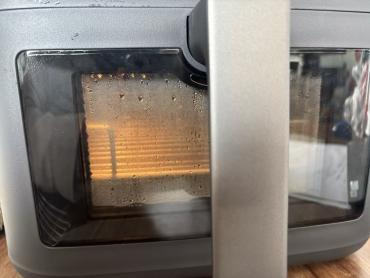
A: To prevent overheating of the surface, the transparent sight window has a double‑layer design (the inner layer is glass, and the outer layer is transparent PC) and is not a sealed structure. Water may enter when using Steam mode or after cleaning the basket, causing water droplets inside. The droplets will vaporize when heated. Please do not worry; this is normal and does not affect product use.
Q52: What material is the transparent sight window of the Mijia Smart Steam Air Fryer 7L made of?
A: To prevent the surface from overheating, the transparent sight window features a double‑layer design (the inner layer is glass, and the outer layer is transparent PC).
Q53: Is it normal for there to be a large gap after inserting the basket into the Mijia Smart Steam Air Fryer 7L?
A: According to the product definition, leaving a gap is to avoid the phenomenon of difficulty in pushing and pulling when the basket is inserted into the main unit. It does not affect the normal operation of the product.
Q54: Why does the Mijia Smart Steam Air Fryer 7L automatically switch to the Keep-warm mode after cooking is complete?
A: For some preset recipes, the device enables Keep‑warm mode by default. After cooking is completed, it will automatically enter Keep-warm mode.
Q55: What is the keep-warm temperature of the Mijia Smart Steam Air Fryer 7L?
A: For your reference, here is the information about the keep-warm temperature of the Mijia Smart Steam Air Fryer 7L:
1. The device enables the keep-warm function by default. In Steam mode, the keep-warm temperature is 60 °C, and the duration is 30 minutes. These settings cannot be adjusted.
2. The device enables the keep-warm function by default. In Steam & air fry mode, the keep-warm temperature is 80 °C, and the duration is 30 minutes. These settings cannot be adjusted.
3. The device enables the keep-warm function by default. In Bake mode, the keep-warm temperature is 80 °C, and the duration is 30 minutes. These settings cannot be adjusted.
Q56: How to disable the keep-warm mode after cooking is complete on the Mijia Smart Steam Air Fryer 7L?
A: To disable the keep-warm mode after cooking is complete on the Mijia Smart Steam Air Fryer 7L, please refer to the following steps:
1. Power on the device to enter the [Air fry] interface.
2. Rotate the control knob to switch to [Settings].
3. Press the control knob to enter the [Wi-Fi] settings.
4. Switch to the [Keep warm] settings.
5. Press the control knob to access the [Disable keeping warm?] confirmation screen.
6. Rotate the control knob to select [Yes].
7. Press the control knob again to disable the automatic Keep-warm function and return to the Settings interface.
Q57: Why does the water tank on the Mijia Smart Steam Air Fryer 7L shake slightly?
A: The top-mounted water tank of the Mijia Smart Steam Air Fryer 7L is a detachable component with a slight play tolerance to facilitate removal and installation to add water. This does not affect normal use.
Note:
As the water tank is detachable from the main unit, check whether there is water in the tank before moving the device to prevent water spillage.
Q58: How to use the Steam mode on the Mijia Smart Steam Air Fryer 7L?
A: After powering on the Mijia Smart Steam Air Fryer 7L, select Steam mode to steam foods such as root vegetables, broccoli, corn, salmon, rice, eggs, or to use the custom steaming setting.
Notes:
1. When cooking in Steam mode, ensure that a sufficient amount of water is added to the water tank. The cooking time can be set from 1 minute to 1 hour and 30 minutes; however, the temperature cannot be adjusted in Steam mode.
2. When steaming food—particularly if using a separate container—it is normal to observe a small amount of condensed water accumulating inside the container due to the steam; please use with confidence. Alternatively, you can use the dedicated steaming rack to allow excess moisture to drain to the bottom of the frying plate.
Q59: How to use the Steam & air fry mode on the Mijia Smart Steam Air Fryer 7L?
A: After turning on the Mijia Smart Steam Air Fryer 7L, rotate the control knob to select Steam & air fry mode. This mode operates by alternating between steaming and air frying cycles.
Notes:
1. When cooking in Steam & air fry mode, ensure that a sufficient amount of water is added to the water tank. The temperature can be adjusted between 140 ℃ and 230 ℃ (this setting controls the air frying temperature), and the cooking time can be set from 1 minute to 60 minutes.
2. During operation in Steam and Steam & air fry modes, the water pump can make intermittent noises, which is normal. You can use it with confidence.
Q60: How to use Bake mode on the Mijia Smart Steam Air Fryer 7L?
A: After turning on the Mijia Smart Steam Air Fryer 7L, rotate the control knob to select Bake mode. In the Bake mode, you can choose from cooking recipes, such as cupcakes, pizza, bread, or custom settings.
Note:
In Bake mode, the temperature can be adjusted between 140 ℃ and 230 ℃, and the time can be set from 1 minute to 60 minutes.
Q61: How to use the Sous vide mode on the Mijia Smart Steam Air Fryer 7L?
A: After turning on the Mijia Smart Steam Air Fryer 7L, rotate the control knob to select Sous vide mode. In the Sous vide mode, you can choose from cooking recipes, such as steak, chicken cutlet, salmon, eggs, or custom settings.
Note:
In Sous vide mode, the temperature can be adjusted between 40 ℃ and 90 ℃, and the time can be set from 1 minute to 24 hours.
Q62: How to use the Max crisp mode on the Mijia Smart Steam Air Fryer 7L?
A: After turning on the Mijia Smart Steam Air Fryer 7L, rotate the control knob to select Max crisp mode; the time can be set from 1 minute to 60 minutes.
Q63: How to use the Dehydrate mode on the Mijia Smart Steam Air Fryer 7L?
A: After turning on the Mijia Smart Steam Air Fryer 7L, rotate the control knob to select Dehydrate mode. This mode does not support the keep-warm function. The temperature can be adjusted between 30 ℃ and 80 ℃, and the time can be set from 1 minute to 24 hours.
Q64: How to use the Ferment mode on the Mijia Smart Steam Air Fryer 7L?
A: After turning on the Mijia Smart Steam Air Fryer 7L, rotate the control knob to select Ferment mode. This mode does not support the keep-warm function. The temperature can be adjusted between 30 ℃ and 50 ℃, and the time can be set from 1 minute to 24 hours.
Q65: How to use the Defrost mode on the Mijia Smart Steam Air Fryer 7L?
A: After turning on the Mijia Smart Steam Air Fryer 7L, rotate the control knob to select Defrost mode. This mode does not support the keep-warm function. The temperature can be adjusted between 40 ℃ and 80 ℃, and the time can be set from 1 minute to 60 minutes.
Q66: How to use the Reheat mode on the Mijia Smart Steam Air Fryer 7L?
A: After turning on the Mijia Smart Steam Air Fryer 7L, rotate the control knob to select Reheat mode. This mode does not support the keep-warm function. The temperature can be adjusted between 140 ℃ and 180 ℃ (temperature cannot be adjusted for Steam reheat), and the time can be adjusted from 1 minute to 60 minutes.
Q67: How to use the Dry mode of Additional functions on the Mijia Smart Steam Air Fryer 7L?
A: After turning on the Mijia Smart Steam Air Fryer 7L, select Additional Functions mode, then rotate the control knob to select Dry mode. In Dry mode, the temperature is 230 ℃ and cannot be adjusted. The time cannot be adjusted before cooking, but can be adjusted from 1 minute to 60 minutes during cooking.
Q68: How to use the Waterline cleaning mode of Additional functions on the Mijia Smart Steam Air Fryer 7L?
A: After turning on the Mijia Smart Steam Air Fryer 7L, select Additional functions mode, then rotate the control knob to select Waterline cleaning mode to start the cleaning process.
Notes:
1. When performing a waterline cleaning, add citric acid and sufficient water to the water tank.
2. The cleaning process cannot be paused or canceled while it is in progress, and the time cannot be adjusted.
3. If power is interrupted during the process, the device will prompt you to resume cleaning the next time it is powered on.
Q69: How to use the Deodorize mode of Additional functions on the Mijia Smart Steam Air Fryer 7L?
A: After turning on the Mijia Smart Steam Air Fryer 7L, select Additional Functions mode, then rotate the control knob to select Deodorize mode to begin the deodorizing process.
Note:
When using the Deodorize function, the time cannot be adjusted. The process cannot be paused; it can only be canceled.
Basket related
Q1: Will the coating of the basket of the Mijia Smart Steam Air Fryer 7L fall off when in use?
A: When using the Mijia Smart Steam Air Fryer 7L basket, the coating will not peel off, provided that you avoid using sharp objects and hard materials such as steel wool.
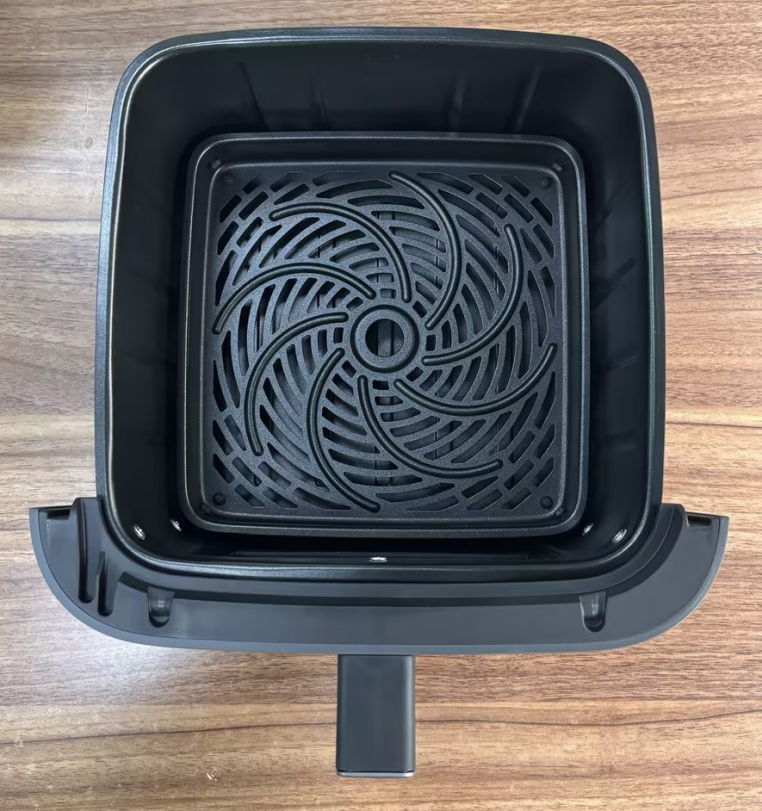
Q2: What is the maximum heat resistance of the Mijia Smart Steam Air Fryer 7L's basket?
A: The Mijia Smart Steam Air Fryer 7L's basket has a maximum heat resistance of 230 °C.
Q3: Can the Mijia Smart Steam Air Fryer 7L's basket be used on a gas stove?
A: No, it cannot. The basket of the Mijia Smart Steam Air Fryer 7L is designed exclusively for use with the air fryers and cannot be used on other open-flame stoves. The temperature of an open flame is uncontrollable, and excessive heat will damage the non-stick coating. Please refer to the product manual for use.
Q4: What material is the Mijia Smart Steam Air Fryer 7L made of?
A: The base material of the Mijia Smart Steam Air Fryer 7L's basket is aluminum alloy, featuring a food-grade, oil-based, double-layer ceramic non-stick coating on the surface.
Q5: Is the basket coating of the Mijia Smart Steam Air Fryer 7L safe?
A: The coating on the Mijia Smart Steam Air Fryer 7L basket is an oil-based, double-layer ceramic coating that complies with international standards for food contact materials as well as NIAS requirements. Please use it with confidence.
Q6: Why is the bottom surface of the Mijia Smart Steam Air Fryer 7L basket scratched?
A: Minor scratches or scuffs on the bottom surface of the basket during use are considered normal wear and tear. Please handle the basket gently when pulling it out or pushing it back in.
Q7: Why can't the left and right sides of the Mijia Smart Steam Air Fryer 7L's basket be pushed into place at the same time?
A: The basket is locked in place using a combination of spring shafts and slide rails on both sides. The structural design ensures that the force is distributed evenly on both sides. However, during actual use, the force applied when pushing the basket in may be uneven, causing one side to fail to slide fully into place. We recommend simply ensuring the basket is aligned squarely before pushing it in. Additionally, when the product is brand new, some components may fit together slightly tightly; any sensation of sticking or resistance should disappear after using the device a few times.
Q8: What are the white spots inside the basket of the Mijia Smart Steam Air Fryer 7L?
A: The Mijia Smart Steam Air Fryer 7L requires a water tank for functions such as Steam & air fry, Steam, and Waterline cleaning. Due to regional variations in water quality, limescale deposits may form. Please fill the water tank with purified water only (do not use hot water, mineral water, or other liquids).
Note:
It is recommended to clean the basket after using functions such as Steam & air fry, Steam, and Waterline cleaning.
Q9: What size container can be placed in the basket of the Mijia Smart Steam Air Fryer 7L?
A: When using the Steam mode on the Mijia Smart Steam Air Fryer 7L, you must use the rack together with an 8-inch inner container.
Q10: Why is water leaking from the Mijia Smart Steam Air Fryer 7L basket?
A: The basket of the Mijia Smart Steam Air Fryer 7L is not a sealed structure. Water will flow out if the water level exceeds the sight window during cleaning. Simply dry the water stains after cleaning.
Water tank related
Q1: How to add water to the water tank of the Mijia Smart Steam Air Fryer 7L?
A: For the Mijia Smart Steam Air Fryer 7L, you can add water through the water inlet. You can also remove the water tank cover to add water, or remove the entire water tank and fill it directly at a water source.
Q2: How much water should be added to the water tank when cooking with the Mijia Smart Steam Air Fryer 7L?
A: Please add water to the Mijia Smart Steam Air Fryer 7L according to the markings on the water tank to avoid overflow caused by overfilling.
Note:
1. The indicated water level capacity on the Mijia Smart Steam Air Fryer 7L water tank is approximately 1.5 L.
2. The full capacity of the Mijia Smart Steam Air Fryer 7L water tank is approximately 2.2 L.
3. Please ensure there is sufficient purified water in the water tank.
Q3: Why is there condensation inside the water tank of the Mijia Smart Steam Air Fryer 7L?
A: Condensation forms on the inside of the Mijia Smart Steam Air Fryer 7L water tank cover due to the temperature difference between the water and the room temperature. This is a normal phenomenon, and please use the device with confidence.
App related
Q1: Does the Mijia Smart Steam Air Fryer 7L support networking?
A: The Mijia Smart Steam Air Fryer 7L supports networking and needs to be configured through the Xiaomi Home App.
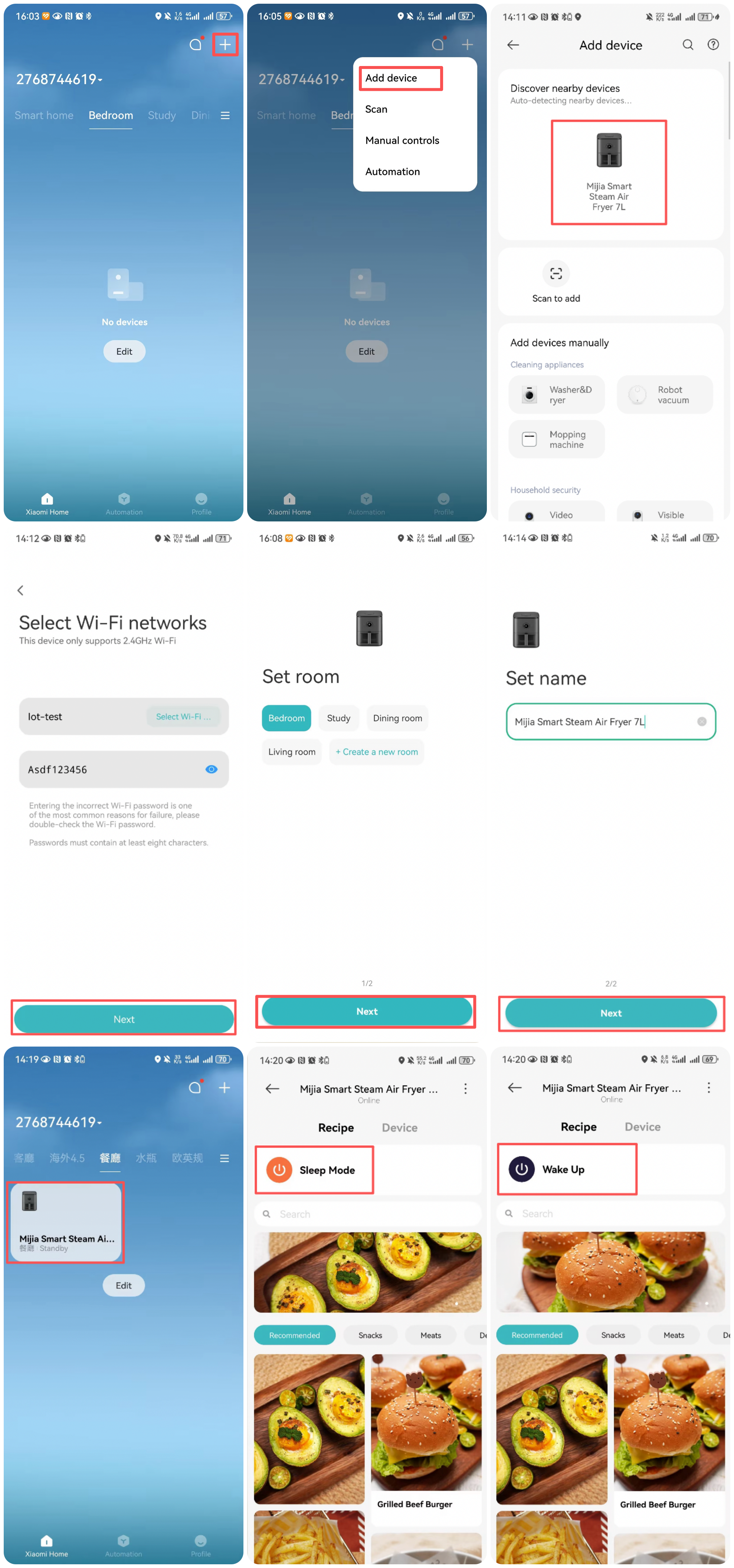
Q2: How to connect the Mijia Smart Steam Air Fryer 7L to the Xiaomi Home App?
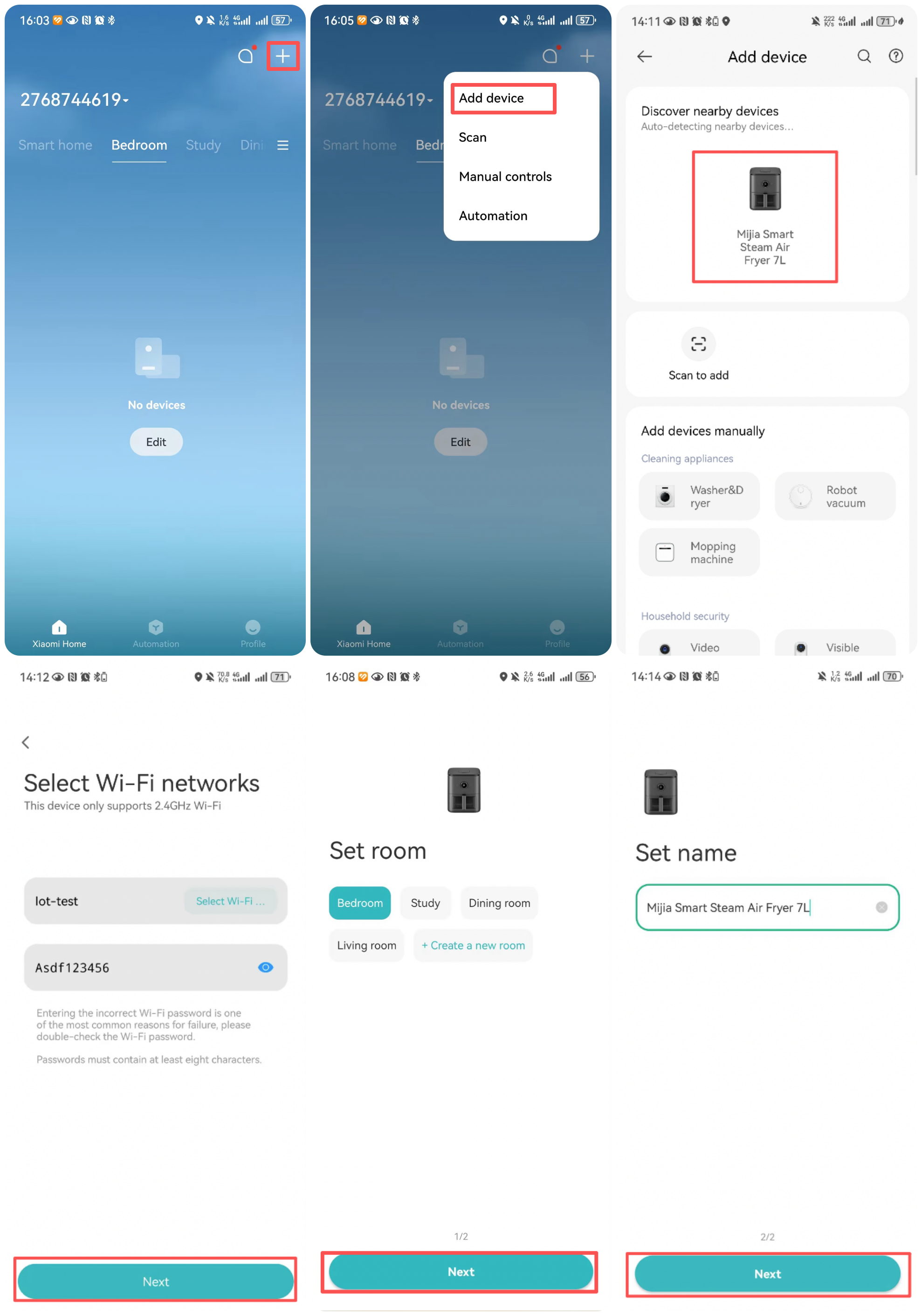
A: To connect the Mijia Smart Steam Air Fryer 7L to the Xiaomi Home App, please refer to the following information:
1. Download the App: Scan the QR code in the instruction manual to download and install the Xiaomi Home App. If you already have the Xiaomi Home App installed, you will be directed to the device connection page. Alternatively, search for the Xiaomi Home App in your mobile app store, download, and install it.
2. Add a device: Open the Xiaomi Home App homepage, tap "+" in the upper-right corner, and follow the App prompts to add a device. The App supports both automatic device discovery and manual device selection for adding.
Note:
Due to the upgrade and update of the Xiaomi Home App, the actual operation may be slightly different from the above description. Please follow the current instructions in the Xiaomi Home App.
Q3: What functions does the Xiaomi Home App of the Mijia Smart Steam Air Fryer 7L have?
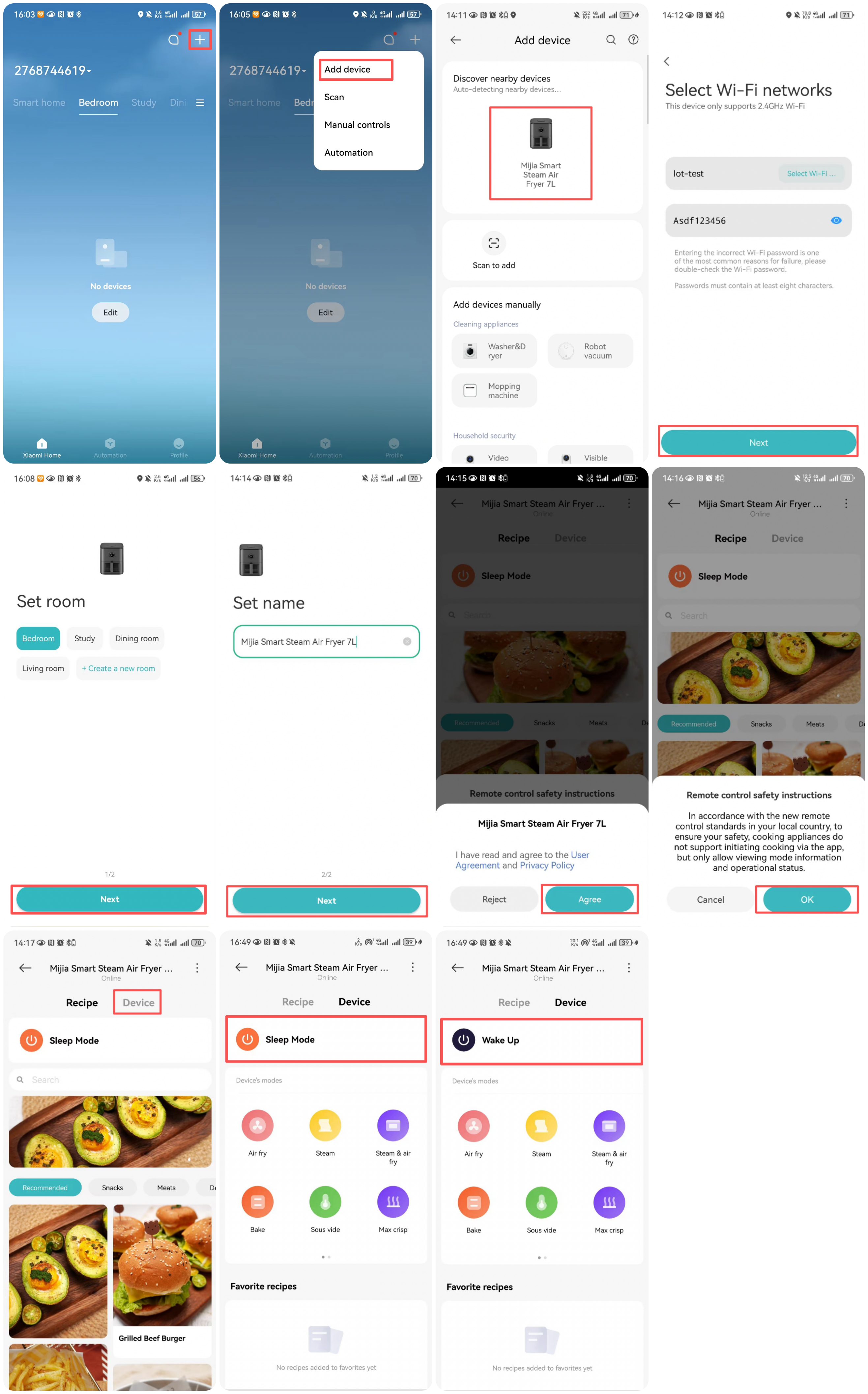
A: After connecting to the Xiaomi Home App, it supports remote control to turn on and off. You can also save recipes, making cooking more flexible. The device needs to be powered on and paired with the Xiaomi Home App to enable these functions. You can control the device's screen (turning it off or waking it up) directly from the main interface of the device plugin within the Xiaomi Home App:
Q4: Does the Mijia Smart Steam Air Fryer 7L support custom recipes?
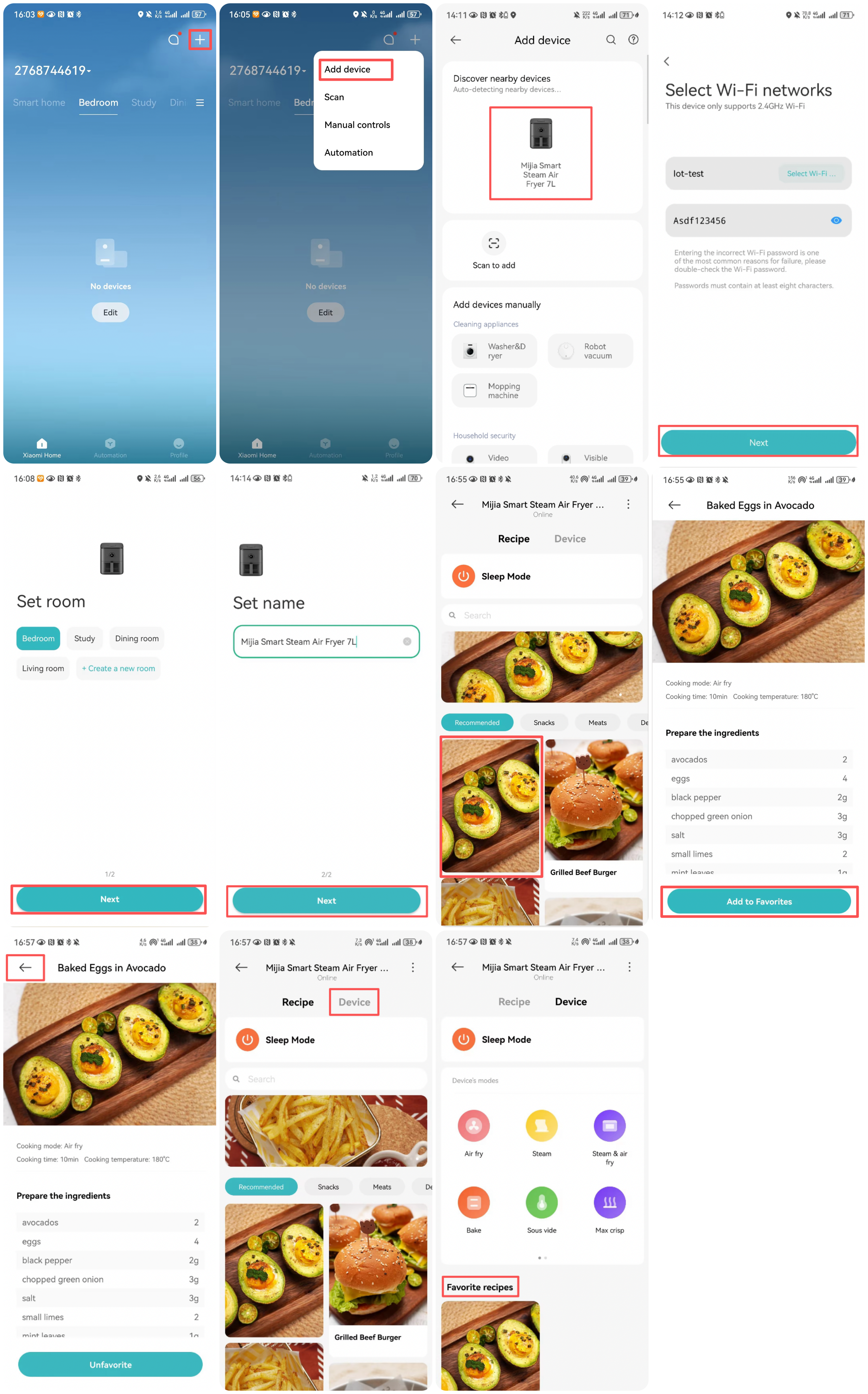
A: For the Air fry, Steam, Bake, and Sous vide modes of the Mijia Smart Steam Air Fryer 7L, there is a custom option for you to add your own recipes. Cloud recipes can be saved to favorites but cannot be customized.
Q5: Does the Mijia Smart Steam Air Fryer 7L support remote operation?
A: The Mijia Smart Steam Air Fryer 7L supports remote control. The device must be powered on and paired with the Xiaomi Home App; you can then control the device's screen (turning it off or waking it up) from the main page of the device's plugin within the App. You can also directly control the product's power status (turning it on or off) via the App.
Q6: What is the status of the Wi-Fi indicator on the Mijia Smart Steam Air Fryer 7L?
A: The Wi-Fi indicator for the Mijia Smart Steam Air Fryer 7L is located at the top of the screen. The states of the Wi-Fi indicator are as follows:
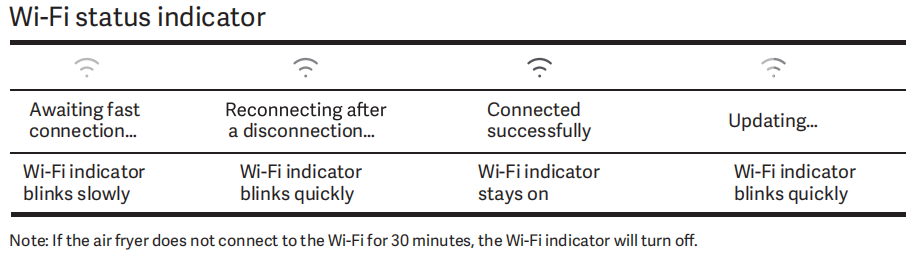
1. When Wi-Fi is not connected, the Wi-Fi indicator flashes slowly.
2. When attempting to reconnect after a disconnection, the Wi-Fi indicator flashes rapidly.
3. When successfully connected, the Wi-Fi indicator remains steadily lit.
4. When a Wi-Fi update is in progress, the Wi-Fi indicator flashes rapidly.
5. If Wi-Fi remains unconnected for 30 minutes, the Wi-Fi indicator turns off.
Q7: Does the Mijia Smart Steam Air Fryer 7L support firmware upgrades?
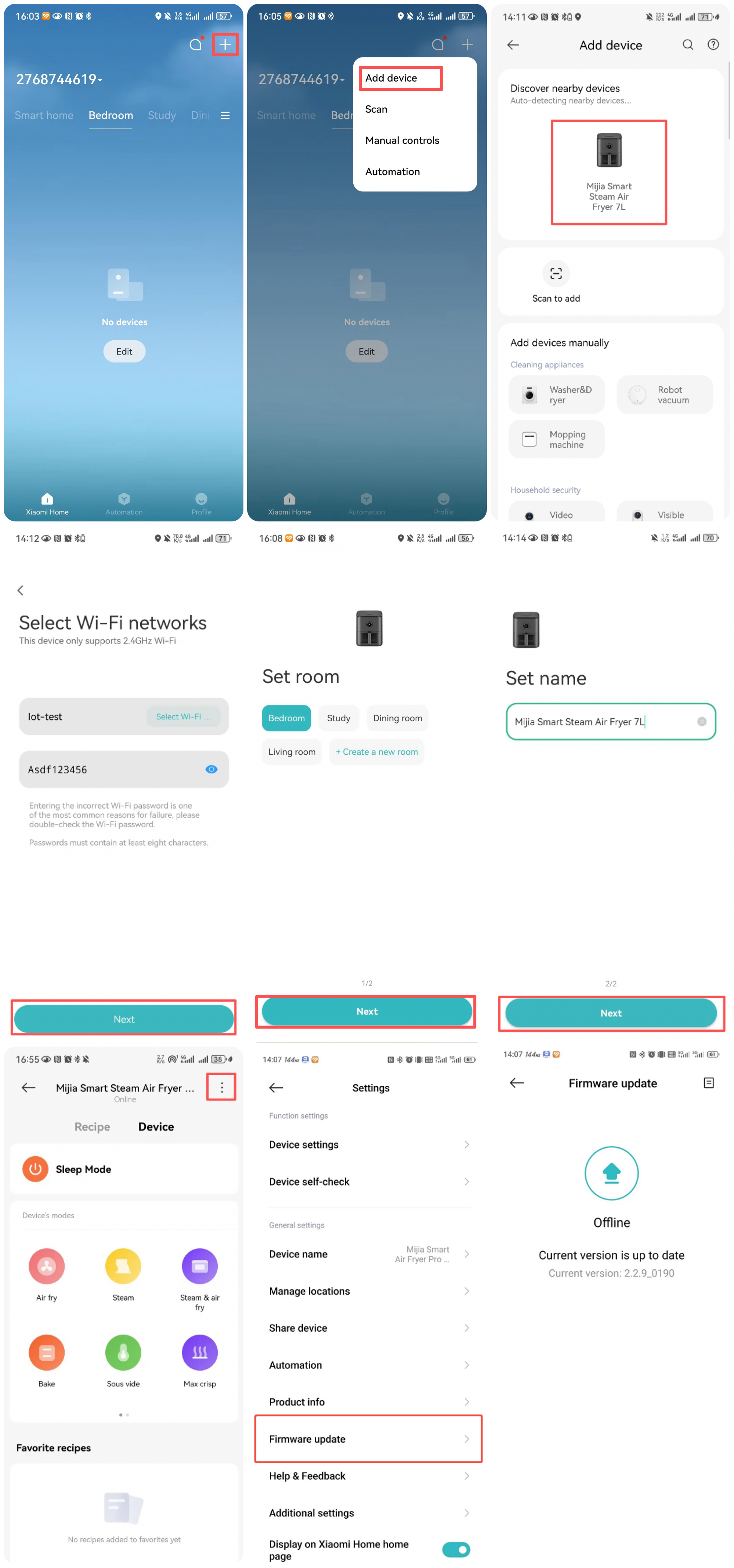
A: The Mijia Smart Steam Air Fryer 7L supports firmware upgrades. It is recommended to upgrade the firmware to the latest version when using it to ensure the best usage experience.
For your reference, the upgrade method is as follows:
After binding the Mijia Smart Steam Air Fryer 7L to the Xiaomi Home App, open the App, tap on the three-dot icon at the right corner of the interface >> [Firmware update] >> check for updates.
Q8: How many mobile phones can the Mijia Smart Steam Air Fryer 7L be connected to?
A: The Mijia Smart Steam Air Fryer 7L supports connection to only one Xiaomi account at a time, but it can be used for device sharing through the Xiaomi Home App, and the air fryer can be shared with other Xiaomi accounts or families.
For your reference, the sharing method is as follows:
After binding the Mijia Smart Steam Air Fryer 7L to the Xiaomi Home App, select the device card >> tap the three-dot icon >> [Share device].
Note:
The sharing of the Xiaomi account is considered successful only after confirmation by the account to be shared.
Q9: Does the Mijia Smart Steam Air Fryer 7L support smart scenes?
A: Yes, the Mijia Smart Steam Air Fryer 7L supports Google Home control. The binding method is as follows:
1. You must connect the device to Google Home or log in with your Xiaomi account.
2. Connect the Mijia Smart Steam Air Fryer 7L to the Xiaomi Home App or Google Home App.
3. Ensure that the Mijia Smart Steam Air Fryer 7L and Google Home App are linked to the same mobile phone number.
4. Grant authorization within the Google Home App (the phone with MIUI or HyperOS system needs to enable Smart Home Control authorization in the App). Once authorized, you can control the device using Google Home commands.
Control commands:
To turn off the air fryer: "Hey Google, turn off the <Mijia Smart Steam Air Fryer 7L>" or "Hey Google, stop the <Mijia Smart Steam Air Fryer 7L>."
Q10: What to do if the Mijia Smart Steam Air Fryer 7L can not connect to Xiaomi Home App?
A: If the Mijia Smart Steam Air Fryer 7L has an APP connection fault (such as being unable to connect, the product not being detected, or connection failure), please reset both the device and your Wi-Fi network, then attempt to reconnect. If the connection issue persists, please contact after-sales service for assistance.
Troubleshooting
Q1: Why doesn't the Mijia Smart Steam Air Fryer 7L power on?
A: If the Mijia Smart Steam Air Fryer 7L doesn’t power on, please refer to the following troubleshooting steps:
1. Confirm whether the air fryer is connected to the power supply. It is recommended to check whether the power cord plug is fully inserted into the grounded outlet.
2. After confirming the power connection, check if the product emits a "beep" sound and if the LCD screen displays any information. If there is a beep but no display, the LCD screen is defective; please contact after-sales support for assistance.
3. If there is neither a beep nor a display, the product is faulty and does not power on. Please contact the after-sales service center.
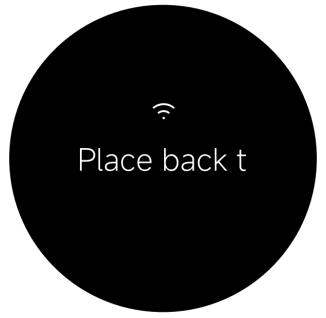
Q2: Why does the Mijia Smart Steam Air Fryer 7L prompt "Place back the basket to continue"?
A: If the screen displays normally after powering on, but the device prompts "Place back the basket to continue" and cannot be operated, the air fryer basket may not have been pushed in place. It is recommended to pull out the basket and push it back in place. If it is confirmed that the basket has been pushed in place, the product’s door control function fails. Please contact the after-sales service center.
Q3: Is it normal for the screen on the Mijia Smart Steam Air Fryer 7L to automatically turn off when it is powered on?
A: When the Mijia Smart Steam Air Fryer 7L is in the setup state before entering operation, it will turn off automatically if there is no operation for 10 minutes. In the power-off state, press the Power button to power it back on.
Q4: Why does the Mijia Smart Steam Air Fryer 7L start automatically after powering on?
A: The Mijia Smart Steam Air Fryer 7L works automatically without any operation after powering on (the motor runs and hot air comes out of the air outlet). However, if there is no display on the screen, the internal wiring of the product is faulty. Please contact the after-sales service.
Q5: Why is the oven light of the Mijia Smart Steam Air Fryer 7L not lighting up?
A: The oven light turns on during the cooking process, allowing you to observe the food cooking situation.
The light stays on for 1 minute each time before automatically turning off. It can be manually reactivated up to 4 consecutive times. After a 1-minute interval, the light can be turned on again.
Note:
The oven light will turn on automatically in the following three situations during cooking:
1. When the cooking program starts.
2. When the control knob is rotated or a button is pressed.
3. When the basket is reinserted to resume cooking after being pulled out.
Note:
If the oven light remains off continuously, the light is faulty. Please contact the after-sales service.
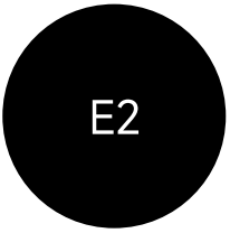
Q6: What to do if the Mijia Smart Steam Air Fryer 7L screen shows E1 or E2?
A: If the Mijia Smart Steam Air Fryer 7L screen shows E1 or E2, please refer to the following information:
1. E1 indicates an open circuit in the temperature sensor (NTC). If the screen shows E1, please contact the after-sales service center.

2. E2 indicates a short circuit in the temperature sensor (NTC). If the screen shows E2, please contact the after-sales service center.
Q7: What to do if the fan of the Mijia Smart Steam Air Fryer 7L doesn't rotate?
A: If the fan of the Mijia Smart Steam Air Fryer 7L doesn't rotate, please refer to the following troubleshooting steps:
1. The fan blade is stuck. Check the area around the fan blades for any foreign objects (such as food residue, aluminum foil, plastic debris, or metal objects that may be jamming the blades). Attempt to clear the foreign objects to see if the fan resumes normal operation.
2. The motor is damaged, or other components have a broken circuit. Select Air fry mode to diagnose. Once the product begins operating, check the air outlet to see if air is being expelled (caution: high temperature). If air is being expelled, the fan is functioning normally; if the product is heating up but no air is being expelled, the fan is not spinning. In this case, please contact the after-sales service center; do not repair the device yourself.
Q8: Why does the Mijia Smart Steam Air Fryer 7L emit white smoke?
A: If the Mijia Smart Steam Air Fryer 7L emits white smoke, please refer to the following information:
1. When you fry ingredients containing more fat, it will naturally result in a significant amount of white smoke being emitted, which is normal.
2. The air fryer still contains grease residue from the previous cooking program. Ensure that you clean the air fryer after each cooking program.
Q9: What to do if the Mijia Smart Steam Air Fryer 7L can't insert the basket into the air fryer smoothly?
A: If the Mijia Smart Steam Air Fryer 7L can't insert the basket into the air fryer smoothly, please refer to the following troubleshooting steps:
1. There is too much food in the basket. Please ensure that the contents in the basket don’t exceed the maximum mark.
2. The basket is not properly inserted into the correct position. Please ensure the basket is properly and securely installed.
Q10: What to do if the Scheduled function of the Mijia Smart Steam Air Fryer 7L cannot be carried out as required?
A: If the Scheduled function of the Mijia Smart Steam Air Fryer 7L cannot be carried out as required, please refer to the following troubleshooting steps:
1. The scheduled time is too short. The scheduled time should be longer than the cooking time.
2. The scheduled time is not saved. Once you've set a time, press the control button to save and initiate the schedule.
Q11: What to do if the Mijia Smart Steam Air Fryer 7L cannot connect to Wi-Fi?
A: If the Mijia Smart Steam Air Fryer 7L cannot connect to Wi-Fi, please refer to the following troubleshooting steps:
1. Reset the Wi-Fi.
2. Reconnect to Wi-Fi (the product should be placed in a place with sufficient Wi-Fi signal strength).
3. Set the Wi-Fi password to a simple password (the following special characters can not be set as the password: "/ \% ).
4. Place the product close to your home wireless router.
5. Use another mobile phone as a hotspot. Once a successful connection is established, reset the device again to connect to the router Wi-Fi.
6. The router must use the 2.4 GHz frequency band and does not currently support the 5 GHz frequency band network.
7. Make sure your phone's Bluetooth and Location Services are enabled on your mobile phone, and verify that Bluetooth is not currently connected to any other products.
8. Check if the router encryption method is set to WPA[TKIP]/WPA2[AES] (WEP and WAPI encrypted hotspots are not supported yet).
Notes:
1. Check if your phone is connected to the public network (it is not recommended to connect to an unstable public network).
2. Open the Wi-Fi settings on your phone to check if Wi-Fi is starting with "xiaomi-fryer-maf16_XXX". Confirm whether the product Wi-Fi module is damaged. If the Wi-Fi module starts with the above, it means there is no problem with the product module. Adjust the network and reconnect.
3. If you confirm the above operations are correct but issue persists, please contact the after-sales service for repair.
Q12: What to do if the firmware update for the Mijia Smart Steam Air Fryer 7L is unsuccessful?
A: If the firmware update for the Mijia Smart Steam Air Fryer 7L is unsuccessful, please refer to the following troubleshooting steps:
1. It is impossible to update the firmware in the working state. You can try again in the non-working (startup) state.
2. Please check whether the Wi-Fi is connected normally. You can change the network to try.
3. Try upgrading the firmware again.
4. If the problem persists, please contact the after-sales service for further assistance.
Q13: What to do if the Mijia Smart Steam Air Fryer 7L screen displays "Water tank empty, please refill in time"?
A: When steaming food, cleaning the water circuit, or if the water tank has not been placed correctly, please check to ensure that a sufficient amount of water has been added to the tank and that the tank is positioned correctly.
Note:
If the water tank was not placed correctly, or if you have just refilled an empty tank, you must ensure the tank is properly seated and contains sufficient water; then, tap the screen to resume and complete the cooking program.
Q14: What to do if the Mijia Smart Steam Air Fryer 7L malfunctions during use?
A: If the Mijia Smart Steam Air Fryer 7L malfunctions during use, please refer to the following troubleshooting steps:
1. If the Mijia Smart Steam Air Fryer 7L doesn't function, please check if the air fryer is not connected to a power supply. Please plug the power cord into a grounded electrical outlet. And check if the basket is not pushed into place. Please pull out the basket and push it back into place.
2. If the display shows E2, indicating a short circuit in the temperature sensor (NTC). Please contact the after-sales service team.
3. If the display shows E1, indicating an open circuit in the temperature sensor (NTC). Please contact the after-sales service center.
4. If the fan doesn't rotate, it may be caused by a stuck fan blade, a damaged motor, or a broken circuit in other components. Please contact the after-sales service team.
5. Check if the air fryer still contains grease residue from the previous cooking program. Ensure that you clean the air fryer after each cooking program.
6. Check if the air fryer is in steam mode. White smoke may be water vapor. During steam mode, water vapor emission is a normal phenomenon.
7. If white smoke is coming out, check if cooking oily ingredients. When you fry ingredients containing more fat, there will be a lot of smoke, which is normal.
8. If you can't insert the basket into the air fryer smoothly, please check if there are too many ingredients in the basket. Please ensure that the ingredients in the basket don’t exceed the maximum mark. Check if the basket is not properly inserted. Please properly insert the basket.
9. If the schedule function doesn't function as requested, check if the scheduled time is too short. The scheduled time should be longer than the cooking time.
10. If the air fryer couldn't connect to Wi-Fi, check whether the Xiaomi Home App is up to date. Please update the Xiaomi Home App to the latest version. Check if the Wi-Fi signal is weak. Please move to a location where the signal is strong enough.
11. If you are unable to connect the air fryer, check whether the Wi-Fi is connected normally, or reset the Wi-Fi to reconnect.
Does it help?
Yes
No