

Xiaomi Smart Air Purifier 4 Lite FAQ
Overview
Q1: What is the appearance of the Xiaomi Smart Air Purifier 4 Lite?
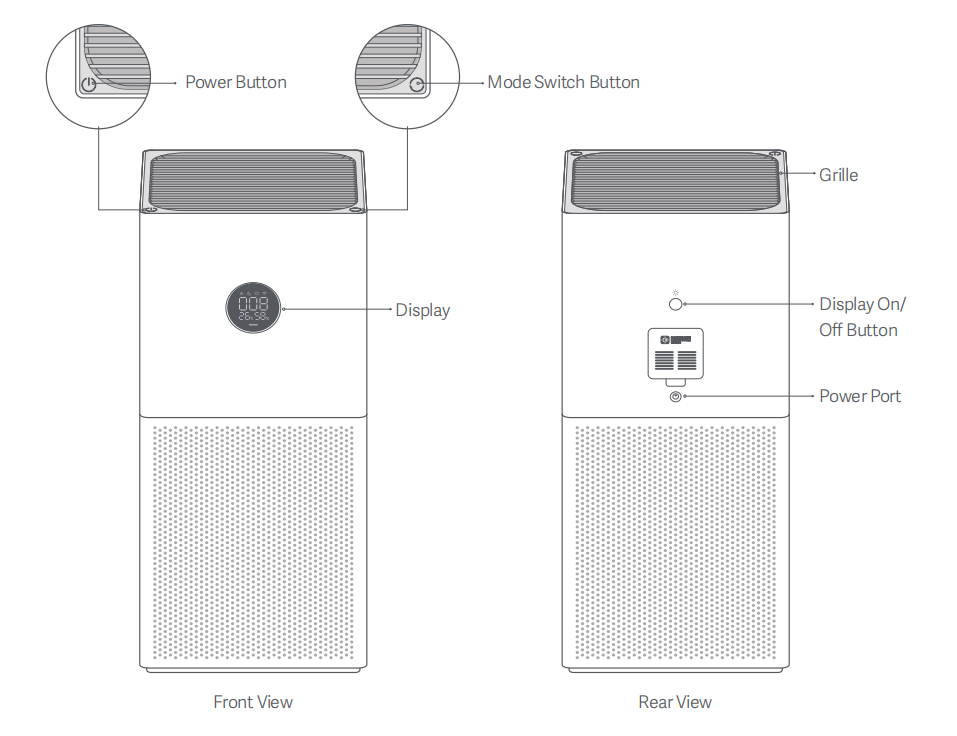
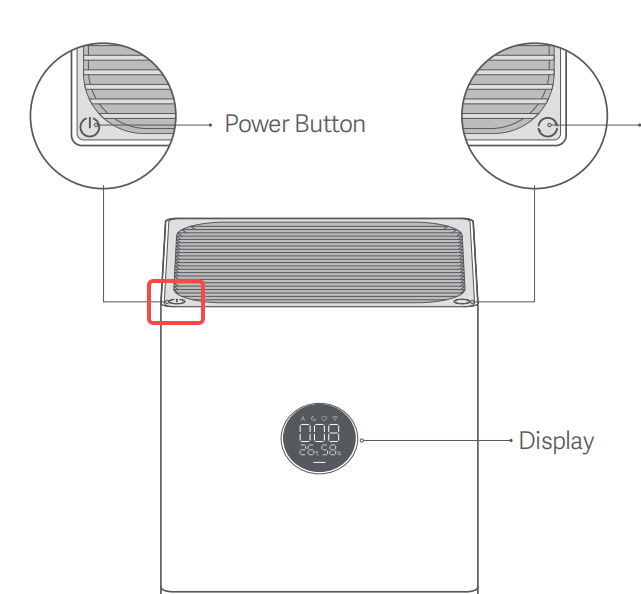
A: The Xiaomi Smart Air Purifier 4 Lite structure and components include a grille, display, mode switch button, power button, display on/off button, power port, temperature and humidity sensor, and laser particle sensor.
Q2: What information is shown on the display of the Xiaomi Smart Air Purifier 4 Lite?
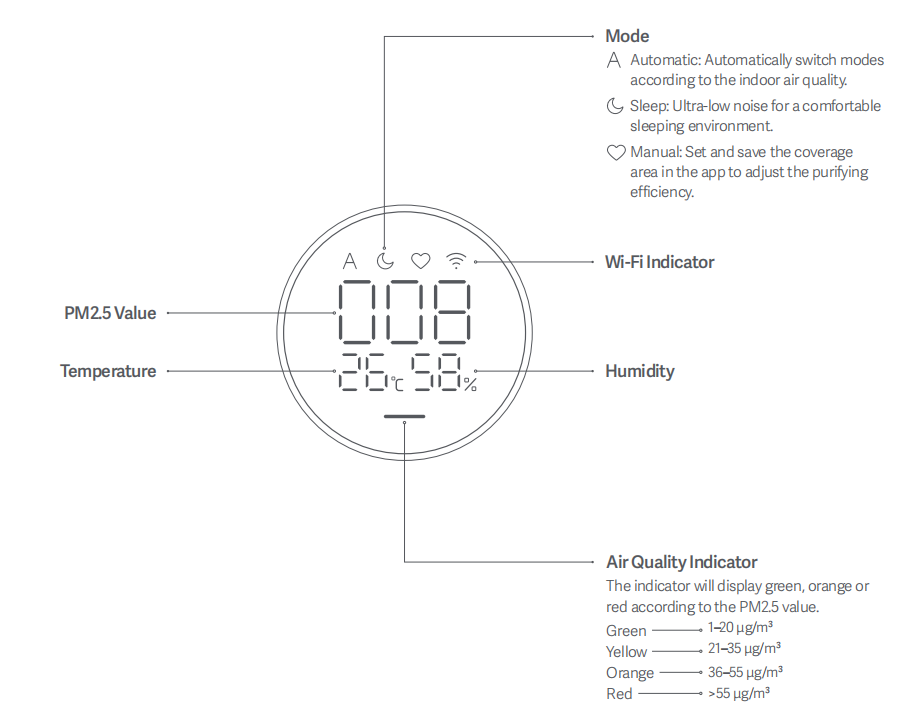
A: The display shows temperature, humidity, air quality indicator, PM2.5 value, operating mode, and Wi-Fi indicator.
Q3: How should the Xiaomi Smart Air Purifier 4 Lite be placed?
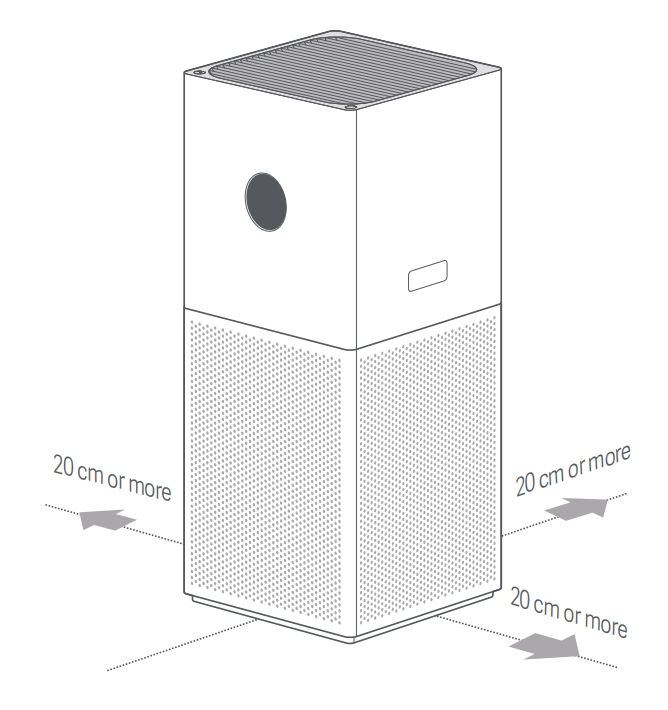
A: To ensure optimal performance, keep the air inlet of the main unit at least 20 cm from walls or other obstructions.
Note:
It is recommended to keep doors and windows closed for a better purifying effect when using the purifier.
Q4: How to connect the Xiaomi Smart Air Purifier 4 Lite to power?
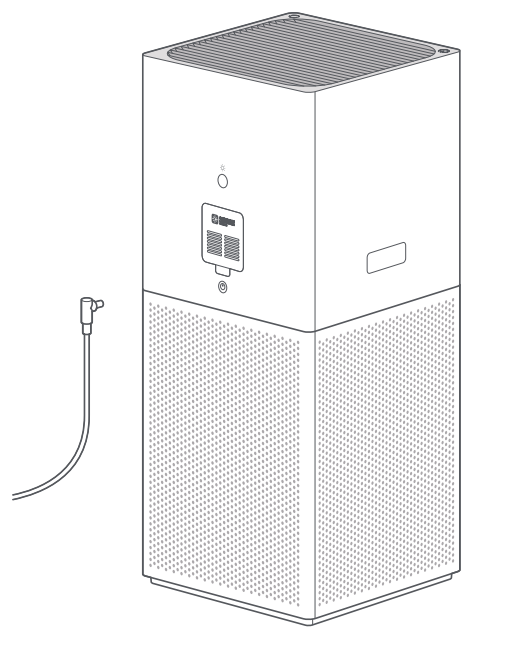
A: Connect the power cord to the power port located in the middle of the main unit, then plug it into a power outlet.
Q5: What are the selling points of the Xiaomi Smart Air Purifier 4 Lite?
A: 1. It delivers 99.97% filtration for 0.3μm particles, 120m³/h FCADR for formaldehyde, and effective H1N1 virus reduction for comprehensive respiratory protection.
2. It features an A4-sized base footprint for easy placement, with 25-43 m² wide coverage to fit bedrooms, living rooms, and more.
3. It runs at just 33.4 dB(A), delivering silent purification at night without disturbing your rest.
4. It comes with an LED display for real-time air quality checks, plus App remote control, scheduling, and filter reminders for hassle-free use.
Q6: What are the dimensions and weight of the Xiaomi Smart Air Purifier 4 Lite?
A: The dimensions of the Xiaomi Smart Air Purifier 4 Lite are 240 x 240 x 533.5 mm, and the weight is approximately 4.8 kg.
Q7: What is the material of the Xiaomi Smart Air Purifier 4 Lite?
A: The external material of the Xiaomi Smart Air Purifier 4 Lite is ABS.
Product Usage
Q1: How to power on/off the Xiaomi Smart Air Purifier 4 Lite?
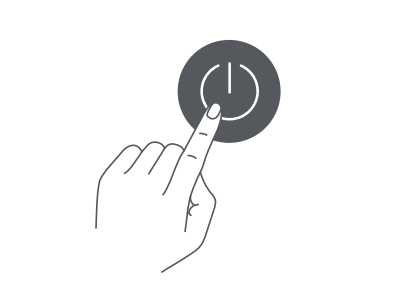
A: Tap the power button to turn it on. When it is on, tap the power button again to turn it off.
When connected to the Xiaomi Home App, you can also go to the device interface to power on/off the device.
When connected to the Xiaomi Home App, you can also go to the device interface to power on/off the device.
Q2: How to switch modes on the Xiaomi Smart Air Purifier 4 Lite?
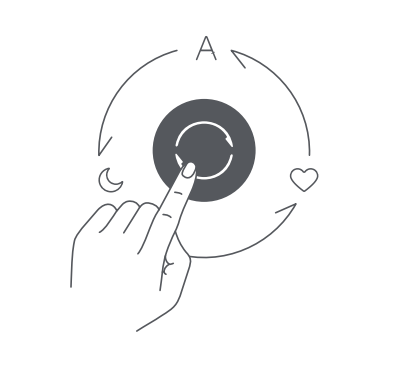
A: When powered on, tap the mode switch button to cycle through Automatic, Sleep, and Manual modes.
When connected to the Xiaomi Home App, you can also go to the device interface to select modes.
When connected to the Xiaomi Home App, you can also go to the device interface to select modes.
Q3: How to adjust display brightness on the Xiaomi Smart Air Purifier 4 Lite?
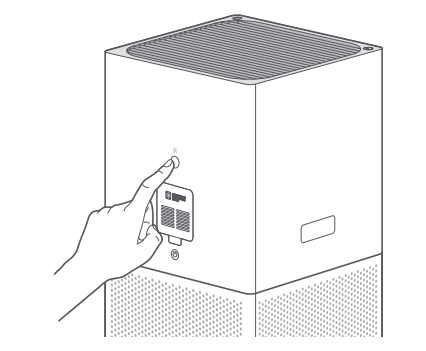
A: Press the display button briefly to cycle brightness: on, dim, and off.
When connected to the Xiaomi Home App, you can also go to the device interface to adjust display brightness.
When connected to the Xiaomi Home App, you can also go to the device interface to adjust display brightness.
Q4: How to enable / disable child lock on the Xiaomi Smart Air Purifier 4 Lite?
A: Child lock can only be enabled via the Xiaomi Home App.
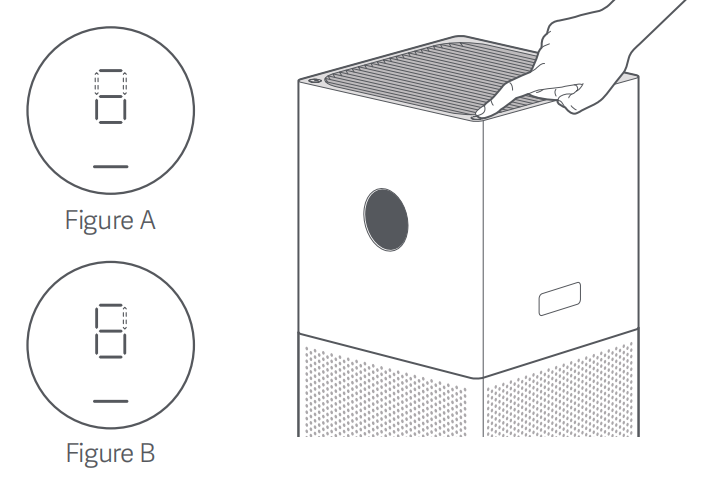
Once enabled, the screen will flash and display as shown in Figure A. To disable the child lock function, press and hold the mode switch button for seven seconds until you hear a notification sound. Then the screen will display as shown in Figure B.
In the App, you can toggle Child lock. When enabled, the purifier can only be controlled via the App.
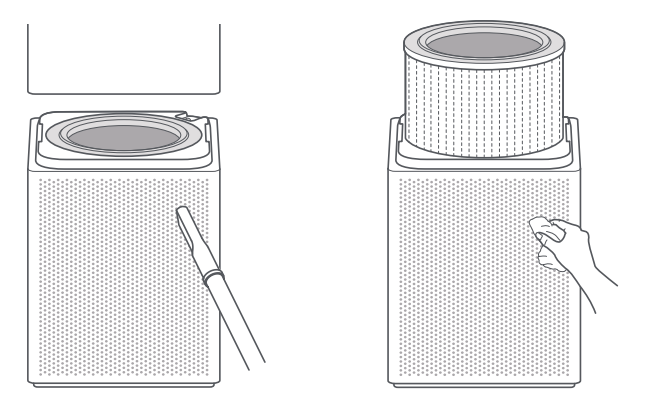
Q5: How to clean the filter compartment of the Xiaomi Smart Air Purifier 4 Lite?
A: To ensure optimal ventilation and purification, use a vacuum cleaner to remove any dust from the air inlets and the filter compartment, or wipe these areas gently with a soft cloth.
Note:
To avoid damaging the purifier, do not rinse or spray the purifier directly with water, or wipe it with a soaking wet cloth.
Q6: How to clean the laser particle sensor of the Xiaomi Smart Air Purifier 4 Lite?
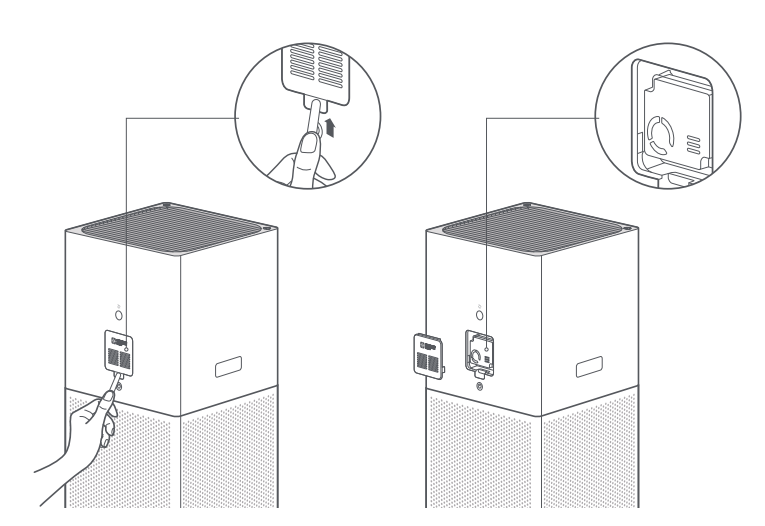
A: Use a non-sharp tool to open the cover of the laser particle sensor, and then use an air blow gun or hair dryer to clean the filter on the cover and the sensor.
Note:
Do not use hot air.
Q7: How to replace the filter of the Xiaomi Smart Air Purifier 4 Lite?
A: 1. Make sure the purifier is turned off and the power adapter is unplugged before replacing the filter. To avoid injuries, do not put your fingers between the upper and lower compartments when replacing the filter.
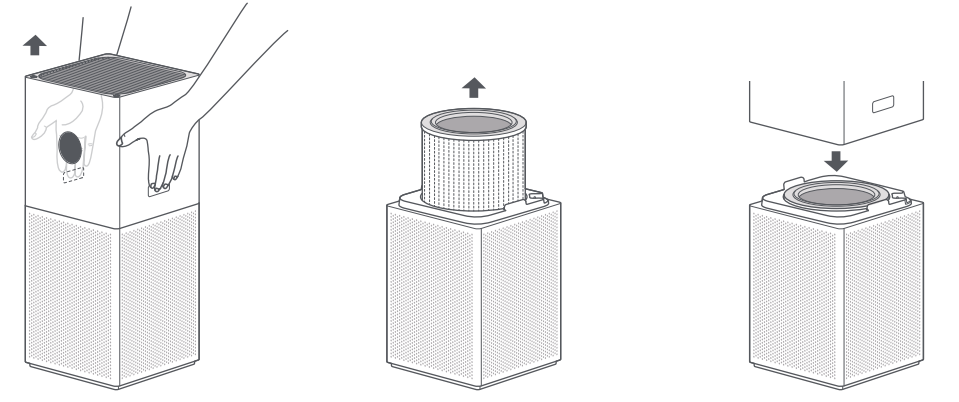
2. Press and hold the release buttons with both of your hands, and lift up the upper compartment of the purifier.
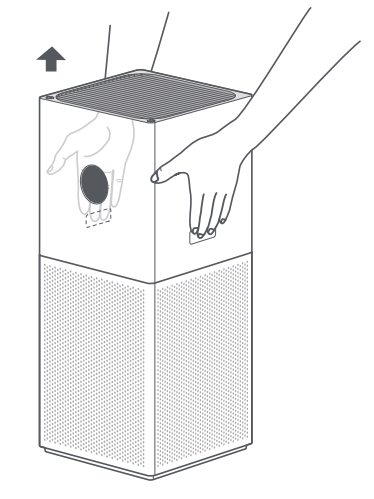
3. Remove the old filter upwards.
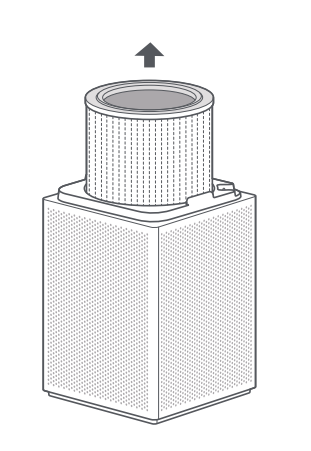
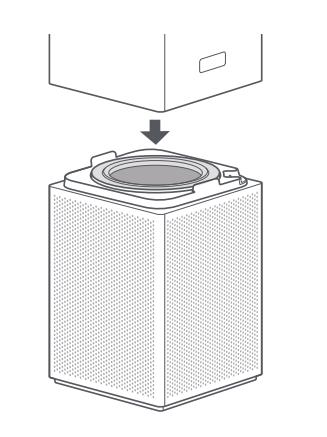
4. Install the filter into the filter compartment, and then place back the upper compartment of the purifier.
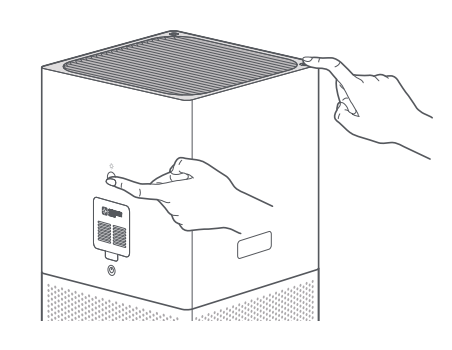
5. While the purifier is on standby, simultaneously press and hold the power button and the display on/off button on the back of the purifier for 7 seconds. Once the filter is successfully reset, the purifier will make two beeps and the air quality indicator will blink green three times.
Note:
1. When the air quality indicator blinks red for 30 seconds, it is a reminder that the filter is exhausted.
2. It is recommended to replace the filter every 6 to 12 months.
3. Please purchase genuine and compatible filters from official channels.
Q8: What motor does the Xiaomi Smart Air Purifier 4 Lite use?
A: It uses a DC brushless motor, supporting stepless speed adjustment, low noise, and long lifespan.
Maximum noise ≤ 61 dB(A). Sleep mode is recommended at night.
Maximum noise ≤ 61 dB(A). Sleep mode is recommended at night.
A: It is the laser particle sensor, used to detect PM2.5 levels in the air.
Q10: Can the Xiaomi Smart Air Purifier 4 Lite be placed horizontally?
A: Not recommended. For optimal air circulation, place it vertically.
Keep at least 20 cm clearance at the back and around the sides and front to avoid blocking airflow.
Keep at least 20 cm clearance at the back and around the sides and front to avoid blocking airflow.
Q11: Does a humidifier affect the Xiaomi Smart Air Purifier 4 Lite PM2.5 readings?
A: Yes. Ultrasonic humidifiers produce fine mist particles that may be detected as PM2.5, causing higher readings.
This is normal and readings will return to normal after the humidifier is turned off.
This is normal and readings will return to normal after the humidifier is turned off.
Q12: Why are the buttons of the Xiaomi Smart Air Purifier 4 Lite not responding?
A: The Child lock function may be enabled in the Xiaomi Home App. Disable it to restore button functionality.
Cut off the power and power on again or resetting Wi-Fi will also disable Child lock.
Cut off the power and power on again or resetting Wi-Fi will also disable Child lock.
Q13: What is the filter of the Xiaomi Smart Air Purifier 4 Lite?
A: It comes with a high-quality composite filter (HEPA + Activated Carbon) with antibacterial coating – E12.
Q14: Why does the air quality indicator of the Xiaomi Smart Air Purifier 4 Lite change suddenly?
A: The indicator reflects PM2.5 levels and changes color when values cross thresholds.
Q15: Are filters of the Xiaomi Smart Air Purifier 4 Lite interchangeable with other Xiaomi purifiers?
A: No. The filter size differs and is not compatible with other models.
Q16: How is Xiaomi Smart Air Purifier 4 Lite filter lifespan calculated?
A: It is calculated based on air quality, operating mode, speed, and usage time. The lifespan is about 3–6 months.
Q17: How often should the Xiaomi Smart Air Purifier 4 Lite filter be replaced?
A: It is recommended to replace the filter every 3–6 months depending on usage conditions. When lifespan ≤10%, the device and Xiaomi Home App will remind you.
Q18: What are the precautions for using the Xiaomi Smart Air Purifier 4 Lite filter?
A: The Xiaomi Smart Air Purifier 4 Lite uses catalytic activated carbon in its filter, which can adsorb and help neutralize formaldehyde to a certain extent.
However, for proper use, after a period of operation (about one month), the filter should be removed and aired in a well-ventilated place to reduce saturation. If the environment is poor, this interval should be shortened. Otherwise, there is a risk of secondary pollution.
Q19: What to do if formaldehyde removal of the Xiaomi Smart Air Purifier 4 Lite is not effective?
A: The Xiaomi Smart Air Purifier 4 Lite uses catalytic activated carbon in its filter, which is highly effective in adsorbing and reacting with formaldehyde. It primarily relies on the adsorption properties of activated carbon, repeatedly filtering indoor air to capture formaldehyde and achieve purification. This method is scientific and environmentally friendly, and does not generate harmful byproducts.
Formaldehyde is a slowly released gaseous pollutant. It is not emitted all at once but can be released gradually over several years. When the indoor temperature exceeds 19 °C, the release rate increases, and higher temperatures further accelerate this process. Therefore, safely removing formaldehyde requires time.
If you use the purifier in a closed space and the reading increases from 0.45 to 0.5 after running overnight, it indicates that the concentration in the enclosed space is too high. Without purification, the level could be significantly higher.
In addition, if precise measurements show that the purifier’s formaldehyde removal performance is not ideal, it is likely due to a continuous emission source in the enclosed environment. Long-term ventilation is recommended.
Q20: Why is there an odor of the Xiaomi Smart Air Purifier 4 Lite?
A: The Xiaomi Smart Air Purifier 4 Lite and its filter do not have any inherent source of odor. After use, the filter captures PM2.5 and other pollutants from the air. Over time, as more contaminants accumulate, especially in humid environments, odors can develop.
In such cases, the filter should be ventilated and aired outdoors to help reduce the odor. However, it cannot be restored to its original new condition. This is a normal phenomenon.
Q21: Do I need to reset filter life of the Xiaomi Smart Air Purifier 4 Lite after replacement?
A: Yes. Manual reset is required after installing a new filter.
Q22: Why is the purification performance of the Xiaomi Smart Air Purifier 4 Lite poor?
A: Check room size, sealing, height, and selected mode to ensure they match the device capacity.
Q23: Why is indoor PM2.5 of the Xiaomi Smart Air Purifier 4 Lite higher than outdoors?
A: Indoor activities like cooking, smoking, or humidifiers can increase readings.
Outdoor data in the Xiaomi Home App can also differ from actual local conditions.
Outdoor data in the Xiaomi Home App can also differ from actual local conditions.
Q24: Why does PM2.5 change without a filter installed in the Xiaomi Smart Air Purifier 4 Lite?
A: Without a filter, it acts like a fan, mixing air and causing fluctuating readings until stabilized.
Q25: Will filter life decrease if no filter is installed in the Xiaomi Smart Air Purifier 4 Lite?
A: Yes. Since there is no RFID, lifespan continues to count down.
Q26: Does long-term use of the Xiaomi Smart Air Purifier 4 Lite reduce humidity?
A: Yes. The purifier also removes moisture particles, slightly lowering humidity.
Q27: Can the Xiaomi Smart Air Purifier 4 Lite remove odors like cooking fumes?
A: Yes, but it may take time. Effectiveness depends on filter condition and environment.
Q28: Does the Xiaomi Smart Air Purifier 4 Lite support ionization?
A: No, ionization is not supported.
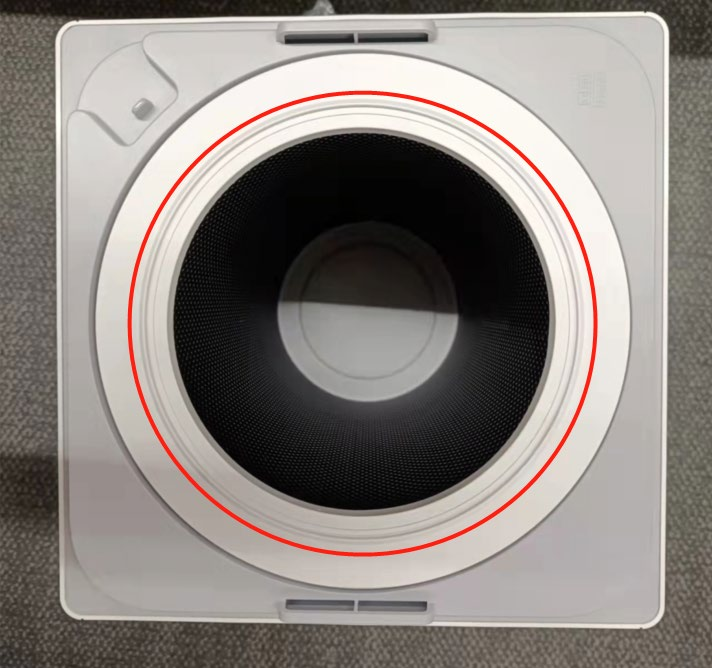
Q29: Where is the filter located in the Xiaomi Smart Air Purifier 4 Lite?
A: Press the release buttons and lift the upper housing.
The cylindrical white filter is located inside the lower compartment.
The cylindrical white filter is located inside the lower compartment.
App Related
Q1: What are the requirements for connecting the Xiaomi Smart Air Purifier 4 Lite to Wi-Fi?
A: The purifier supports smart control and is compatible with most home routers.
Requirements:
Requirements:
1. Supports only 2.4 GHz Wi-Fi (5 GHz not supported);
2. Encryption must be WPA or WPA2 (WEP not supported);
3. Router must have DHCP enabled; static IP, web authentication, and enterprise 802.1X are not supported.
(Control requires the Mi Home app.)
(Control requires the Mi Home app.)
Q2: How to remotely control the Xiaomi Smart Air Purifier 4 Lite via phone?
A: Install the Xiaomi Home App by scanning the QR code in the manual or downloading it from the app store, then log in with a Xiaomi account.
Ensure your Wi-Fi is working, connect your phone to Wi-Fi, and power on the purifier.
Open the App, which will automatically detect nearby devices, or tap “+” to add manually.
Once added, you can control power, switch modes, and view air quality, temperature, and humidity.
Ensure your Wi-Fi is working, connect your phone to Wi-Fi, and power on the purifier.
Open the App, which will automatically detect nearby devices, or tap “+” to add manually.
Once added, you can control power, switch modes, and view air quality, temperature, and humidity.
Q3: How to reset Wi-Fi of the Xiaomi Smart Air Purifier 4 Lite?
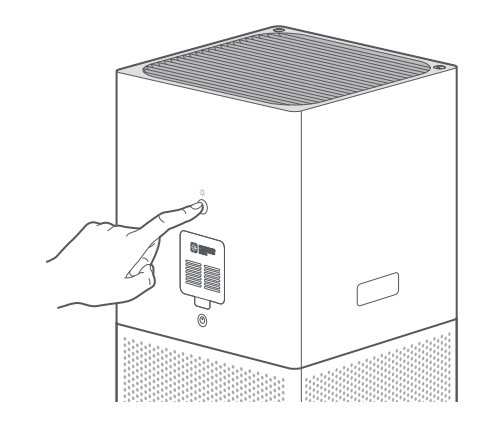
A: Press and hold the display on/off button on the back for 7 seconds until you hear a prompt sound. Wi-Fi reset is complete.
Q4: What settings are cleared after resetting Wi-Fi of the Xiaomi Smart Air Purifier 4 Lite?
A: Child lock and scheduled on/off settings configured in the Xiaomi Home App will be cleared.
Q5: How to perform a factory reset of the Xiaomi Smart Air Purifier 4 Lite?
A: Press and hold the power button and mode button together for 7 seconds until a prompt sound is heard.
Q6: What to do if the Xiaomi Smart Air Purifier 4 Lite is always offline or cannot connect to Wi-Fi?
A: 1. Ensure the purifier is powered on and running normally.
2. Check that Wi-Fi is working properly.
3. Unplug the power cord, wait 10 seconds, then power it back on and reset Wi-Fi before reconnecting.
Q7: What is the Manual mode of the Xiaomi Smart Air Purifier 4 Lite?
A: Manual mode allows you to customize the fan speed via the Xiaomi Home App.
It supports stepless adjustment to match your preferred purification performance and room size.
It supports stepless adjustment to match your preferred purification performance and room size.
Q8: How to turn off the notification sound of the Xiaomi Smart Air Purifier 4 Lite?
A: When the Xiaomi Smart Air Purifier 4 Lite is connected to the Xiaomi Home App, go to the device interface, tap three dots icon in the upper right corner, and toggle the notification sound on or off.
Troubleshooting
Q1: What to do if the Xiaomi Smart Air Purifier 4 Lite cannot power on?
A: 1. Check whether the power outlet has electricity and the power cord is properly connected.
2. After plugging in, the device will beep and display the Mi logo briefly, then press the power button to turn it on.
3. If there is a prompt indicating the filter door or top grille is not closed, reinstall them properly.
Q2: What to do if there are vertical lines appear on the display of the Xiaomi Smart Air Purifier 4 Lite?
A: Unplug the device for more than 10 seconds and restart. If the issue persists, the display may be faulty. Please contact the local after-sales service.
Q3: What to do if the Xiaomi Smart Air Purifier 4 Lite screen shows “filter compartment door not closed”?
A: Ensure the filter door is securely closed. Reassemble and restart after 10 seconds. If unresolved, contact after-sales support.
Q4: What to do if the motor error prompt appears on the Xiaomi Smart Air Purifier 4 Lite?
A: 1. Check whether the filter is installed correctly and reinstalled if needed.
2. Check for foreign objects blocking the fan.
3. Power off for 10 seconds and restart.
Q5: What to do if the PM2.5 readings on the Xiaomi Smart Air Purifier 4 Lite are inaccurate or abnormal?
A: 1. Check whether the laser particle sensor cover on the back is dirty or blocked. Open it using a non-sharp tool.
2. Clean the filter mesh and sensor using an air blower or hair dryer (no hot air).
3. You can gently clean the mesh with a soft brush and water, then dry completely before reinstalling.
4. If the issue persists, please contact after-sales service.
Note:
Note:
Slight differences between multiple devices are normal due to environmental factors.
Q6: Why is there a slight electrical noise when the Xiaomi Smart Air Purifier 4 Lite powered off?
A: This is normal. It comes from the inductor in the DC-DC circuit converting voltage (24V to 5V/3.3V), which can produce a faint sound.
Q7: Why does the sensor of the Xiaomi Smart Air Purifier 4 Lite not work?
A: When the screen is on, the sensor runs continuously;
When the screen is off, it runs intermittently (every 2 minutes for 12–15 seconds) to extend lifespan;
When the Xiaomi Home App is open, it runs continuously again.
Q8: What to do if there is abnormal noise from the Xiaomi Smart Air Purifier 4 Lite?
A: 1. Check whether the filter is properly installed and the packaging has been removed.
2. Check for foreign objects inside the unit and remove them.
3. Check whether the laser particle sensor is blocked.
Q9: Why do multiple purifiers show different air quality colors in the same room?
A: 1. Airflow causes uneven dust distribution even in the same room.
2. Sensor sensitivity and manufacturing tolerances can cause slight differences.
3. A deviation within 10% is normal.
4. If the difference is large, clean the sensor cover.
Q10: Can the Xiaomi Smart Air Purifier 4 Lite be modified or used with third-party accessories?
A: No. Modifying the device (e.g., adding ducts or humidifiers) can affect performance, stability, and safety. Do not alter its original design.
Q11: Is the filter of the Xiaomi Smart Air Purifier 4 Lite compatible with older Xiaomi purifier models?
A: No. The filter for the Xiaomi Smart Air Purifier 4 Lite is unique and not interchangeable with other models.
Does it help?
Yes
No