

REDMI Buds 8 Active FAQ
Overview
Q1: What are the key features of the REDMI Buds 8 Active?
A: The REDMI Buds 8 Active come with the following key features:
1. The ergonomic semi-in-ear design ensures enhanced wearing comfort.
2. The earbuds are equipped with a 14.2 mm large dynamic driver with a titanium diaphragm for powerful sound performance.
3. Dual-mic AI noise reduction helps deliver clearer call quality.
4. With the charging case, the earbuds provide up to 37 hours of long battery life.
5. Wind noise cancellation is effective at wind speeds of up to 6 m/s.
6. Dual-device smart connection is supported for more convenient use.
Q2: What is the structural design of the REDMI Buds 8 Active?
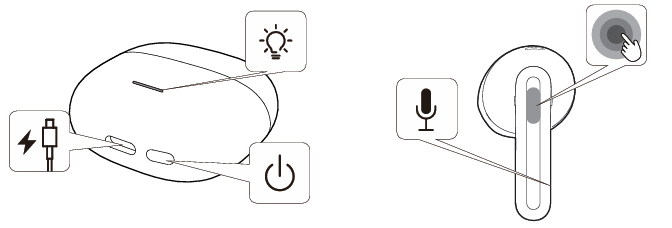
A: The REDMI Buds 8 Active charging case features a Type-C charging port for power input, a status indicator to display the charging or connection status, and a function button that can be used for pairing or resetting the earbuds. Each REDMI Buds 8 Active earbud is equipped with a built-in microphone for calls and noise reduction, and a touch-sensitive area on the outer surface that supports touch controls such as playing or pausing music and answering or ending calls.
Q3: What is the Bluetooth version of the REDMI Buds 8 Active?
A: The REDMI Buds 8 Active use the latest Bluetooth 5.4 version. With the commercialization of the latest technology standard, more and more smartphones are adopting Bluetooth 5.4. When earbuds also support Bluetooth 5.4, they can fully leverage the advantages of this standard, providing you with an excellent experience. The REDMI Buds 8 Active offers a faster transmission speed, a more stable connection, and lower power consumption.
Q4: How long is the battery life of the REDMI Buds 8 Active?
A: The REDMI Buds 8 Active provide up to 7 hours of battery life on a single charge, and up to 37 hours when used with the charging case (music playback at 50% volume using the AAC codec).
Battery life test conditions: The earbuds were fully charged to 100%, the volume was set to 50%, and the Bluetooth codec was AAC. During testing, music was played continuously on the REDMI Buds 8 Active until one of the earbuds stopped playback due to complete battery depletion.
Note:
The above data are based on Xiaomi Lab tests, and actual usage time varies depending on usage habits, charging conditions, and environmental factors.
Q5: Is the battery of the REDMI Buds 8 Active replaceable?
A: The battery of the REDMI Buds 8 Active is not replaceable.
Q6: Does the REDMI Buds 8 Active support noise cancellation?
A: The REDMI Buds 8 Active do not support ANC (Active Noise Cancellation).
Q7: Do the REDMI Buds 8 Active earbuds and charging case support water resistance?
A: The REDMI Buds 8 Active earbuds support IP54 dust and water resistance, while the charging case does not support water resistance.
Q8: Why is there no charging cable included in the REDMI Buds 8 Active package?
A: The REDMI Buds 8 Active does not include a charging cable. You can use any standard Type-C charging cable to charge the product.
Appearance Related
Q9: Why is there a line on the surface of the REDMI Buds 8 Active earbuds? Is it a crack?
A: The REDMI Buds 8 Active earbuds are not cracked. This line is a molding seam caused by the injection molding process. Such lines are common on products manufactured using molds and do not indicate damage. Please feel free to use the REDMI Buds 8 Active with confidence.
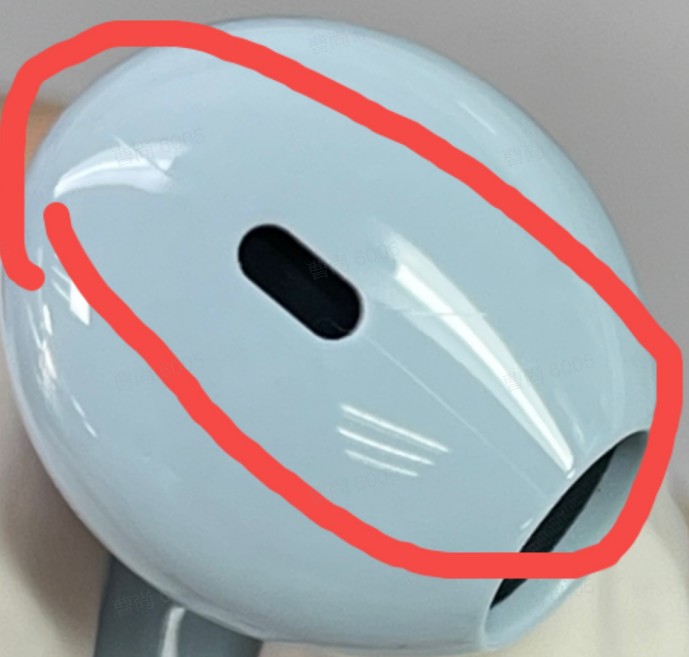
Q10: Why does the protective film on the stem of the REDMI Buds 8 Active earbuds pop up or lift after first removing them from the charging case?
A: On the REDMI Buds 8 Active, the protective film on the earbud stem is designed to protect the earbuds during transportation. It needs to be removed before first use. The film popping up or lifting does not affect normal use.
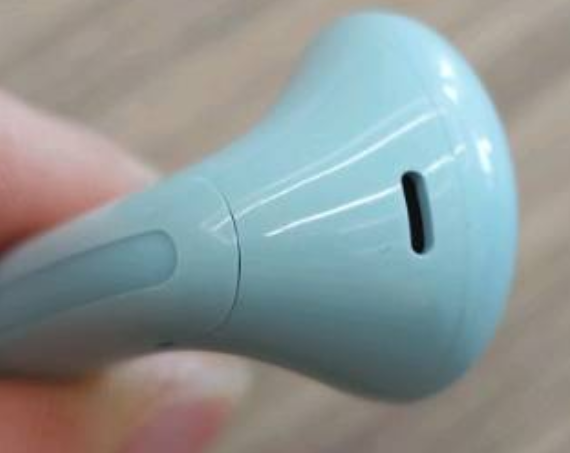
Q11: Is a slight gap at the top of the back cover of the REDMI Buds 8 Active earbuds considered a defect?
A: The REDMI Buds 8 Active are not defective. They have passed factory standard inspections before shipment. A slight gap is within normal manufacturing tolerance and does not affect normal use.
Wearing Related
Q12: How to properly wear the REDMI Buds 8 Active?
A: To wear the REDMI Buds 8 Active, hold the earbud by the stem and gently insert it into your ear slightly. Slightly tilt or shake your head to check stability. If you feel loose, adjust the insertion angle until it sits securely without wobbling.
Friendly tips:
The REDMI Buds 8 Active distinguish left and right channels. Each earbud is marked with “L” (left) or “R” (right). Please wear them according to the markings.
Q13: Does the REDMI Buds 8 Active support in-ear detection?
A: The REDMI Buds 8 Active do not support in-ear detection. Therefore, music will not automatically pause when you remove the earbuds.
Q14: Why does music pause when the REDMI Buds 8 Active earbuds are removed and reinserted?
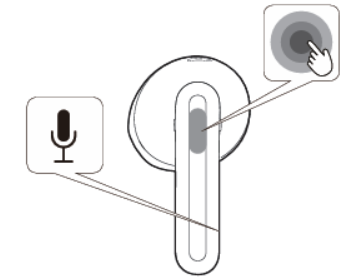
A: Please check whether accidental touches occurred during the removal or reinsertion of the REDMI Buds 8 Active, which may have triggered the pause command. To avoid this, hold the earbuds by the stem when removing or inserting them. The touch-sensitive area is shown below:
Q15: How to charge the REDMI Buds 8 Active, and do they support wireless charging?
A: The REDMI Buds 8 Active does not support wireless charging.
The charging methods are as follows:
1. Charging the earbuds: Place the earbuds into the charging case, and they will automatically start charging.
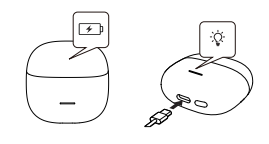
2. Charging the case: Use a Type-C cable to charge the case. The white indicator stays on during charging and turns off when fully charged.
Q16: What to do if wearing the REDMI Buds 8 Active causes discomfort or allergic reactions?
A: All skin-contact components of the REDMI Buds 8 Active have passed strict harmful substance testing and are safe for use. However, it is recommended to avoid prolonged wear (such as during sleep), keep your ears clean, and prevent sweat or dirt buildup, which can cause discomfort, inflammation, or allergy-like symptoms.
Possible causes of allergy-like symptoms include:
1. Prolonged wearing (such as during sleep) can reduce ventilation, and sweat can remain on the earbuds, which can cause discomfort.
2. If the earbuds are not cleaned for a long time, dirt and residue will accumulate, potentially leading to symptoms that resemble an allergic reaction.
3. If you experience severe discomfort, inflammation, or allergic reactions after wearing the earbuds, it is recommended to stop using them immediately and consult a medical professional. If you only experience mild itching, please follow these guidelines:
(1). After exercising while wearing the earbuds, check for sweat on the earbuds and wipe them clean before placing them back into the charging case.
(2). During daily use, regularly check the earbuds and the inside of the charging case for dirt, and clean them promptly if any is found.
(3). After wearing the earbuds continuously for a long time, remove them and allow your ears to rest for about 30 minutes to relieve ear fatigue.
(4). After showering, if there is any residual water inside your ears, make sure to dry them thoroughly before wearing the earbuds again.
Connection Related
Q17: How to connect the REDMI Buds 8 Active to the phone?
A: To connect the REDMI Buds 8 Active to the phone, please refer to the following methods:
Connect the new device:
1. Place the earbuds into the charging case and close the lid. Open the charging case lid, then press and hold the button on the case for 2 seconds. The white indicator on the case will flash continuously for 1 minute, during which the earbuds will wait for connection.
2. Enable Bluetooth on the device, search for, and connect to REDMI Buds 8 Active.
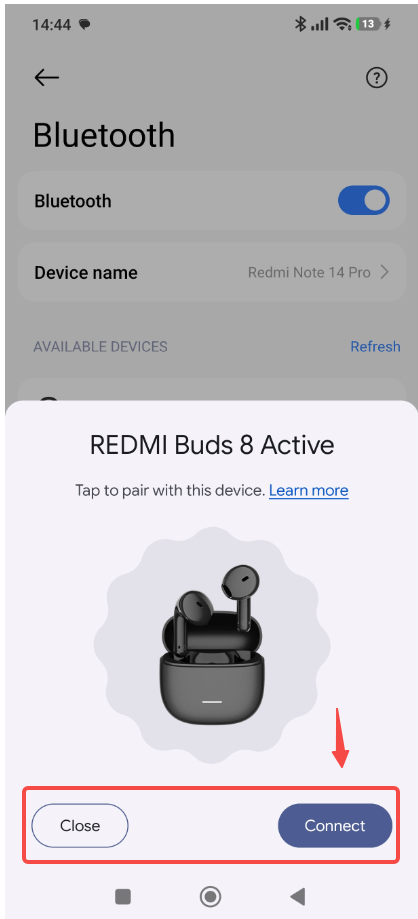
Connect using the Google Fast Pair pop-up:
Place the earbuds into the charging case, close the lid, and bring the case near an unlocked phone with Bluetooth enabled. Open the charging case lid, then follow the instructions on the phone’s pop-up window and tap [Connect] to pair the earbuds.
Q18: Why can’t the REDMI Buds 8 Active be recognized by the phone?
A: If the REDMI Buds 8 Active can't be recognized by the phone, please refer to the following aspects:
1. When searching for Bluetooth earbuds on your phone, make sure the REDMI Buds 8 Active are in pairing mode.
(1). First, ensure the earbuds have sufficient battery (the charging case indicator stays on when the lid is opened).
(2). Open the charging case lid and press and hold the function button for 2 seconds. The indicator will flash continuously, indicating that the earbuds are in pairing mode. Search for the earbuds via Bluetooth on the device to complete pairing.
2. If pairing times out, the REDMI Buds 8 Active may become undiscoverable. Place the earbuds back into the charging case, close the lid, wait at least 5 seconds, then reopen the lid and press and hold the function button for 2 seconds to enter pairing mode.
3. If the REDMI Buds 8 Active is already paired with another device, the current device can fail to connect. Please disconnect the earbuds from the other device first, then try pairing them again.
4. If none of the above methods work, restore the REDMI Buds 8 Active to factory settings. Place the earbuds back into the charging case and open the lid. Press and hold the function button at the bottom of the case for 10 seconds until the white indicator flashes slowly for 3 seconds, then switches to fast flashing. The earbuds will reset to factory settings and enter pairing mode. After resetting, follow the steps above to pair again.
Note:
Due to the nature of Bluetooth technology, electromagnetic interference in your area can affect Bluetooth connections and prevent your phone from detecting earbuds.
Q19: Does the REDMI Buds 8 Active support Dual connection?
A: The REDMI Buds 8 Active supports Dual connection, and this feature is enabled by default.
Note:
1. The phone’s system version should be up to date.
2. Dual connection means the earbuds are connected to two devices simultaneously. When both device A and device B are in the same playback state, device A has priority. When a call occurs on either device, the device receiving the call has priority.
3. In Dual connection mode, the earbuds can connect to only one device using the Xiaomi Earbuds App.
4. During Dual connection, if device A is idle and device B is playing music, and a single earbud (left or right) moves out of range from device B for more than 10 minutes, the earbud will not automatically reconnect upon returning. Placing both earbuds back in the charging case and closing and then reopening the lid will restore the connection.
5. In the HyperOS system, Dual connection and automatic connection functions are not mutually exclusive. Both Dual connection and automatic connection can be enabled simultaneously. (Currently, the automatic connection feature is supported only on Xiaomi/REDMI devices running the HyperOS system.)
Q20: Why does the REDMI Buds 8 Active fail to reconnect or reconnect slowly to one of the two paired devices (A and B) when the charging case is opened?
A: If the REDMI Buds 8 Active fail to reconnect or reconnect slowly to one of the two paired devices (A and B) when the charging case is opened, please refer to the following aspects:
1. When opening the charging case to reconnect to two devices and neither device A nor device B has an active audio stream (such as calls, audio/video playback, or system sound prompts), REDMI Buds 8 Active will reconnect to the devices one by one. Since the earbuds need to query the pairing address information of the previously connected devices, the reconnection process can take some time. Please wait patiently for up to around 20 seconds.
2. In the dual-device reconnection scenario, if REDMI Buds 8 Active has already reconnected to device A and device A has an active audio stream (such as calls, audio/video playback, or system sound prompts), the earbuds will temporarily pause reconnection to device B to prevent a poor experience. As a result, device B can reconnect more slowly or fail to reconnect due to a timeout. If REDMI Buds 8 Active still cannot reconnect to device B after 10 minutes, you can manually reconnect by selecting REDMI Buds 8 Active from the Bluetooth device list on device B.
Q21: How to pair the REDMI Buds 8 Active with a new phone after pairing with another phone?
A: To pair the REDMI Buds 8 Active with a new phone after pairing with another phone, please refer to the following methods:
1. Place the earbuds into the charging case, keep the charging case lid open, then press and hold the case button for 2–3 seconds. The charging case indicator will flash in white slowly, and the earbuds will enter waiting-for-connection mode. The new device can then connect to earbuds.
2. Place the earbuds into the charging case, keep the charging case lid open, then press and hold the case button for 10 seconds until the charging case indicator flashes in white three times, then release. The charging case indicator will then flash in white slowly, and the earbuds will enter waiting-for-connection mode. The new device can then connect to earbuds.
Q22: Will the REDMI Buds 8 Active automatically turn off if they remain disconnected for an extended period of time?
A: The REDMI Buds 8 Active will automatically power off under the following conditions:
1. When the earbuds are outside the case and not connected to any device, they will enter RTC mode after 1 minute and automatically power off after 1 hour.
2. When Bluetooth is turned off on the device and the earbuds have no connection, they will enter RTC mode after 1 minute and automatically power off after 1 hour.
3. When the earbuds move out of connection range, they will enter waiting-for-connection mode. If no device connection occurs within 10 minutes, they will enter RTC mode, and automatically power off after 1 hour.
Note:
1. When the REDMI Buds 8 Active are placed into the charging case, they will automatically start charging. After the earbuds are fully charged with the case closed, they will enter the power-off state.
2. When the charging case battery level is below 5%, placing the earbuds into the case and closing the lid will cause the earbuds to disconnect and power off.
Q23: Why does the sound of the REDMI Buds 8 Active stutter in certain environments (such as train stations, subway stations, or substations)?
A: In environments with strong interference, radio frequency (RF) performance can be affected, causing audio stuttering when using the REDMI Buds 8 Active. This is a common characteristic of all Bluetooth products and is considered normal behavior. In environments with less interference, such as offices, cafés, or homes, audio stuttering should not occur.
Q24: Why does the REDMI Buds 8 Active disconnect from Bluetooth and music play through the phone instead?
A: If the REDMI Buds 8 Active disconnect from Bluetooth and music plays through the phone instead, please refer to the following aspects:
1. Due to the characteristics of Bluetooth earbuds, electromagnetic interference in the surrounding environment (such as large base stations at train stations or airports) can cause disconnection. Re-pairing the earbuds via Bluetooth can restore the connection.
2. If the earbuds are too far from the device (exceeding the effective transmission distance of 10 m) or obstacles exist between the earbuds and the device, disconnection can occur. Place the earbuds back into the charging case and press and hold the case button for 2 seconds to perform manual Bluetooth pairing.
Q25: Under what circumstances can the REDMI Buds 8 Active experience disconnections or audio latency?
A: The REDMI Buds 8 Active can experience varying degrees of latency due to factors such as the usage environment, network conditions, and the phone’s audio codec processing speed, which can affect how audio data is transmitted from the phone to the earbuds. As true wireless Bluetooth earbuds, REDMI Buds 8 Active can have a slight delay during audio transmission from the phone to the primary and secondary earbuds. However, this does not affect the quality of music or calls. Whether during voice calls or music playback, sound details and rich frequency ranges are accurately reproduced.
If multiple routers or Bluetooth devices are operating nearby, different levels of interference can occur, which can result in audio stuttering, intermittent sound, or disconnections.
Note:
The effective connection distance between REDMI Buds 8 Active and a phone is approximately 10 meters in an unobstructed environment. Exceeding this distance can cause disconnections.
Q26: What is the effective usage range of the REDMI Buds 8 Active?
A: In an unobstructed environment, the effective Bluetooth connection range between the REDMI Buds 8 Active and a phone is approximately 10 meters. In environments with stronger interference, such as areas with many obstacles, multiple routers, or nearby base stations, the effective range can be reduced.
When used in offices or homes, walls or other physical obstacles can further shorten the usable distance. As a result, moving from a living room to a bedroom while wearing REDMI Buds 8 Active can cause audio stuttering or Bluetooth disconnections.
Q27: What to do if the phone can find the REDMI Buds 8 Active but cannot connect?
A: If the REDMI Buds 8 Active is discoverable but cannot connect, it may be due to abnormal Bluetooth data on the device. Delete any previous connection records on the device, then reset the earbuds by placing both into a fully charged charging case, closing the lid for 60 seconds, opening the lid, and pressing and holding the case button for 10 seconds until the charging case indicator flashes in white three times, then release, and the indicator will then flash in white slowly. After the reset, attempt to pair the earbuds with the device again.
To delete the Bluetooth record on the phone:
Go to [Settings] >> [Bluetooth] >> tap the [>] icon on the right side of [REDMI Buds 8 Active] >> choose [Unpair].
Go to [Settings] >> [Bluetooth] >> tap the [>] icon on the right side of [REDMI Buds 8 Active] >> choose [Unpair].
Q28: What to do if the REDMI Buds 8 Active cannot reconnect after disconnecting from the phone?
A: If the REDMI Buds 8 Active do not automatically reconnect when the charging case is opened, the following factors can be involved:
1. The issue may be caused by Bluetooth being turned off or not functioning properly on the device. Turn off Bluetooth from the device’s Bluetooth settings, then turn it back on and attempt to connect to the earbuds again.
2. The phone may be too far from the earbuds, exceeding the effective transmission range (approximately 10 meters), or there may be obstacles between the phone and the earbuds.
3. REDMI Buds 8 Active will automatically attempt to reconnect to the last paired device, which may not be your current phone.
4. Due to the nature of Bluetooth devices, electromagnetic interference in your environment can prevent automatic reconnection.
5. If the earbuds still cannot connect using the above method, perform a reset: place the earbuds into the charging case, keep the charging case lid open, then press and hold the case button for 10 seconds until the charging case indicator flashes in white three times, then release, and the indicator will then flash in white rapidly. After this, you can use the phone to try to search for and connect to the earbuds again.
Q29: What to do if the device prompts for a PIN or reports pairing password errors when connecting to the REDMI Buds 8 Active?
A: If the device prompts for a PIN or reports pairing password errors when connecting to the REDMI Buds 8 Active, please refer to the following aspects:
1. Try entering "0000". If it still fails, the issue may be caused by abnormal Bluetooth data on the device.
2. Delete the previous Bluetooth connection record on the device.
3. Restore REDMI Buds 8 Active to factory settings. Place both earbuds into a fully charged charging case, keep the charging case lid open, then press and hold the case button for 10 seconds until the charging case indicator flashes in white three times, then release, and the indicator will then flash in white slowly. After this, search for the earbuds on the device and pair them.
Q30: Why can’t the REDMI Buds 8 Active reconnect to the computer when connected to both a phone and a computer, after moving away from the phone and returning to the computer’s signal range?
A: If the REDMI Buds 8 Active remain out of range for more than 10 minutes, they will not automatically reconnect to the original device. If the earbuds return within 10 minutes to the PC’s connection range, they can reconnect to the PC (reconnection requires no ongoing activity on the phone. If the phone is engaged in a call, the earbuds will not reconnect to the PC). To restore the connection, end any phone calls, place the earbuds back into the charging case, and reopen the lid to reconnect.
Q31: Why does the REDMI Buds 8 Active show as connected on the computer even after being disconnected?
A: This is a PC compatibility display issue. The problem has been reported to Microsoft.
To restore, you can delete the REDMI Buds 8 Active from the PC’s Bluetooth settings and re-pair them, or place the earbuds in the charging case and reopen it. After reconnection, the PC should show REDMI Buds 8 Active as "Connected for calls and music," and the earbuds can be used normally.
Q32: Why don't the REDMI Buds 8 Active reconnect immediately when the charging case is opened?
A: This may be due to the charging case being low on power or the previously connected device being out of range. Please try the following steps to restore the connection:
1. Ensure the charging case has sufficient battery. When opening the case, the indicator displays the corresponding lid-open effect.
2. Make sure the earbuds are properly seated, and the charging pins are in full contact with the case.
3. If both of the above are confirmed, try closing the lid for 1 minute and reopening it to see if the earbuds reconnect.
4. If the earbuds still do not reconnect after these steps, restore the earbuds to factory settings and reconnect to the device. To do this, first delete the device’s Bluetooth pairing record on your phone, then place the earbuds back into the charging case with the lid open, and press and hold the function button on the bottom of the charging case for 10 seconds until the white indicator flashes rapidly. The earbuds will reset to factory settings and enter pairing mode. After the reset, follow the steps above to pair the earbuds again.
Q33: Why does the Xiaomi Earbuds App fail to reconnect to the REDMI Buds 8 Active on an iOS device after Bluetooth is turned off and on again?
A: After Bluetooth is turned off, the Xiaomi Earbuds App does not automatically initiate a reconnect to the REDMI Buds 8 Active.
To reconnect to the REDMI Buds 8 Active, please refer to the following methods:
1. Manually select the earbuds from the device’s Bluetooth list to connect, then open the Xiaomi Earbuds App to complete reconnection.
2. Place the earbuds into the charging case, close and reopen the lid, then open the Xiaomi Earbuds App to complete reconnection.
Q34: How to clear pairing records between REDMI Buds 8 Active and a device, and how to reset the earbuds?
A: Clearing pairing records between REDMI Buds 8 Active and a device:
On Xiaomi phones, please go to [Settings] >> [Bluetooth] >> tap the [>] icon on the right side of [REDMI Buds 8 Active] >> choose [Unpair]. On other devices, search for “Bluetooth” in the settings and follow the process to delete the record.
Resetting the earbuds:
1. Place both earbuds into the charging case, and keep the charging case lid open.
2. Press and hold the case button for 10 seconds, then release (the charging case indicator flashes slowly 3 times, indicating successful reset).
3. After reset, the earbuds enter pairing mode automatically.
4. Search for and connect the earbuds to the device.
Q35: Do the REDMI Buds 8 Active support single-ear replacement or recombining left and right earbuds?
A: The REDMI Buds 8 Active supports single-ear replacement or recombining left and right earbuds. First, delete the device’s pairing record. Then perform a factory reset: place the earbuds into the charging case, open the lid, and press and hold the function button on the case for 10 seconds until the charging case indicator flashes in white rapidly. The earbuds will be restored to factory settings and re-enter pairing mode. After the reset, follow the pairing steps to reconnect.
Touch Controls
Q36: How to control the REDMI Buds 8 Active?
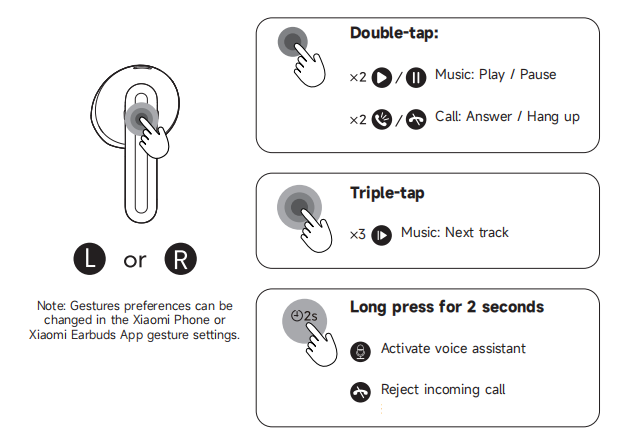
A: The touch control area of the earbuds is shown below and can be used to control the earbuds via touch:
1. By default, double-tap on the left or right earbud touch control area to play or pause music and answer or end calls.
3. By default, triple-tapping on the left or right earbud touch control area will skip to the next track.
4. By default, press and hold on the left or right earbud touch control area for 2 seconds to activate the voice assistant, or reject a call.
Note:
Gesture preferences can be changed in the Xiaomi Phone or Xiaomi Earbuds App gesture settings.
Q37: Why do the REDMI Buds 8 Active touch controls sometimes not respond?
A: If the REDMI Buds 8 Active touch controls sometimes do not respond, please refer to the following troubleshooting steps:
1. Ensure you are touching the correct area of the earbuds as described in the user manual.
2. Double-tapping to pause or play music should be performed while music is playing. Open your music App on your phone before attempting this gesture.
3. Consecutive taps may be too slow. Make sure to complete the double-tap or triple-tap quickly and continuously.
4. Excess oil or moisture on your fingers can reduce touch sensitivity. Make sure your fingers are clean and dry when tapping.
5. In cold weather, dry fingers can cause touch gestures to malfunction.
Charging and Battery Life
Q38: How to tell the charging status of the REDMI Buds 8 Active and check the battery level?
A: For the REDMI Buds 8 Active, the charging indicator is located on the front of the charging case. During charging, the white indicator stays on. When charging is complete, the white indicator turns off. The earbuds start charging automatically when placed in the charging case.
To check the battery level, please refer to the following methods:
Checking earbud battery level:
1. After connecting the REDMI Buds 8 Active to a phone, the battery level can be viewed in the phone’s notification bar.
2. When connected to the Xiaomi Earbuds App, the battery level can be checked in the App, and some Xiaomi/REDMI devices also support viewing the battery level in the status bar or additional settings.
Note:
1. After connecting the REDMI Buds 8 Active to a phone, the battery level can be viewed in the phone’s notification bar.
2. When connected to the Xiaomi Earbuds App, the battery level can be checked in the App, and some Xiaomi/REDMI devices also support viewing the battery level in the status bar or additional settings.
Note:
The status bar only displays the battery level of the earbud with a lower charge. Some phone models do not support viewing the earbud battery level.
Checking the charging case battery level:
When connected to the Xiaomi Earbuds App with both earbuds in the charging case, the case battery level can be viewed in the Xiaomi Earbuds App. Some Xiaomi/REDMI devices also support viewing the charging case battery level in the additional settings.
When connected to the Xiaomi Earbuds App with both earbuds in the charging case, the case battery level can be viewed in the Xiaomi Earbuds App. Some Xiaomi/REDMI devices also support viewing the charging case battery level in the additional settings.
Q39: Why does the battery level not show in the notification bar after connecting the REDMI Buds 8 Active to the phone?
A: Not all phones support showing the REDMI Buds 8 Active battery levels in the notification bar. If your phone does not support this feature, the battery level cannot be displayed. It is recommended to contact the corresponding brand’s customer service for assistance.
Q40: Is it normal for the REDMI Buds 8 Active to become warm while charging?
A: The REDMI Buds 8 Active uses a more efficient charging method, so their temperature can rise during fast charging. This is a normal phenomenon. Core components have been designed with protection mechanisms, so you can use the earbuds safely.
Note:
Charging heat has been tested in laboratories and by professional institutions and meets all safety standards. It will not cause harm to the human body. However, it is recommended to keep the earbuds away from highly flammable materials with low ignition points, such as white phosphorus, during charging.
Q41: Does the REDMI Buds 8 Active support charging with a power bank?
A: It is not recommended to charge the REDMI Buds 8 Active with a power bank. Most power banks have current protection features. If the output current is too low, the power bank can stop charging. Because the REDMI Buds 8 Active has a small battery and draws low current during charging, it can trigger the power bank’s current protection and prevent full charging. If your power bank supports a low-current mode, you can use it to charge the earbuds safely.
Q42: Why do the left and right earbuds of the REDMI Buds 8 Active show different battery levels or have different usage times?
A: For the REDMI Buds 8 Active, TWS earbuds operate in a primary–secondary mode, and the power consumption of the primary and secondary earbuds differs in various working states, with the primary earbud consuming more power than the secondary earbud. Over time, this can cause the battery levels displayed in the Xiaomi Earbuds App to differ, and the usage times of the left and right earbuds can vary. This is normal.
Please note the following scenario:
1. If you usually wear only one earbud while the other charges in the case, the battery levels can become unsynchronized when both earbuds are used together. It is recommended to wear both earbuds consistently to minimize differences in battery levels.
2. If one earbud is not properly seated while wearing, and is used for a period of time, significant differences in battery levels between the left and right earbuds can occur.
Q43: What to do if the REDMI Buds 8 Active cannot charge, cannot power on, or the indicator does not light?
A: If the REDMI Buds 8 Active cannot charge, cannot power on, or the indicator does not light, please refer to the following troubleshooting steps:
1. Check whether the charging case has sufficient battery. If the charging case runs out of battery, charge the case first, then charge the earbuds. After charging, attempt to power on the earbuds. If the earbuds have not been used for a long time and the battery is low, charging for a while is required before the indicator lights up.
2. Check whether any protective film on the earbud charging contacts has been removed, and inspect the charging contacts and pins inside the case for dirt, deformation, or damage. Remove any protective film and clean the contacts to ensure a good connection.
3. Try resetting the earbuds: place both earbuds into a fully charged charging case, keep the charging case lid open, then press and hold the case button for 10 seconds (the charging case indicator flashes slowly 3 times). After a successful reset, the earbuds enter pairing mode.
4. If the above steps do not resolve the issue, contact after-sales service for assistance.
Q44: Why does the actual battery life of the REDMI Buds 8 Active appear shorter than the advertised time?
A: The battery life of the REDMI Buds 8 Active is strongly affected by usage habits. The advertised battery life corresponds to specific test scenarios, such as music format and volume level. The test data was obtained under controlled conditions in Xiaomi labs. In real-world use, environmental factors such as signal interference and electromagnetic interference can cause the actual battery life of REDMI Buds 8 Active to differ from the lab results. This is normal.
Audio Related
Q45: Are the REDMI Buds 8 Active stereo?
A: Yes, the REDMI Buds 8 Active are stereo earbuds.
Q46: How to adjust the volume on the REDMI Buds 8 Active?
A: To adjust the volume on the REDMI Buds 8 Active, please refer to the following methods:
1. Use the volume buttons on your phone.
2. In the Bluetooth settings interface or the Xiaomi Earbuds App, you can customize touch gestures for the REDMI Buds 8 Active to control volume.
Note:
Volume cannot be adjusted via the earbuds' touch controls during phone calls.
Q47: Why does the REDMI Buds 8 Active sometimes automatically adjust volume when connecting to a device?
A: The REDMI Buds 8 Active may automatically adjust the volume in the following situations, which is normal:
1. When connecting the earbuds to a Xiaomi/REDMI device for the first time, the MIUI/HyperOS volume protection mechanism can adjust the volume automatically.
2. When connecting the earbuds to an iOS device for the first time, the iOS device can automatically sync the volume level.
3. After adjusting the volume on a connected device, the earbuds will synchronize to the last set volume when reconnected.
Q48: Why is there sound during calls but no sound when listening to music after connecting the REDMI Buds 8 Active to the phone?
A: Please go to the phone's Bluetooth settings, tap the paired REDMI Buds 8 Active, and make sure the [Media audio] option is enabled. If [Media audio] is turned off, there will be no sound when listening to music or watching videos, and this option needs to be manually enabled.
Q49: How to use the audio sharing feature on the REDMI Buds 8 Active?
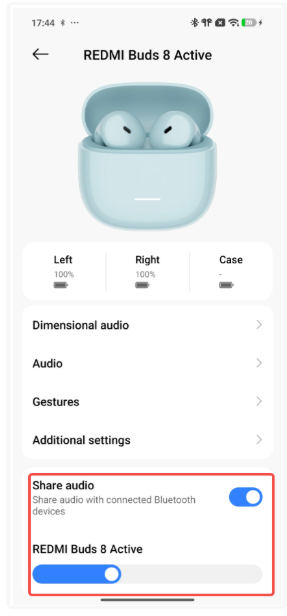
A: The REDMI Buds 8 Active supports the audio sharing feature. When the phone is connected to one Xiaomi earbud device (device A), connect another Xiaomi earbud device (device B). Then go to the Bluetooth settings interface for device B and turn on the [Share audio] to enter audio sharing mode.
Q50: What to do if one earbud of the REDMI Buds 8 Active has no sound or does not connect?
A: If one earbud of the REDMI Buds 8 Active has no sound or does not connect, place the earbuds into the charging case, keep the charging case lid open, then press and hold the case button for 10 seconds until the charging case indicator flashes in white slowly three times, then release, and the indicator will then flash in white rapidly to reset the device. Reconnect the earbuds to the phone and check if audio is restored. If the issue persists, try connecting the earbuds to another phone. If the problem still cannot be resolved, contact Xiaomi after-sales service for inspection.
Q51: Why does audio from the PC not play through the REDMI Buds 8 Active in Dual connection mode with a PC and a phone?
A: If audio is active on the phone, Windows PCs (with the input channel defaulted to the microphone array) cannot override the phone audio. PC audio will play through the REDMI Buds 8 Active only after phone audio is stopped. On Mac computers (with the input channel defaulted to headphones), PC audio can override phone audio.
Q52: Why does audio become silent during music playback on the REDMI Buds 8 Active, and how can it be restored?
A: The REDMI Buds 8 Active requires audio synchronization between both earbuds. In environments with strong interference, the audio link may fail, causing temporary silence.
To restore audio, place the earbuds back into the charging case, close the lid for 60 seconds, then reopen the lid to reconnect via Bluetooth. After reconnection, confirm whether music playback resumes in the earbuds.
Q53: What to do if the sound of the REDMI Buds 8 Active is intermittent or has noise during use?
A: If the REDMI Buds 8 Active has intermittent sound or noise during use, please refer to the following troubleshooting steps:
1. The low battery on the phone or the REDMI Buds 8 Active can cause unstable audio, so please fully charge both devices and check again.
2. If the distance between the phone and the REDMI Buds 8 Active, or between the two earbuds, is too far, or if there are obstacles such as walls blocking the signal, audio interruptions or noise can occur. Please keep the phone and earbuds close to each other and avoid signal obstructions.
3. Signal interference in the usage environment can cause this issue. Try using the REDMI Buds 8 Active in a different environment, such as indoors with minimal electronic interference, to check whether the phenomenon still occurs.
4. You can reset the REDMI Buds 8 Active, delete the Bluetooth pairing record on the phone, restart the phone, and pair again. If the issue persists, test the earbuds with another phone. If the problem still exists, please contact the after-sales service for inspection.
Q54: What to do if the sound volume of the REDMI Buds 8 Active is too low during use?
A: If the sound volume of the REDMI Buds 8 Active is too low during use, please confirm that [Absolute volume] is enabled on your phone. On Xiaomi phones, go to the Bluetooth device list >> tap the [>] icon next to the REDMI Buds 8 Active >> select [Audio] >> enable [Keep volume consistent].
Usage Scenarios
Q55: Does the REDMI Buds 8 Active support Smart scenes?
A: The REDMI Buds 8 Active does not support Smart scenes.
Q56: Does the REDMI Buds 8 Active support the voice wake-up (hotword) function?
A: The REDMI Buds 8 Active does not support the voice wake-up function.
Q57: Does the REDMI Buds 8 Active support firmware updates/OTA upgrades, and how to update it?
A: The REDMI Buds 8 Active supports firmware updates.
You can update the firmware in either of the following ways:
1. Go to the earbud Bluetooth settings interface >> [Additional settings] >> [Firmware update] to check for and install new firmware.
2. Connect the REDMI Buds 8 Active via the Xiaomi Earbuds App, then update from the Firmware update section after successful connection.
Q58: Does the REDMI Buds 8 Active support announcing the caller’s name during incoming calls?
A: The REDMI Buds 8 Active does not support caller name announcement.
Q59: What to do if both the phone and the earbuds play notification sounds after connecting the REDMI Buds 8 Active?
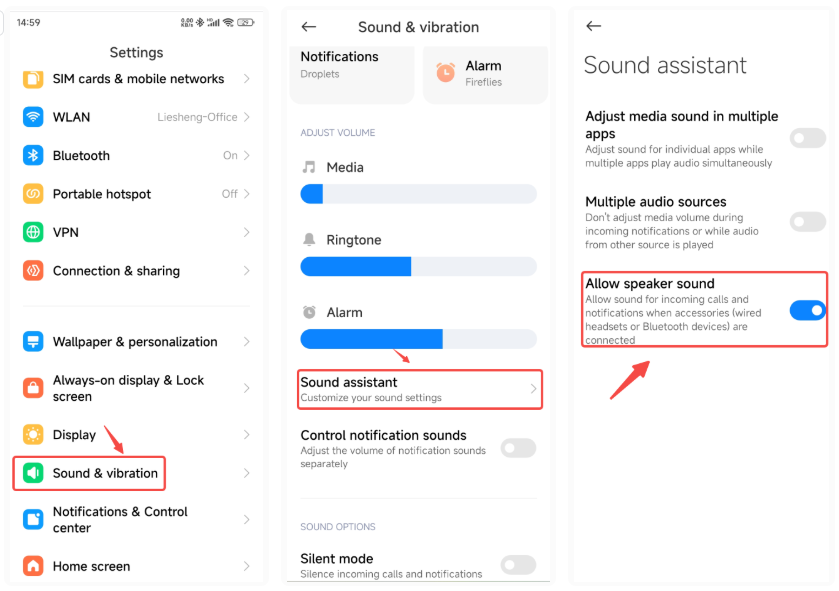
A: This is normal Android system behavior when using the REDMI Buds 8 Active. MIUI 13 introduced the Sound assistant feature to adjust this setting.
On Xiaomi phones running MIUI 13 or later, go to Settings >> [Sound & vibration] >> [Sound assistant] >> turn off [Allow speaker sound]. After disabling this option, sound will play only through REDMI Buds 8 Active.
On non-Xiaomi phones, feature availability and location may vary. Please consult the official customer support of the device brand.
Q60: Does the REDMI Buds 8 Active support Xiaomi PC Manager on computers?
A: The REDMI Buds 8 Active does not support Xiaomi PC Manager on computers.
Q61: Why is the equalizer not displayed in the Bluetooth settings interface or Xiaomi Earbuds App when using the REDMI Buds 8 Active?
A: If this occurs while using the REDMI Buds 8 Active, toggle Bluetooth off and on, or reconnect the earbuds. The equalizer display can be restored afterward.
Q62: Does the REDMI Buds 8 Active support notification announcements?
A: The REDMI Buds 8 Active does not support notification announcements.
Q63: Does the REDMI Buds 8 Active support the find your earphones function?
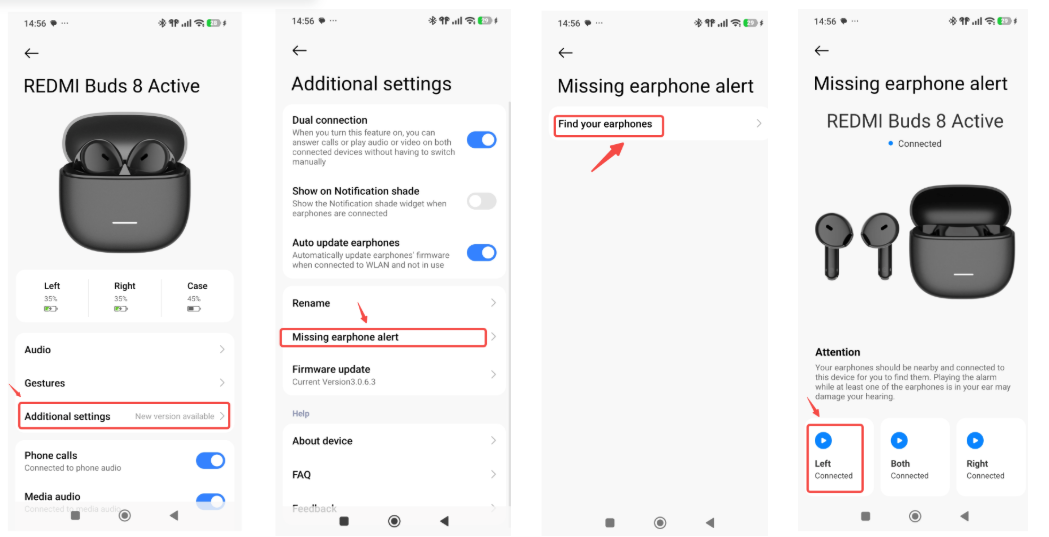
A: The REDMI Buds 8 Active supports the find your earphones function. It supports local sound-based earbud finding.
On a Xiaomi phone, tap the arrow next to REDMI Buds 8 Active in the system Bluetooth interface to enter [Additional settings] >> [Missing earphones alert] >> [Find your earphone] >> choose [Left], [Both], or [Right].
Does it help?
Yes
No