

Xiaomi Bluetooth Speaker Essential FAQ
Overview
Q1: What is the Xiaomi Bluetooth Speaker Essential?
A: The Xiaomi Bluetooth Speaker Essential is a portable Bluetooth speaker featuring a front-facing acoustic configuration with one full-range speaker and one passive radiator. The IP rating of the speaker is IP66. It supports stereo pairing of two identical speakers and allows for multi-speaker grouping of up to ten identical speakers. A built-in microphone enables hands-free Bluetooth calling, and it also supports USB mode. This portable Bluetooth speaker offers exceptional value for money, delivering superior sound quality and a stylish, trendy design.
Note:
The Xiaomi Bluetooth Speaker Essential doesn't support network connection, App connection, or voice assistant.
Q2: What are the specifications of the Xiaomi Bluetooth Speaker Essential?
A: For your reference, here are the specifications of the Xiaomi Bluetooth Speaker Essential:
1. Product appearance:
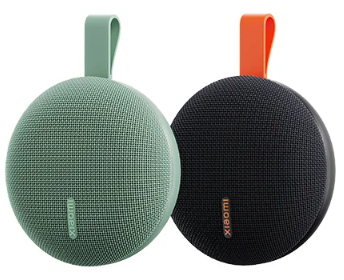
2. Model: OH3RG.
3. Color: Black/Green.
4. Acoustic configuration: A front-facing acoustic configuration consists of one full-range speaker and one passive radiator, with a rated power of 5 W.
5. Hardware configuration:
(1) Physical buttons: a power button and a Bluetooth button.
(2) IP rating: IP66.
(3) Bluetooth version: BT 6.0.
(4) Microphone: built-in microphone supporting Bluetooth hands-free calling.
(5) Battery capacity: 1000 mAh.
(6) Battery endurance: ≥10 h (40% volume), ≥2.5 h (the highest volume).
Note:
1. The battery endurance data is tested in a situation with the absolute volume function and AAC codec mode enabled, and the selection of the specific audio source.
2. Prolonged high-volume playback has a significant impact on battery endurance.
3. The speaker will automatically shut down if there is no operation or audio input to extend battery endurance.
(7) Charging: The Xiaomi Bluetooth Speaker Essential supports the charging power of 5 V/1 A, taking about 2 hours to charge it from 0% to 100%.
Note:
If the speaker runs out of power, in addition to plugging in the standard charger, you should charge it for a while (about 30 to 60 seconds) before trying to turn it on. If you try to turn it on immediately after plugging it in, it will not turn on. You should wait about 30 to 60 seconds until the speaker has been charged with some power before you can try turning it on.
(8) Port: USB Type-C.
6. Interconnectivity:
(1) Play mode: USB sound card.
(2) Multi-speaker pairing: 2.0 stereo pairing/multi-speaker grouping (up to 10 speakers).
Q3: What are the selling points of the Xiaomi Bluetooth Speaker Essential?
A: For your reference, here are the selling points of the Xiaomi Bluetooth Speaker Essential:
1. The Xiaomi Bluetooth Speaker Essential supports a dual-driver acoustic setup, with a 1.5-inch full-range speaker and a large passive radiator.
2. The Xiaomi Bluetooth Speaker Essential has a compact body, with a 5W speaker and bass boost, creating a powerful sound.
3. The rounded design with refined fabric mesh makes the Xiaomi Bluetooth Speaker Essential lightweight and portable.
4. The Xiaomi Bluetooth Speaker Essential supports stereo pairing, providing you with superior immersive sound quality.
5. IP66 dust and water-resistant feature makes the Xiaomi Bluetooth Speaker Essential withstand light rain with ease.
6. The Xiaomi Bluetooth Speaker Essential comes with a 1000 mAh high-capacity battery, supporting up to 10 hours of battery life.
Q4: How to use the buttons of the Xiaomi Bluetooth Speaker Essential?
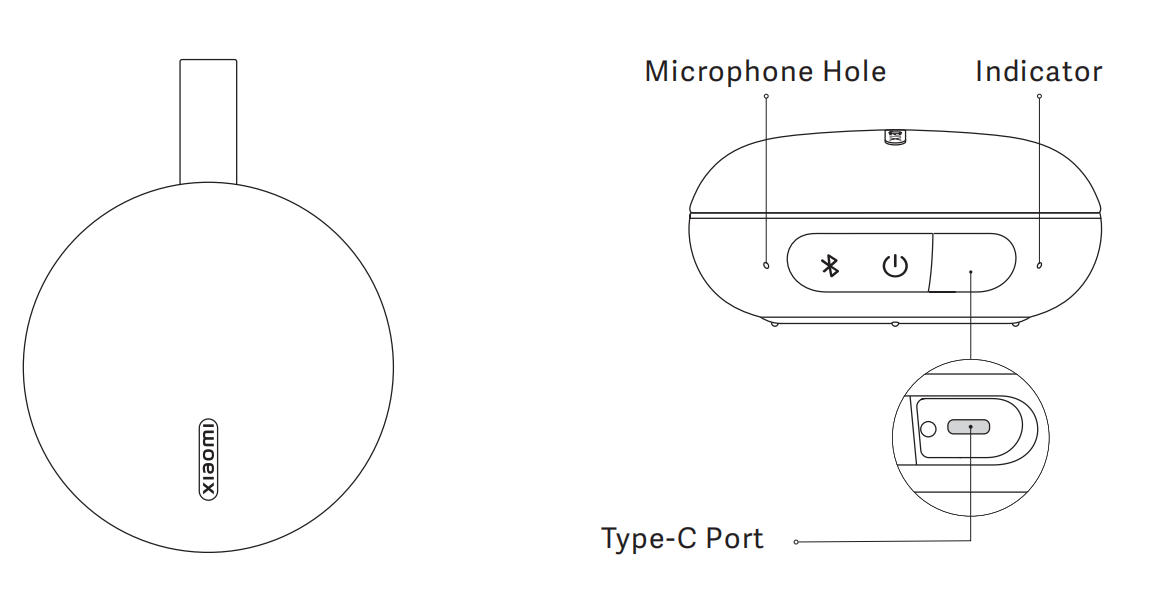
A: The Xiaomi Bluetooth Speaker Essential has two physical buttons, both of which are on the side of the speaker when it is placed flat. Two physical buttons are the power button and the Bluetooth button.
To use the buttons of the Xiaomi Bluetooth Speaker Essential, please refer to the following information:
1. Power button:
(1) Press and hold for 3 seconds to turn the speaker on/off.
(2) Press to play/pause music or answer/end a call.
(3) Double-press to reject a call.
(4) Press and hold for 10 seconds to force a restart.
2. Bluetooth button:
(1) Press to enter/exit Bluetooth pairing status.
(2) Double-press to enter/exit stereo pairing status or exit stereo pair mode.
(3) Triple-press to enter/exit multi-speaker grouping status or exit multi-speaker group mode.
(4) Press and hold for 3 seconds to switch between Bluetooth mode and USB mode.
(5) Press and hold the power button and Bluetooth button simultaneously for 10 seconds to restore factory settings.
Q5: How to switch to the next/previous song on the Xiaomi Bluetooth Speaker Essential?
A: The Xiaomi Bluetooth Speaker Essential doesn't support switching songs on the speaker in Bluetooth mode.
Q6: What are the indicator statuses of the Xiaomi Bluetooth Speaker Essential?
A: The Xiaomi Bluetooth Speaker Essential has an indicator on the right side of the charging port protective cover, which is a dot light source indicator and has five color statuses.
For your reference, here are the indicator statuses of the Xiaomi Bluetooth Speaker Essential:
1. Green: Fully charged.
2. White: Power on.
3. Blue: Bluetooth pairing.
4. Purple: Stereo pair mode or multi-speaker group mode.
5. Red: Low battery or charging in progress.
Q7: Do the package contents of the Xiaomi Bluetooth Speaker Essential include a charging cable?
A: The package contents of the Xiaomi Bluetooth Speaker Essential don't have charging cable.
Note:
The package contents don't include a charging cable and a power adapter. You can use the USB-C adapter meeting the charging parameter of 5 V=1 A to charge the speaker.
Q8: How to power on/off the Xiaomi Bluetooth Speaker Essential?
A: You can press and hold the power button for 3 seconds to power on/off the Xiaomi Bluetooth Speaker Essential, or press the power button to power on.
Q9: Why does the Xiaomi Bluetooth Speaker Essential automatically power off?
A: If there are no operations or audio playing on the Xiaomi Bluetooth Speaker Essential for 15 minutes, it will automatically power off to extend the battery endurance.
Note:
1. The Xiaomi Bluetooth Speaker Essential doesn't support disabling or customizing the function of automatic power-off.
2. When the Xiaomi Bluetooth Speaker Essential is in the charging status (including USB mode), automatic power-off is not supported.
Q10: How to restore the Xiaomi Bluetooth Speaker Essential to factory settings?
A: If the Xiaomi Bluetooth Speaker Essential is malfunctioning or has any other abnormalities, please refer to the following methods for restarting or resetting the speaker:
1. Press and hold the power button for 10 seconds to force the speaker to restart.
2. Simultaneously press and hold the power button and the Bluetooth button for 10 seconds to restore the speaker to factory settings.
Note:
After the speaker is restored to factory settings, the multi-speaker grouping records will be deleted.
Q11: Does the Xiaomi Bluetooth Speaker Essential support NFC?
A: The Xiaomi Bluetooth Speaker Essential doesn't support such functions as NFC and AirPlay.
Q12: Does the Xiaomi Bluetooth Speaker Essential support OTA upgrade?
A: The Xiaomi Bluetooth Speaker Essential doesn't support OTA upgrades.
Q13: Does the Xiaomi Bluetooth Speaker Essential support using a USB sound card?
A: The Xiaomi Bluetooth Speaker Essential supports using a USB sound card.
For your reference, here are the details about using a USB sound card on the Xiaomi Bluetooth Speaker Essential:
1. Connect the speaker and the audio source device using a USB data cable (a USB data cable with data transfer function needs to be purchased separately). The speaker will automatically enter USB mode and can play the audio content currently playing on the audio source device.
2. It is recommended that you connect the USB cable directly to the USB port of the audio source device. If you use a USB splitter/docking station to connect the computer and speakers, the speaker playback can malfunction due to incompatibility issues.
3. Due to factors such as device compatibility, software version, and audio source quality, the speaker's playback effect can vary. The actual experience should be taken into account.
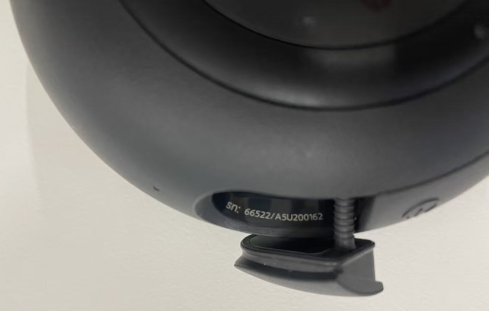
Q14: How to check the SN of the Xiaomi Bluetooth Speaker Essential?
A: The SN of the Xiaomi Bluetooth Speaker Essential is beside the charging port.
Q15: What Bluetooth protocols does the Xiaomi Bluetooth Speaker Essential support?
A: The Xiaomi Bluetooth Speaker Essential supports BT 6.0, which can be connected to a phone, pad, computer, or other audio devices to play music. The supported Bluetooth codec protocols include A2DP (SBC/ AAC).
Q16: Does the Xiaomi Bluetooth Speaker Essential support hands-free calling?
A: The Xiaomi Bluetooth Speaker Essential has a built-in microphone and supports hands-free calling.
For your reference, here are more details about hands-free calling on the Xiaomi Bluetooth Speaker Essential:
1. When a call comes in, the speaker will play a calling reminder sound on a loop. Pressing the power button answers the call, and pressing twice rejects the call. If the speaker is playing music, it will pause during an incoming call and resume playback after the call ends.
2. During a call, pressing the power button ends the call, and the speaker will play a notification tone. If the speaker is playing music, it will resume playback after the call ends.
Q17: Can the Xiaomi Bluetooth Speaker Essential be used as a Bluetooth gateway?
A: The Xiaomi Bluetooth Speaker Essential doesn't support being used as a Bluetooth gateway.
Q18: How to connect to the Xiaomi Bluetooth Speaker Essential with Bluetooth?
A: When first powering on the Xiaomi Bluetooth Speaker Essential, it will be in the Bluetooth pairing mode by default. You can also press the Bluetooth button to enable the Bluetooth pairing mode.
To connect to the Xiaomi Bluetooth Speaker Essential with Bluetooth, please refer to the following methods:
1. Press the Bluetooth button to enable the Bluetooth pairing mode. You can select the speaker with the name of "Xiaomi Speaker ES-XXXX" (XXXX is the last four numbers of the SN). After finishing the Bluetooth pairing, you can play the audio on the audio source with the speaker.
2. If the speaker is already connected to a Bluetooth device, you can press the Bluetooth button again to enable Bluetooth pairing mode. This will disconnect the connected Bluetooth device, and you can then pair and connect the speaker with a new Bluetooth device. This Bluetooth speaker only supports one Bluetooth device to remain connected at a time.
Note:
The supported Bluetooth codec protocols include SBC and AAC.
Q19: What to do if playback is not smooth when connecting to the Xiaomi Bluetooth Speaker Essential with Bluetooth?
A: If playback is not smooth when connecting to the Xiaomi Bluetooth Speaker Essential with Bluetooth, please refer to the following methods:
1. Confirm whether the input device (e.g., a mobile phone) is playing online or local music. If it's online music, playback will not be smooth due to network speed, buffering issues, etc.
2. Check whether the input device and the speaker are too far apart. Bluetooth's effective transmission distance is generally considered to be a maximum of 10 meters. If the distance is too far or there's a wall in between, Bluetooth playback will not be smooth.
3. Check whether there are multiple devices connected to 2.4 GHz Wi-Fi. Bluetooth uses the 2.4 GHz frequency band for communication. Having many devices on this band can cause strong interference.
4. If the methods mentioned above don't work, try turning the input device's Bluetooth on and off and reconnecting.
Q20: What to do if the Xiaomi Bluetooth Speaker Essential can't be searched when scanning with Bluetooth?
A: If the Xiaomi Bluetooth Speaker Essential can't be searched when scanning with Bluetooth, please refer to the following methods:
1. Check whether the speaker is connected to power and whether the Bluetooth pairing mode is enabled.
2. Check whether there are multiple devices connected to 2.4 GHz Wi-Fi. Bluetooth uses the 2.4 GHz frequency band for communication. Having many devices on this band can cause strong interference. Try switching to other devices to 5 GHz.
3. The Bluetooth system malfunction on the phone will affect the connection. Please restart the Bluetooth function on the phone to reconnect.
Q21: Why does the Xiaomi Bluetooth Speaker Essential automatically disable Bluetooth pairing mode?
A: Bluetooth will be turned off by default after the Xiaomi Bluetooth Speaker Essential is initialized. To prevent unauthorized Bluetooth connections and maintain a good use experience, Bluetooth will be automatically turned off in the following two situations:
1. After turning on the speaker for 5 minutes, no Bluetooth device is paired to connect.
2. After turning on the speaker for 5 minutes, once the speaker is successfully paired with your own device, the speaker's Bluetooth will automatically turn off (disconnecting from the discoverable state). To reconnect, press the Bluetooth button to turn Bluetooth back on.
Q22: Why does the Xiaomi Bluetooth Speaker Essential automatically play music?
A: If the Xiaomi Bluetooth Speaker Essential automatically plays music, please refer to the following methods for troubleshooting:
1. When your device has been paired with the speaker before, there will be connection records. Your device will automatically enable Bluetooth to connect to the speaker and play the audio on the device.
2. When your speaker is not turned off, it can be connected to other devices by others and play audio.
Q23: Why are there noises when using the Xiaomi Bluetooth Speaker Essential?
A: If there are noises when using the Xiaomi Bluetooth Speaker Essential, please refer to the following methods for troubleshooting:
1. Ensure there are no obstructions between the speaker and your device, and that they are within a reasonable range (ideally within 10 meters).
2. Sometimes other electronic devices (such as Wi-Fi routers, microwave ovens, etc.) can interfere with the Bluetooth signal. Try keeping the speaker a certain distance from these devices.
3. Restart your Bluetooth speaker and playback device, and re-pair via Bluetooth.
4. Try playing different audio sources to rule out issues with the audio file itself.
Multi-speaker Pairing
Q24: What is the number of the Xiaomi Bluetooth Speaker Essential for multi-speaker pairing?
A: The Xiaomi Bluetooth Speaker Essential supports stereo pairing with two identical speakers (the color can be different). It also supports multi-speaker grouping, allowing for up to 10 identical speakers.
Q25: How to use stereo pairing on the Xiaomi Bluetooth Speaker Essential?
A: To use stereo pairing on the Xiaomi Bluetooth Speaker Essential, please refer to the following methods:
1. Enable stereo pairing mode: Press twice the Bluetooth button of each speaker, the indicator will flash in purple, and unpair the audio devices connected to the speaker.
2. Automatic grouping: After enabling the pairing mode on two speakers, the stereo pairing will be enabled automatically, the pairing notification tone will be prompted, and the indicator of the main speaker will flash in blue.
3. Pair the audio device: After pairing, the main speaker will automatically enable Bluetooth pairing mode. You can select the speaker with the name of "Xiaomi Speaker ES-XXXX" (XXXX is the last four numbers of the SN of the main speaker). The indicator will stay in purple after successful pairing.
4. Playback in stereo pairing: After successful pairing, the main speaker will play as the left channel, and the other speaker will play as the right channel.
Note:
1. Stereo pairing mode supports a maximum of 2 speakers, and they should be the same model.
2. When combining speakers, it is recommended that the distance between them be within 1 meter.
3. The stereo pairing function is mainly used for playing music. When playing video, due to device and network limitations, varying degrees of audio-visual desynchronization can occur.
Q26: How to use multi-speaker grouping on the Xiaomi Bluetooth Speaker Essential?
A: To use multi-speaker grouping on the Xiaomi Bluetooth Speaker Essential, please refer to the following methods:
1. Pair the audio device: Press the Bluetooth button of one of the speakers to enable Bluetooth pairing mode. You can select the speaker with the name of "Xiaomi Speaker ES-XXXX" (XXXX is the last four numbers of the SN). After pairing, this speaker will be the main speaker of the multi-speaker grouping.
2. Enable multi-speaker grouping on the main speaker: Press the Bluetooth button of the main speaker three times; the indicator will stay in purple, and enable the multi-speaker grouping on the main speaker.
3. Enable multi-speaker grouping on other speakers: Press the Bluetooth button three times on other speakers, the indicator will flash in purple, and enable the multi-speaker grouping on other speakers.
4. Automatic grouping: Speakers of the same model will automatically form a multi-speaker grouping in series with the main speaker. Once the combination is successful, the indicator will stay in purple, and a grouping success prompt tone will be emitted.
5. Playback in multi-speaker grouping: In this mode, all the speakers will play the same audio, with a wider coverage range.
Note:
1. When combining speakers, it is recommended that the distance between them be within 1 meter.
2. The multi-speaker grouping function is mainly used for playing music. When playing video, due to device and network limitations, varying degrees of audio-visual desynchronization can occur.
Q27: How to use the Xiaomi Bluetooth Speaker Essential after finishing stereo pairing?
A: To use the Xiaomi Bluetooth Speaker Essential after finishing stereo pairing, please refer to the following details:
1. After finishing a stereo pairing, the two speakers will play audio from both speakers simultaneously when used together.
2. Once in a stereo pairing, the speaker volume adjustments will be synchronized. Adjusting one speaker will also adjust the other.
Q28: Why does the phone disconnect from the Xiaomi Bluetooth Speaker Essential in the multi-speaker grouping or stereo pairing mode?
A: If the phone disconnects from the Xiaomi Bluetooth Speaker Essential in the multi-speaker grouping or stereo pairing mode, please refer to the following details:
1. In a stereo pairing, only one of the two speakers can be the main speaker. The system will only play audio from the phone connected to the main speaker. If both speakers are connected to the phone via Bluetooth during the setup, the Bluetooth connection between the sub speaker and the phone will be disconnected after the setup is successful, while the Bluetooth connection between the main speaker and the phone will be retained.
2. The main speaker in a stereo pairing can only connect to one phone.
Q29: How to terminate the multi-speaker grouping or stereo pairing mode on the Xiaomi Bluetooth Speaker Essential?
A: To terminate the multi-speaker grouping or stereo pairing mode on the Xiaomi Bluetooth Speaker Essential, please refer to the following methods:
1. When the multi-speaker grouping or stereo pairing mode is finished, press the Bluetooth button twice to terminate it.
2. Any one of the speakers in the stereo pairing stopping working will end the stereo pairing.
USB Mode
Q30: How to use the USB mode on the Xiaomi Bluetooth Speaker Essential?
A: To use the USB mode on the Xiaomi Bluetooth Speaker Essential, please refer to the following details:
1. Power on the speaker. Connect the speaker and the audio source device using a USB data cable (a USB data cable with data transfer function needs to be purchased separately). The speaker will automatically enable USB mode and can play the audio content currently playing on the audio source device.
2. If the speaker can't enable the USB mode, try pressing and holding the Bluetooth button to switch the mode.
Q31: What to do if the USB mode on the Xiaomi Bluetooth Speaker Essential can't be used?
A: If the USB mode on the Xiaomi Bluetooth Speaker Essential can't be used, please refer to the following methods:
1. Please check whether the speaker is powered on and currently operating in USB mode.
2. Please check whether your USB cable supports data transfer and whether the speakers are connected to your computer using the USB cable.
3. Please check the USB port you are using with your computer. If it is not recognized, please try a different port. It is recommended that you connect it to a USB port on the back of the computer host.
Battery Endurance and Charging
Q32: How to check the remaining battery power of the Xiaomi Bluetooth Speaker Essential?
A: To check the remaining battery power of the Xiaomi Bluetooth Speaker Essential, please refer to the following methods:
1. After powering on the speaker, press the power button twice, and the speaker will give a voice prompt of the remaining battery level.
2. When the battery level drops to 20%, 10%, and 5%, the speaker will actively give a voice prompt of the remaining battery level. The indicator will flash in red when the battery level of the speaker is low.
3. When the battery level drops to 0%, the speaker will give a voice prompt that its battery level is low and will shut down automatically.
Q33: Why is there a large change in the battery level announced by the Xiaomi Bluetooth Speaker Essential?
A: The battery level of the Xiaomi Bluetooth Speaker Essential is displayed in increments of 10%. If the displayed battery level changes within a short period of time, it means that the speaker's battery level is at the threshold of the second level (e.g., if the battery level is checked at 80% and 79%, the speaker will display 80% and 70% remaining battery respectively).
Q34: How to charge the Xiaomi Bluetooth Speaker Essential?
A: To charge the Xiaomi Bluetooth Speaker Essential, first connect the speaker to a compatible adapter via USB-C cable. The indicator at the bottom of the speaker will stay red. Once fully charged, the indicator will stay green. It takes approximately 2 hours to fully charge the speaker while it is powered off.
Q35: Can the Xiaomi Bluetooth Speaker Essential be used while being charged?
A: The Xiaomi Bluetooth Speaker Essential can be used while being charged, but it will take a longer time to fully charge it.
Q36: What to do if the Xiaomi Bluetooth Speaker Essential can't be charged?
A: Check the USB-C charging cable and the device's charging port for any abnormalities, and ensure good contact during charging. Besides, check whether the indicator of the speaker changes when connected to a power source via the USB-C cable. Try replacing the charging cable and adapter. If these methods don't work, it is recommended that you apply for after-sales service.
Q37: What to do if the Xiaomi Bluetooth Speaker Essential can't be powered on?
A: If the Xiaomi Bluetooth Speaker Essential can't be powered on, please refer to the following methods:
1. If the speaker is out of power, first plug it in to charge. After plugging in the charger, the charging indicator will flash, and the speaker will automatically power on after about 30 seconds without needing to press the power button.
2. If you don't hear the power-on prompt tone or the indicator doesn't flash after more than 3 minutes, please press and hold the power button for 10 seconds to try to force power on. If the speaker still cannot power on after 1 minute of forced power-on, it is a malfunction, and please apply for after-sales service.
Note:
If you try to power the speaker immediately after plugging it in, it won't turn on. You have to wait about 30 to 60 seconds.
Does it help?
Yes
No