

How to let AI adjust the Mijia Air Conditioner settings using the Xiaomi Home App?
You can set AI to adjust the Mijia Air Conditioner settings in the Xiaomi Home App. This feature enables the device to automatically optimize temperature, fan speed, and operating modes based on real-time conditions, room size, and your preferences, providing a more comfortable and energy-efficient home environment.
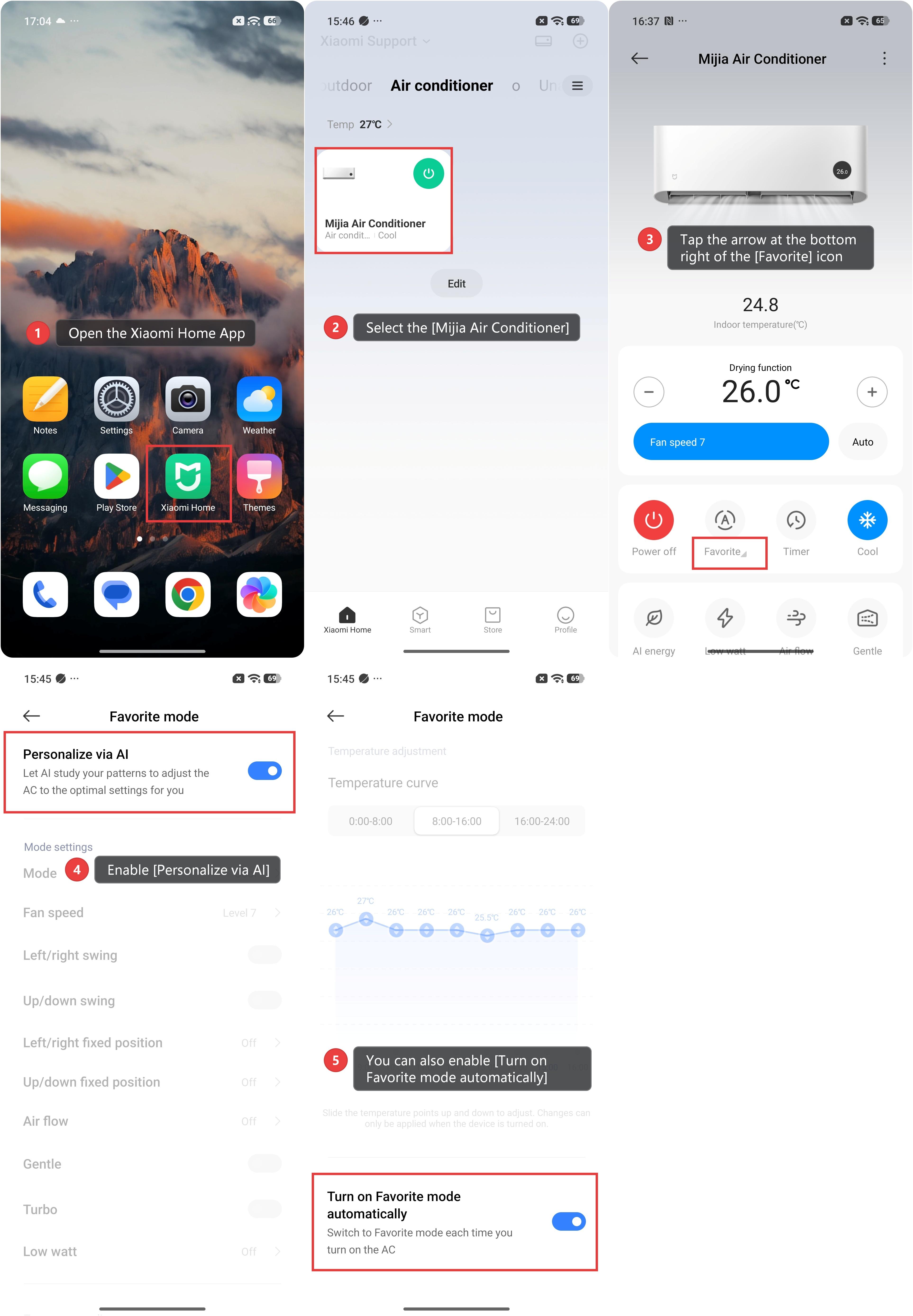
To let AI adjust the Mijia Air Conditioner settings using the Xiaomi Home App, please refer to the following steps:
1. Open the Xiaomi Home App.
2. Select the [Mijia Air Conditioner].
3. Tap the arrow at the bottom right of the [Favorite] icon.
4. Enable [Personalize via AI].
5. You can also enable [Turn on Favorite mode automatically], which allows the air conditioner to switch to Favorite mode each time it is turned on.
Does it help?
Yes
No