

How to adjust the Fan speed of the Mijia Air Conditioner?
You can adjust the Fan speed of the Mijia Air Conditioner to control airflow output to match different comfort and usage needs. By adjusting the fan speed, the air conditioner can deliver air more gently or more powerfully, helping to create a pleasant indoor environment while maintaining efficient operation.
To adjust the Fan speed of the Mijia Air Conditioner, please refer to the following methods:
Method 1:
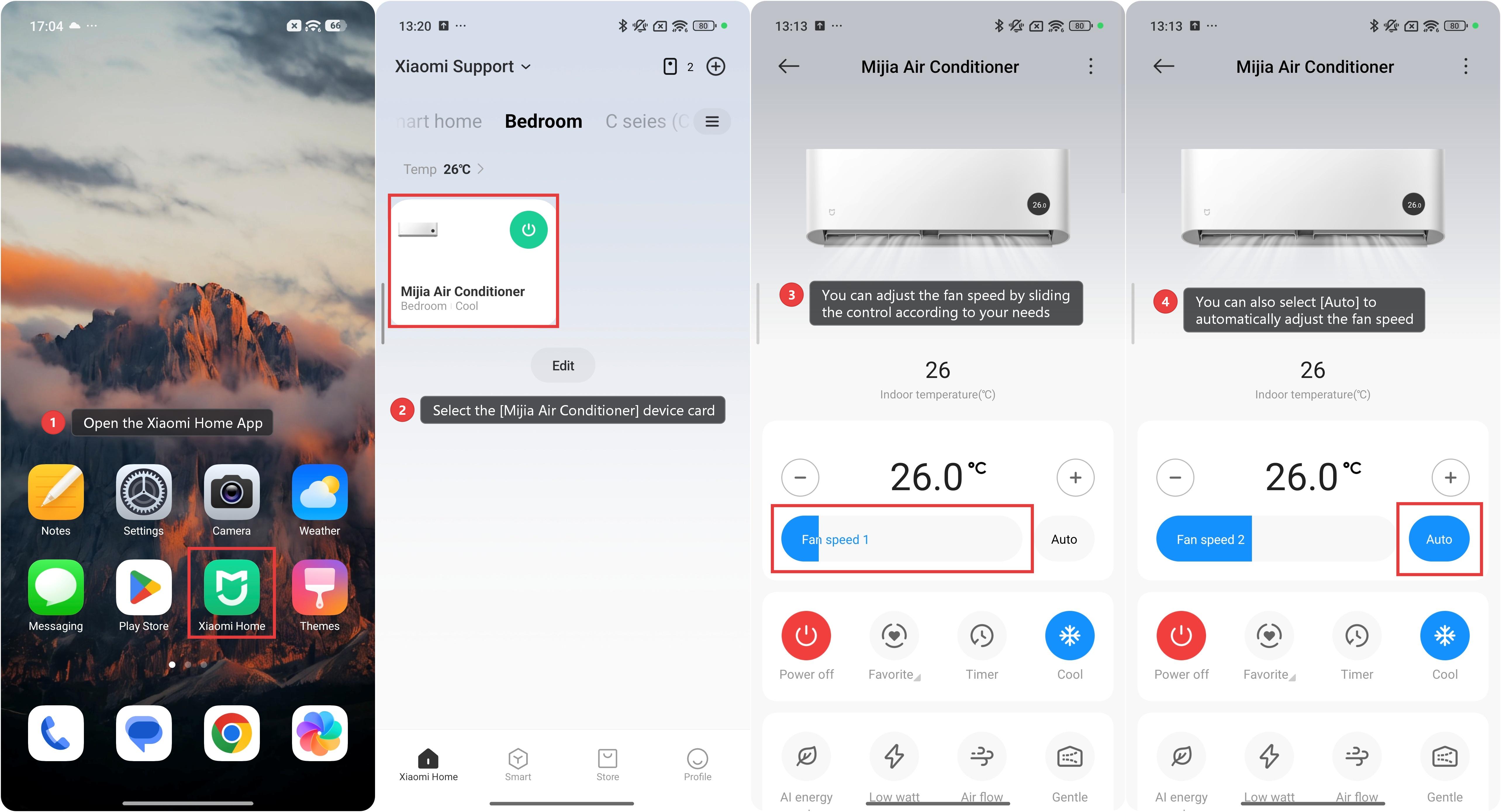
1. Open the Xiaomi Home App on your phone.
2. Select the [Mijia Air Conditioner] device card.
3. You can adjust the fan speed by sliding the control according to your needs; there are seven wind speed settings available.
4. You can also select [Auto] to automatically adjust the fan speed. When you manually adjust the fan speed, the [Auto] setting will be canceled.
Method 2:
Press the Fan Speed Button to adjust the fan speed: automatic, quiet (level 1), low (level 2), low-medium (level 3), medium (level 4), medium-high (level 5), high (level 6), and super-high (level 7).
Note:
When the mode is set to Dry mode, the fan speed cannot be adjusted.
Does it help?
Yes
No