

How to run a self-clean proform for the Mijia Air Conditioner?
The Mijia Air Conditioner can be set to run a self-cleaning program, which can effectively clean the air conditioner's heat exchanger, keep it running smoothly, and ensure clean air output. This process takes about 40 minutes, during which time you won't be able to use the air conditioner's other functions. It is recommended to auto clean once per quarter. This not only improves air quality but also enhances performance, prolongs the lifespan of the device, and ensures more efficient cooling or heating.
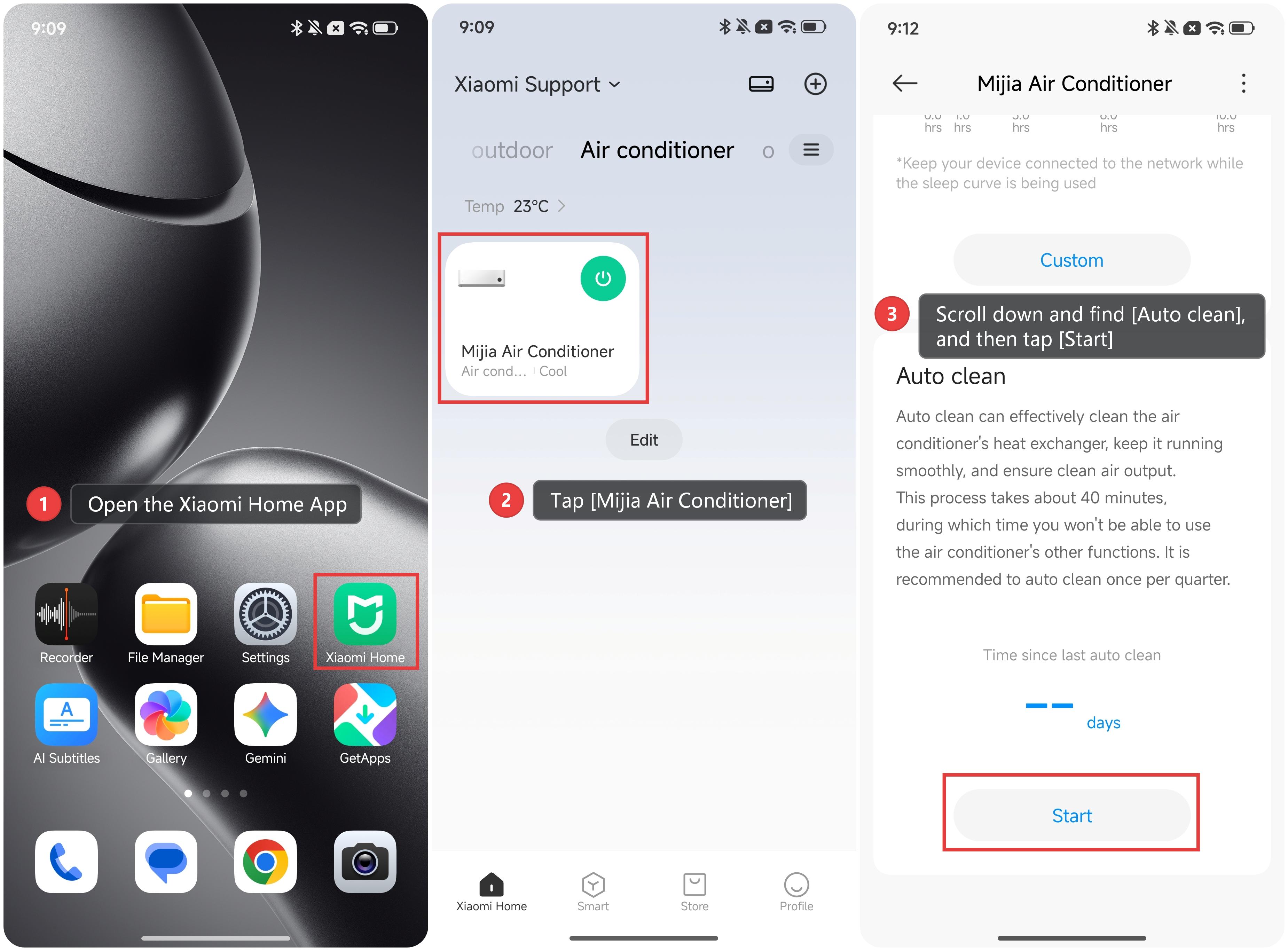
To run a self-cleaning program for the Mijia Air Conditioner, please refer to the following methods:
Method 1:
1. Open the Xiaomi Home App.
2. Tap [Mijia Air Conditioner].
3. Scroll down and find [Auto clean], and then tap [Start].
Method 2:
When the air conditioner is off, simultaneously press and hold the Eco button (Low Watt button) and the Timer button for more than 3 seconds to enable the auto clean function. The remote control display will show "Auto Clean", and the air conditioner display will start blinking.
Does it help?
Yes
No