

How to enable noise reduction function for the Mijia Air Conditioner?
The Mijia Air Conditioner supports a noise reduction function, which helps lower operating noise from the indoor or outdoor unit to create a quieter and more comfortable environment, especially during rest or nighttime use.
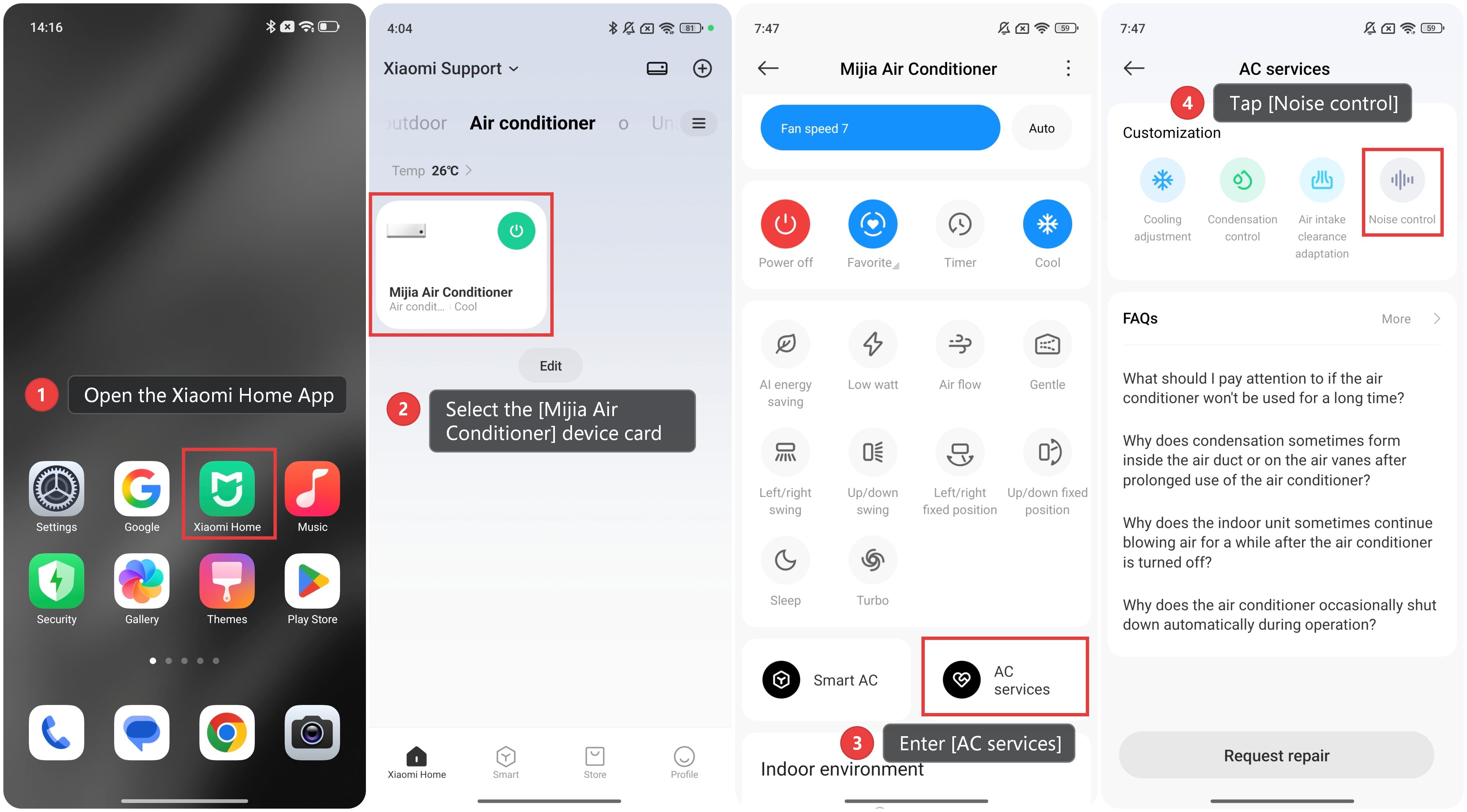
To enable noise reduction function for the Mijia Air Conditioner, please refer to the following steps:
1. Open the Xiaomi Home App and make sure the Mijia Air Conditioner is connected successfully.
2. Select the [Mijia Air Conditioner] device card.
3. Enter [AC services].
4. Tap [Noise control].
5. You can enable the noise reduction function for both the indoor and outdoor units during cooling and heating operations.
Note:
The causes of noise generated from indoor/outdoor unit fans are quite complex. Enabling this feature will minimize the noise to the greatest extent possible, but it can also affect the cooling or heating performance. Please use it as needed.
Does it help?
Yes
No