

How to adjust the cooling effect of the Mijia Air Conditioner using the Xiaomi Home App?
To meet different cooling needs, you can easily adjust the cooling effect of the Mijia Air Conditioner through the Xiaomi Home App. You can select [Intense cooling] or [Medium cooling] to improve cooling, or choose [Gentle cooling] or [Mild cooling] to reduce cooling, helping create a more comfortable indoor environment.
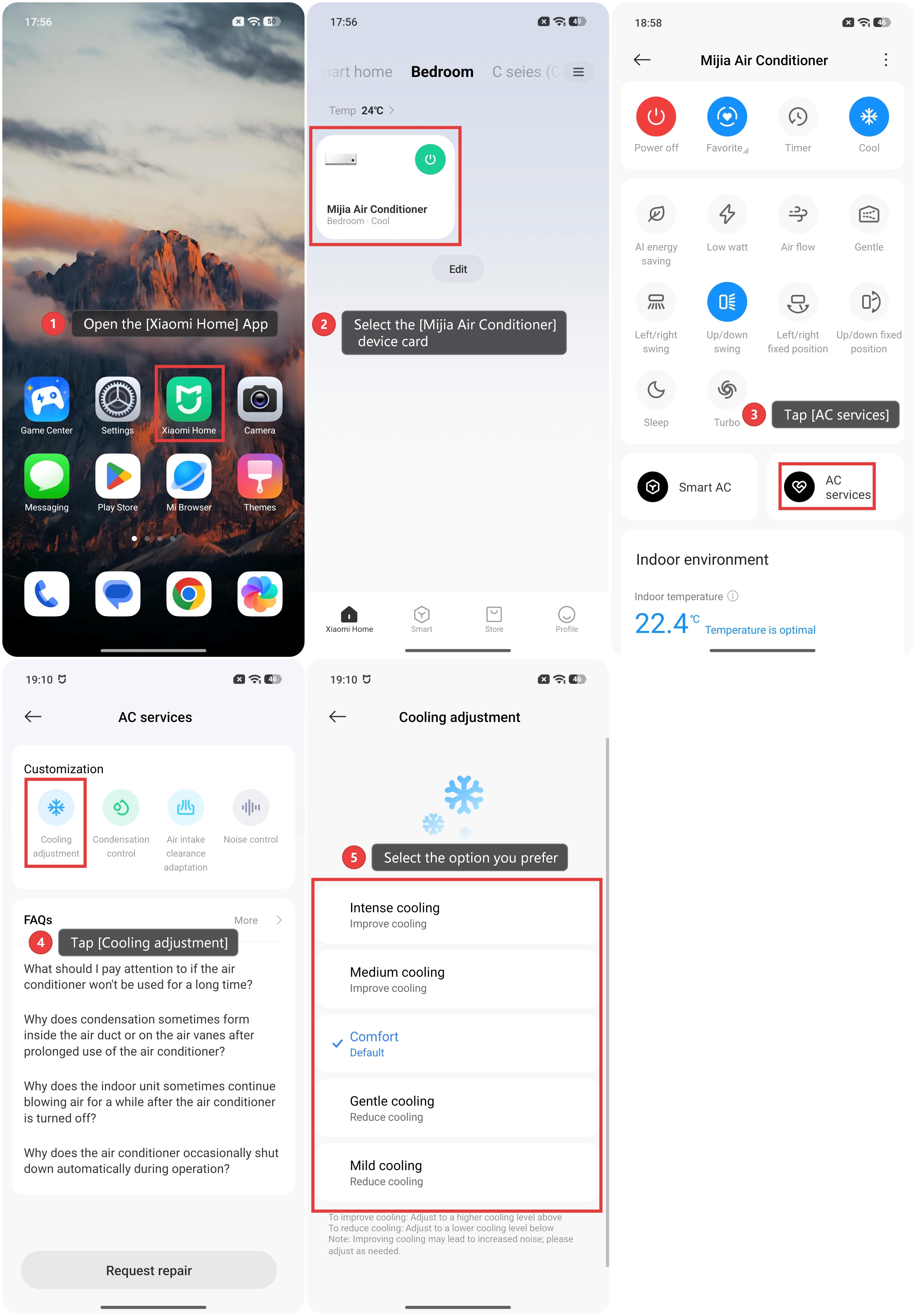
To adjust the cooling effect of the Mijia Air Conditioner using the Xiaomi Home App, please refer to the following steps:
1. Open the [Xiaomi Home] App and make sure the Mijia Air Conditioner is connected successfully.
2. Select the [Mijia Air Conditioner] device card.
3. Tap [AC services] to enter the feature and service options for the air conditioner.
4. Tap [Cooling adjustment].
5. Select the option that matches your needs from [Intense cooling], [Medium cooling], [Comfort], [Gentle cooling], and [Mild cooling]. To improve cooling, adjust to a higher cooling level above; to reduce cooling, adjust to a lower level below.
Note:
Improving cooling may lead to increased noise; please adjust as needed.
Does it help?
Yes
No