

How to check the indoor temperature curve in the Xiaomi Home App when using the Mijia Air Conditioner?
You can check the indoor temperature curve in the Xiaomi Home App when using the Mijia Air Conditioner, which provides a clear and intuitive view of how the room temperature changes over time. The indoor temperature curve helps you better understand the air conditioner's operation and adjust the temperature promptly to achieve a comfortable level. Optimal temperature helps stabilize the body's metabolic functions, pulse, and breathing. It prevents tension in the body and the weakening of the respiratory system due to low temperatures.
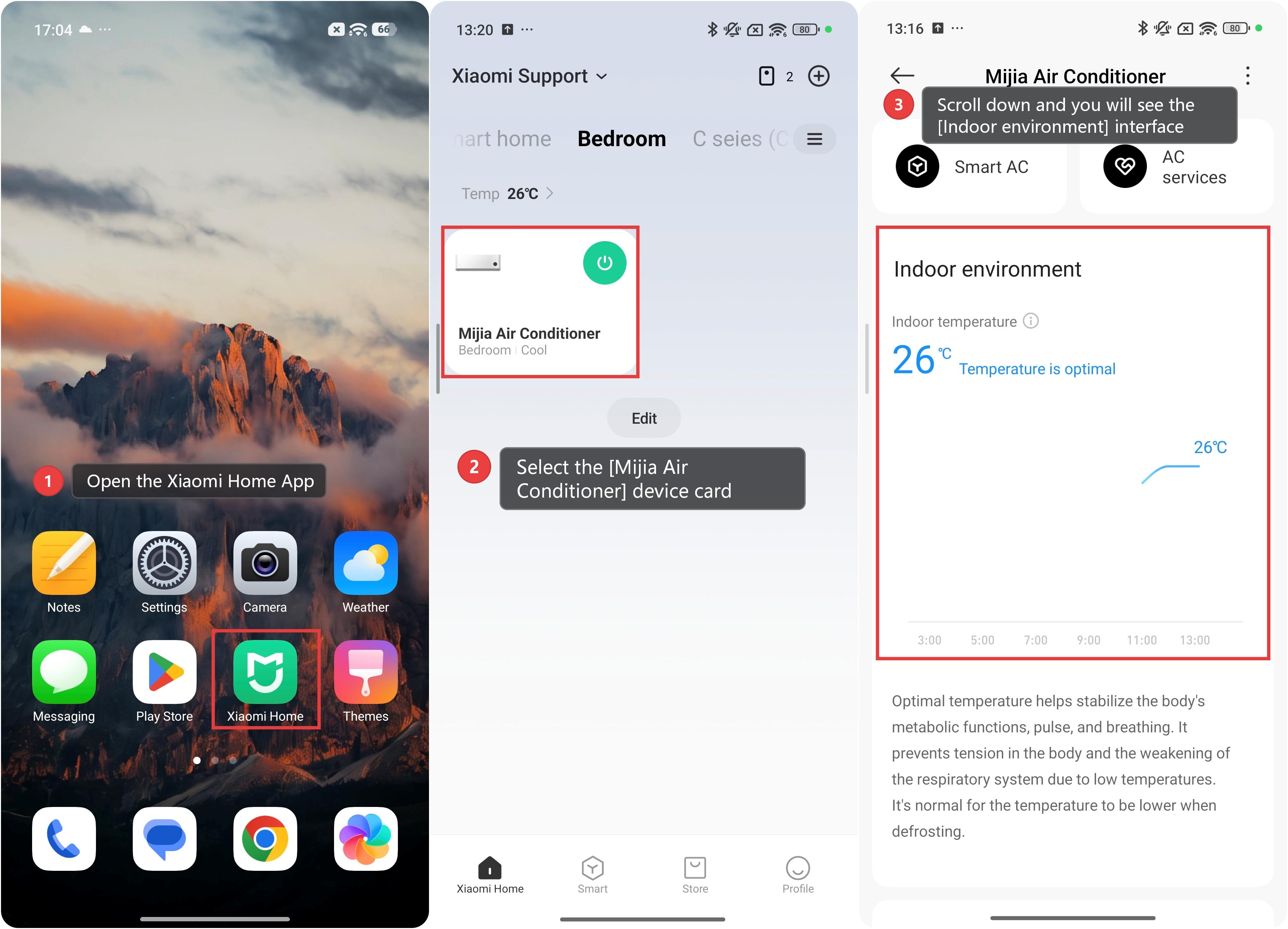
To check the indoor temperature curve in the Xiaomi Home App when using the Mijia Air Conditioner, please refer to the following steps:
1. Open the Xiaomi Home App on your phone and make sure the Mijia Air Conditioner is connected successfully.
2. Select the [Mijia Air Conditioner] device card.
3. Scroll down and you will see the [Indoor environment] interface, where you can view the temperature change curve.
Does it help?
Yes
No