

Mijia Tool Kit FAQ
Product Overview
Q1: What does the Mijia Tool Kit include?
A: The Mijia Tool Kit provides a versatile collection of tools designed for striking, fastening, measuring, and cutting tasks. It includes: a self-locking tape measure, short bit set, electric straight screwdriver, long bit set, adjustable wrench, utility knife, multi-function needle-nose pliers, extension rod, claw hammer, rubber hammer sleeve, flexible shaft, Allen key set, and a storage box. You can rely on this set to support daily maintenance, DIY work, and home projects with confidence.
Q2: What are the selling points of the Mijia Tool Kit?
A: The selling points of the Mijia Tool Kit are as follows:
1. It offers a multi-functional tool set that combines both electric and manual tools for versatile use.
2. It is suitable for a wide range of scenarios, including home repairs, daily maintenance tasks, and DIY projects.
3. It provides carefully selected essential tools that ensure you can confidently handle everyday tasks.
4. It includes a practical storage box that allows you to keep your tools neatly organized and well protected.
5. It features an inner and outer clasp design for secure closure and easy portability.
6. It adopts a home-style aesthetic, making it blend seamlessly into your living space.
FAQs
Q1: What does the exterior layout of the Mijia Tool Kit look like?
A: The layout of the Mijia Tool Kit is as follows:
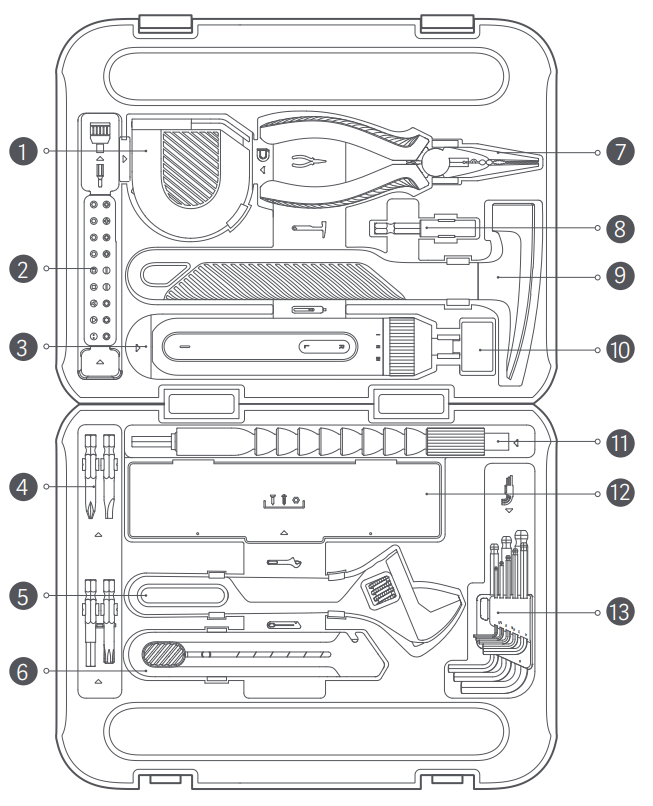
1. Self-locking Tape Measure
2. Short Bit Set
3. Electric Straight Screwdriver
4. Long Bit Set
5. Adjustable Wrench
6. Utility Knife
7. Multi-function Needle-nose Pliers
8. Extension Rod
9. Claw Hammer
10. Rubber Hammer Sleeve
11. Flexible Shaft
12. Storage Box
13. Allen Key Set
Note:
Illustrations of product and accessories above are for reference purposes only. Actual product and functions can vary due to product enhancements.
Q2: What are the dimensions of the items inside the Mijia Tool Kit?
A: The dimensions of the items inside the Mijia Tool Kit are as follows:
1. Electric Straight Screwdriver: Approx. 179 mm × Φ35 mm.
2. Multi-function Needle-nose Pliers: Approx. 165 mm × 56 mm × 16 mm.
3. Self-locking Tape Measure: Approx. 71 mm × 70 mm × 28 mm.
4. Claw Hammer: Approx. 243 mm × 105 mm × 24 mm.
5. Adjustable Wrench: Approx. 200 mm × 58 mm × 13 mm.
6. Flexible Shaft: Approx. 220 mm × Φ16 mm.
7. Utility Knife: Approx. 152 mm × 26 mm × 16 mm.
8. Allen Key Set: Approx. 110 mm × 53 mm × 21 mm.
9. Storage box: Approx. 185 mm × 43 mm × 29 mm.
10. Extension rod: Approx. 60 mm × Φ10 mm.
11. Short bit set: C6.3 × 25 mm × 18.
12. Long bit set: C6.3 × 50 mm × 4.
Q3: How to charge the electric straight screwdriver included in the Mijia Tool Kit?
A: The electric straight screwdriver included in the Mijia Tool Kit uses a Type-C charging port. Charge it with a Type-C cable and a 5V/1A charger. The charging time is approximately 180 minutes.
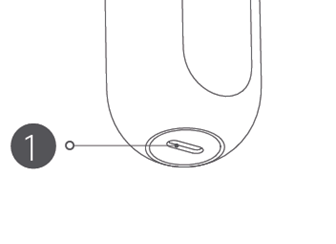
The charging port location of the electric straight screwdriver included in the Mijia Tool Kit is shown below:
Q4: Does the Mijia Tool Kit come with a charging cable?
A: The Mijia Tool Kit does not include a charging cable or charger. You can use your own Type-C charging cable for charging.
Q5: What are the safety precautions when using the Mijia Tool Kit?
A: The tools in the Mijia Tool Kit are suitable for striking, fastening, measuring, and cutting tasks. Please read all safety warnings, instructions, illustrations, and specifications provided with the electric tool. Ignoring these safety guidelines can result in electric shock or serious injury. For detailed safety information, refer to the safety instructions in the user manual.
Q6: What is the net weight and gross weight of the Mijia Tool Kit?
A: The net weight of the Mijia Tool Kit is 2.48 kg and the gross weight is 2.76 kg.
Q7: What is the weight of the outer packaging of the Mijia Tool Kit?
A: The weight of the outer packaging of the Mijia Tool Kit is approximately 970 g.
Q8: Where is the SN location of the Mijia Tool Kit?
A: The SN of the Mijia Tool Kit is located on the outer packaging box.
Product Using
Q1: What is the electric straight screwdriver included in the Mijia Tool Kit?
A: The electric straight screwdriver included in the Mijia Tool Kit starts operating when you adjust the torque knob to Level I, II, or III and press the forward/reverse rotation button. When you release the forward/reverse rotation button, the tool pauses.
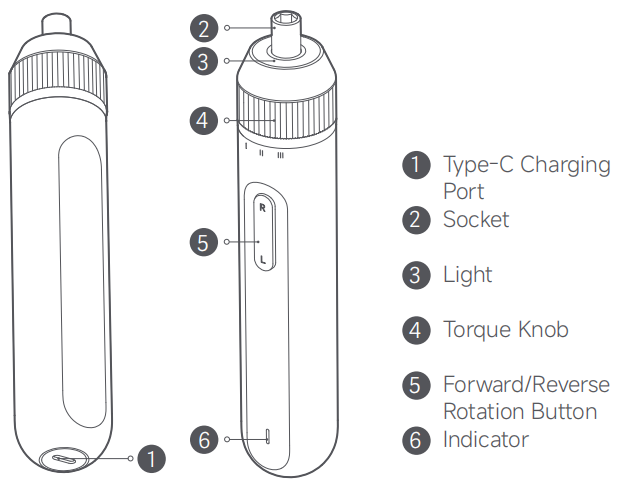
1. Type-C charging port
2. Socket
3. Light
4. Torque knob
5. Forward/Reverse rotation button
6. Indicator
Q2: What are the multi-function needle-nose pliers included in the Mijia Tool Kit?
A: The multi-function needle-nose pliers in the Mijia Tool Kit offer multiple capabilities, including gripping, holding workpieces, twisting, bending, cutting metal wires, stripping insulation, and crimping terminals. They also feature a built-in return spring for easier operation.
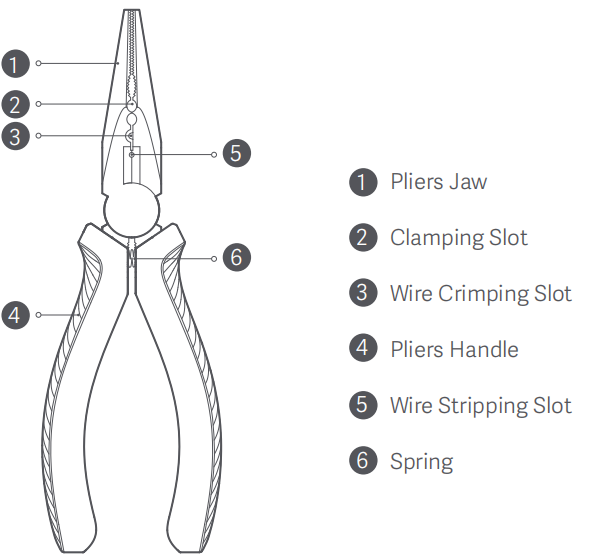
1. Pliers jaw
2. Clamping slot
3. Wire crimping slot
4. Pliers handle
5. Wire stripping slot
6. Spring
Q3: What is the self-locking tape measure included in the Mijia Tool Kit?
A: The self-locking tape measure in the Mijia Tool Kit includes a self-locking mechanism and a horizontal level assist function for convenient and safe use. You can pull out the tape for measurement and release it to automatically lock. Press the retraction button, and the tape retracts automatically. When placed horizontally, the level bubble helps you measure more accurately.
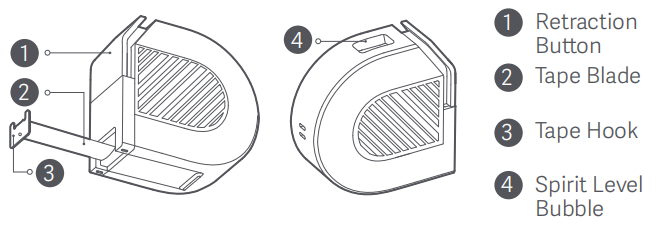
1. Retraction button
2. Tape blade
3. Tape hook
4. Spirit level bubble
Q4: What is the claw hammer included in the Mijia Tool Kit?
A: The claw hammer in the Mijia Tool Kit features a flat striking face for hitting hard materials and a claw end for nail removal. A rubber hammer sleeve is also included, which you can attach when you need to strike softer surfaces without causing scratches.
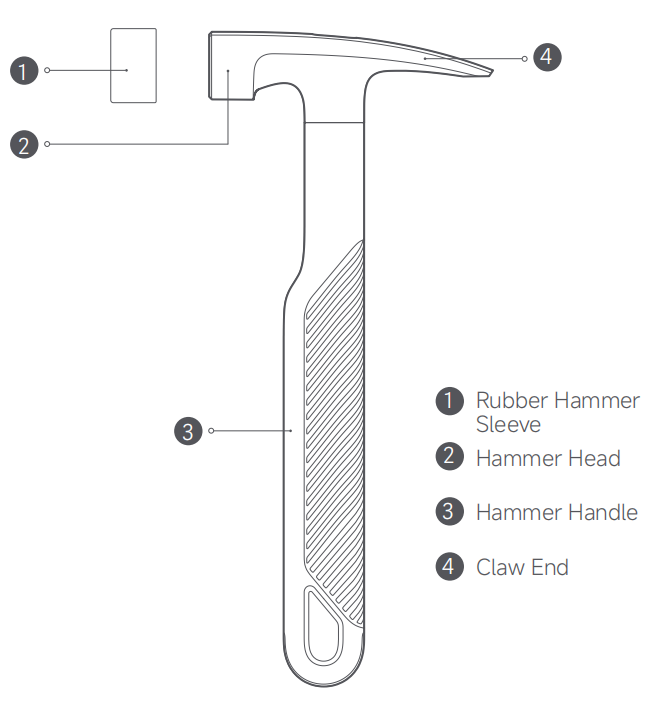
1. Rubber hammer sleeve
2. Hammer head
3. Hammer handle
4. Claw end
Q5: What is the adjustable wrench included in the Mijia Tool Kit?
A: The adjustable wrench in the Mijia Tool Kit has a length of 200 mm and is suitable for installing or removing hex screws or nuts. You can rotate the worm gear to adjust the jaw width. The wrench is designed for hex screws or nuts with an outer diameter of less than 20 mm.
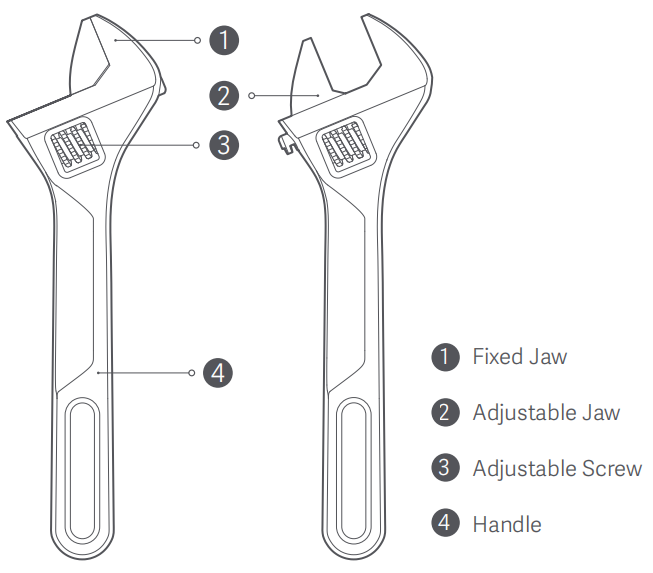
1. Fixed jaw
2. Adjustable jaw
3. Adjustable screw
4. Handle
Q6: What is the flexible shaft included in the Mijia Tool Kit?
A: The flexible shaft in the Mijia Tool Kit is an accessory for the electric screwdriver. You can attach a bit to the shaft and connect the shaft to the screwdriver, making it easier to operate the tool at various angles and in tight spaces.
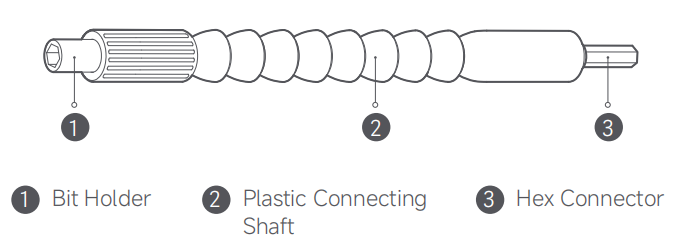
1. Bit holder
2. Plastic connecting shaft
3. Hex connector
Q7: What is the utility knife included in the Mijia Tool Kit?
A: The utility knife in the Mijia Tool Kit is equipped with a cutting slot and uses an 18 mm blade with an eight-segment snap-off design for extended usability.
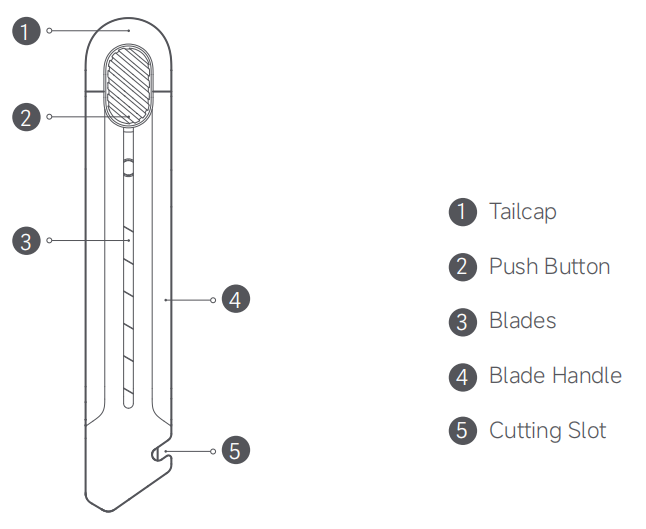
1. Tailcap
2. Push button
3. Blades
4. Blade handle
5. Cutting slot
Q8: What is the Allen key set included in the Mijia Tool Kit?
A: The Allen key set in the Mijia Tool Kit is an eight-piece set designed for hex socket screws. The available sizes are 1.5 / 2 / 2.5 / 3 / 4 / 5 / 6 / 8 mm. You simply select the correct size for the task and start working.
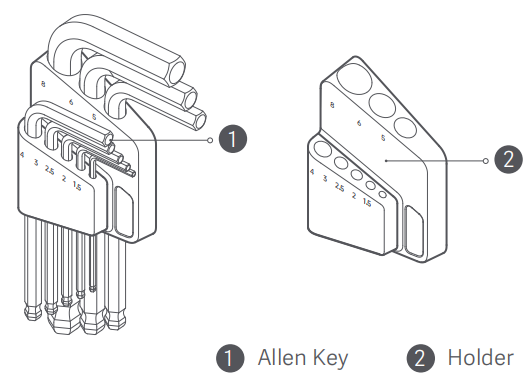
1. Allen key
2. Holder
Q9: How many torque levels does the electric straight screwdriver in the Mijia Tool Kit have?
A: The electric straight screwdriver in the Mijia Tool Kit has three torque levels: low torque, medium torque, and high torque.
Q10: How does the lighting function of the electric straight screwdriver in the Mijia Tool Kit work?
A: The electric straight screwdriver in the Mijia Tool Kit automatically activates its light when the tool starts. After you release the forward/reverse rotation button, the light turns off after 10-second delay.
Q11: What are the indicator states of the electric straight screwdriver in the Mijia Tool Kit?
A: The indicator of the electric straight screwdriver in the Mijia Tool Kit works as follows:
1. When the battery level drops below 20% during operation, the indicator flashes in red rapidly. It turns off 3 seconds after you release the forward/reverse rotation button.
2. During charging, the indicator breathes in white.
3. When fully charged, the indicator remains steadily white for 2 seconds before turning off.
Q12: Does the electric straight screwdriver in the Mijia Tool Kit support forward and reverse rotation?
A: The electric straight screwdriver in the Mijia Tool Kit supports both forward and reverse rotation. Pressing the R button tightens a screw, while pressing the L button removes screws.
Q13: How many operating modes does the electric straight screwdriver in the Mijia Tool Kit have?
A: The electric straight screwdriver in the Mijia Tool Kit has two operating modes: electric mode with a maximum torque of 4 N·m, and manual mode with a maximum torque of 8 N·m.
Q14: What size screwdriver bits does the electric straight screwdriver in the Mijia Tool Kit use?
A: The electric straight screwdriver in the Mijia Tool Kit uses C6.3-type bits.
Q15: Why is the front hook of the self-locking tape measure in the Mijia Tool Kit slightly loose?
A: The self-locking tape measure in the Mijia Tool Kit features a compensated hook design to eliminate thickness error and make the zero marking more accurate.
Q16: What bit types are included in the short bit set of the Mijia Tool Kit?
A: The short bit set in the Mijia Tool Kit contains 25 mm bits in the following types:
1. Slotted: SL4 / SL6.
2. Phillips head: PH2, PH3.
3. Hex: H2, H2.5, H3, H4.
4. Torx: T10, T15, T20.
5. Triangle: △2.3.
6. Pozidriv: PZ1, PZ2.
7. Square: S1, S2.
8. TW type: TW1.
9. U type: 2.6.
Q17: What bit types are included in the long bit set of the Mijia Tool Kit?
A: The long bit set in the Mijia Tool Kit contains 50 mm bits in the following types:
1. Standard: SL5.
2. Phillips head: PH1.
3. Hex: H5.
4. Torx: T25.
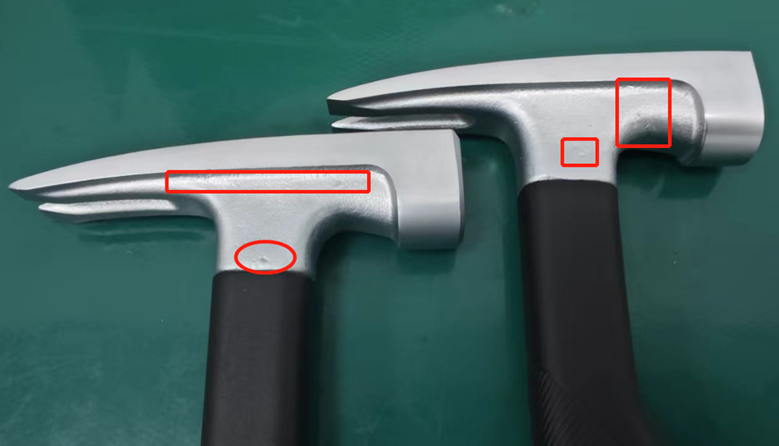
Q18: Why does the claw hammer in the Mijia Tool Kit show dents after striking?
A: The claw hammer in the Mijia Tool Kit uses an electroplated surface to prevent oxidation and corrosion. When striking or contacting metal, the protective layer can show marks or dents, which do not indicate internal metal damage. This is normal and does not affect product performance, so you can continue using it with confidence.
Q19: How to replace the blade of the utility knife in the Mijia Tool Kit?
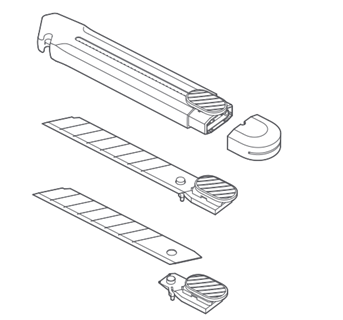
A: To replace the blade of the utility knife in the Mijia Tool Kit, remove the tailcap, push the button from the back, and replace the blade. Please note that blades need to be purchased separately.
Q20: Why does the surface of the claw hammer in the Mijia Tool Kit appear uneven?
A: The claw hammer in the Mijia Tool Kit is made using a forging process, which naturally creates small surface pits, marks, and uneven textures. This is a normal characteristic of forged hardware and does not indicate a quality issue.
Q21: Why does the adjustable wrench in the Mijia Tool Kit have uneven surface dents?
A: The adjustable wrench in the Mijia Tool Kit is produced using a forging process, and any dents on the surface are normal results of this manufacturing method. The characteristics of forging determine that the metal surface will not be perfectly smooth and can show minor pits or stamped markings. This is not a quality issue, and it does not affect normal use.
Q22: What to do if the flexible shaft in the Mijia Tool Kit becomes separated at the middle joint?
A: If the flexible shaft in the Mijia Tool Kit becomes separated at the middle joint, align the joint correctly and press it back into place to restore normal use.
Q23: Why are there dark marks on the outer case of the Mijia Tool Kit?
A: The toolbox shell of the Mijia Tool Kit is produced through an injection-molding process. Marks near the injection gate are unavoidable characteristics of this manufacturing method. This is a normal appearance condition and not a product quality issue.
Q24: Why can't the electric straight screwdriver in the Mijia Tool Kit stop rotating after the button is released?
A: To improve the operating feel and handling experience, the button of the electric straight screwdriver in the Mijia Tool Kit uses soft silicone material. Pressing the button can occasionally cause slight internal sticking within the housing. Gently lifting the front end of the button outward resets it. This is not a product quality issue.
Q25: Why is there oil on the front section of the electric straight screwdriver in the Mijia Tool Kit?
A: To enhance rust protection of the socket, the electric straight screwdriver in the Mijia Tool Kit is coated with anti-rust oil during production. If a small amount appears on the surface, wipe it clean as needed. This condition is normal and not a product quality issue.
Q26: What material is used for the screw bits in the Mijia Tool Kit?
A: The screw bits in the Mijia Tool Kit are made of S2 alloy steel with a Rockwell hardness of approximately 60. This material provides high strength and durability.
Q27: What material is used for the body of the electric straight screwdriver in the Mijia Tool Kit?
A: The body of the electric straight screwdriver in the Mijia Tool Kit uses high-strength plastic material with good corrosion resistance, anti-slip performance, and resistance to sweat and dirt.
Q28: Can the electric straight screwdriver in the Mijia Tool Kit use bits not in the package?
A: The Mijia Tool Kit includes standard C6.3 bits. Any bit on the market with the same C6.3 specification can be used normally. If the included bit does not match a particular screw, compatible C6.3 bits can be selected as needed.
Q29: Does the electric straight screwdriver in the Mijia Tool Kit support manual operation when the electric torque is insufficient?
A: When the electric torque of the electric straight screwdriver in the Mijia Tool Kit is insufficient, it supports manual operation. The maximum electric torque is 4 N·m, and the maximum manual torque is 8 N·m.
Q30: What types of items can be assembled or disassembled using the electric straight screwdriver in the Mijia Tool Kit?
A: The electric straight screwdriver in the Mijia Tool Kit is designed for various small and medium-sized items such as small toys, drones, power strips, and other household objects.
Q31: What is the service life of the electric straight screwdriver in the Mijia Tool Kit?
A: The service life of the electric straight screwdriver in the Mijia Tool Kit depends on usage scenarios and intensity. The main unit and bits are made with high-strength materials and do not become damaged under normal use. Storing the tool in a dry and ventilated environment while avoiding moisture and oil will significantly improve durability.
Q32: Can the electric straight screwdriver in the Mijia Tool Kit be used while charging?
A: To protect the motor and battery, the electric straight screwdriver in the Mijia Tool Kit cannot operate while charging.
Q33: Does the electric straight screwdriver in the Mijia Tool Kit require regular charging?
A: To protect the battery, the electric straight screwdriver in the Mijia Tool Kit should be charged once every six months when left unused in a fully charged state.
Q34: Why does the electric straight screwdriver in the Mijia Tool Kit produce different sounds when rotating forward and backward?
A: Both sound levels are controlled within 60 dB (measured at approximately 1 meter). Because the electric straight screwdriver in the Mijia Tool Kit operates using mechanical gears, slight differences in sound between forward and reverse rotation are normal.
Q35: Can the screw bits in the Mijia Tool Kit become rusty?
A: The bits in the Mijia Tool Kit are coated with anti-rust oil before leaving the factory and can withstand 8 hours of neutral salt-spray testing. Repeated handling removes surface oil, and sweat can accelerate rust. After use, applying anti-rust oil and avoiding storage in humid or salty environments helps prevent rust.
Q36: Can the screw bits in the Mijia Tool Kit become worn, deformed, or broken?
A: During manual operation, the applied torque can exceed the bit’s maximum tolerance, causing wear, deformation, or breakage. Misalignment, incorrect engagement, or irregular screw structures can also contribute to bit damage. These are normal wear conditions. It is recommended to start with low torque, switch to higher torque only when necessary, and ensure correct alignment when operating manually.
Q37: Do the screw bits in the Mijia Tool Kit have magnetic properties?
A: The bits in the Mijia Tool Kit are not magnetic.
Q38: Why does the screwdriver bit appear to wobble when attached to the electric straight screwdriver in the Mijia Tool Kit?
A: A designed clearance is reserved between the gearbox interior and the socket. Therefore, slight wobbling is visible when bits are installed, but this is within design limits and does not affect normal use.
Q39: Why do items such as the utility knife blade, adjustable wrench, or multi-function needle-nose pliers in the Mijia Tool Kit have oil on the surface?
A: To ensure smooth operation of moving parts and enhance rust protection, certain components in the Mijia Tool Kit are coated with oil. This is normal and does not affect functionality. For long-term storage, applying light anti-rust oil is recommended.
Q40: Why are the allen key set in the Mijia Tool Kit not perfectly parallel when placed in the holder?
A: Due to normal manufacturing tolerances in the bending angles of the allen key set, different sizes can appear non-parallel when stored together. This is normal and does not affect performance.
Precautions
Q1: What precautions should be taken when using the multi-function needle-nose pliers included in the Mijia Tool Kit?
A: When using the multi-function needle-nose pliers in the Mijia Tool Kit, please refer to the following information:
1. Always wear protective glasses when cutting or tightening cables.
2. Avoid using the pliers as a hammer, as this can damage the tool.
3. It is recommended to maintain the pliers regularly by applying lubricant to the hinge for smoother operation.
4. Please do not operate the pliers on live circuits to prevent electric hazards.
Q2: What precautions should be taken when using the self-locking tape measure included in the Mijia Tool Kit?
A: When using the self-locking tape measure in the Mijia Tool Kit, please refer to the following information:
1. Please do not extend the tape beyond its maximum length of 3 meters.
2. Kindly avoid touching the edges of the tape during retraction to prevent cuts.
3. Do not hold the tape itself while measuring, as this can cause injury.
4. Please discontinue use if the tape is damaged or broken.
5. The spirit level bubble is provided for auxiliary use only and should not replace professional leveling tools.
Q3: What precautions should be taken when using the claw hammer included in the Mijia Tool Kit?
A: When using the claw hammer in the Mijia Tool Kit, please refer to the following information:
1. Ensure the hammer face is level with the surface being struck.
2. Never strike one hammer against another.
3. Please stop using the hammer if the head becomes loose.
4. Discontinue use if the handle is damaged.
5. Do not use a rubber hammer head to hit nails.
6. Never use the hammer on people or animals.
Q4: What precautions should be taken when using the adjustable wrench included in the Mijia Tool Kit?
A: When using the adjustable wrench in the Mijia Tool Kit, please refer to the following information:
1. Adjust the wrench opening accurately to fit the nut.
2. Apply force horizontally to the nut to prevent slipping.
3. Please do not use the wrench to strike hard objects.
4. Avoid attaching a pipe to the wrench handle to increase leverage, as this can cause damage.
Q5: What precautions should be taken when using the flexible shaft included in the Mijia Tool Kit?
A: When using the flexible shaft in the Mijia Tool Kit, please refer to the following information:
1. Avoid excessive bending or twisting to protect the internal structure of the shaft.
2. Keep the shaft head aligned vertically with the screw to ensure smooth rotation and prevent damage.
3. It is not recommended to use the flexible shaft for high-precision screws to maintain accuracy and stability.
4. Before using the flexible shaft, securely attach it to the screwdriver, and always stop the electric screwdriver before detaching the shaft to prevent accidents.
Q6: What precautions should be taken when using the utility knife included in the Mijia Tool Kit?
A: When using the utility knife in the Mijia Tool Kit, please refer to the following information:
1. Please exercise caution when breaking off blade segments using the end cap.
2. Always retract the blade into the handle after each use.
3. The utility knife is not suitable for children to prevent injury.
4. Please store the utility knife out of reach of children.
Q7: What precautions should be taken when using the allen key set included in the Mijia Tool Kit?
A: When using the allen key set in the Mijia Tool Kit, please refer to the following information:
1. Confirm that the key size matches the screw before use.
2. Apply force horizontally to the screw to prevent slipping.
3. Please do not use the allen key to strike hard objects.
4. Avoid attaching a pipe to the key to increase leverage, as this can damage the tool.
Q8: What precautions should be taken when using the storage box included in the Mijia Tool Kit?
A: When using the storage box in the Mijia Tool Kit, please refer to the following information:
1. The storage box is designed to store small components only. Please do not store oversized items.
2. Do not place liquids in the storage box.
3. The storage box is non-removable and should be used as intended.
Q9: What precautions should be taken when using the extension rod included in the Mijia Tool Kit?
A: When using the extension rod in the Mijia Tool Kit, please refer to the following information:
1. Please inspect the extension rod for integrity before use.
2. Avoid applying excessive force to prevent damage.
3. After use, clean the extension rod to remove water, dirt, or debris to maintain performance and service life.
Q10: What precautions should be taken when using the bits set included in the Mijia Tool Kit?
A: When using the bits set in the Mijia Tool Kit, please refer to the following information:
1. Inspect the bits for completeness before use.
2. Avoid applying excessive force to prevent breakage.
3. After use, clean the bits to remove water, dirt, or debris, ensuring consistent performance and extended lifespan.
Troubleshootings
Q1: What to do if the electric straight screwdriver included in the Mijia Tool Kit flashes a red light when pressing the forward/reverse rotation button?
A: If the electric straight screwdriver included in the Mijia Tool Kit flashes a red light when pressing the forward/reverse rotation button, please refer to the following information:
1. Check whether the battery is sufficiently charged. A possible cause is low battery in the built-in lithium battery of the electric straight screwdriver.
2. It is recommended to charge the device first.
Q2: What to do if the electric straight screwdriver included in the Mijia Tool Kit does not work after pressing the forward/reverse rotation button?
A: If the electric straight screwdriver included in the Mijia Tool Kit does not work after pressing the forward/reverse rotation button, please refer to the following information:
1. Check whether the battery is sufficiently charged. A possible cause is low battery in the built-in lithium battery of the electric straight screwdriver.
2. It is recommended to charge the device first.
Q3: What to do if the bits cannot be installed on the electric straight screwdriver included in the Mijia Tool Kit?
A: Please check whether the bit size matches the socket. If the sizes do not match, please replace with the appropriate bit.
Q4: What to do if the electric straight screwdriver included in the Mijia Tool Kit cannot be charged?
A: Please check whether the USB cable is properly connected and whether the specified charging cable is being used. It is recommended to use the specified charging cable and adapter for charging.
Does it help?