

REDMI Buds 8 Lite FAQ
Product Parameters
Q1: What is the product weight of the REDMI Buds 8 Lite?
A: Each REDMI Buds 8 Lite weighs approximately 4.5g (±0.2g). When both earbuds are placed in the charging case, the total product weight is approximately 35.2 g (tolerance ± 2 g).
Q2: What is the product size of the REDMI Buds 8 Lite?
A: The dimensions of the single REDMI Buds 8 Lite are 31.02mm * 21.45mm * 23.48mm, and the charging case dimensions are 56.43mm * 55.99mm * 26.24mm.
Q3: What is the Bluetooth version of the REDMI Buds 8 Lite?
A: The REDMI Buds 8 Lite uses Bluetooth 5.4, which is backward compatible. Both Android and iOS systems can connect. Connecting via Bluetooth does not require downloading an App. If prompted for a password, please enter "0000"(Some devices could not display this notification).
To check the battery level, adjust touch controls, and access other features, you can download and install the Xiaomi Earbuds App for management.
Q4: What are the audio and Bluetooth protocols of the REDMI Buds 8 Lite?
A: The REDMI Buds 8 Lite supports audio decoding protocols AAC and SBC, and Bluetooth transmission protocols BLE, HFP, A2DP, and AVRCP, meeting daily needs for music playback and phone calls.
Q5: What is the Bluetooth search name of the REDMI Buds 8 Lite?
A: The Bluetooth search name of the REDMI Buds 8 Lite is "REDMI Buds 8 Lite". If you cannot find the name in your Bluetooth list, it is recommended to place the earbuds back in the charging case and open the lid, or press and hold the function button to enter pairing mode as instructed, and then search again. (Please note that the display method could vary slightly depending on your phone's operating system.)
Q6: What is the product certification of the REDMI Buds 8 Lite?
A: The REDMI Buds 8 Lite has the following certifications:
1. EU/Europe related: CE, CB, EAC, EAC RoHS.
2. USA/Canada: FCC ID, IC ID, CEC, DOE, NRCan.
3. Japan/South Korea/Taiwan: MIC, PSE, KC, NCC.
4. Southeast Asia: IMDA, SIRIM, NBTC, SDPPI.
5. Middle East/Australia/New Zealand: TRA, TDRA, RCM.
6. Other regions: NTRA, FAC, SUBTEL, MTC, NTC, NOM, IFETEL, ENACOM, UA DOC, ANRT.
7. Other compliance items: PSTI, Type-C, IECEE.
Note:
Certification requirements could vary depending on the country/region of sale and product batch. Please refer to the product nameplate/packaging labels and local sales version information for details.
Q7: What are the environmental protection requirements of the REDMI Buds 8 Lite?
A: The REDMI Buds 8 Lite meets the following environmental protection requirements:
1. EU Regulations: RoHS, WEEE, REACH (SVHC, Annex XVII), POPs, Packaging and Packaging Waste Directive.
2. US Regulations: CP65, TSCA.
3. Other Regions/Standards: TPCH, South Korean standards for plastic products.
Note:
The specific applicable items are subject to the regulations of the sales region and product labeling information.
Q8: What is the sensitivity, frequency, and impedance of the REDMI Buds 8 Lite?
A: The REDMI Buds 8 Lite has a sensitivity of 122 dB ± 1.5 dB, a frequency response range of 20 Hz–20 kHz, and an impedance of 32 Ω ± 10%.
Note:
The parameters above are related to the test standards and measurement conditions (such as frequency, input power/voltage, etc.). Actual performance could vary slightly depending on the equipment and operating environment.
Q9: What are the available colors of the REDMI Buds 8 Lite?
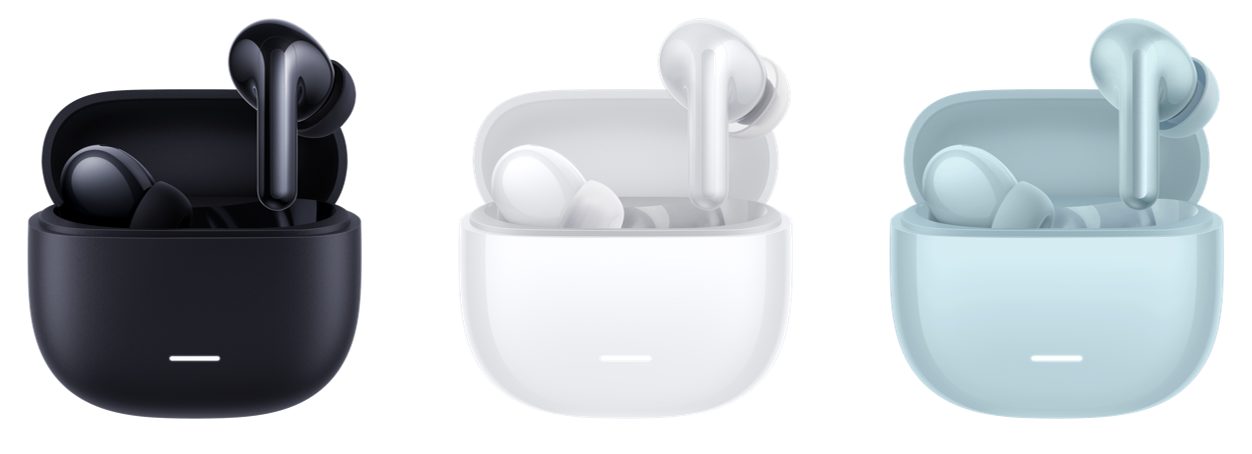
A: The REDMI Buds 8 Lite is available in white, black, and blue.
Charging & Power Consumption
Q1: Does the REDMI Buds 8 Lite support wired charging?
A: The REDMI Buds 8 Lite supports wired charging. Connect the charging case to a Type-C charging cable or data cable and use a 5 V charger to charge the charging case.
The earbuds will be fully charged in about 60 minutes (this can vary depending on the charging case's battery level).
Q2: What are the battery indicator effects of the REDMI Buds 8 Lite charging case?
A: The charging case automatically detects the battery level when the lid is opened.
Indicator effects of the REDMI Buds 8 Lite's charging case are as follows:
1. When the battery level of the charging case is more than 40%, the white light stays on for 5 seconds and then turns off when the lid is opened or closed.
2. When the battery level of the charging case is between 5% and 40%, the white light flashes twice per second and then turns off.
3. When the battery level of the charging case is between 0% and 5%, it cannot charge the earbuds.
4. When the battery level of the charging case is ≤ 0%, the light does not flash.
5. When the charging case is fully charged, the white indicator turns off.
Note:
Actual performance could vary slightly due to usage conditions or battery level estimation. Please refer to the actual product display.
Q3: How to charge the REDMI Buds 8 Lite?
A: When your REDMI Buds 8 Lite has a low battery, please follow these steps to charge them:
1. Place the left and right earbuds into their respective slots in the charging case.
2. Ensure that the metal contacts on the bottom of the earbuds are in full contact with the charging contacts inside the charging case. The earbuds will automatically begin charging.
With a fully charged charging case, it takes approximately 60 minutes to charge the earbuds from 0% to 100% (actual charging time could vary depending on factors such as the remaining battery level of the charging case).
Q4: What are the charging environment requirements for the REDMI Buds 8 Lite?
A: To ensure charging efficiency and battery stability, it is recommended to charge the REDMI Buds 8 Lite earbuds and charging case at an ambient temperature of 15℃~35℃.
Charging at excessively high or low temperatures could result in slower charging speeds or temporary interruptions. It is recommended to allow the device to return to a suitable temperature before charging.
The battery capacity of the earbuds is 45 mAh, and the battery capacity of the charging case is 475 mAh.
Q5: How long is the battery life of the REDMI Buds 8 Lite?
A: When connected to a mobile phone, the battery life of the REDMI Buds 8 Lite is as follows (could vary depending on different usage scenarios/settings):
1. When the REDMI Buds 8 Lite is connected to a phone and plays music with AAC off, it can remain 8 hours (single charge).
2. When the REDMI Buds 8 Lite is connected to a phone, the call duration with AAC encoding and ANC off remains 4.5 hours.
3. When the REDMI Buds 8 Lite is connected to a phone and plays music with AAC off, the battery life of the earbuds with the charging case is 36 hours.
4. When the REDMI Buds 8 Lite is connected to a phone and is in standby mode with ANC off, it can remain 30 hours.
Note:
Battery life refers to music playback time.
Test conditions:
Bluetooth AAC connection with volume at 50% and all other functions set to default. Actual battery life could vary depending on the phone model, system settings, volume, environment, and usage habits.
Q6: Why is the battery level of the REDMI Buds 8 Lite displayed inaccurately on the phone?
A: The battery level of the REDMI Buds 8 Lite will dynamically change during use or charging, depending on the load and charging status. The battery level displayed on your phone will also refresh at certain intervals, which could cause short-term fluctuations or delays. Because the left and right earbuds are powered independently and used in different scenarios, there could be a difference in battery level between the two sides, up to 15%, which can lead to a temporary discrepancy between the phone's display and your experience.
It is recommended to place the earbuds back in the charging case, closing and then opening the lid to reconnect, or disconnecting Bluetooth and then re-pairing. If the issue persists, you can update the firmware through the Xiaomi Earbuds App and try resetting the earbuds to restore battery level synchronization.
Note:
The battery level display is an estimated value and is affected by usage scenarios, volume, ambient temperature, and connection status.
Q7: Why is the usage time of the REDMI Buds 8 Lite relatively short?
A: The battery life of the REDMI Buds 8 Lite is affected by usage conditions. Please check the following factors and make adjustments accordingly:
1. High volume significantly increases power consumption. Please fully charge the earbuds and charging case before use, and then test the battery life performance.
2. Strong electromagnetic interference can reduce the battery life of the earbuds. Please lower the volume appropriately (e.g., by 10%~20%) and observe if the battery life returns to normal.
3. When there are obstacles such as walls between the earbuds and the phone, or when the distance is too far, the Bluetooth connection will retransmit data more frequently and increase the transmission power, thus accelerating power consumption. Please try to avoid strong electromagnetic interference sources (such as microwave ovens), and ensure that there are as few obstacles as possible between the earbuds and the phone, and that the distance is moderate, to reduce the extra power consumption caused by signal attenuation and retransmission.
Note:
Battery life performance could also be affected by temperature, usage habits, and connection status. The actual performance could vary depending on the specific usage scenario.
Q8: How to check the battery level of the REDMI Buds 8 Lite on the phone?
A: To check the battery level of the REDMI Buds 8 Lite on the phone, please refer to the following steps:
Notification/Status display:
Some phones display the Bluetooth device's battery level in the status bar or notification panel. When the battery level is low, the system could also display a low battery warning.
Viewing via the Xiaomi Earbuds App:
You can download and install the Xiaomi Earbuds App to check the battery level of the earbuds and adjust related settings.
Note:
The battery level displayed is an estimated value, and the displayed items and presentation methods could vary depending on the phone's operating system version, Bluetooth protocol support, and app/firmware version.
Q9: Can the battery of the REDMI Buds 8 Lite be replaced?
A: No, the REDMI Buds 8 Lite uses a built-in lithium-ion polymer battery with an integrated design, which cannot be replaced.
Recommendation:
If you experience a significant decrease in battery life or charging abnormalities, please contact Xiaomi's official after-sales service center for inspection and repair.
Note:
Disassembling the device or replacing the battery yourself could cause product damage and could void the warranty.
Q10: Why can't the REDMI Buds 8 Lite be charged?
A: If the REDMI Buds 8 Lite cannot be charged, please refer to the following steps to troubleshoot:
1. The charging case is out of power (the white indicator flashes when the lid is opened). The earbuds cannot be charged after being placed in the charging case once the battery is completely depleted. Please charge the charging case for at least 10 minutes to activate the earbuds.
2. Poor contact between the earbuds and the charging case. Repeatedly insert and remove the earbuds from the charging case three times. If they make good contact, the indicator will turn on when the earbuds are placed back in.
3. There could be dirt or grime on the charging contacts. Please use cotton swabs to clean the charging contact copper posts on both the earbuds and the charging case.
Recommendation:
If the earbuds still cannot be charged after replacing the charging cable and confirming that the power supply is working correctly, or if there is no response from the indicator, it is recommended to contact Xiaomi's official after-sales service center for inspection and repair.
Note:
When cleaning, please ensure that the earbuds and charging case are dry to avoid liquid entering the interfaces or contact areas.
Q11: Can the REDMI Buds 8 Lite be charged using a power bank?
A: Most power banks can charge the REDMI Buds 8 Lite, but a Type-C charging cable is required. If it fails to charge, please try changing the cable or using a different output port on the power bank.
Appearance & Structure & Accessories
Q1: What is the product structure of the REDMI Buds 8 Lite?
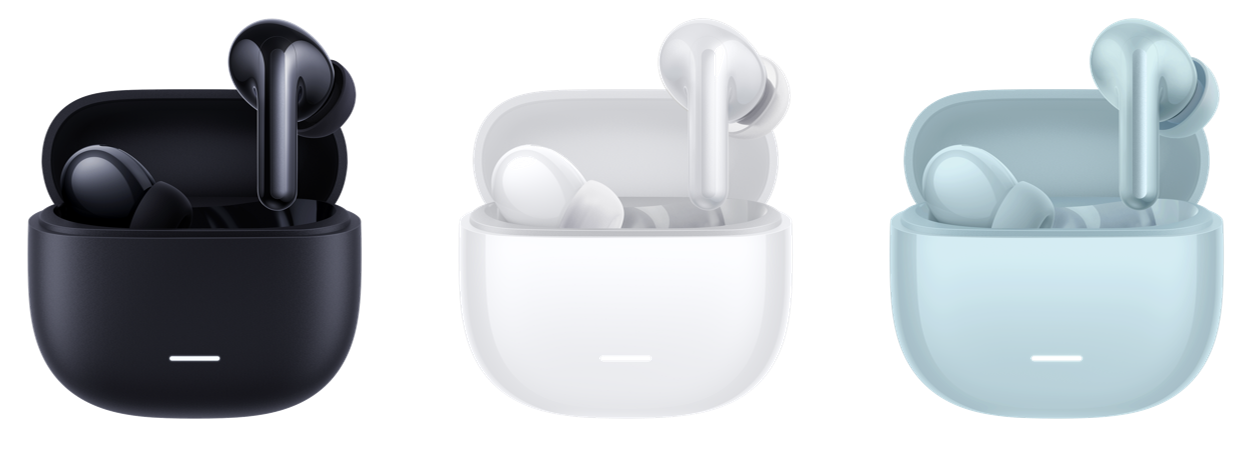
A: The REDMI Buds 8 Lite consists of a charging case and left and right earbuds, and is available in white, black, and blue.
Charging case:
1. Bottom: USB-C (Type-C) charging port, function button (for pairing/resetting, etc.).
2. Front: Status indicator (to indicate battery level/charging status).
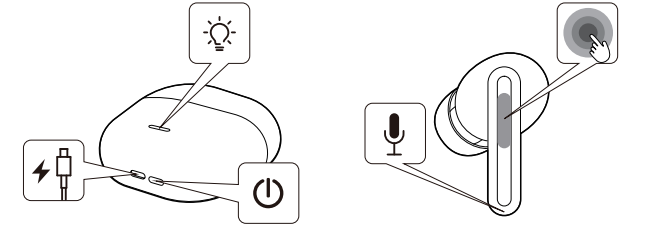
Earbuds:
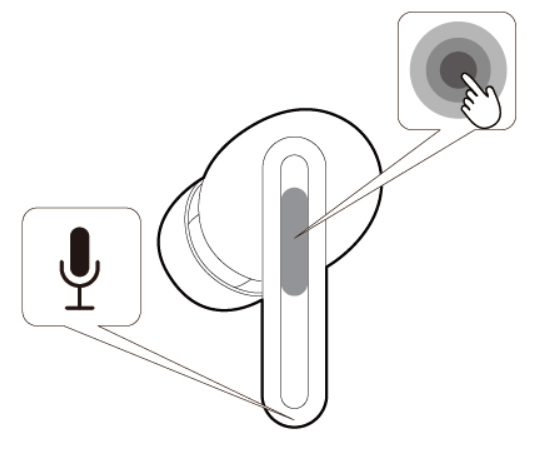
1. Outer side of the earbuds: Touch control area (for play/pause, answer/end calls, etc., specific functions could vary depending on settings).
2. Bottom of the earbuds: Microphone opening (for voice pickup during calls).
Q2: What is included in the packaging of the REDMI Buds 8 Lite?
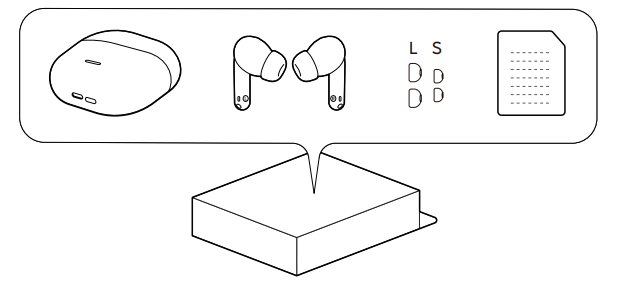
A: The packaging of the REDMI Buds 8 Lite includes:
1. REDMI Buds 8 Lite × 1 (a charging case and two earbuds with M ear tips).
2. User manual × 1.
3. S ear tips × 2.
4. L ear tips × 2.
Note:
The actual packaging contents could vary from what is shown and are subject to change without notice.
Q3: Where is the SN location of the REDMI Buds 8 Lite?
A: The SN location of the REDMI Buds 8 Lite is on the hinge of the charging case. You can also check the SN number on the original packaging box of the product.
Features & Usage Tips
Q1: How to control the REDMI Buds 8 Lite?
A: You can control the REDMI Buds 8 Lite through the touch area on the sides of the earbuds (some functions support customizable gestures in the Xiaomi Earbuds App). Common control methods are as follows:
The touch controls on the REDMI Buds 8 Lite are as follows:
1. To answer a call: Double-tap the left or right earbud when there is an incoming call.
2. To hang up a call: Double-tap the left or right earbud during a call.
3. To reject a call: Hold and press either earbud when there is an incoming call.
4. To play or pause music: Double-tap the left or right earbud while playing music.
5. To play the previous song: Use the phone’s music control feature or customize the gesture in the Xiaomi Earbuds App.
6. To play the next song: Triple-tap the left or right earbud while playing music.
7. To increase the volume: Control via the phone or customize the gesture in the Xiaomi Earbuds App.
8. To decrease the volume: Control via the phone or customize the gesture in the Xiaomi Earbuds App.
9. To wake up the voice assistant: Control via the phone or customize the gesture in the Xiaomi Earbuds App.
10. To switch noise cancellation mode: Press and hold the touch area on either earbud for 2 seconds.
11. Wearing detection: Not supported.
The button operation of the REDMI Buds 8 Lite charging case is as follows:
1. Hold and press the button on the charging case for 2 seconds to pair.
2. Hold and press the button on the charging case for 10 seconds to clear the connection history with the phone and restore factory settings.
3. Hold and press the button on the charging case for 20 seconds to clear the connection history with the phone, restore factory settings, and perform a hardware reset.
Note:
Different phone systems, App versions, and firmware versions could result in slight differences in display or settings. For customizable gestures, please refer to the actual options in the Xiaomi Earbuds App.
Q2: How to connect and disconnect the REDMI Buds 8 Lite via Bluetooth?
A: The REDMI Buds 8 Lite can be connected, disconnected, and automatically reconnected using the following methods.
To first connect the REDMI Buds 8 Lite via Bluetooth, please refer to the following steps:
1. Place the earbuds into the charging case and open the lid.
2. Press and hold the button on the bottom of the charging case for about 2 seconds until the indicator light flashes twice per second, and the earbuds will enter Bluetooth pairing mode.
3. Search for the Bluetooth name "REDMI Buds 8 Lite" on your phone and tap to connect.
4. When the paired device displays [Connected], the Bluetooth connection is successfully established.
To disconnect the REDMI Buds 8 Lite via Bluetooth, please refer to the following steps:
1. Place both earbuds into the charging case and close the lid. The connection will automatically disconnect after a few seconds.
2. In the Bluetooth device list, tap [REDMI Buds 8 Lite] and select [Disconnect] (the name could vary depending on your phone or system).
3. In the Bluetooth device list, select [Unpair] to clear the pairing record on your phone (you will need to re-pair to connect again later).
4. Turn off the Bluetooth switch on your device to disconnect.
For automatic reconnection (for paired phones) the REDMI Buds 8 Lite via Bluetooth, please refer to the following steps:
1. If the phone to be connected is the one last paired, open the case to reconnect automatically.
2. If the phone to be connected is not the last paired device, manually tap the Bluetooth name of the earbuds on your phone to reconnect.
Note:
1. In environments with strong electromagnetic interference, or when there are obstacles such as walls between the earphones and the phone, or when the distance is too far, audio stuttering, interruptions, or disconnections could occur.
2. The earphones will automatically enter pairing mode when the charging case is opened for the first time. If they do not enter pairing mode automatically, you can manually enter pairing mode by pressing and holding the button on the charging case as described above.
Q3: What are the indicator effects of the REDMI Buds 8 Lite charging case?
A: The indicator effects of the REDMI Buds 8 Lite charging case are as follows:
1. When the REDMI Buds 8 Lite is in pairing mode, the indicator on the charging case flashes white twice per second.
2. When the REDMI Buds 8 Lite is connected to a phone successfully, the indicator on the charging case remains white for 5 seconds.
3. When the charging case is charging, the indicator stays on white while charging and turns off when fully charged.
4. When the battery level of the charging case is more than 40%, the white light stays on for 5 seconds and then turns off when the lid is opened or closed.
5. When the battery level of the charging case is between 5% and 40%, the white light flashes twice per second and then turns off.
6. When the battery level of the charging case is between 0% and 5%, it cannot charge the earbuds.
7. When the battery level of the charging case is ≤ 0%, the light does not flash.
Q4: Does the REDMI Buds 8 Lite have noise cancellation?
A: Yes. The REDMI Buds 8 Lite supports Hybrid Active Noise Cancellation (Hybrid ANC), with a maximum noise reduction depth of up to 42 dB, effectively reducing ambient noise.
It also features dual-microphone AI call noise reduction, improving call clarity even in environments with wind speeds up to 6 m/s, and further optimizing call performance through the earphones' acoustic design.
Note:
Noise cancellation performance could be affected by the fit of the earbuds, the type of ambient noise, and the usage scenario.
Q5: Does the REDMI Buds 8 Lite support Low-latency mode?
A: The REDMI Buds 8 Lite supports Low-latency mode. You can enable Low latency on the REDMI Buds 8 Lite by entering [Settings] on the phone >> [Bluetooth] >> tap the arrow icon on the right of the REDMI Buds 8 Lite to enter additional settings >> [Sound settings] >> [Low latency].
Note:
When the Bluetooth codec type is SBC, the low-latency function can be turned on or off. The interface could vary slightly depending on the mobile phone system; please refer to the actual display.
Q6: Does the REDMI Buds 8 Lite support local voice function?
A: The REDMI Buds 8 Lite does not support the local voice function.
Q7: What are the basic functions for the REDMI Buds 8 Lite after connecting to the Xiaomi Earbuds App?
A: After connecting the REDMI Buds 8 Lite to the Xiaomi Earbuds App, the following basic functions are available:
1. You can check the earbuds and charging case battery levels.
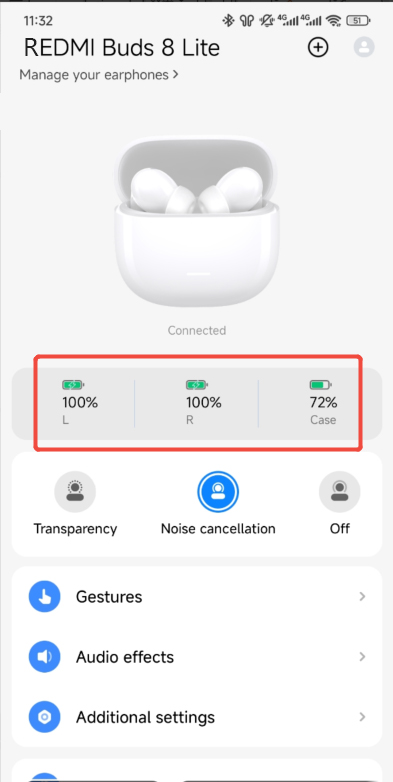
2. You can check the device serial number in the Xiaomi Earbuds App.
Note:
The Xiaomi Earbuds App supports Android 6.0 and above and iOS 14.0 and above. The interface display could vary slightly depending on the mobile phone system and application version; please refer to the actual interface.
Q8: What is the effective transmission distance of Bluetooth for the REDMI Buds 8 Lite, and what happens if it is exceeded?
A: In an unobstructed, open environment, the effective Bluetooth transmission distance of the REDMI Buds 8 Lite is approximately 10 meters. If the distance is too far, or if there are obstacles such as walls or strong electromagnetic interference, audio stuttering, interruptions, or disconnections could occur.
1. If you return within 10 minutes, the connection will automatically resume. After 10 minutes, the earbuds will enter sleep mode. You can restore the automatic reconnection mode by placing the earbuds back into the charging case.
2. If the earbuds still cannot reconnect automatically, please restart Bluetooth on your phone and press and hold the button on the charging case for 2 seconds. When the indicator on the charging case flashes, it enters pairing mode, and you can reconnect to your phone.
Q9: Will the REDMI Buds 8 Lite automatically disconnect when placed in the charging case?
A: When the REDMI Buds 8 Lite are placed in the charging case without closing the lid, they will not automatically disconnect and will remain connected.
After placing the earbuds in the charging case and closing the lid, the earbuds will automatically disconnect from the phone after 5 seconds.
If you would like to disconnect the phone from the earbuds, you can either turn off Bluetooth on your phone or put the earbuds into the charging case and close the lid.
Q10: Why didn't the REDMI Buds 8 Lite reconnect automatically after opening the lid of the charging case?
A: If the REDMI Buds 8 Lite doesn't reconnect automatically after opening the lid of the charging case, please refer to the following steps:
1. If the Bluetooth on your phone is not turned on, the REDMI Buds 8 Lite cannot automatically reconnect.
2. The earbuds automatically reconnect to the last connected device by default. If your phone is not the last connected device, please re-pair and reconnect.
3. The distance between your phone and earbuds could exceed the effective transmission distance (10 meters), or there is an obstacle blocking the signal. Keep your phone and earbuds close together when reconnecting. Ensure you are not in an environment with strong interference and keep them away from devices that generate electromagnetic interference, such as microwave ovens.
4. Electromagnetic interference in your environment will affect the Bluetooth connection. Please reconnect the earbuds and the phone in an open place.
5. If the copper posts at the bottom of the earbuds are dirty, the charging case will not recognize the earbuds. Please clean the copper posts at the bottom of the earbuds and then re-pair.
6. If the above methods do not work, please restore factory settings. Place the earbuds in the charging case and open the lid. Press and hold the button on the charging case for 10 seconds to clear the pairing history and restore factory settings, then re-pair and connect the earbuds.
Q11: Can other people hear the sound when I'm making calls using the REDMI Buds 8 Lite?
A: No. The call audio of the REDMI Buds 8 Lite is transmitted via Bluetooth only to the connected device and will not be "broadcast" to surrounding devices. The REDMI Buds 8 Lite can only connect to one device at a time. There will be no crosstalk with other devices, so you can use it with confidence.
Note:
1. The connected device could switch if the earbuds are in pairing mode or if you actively re-pair them with another device.
2. If the volume is very high, some sound leakage could occur, and others could hear a small amount of the conversation. It is recommended to lower the volume appropriately to protect your privacy.
Q12: Why does the other party hear low volume or background noise during a call when using the REDMI Buds 8 Lite?
A: If the other party hears low volume or background noise during a call when using the REDMI Buds 8 Lite, please refer to the following methods:
1. If there are obstructions or the distance between your phone and the REDMI Buds 8 Lite is too far, the other party can hear low volume or background noise. Please ensure there are no obstructions between your phone and the earbuds, such as removing your phone from your pants pocket and placing it in your shirt pocket.
2. If the signal is weak or the network is unstable, call quality can also be affected. Please move to an area with a better signal before making a call.
3. If there are objects nearby that cause significant electromagnetic interference, the other party can hear a low volume or background noise. It is recommended that you keep the device away from objects that generate significant electromagnetic interference, such as microwave ovens, during use.
Q13: Why is there no sound or lag when the REDMI Buds 8 Lite is connected to a phone?
A: If there is no sound or lag when the REDMI Buds 8 Lite is connected to a phone, please refer to the following information:
1. Due to the nature of Bluetooth earbuds, electromagnetic waves in your area could interfere with the Bluetooth connection, resulting in no sound. Please place your earbuds in an environment without interference, and keep them away from objects with strong electromagnetic interference, such as microwave ovens.
2. Please check your phone’s volume settings to see if the volume is turned off or if it is in silent mode. Try turning up the volume on your phone.
3. Please check if the phone is too far from the earbuds, exceeding the effective transmission distance (10 meters), or if there is an obstacle between the earbuds and the phone, such as the phone being in your pocket.
4. Put the earbuds back into the charging case, close the lid for 5 seconds, then open it and reconnect them to your phone, or disconnect your phone from another Bluetooth device.
5. If none of the above solutions work, try restoring the earbuds to factory settings. Place both earbuds in the case, open the lid, and press and hold the button for 10 seconds to restore the phone to factory settings.
Q14: Why are the REDMI Buds 8 Lite connected, but the sound still comes from the phone's speaker?
A: If the REDMI Buds 8 Lite are connected but the sound still comes from the phone's speaker, please refer to the following methods:
1. This can be because Bluetooth is connected, but the Media audio option is not selected. To resolve this, after connecting the earbuds to your phone, tap [Settings] >> [Bluetooth] >> find "REDMI Buds 8 Lite" >> tap the icon on the right >> enable [Media audio].
Note:
The option names could vary slightly depending on the mobile phone system; please refer to the actual display on your device.
2. In your phone’s Bluetooth settings, disconnect Bluetooth and then reconnect it. This should restore functionality.
3. Turn off Bluetooth on your phone, then turn it back on. The earbuds and phone will automatically reconnect successfully.
4. If the above solutions cannot solve the problem, please try restoring factory settings. Put both earbuds into the case, open the lid, and press and hold the button for 10 seconds to restore factory settings.
Q15: When recording video or audio, does the REDMI Buds 8 Lite use the earbuds’ microphone or the phone’s microphone?
A: Different mobile phones and software have different settings when recording videos and audio, depending on the specific scenario.
1. When making calls, listening to music, or using third-party voice and video call Apps, the earbuds' microphone is used.
2. When recording videos or audio with recording software, the phone’s microphone is used.
To confirm which microphone is actually being used, it is recommended to check within the corresponding application to see if it supports microphone input switching, or to determine this through simple recording tests (by covering the phone's microphone or moving away from the phone).
Q16: Does using REDMI Buds 8 Lite consume mobile data?
A: No. REDMI Buds 8 Lite connects to your phone via Bluetooth only, and the earbuds themselves do not generate or consume mobile data. Actual data consumption originates from your phone and the applications you use (e.g., streaming music, watching videos, making online calls, etc.).
Note:
If you download or update firmware through the Xiaomi Earbuds App, the data consumption is also generated by your phone. It is recommended to perform this operation in a Wi-Fi environment.
Q17: Does the REDMI Buds 8 Lite support file transfer?
A: No. REDMI Buds 8 Lite is a Bluetooth audio device, primarily used for playing audio and making calls. It cannot transfer or copy files like a storage device.
Q18: Does REDMI Buds 8 Lite have storage capabilities? Can it download or play music independently?
A: No. REDMI Buds 8 Lite does not have local storage capabilities and cannot independently download, save, or play music offline on the earbuds. The earbuds need to be connected to a phone, tablet, or other device via Bluetooth, and the audio content is output by the playback device.
Q19: Can the REDMI Buds 8 Lite be used to listen to audiobooks?
A: Yes. The REDMI Buds 8 Lite can be used to listen to audio content. You can play audiobooks on your phone or tablet, or use the audiobook function of reading apps to output the e-book content in audio form and then listen through the earphones.
Q20: Does the REDMI Buds 8 Lite support heart rate monitoring?
A: No. The REDMI Buds 8 Lite does not have health data monitoring functions such as heart rate monitoring. For heart rate and other health monitoring, please use smartwatches, smart bands, or other devices that support these functions.
Q21: Is the Bluetooth connection of the REDMI Buds 8 Lite safe?
A: The REDMI Buds 8 Lite connects to your phone via Bluetooth, which is a short-range wireless communication method with extremely low radiation levels. It has also passed strict safety and environmental certifications, so you can use it with confidence.
If you have special health concerns regarding the use of wireless devices, it is recommended to reduce prolonged close contact use or consult a professional.
Q22: Can the REDMI Buds 8 Lite be used to listen to navigation voice prompts?
A: Yes. The REDMI Buds 8 Lite can receive voice prompts from navigation software. The specific playback effect and output method depend on your phone's system settings and the audio output settings of the navigation App.
Note:
If you do not hear navigation prompts, please check the voice broadcast switch and media volume of the navigation app, and whether the Bluetooth audio output device is selected as the earphones.
Q23: Why are there sometimes delays when using the REDMI Buds 8 Lite for voice calls, video calls, or games?
A: If there are sometimes delays when using the REDMI Buds 8 Lite for voice calls, video calls, or games, please refer to the following methods:
1. The audio is first transmitted from the phone to the main earbud, and then from the main earbud to the secondary earbud. There will be a certain delay in this audio transmission process, but it does not affect music playback or calls.
2. When the network environment is poor, packet loss can cause delays in signal transmission.
3. The game has high demands on phone performance; audio and video could become out of sync when the phone is under heavy load or overheating.
Note:
Try to shorten the distance between your phone and earbuds, avoid obstructions like walls, ensure a stable network connection during calls, and close background applications while playing games to reduce system load.
Q24: Why does only one earbud have sound after Bluetooth pairing with the REDMI Buds 8 Lite?
A: The reasons why only one earbud produces sound after Bluetooth pairing with the REDMI Buds 8 Lite are as follows:
1. One earbud has poor contact, resulting in only one earbud being paired.
2. A single earbud can shut down due to a low battery, while the other one is still playing normally.
3. There can be dirt or debris blocking the speakers in the earbuds.
4. The earbuds can have gotten wet or sweaty, causing a short circuit or crash.
5. Abnormal connection between the left and right earbuds; the connection between the left and right earbuds is interrupted, resulting in sound output from only one side.
The solutions for why only one earbud produces sound after Bluetooth pairing with the REDMI Buds 8 Lite are as follows:
1. Check the left and right channel and volume balance settings of your device. Ensure that "Audio Balance Left/Right" is disabled and that "Mono Audio" is turned off. For example, on a Xiaomi phone: [Settings] >> [More settings] >> [Accessibility] >> [Hearing] >> [Adjust the audio balance slider]. (The specific path could vary depending on the device model or system version.)
2. Place both earbuds back into the charging case, ensuring they are correctly positioned and making contact with the charging pins (gently wipe the charging pins and earbud metal contacts if necessary). Close the lid, wait a few seconds, then open the lid and take them out again.
3. After charging for 10 minutes, put them back on and check if both earbuds are now producing sound (to rule out one side shutting down due to low battery).
4. Unpair and then re-pair the earbuds on your phone.
5. Check if the mesh covers are blocked by dust or earwax. Gently clean them with a dry, soft brush or cotton swab (avoid using sharp objects or applying excessive force).
6. Place both earbuds in the charging case and open the lid. Press and hold the function button on the charging case for about 10 seconds to reset the earbuds. After the reset, re-pair and test again.
7. If the problem persists, please contact the after-sales service center for inspection.
Q25: Why is the music still playing even though the REDMI Buds 8 Lite are in the charging case?
A: If the music is still playing even though the REDMI Buds 8 Lite are in the charging case, please refer to the following methods:
1. Dust, sweat, or oil on the metal contacts of the earbuds or charging case could cause poor contact. It is recommended to gently wipe the earbud and charging case contacts with a dry, soft cotton swab. Reinsert the earbuds and check if the indicator responds.
2. Using incompatible or ill-fitting ear tips could prevent the earbuds from being fully inserted, thus preventing disconnection. It is recommended to use the original ear tips and choose the appropriate size. After inserting, gently press the earbuds to ensure they are securely seated, then close the case lid and observe if playback stops.
3. Check the charging case battery level and lid status. If the charging case battery is low or the lid is not closed properly, the earbuds cannot be correctly recognized and will disconnect. It is recommended to charge the charging case for at least 10 minutes before testing whether the earbuds can disconnect properly.
4. Press and hold the function button on the charging case for about 10 seconds to perform a factory reset, then re-pair and connect the earbuds.
5. If the problem persists, please contact the after-sales service center for inspection.
Q26: Are the REDMI Buds 8 Lite waterproof?
A: Yes. The REDMI Buds 8 Lite earbuds themselves have an IP54 protection rating (the charging case is not waterproof), which can handle everyday situations such as sweat and splashes of water in rainy weather. It is recommended to wipe the earbuds dry promptly after sweating during exercise. Do not charge earbuds when they are wet.
Note:
1. IP54 is mainly for dust and splash protection, and is not suitable for water immersion. Do not wear them while swimming or showering, and it is not recommended to use them in heavy rain or strong water flow environments.
2. Dust and splash protection performance is not permanently effective and could decrease due to daily wear and tear, drops, aging, etc.
3. Damage caused by liquid immersion is not covered by the warranty (subject to the actual after-sales policy).
Q27: Why does the Bluetooth connection of the REDMI Buds 8 Lite suddenly drop?
A: If the Bluetooth connection of the REDMI Buds 8 Lite suddenly drops, please refer to the following methods:
1. Please ensure both the earbuds and charging case have sufficient battery power. Low battery levels could cause unstable connections or automatic disconnections. It is recommended to charge the earbuds and the charging case before testing.
2. The phone could be too far from the earphone, exceeding the effective transmission distance (10 m), or there is an obstacle between the earphone and the phone. Place the earbuds and phone together to reconnect them.
3. In areas with strong electromagnetic interference (such as near microwave ovens, monitoring equipment, or areas with many wireless routers), stuttering, intermittent connections, or disconnections could occur. It is recommended to move away from the interference source before attempting to connect again.
4. Disconnect and reconnect the REDMI Buds 8 Lite in your device's Bluetooth settings. If the problem persists, please try restoring factory settings. Place both earbuds in the charging case and open the lid. Press and hold the button on the charging case for about 10 seconds to reset, then re-pair and connect.
5. If frequent disconnections still occur, it is recommended to check and update the firmware through the Xiaomi Earbuds App. If the problem persists, please contact the after-sales service center for inspection.
Q28: Will wearing the REDMI Buds 8 Lite for a long time cause adverse reactions?
A: Wearing the REDMI Buds 8 Lite for extended periods can cause fatigue and slight pain due to their in-ear design. It is recommended to remove the earbuds and rest for a while after using them continuously for 1 hour. Choosing suitable ear tips can improve comfort and reduce discomfort.
Q29: Are the REDMI Buds 8 Lite magnetically attached to the charging case? Will they fall out?
A: The REDMI Buds 8 Lite is magnetically attached to the charging case and will not fall out during normal use. The top and bottom lids of the charging case also have magnetic attachments, ensuring they remain securely closed under normal conditions.
Q30: Is it okay to go out without the charging case and only bring the REDMI Buds 8 Lite?
A: If your REDMI Buds 8 Lite are already connected to your phone and have sufficient battery power for your needs, you can go out without the charging case.
However, to prevent the earbuds from running out of power, having no storage place, or being lost, it is recommended to bring the charging case with you when going out.
Q31: How to maintain the REDMI Buds 8 Lite?
A: The maintenance guidelines for the REDMI Buds 8 Lite are as follows:
1. Avoid contact with liquids or prolonged exposure to humid environments. Do not charge the earphones or charging case when they are wet.
2. When cleaning, gently wipe with a dry, soft cloth or cotton swab. Do not use alcohol, abrasive cleaners, or corrosive solvents.
3. Avoid placing the earbuds in environments with temperatures below 0 ℃ or above 45 ℃, or in locations with large temperature differences for extended periods, as this can damage the battery and affect performance.
4. Do not expose the earbuds to open flames to prevent explosion risks.
5. Avoid contact with sharp objects to prevent scratches or damage.
6. Do not insert any foreign objects into the earbuds to prevent internal damage.
7. Do not attempt to disassemble or modify the earbuds, as this could damage and void the warranty.
8. If you do not use the earbuds for a long time, store them in a dry place. If stored for more than one month, charge it regularly to maintain battery performance.
Q32: Does the REDMI Buds 8 Lite support connecting to a TV?
A: The REDMI Buds 8 Lite supports connecting to smart TVs equipped with Bluetooth functionality. After putting the earbuds into pairing mode, search for and connect to them in the TV's Bluetooth settings.
Note:
Bluetooth compatibility and latency could vary among different TV brands. Please refer to your TV's Bluetooth functions and settings for details.
Q33: Why is the battery level of the left and right REDMI Buds 8 Lite earbuds inconsistent?
A: This is a normal phenomenon. The inconsistency in battery levels between the left and right REDMI Buds 8 Lite earbuds occurs because the earbuds consume power differently. The earbud removed from the charging case first acts as the main earbud, which is responsible for data transmission to the secondary earbud and for connecting to the phone. As a result, the main earbud consumes more power and has a shorter usage time.
Q34: Why does the REDMI Buds 8 Lite stutter when listening to music in certain environments?
A: The causes of stuttering when using the REDMI Buds 8 Lite in certain environments include:
1. In areas with strong interference sources, such as near Wi-Fi routers, base stations, transformers, or high-power electrical appliances, Bluetooth stability could be affected.
2. When the distance between the earbuds and the phone is too far, or when there are walls, body obstructions, or the earbuds are placed deep inside a bag or pocket, the signal strength will be reduced.
3. When the phone is connected to multiple Bluetooth devices simultaneously, is under heavy load, or has a weak signal, it could lead to unstable transmission.
4. Intermittent stuttering could also occur if the earbud antenna is obstructed during use. It is recommended to keep the phone and earbuds closer together, minimize obstructions, and avoid using them near strong interference sources.
Q35: Why do the REDMI Buds 8 Lite play sound through the phone speaker when using third-party Apps for voice calls after double-tapping?
A: When using the REDMI Buds 8 Lite for third-party App voice calls, double-tapping the earbud touch area can be recognized by the system as a command to switch the call, causing the sound to play through the phone’s speaker instead. If this happens, please end the current voice call and redial to restore normal operation.
Note:
The compatibility of touch commands could vary depending on the different third-party apps and their versions, as well as the system versions of different devices. The actual performance will depend on the specific device and application being used.
Q36: Why does audio play through the REDMI Buds 8 Lite after ending a third-party App call?
A: This is a compatibility issue caused by a third-party app failing to properly release the Bluetooth hands-free profile (HFP) channel after a call ends. Although the call has ended, the system briefly maintains the "call audio routing," and the REDMI Buds 8 Lite could continue to play sound as the output device.
If you encounter this situation, try waiting a few seconds after ending the call or disconnecting and reconnecting Bluetooth. The compatibility could vary depending on the third-party app and its version. It is recommended to update the third-party app and the system to improve compatibility.
Q37: Why is the sound quality of the REDMI Buds 8 Lite good when listening to music but worse when playing games?
A: This is a normal phenomenon caused by switching between Bluetooth modes. When listening to music, the REDMI Buds 8 Lite uses the high-quality A2DP music transmission channel (with higher bandwidth), resulting in better sound quality. However, when playing games, if the game or device's system enables the microphone (e.g., for voice chat or granting microphone permissions to an application), the connection could switch to the HFP call channel (with narrower bandwidth).
To ensure synchronization between the call and the game, some sound quality is sacrificed, which is why the sound quality seems to deteriorate. To optimize the gaming experience, you can enable the low-latency gaming mode on the REDMI Buds 8 Lite (by pressing and holding the touch areas of both earbuds simultaneously).
Note:
When voice communication is not needed, disabling in-game voice or microphone permissions can help maintain higher sound quality.
Q38: How to access the voice assistant through the REDMI Buds 8 Lite?
A: Please enter Xiaomi Earbuds App >> [Gestures] >> [Press and hold left earphone] or [Press and hold right earphone] >> select [Voice assistant].
Frequently Asked Questions
Q1: Why does the REDMI Buds 8 Lite suddenly stop charging or charge unstably?
A: If the REDMI Buds 8 Lite suddenly stop charging or charge unstably, please refer to the following methods:
1. Leaving the earbuds or charging case unused for an extended period could lead to excessive battery drain. Please connect them to a power and charge for at least 10 minutes before checking if the issue is resolved.
2. Poor contact or dirt on the earbud and charging case contacts could cause charging problems. Please try removing and reinserting the earbuds, ensuring the magnetic connection is secure (repeat three times). If the problem persists, gently wipe the charging contacts on the bottom of the earbuds and the contacts inside the charging case (including the magnetic contact area) with a dry cotton swab, then try charging again.
3. Try using a reliable charging adapter and data cable, and avoid using unstable or low-quality charging equipment.
4. If the problem persists, please contact the after-sales service center for inspection.
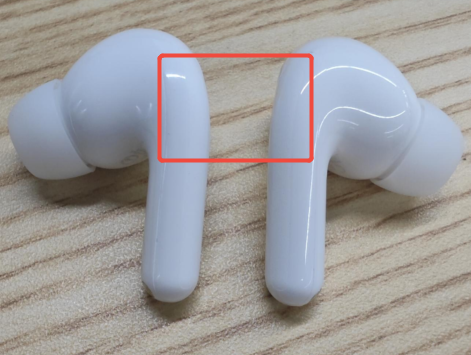
Q2: Why does tapping the touch area of the REDMI Buds 8 Lite sometimes have no effect?
A: The REDMI Buds 8 Lite can not respond when tapping if the touch area is not tapped correctly. Please tap the touch area indicated on the side of the earbuds. If you do not tap the designated area, the interval between consecutive taps is too short, or the tapping force is insufficient, the touch function can not respond properly.
Q3: Why does the volume on one earbud of the REDMI Buds 8 Lite decrease after using it for a while?
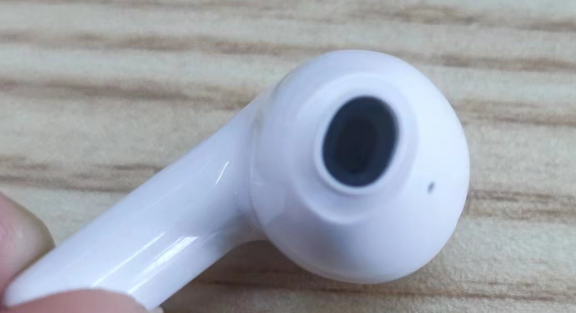
A: If your REDMI Buds 8 Lite experience reduced volume on one side, please refer to the following methods:
1. Remove the ear tip and check if there is any dirt or foreign matter in the sound outlet.
2. Gently clean the sound outlet mesh and the inside of the ear tip with a dry, soft brush or cotton swab, ensuring there are no blockages.
3. After cleaning, put the earbuds back on and test to check if the volume has returned to normal.
Note:
It is not recommended to use sharp objects such as toothpicks or needles to poke into the sound outlet, as this could damage the mesh or internal components.
Q4: Will wearing REDMI Buds 8 Lite cause allergies?
A: The parts of the REDMI Buds 8 Lite that come into contact with the skin, including the earbuds and ear tips, have undergone strict inspection for harmful substances and are safe for use. Please avoid wearing them for extended periods, keep your ears clean, and prevent sweat or dirt buildup to avoid discomfort or inflammation.
Possible causes of suspected allergy symptoms:
1. Wearing for extended periods (such as while sleeping) can cause heat and sweat accumulation.
2. Dirt buildup on the earbuds can cause skin irritation.
If you experience severe discomfort, inflammation, or allergic reactions, stop using the earphones and consult a doctor.
For mild itching, please refer to the following methods:
1. After exercise, wipe off any sweat before putting it back into the charging case.
2. Regularly clean the earbuds, ear tips, and charging case.
3. After long periods of wear, remove the earbuds and rest your ears for about 30 minutes.
4. Make sure your ears are dry before wearing the earbuds after showering.
Q5: Why does the pop-up window show non-dynamic icons when opening the REDMI Buds 8 Lite charging case and connecting to the phone?
A: The REDMI Buds 8 Lite does not support dynamic pop-ups (only Google pop-ups are supported). On supported phones, it only provides connection prompts in the form of Google Fast Pair (Google pop-up notifications), so the interface displays static icons/non-animated effects, which is normal.
Q6: Why doesn’t the music pause when removing one earbud of the REDMI Buds 8 Lite?
A: The REDMI Buds 8 Lite does not support the in-ear detection pause function, so the music will not automatically pause when you remove one earbud. To pause music, double-tap the touch area of the earbuds or manually tap pause on your phone or music player.
Q7: Why do the REDMI Buds 8 Lite ear tips easily fall off?
A: The REDMI Buds 8 Lite features an in-ear design, and wearing stability is closely related to how well the ear tips fit the ear canal.
If the earbuds easily become loose or fall out during wear, the common reasons include:
1. The ear tip size is unsuitable, resulting in insufficient sealing and support.
2. During exercise or vigorous activity, vibrations, sweating, or pulling can affect the fit, leading to loosening or falling out.
Note:
It is recommended to replace the ear tips with a more suitable size based on your ear canal size to achieve a more comfortable and secure wearing experience.
Q8: Why does the hinge of the REDMI Buds 8 Lite charging case have a visible gap?
A: The top and bottom covers of the REDMI Buds 8 Lite charging case are connected by a metal hinge. To ensure smooth opening and closing, a reasonable gap is designed between the hinge stator and rotor. The top cover naturally falls within this gap. This is normal and has passed strict quality and functionality inspections. Please use it with confidence.
Q9: Why does the material of the REDMI Buds 8 Lite feel plasticky to the touch?
A: The REDMI Buds 8 Lite charging case features a non-slip matte surface. This texture is a normal design feature, intended to improve grip, prevent slipping, and reduce fingerprints. It does not affect normal use, so please use it with confidence.
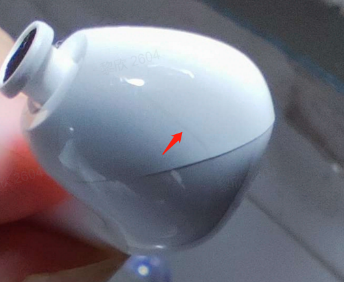
Q10: Does rubbing the charging case lid of the REDMI Buds 8 Lite make a creaking sound?
A: When the charging case of the REDMI Buds 8 Lite is rubbed or pressed firmly, a slight creaking sound could occur due to the gap between the top and bottom shells. This is a normal phenomenon caused by the structural design and does not affect the functionality or durability of the product.
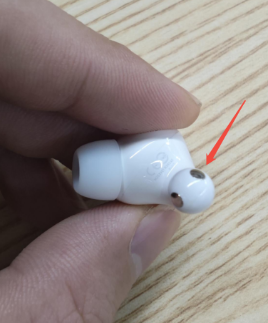
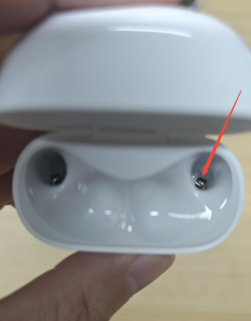
Q11: Why is there no charging cable included in the REDMI Buds 8 Lite packaging?
A: The REDMI Buds 8 Lite does not include a charging cable in the package. It uses a Type-C charging port, which is compatible with most mobile phones, tablets, and computers. You can use any standard Type-C cable for charging.
Q12: Why does the charging case light up and the REDMI Buds 8 Lite get activated when it’s close to a magnetic phone case or the back of an iPhone?
A: When the REDMI Buds 8 Lite charging case is placed near magnetic objects, such as phone cases with magnetic closures or metal surfaces, magnetic interference can trigger the case’s magnetic switch, causing it to open unintentionally. This makes the earbuds activate even when inside the case.
It is recommended to avoid placing the charging case close to strong magnetic objects or magnetic areas for extended periods to reduce false triggers.
Q13: What is the sound quality of the REDMI Buds 8 Lite? What kind of driver unit does it use?
A: The REDMI Buds 8 Lite uses a large 12.4 mm dynamic driver unit, delivering more powerful bass and finer treble details. The overall sound is more balanced and layered, suitable for daily commuting and listening to various types of music.
Note:
Actual listening experience could be affected by the fit of the earbuds, audio source quality, and playback device.
Q14: Does the REDMI Buds 8 Lite support personalized settings via an app?
A: Yes. You can download and use the Xiaomi Earbuds App to personalize the earbuds, including adjusting EQ sound effects and other parameters, to get a listening experience that better suits your personal preferences. It also supports online firmware upgrades (OTA), allowing you to install the latest firmware via the app to optimize your experience.
Note:
Some functions and settings could vary depending on the phone's system version, app version, and firmware version. Firmware upgrades require a stable connection between the earbuds and the phone and sufficient battery power.
Does it help?
Yes
No