

Mijia Rotary Tool Kit FAQ
Overview
Q1: What is the Mijia Rotary Tool Kit?
A: This Mijia Rotary Tool Kit is a highly versatile and comprehensive set designed to handle a wide variety of tasks with ease. Whether you need to grind, clean, polish, engrave, drill, or perform other detailed, precise operations, this kit provides all the essential tools for professional-quality results. Its adaptable features make it suitable for both hobbyists and skilled craftsmen, enabling users to undertake a diverse array of projects with confidence and efficiency.
Q2: What scenarios are the Mijia Rotary Tool Kit suitable for?
A: The Mijia Rotary Tool Kit is mainly used for engraving, drilling, grinding, polishing, brushing, and similar applications.
The Mijia Rotary Tool Kit is suitable for the following scenarios:
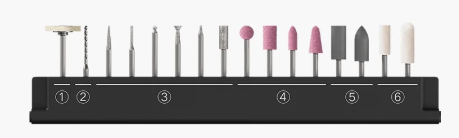
1. The wool brush is suitable for cleaning, deburring, surface pretreatment, and polishing on metal, wood, and plastic.
2. The twist drill bit is suitable for drilling in soft materials such as wood and plastic.
3. The emery grinding head is suitable for fine carving and grinding on hard materials.
4. The grinding wheel head is suitable for rough grinding and semi-finishing grinding of both metal and non-metal materials.
5. The rubber grinding head is suitable for fine polishing, rust removal, and grinding on materials such as metal, plastic, and glass.
6. The wool grinding head is suitable for mirror polishing and grinding of materials such as metal, glass, wood, and jade.
Q3: What are the selling points of the Mijia Rotary Tool Kit?
A: The selling points of the Mijia Rotary Tool Kit are as follows:
1. It serves as a versatile work assistant that can handle engraving, grinding, polishing, and drilling. It is easy to operate and quick to master.
2. It features a slender 2 cm pen-style design that provides a comfortable grip for effortless control.
3. Its elegant and lightweight case design makes it portable and easy to carry.
4. The 22,000 rpm brushless motor delivers high-efficiency performance.
5. The tool is intuitive and straightforward for beginners to use. With a single power button and a speed adjustment knob, it’s easy to get the hang of it quickly. No wrench necessary, simply twist the pen point to attach and remove accessories securely.
6. It supports two modes of operation, either using a lithium battery or being plugged in, so there is no need to worry about running out of power.
7. The automatic lifting bit compartment allows for organized storage of multiple accessories.
External Hardware
Q1: What is the material of the Mijia Rotary Tool Kit?
A: The body of the Mijia Rotary Tool Kit is made of aluminum alloy. The housing is made of aluminum alloy and plastic.
Q2: What material is the lock nut made of, and are there any precautions during use for the Mijia Rotary Tool Kit?
A: The lock nut of the Mijia Rotary Tool Kit is made of aluminum alloy with an anodized finish. During use, keep a safe distance between the lock nut and the workpiece to avoid scratches. The tool operates at high speeds, and contact between the lock nut and the workpiece can damage the workpiece and cause wear on the lock nut’s surface.
Q3: How to install the accessories of the Mijia Rotary Tool Kit?
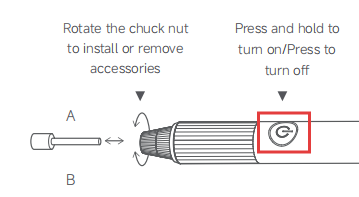
A: To install the accessories of the Mijia Rotary Tool Kit, please refer to the following steps:
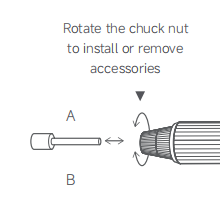
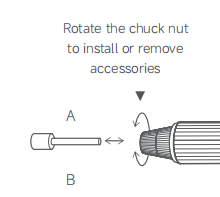
1. Hold the lock nut with one hand, and loosen the chuck nut by turning it in the direction of arrow A with the other.
2. Insert the accessory shank through the chuck nut into the chuck, ensuring it reaches the bottom.
3. Hold the lock nut, then tighten the chuck nut in the direction of arrow B to complete the installation.
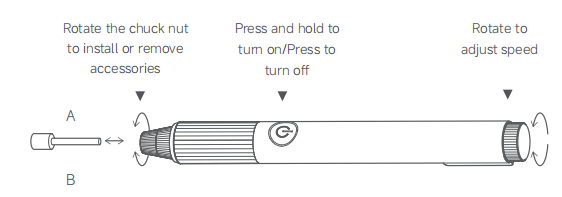
Note:
1. Ensure the accessory shank is fully inserted into the bottom of the chuck before installing.
2. Do not start the tool before tightening the chuck nut. Ensure that both the chuck nut and lock nut are securely fastened before operation.
Q4: What are the functions of the different parts of the Mijia Rotary Tool Kit?
A: The functions of the different parts of the Mijia Rotary Tool Kit are as follows:
1. On/Off Button
2. Rubber Sleeve
3. Lock Nut
4. Chuck Nut
5. Chuck
6. Speed Control Knob
7. Battery Level Indicator
8. Charging Port
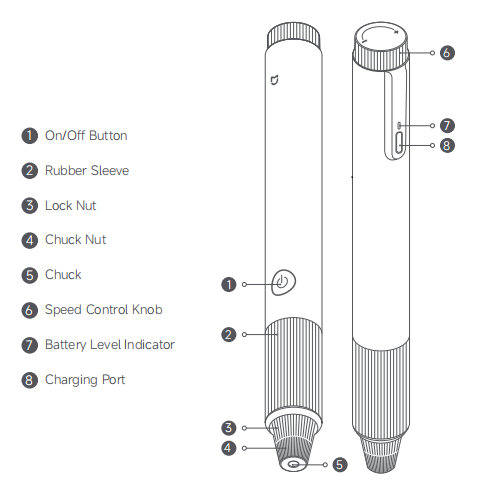
Note:
Illustrations of the product and accessories are for reference purposes only. Actual product and functions may vary due to product enhancements.
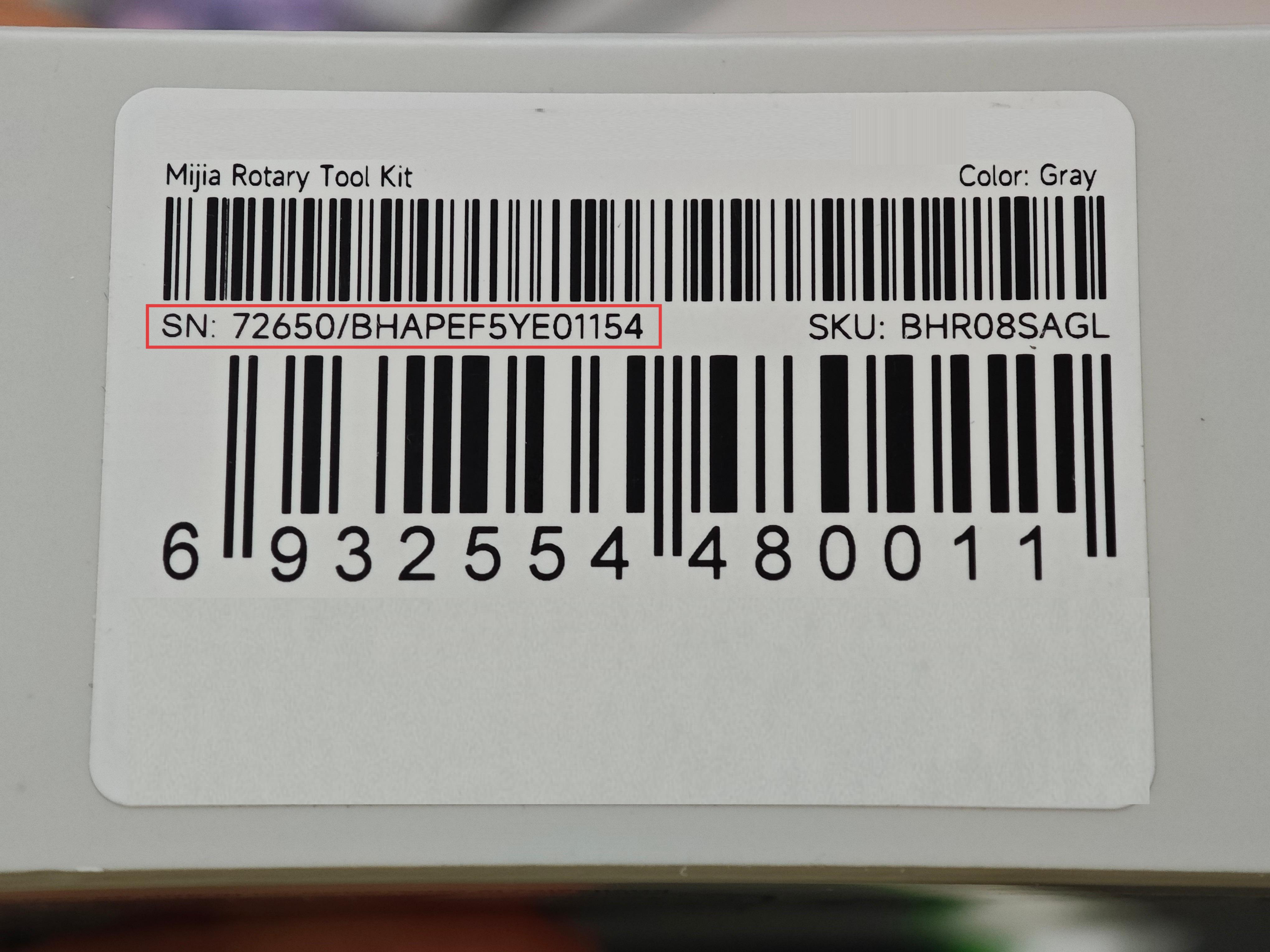
Q5: Where is the SN of the Mijia Rotary Tool Kit located?
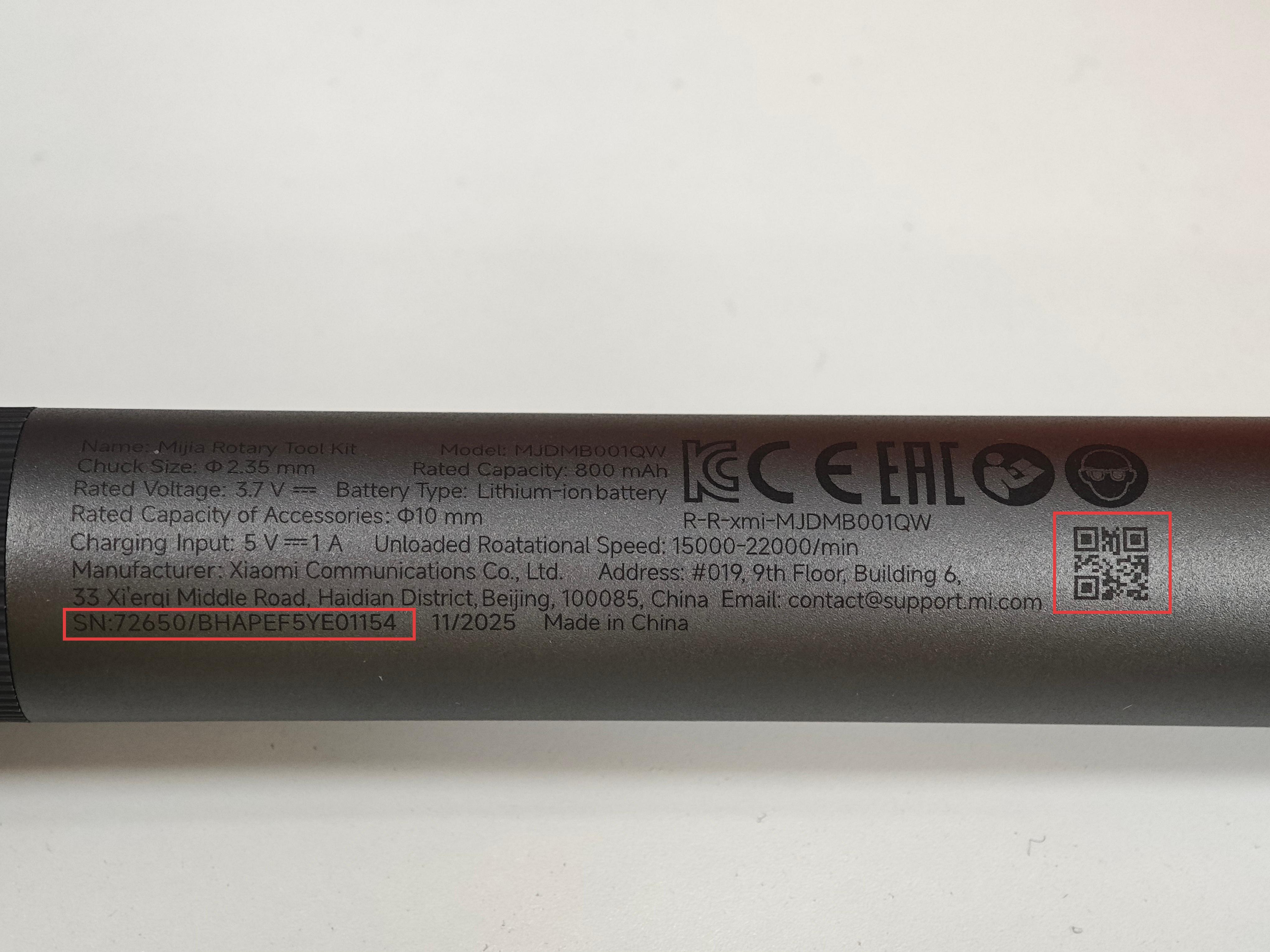
A: There are two ways to check the serial number of the Mijia Rotary Tool Kit.
1. The SN is printed on the original packaging box.
2. The product body also has a printed serial number. And the SN is in the form of a QR code, laser-engraved on the outer shell of the Mijia Rotary Tool Kit, you can scan it using the Scanner App on your device.
Q6: Can the Mijia Rotary Tool Kit use accessories not included in the package?
A: The Mijia Rotary Tool Kit can use accessories not included in the package. The accessories must have a diameter of 2.35 mm to fit into the chuck.
Q7: How to distinguish the accessories of the Mijia Rotary Tool Kit?
A: Please identify and sort them according to the shape of the accessory heads.
The accessories of the Mijia Rotary Tool Kit are distinguished as follows:
1. The wool polishing wheel is suitable for cleaning, deburring, surface pretreatment, and polishing on metal, wood, and plastic.
2. Twist drill bit is suitable for drilling in soft materials such as wood and plastic.
3. Diamond grinding bits are suitable for delicate carving and grinding on hard materials.
4. Abrasive grinding bits are suitable for rough grinding and semi-finishing grinding of both metal and non-metal materials.
5. Rubber grinding heads are suitable for fine polishing, rust removal, and grinding on materials such as metal, plastic, and glass.
6. Wool grinding heads are suitable for mirror polishing and grinding of materials such as metal, glass, wood, and jade.
Battery and Charging
Q1: How to charge the Mijia Rotary Tool Kit?
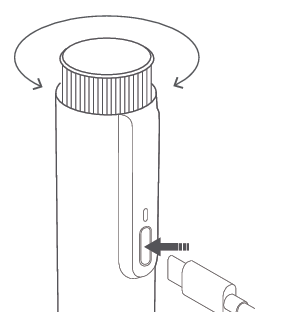
A: For the first use of the Mijia Rotary Tool Kit, please fully charge the battery to ensure the best experience. Insert the Type-C plug of the charging cable into the charging port on the tool, and connect the other end to a power source. During charging, the charging indicator breathes in white. Once fully charged, the indicator stays in white for 20 seconds, then goes off.
Battery level indicator:
1. When the battery is sufficient, no light is displayed on the indicator.
2. When the battery is low, the indicator breathes in red.
Q2: Does the Mijia Rotary Tool Kit support fast charging?
A: The Mijia Rotary Tool Kit does not support fast charging. The tool can be charged with a 5V/1A charger.
Q3: Does the Mijia Rotary Tool Kit need to be charged regularly?
A: When fully charged and idle, it is recommended to charge the Mijia Rotary Tool Kit once every six months. After use, charge the tool promptly to keep the battery at least half full, which helps extend the tool’s lifespan.
Q4: Can the Mijia Rotary Tool Kit be used while charging?
A: The Mijia Rotary Tool Kit can be used while charging.
Q5: Why doesn’t the Mijia Rotary Tool Kit come with an adapter?
A: The Mijia Rotary Tool Kit does not include an adapter. You can use the included charging cable with a 5V/1A adapter to charge. When using it plugged in, a 5V 3A adapter should be used.
Q6: What is the runtime of the Mijia Rotary Tool Kit?
A: The runtime of the Mijia Rotary Tool Kit varies at different statuses.
On full charge, the Mijia Rotary Tool Kit has the following runtime:
Maximum speed (no load): no less than 70 minutes.
Normal use: average runtime on a full charge of no less than 60 minutes, which passes the standard.
Note:
The tool can also be used while plugged in.
Q7: What type of battery does the Mijia Rotary Tool Kit use?
A: The Mijia Rotary Tool Kit uses an 800 mAh lithium-ion battery.
Q8: Why does the Mijia Rotary Tool Kit stop even when plugged in?
A: When using the Mijia Rotary Tool Kit while plugged in, ensure that the power supply is sufficient. Use an adapter rated for 5V 3A, along with the included charging cable. Using a lower-power adapter can reduce operating power, causing the tool to stop even when plugged in.
For safety and optimal performance, the Tool kit will automatically stop after 10 minutes of continuous operation to allow heat to dissipate. It is recommended to wait a few minutes before restarting.
Frequently Asked Questions
Q1: What are the working states of the Mijia Rotary Tool Kit?
A: When the Mijia Rotary Tool Kit is turned on with a press, the tool kit starts operating without any indicator.
If the Mijia Rotary Tool Kit is turned on while charging, it will operate normally, and the indicator will stay on. After turning off, the tool kit automatically switches back to charging mode.
Q2: How to turn on/off the Mijia Rotary Tool Kit?
A: Locate the power button on the Mijia Rotary Tool Kit. Press the button to turn on the tool, and press it again to turn it off.
Q3: How to adjust the speed of the Mijia Rotary Tool Kit?
A: After attaching a compatible accessory, press the power button to start the Mijia Rotary Tool Kit. While the tool is running, you can adjust the rotational speed in a stepless manner using the speed control knob.
When the knob reaches the maximum or minimum setting, the white light will flash three times, indicating that the speed has reached its limit. Turning the knob further will not change the speed.
Q4: How to rotate and open the chuck of the Mijia Rotary Tool Kit?
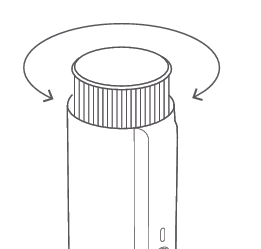
A: If it is necessary to rotate the chuck on the Mijia Rotary Tool Kit, hold the lock nut with your hand and turn the chuck nut to replace or remove the chuck.
No auxiliary rotation tool is included. If additional assistance is needed, pliers can be used to hold the lock nut securely.
Q5: What to do if the accessory rotates off-center after installation on the Mijia Rotary Tool Kit?
A: If the accessory of the Mijia Rotary Tool Kit wobbles or rotates off-center, it is likely not installed correctly. Remove and reinstall the accessory securely on the Mijia Rotary Tool Kit.
Q6: How powerful is the Mijia Rotary Tool Kit?
A: The Mijia Rotary Tool Kit is a low-power, portable rotary tool designed for precision work, with less power than medium or large hand-held rotary tools.
Q7: What size holes can the Mijia Rotary Tool Kit drill?
A: The Mijia Rotary Tool Kit can make holes of 1.3–1.4 mm in diameter.
Q8: What to do if the Mijia Rotary Tool Kit vibrates and causes hand fatigue?
A: Please check if the grinding head of the Mijia Rotary Tool Kit is loose. If so, reinstall the grinding head and tighten the lock nut.
Q9: Why does the Mijia Rotary Tool Kit make noise?
A: Some noise during operation is normal for the Mijia Rotary Tool Kit, as it is a grinding tool and produces sound from both the motor and the grinding process. Even when running idle, sound can be heard, and it can vary with changes in speed or oscillation direction. During grinding, noise can also vary with the applied pressure. The normal noise level is within 60 dB, so there is no cause for concern.
Note:
Due to the motor's characteristics, slight differences in noise can occur between units of the same model. This phenomenon is within the typical range of occurrences. Please feel free to use it in this regard.
Precautions
Q1: How to store the Mijia Rotary Tool Kit?
A: Store the Mijia Rotary Tool Kit in a safe, dry place and keep it out of reach of children. Do not place other objects on the tool. The recommended storage temperature is -10 °C to 45 °C.
Q2: How to store the Mijia Rotary Tool Kit in the case?
A: After using the Mijia Rotary Tool Kit, remove the accessory and tighten the lock nut before placing the tool in the storage case. If the tool does not fit or feels too tight in the case, it is likely because the lock nut is not fully tightened. Retighten the lock nut and try again.
Q3: What are the safety precautions when using the Mijia Rotary Tool Kit?
A: The safety precautions when using the Mijia Rotary Tool Kit are as follows:
1. Select appropriate eye protection based on the specific task—this includes a face shield, safety goggles, or protective glasses.
2. When working in applicable scenarios, wear a dust mask, hearing protection, abrasion-resistant gloves, and a work apron that can resist small abrasive particles.
3. Eye protection must effectively block flying debris generated by all types of operations. Dust masks or respirators should be capable of filtering out particles produced during tool use.
4. Avoid prolonged exposure to high noise levels, as this can cause permanent hearing damage.
5. For complete and detailed safety guidelines, consult the official user manual.
Q4: Does the Mijia Rotary Tool Kit need regular cleaning?
A: It is recommended to clean the electric tools and charging port of the Mijia Rotary Tool Kit regularly. Excessive accumulation of metal dust can cause electrical malfunctions.
Troubleshooting
Q1: Why can’t the Mijia Rotary Tool Kit turn on?
A: The Mijia Rotary Tool Kit can not turn on because the battery is depleted. It is recommended to fully charge the tool before turning it on. Plug-in operation is also supported.
Q2: Why does the Mijia Rotary Tool Kit suddenly stop working during operation?
A: If the Mijia Rotary Tool Kit suddenly stops working during operation, please refer to the following aspects:
1. Running out of battery power can cause the device to shut down suddenly. Please ensure the tool is fully charged before using it again.
2. The tool has been running under heavy load for an extended period, triggering over-temperature protection. Let the tool cool down, then charge it and check if it operates normally.
3. Excessive force is applied, causing stall protection to activate. Remove the tool from the workpiece and restart it.
4. Continuous operation for 10 minutes will trigger automatic shutdown for protection. Please wait a moment, then restart the tool.
Q3: What to do if accessories cannot be installed on the Mijia Rotary Tool Kit?
A: If accessories cannot be installed, it is because their size does not match the chuck of the Mijia Rotary Tool Kit. Use the accessories provided in the accessory kit or ensure the accessories have a diameter of 2.35 mm.
Q4: What to do if the Mijia Rotary Tool Kit cannot be charged after long-term storage?
A: After long-term storage, the Mijia Rotary Tool Kit needs to be charged. During charging, ensure the charging cable is properly connected, and a suitable charger is used. After connecting the cable and charger, wait a while, then check whether the tool functions normally.
Q5: What to do if the grinding head cannot be removed from the Mijia Rotary Tool Kit?
A: Hold the lock nut of the Mijia Rotary Tool Kit firmly with your hand and rotate the chuck nut until it loosens. If it cannot be removed due to slipping or other issues, wrap it with a cloth or use pliers to assist in removal.
Does it help?
Yes
No