

How to set a fenced area on the Xiaomi Smart Camera C300 Dual?
The Xiaomi Smart Camera C300 Dual supports the virtual fence feature. Once enabled, you can manually draw a detection area on the fixed screen. When the camera detects someone entering or leaving the fenced area, it will send a notification to your phone, record the event, and can also trigger smart scenes.
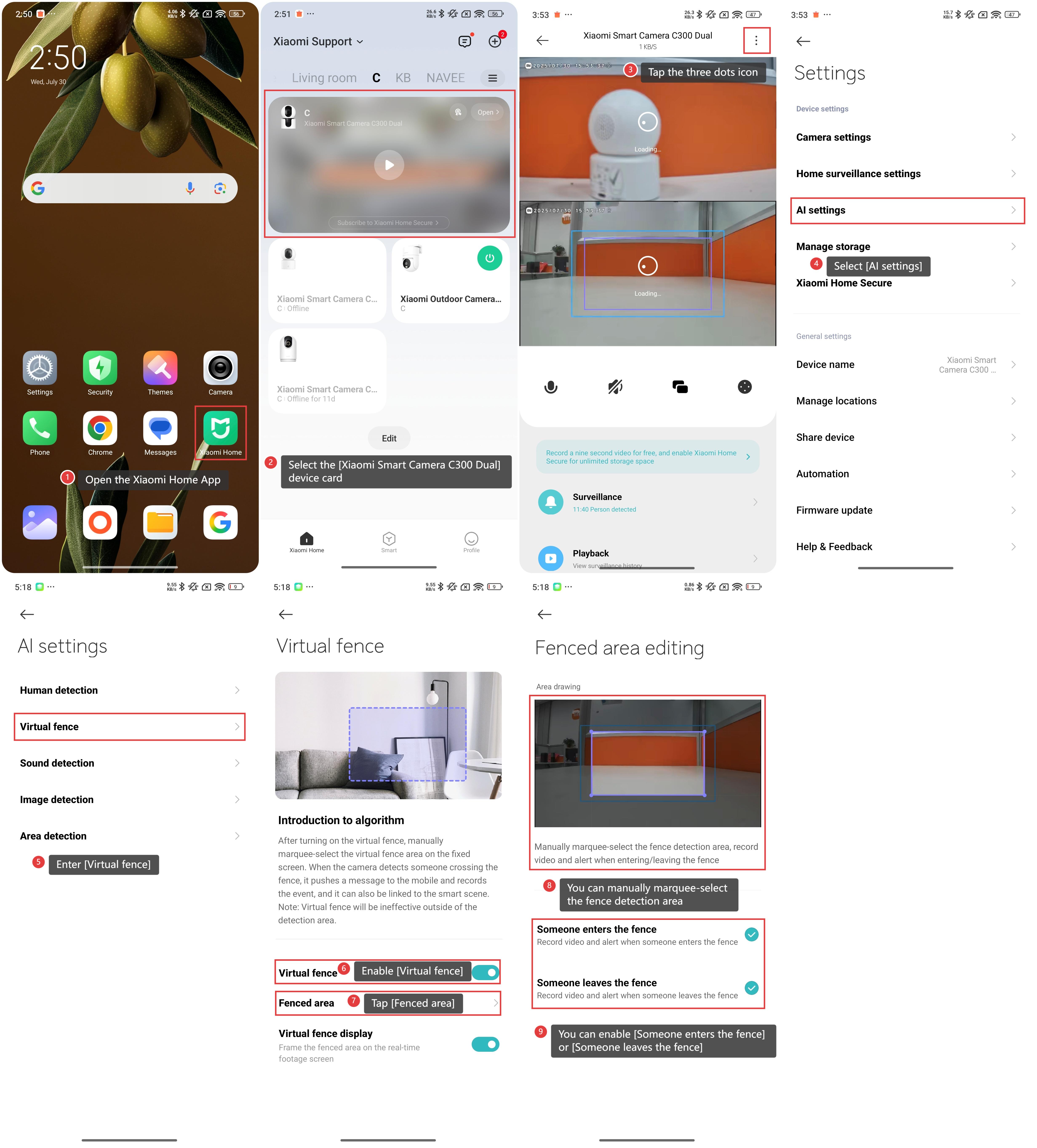
To set a fenced area on the Xiaomi Smart Camera C300 Dual, please refer to the following steps:
1. Open the Xiaomi Home App on your phone.
2. Select the [Xiaomi Smart Camera C300 Dual] device card.
3. Tap the three dots icon at the upper right corner.
4. Select [AI settings].
5. Enter [Virtual fence].
6. Enable [Virtual fence].
7. Tap [Fenced area].
8. You can manually marquee-select the fence detection area, record video and alert when entering/leaving the fence.
9. Additionally, you can enable [Someone enters the fence] or [Someone leaves the fence] according to your preference.
Does it help?
Yes
No