

How to turn on/off the sleep mode of the Xiaomi Smart Camera C300 Dual?
The Xiaomi Smart Camera C300 Dual features a sleep mode that allows you to temporarily disable the camera without disconnecting it from power or Wi-Fi. This feature is ideal when you want to pause monitoring for privacy, such as during family gatherings or personal time. You can easily enable or disable sleep mode at any time with just a tap.
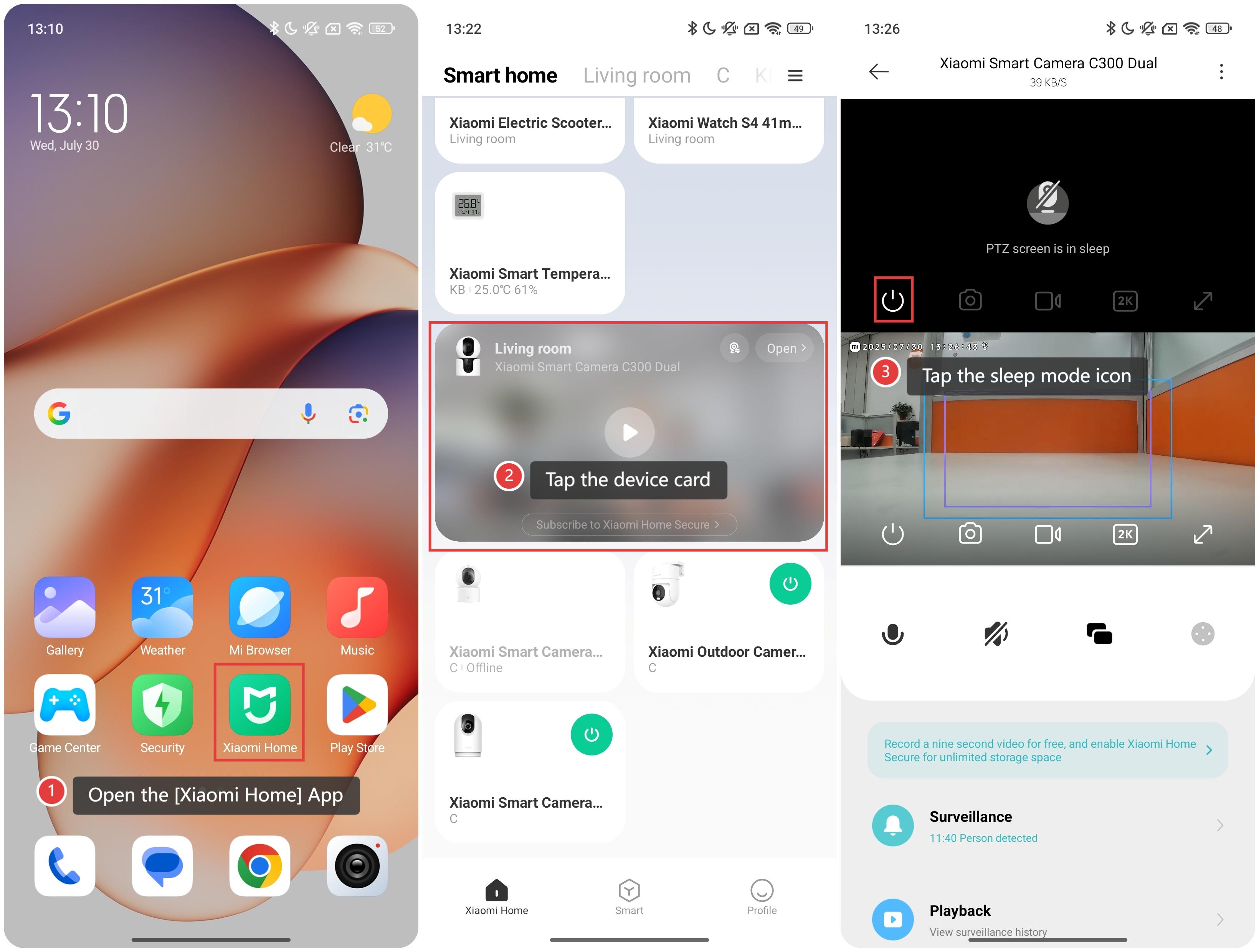
To turn on/off the sleep mode of the smart camera, please refer to the following steps:
Open the [Xiaomi Home] App on the phone.
Tap the [Xiaomi Smart Camera C300 Dual] device card.
Tap the sleep mode icon to turn on/off the sleep mode.
Friendly tips:
Once sleep mode is turned on, the camera stops recording and streaming. You can resume normal operation at any time by tapping the icon again.
Does it help?
Yes
No