

POCO Focus Pen FAQ
Product Information
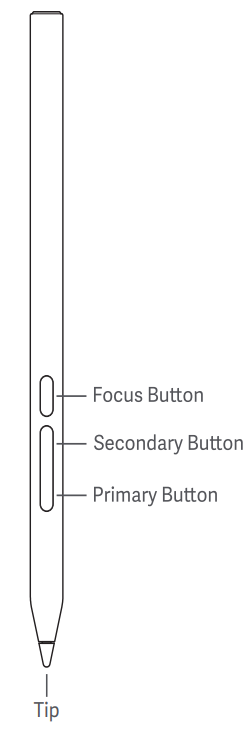
Q1: What are the buttons of the POCO Focus Pen?
A: The POCO Focus Pen has three buttons: the Focus button, Secondary button, and Primary button.
Q2: How to use the buttons of the POCO Focus Pen?
A: To use the buttons of the POCO Focus Pen, please refer to the following information:
Focus button:
1. Press and hold for a few seconds to turn the pen into a virtual laser pointer for even clearer meeting presentations.
2. After pressing to bring up the brush icon, press and hold to circle and annotate. Double-press to immediately clear the screen.
3. Press to take photos and start/stop recording.
Note:
Only available in the Camera App.
Primary button:
Press and hold the primary button and touch the screen to open Mi Canvas App. Press the writing button to switch between various brushes.
Secondary button:
Press and hold the secondary button and tap the screen to take quick global or local screenshots. Press the screenshot button in Mi Canvas App to easily switch between frequently-used colors.
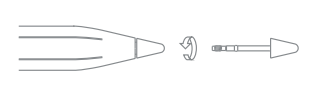
Q3: How to replace the tip of the POCO Focus Pen?
A: The package includes a spare pen tip. Gently pull out the old tip to replace.
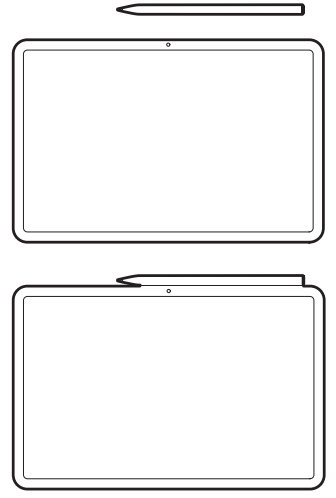
Q4: How to pair the POCO Focus Pen and the tablet and how to charge the POCO Focus Pen?
A: Please attach the stylus body horizontally to the centre of the long side of the tablet, perform Bluetooth pairing and start charging.
Note:
Please turn on the Bluetooth function on your tablet before.
FAQs
Q1: Why is the POCO Focus Pen battery draining even though it's been magnetically attached to the tablet?
A: To conserve tablet battery, when the POCO Focus Pen is magnetically attached to the tablet for charging, charging will stop once fully charged and then proceed with normal discharge. If the stylus remains attached, it will only resume charging when the battery level drops below 80%. If needed, the stylus can be removed and reattached to begin charging immediately.
Q2: Why is the cursor not positioned correctly on the tablet after pressing the focus button on the POCO Focus Pen?
A:
1. The virtual laser transforms the pen's spatial movements into changes in planar coordinates. It is not an actual laser beam. Therefore, there is no real correspondence between the pen tip and the cursor position.
2. It is recommended to hold the pen using the same grip method as a conductor's baton, keeping your arm still while rotating your wrist.
Q3: Why can't I use the POCO Focus Pen to play games?
A: Some third-party games are not fully compatible with the POCO Focus Pen, and the stylus is disabled by default when Game Turbo is enabled. Therefore, it's normal that you can't use the stylus when playing some games.
Q4: Why is the magnetic attachment of the POCO Focus Pen unstable and why does it easily fall off?
A: Our product's magnetic attraction force meets the product definition and reliability test case requirements of ≥4N. When using, the tablet will pop up a window prompting you to align it correctly. Please attach it to the indicated position.
Q5: Why doesn't the tablet display the stylus's battery level when the POCO Focus Pen is placed on the magnetic charging slot in certain scenarios?
A: Once the POCO Focus Pen establishes a communication connection with the tablet, the tablet will display the stylus's battery level. If no battery level indicator appears after placing the stylus on the tablet's magnetic charging slot, please check the following:
1. The stylus may not be placed in the correct position on the tablet. We suggest you remove the stylus and adjust its position, placing it in the position with the strongest magnetic attraction. After the stylus is correctly attached to the right side frame of the tablet, the tablet will display a wireless charging prompt and show the stylus's current battery level.
2. The stylus's battery may be out of power. The POCO Focus Pen uses a built-in battery, similar to smartphones with built-in batteries. When the built-in battery is completely dead, the stylus cannot power on and complete communication with the tablet. It needs to be charged for a period of time before it can establish a communication connection with the tablet. Only after a successful connection will the tablet display the stylus's current battery level. Therefore, you can place the stylus on the magnetic charging slot on the right side of the tablet to charge it for 2-3 minutes before trying again.
Q6: Why does the POCO Focus Pen fail to reconnect to the tablet after being idle for a period of time?
A: When the pen is not connected to the tablet, it will enter sleep mode if left idle for an extended period. It needs to be magnetically reactivated to wake up before it can be reconnected.
Q7: Why can't I use the POCO Focus Pen after placing it on the magnetic slot of the tablet?
A: If the POCO Focus Pen doesn't work after placing it on the tablet's magnetic slot, it may be incorrectly positioned. The stylus needs to be magnetically attached to the long side of the tablet's charging strip. Once attached, it will pair successfully and display the stylus's battery level. If it's misaligned, the system will provide a notification indicating the correct placement.
Q8: Why isn't the POCO Focus Pen fully charged when I remove it from the tablet's magnetic holder after a long time?
A: To extend the stylus's lifespan and prevent overcharging, we've designed an anti-overcharging strategy. Once the stylus is fully charged, the tablet will stop charging it until the battery level drops to around 80%, at which point it will resume charging until fully charged. Therefore, it's possible that the stylus isn't fully charged when removed from the tablet, even though it's been magnetically attached. Don't worry, 80% battery is sufficient for approximately 80 hours of continuous writing, which should meet your needs for extended periods.
Note:
If you're concerned about the stylus not being fully charged, you can periodically remove the stylus from the tablet and then place it back on. This will recharge it until fully charged.
Does it help?