

How to add the device card of the Xiaomi Outdoor Camera CW100 Dual to the home page of the Xiaomi Home App?
Enabling home page display allows the Xiaomi Outdoor Camera CW100 Dual to appear directly on the Xiaomi Home App home page. This provides quick access to the camera, making it easier to view live feeds, check notifications, and manage settings without navigating through the device list. With this feature, commonly used devices can be accessed immediately, ensuring faster response times and a more streamlined smart home experience.
To display your Xiaomi Outdoor Camera CW100 Dual on the Xiaomi Home App home page, please refer to the following steps:
1. Open the Xiaomi Home App on your phone.
2. Choose the [Xiaomi Outdoor Camera CW100 Dual] device card.
3. Tap the three dots icon in the top right corner.
4. Enable [Display on Xiaomi Home home page].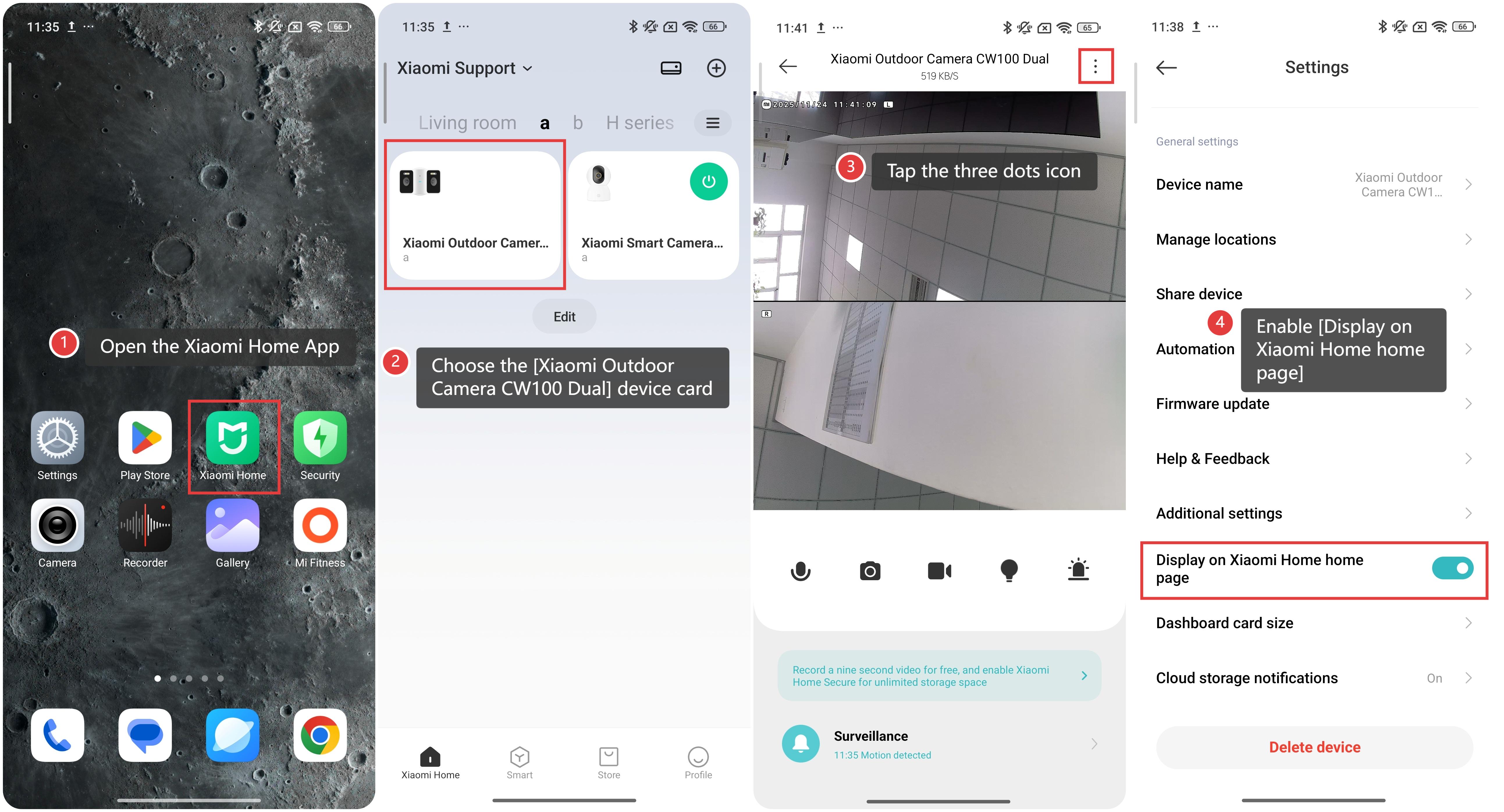
Does it help?
Yes
No