

How to set the time zone of the Xiaomi Outdoor Camera CW100 Dual in the Xiaomi Home App?
Setting the time zone of the Xiaomi Outdoor Camera CW100 Dual can ensure that any timed actions or schedules programmed into the camera, such as turning on or off at specific times, are accurate. You can easily adjust the time zone through the Xiaomi Home App.
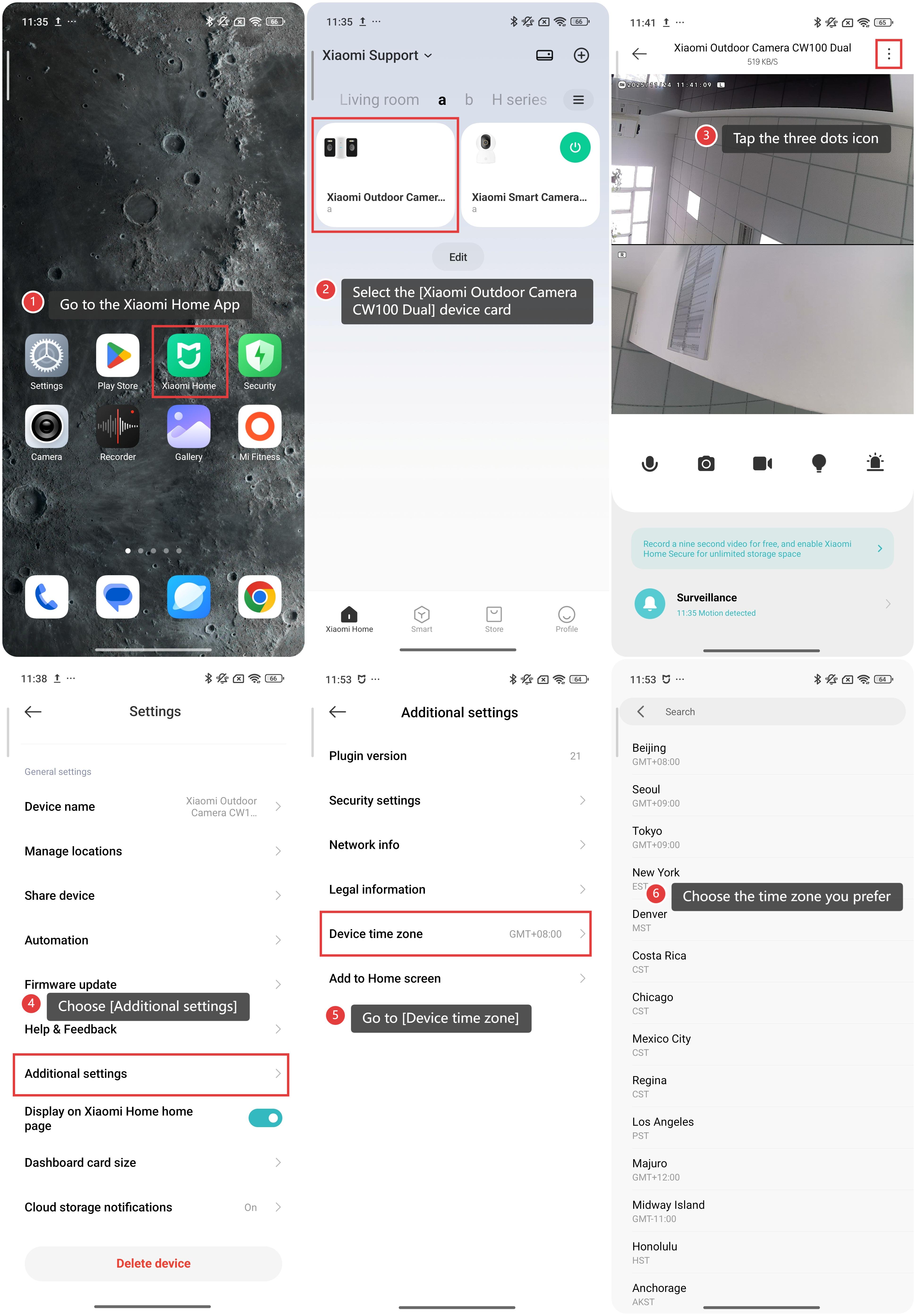
To change the time zone of the Xiaomi Outdoor Camera CW100 Dual, please refer to the following steps:
1. Go to the Xiaomi Home App.
2. Select the [Xiaomi Outdoor Camera CW100 Dual] device card.
3. Tap the three dots icon in the upper right corner.
4. Choose [Additional settings].
5. Go to [Device time zone].
6. Choose the time zone you prefer, and you can search in the search bar to quickly find your desired time zone.
Does it help?
Yes
No