

How to submit feedback for the Xiaomi Outdoor Camera CW100 Dual in the Xiaomi Home App?
You can submit issues or bugs you’ve encountered or suggestions for improving the Xiaomi Outdoor Camera CW100 Dual in the Xiaomi Home App. Your feedback is crucial for continuous improvement and product development.
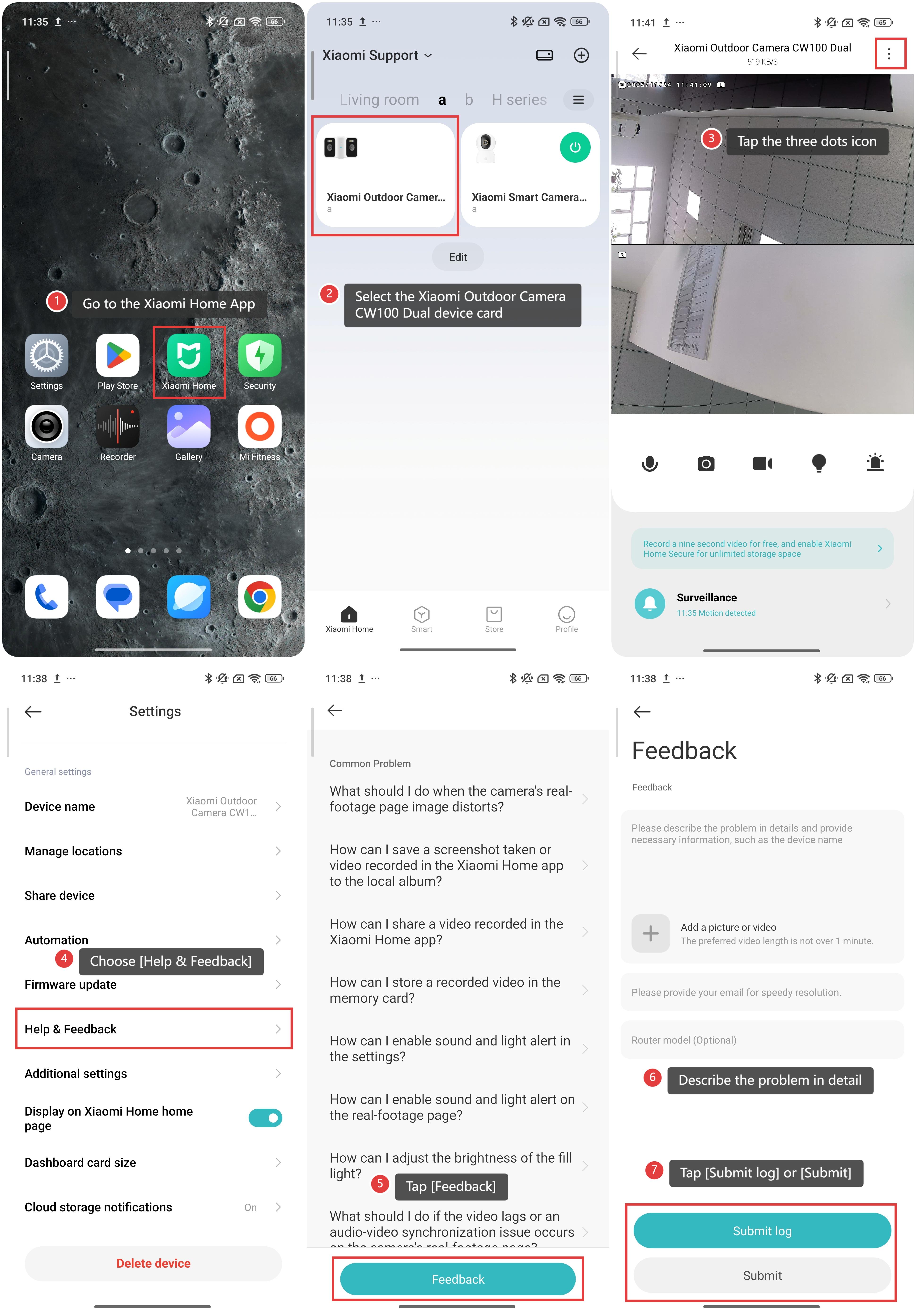
To submit feedback for the Xiaomi Outdoor Camera CW100 Dual in the Xiaomi Home App, please refer to the following steps:
1. Go to the Xiaomi Home App.
2. Select the [Xiaomi Outdoor Camera CW100 Dual] device card.
3. Tap the three dots icon in the upper right corner.
4. Scroll down to find and choose [Help & Feedback], where you can view FAQs and find useful guidance.
5. If your issue is not addressed in the FAQs, tap [Feedback].
6. Describe the problem in detail, and you can attach a picture or video to illustrate the issue.
7. Finally, tap [Submit log] or [Submit] to send your feedback to the support team.
Does it help?
Yes
No