

How to fix the Xiaomi TV F2 50’s remote buttons not working?
If your Xiaomi TV F2 50’s remote control buttons are malfunctioning or not responding, please refer to the following steps to troubleshoot the issue:
1. Check Batteries: Ensure the batteries in the remote are correctly inserted and have enough power. Try replacing them with fresh batteries to see if it resolves the problem.
2. Inspect for Physical Damage: Check for physical damage such as cracks, spills, or signs of wear and tear. If the remote has been damaged, it might need to be replaced.
3. Check for Interference: Interference from other electronic can sometimes disrupt the signal between the remote and the device. Ensure there's no interference or direct light hitting the sensor on the device.
4. Reposition the Remote: Point the remote directly at the device and ensure there are no obstacles between the remote and the device. Sometimes, the signal might not be reaching the device due to its position or obstacles.
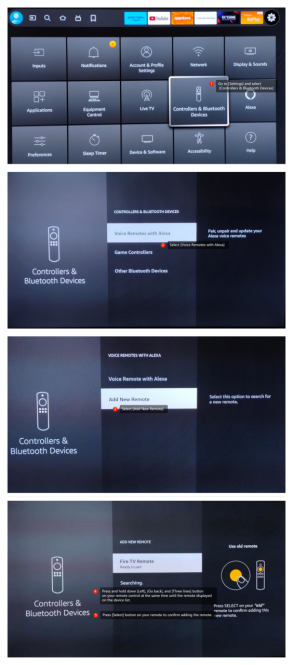
5. Reset the Remote Control: Go to [Settings] at the upper right corner >> scroll down and select [Controllers & Bluetooth Devices] >> select [Voice Remotes with Alexa] on the top >> select [Add New Remote] to search for a new remote >> press and hold down [Left], [Go back], and [Three lines] button on your remote control at the same time until the remote displayed on the device list >> press [Select] button on your remote to confirm adding the remote.
1. Check Batteries: Ensure the batteries in the remote are correctly inserted and have enough power. Try replacing them with fresh batteries to see if it resolves the problem.
2. Inspect for Physical Damage: Check for physical damage such as cracks, spills, or signs of wear and tear. If the remote has been damaged, it might need to be replaced.
3. Check for Interference: Interference from other electronic can sometimes disrupt the signal between the remote and the device. Ensure there's no interference or direct light hitting the sensor on the device.
4. Reposition the Remote: Point the remote directly at the device and ensure there are no obstacles between the remote and the device. Sometimes, the signal might not be reaching the device due to its position or obstacles.
5. Reset the Remote Control: Go to [Settings] at the upper right corner >> scroll down and select [Controllers & Bluetooth Devices] >> select [Voice Remotes with Alexa] on the top >> select [Add New Remote] to search for a new remote >> press and hold down [Left], [Go back], and [Three lines] button on your remote control at the same time until the remote displayed on the device list >> press [Select] button on your remote to confirm adding the remote.
6. Add a new remote
(1). Go to [Settings] at the upper right corner >> scroll down and select [Controllers & Bluetooth Devices].
(2). Select [Voice Remotes with Alexa] on the top >> select [Add New Remote] to search for a new remote.
(3). Press and hold down [Home] button for 10 seconds on the new remote, once it is discovered, it will be displayed in the device list.
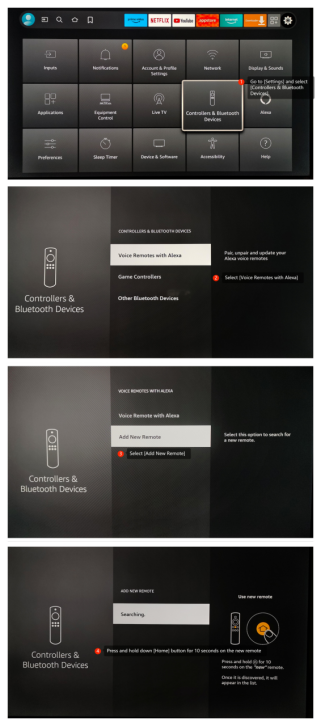
(1). Go to [Settings] at the upper right corner >> scroll down and select [Controllers & Bluetooth Devices].
(2). Select [Voice Remotes with Alexa] on the top >> select [Add New Remote] to search for a new remote.
(3). Press and hold down [Home] button for 10 seconds on the new remote, once it is discovered, it will be displayed in the device list.
Does it help?
Yes
No