

What to do if the Xiaomi Smart Double Stack Air Fryer 12L malfunctions during use?
If the Xiaomi Smart Double Stack Air Fryer 12L malfunctions during use, please refer to the following information:
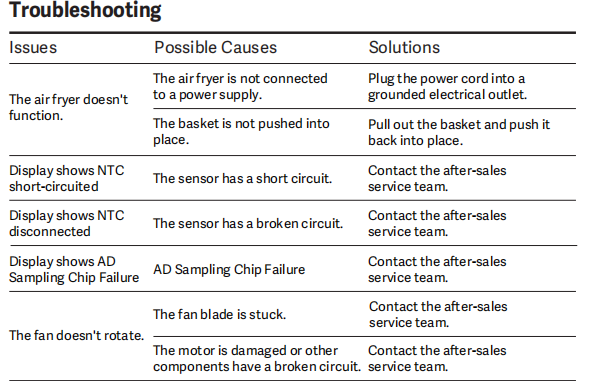
1. If the air fryer doesn't function, please refer to the following troubleshooting steps:
a. The air fryer is not connected to a power supply. Please plug the power cord into a grounded electrical outlet.
b. Plug the power cord into a grounded electrical outlet. Please pull out the basket and push it back into place.
2. If the display shows NTC short-circuited, please refer to the following troubleshooting steps:
The sensor has a short circuit. Please contact the after-sales service team.
3. If the display shows NTC Disconnected, please refer to the following troubleshooting steps:
The sensor has a broken circuit. Please contact the after-sales service team.
4. If the display shows AD Sampling Chip Failure, please refer to the following troubleshooting steps:
This is due to the AD sampling chip failure. Please contact the after-sales service team.
5. If the fan doesn't rotate, please refer to the following troubleshooting steps:
a. The fan blade is stuck.
b. The motor is damaged or other components have a broken circuit.
Please contact the after-sales service team.
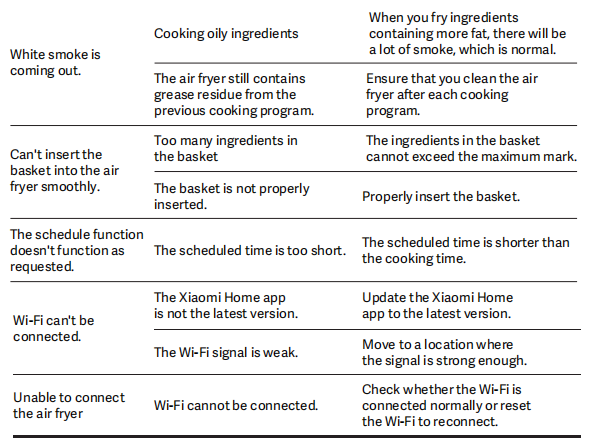
6. If white smoke is coming out, please refer to the following troubleshooting steps:
a. Cooking oily ingredients may cause white smoke to come out. When you fry ingredients containing more fat, there will be a lot of smoke, which is normal.
b. The air fryer still contains grease residue from the previous cooking program. Ensure that you clean the air fryer after each cooking program.
7. If you can't insert the basket into the air fryer smoothly, please refer to the following troubleshooting steps:
a. There are too many ingredients in the basket. Please ensure that the ingredients in the basket don’t exceed the maximum mark.
b. The basket is not properly inserted. Please properly insert the basket.
8. If the schedule function doesn't function as requested, please refer to the following troubleshooting steps:
The scheduled time is too short. The scheduled time is shorter than the cooking time.
9. If Wi-Fi can't be connected, please refer to the following troubleshooting steps:
a. The Xiaomi Home App is not the latest version. Please update the Xiaomi Home App to the latest version.
b. The Wi-Fi signal is weak. Please move to a location where the signal is strong enough.
10. Unable to connect the air fryer, please refer to the following troubleshooting steps:
Wi-Fi cannot be connected. Please check whether the Wi-Fi is connected normally or reset the Wi-Fi to reconnect.
Does it help?
Yes
No