

What to do if there is no sound when viewing real-time images on the Xiaomi Smart Camera C302?
If there is no sound when viewing the real-time surveillance footage of the Xiaomi Smart Camera C302, please refer to the steps to troubleshoot:
1. The volume of real-time video is turned off by default in the Xiaomi Home App. You can enable the volume in the Xiaomi Home App's video window by tapping the [Mute] icon. If the volume is low, adjust it higher on your phone.
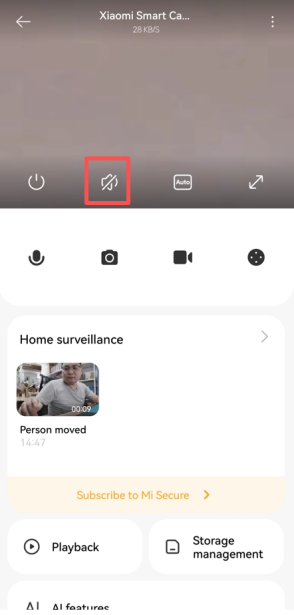
2. If there is noise in the real-time video, please keep your phone away from the camera and avoid placing the camera near refrigerators, microwave ovens, or other electronic devices.
3. If the camera is placed at a high position or the lens is facing downward, the microphone can be buried and pick up echoes from surrounding surfaces. In this case, the device's microphone should be removed from the cavity.
Does it help?
Yes
No