

How to connect the Mijia Front Load Washer Dryer Pro 9kg with the Xiaomi Home App?
To connect the Mijia Front Load Washer Dryer Pro 9kg with Xiaomi Home App, please refer to the following steps:
1. Scan the QR code on the instruction manual to download and install the Xiaomi Home App.

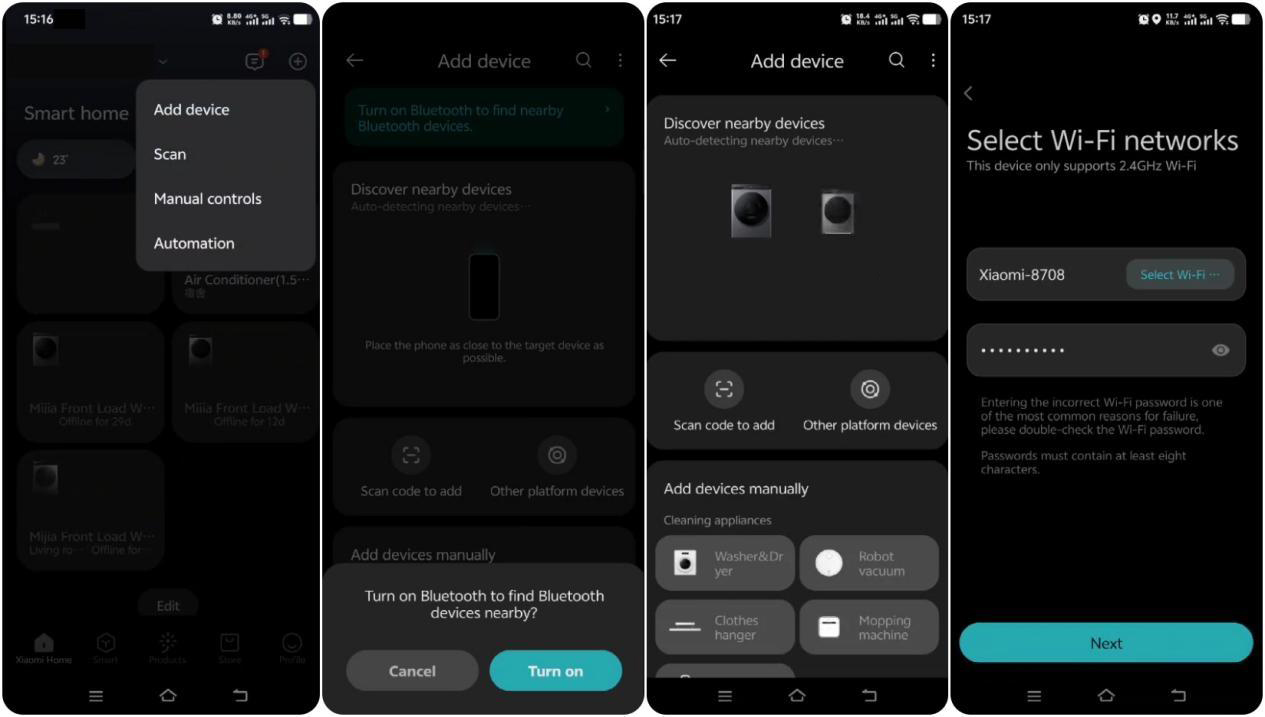
2. If the App is already installed, you will be directed to the connection settings page. Alternatively, search for "Xiaomi Home" in the App Store to download and install it.
3. Open the Xiaomi Home App, tap [+] in the upper right corner, and follow the instructions to add your device.
Remote Control Instructions
1. Make sure the washer dryer is connected to a wireless network (the Wi-Fi icon on the panel should remain on).
2. Place the laundry into the drum and close the door.
3. Enable remote control on the device. The drum door will automatically lock, and you can then control the washer dryer using your smartphone.
Note:
1. You can turn remote control On/Off on the program selection page of the device or press the Scroll up/Confirm button during a program to enable/disable remote control.
2. After enabling Remote Control, if there is no operation from the App within 10 minutes, the washer dryer will enter low-power mode. The remote control function will remain active for up to 24 hours and then automatically turn off. During this period, pressing any button on the device or sending a command from the App will exit low-power mode.
3. After the washing program finishes, remote control will automatically turn off and the door will unlock. If the washer dryer is powered off or disconnected from power, remote control will also automatically turn off.
Does it help?
Yes
No