

What to do if the Xiaomi Robot Vacuum cannot recognize the charging dock?
If the Xiaomi Robot Vacuum cannot recognize the charging dock, please refer to the following steps to troubleshoot:
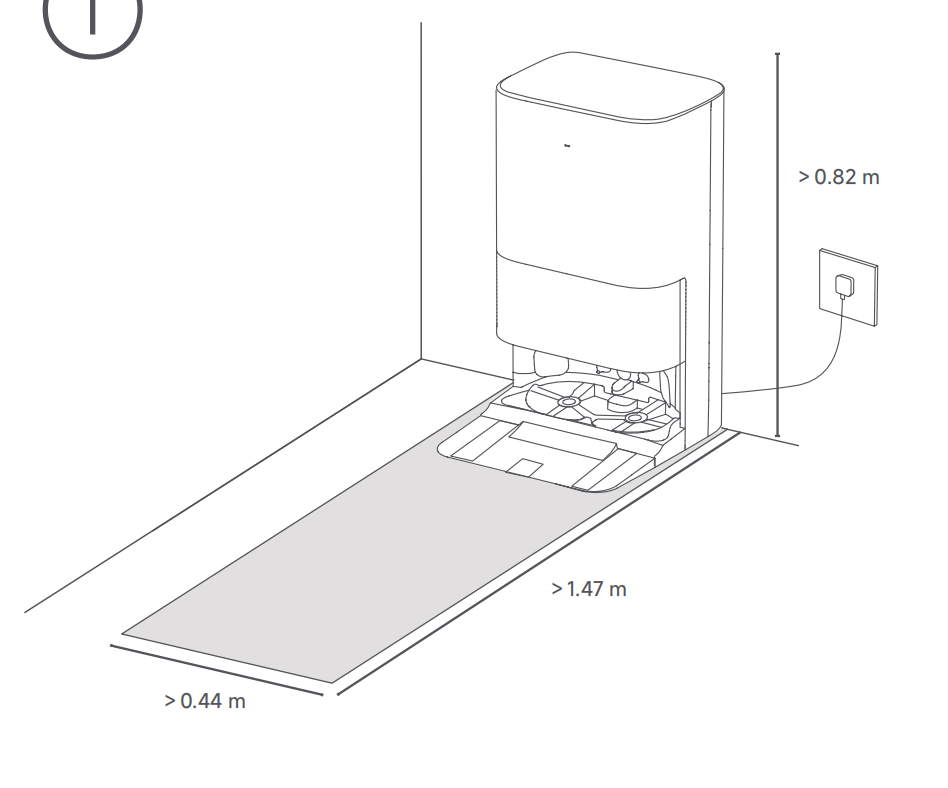
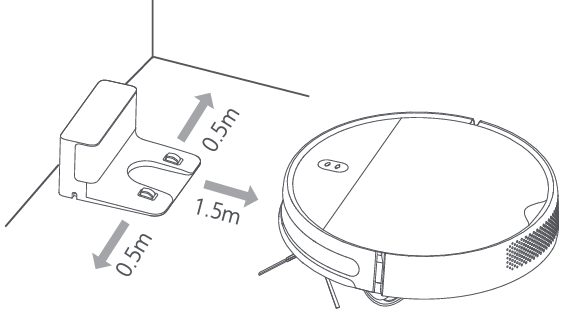
1. Please check whether the charging dock is placed correctly.
2. Ensure the device starts from the charging dock (mapping can only be created when the device is properly docked).
3. Environmental factors: Dark-colored surroundings, such as dark floors, dark carpets, dark floor mats, or dark skirting boards.
4. The home size exceeds 120 m².
5. Check for dirt on the charging contacts. Clean any debris or dirt on the charging contacts of the charging dock and the robot vacuum.
6. If the issue persists, please contact the after-sales service center.
Note:
1. Place the charging dock in the correct position and maintain an adequate distance from surrounding walls.
2. Ensure the robot vacuum starts cleaning from the charging dock.
3. Avoid using the device in the following environments: Areas with floor-to-ceiling windows, full-length mirrors, or sinks. Dark-colored environments, such as dark floors, thick carpets, skirting boards, or walls.
Does it help?
Yes
No