

What to do if the Mijia Front Load Washer Dryer Pro 9kg automatically stops during operation?
If the Mijia Front Load Washer Dryer Pro 9kg automatically stops during operation, please refer to the following methods to troubleshoot:
- Check the power supply. Plug another device into the power source to confirm it works. If it doesn't, check your home power supply.
- The washing machine will pause or soak during operation. Wait a moment, and the machine will automatically start.
- Check if the water inlet filter is blocked. A blockage in the water filter can cause water flow problems. Clean the filter.
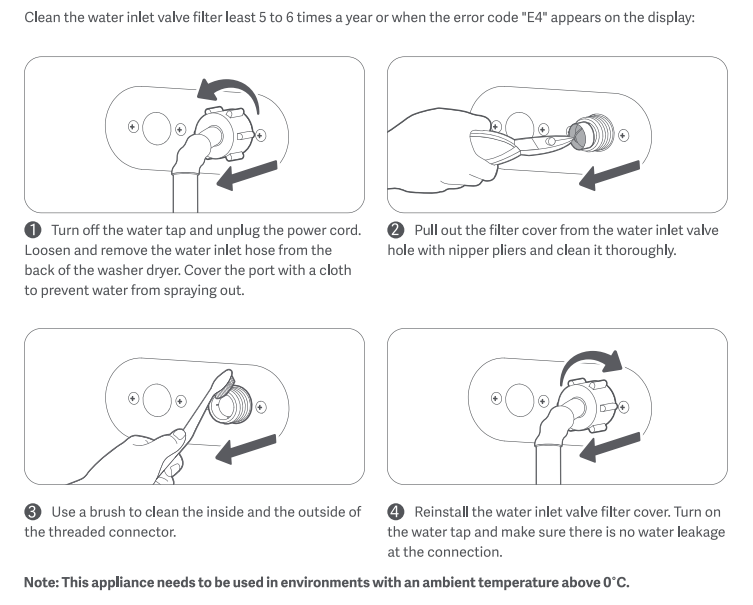
(1). Turn off the water tap and unplug the power cord. Loosen and remove the water inlet hose from the back of the washer dryer. Cover the port with a cloth to prevent water from spraying out.
(2). Pull out the filter cover from the water inlet valve hole with nipper pliers and clean it thoroughly.
(3). Use a brush to clean the inside and the outside of the threaded connector.
(4). Reinstall the water inlet valve filter cover. Turn on the water tap and make sure there is no water leakage at the connection.
- Check the drain filter for blockage. A blockage in the drain filter can cause water flow problems. Clean the drain filter.
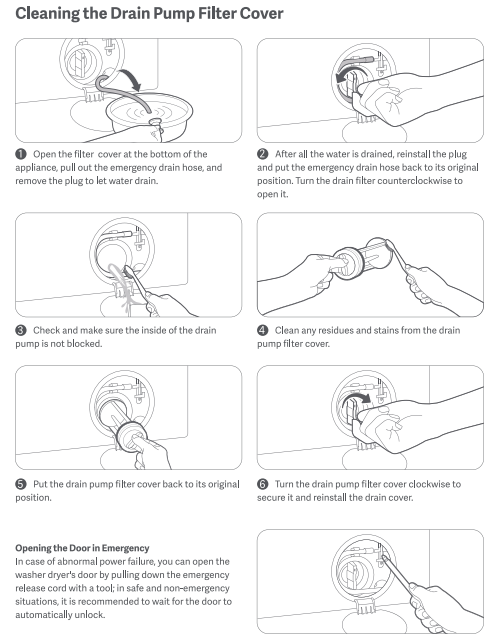
(1). Open the filter cover at the bottom of the device, pull out the emergency drain hose, and remove the plug to let water drain.
(2). After all the water is drained, reinstall the plug and put the emergency drain hose back to its original position. Turn the drain filter counterclockwise to open it.
(3). Check and make sure the inside of the drain pump is not blocked.
(4). Clean any residues and stains from the drain pump filter cover.
(5). Put the drain pump filter cover back to its original position.
(6). Turn the drain pump filter cover clockwise to secure it and reinstall the drain cover.
If the above methods still do not solve the problem, please apply for local after-sales service center inspection.
Does it help?
Yes
No