

Xiaomi Soundbar Pro 2.1 ch FAQ
Product introduction
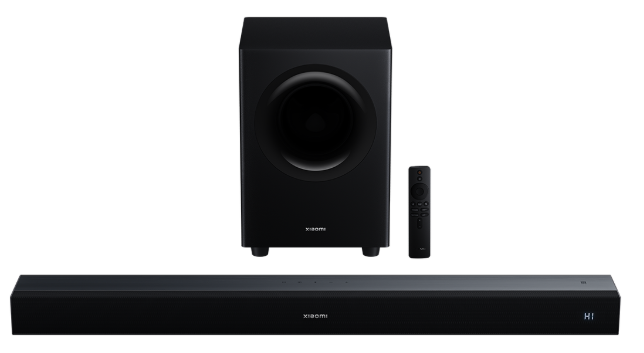
Q1: What is the Xiaomi Soundbar Pro 2.1 ch?
A: The Xiaomi Soundbar Pro 2.1 ch is a soundbar with a built-in subwoofer.
The 2 in 2.1 represents the left and right channels, and the 1 represents the subwoofer.
Q2: What does the Xiaomi Soundbar Pro 2.1 ch look like?
A:
- The color of the Xiaomi Soundbar Pro 2.1 ch is black.
- The dimensions of the soundbar are 840 mm × 87 mm × 60mm. The dimensions of the subwoofer are 363 mm × 249 mm × 249 mm.
- The soundbar weighs approximately 2200 g ± 50 g. The subwoofer weighs approximately 5140 g ± 50 g.
Q3: What buttons does the Xiaomi Soundbar Pro 2.1 ch have?
A: There are seven buttons on the Xiaomi Soundbar Pro 2.1 ch.
There are five buttons on the top of the soundbar, including the power button, the input source button, the Bluetooth button, the volume down button, and the volume up button from left to right.
For your reference, the functions of each button are as follows:
- Press the power button to turn it on/off.
- Press the input source button to cycle through the modes in the following order: HDMI > Bluetooth > Optical > Coaxial.
- Press the Bluetooth button to enter Bluetooth connection, press and hold for 3s to disconnect, and re-enter Bluetooth pairing mode.
- Press the volume down button to decrease the volume by one level. Press and hold this button to decrease the volume continuously until the minimum level is reached.
- Press the volume up button to increase the volume by one level. Press and hold this button to increase the volume continuously until the maximum level is reached.
There are two buttons on the back of the subwoofer: the power button and the PAIR button.
For your reference, the functions of each button are as follows:
- Press the power button to turn it on/off.
- Press and hold the subwoofer PAIR button for 2 seconds to put the subwoofer into pairing mode with the soundbar.
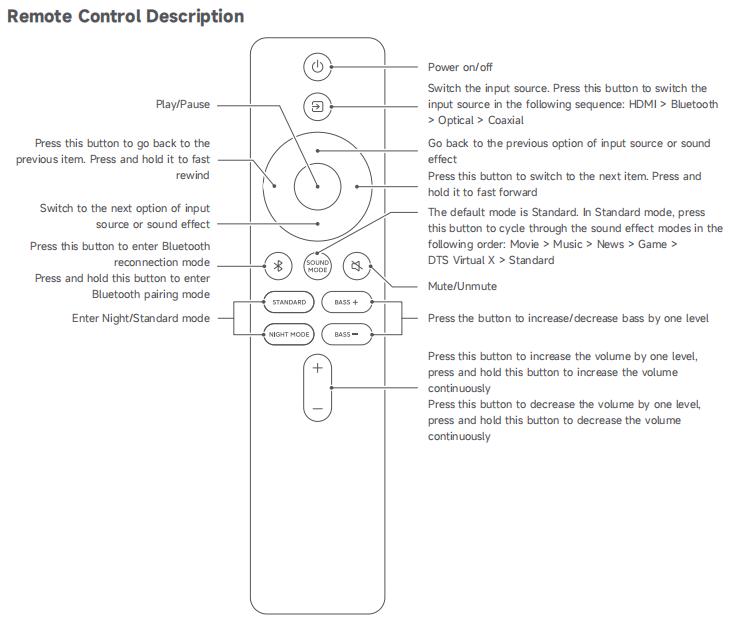
Q4: What buttons does the remote of the Xiaomi Soundbar Pro 2.1 ch have?
A: There are sixteen buttons on the remote of the Xiaomi Soundbar Pro 2.1 ch.
For your reference, the functions of each button are as follows:
- Press the power button to turn the device on/off.
- Press the input source button to cycle through the modes in the following order: HDMI > Bluetooth > Optical > Coaxial.
- Press the up button to go back to the previous option of input source modes or sound effect modes.
- Press the down button to switch to the next option of input source modes or sound effect modes.
- Press the left button to go back to the previous item. Press and hold it to fast rewind.
- Press the right button to switch to the next item. Press and hold it to fast forward.
- Press the middle button to play or pause.
- Press the Bluetooth button to enable Bluetooth connection, and press and hold to enter Bluetooth pairing mode.
- Press the SOUND MODE button to cycle through the sound effect modes in the following order: Movie > Music > News > Game > DTS Virtual X > Standard. The default mode is Standard.
- Press the Mute button to mute or unmute.
- Press the STANDARD button to enter Standard mode.
- Press the NIGHT MODE button to enter Night mode.
- Press the BASS + button to increase the bass by one level.
- Press the BASS - button to decrease the bass by one level.
- Press the volume up button to increase the volume by one level. Press and hold this button to increase the volume continuously until the maximum level is reached.
- Press the volume down button to decrease the volume by one level. Press and hold this button to decrease the volume continuously until the minimum level is reached.
Q5: What ports does the Xiaomi Soundbar Pro 2.1 ch have, and how to connect it to a TV?
A: The Xiaomi Soundbar Pro 2.1 ch has five ports.
There are four ports on the soundbar. The port on the subwoofer is AC IN.
For your reference, the functions of each port are as follows:
- AC IN: For connecting the power cord.
- Coaxial & Optical: Used to connect to a DAC, amplifier, TV, etc.
- HDMI (ARC): For connecting to a TV and other external devices.
For your reference, the specific TV connection methods are as follows:
- Coaxial & Optical: Connect one end of the optical/coaxial cable to the TV's optical/coaxial port, and the other end to the soundbar's optical/coaxial port. Press the soundbar's power button to turn it on. The soundbar defaults to HDMI mode. Use the remote control to switch the input source to Optical or Coaxial.
- HDMI: To connect the soundbar to a TV via an HDMI cable, the TV must have an HDMI (ARC) port. In the TV system settings, go to [All settings] >> [Display & Sound] >> [Audio output], select HDMI Output, and Digital Output (PCM). In the soundbar, the mode needs to be HDMI mode.
Note:
If it is not in HDMI mode, you will need to touch the input source button on the soundbar or use the input source button on the remote control to switch to HDMI mode.
Q6: What are the placement requirements for the Xiaomi Soundbar Pro 2.1 ch?
A: For optimal sound quality, the Xiaomi Soundbar Pro 2.1 ch should be placed facing the viewer, with minimal obstruction.
Q7: Can the Xiaomi Soundbar Pro 2.1 ch be controlled via the App?
A: The Xiaomi Soundbar Pro 2.1 ch can not be controlled by the App.
Q8: Does the Xiaomi Soundbar Pro 2.1 ch have built-in batteries?
A: The Xiaomi Soundbar Pro 2.1 ch does not have built-in batteries.
Q9: How many phases does the power cord of the Xiaomi Soundbar Pro 2.1 ch have?
A: The power cord of the Xiaomi Soundbar Pro 2.1 ch has 2 phases.
Q10: How to install the Xiaomi Soundbar Pro 2.1 ch bracket?
A: The Xiaomi Soundbar Pro 2.1 ch bracket installation instructions are detailed in the user manual.
For your reference, the steps are as follows:
- Determine the hole positions. Mark point A1 according to the desired mounting height, then measure 750 mm horizontally to the right from point A1 to mark point A2 on the wall.
- Drill holes at the marked positions.
- To mount the soundbar, insert expansion plugs into the two holes. Pass the screws through the EVA foam pad into the expansion plugs, tighten them, and hang the soundbar onto the screws.
Q11: How to connect the Xiaomi Soundbar Pro 2.1 ch to a mobile device via Bluetooth?
A: For your reference, there are two methods to connect the Xiaomi Soundbar Pro 2.1 ch to a mobile device via Bluetooth:
Method 1:
- Turn on the Soundbar.
- Press the input source button or the Bluetooth button on the remote control to switch to Bluetooth mode.
- When “bT” appears and flashes on the screen, open your phone’s Bluetooth settings.
- Search for “Xiaomi Soundbar Pro 2.1” and tap to connect. Once connected, “bT” remains steady.
Method 2:
- Ensure NFC is enabled on your phone and the screen is unlocked.
- With the Soundbar in Bluetooth mode, tap your phone’s NFC area to the NFC icon on the Soundbar.
- Confirm the connection on your phone. Audio from your phone will then play through the Soundbar.
Note:
NFC connection is supported only on phones running Android 8.1 or later.
Q12: Does the Xiaomi Soundbar Pro 2.1 ch support remote control?
A: The Xiaomi Soundbar Pro 2.1 ch supports remote control.
Usage & Troubleshooting
Q1: What to do if the Xiaomi Soundbar Pro 2.1 ch can't connect to or find the Bluetooth signal?
A: For your reference, here is some information on when the Xiaomi Soundbar Pro 2.1 ch can't connect to Bluetooth:
- Check whether the input source is set to Bluetooth mode or try restarting the soundbar.
- Re-enter Bluetooth pairing mode by briefly pressing the Bluetooth button. The pairing time is 3 minutes. If no connection is made within 3 minutes, Bluetooth pairing mode will exit, and the device will no longer be discoverable.
- Simultaneously press and hold the power button and the input source button for 3 seconds to restore the soundbar to factory settings and restart it.
Q2: How to fix the low volume when the Xiaomi Soundbar Pro 2.1 ch is playing audio?
A: To fix the low volume when the Xiaomi Soundbar Pro 2.1 ch is playing audio, please refer to the following steps:
- The soundbar supports independent volume control. If the volume is still low after turning it up, check whether the output volume of the audio source device (mobile phone, TV, etc.) is set too low. Adjust the volume on that device.
- Check if the soundbar is in Night mode. Night mode has a maximum volume of 30, which is low. To switch to Standard mode, briefly press the STANDARD button on the remote control, then increase the volume to 100 to verify the sound level.
Q3: How to fix Bluetooth audio lag on the Xiaomi Soundbar Pro 2.1 ch?
A: If the Xiaomi Soundbar Pro 2.1 ch experiences lag, stuttering, or audio delay when playing music via Bluetooth, please refer to the following steps:
- Move the playback device closer to the Soundbar and remove any obstacles that can interfere with the Bluetooth signal.
- Avoid using the Soundbar near Wi-Fi routers, microwaves, or other devices, as these can cause Bluetooth interference.
- If the issue persists, switch to another input mode, such as HDMI or Optical, to check whether the problem is related to the Bluetooth connection.
Q4: What are the differences between the various sound modes on the Xiaomi Soundbar Pro 2.1 ch?
A: For your reference, below is an overview of the sound modes available on the Xiaomi Soundbar Pro 2.1 ch:
- Movie mode: Enhances both bass and treble, delivering stronger bass impact and clearer vocals.
- Music mode: Reduces both bass and treble for a softer, more comfortable sound balance.
- News mode: Reduces bass to make speech and vocals more prominent.
- Game mode: Keeps bass the same as Standard mode but increases treble by 3 dB, adding more detail to game audio and background effects.
- Standard mode: Maintains balanced bass and treble for everyday listening.
- Night mode: Limits overall output volume to about 30% of the maximum to avoid disturbing others.
- DTS Virtual:X mode: A technology called "immersive surround sound audio" that enhances the surround sound effect.
Q5: How to fix no sound when the Xiaomi Soundbar Pro 2.1 ch is connected to a TV via a wired connection?
A: For your reference, here is some information if the Xiaomi Soundbar Pro 2.1 ch has no sound when connected to a TV via a wired connection:
- Ensure the soundbar is connected to the TV via an HDMI cable. The TV needs to be connected to the HDMI (ARC) port. Also, go to [All settings] >> [Display & Sound] >> [Audio output], select HDMI Output, and Digital Output (PCM) on the TV.
- Make sure the Soundbar is set to HDMI mode. Press the soundbar power button to turn it on. The soundbar defaults to HDMI mode.
- Check if the soundbar is muted. You can unmute it by pressing the Mute button.
- Adjust the volume to make sure it is not set to level 0.
Note:
If the Soundbar is not in HDMI mode, press the Input Source button on the Soundbar or use the remote control to switch to HDMI mode.
Q6: What is the TV and the Xiaomi Soundbar Pro 2.1 ch power synchronization?
A: For your reference, below is an overview of TV and the Xiaomi Soundbar Pro 2.1 ch power synchronization:
- Connect the soundbar to the TV via the HDMI ARC port, and synchronize its power on and off with the TV
- Go to TV [All settings] >> [Channel & Inputs] >> [Inputs] >> turn on [HDMI control] >> enable [Device auto power off] and [TV auto power on].
- When the TV is on but no audio input is detected, the Soundbar will automatically enter standby mode after 15 minutes and will wake up automatically when audio input resumes.
- To completely shut down the Soundbar, unplug it.
Note:
If the soundbar is connected via SPDIF (Coaxial), the above features are not supported.
Q7: What Bluetooth protocols does the Xiaomi Soundbar Pro 2.1 ch support?
A: The Xiaomi Soundbar Pro 2.1 ch uses Bluetooth version 5.3 and supports A2DP, AVRCP, AVDTP, and AVCTP protocols. It does not support LDAC.
Q8: Can the Xiaomi Soundbar Pro 2.1 ch volume be controlled using a TV remote?
A: When connected via HDMI ARC, the volume of the Xiaomi Soundbar Pro 2.1 ch can be adjusted using the TV remote.
Q9: Why does the Xiaomi Soundbar Pro 2.1 ch screen not display notifications when the TV is turned on or off with CEC enabled?
A: When the TV and the Xiaomi Soundbar Pro 2.1 ch are linked via HDMI CEC, the Soundbar automatically turns on or off together with the TV. The screen will automatically turn off after 30 seconds of inactivity. This prevents unnecessary interruptions, but audio from the TV will continue to play through the Soundbar even if the screen is off.
Does it help?
Yes
No