

What to do if the Xiaomi Smart Camera C701 cannot recognize the microSD card?
If the Xiaomi Smart Camera C701 cannot recognize the microSD card, please refer to the following steps to troubleshoot:
- Restart the device.
- Check if the camera firmware and the Xiaomi Home App need to be updated.
- Clear the data of the Xiaomi Home App.
- Replace the microSD card.
Note:
- Clearing the data of the Xiaomi Home App will delete any downloaded cloud storage videos.
- MicroSD cards have a finite lifespan. Continuous reading and writing can cause wear over time, eventually making the card unusable. To ensure optimal performance, it's advisable to replace the card periodically with a new one.
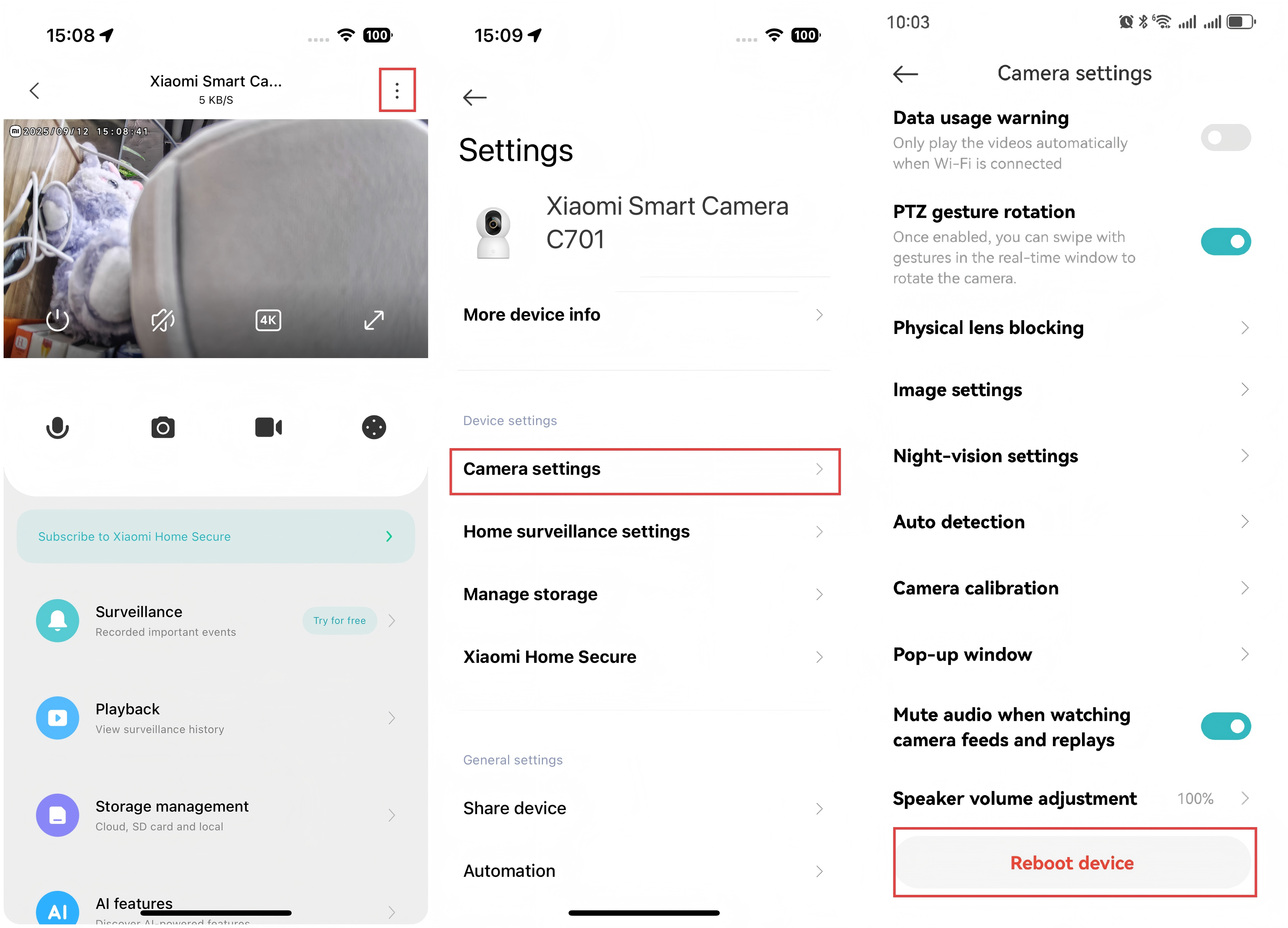
To reboot the Xiaomi Smart Camera C701, please refer to the following steps:
Open the Xiaomi Home App >> select the Xiaomi Smart Camera C701 >> tap the three-dot icon at the upper right corner >> select [Camera settings] >> tap [Reboot device].
Does it help?
Yes
No