

Why are the recorded videos on the microSD card inconsistent and out of sync with the audio when using the Xiaomi Smart Camera C701?
If the recorded videos on the microSD card are inconsistent and out of sync with the audio when using the Xiaomi Smart Camera C701, please refer to the following steps to troubleshoot:
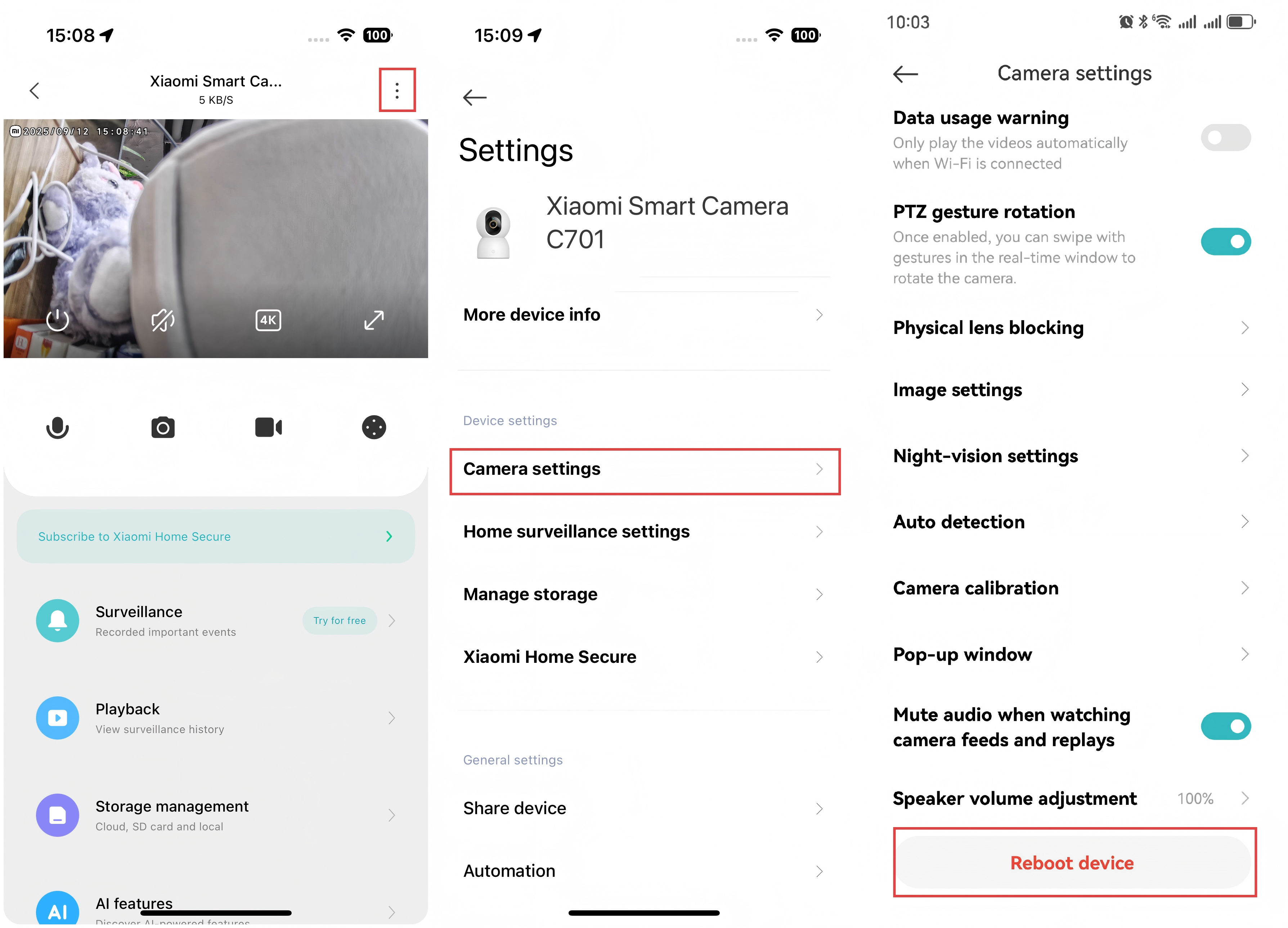
- Restart the device to see if it returns to normal.
- Avoid frequently hot-swapping the microSD card, as it should only be inserted or removed when the camera is powered off. Regular hot-swapping can degrade the microSD card's performance, leading to recording issues.
- Check if the reading speed of the microSD card is too low.
- Consider replacing the microSD card. It is advisable to use high-quality, reputable brands that meet the requirements, as using inferior cards can cause various issues, such as inconsistent recordings or persistent memory errors.
To reboot the Xiaomi Smart Camera C701, please refer to the following steps:
Open the Xiaomi Home App >> select the Xiaomi Smart Camera C701 >> tap the three-dot icon at the upper right corner >> select [Camera settings] >> tap [Reboot device].
Does it help?
Yes
No