

What to do if there is an anomaly with the microSD card used in the Xiaomi Smart Camera C701?
If there is an anomaly with the microSD card used in the Xiaomi Smart Camera C701, please refer to the steps to troubleshoot:
- Use a high-speed FAT32 format microSD card designed specifically for cameras, and ensure it’s from a reputable manufacturer.
- Confirm that a compatible microSD card is properly installed in the camera, as the device cannot store recordings or playback historical videos without one.
- If the microSD card is not recording or cannot automatically overwrite old files, try formatting it through the storage settings in the Xiaomi Home App.
- If formatting via the App is unsuccessful, you can use a card reader to format the microSD card on a computer. After formatting, power off the camera, reinsert the microSD card, and restart the camera.
Note:
Formatting will delete all files on the microSD card.
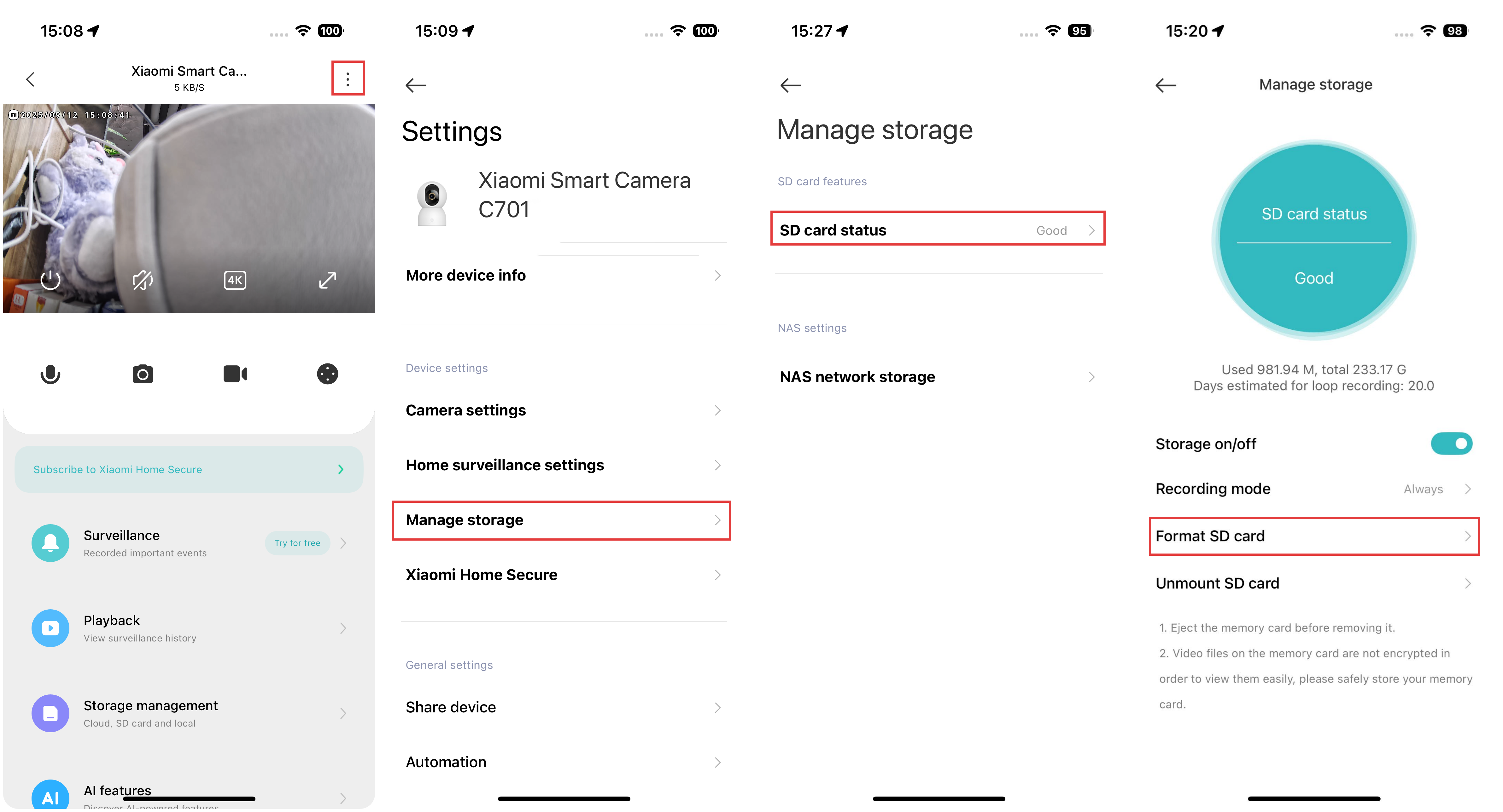
To format the SD card of the Xiaomi Smart Camera C701, please refer to the following steps:
Open the Xiaomi Home App >> select the Xiaomi Smart Camera C701 >> tap the three-dot icon at the upper right corner >> select [Manage storage] >> choose [SD card status] >> tap [Format SD card].
Does it help?
Yes
No