

What to do if the historical videos watched on the Xiaomi Smart Camera C701 are not continuous or smooth?
If the historical videos watched on the Xiaomi Smart Camera C701 are not continuous or smooth, please refer to the steps to troubleshoot:
- If the video stored on the microSD card is not continuous, it is due to the record motion only feature being enabled, which limits recording to when motion is detected. For cloud storage, it is normal for videos to be non-continuous, as they only record when motion is detected and cannot record continuously for 24 hours.
- If the video is lagging, it can be a network issue. Check if too many devices are connected to the same network as the camera, or if other devices are streaming video at the same time.
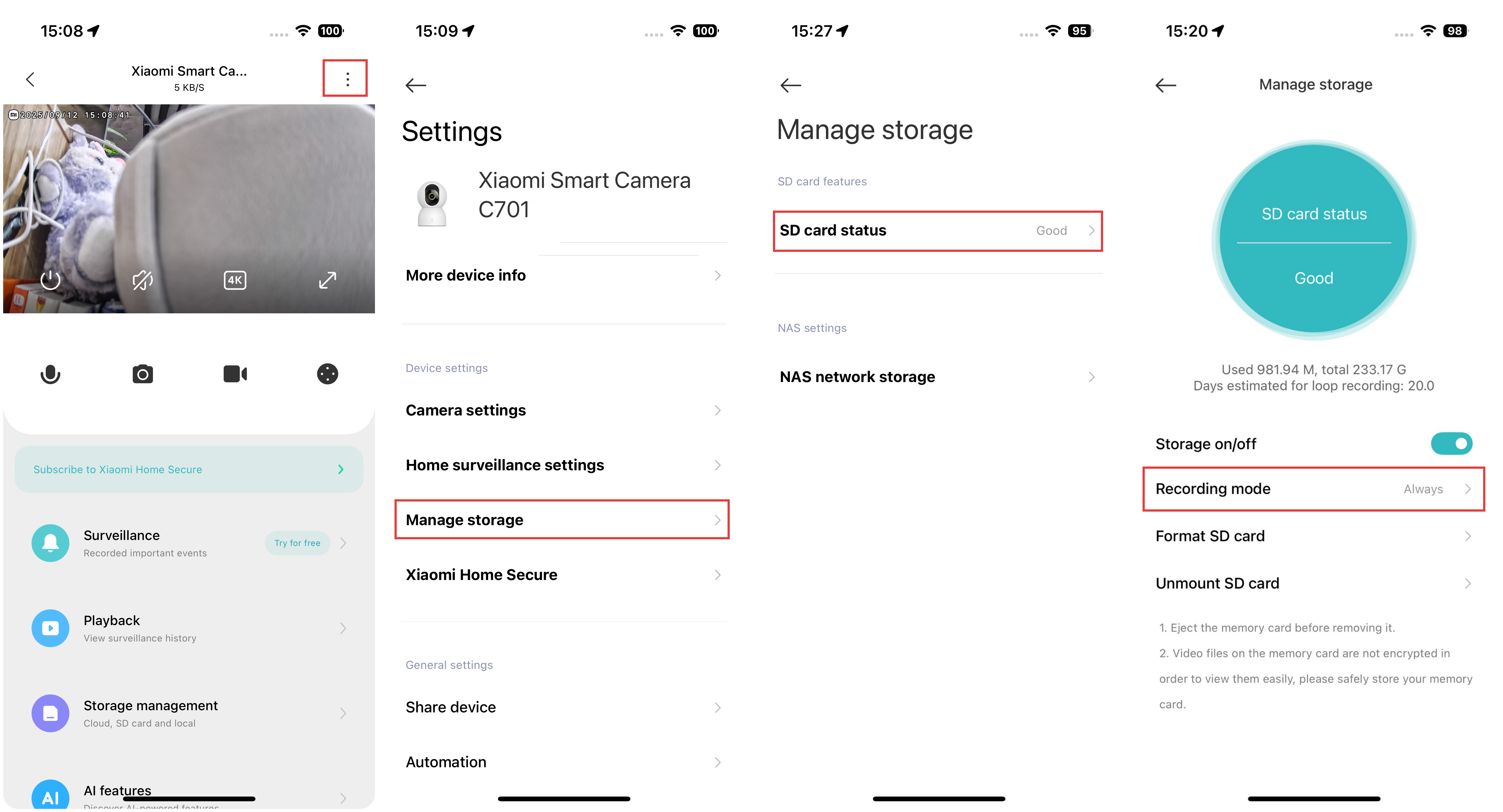
To set the recording mode of the camera, please refer to the following steps:
Open the Xiaomi Home App >> select the Xiaomi Smart Camera C701 >> tap the three-dot icon at the upper right corner >> select [Manage storage] >> choose [SD card status] >> tap [Recording mode].
Does it help?
Yes
No