

What to do if there is no sound when viewing the real-time surveillance footage of the Xiaomi Smart Camera C701?
If there is no sound when viewing the real-time surveillance footage of the Xiaomi Smart Camera C701, please refer to the steps to troubleshoot:
- The Xiaomi Home App has the real-time video volume turned off by default. You can enable the volume by tapping the mute icon in the video window of the App. If the volume is too low, try increasing your phone's volume.
- If there is noise in the real-time video, move your phone away from the camera and avoid placing the camera near electronic devices like refrigerators or microwaves.
- If the device is placed at a height or the lens is facing downward, the mic will be blocked inside the casing, causing it to pick up the speaker's sound and create an echo. In this case, reposition the mic outside the casing.
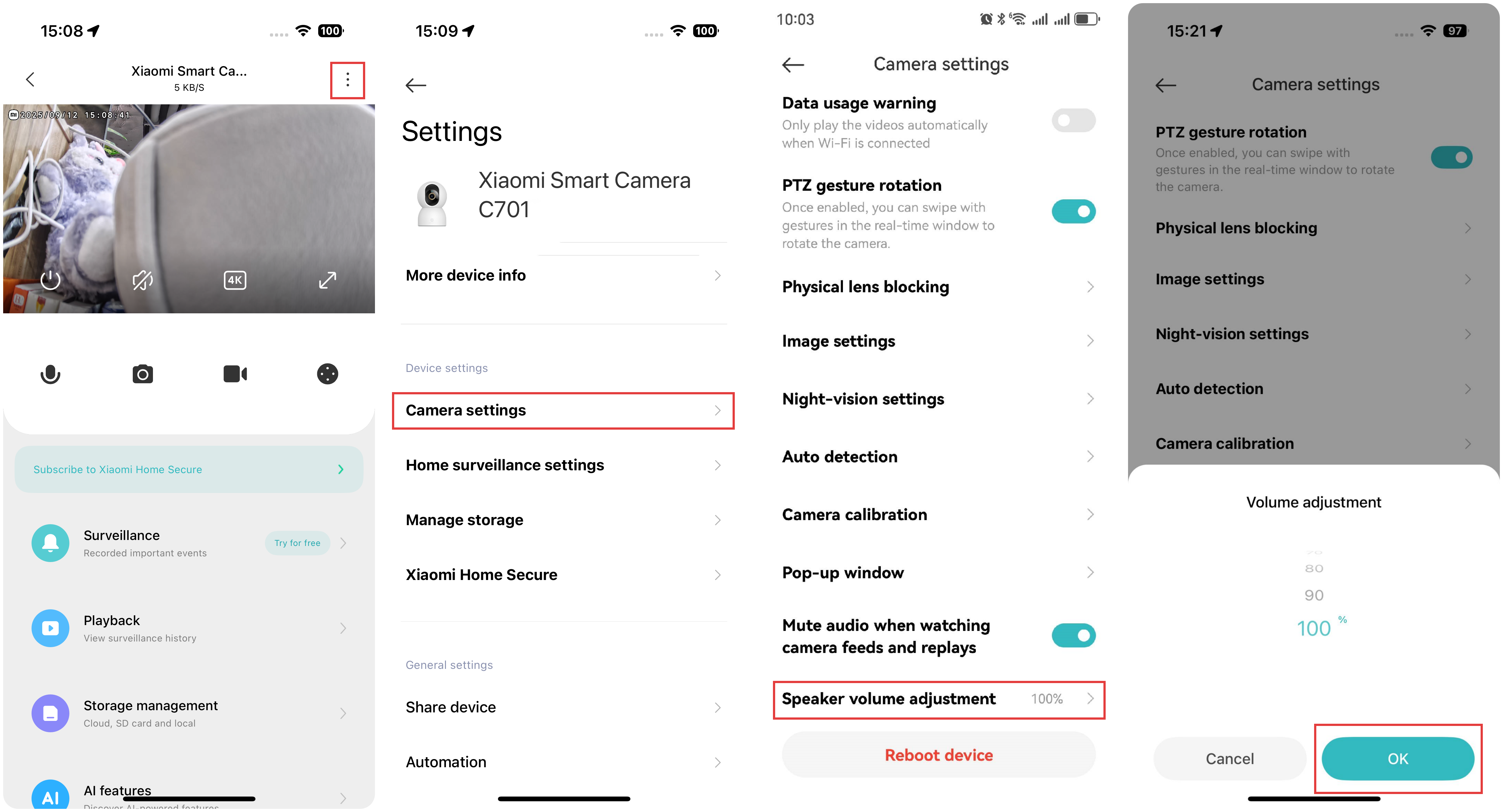
To adjust the volume during a voice call, please refer to the following steps:
Open the Xiaomi Home App >> select the [Xiaomi Smart Camera C701] card >> tap the three-dot icon at the upper right corner >> select [Camera settings] >> tap [Speaker volume adjustment] to adjust the volume level>> tap [OK].
Does it help?
Yes
No