

How to activate and use the Auto mode of the Mijia Refrigerator Cross Door 510L?
The Mijia Refrigerator Cross Door 510L supports Auto mode, which automatically adjusts the temperature of the Fridge, Freezer, and i Fresh.
To activate and use the Auto mode of the refrigerator, please refer to the following steps:
- Wake up the Mijia Refrigerator Cross Door 510L screen and tap the mode icon.
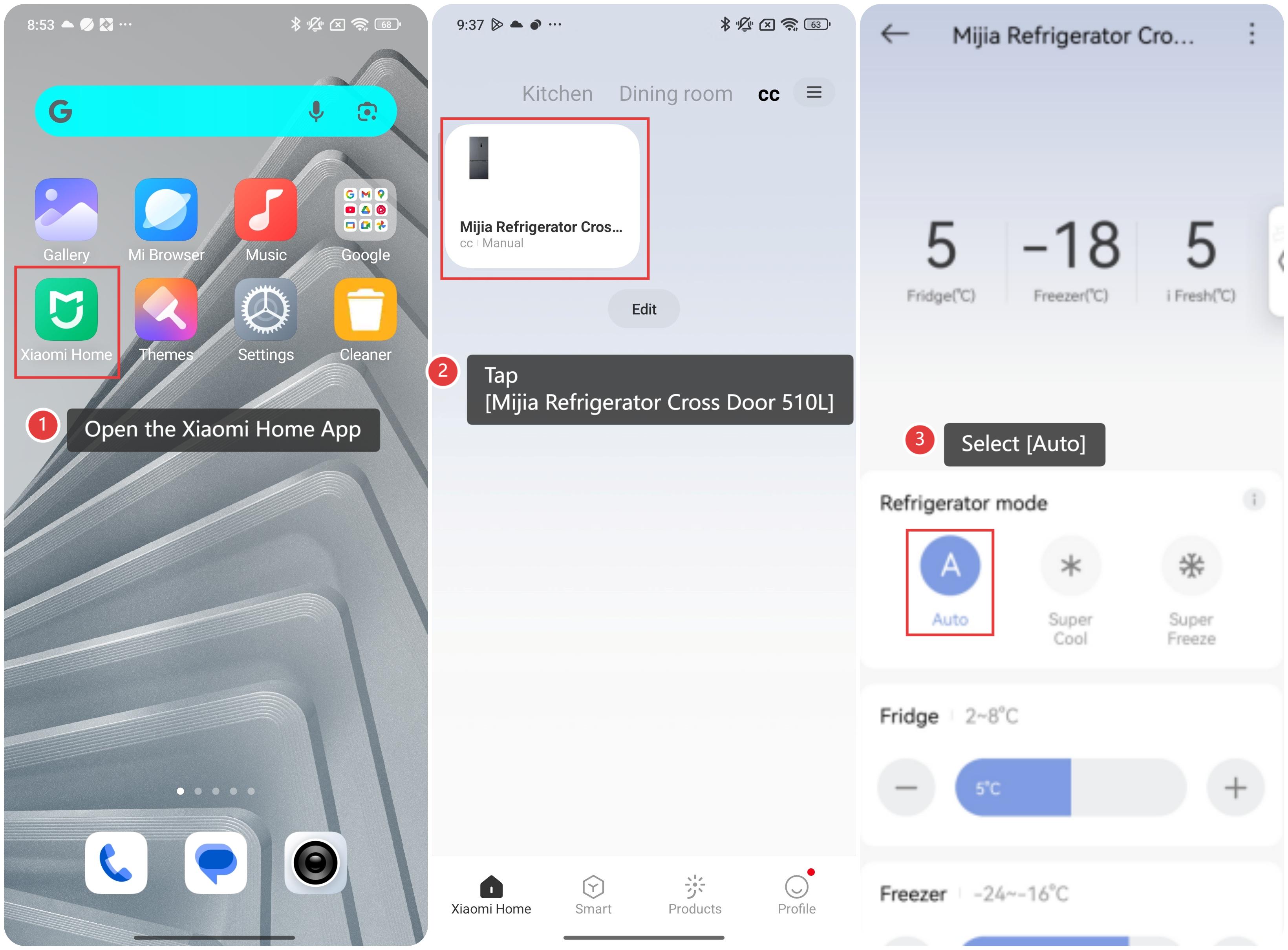
- Control through the Xiaomi Home App:
(1). Open the Xiaomi Home App.
(2). Tap [Mijia Refrigerator Cross Door 510L].
(3). Select [Auto]. In the device control interface, you can view real-time temperature, adjust the temperature of each chamber and activate features like Super Cool mode and Super Freeze mode.
Note:
- When the Auto mode is enabled, the refrigerator will automatically exit other manually set modes (e.g., Super Cool, Super Freeze and so on).
- The App provides more detailed controls, such as setting the i Fresh temperature (-1 °C to 5 °C).
Does it help?
Yes
No