

Xiaomi Vacuum Cleaner P30 FAQ
Product Introduction
Q1: What are the features of the Xiaomi Vacuum Cleaner P30?
A:
- Powerful suction:With a maximum suction of 22 kPa, it can achieve effective cleaning in the turbo mode (50 AW).
- Lightweight design:The main unit is designed to be lightweight, weighing only 860 g, making it easy and convenient to use and reducing the cleaning burden.
- Long-lasting battery life:In a fully charged state, the eco mode (8 AW) can support 40 minutes of long-lasting cleaning, meeting the needs of large-area cleaning; the turbo mode can support 10 minutes of intensive cleaning.
- High-efficiency filtration:Adopting a 5-stage fine filtration system, it can effectively filter dust and impurities, discharge clean air, and protect your health
- Cyclone separation technology:Utilizing single-cone cyclone separation technology, it can efficiently separate dust and air, prevent filter clogging, and maintain long-lasting and powerful suction.
- Rich brush head configuration:Equipped with two types of brush heads, namely the brush bar and the 2-in-1 crevice brush, which can meet the cleaning needs of different scenarios, such as floor cleaning, crevice cleaning, etc.
- The dust compartment is reasonably designed:with a moderate capacity of 200 mL, when the height of dust or debris reaches the "MAX" mark, it should be cleaned promptly to ensure the suction effect.
- Convenient charging:Compatible with Type-C charging port, making charging more convenient. The European version is only for use with the original MDY-09EW power adapter and original Type-C charging cable; the global version is only for use with a regular 5 V 2 A DC power adapter and original Type-C charging cable.
- Simple operation:The device has two buttons in total, the on/off button and the switch button. Press the on/off button to turn on the device, which defaults to the eco mode; press the switch button to switch from the eco mode to the turbo mode; press the on/off button to turn off the device after use.
- Intuitive indicator lights:The device is equipped with 2 red and white dual-color indicator lights, which can display states such as power-on, mode switching, battery level (charging/discharging), malfunction, and power-off, facilitating easy understanding of the device's operating status.
Q2: How many power levels and what is its power for the Xiaomi Vacuum Cleaner P30?
A: The Xiaomi Vacuum Cleaner P30 has two settings in total: the turbo mode (50 AW) and the eco mode (8 AW).
Q3: What are the functions of the buttons on the Xiaomi Vacuum Cleaner P30?
A: The Xiaomi Vacuum Cleaner P30 has two buttons in total: the power button and the mode button. Short-press the power button to turn on the device, which defaults to eco mode when powered on. Short-press the mode button to switch from eco mode to turbo mode. After use, short-press the power button to turn off the device.
- Power on
(1). Press the power button shortly to turn the device on.
(2). Indicator Status: Light 1 remains constantly white. The device defaults to starting at the eco mode.
- Mode switch
(1). Press the mode button shortly to cycle through the gears: eco mode (default) -> turbo mode -> eco mode.
(2). Indicator status:
a. eco mode: Only Light 1 remains constantly white.
b. turbo mode: Both Light 1 and Light 2 remain constantly white.
- Discharging (While operating)
During operation, the indicator light for the current gear will show the battery status:
(1). Sufficient battery (Battery level ≥ 10%): The corresponding gear indicator light stays constantly white.
(2). Low battery (0% < Battery level < 10%): The corresponding gear indicator light remains constantly red.
(3). Battery exhausted: The corresponding gear indicator light flashes red for 10 seconds and then turns off (device shuts down).
- Charging
Connect the charger to see the following charging status:
(1). Charging (Low charge) (0% < battery level < 50%): Light 1 breathes white.
(2). Charging (Medium charge) (battery level ≥ 50%): Light 1 is constant white. Light 2 breathes white.
(3). Fully charged (battery level 100%):
- a. Lights 1 and 2 will both light up solid white for 20 seconds before turning off.
- b. Unplug the power cable and then plug it back in. Lights 1 and 2 will light up again and turn off again after another 20 seconds.
- Fault
(1). When the dust compartment is full, the filter or nozzle is clogged and the device cannot work properly, or the power adapter is incompatible and cannot be charged, the device will stop running and automatically shut down after the red and white indicator lights flash alternately for 6 seconds.
(2). The device cannot be charged when the charger is not plugged in tightly and the indicator light remains off.
- Power off
(1). Press the power button shortly to turn the device off.
(2). Indicator status: All indicator lights turn off.
Q4: What are the standard accessories of the Xiaomi Vacuum Cleaner P30?
A: The standard package includes the Xiaomi Vacuum Cleaner P30, upper extension rod (for vacuum cleaner), lower extension rod (for brush head), brush bar, 2-in-1 crevice brush, Type-C power cable, and user manual.
Note:
Only the European version comes with a European adapter, while the global version does not include an adapter.
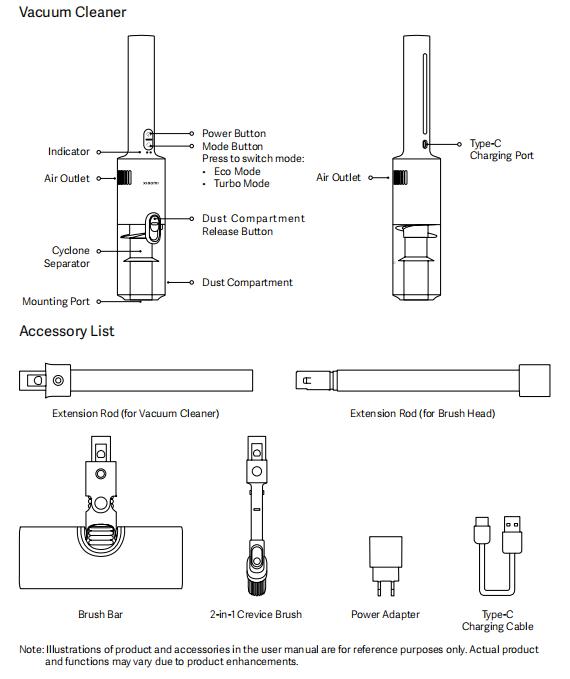
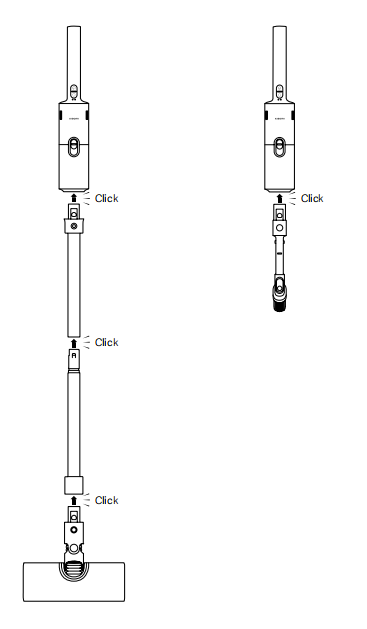
Q5: How to assemble the various accessories of the Xiaomi Vacuum Cleaner P30?
A: The Xiaomi Vacuum Cleaner P30 comes in two forms: the brush bar form and the crevice brush form, and the installation method is as follows:
Brush bar form:
- After the device is unpacked, the main unit and the dust compartment have already been connected at the factory stage, requiring no additional operations. The dust compartment and the upper extension rod have an anti-misalignment design. Align the two protrusions of the upper extension rod with the two grooves of the dust compartment, and after inserting, a clear "click" sound from the lock indicates proper installation. If there is no sound or the lock is clearly misaligned, please reconnect to ensure proper installation.
- The lower extension rod has the same anti-misalignment design as the upper extension rod. Align the circular mark on the two rods, or align the protrusion on the lower extension rod with the internal groove of the upper extension rod. After insertion, a clear "click" sound from the lock indicates proper installation. If there is no sound, the marks are misaligned, or the extension rod is obviously loose, please reconnect to ensure proper installation.
- The lower extension rod and the brush bar have an anti-misassembly design. Align the two protrusions of the brush bar connector with the two grooves of the lower extension rod. After inserting, a clear "click" sound indicates proper installation. If there is no sound or the connection is obviously loose, please reconnect to ensure proper installation.
- After the connection is completed, do not turn on the device. Try to push and pull it on the ground to simulate usage. If all connection parts are firm and without looseness, it means the installation is in place, and then you can turn on the device for use.
2-in-1 crevice brush:
- After unpacking the device, the main unit and the dust compartment are already connected, requiring no additional operations. The dust compartment and the 2-in-1 crevice brush have an anti-misalignment design. Align the two protrusions of the 2-in-1 crevice brush with the two grooves of the dust compartment, and after inserting, a clear "click" sound from the lock indicates proper installation. If there is no sound or the extension rod is clearly loose, please reconnect to ensure proper installation.
- After the connection is completed, please do not turn on the device immediately. Try to push and pull it on the ground to simulate usage. If all connection parts are firm and without looseness, it means the installation is in place, and then you can turn on the device for use.
Q6: How to disassemble the upper and lower extension rods of the Xiaomi Vacuum Cleaner P30?
A: To ensure a secure connection, the upper and lower extension rods of P30 are mechanically wedged at the joint. When disassembling, there is no need to rotate or twist; simply pull them out directly with force. During the disassembly process, please pay attention to the surrounding environment and the amount of force applied to avoid causing harm to yourself or others.
Q7: Does the Xiaomi Vacuum Cleaner P30 support both wet and dry use?
A: Not supported. The Xiaomi Vacuum Cleaner P30 is a dry vacuum cleaner, and moisture absorption can cause damage to the device.
If liquid is accidentally inhaled, stop the device, disassemble the main unit, and remove the dust compartment, cyclone separator, pre-filter, and post-filter of the vacuum cleaner. Place the dust compartment, cyclone separator, and main unit in a well-ventilated and cool place to air dry. Wash the pre-filter and post-filter with clean water, and only reassemble and use them after they are fully dried.
Q8: What does the MAX logo on the transparent dust compartment of the Xiaomi Vacuum Cleaner P30 mean?
A: When the height of dust or debris in the dust compartment reaches the "MAX" mark, continued use will affect the suction performance. Please stop using it as soon as possible and clean the dust compartment.
Q9: How to empty the trash from the Xiaomi Vacuum Cleaner P30?
A:
- Before cleaning, remove the extension rod and brush head, press the dust compartment release button, and then rotate the dust compartment to unkock mark to remove it.
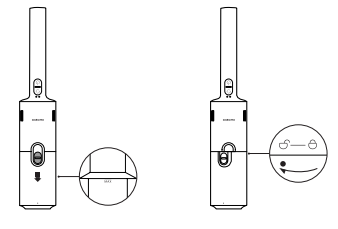
- Lift the handle, remove the cyclone separator, and empty the dust compartment.
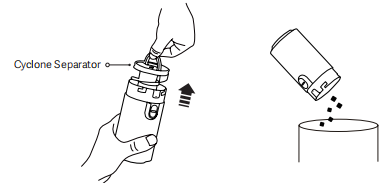
Q10: What are the statuses of the indicator light on the Xiaomi Vacuum Cleaner P30?
A: First, distinguish the indicator lights. When the vacuum cleaner is in the use position (the handshake end facing up and the extension rod connection port facing down), the left indicator light is Light 1, and the right indicator light is Light 2, as shown in the figure.
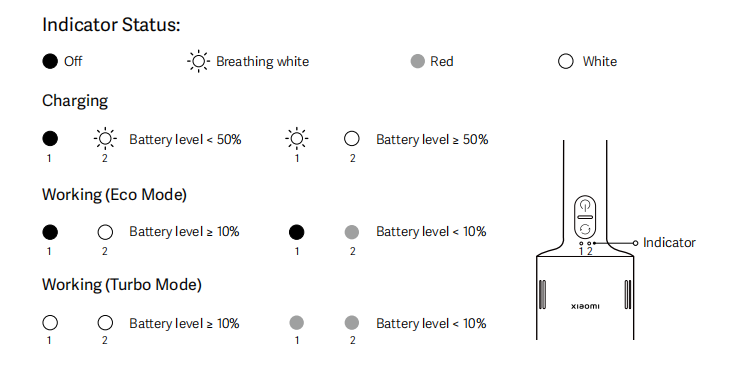
Lighting states are divided into three types: steady on (brightness remains constant), blinking (rapid switching between bright and dim), and breathing (slow cycle of brightness from bright to dim and back to bright).
- After short pressing the power button to turn on the device, the device will defaults to eco mode operation. At this time, the No. 2 light is always bright white and the NO. 1 light is off.
- After short-pressing the mode button to switch from eco mode to turbo mode, at this time Lights 1 and 2 are both constantly lit white.
- The device is working:(1). If the battery level is sufficient (≥ 10%), the white light of the corresponding gear remains constantly on.(2). When the battery level is low (0% ≤ current battery level ≤ 10%), the red light of the corresponding gear stays on.(3). When the battery is depleted, the red light of the corresponding gear flashes for 6 seconds and then goes out, and the device stops working.
- Device is charging:(1). If the battery level is between 0% and 50%, the No. 2 light breathes white and the No. 1 light is off.(2). When the battery level is in the range of 50% to 99%, the No. 2 light remains white and constantly on, and the No. 1 light breathes white.(3). When the battery level reaches 100%, Lights 1 and 2 stay on steadily in white simultaneously, then turn off after 20 seconds, and the device stops charging.
- The device malfunctions and fails to operate, Lights 1 and 2 flash red and white together, and will stop running after 6 seconds if no action is taken.
Note:
When the power button is pressed briefly to turn off the device or the charger is not properly plugged in during charging, the indicator lights do not illuminate.
Q11: Is the Xiaomi Vacuum Cleaner P30 suitable for cleaning under the bed?
A: When using the Xiaomi Vacuum Cleaner P30 for cleaning, the angle supports being parallel to the ground. If there is sufficient height under the bed, the vacuum cleaner can reach deep for cleaning. However, it is important to note that the main body should be kept from contacting the ground or the underside of the bed as much as possible to avoid scratches and damage to the appearance.
Q12: What is the battery capacity of the Xiaomi Vacuum Cleaner P30?
A: Battery pack rated capacity 1800 mAh, nominal capacity 2000 mAh.
Q13: How long can the Xiaomi Vacuum Cleaner P30 work after being fully charged?
A: When the Xiaomi Vacuum Cleaner P30 is fully charged and paired with a brush bar or a 2-in-1 crevice brush, the eco mode can support 40 minutes of long-lasting cleaning, and the turbo mode can support 10 minutes of intensive cleaning.
Q14: What should be paid attention to when charging the Xiaomi Vacuum Cleaner P30?
A: The following points should be noted:
- Before first use and after each cleaning, please fully charge the battery, with a charging time of approximately 4 hours.
- When charging, please place the device flat on a stable surface to prevent it from tipping over and causing accidental injury.
- The European version of this product is only intended for use with the original power adapter of model MDY-09EW and the original Type-C charging cable.
- The global version of the product is only compatible with a regular 5 V 2 A DC power adapter and the original Type-C charging cable.
- The vacuum cleaner cannot be started while charging.
- After continuous cleaning using the turbo mode, it is recommended to wait for the main unit to cool down for 30 minutes before charging.
- After being fully charged, the indicator light stays on white for 20 seconds and then goes out.
- Charge at least once every 3 months to avoid battery damage.
- The device battery will activate temperature protection at temperatures below -16°C and above 55°C. Please pay attention to the charging and usage environment.
Q15: Can the Xiaomi Vacuum Cleaner P30 be kept charging all the time?
A: The Xiaomi Vacuum Cleaner P30 supports overcharge protection. After the battery is fully charged, the charging circuit will automatically disconnect, preventing continuous charging. However, to ensure safety and avoid continuous charging and discharging of the battery, please disconnect the charging power supply immediately after the battery is fully charged.
Q16: Does the Xiaomi Vacuum Cleaner P30 support connection to the Mi Home App for use?
A: The Xiaomi Vacuum Cleaner P30 does not support internet connectivity and does not support use with the Xiaomi Home App.
Q17: Does the Xiaomi Vacuum Cleaner P30 need to be charged if not used for a long time?
A: When not in use for an extended period, please fully charge the vacuum cleaner, unplug the Type-C power cable, and store it in a cool, dry place. Do not place it in direct sunlight or a humid environment. Charge it at least once every 3 months to avoid battery damage.
Q18: Can the Xiaomi Vacuum Cleaner P30 be used without installing the rear filter and the front filter?
A: No, using the Xiaomi Vacuum Cleaner P30 to vacuum directly without installing the rear filter and pre-filter can cause dust or dirt to enter the motor directly, affecting the normal operation of the motor and the use of the device, and in severe cases, can lead to damage to the key components of the device. Please keep the pre-filter and rear filter dry and properly installed.
Q19: How to recycle the Xiaomi Vacuum Cleaner P30 2-in-1 crevice brush?
A: When retracting the 2-in-1 crevice brush, press the locking buckle button and pull it down to retract the brush.
If you forcefully push or pull without pressing the locking buckle, it can damage the buckle structure, causing the locking of the 2-in-1 gap brush to loosen.
Q20: Where is the SN code of the Xiaomi Vacuum Cleaner P30 located?
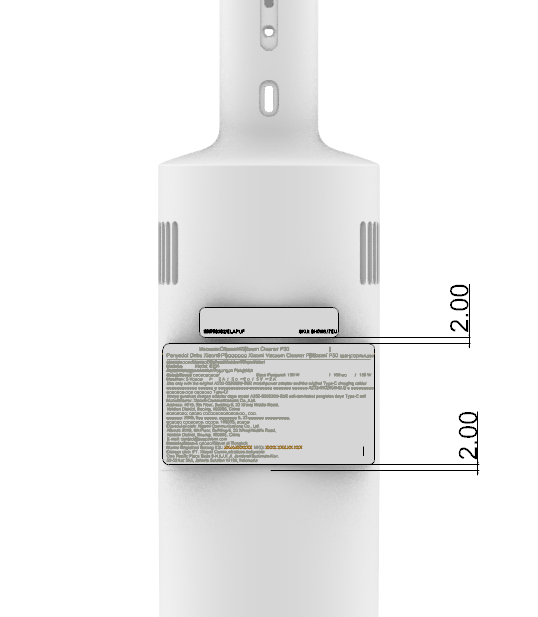
A: The SN code of the Xiaomi Vacuum Cleaner P30 is located at the bottom left corner of the SN code label, with the format of five digits/long string code. The SN code label is located between the two sets of ventilation holes.
Q21: What are the usage precautions for the Xiaomi Vacuum Cleaner P30?
A:
- Use by children and special populations:This appliance can be used by children aged 8 years and over and persons with reduced physical, sensory, or mental capabilities, or lack of experience and knowledge, if they have received supervision or instruction concerning the safe use of the appliance and understand the hazards involved. This appliance is not intended as a children's toy. Cleaning and maintenance should not be performed by children without supervision.
- Special power adapter:This device is only allowed to use the power adapter provided with it.
- Usage environment:This vacuum cleaner is only for indoor use. Do not install or use it in outdoor, industrial, or commercial environments.
- power cable risk:Crushing the power cable during equipment operation can lead to danger.
- Power off before maintenance:Before cleaning or maintaining the equipment, the plug must be unplugged from the socket.
- Power adapter inspection:To reduce the risk of fire, explosion, or personal injury, please check if the power adapter is in good condition before use. If the power adapter is damaged, do not use the vacuum cleaner.
- Replacement of damaged parts:If the charger or battery is damaged, it must be replaced with genuine original parts purchased from the manufacturer or after-sales services department.
- Turn off the vacuum cleaner before cleaning/replacing the roller brush:Before cleaning or replacing the roller brush, please ensure that the vacuum cleaner is turned off.
- Waterproof and moistureproof:The brush bar, extension rod, and vacuum cleaner main unit are all conductive. Do not immerse them in water or other liquids. After cleaning, please ensure that the filter, pre-filter, and post-filter are completely dry.
- Maintain safety:To prevent injury, turn off the vacuum cleaner and remove the brush bar before cleaning and maintenance. Do not use the vacuum cleaner until the brush bar, dustbin cover, filter, pre-filter, and post-filter are properly installed.
- Extension rod inspection:Regularly inspect the extension rod, and do not use it if it is damaged.
- Liquids prohibited for inhalation:Do not use the vacuum cleaner to suck up flammable or explosive liquids (such as gasoline), other liquids (such as water), or toxic liquids (such as bleach, ammonia, and drain cleaner).
- Do not inhale toner:Do not use the vacuum cleaner to clean the toner used in laser printers and copiers, as toner can cause fire or explosion.
- Do not inhale specific dust/burning materials:Do not use the vacuum cleaner to pick up drywall dust, ashes (such as fireplace ash), or smoldering/burning materials (such as coal, cigarette butts, or matches).
- Do not inhale sharp/hard objects:Do not use the vacuum cleaner to pick up sharp or hard objects such as glass, nails, screws, or coins, as these objects can damage the product.
- Stains prohibited from cleaning:Do not use the vacuum cleaner to clean stains of heavy oily substances, strong adhesives, or dyes, such as shoe polish, paint, and pigments.
- Keep away from moving parts:Please keep hair, fingers, other body parts, and loose clothing away from the openings and moving parts of the vacuum cleaner.
- Do not point at body parts:Do not point the suction opening, extension rod, or other accessories at your eyes or ears, or put them in your mouth.
- Keep the openings clear:Do not insert any objects into the openings of the vacuum cleaner, and do not use the vacuum cleaner with any opening blocked. Keep the vacuum cleaner away from dust, lint, hair, or other items that can reduce its suction power.
- Placement safety:Do not lean the vacuum cleaner against unstable objects such as chairs, tables, etc., to prevent it from falling and causing damage or injury.
- Charging and storage environment:Do not charge or store the vacuum cleaner near heat sources or in damp areas (such as near radiators, in the kitchen, or in the bathroom).
- Avoid high temperatures:Do not expose the device or battery to excessively high temperatures.
- Prevent battery short circuit:Please be aware of the risk that the terminals of battery-powered devices or the battery itself can be short-circuited by metal objects.
- Use original parts:Only use replacement parts certified by Xiaomi.
- Battery leakage handling:If battery leakage occurs, avoid contact with the leaked liquid and send the battery to a government-approved recycling facility for disposal. If the leaked liquid accidentally gets into your eyes, immediately rinse with plenty of clean water and seek medical attention.
- Caution when cleaning stairs:Please exercise extra caution when using the vacuum cleaner to clean stairs.
- Fire risk warning:Do not use any type of air freshener on the pre-filter and post-filter of the vacuum cleaner. Such products are known to contain flammable chemicals, which can cause the vacuum cleaner to catch fire.
- Charging temperature requirements:Please strictly follow the instructions in this user manual to charge the vacuum cleaner at an ambient temperature of 0°C to 35°C. Improper charging can cause battery damage.
- Usage responsibility:Please use the vacuum cleaner strictly in accordance with the instructions in this user manual. You are solely responsible for any loss or damage that can result from improper use of the vacuum cleaner.
- Warning:Only use the power supply unit provided with this device.
- Warning:When charging the battery, only use the detachable power supply unit included with this device.
- Specialized power supply unit:Can only be used in conjunction with the power supply unit model MDY-09-EW.
- Charging placement:When charging, please lay the vacuum cleaner flat to prevent accidental injury caused by tipping over.
Usage Issues
Q1: Why is the suction power of the Xiaomi Vacuum Cleaner P30 very weak when it is first turned on?
A: When the Xiaomi Vacuum Cleaner P30 is first turned on, it defaults to the eco mode. If you need stronger suction, you can briefly press the mod button to switch to turbo mode. The eco mode's suction can also meet daily usage needs, and its working battery life will be longer than that of the turbo mode. If you feel the suction is weak, please first check whether it was cleaned after the last use to avoid reduced suction caused by dirt blockage.
Q2: Does the Xiaomi Vacuum Cleaner P30 have a clogging protection feature?
A: The Xiaomi Vacuum Cleaner P30 has a dirt blockage protection feature, which protects the motor by avoiding overload and extends the motor's service life. When foreign objects enter or blockage is severe, the device's indicator light will flash red and white, and it will automatically shut down for protection after 6 seconds if no operation is performed.
Q3: What to do if the bristles of the 2-in-1 crevice brush of the Xiaomi Vacuum Cleaner P30 are deformed?
A: The bristles of the Xiaomi Vacuum Cleaner P30 are made of a special material with strong self-healing properties. They may deform slightly due to pressure during use or transportation, but they generally recover after a period of rest. If the bristles become deformed or damaged to the point of impairing normal use, please contact our after-sales service team for assistance.
Q4: Why does the indicator light of the Xiaomi Vacuum Cleaner P30 turn off after charging is completed?
A: To ensure safety during charging, the Xiaomi Vacuum Cleaner P30 will automatically cut off the power and stop charging after charging is completed to avoid damage to the machine caused by overcharging of the battery, and to ensure that the power will not continue to be lost due to long-term standby.
Q5: Is the vertical line on the grip and dust compartment of the Xiaomi Vacuum Cleaner P30 a crack?
A: The vertical line on the grip and dust compartment of the Xiaomi Vacuum Cleaner P30 is a parting line, not a crack. It does not affect material strength or performance. If cracks or chips occur during use, please contact official after-sales service for professional assistance.
Q6: What to do if dust falls out after the Xiaomi Vacuum Cleaner P30 stops working?
A: After vacuuming, it is recommended to let the vacuum cleaner run for a few more seconds to ensure that dust inside the tube is fully drawn into the dust compartment. Any falling dust likely comes from residue in the tube that has not yet entered the dust compartment.
Q7: What are the usage environment limitations of the Xiaomi Vacuum Cleaner P30?
A: There are relevant precautions for use in the following environments:
- When using the brush bar for cleaning, some carpets can experience fraying. If such a situation occurs, it is recommended to use the 2-in-1 crevice brush when vacuuming.
- When vacuuming highly polished floors, wooden floors, or polished tiles, please first check whether there are foreign objects attached to the brush bar to avoid scratching the floor.
- Before using the vacuum cleaner, please ensure that the dust compartment and filter assembly are properly installed.
- Do not block the air outlet when vacuuming.
- For fine dust such as flour, the vacuum cleaner should only be used when the amount of dust is relatively small.
- Do not use the vacuum cleaner to pick up sharp, hard objects, small toys, pins, etc., to avoid damaging the vacuum cleaner and the floor.
- The movement of the vacuum cleaner brush bar can cause uneven surface gloss on waxed floors. You can wipe the floor with a damp cloth and polish it with floor wax.
Q8: Is it normal for the connection between the handle and the main body of the Xiaomi Vacuum Cleaner P30 to feel loose?
A: The product is designed with a reasonable gap at the connection between the rod and the main body to ensure smooth attachment and detachment. A small amount of dust will not affect this. Other vacuum cleaner brands on the market also have similar design gaps. As long as the handle clip is properly locked onto the main body according to the installation instructions, the vacuum can be used normally.
Q9: Which accessories of the Xiaomi Vacuum Cleaner P30 can be washed?
A: The dust compartment, cyclone separator assembly, pre-filter, and post-filter can be washed with clean water. Before washing, make sure these components are detached from the main unit or assembly. After washing, air-dry them for at least 24 hours to ensure they are completely dry.
Q10: Does the Xiaomi Vacuum Cleaner P30 support car charging?
A: There is currently no car charger available. For safety reasons, please try to charge in a normal charging environment.
Q11: Can the battery of the Xiaomi Vacuum Cleaner P30 be replaced manually?
A: If the battery of the Xiaomi Vacuum Cleaner P30 malfunctions and the device cannot be used normally, it can be disassembled and replaced with an original battery by professional engineers at official after-sales service. For safety reasons, self-replacement is not recommended.
Q12: Does the Xiaomi Vacuum Cleaner P30 need to be fully charged before first use?
A: Before first use, fully charge the battery, which takes approximately 4 hours. Once fully charged, the vacuum cleaner will activate overcharge protection and automatically power off. Both indicator lights will remain solid white for 20 seconds before turning off.
Q13: Can the Xiaomi Vacuum Cleaner P30 be used while charging?
A: No, the Xiaomi Vacuum Cleaner P30 is positioned as a handheld wireless portable vacuum cleaner. It has charging protection during charging and cannot be started while charging.
Q14: What types of garbage can the Xiaomi Vacuum Cleaner P30 clean?
A: The Xiaomi Vacuum Cleaner P30 is intended for use only in the following environments and on the following cleaning surfaces:
- Use only on indoor, dry surfaces.
- Do not vacuum water, gasoline, or other flammable or explosive liquids. Avoid inhaling toxic solutions, such as chlorine bleach, ammonia, drain cleaners, or other chemicals.
- Do not vacuum drywall dust, fireplace ash, or embers. Avoid inhaling smoke or burning materials, such as hot coals, cigarette butts, or matches.
- Do not vacuum sharp objects, such as glass, nails, screws, or coins, as this can damage the vacuum cleaner.
Q15: Can the Xiaomi Vacuum Cleaner P30 be stored in a car?
A: Do not place in direct sunlight. During high temperatures in summer, do not leave the main unit in the vehicle to avoid danger.
Q16: Can the Xiaomi Vacuum Cleaner P30 be directly placed against the wall during or after use?
A: No, do not place it against the wall during or after use to avoid accidental injury caused by tipping over. Please remove the extension rod or brush head after use and lay the main unit flat on a stable surface to ensure it does not roll.
Q17: Can the Xiaomi Vacuum Cleaner P30 be lifted to clean dust or dirt in high places?
A: The Xiaomi Vacuum Cleaner P30 supports cleaning dust or dirt in high places, and the weight of the body plus attachments is light enough for a normal adult to lift and use. Before cleaning dust or dirt in high places, please ensure that the extension rod and brush head are firmly connected to avoid damage to the device or personal injury caused by falling. When cleaning high places, it is recommended to use the extension rod and the 2-in-1 crevice brush or the 2-in-1 crevice brush alone, and the brush bar configuration cannot be used.
Cleaning and maintenance issues
Q1: What are the precautions for daily cleaning and maintenance of the Xiaomi Vacuum Cleaner P30?
A: Please refer to the following precautions for daily cleaning and maintenance of the Xiaomi Vacuum Cleaner P30:
- Before maintenance and servicing, please ensure that the main unit is powered off and the power cable is unplugged.
- Before cleaning, please ensure that the brush has been separated from the main unit to avoid personal injury caused by accidental startup.
- If the cyclone separator, filter, extension rod, brush bar, or 2-in-1 crevice brush is blocked, the main unit will stop working. Please turn off the device, clean it, and then use it again.
- Be sure to use original parts; otherwise, it can not function properly or be eligible for warranty service.
- When not in use for an extended period, please fully charge the vacuum cleaner, unplug the Type-C power cable, and store it in a cool, dry place. Do not place it in direct sunlight or a humid environment. Charge it at least once every three months to avoid battery damage.
Q2: How to clean the main unit of the Xiaomi Vacuum Cleaner P30?
A: Before cleaning the main unit, please ensure that the Xiaomi Vacuum Cleaner P30 has stopped operating and separate the main unit from other components. The common dirty areas of the main unit are limited to its exterior. Please use a soft dry cloth to wipe the main unit.
Q3: How to clean the dust compartment and filter assembly of the Xiaomi Vacuum Cleaner P30?
A: Before cleaning the dust compartment, please ensure that the main unit is turned off, unplug the power cable, and remove the accessories.
- Before cleaning, please remove the extension rod and brush head, then press the dust compartment release button, and rotate the dust compartment to remove it.
- Pull up the handle, lift out the cyclone separator, and empty the dust compartment.
- Remove the sponge and filter.
Wash the cyclone separator, air intake sponge, and filter thoroughly. After washing, allow them to dry completely by sunning for at least 24 hours.
The following points should be noted in this step:
- Do not soak the filter.
- Please use tap water for cleaning: do not use detergents or disinfectants to avoid affecting the sealing performance of the soft rubber in the device.
- When flushing the filter, it is recommended to repeatedly pat the frame of the filter to knock out dirt.
- Do not clean the filter with hands, brushes, or other sharp objects to avoid damage.
- After cleaning the filter, if the suction still drops significantly, it is recommended to purchase the original filter for replacement.
Q4: How to clean the brush bar of the Xiaomi Vacuum Cleaner P30?
A: Before cleaning the brush bar, please ensure that the Xiaomi Vacuum Cleaner P30 has stopped working and separate the brush bar assembly from the connecting tube.
- The common dirty locations of the brush bar assembly are the small wheels of the brush bar, the brush strip, and the brush bar pipe.
- If the small wheels of the brush bar are entangled with hair or attached with dirt, it can cause the brush bar to fail to move smoothly or fit the ground properly, resulting in poor vacuuming performance. Please clean the dirt on the small wheels in time.
- The brush strip can accumulate lint and dirt: please clean it in time.
- There can be residual or clogged debris inside the brush bar pipeline. After disassembling the components and separating the extension rod, you can gently tap or use a long tool to push out the dirt. Please note not to damage the hose.
Q5: How to clean the 2-in-1 crevice brush assembly of the Xiaomi Vacuum Cleaner P30?
A: Before cleaning the 2-in-1 crevice brush assembly, please ensure that the Xiaomi Vacuum Cleaner P30 has stopped operating and separate the crevice brush assembly from the main body.
- The common dirty locations of the 2-in-1 crevice brush assembly are the bristles and the pipe.
- If the bristles are entangled with hair or mixed with debris, please clean them promptly to avoid affecting the usage effect.
- There can be dirt or debris clogging inside the pipeline. After disassembling the components and separating the body, you can gently tap or use a long tool to push out the dirt.
Q6: How to clean the extension rod of the Xiaomi Vacuum Cleaner P30?
A: Before cleaning the extension rod, please ensure that the Xiaomi Vacuum Cleaner P30 has stopped working, and separate the extension rod assembly from the device body and the brush bar assembly. It can be disassembled into upper and lower extension rods. The common dirty areas of the extension rod are the pipes, where dirt can be removed by gently tapping or using a long tool to push it out.
Common Exceptions
Q1: What is the reason why the Xiaomi Vacuum Cleaner P30 fails to work?
A: Please refer to the following possible causes and corresponding solutions if the device fails to operate:
- The device cannot be used while charging. Please disconnect the charging power supply after charging is complete before turning it on for use.
- The battery is depleted, and the device cannot start. Please fully charge the battery before use.
- The suction port, air outlet, or filter is blocked, and the device is protected against dirty blockage. Please clean the suction port, air outlet, or filter in time, and then try restarting the device.
- Battery temperature protectionWhen using turbo mode for an extended period or in a high-temperature environment, monitor the usage conditions. Allow the device to cool down before turning it on and using it again.
- Device malfunction or damageIf the device malfunctions or is damaged, ensure it has been charged for a sufficient time, is free of dirt and blockages, and has a normal body temperature. Let it stand for a while, then try restarting it. If it still fails to work, contact official after-sales service for diagnosis and resolution by a professional engineer.
Q2: What is the reason for the red and white lights flashing on the Xiaomi Vacuum Cleaner P30?
A: The red and white lights flashing on the Xiaomi Vacuum Cleaner P30 can have the following possible causes. Please clean it according to the solutions in sequence, and the device can usually return to normal.
Possible Reasons | Solution |
Dust compartment is full | Clean the dust compartment |
filter clogged | Clean the filter |
Tip blockage | Clean the tip |
Power adapter is not compatible (using non-original or non-standard adapter) | Use the original adapter or an adapter with specified specifications |
Q3: What causes the suction power of the Xiaomi Vacuum Cleaner P30 to weaken?
A: Please refer to the following possible causes and solutions for reduced suction of the device:
- The eco mode can be switched to turbo mode to determine whether the suction is stronger.
- The suction port, air outlet, or filter is blocked, affecting the normal wind power of the device. Please clean the suction port, air outlet, or filter in time, and then try restarting the device; if the blockage persists after cleaning the filter, you can purchase a new filter for replacement.
- Using the device without properly installing the pre-filter or post-filter allows dirt to enter the motor, affecting its normal operation.
Note:
Do not disassemble the motor by yourself; please contact the official after-sales service for cleaning by professional engineers.
- During long-term use, performance will naturally decline. After multiple uses, the lifespan of both the motor and battery will be shortened. Compared with a brand-new device, suction may differ slightly, but the difference is minor and will not affect normal use.
- The device can be malfunctioning or damaged. Please contact the official after-sales service, and professional engineers will diagnose and handle the issue.
Q4: What is the reason for the short battery life of the Xiaomi Vacuum Cleaner P30?
A: The short battery life of the device can have the following possible causes and solutions:
- The battery is not fully charged. Please fully charge it before use. The battery is fully charged when all the device’s indicator lights remain solid white.
- The dust compartment is full or the filter is clogged, which affects the normal operation of the motor. Please clean the dust compartment or filter in time.
- The brush head is blocked. Please clean it in time.
- The vacuuming runtime in turbo mode is shorter than that in eco mode. The maximum runtime in turbo mode is 10 minutes, while in eco mode it is 40 minutes. There can be some deviation in runtime depending on the usage environment. Please check the mode you are using.
- Extended use will cause the device's temperature to rise. To ensure safety, the device's overheat protection mechanism will be triggered, and the device will stop running. Please wait for the device to cool down before attempting to turn it on and use it again.
- The device can be malfunctioning or damaged. Please contact official after-sales service, and professional engineers will diagnose and handle the issue.
Q5: What is the reason for the high operating noise of the Xiaomi Vacuum Cleaner P30?
A: The following are the possible causes and solutions for the loud noise during device operation:
- To meet the home use environment, the operating noise of the device (at 1.5 meters) is controlled below 80 dB(A) in accordance with the IEC-62885-4 standard, meeting the design requirements. If the noise is just the wind sound from normal motor operation, please use it with confidence, as it is not a device malfunction.
- When the main unit is directly connected to the brush bar without using the extension rod, it can result in loud airflow noise. The device is designed to operate with a single main unit or when connected to the brush bar on the turbo mode, with the noise (1.5 meters) controlled below 80 dB(A), which meets the design specifications. This is not a device malfunction, and the device can be used normally.
- Blockage of the suction port, air outlet, or filter causes the device to emit abnormal noise during operation. Please clean the dust compartment, suction port, air outlet, or filter in a timely manner.
- The pre-filter or post-filter is not installed. Please ensure correct installation of the filter assembly.
- If a sound other than wind noise occurs, the device can be malfunctioning or damaged. Please contact official after-sales service, and professional engineers will diagnose and handle the issue.
Q6: What is the reason for the Xiaomi Vacuum Cleaner P30 getting very hot after working for a while?
A: After the device has been operating for a period of time, the high temperature can have the following possible causes and solutions:
- When using in a high-temperature environment, please pay attention to the usage environment to avoid danger.
- When the device operates at a high level for an extended period, it is normal for it to heat up, which does not affect normal use.
- The suction port, air outlet, or filter is blocked, causing the device to overheat. Please clean the suction port, air outlet, or filter in a timely manner.
- The device can be malfunctioning or damaged. Please contact official after-sales service, and professional engineers will diagnose and handle the issue.
Q7: Why does the Xiaomi Vacuum Cleaner P30 take a long time to charge but still not fully charge?
A: There are the following possible reasons and solutions for the device taking a long time to charge but still not being fully charged:
- When using the high-grade mode for a long time, the battery pack temperature is relatively high. The device has a battery temperature protection function. To ensure safety, charging is slower in this situation. Please let the device stand for a while until it cools down before charging.
- The power cable is not plugged in tightly, resulting in poor contact, which can cause the device indicator light not to light up or to go out after lighting up. Please make sure to plug in the power cable tightly.
- If the power adapter or charging cable is not compatible, the two indicator lights can flash red and white together, and the device will stop working after 6 seconds. Please use the original charging cable. For European models, please use the original power adapter, and for global models, please use a regular 5V2A DC power adapter.
- device malfunction or damage: please contact official after-sales service. Professional engineers will diagnose and handle the issue.
Q8: What is the reason for the unpleasant odor from the outlet trend of the Xiaomi Vacuum Cleaner P30?
A: The following are the possible causes and solutions for the unpleasant odor from the device's trend:
- The materials used in the vacuum cleaner contain rubber components, so a new device can have an odor when first used, but it will not cause harm to the human body. As it is used normally, this odor will gradually fade until it disappears, without affecting normal use.
- If there is an odor coming from the trend, it can be due to dirt residue that has not been cleaned for a long time. Please pay attention to cleaning the device.
- If a burnt smell is detected at the trend, please stop using the device and check whether any flammable dirt has entered the unit, check whether the filter assembly is correctly installed,and retry after cleaning. If the burnt smell persists after running for a period of time, please contact the official after-sales service, and a professional engineer will diagnose and handle the issue.
- The device can be malfunctioning or damaged. Please contact official after-sales service, and professional engineers will diagnose and handle the issue.
Q9: What is the reason why the indicator light of the Xiaomi Vacuum Cleaner P30 does not light up when charging?
A: When the device is charging, the indicator light not lighting up can have the following possible causes and solutions:
- The device has completed charging. Please press the power button briefly to observe the indicator light. If the device is working properly and the corresponding gear indicator light remains white and constantly on, it is determined that charging is complete.
- The adapter is not properly connected to the device. Please use the specified charging device. If it is not properly connected, please reconnect and plug it in tightly. If charging still fails, please contact official after-sales service, and a professional engineer will diagnose and handle the issue.
- The device can be malfunctioning or damaged. Please contact official after-sales service, and professional engineers will diagnose and handle the issue.
Q10: After turning on the Xiaomi Vacuum Cleaner P30, one indicator light comes on, but it fails to work and immediately starts flashing red and white lights. What could be the reason?
A: The battery is low: please charge it in time and retry to check if the function is normal after charging.
Q11: What is the reason for dust leakage from the dust compartment or brush head of the Xiaomi Vacuum Cleaner P30?
A: There are the following possible causes and solutions for the device leaking dust from the dust compartment or brush head:
- The extension rod or brush head is not properly assembled. Please reassemble the connecting tube and brush head correctly and try again.
- Turn off the device immediately after use. If dust remains in the brush bar or pipeline and has not yet entered the dust compartment, please delay turning off the device for a few seconds after use, and turn it off after the dust has entered the dust compartment.
- 3. During daily use, do not shake the device forcefully towards the brush head to prevent the dust that has been sucked into the dust compartment from being thrown out through the brush head, and to avoid damage to the device and yourself.
Q12: What are the reasons for the brush bar of the Xiaomi Vacuum Cleaner P30 feeling difficult to control, slipping, and being unable to roll during vacuuming?
A: When using the device, the brush bar feels difficult to control, slips, or fails to roll.
The following are the possible causes and solutions:
- The surface material to be cleaned is too smooth. Check if there is hardened dirt residue on the small wheels of the brush bar, which reduces friction, or entangled hair, causing the small wheels to fail to rotate flexibly. Please clean them in time.
- The brush bar has sucked in large debris and become jammed, preventing it from adhering to the cleaning surface. Please turn off the device, check for blockages, and clean them promptly.
Q13: How to handle the situation where the fixed slide button on the dust compartment of the Xiaomi Vacuum Cleaner P30 is dislocated and falls out?
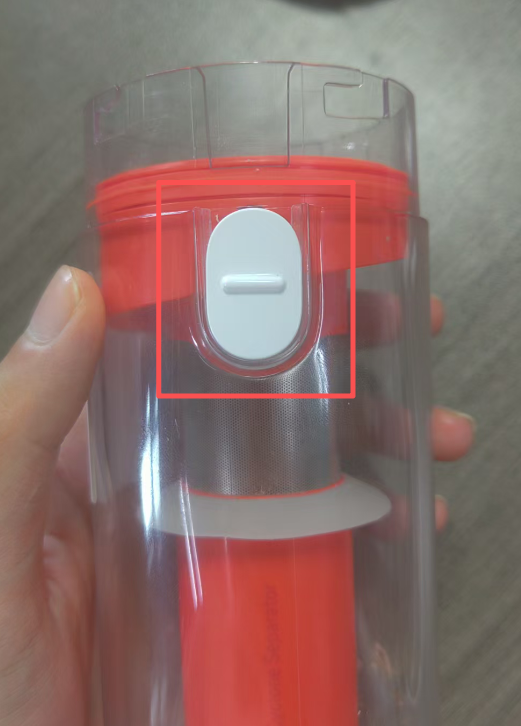
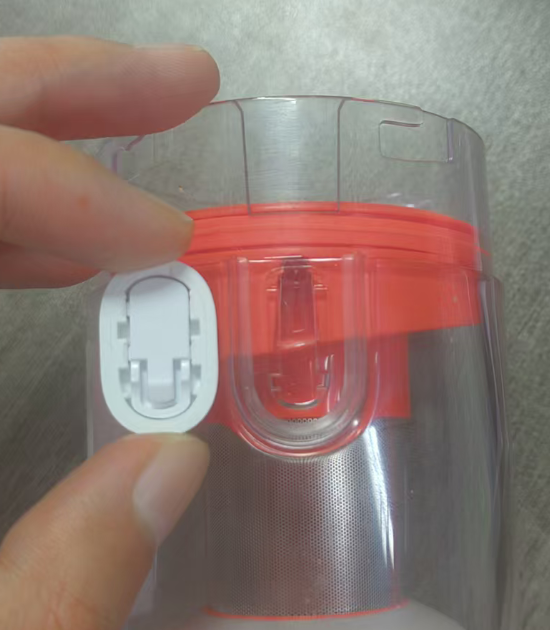
A: The disengagement of the dust compartment slide button on the Xiaomi Vacuum Cleaner P30 often occurs when the slide button is slid without connecting to the main body, causing the slide button to come off. Due to the product design, the dust compartment slide button has a structural design to prevent incorrect installation. If installed in the reverse direction, the slide button will not slide. After installing it in the correct direction, the slide button can be used normally.
Q14: What to do if the Xiaomi Vacuum Cleaner P30 still cannot be charged even when using the original charging cable?
A: The Xiaomi Vacuum Cleaner P30 can fail to charge when using the original charging cable for the following reasons:
- If a compatible adapter is not used, the indicator light will flash red and white, and the device will not charge properly. For European version vacuum cleaners, it is recommended to use the original charger that comes with the device; for global version vacuum cleaners, it is recommended to use a 5 V 2 A DC power adapter. Please use a suitable adapter and then try connecting it to the power supply;
- If the power cable is not securely connected, the indicator light will show a malfunction, and the device will not be able to charge. Please securely connect it and try again;
- After the device is turned on, the indicator light flashes red and white. In fact, it can be due to severe dirt blockage in the device, which prevents it from correctly displaying the current remaining battery level and charging status. Due to dirt blockage protection, the device will stop working, and users can mistakenly think that insufficient power caused by the inability to charge is preventing normal operation. Please disassemble the dust compartment, pre-filter, and post-filter to check for dirt blockage. After cleaning them thoroughly, reconnect the power supply and try charging or turning on the device for use;
- The charging cable or adapter is damaged. Please contact official after-sales service, and professional engineers will diagnose and handle the issue.
Does it help?
Yes
No