

Xiaomi Dust Mite Vacuum Cleaner 2 Pro FAQ
Overview
Q1: What are mites?
A: Mites are tiny creatures, generally measuring around 0.5 millimeters, with some as small as 0.1 millimeters. Most species are less than 1 millimeter in size. There are over 40 species of mites, with more than ten related to human health. The most common ones include dust mites, flour mites, demodex mites, and scabies mites. Mites are widely distributed in the dark corners of living spaces, carpets, mattresses, pillows, sofas, air conditioners, bamboo mats, and other places. Among these, dust mites are the most widespread and have the greatest impact. The bodies, secretions, and excretions of mites are allergens, which can cause allergic dermatitis, asthma, bronchitis, nephritis, and allergic rhinitis, posing serious threats to human health. Studies show that about 97% of adults are infected with mites, with dust mites being the most prevalent.
Q2: What are the methods of removing mites?
A: There are three main methods for removing mites:
- Using sunlight to air clothes and quilts can effectively reduce mites. However, some live mites, dander, and dust remain.
- UV radiation can destroy the chromosomes and cells of mites. However, some live mites, dander, and dust persist.
- Mite removal devices can use strong suction, ultraviolet (UV) radiation, and high temperatures to eliminate mites, dander, and dust effectively.
Q3: What is a mite removal device?
A: A mite removal device uses high-frequency tapping, strong suction, heating, ultraviolet (UV) radiation, and ultrasound to disrupt the living environment of mites, killing and extracting them from items such as bedding. This helps to reduce the density of dust mites and allergens in the space, thereby lowering the incidence of allergies and asthma.
Q4: What is ultraviolet radiation?
A: Ultraviolet (UV) radiation refers to sunlight with wavelengths ranging from 10 to 400 nanometers (nm), divided into three types: UVA (320-400 nm, long-wave), UVB (280-320 nm, medium-wave), and UVC (100-280 nm, short-wave). Among these, UVA is the most carcinogenic, with sunburn and sun damage effects 1000 times greater than UVB. UVC is generally blocked by the Ozone Layer. Wavelengths between 250-260 nm are effective for sterilization, as they can disrupt the chromosomes and play a photochemical role. Therefore, UV light generally uses this band. Ultraviolet sterilization and disinfection use ultraviolet radiation of appropriate wavelengths to destroy the molecular structure of DNA (deoxyribonucleic acid) or RNA (ribonucleic acid) in the cells of microorganisms, causing growth cell death and regenerative cell death, achieving the effect of sterilization and disinfection. The Xiaomi Dust Mite Vacuum Cleaner uses 253.7 nm ultraviolet radiation with a sterilization rate of 99%.
Product introduction and usage
Q1: What are the features of the Xiaomi Dust Mite Vacuum Cleaner 2 Pro?
A: The Xiaomi Dust Mite Vacuum Cleaner 2 Pro is equipped with a roller brush for tapping and sweeping, a UV sterilization light, and a hot air drying function. With a single press to start, the roller brush rotates at high speed to effectively dislodge and remove dust mites, enhancing the overall mite removal performance. The UV sterilization light penetrates deep to eliminate mites and bacteria, and it features an automatic shut-off function to prevent harm to the human body. The hot air disrupts the growth environment of dust mites, helping to suppress their proliferation at the source.
Designed with a flat-laying structure, it works in tandem with a high-speed suction motor and a wide suction inlet to quickly remove dust mites and allergens, efficiently completing the mite removal process.
Q2: What is the appearance of the Xiaomi Dust Mite Vacuum Cleaner 2 Pro?
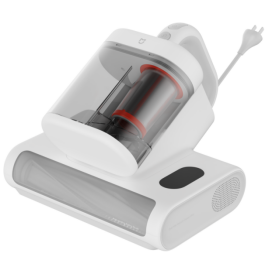
A: The Xiaomi Dust Mite Vacuum Cleaner 2 Pro’s item dimensions are 287 mm × 268 mm × 225 mm, and the package dimensions are 293 mm× 240 mm × 351mm.
For your reference, the appearance is shown as the enclosed picture:
Q3: What are the standard accessories included with the Xiaomi Dust Mite Vacuum Cleaner 2 Pro?
A: The standard accessories included with the Xiaomi Dust Mite Vacuum Cleaner 2 Pro are as follows:
Dust Mite Vacuum Cleaner.
User Manual.
Warranty Notice.
Note:
Illustrations of product, accessories, and user interface in the user manual are for reference purposes only. Actual product and functions can vary due to product enhancements.
Q4: What consumables does the Xiaomi Dust Mite Vacuum Cleaner 2 Pro use?
A: The Xiaomi Dust Mite Vacuum Cleaner 2 Pro uses the following consumable: HEPA filter.

Q5: How many modes does the Xiaomi Dust Mite Vacuum Cleaner 2 Pro have?
A: The Xiaomi Dust Mite Vacuum Cleaner 2 Pro has three modes: Gentle Mode, Smart Mode, and Strong Mode.
After powering on, you can switch between Smart, Gentle, and Strong modes by briefly pressing the Mode Button.
The detailed information about the modes is as follows:
- Gentle Mode: Suitable for daily maintenance cleaning. Ideal for soft fabrics such as plush toys and quilts.
- Smart Mode: Suction power automatically adjusts based on the presence of dust mites, the more mites detected, the stronger the suction. Suitable for a variety of cleaning scenarios.
- Strong Mode: Designed for deep cleaning. Ideal for mattresses, sofas, and other firmer fabrics.
Q6: What are the functions of the display screen on the Xiaomi Dust Mite Vacuum Cleaner 2 Pro?
A: The functions of the display on the Xiaomi Dust Mite Vacuum Cleaner 2 Pro are as follows:
- Dust Mite Index.
- Ultrasound Indicator.
- Hot Air Drying Indicator.
- UV Indicator.
- Indicator Ring.
- Strong Mode.
- Smart Mode.
- Gentle Mode.
Note:
- Dust Mite Index is the percentage level of dirty detected by the dust mite vacuum cleaner, including dust mites, skin flakes, hair, and dust particles.
- Hot air drying and ultrasound are enabled by default.
- The UV indicator is on when the UV function is enabled, and is off when the function is disabled.
- The UV light will go out to prevent UV exposure if the dust mite vacuum cleaner is tilted or lifted (more than 5 cm from the fabric surface) during use. This is normal.
- During use, a yellow or orange indicator ring means an above-average dust mite level on the cleaning area. Correspondingly, the dust mite index is shown on the display. Repeated cleaning is recommended.
Q7: How to use the Xiaomi Dust Mite Vacuum Cleaner 2 Pro?
A: To use the Xiaomi Dust Mite Vacuum Cleaner 2 Pro, please refer to the following information:
- Turning on/off
(1). Connect the dust mite vacuum cleaner to the power supply, and press the power button to turn it on. The dust mite vacuum cleaner enters smart mode by default when turn on for the first time.
(2). When the dust mite vacuum cleaner is turned on, press the power button to turn it off. After each use, turn off and unplug the dust mite vacuum cleaner.
Note:
Hot air comes out from the heat dissipation vent. Slight odors can occur during first-time use, which is normal, and will dissipate with use.
- Switching modes
When the dust mite vacuum cleaner is turn on, press the mode button to cycle through smart mode, strong mode, and gentle mode.
(1). Gentle Mode: Suitable for daily maintenance cleaning. Ideal for soft fabrics such as plush toys and quilts.
(2). Smart Mode: Suction power automatically adjusts based on the presence of dust mites, the more mites detected, the stronger the suction. Suitable for a variety of cleaning scenarios.
(3). Strong Mode: Designed for deep cleaning. Ideal for mattresses, sofas, and other firmer fabrics.
Q8: What is the dust compartment of the Xiaomi Dust Mite Vacuum Cleaner 2 Pro?
A: For your reference, here are the introductions of the dust compartment on the Xiaomi Dust Mite Vacuum Cleaner 2 Pro:
- Filter Material: The device features a spiral centrifugal dual visible dust compartment system with 5-stage filtration (dual dust compartments, cyclonic dust separation, fine stainless steel mesh filter, HEPA filter, and inlet filter cotton). The filter components are washable.
- Dust compartment capacity: Upgraded transparent dual dust compartment with air-dust separation, and the dust compartment itself is also washable.
Q9: How to remove and install the dust compartment of the Xiaomi Dust Mite Vacuum Cleaner 2 Pro?
A: To remove and install the dust compartment of the Xiaomi Dust Mite Vacuum Cleaner 2 Pro, please refer to the following information:
- Removal
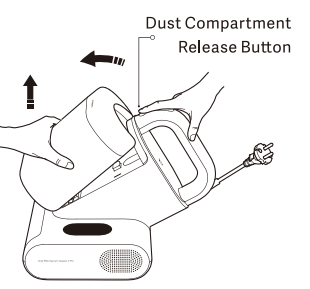
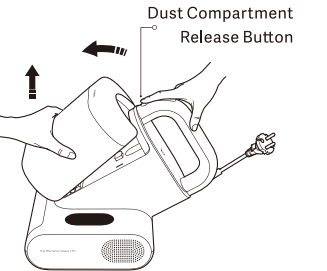
Hold the dust compartment with one hand, and press the dust compartment release button with the other to remove the dust compartment assembly as illustrated.
- Installation
Align the dust compartment latch with the dust compartment positioning slot on the main unit. Insert it in the direction indicated, then press the dust compartment until you hear a "click" sound, indicating successful installation.
Q10: How to remove and clean the roller brush of the Xiaomi Dust Mite Vacuum Cleaner 2 Pro?
A: To remove and clean the roller brush of the Xiaomi Dust Mite Vacuum Cleaner 2 Pro, please refer to the following information:
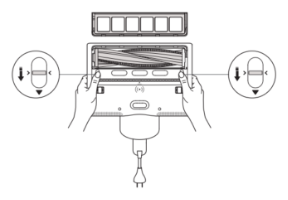
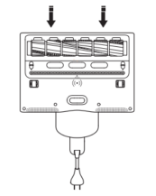
- Press the roller brush cover release button to remove the roller brush cover as illustrated.
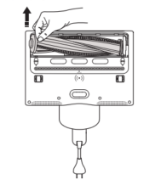
- Remove the roller brush upwards from the left side as illustrated, and clean it.
Note:
It is recommended that the roller brush should be cleaned at least once a month. Rinsing is not recommended.
- After cleaning, reinstall the roller brush. Then, reinstall the roller brush cove, and press it down. A click indicates proper installation.
Q11: Is the Xiaomi Dust Mite Vacuum Cleaner 2 Pro waterproof?
A: The Xiaomi Dust Mite Vacuum Cleaner 2 Pro is designed for use only on dry indoor surfaces. It should not be placed in environments where there is a risk of immersion, spraying, or splashing, as this can damage internal components. Outdoor or moist surface use is prohibited.
Note:
Do not touch the plug or any part of the vacuum cleaner with wet hands.
Q12: How to clean the dust compartment of the Xiaomi Dust Mite Vacuum Cleaner 2 Pro?
A: To clean the dust compartment of the Xiaomi Dust Mite Vacuum Cleaner 2 Pro, please refer to the following steps:
- Hold the dust compartment with one hand, and press the dust compartment release button with the other to remove the dust compartment assembly as illustrated.
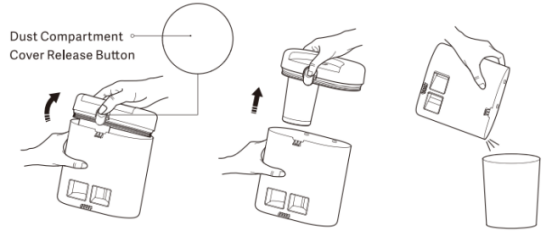
- Press and hold the dust compartment cover release button “trash” to lift out the dust compartment cover assembly as illustrated, empty the dust compartment, and clean the dust compartment cover assembly.
- Reinstall the dust compartment cover assembly onto the dust compartment as illustrated, and press it down. A click indicates proper installation.
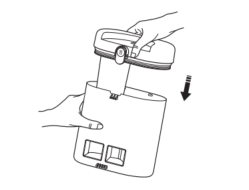
- Make sure the baffle is properly reset. Then reinstall the dust compartment assembly onto the dust mite vacuum cleaner.
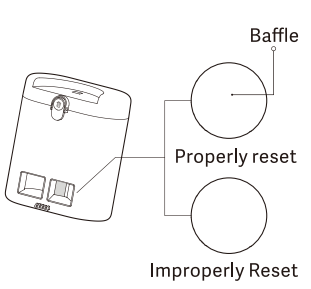
To clean dust compartment assembly, please refer to the following steps:
Note:
When reduced suction occurs, clean the filter promptly and air-dry it before use to avoid reduced performance or unexpected shutdowns due to air dust blockage.
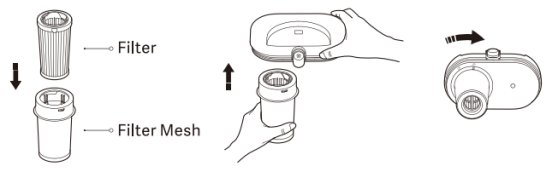
- Remove the dust compartment cover, and rotate the filter mesh counterclockwise to remove it.
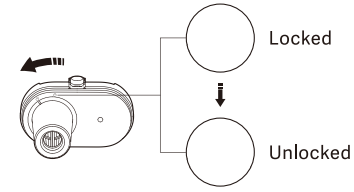
- Remove the filter from the dust compartment cover as illustrated.
Note:
When removing the filter, hold the bottom of the filter and pull it straight out.
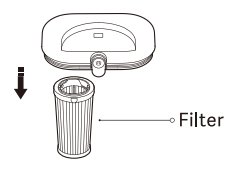
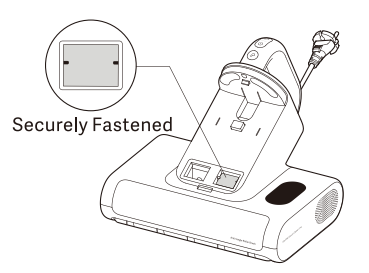
- Remove the filter cotton from the air inlet.
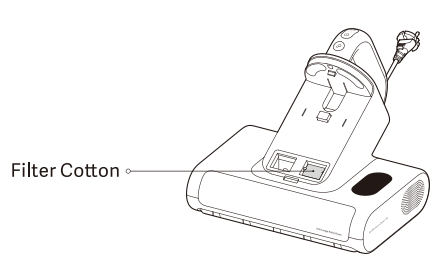
- Clean, rinse, and then fully air-dry the dust compartment, dust compartment cover, filter mesh, filter, and filter cotton.
Note:
- It is recommended that the filter be cleaned every 5-6 uses, or as needed.
- It is recommended that the filter be replaced every 2-3 months to ensure optimal vacuuming performance.
- After rinsing, make sure these components are fully air-dried (avoid direct sunlight) before reinstalling.
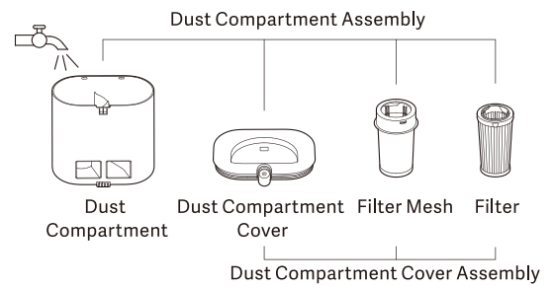
- After the filter is cleaned and fully air-dried, insert it into the filter mesh. Make sure the end surface of the filter is aligned with that of the filter mesh. Then, reinstall the filter mesh onto the dust compartment cover by aligning “rectangular symbol” on the filter mesh with “unlock symbol” on the dust compartment cover, and rotate the filter mesh until “rectangular symbol” is aligned with “unlock symbol”. A click indicates proper installation.
- Reinstall the filter cotton into the air inlet. Make sure it is securely fastened.
- Reinstall the dust compartment cover assembly onto the dust compartment securely, and then reinstall the dust compartment assembly onto the dust mite vacuum cleaner.
Q13: How to clean the suction inlet and dust mite sensor window of the Xiaomi Dust Mite Vacuum Cleaner 2 Pro?
A: To clean the suction inlet and dust mite sensor window of the Xiaomi Dust Mite Vacuum Cleaner 2 Pro, please refer to the following information:
Remove the dust compartment assembly from the dust mite vacuum cleaner, and then wipe clean the dust mite sensor window with a dry cloth or tissue.
Note:
- Clean the suction inlet regularly as dust can collect.
- When the indicator ring blinks orange, it means that the dust mite sensor window is dirty and requires prompt cleaning. It is recommended that the dust mite sensor window be regularly cleaned to prevent dust from reducing sensor accuracy.
- The filter cotton serves as a filter. Do not lose or discard it. If the filter cotton becomes dirty, remove and rinse it. Make sure it is fully air-dried (avoid direct sunlight) before reinstalling.
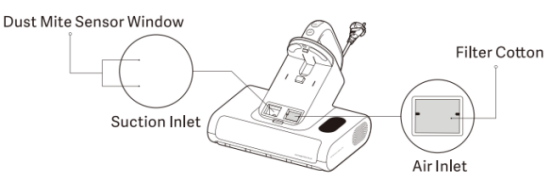
Q14: Why does the roller brush window of the Xiaomi Dust Mite Vacuum Cleaner 2 Pro get dirty during use, and how can it be cleaned?
A: The roller brush window on the Xiaomi Dust Mite Vacuum Cleaner 2 Pro gets dirty because the high-speed rolling action generates static electricity, which causes a mixture of dust mites, dirt, dander, and hair to cling to the window as it passes through the roller brush chamber. This is similar to the dust accumulation inside the dust compartment.
If you notice the roller brush chamber is dirty, you can open the roller brush cover, remove the brush, and wipe off the dust from the window using a dry cloth or tissue.
Q15: How to ensure electrical safety when using the Xiaomi Dust Mite Vacuum Cleaner 2 Pro?
A: When using the Xiaomi Dust Mite Vacuum Cleaner 2 Pro, follow these guidelines to prevent fire, electric shock, or damage:
- Always connect the device to a properly grounded power outlet.
- Do not pull or tug the power cord.
- Before performing maintenance or moving the dust mite vacuum cleaner, always unplug the power cord.
Q16: What are the precautions when using the Xiaomi Dust Mite Vacuum Cleaner 2 Pro?
A: The precautions when using the Xiaomi Dust Mite Vacuum Cleaner 2 Pro are as follows:
- Make sure the vacuum is turned off before cleaning the dust compartment.
- Clean the dust compartment regularly to prevent clogging of the suction inlet.
- Do not press or scrape the suction or exhaust ports with fingernails or sharp objects to avoid damaging the device.
- Do not use alcohol, nail polish remover, detergent, or other corrosive liquids or abrasives, as they can cause malfunction, cracking, or discoloration.
Q17: Can the Xiaomi Dust Mite Vacuum Cleaner 2 Pro be left in one spot for a long time while running?
A: When the Xiaomi Dust Mite Vacuum Cleaner 2 Pro is running, it should not be left stationary for an extended period. The roller brush continues to operate while powered on, which can cause wear to the surface of the mattress or bedding. Additionally, the bottom of the device will heat up, potentially damaging the vacuum cleaner.
Q18: Can the Xiaomi Dust Mite Vacuum Cleaner 2 Pro be used on damp surfaces or outdoors?
A: No. The Xiaomi Dust Mite Vacuum Cleaner 2 Pro is intended only for indoor use on dry surfaces. It can not be used outdoors or on wet/damp surfaces.
Q19: Can the Xiaomi Dust Mite Vacuum Cleaner 2 Pro be used to clean ash?
A: No. Do not use the Xiaomi Dust Mite Vacuum Cleaner 2 Pro as a regular vacuum cleaner. It is prohibited to use it for cleaning drywall dust, fireplace ash, or any other types of ash. Do not vacuum smoking or burning materials, such as hot coals, cigarette butts, or firewood.
Q20: Does the UV light on the Xiaomi Dust Mite Vacuum Cleaner 2 Pro pose any harm to humans? Is there a safety mechanism?
A: Direct exposure to UV sterilization light can cause varying degrees of harm to skin or eyes.
The Xiaomi Dust Mite Vacuum Cleaner 2 Pro uses a micro-switch activated by the roller wheels to protect against UV exposure. When the device is powered on, the roller presses down and triggers the internal switch, turning on the UV light. If the dust mite vacuum cleaner is lifted off the surface, the rollers reset, and the UV light automatically turns off, preventing UV leakage and protecting you from harm.
Q21: How should the Xiaomi Dust Mite Vacuum Cleaner 2 Pro be used properly?
A: Use the Xiaomi Dust Mite Vacuum Cleaner 2 Pro only for cleaning and mite removal from textiles such as mattresses, blankets, pillows, and sofas. It is not suitable for other applications, and does not experiment out of curiosity. When consumables need replacing, always use the recommended accessories and replacement parts provided by the manufacturer.
Q22: How can the UV sterilization light on the Xiaomi Dust Mite Vacuum Cleaner 2 Pro be used safely?
A: To use the UV sterilization light on the Xiaomi Dust Mite Vacuum Cleaner 2 Pro safely, please follow the information:
- Avoid looking at the bottom of the vacuum or tilting/flipping it while powered on, to prevent injury from UV exposure.
- Do not touch the UV light while it is in use or shortly after it has been turned off, as it can cause burns.
- Do not shine the UV light directly on plants, as it can damage them.
- Do not focus the UV light on a single spot for an extended time, as it could damage the surface being cleaned.
- Never expose human or animal skin or eyes directly to the UV light to avoid accidents.
Q23: How often should the filter of the Xiaomi Dust Mite Vacuum Cleaner 2 Pro be replaced?
A: It is recommended to wash the filter of the Xiaomi Dust Mite Vacuum Cleaner 2 Pro after every 5-6 uses, or adjust based on your usage. To ensure optimal performance, replace the filter every 2-3 months. After rinsing, make sure all parts are completely dry before reassembling, and avoid direct sunlight exposure during drying.
Q24: Does the Xiaomi Dust Mite Vacuum Cleaner 2 Pro have anti-tangle protection?
A: The Xiaomi Dust Mite Vacuum Cleaner 2 Pro is equipped with anti-tangle protection. If the roller brush becomes entangled with foreign objects and cannot rotate, the device will automatically shut down. You can restart it after removing the obstruction.
Q25: Can the children use the Xiaomi Dust Mite Vacuum Cleaner 2 Pro?
A: The Xiaomi Dust Mite Vacuum Cleaner 2 Pro should not be used by children or persons with physical, sensory, or mental impairments, or those lacking experience and knowledge, unless they are under supervision or given instruction by a responsible person to ensure safe use.
Children are prohibited from operating the product or treating it as a toy. Close supervision is required when the product is used near children. Children are not allowed to clean or maintain the product without adult supervision.
Q26: Does the Xiaomi Dust Mite Vacuum Cleaner 2 Pro support the hot air function?
A: The Xiaomi Dust Mite Vacuum Cleaner 2 Pro is equipped with a hot air function. During operation, hot air is released from the bottom of the device, with a maximum drying temperature of up to 65 °C.
Q27: What is the QR code on the bottom of the Xiaomi Dust Mite Vacuum Cleaner 2 Pro used for?
A: The QR code contains the product ID, which serves as a unique identifier, like an ID card for the Xiaomi Dust Mite Vacuum Cleaner 2 Pro.
Q28: What is the weight of the Xiaomi Dust Mite Vacuum Cleaner 2 Pro?
A: The net weight of the Xiaomi Dust Mite Vacuum Cleaner 2 Pro is 2.4 kg ±5%, and the gross weight is 3.0 kg ±5%.
Q29: What is the anti-blocking mechanism of the Xiaomi Dust Mite Vacuum Cleaner 2 Pro?
A: The anti-blocking mechanism of the Xiaomi Dust Mite Vacuum Cleaner 2 Pro is floor brush motor blockage protection.
Here is the detailed information:
- Full blockage: When the floor brush motor current reaches ≥2.3 A continuously for 5 seconds, blockage protection is triggered.
- Partial blockage: When the floor brush motor current exceeds 1.25 A continuously for 5 minutes, blockage protection is triggered.
- Once blockage protection is activated, the suction motor, floor brush motor, UV light, and ultrasonic function will all stop working. The dust mite detection ring on the display will flash red for 5 seconds, then stay on for 15 seconds, after which the screen will turn off and the device will shut down. If the digital display is flashing or constantly lit during this time, pressing the power button will immediately shut down the device and turn off the display.
Q30: What is the suction power of the Xiaomi Dust Mite Vacuum Cleaner 2 Pro?
A: The suction power of the Xiaomi Dust Mite Vacuum Cleaner 2 Pro is as follows:
- Strong Mode: ≥16 kPa.
- Gentle Mode: ≥10 kPa.
- Smart Mode: 12–16 kPa.
Q31: Is it normal for the roller brush of the Xiaomi Dust Mite Vacuum Cleaner 2 Pro bristles to bend after use
A: Yes, this is a normal phenomenon during product use and does not affect functionality. The Xiaomi Dust Mite Vacuum Cleaner 2 Pro can continue to be used.
Q32: What is the noise level of the Xiaomi Dust Mite Vacuum Cleaner 2 Pro?
A: During operation, the noise level of the Xiaomi Dust Mite Vacuum Cleaner 2 Pro is ≤80 dBA in Strong Mode and ≤76 dBA in Gentle Mode.
Troubleshooting
Q1: Why does static electricity occur when using the Xiaomi Dust Mite Vacuum Cleaner 2 Pro?
A: Static electricity is a common phenomenon, similar to what happens when removing clothes in dry winter conditions. The main cause is dry weather, where friction between insulating materials (like synthetic fibers) causes electrons to be stripped and accumulate. When the charge builds up and is suddenly released to the human body, a static shock occurs.
When using the Xiaomi Dust Mite Vacuum Cleaner 2 Pro, static electricity is generated due to friction between the device and fabric surfaces.
Q2: What to do if the Xiaomi Dust Mite Vacuum Cleaner 2 Pro experiences reduced suction, excessive noise, or shuts down automatically and stops working?
A: If the Xiaomi Dust Mite Vacuum Cleaner 2 Pro experiences reduced suction, excessive noise, or shuts down automatically and stops working, these issues could be caused by one or more of the following conditions. Please make sure to promptly clean out any debris. If any components have been washed, ensure they are completely dry before reassembly, as residual moisture can damage internal electronic components.
The causes are as follows:
- The dust compartment is full of dust and debris.
- The air inlet filter is clogged with dust.
- The HEPA filter is overloaded with dust.
- The suction port is blocked.
- The vacuum has been left running on a soft surface (e.g., bedding) for too long.
- The roller brush is tangled with debris, or the rubber strip on the brush is loose.
- The power plug is loose, unplug and reconnect it, then restart the device.
Q3: What to do if the UV light on the Xiaomi Dust Mite Vacuum Cleaner 2 Pro is not working properly?
A: If the UV light on the Xiaomi Dust Mite Vacuum Cleaner 2 Pro is not working properly, please refer to the following steps to troubleshoot:
- If the Xiaomi Dust Mite Vacuum Cleaner 2 Pro is not in contact with the surface being cleaned or is held too far from the surface (over 3 cm ± 2 cm), the UV light can not activate.
- If debris is stuck in the bottom rollers, they can not press down properly, which prevents the internal micro switch from being triggered. Remove any debris blocking the rollers.
Q4: What to do if the display screen of the Xiaomi Dust Mite Vacuum Cleaner 2 Pro is unclear?
A: There is a protective film on the screen surface. If the display of the Xiaomi Dust Mite Vacuum Cleaner 2 Pro appears unclear during use, peel off the protective film.
Q5: What to do if there is an odor when using the Xiaomi Dust Mite Vacuum Cleaner 2 Pro?
A: During initial using the Xiaomi Dust Mite Vacuum Cleaner 2 Pro, it is normal for the heat vents to emit hot air and a slight odor. This odor will dissipate over time with continued use.
Q6: Why does the Xiaomi Dust Mite Vacuum Cleaner 2 Pro not blow out hot air?
A: The Xiaomi Dust Mite Vacuum Cleaner 2 Pro features a hot air function. During operation, hot air blows out from the bottom of the device. To prevent potential hazards from high temperatures, the drying temperature of the hot air is approximately 65 °C.
Q7: What to do if the Xiaomi Dust Mite Vacuum Cleaner 2 Pro does not turn on?
A: If the Xiaomi Dust Mite Vacuum Cleaner 2 Pro does not turn on, please refer to the following steps to troubleshoot:
- Ensure the power plug is properly inserted into the socket.
- Use appropriate electrical tools to confirm the power outlet is supplying electricity correctly.
- Check whether the power switch operates smoothly and can be pressed and released properly, allowing the vacuum to turn on and off normally.
- Check if the device entered FCT (Factory Test) mode by pressing and holding the power button. If so, press the power button to exit.
- If the issue persists, contact the after-sales service center for further assistance.
Q8: What to do if the indicator ring on the Xiaomi Dust Mite Vacuum Cleaner 2 Pro flashes red and then stays on?
A: If the indicator ring on the Xiaomi Dust Mite Vacuum Cleaner 2 Pro flashes red and then stays on, this can be due to roller brush jam protection. Remove the roller brush and clean any debris to resolve the issue.
Q9: What to do if the indicator ring on the Xiaomi Dust Mite Vacuum Cleaner 2 Pro flashes orange?
A: If the indicator ring on the Xiaomi Dust Mite Vacuum Cleaner 2 Pro flashes orange, this could be caused by dirt on the dust mite sensor, which needs to be cleaned.
After removing the dust compartment assembly, you will see the suction port on the Xiaomi Dust Mite Vacuum Cleaner 2 Pro, where the dust mite sensor is located. Use a dry cloth or tissue to clean any dust attached to the sensor area.
Note:
- When the indicator ring is flashing orange, it indicates the sensor window is dirty and needs to be cleaned promptly.
Q10: What to do if the silicone dust-blocking flap is misaligned when installing the dust compartment of the Xiaomi Dust Mite Vacuum Cleaner 2 Pro?
A: If the silicone dust flap is misaligned during dust compartment installation, you can gently push the flap back into place from the suction inlet of the dust compartment. Alternatively, attach the dust compartment to the Xiaomi Dust Mite Vacuum Cleaner 2 Pro and activate Strong Mode, using the strong suction to pull the flap back into position.
Q11: What to do if there’s a rattling noise when the Xiaomi Dust Mite Vacuum Cleaner 2 Pro is shaken?
A: The rattling sound can be caused by hard particles that were accidentally sucked into the Xiaomi Dust Mite Vacuum Cleaner 2 Pro. Remove the particles, and the device should return to normal operation.
Q12: What to do if dust accumulates around the power cord connection while using the Xiaomi Dust Mite Vacuum Cleaner 2 Pro?
A: Dust around the power cord interface when using the Xiaomi Dust Mite Vacuum Cleaner 2 Pro is caused by static electricity attracting particles. This does not affect usage, simply clean the area.
Q13: What to do if the indicator ring on the Xiaomi Dust Mite Vacuum Cleaner 2 Pro stays orange or red?
A: If the indicator ring on the Xiaomi Dust Mite Vacuum Cleaner 2 Pro stays orange or red, please refer to the following steps to troubleshoot:
- Remove the roller brush and turn the device on to see if the indicator returns to normal. If it does, clean any tangled hair or fibers from the roller brush. If the issue persists after reinstalling the cleaned brush, try replacing the roller brush.
- If the indicator remains orange/red even after removing the roller brush, check and clean the dust full sensor inlet, as it can be blocked by hair or debris.
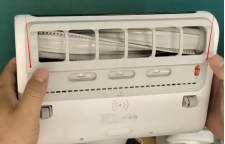
Q14: What to do if the roller brush cover of the Xiaomi Dust Mite Vacuum Cleaner 2 Pro won't snap into place?
A: If the roller brush cover of the Xiaomi Dust Mite Vacuum Cleaner 2 Pro won't snap into place, press down at the angle indicated by the arrows in the image to secure it.
If this method doesn't snap into place, please contact the customer service.
Does it help?
Yes
No