

Mijia Smart Air Purifier 6 FAQ
Overview
1. Q: What are the selling points of the Mijia Smart Air Purifier 6?
A: The selling points of the Mijia Smart Air Purifier 6 are as follows:
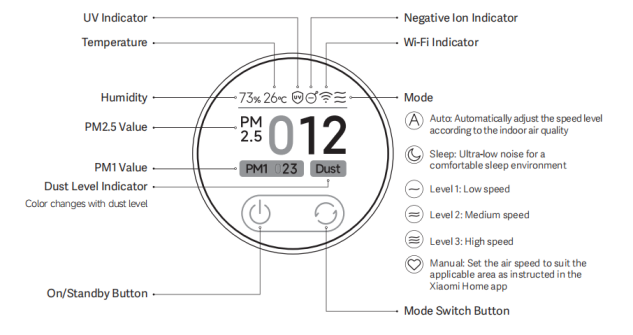
1. The Mijia Smart Air Purifier 6 features PM2.5 and PM1 level displays, a UV light for powerful sterilization, and negative ions to freshen the air;
2. It delivers strong performance suitable for small spaces, with a Particle CADR (Clean Air Delivery Rate) of 420 m³/h and a Formaldehyde CADR of 150 m³/h. Its cumulative purification capacity (CCM) reaches 12,000 mg for particles and 600 mg for formaldehyde, making it suitable for areas of 29–50 m²; 3. Despite its performance, the maximum operating noise is only 64 dB(A);
4. The device can display particle concentration, temperature, humidity, as well as the working status of UV and negative ion functions, along with the current operating mode.
2. Q: What are the differences between the Mijia Smart Air Purifier 6 and the Xiaomi Smart Air Purifier 4?
A: The Mijia Smart Air Purifier 6 has a higher Particle CADR of 420 m³/h compared to the Xiaomi Smart Air Purifier 4’s 400 m³/h, and it covers a slightly larger area of 29–50 m² versus 28–48 m², offering more efficient air purification for bigger rooms. Compared with the Xiaomi Smart Air Purifier 4, the Mijia Smart Air Purifier 6 has a longer filter replacement cycle. It also adds PM1 level display and UV sterilization capabilities.
Product Introduction and Usage
1. Q: What functions do the buttons on the Mijia Smart Air Purifier 6 have?
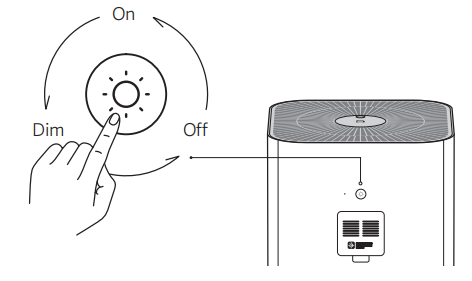
A: The buttons on the Mijia Smart Air Purifier 6 allow you to power the device on or off, switch between modes, reset the Wi-Fi, and adjust the screen brightness.
2. Q: What type of motor does the Mijia Smart Air Purifier 6 use, and how loud is it?
A: The Mijia Smart Air Purifier 6 uses a DC brushless motor that supports stepless speed adjustment. It offers low noise and long service life. The maximum noise level of the entire unit is ≤64 dB(A), and sleep mode can be activated at night for quieter operation.
3. Q: What is the component on the back of the Mijia Smart Air Purifier 6?
A: The component on the back of the Mijia Smart Air Purifier 6 is a laser particle sensor, which is primarily used to monitor the concentration of particulate matter in the surrounding air.
4. Q: Can the Mijia Smart Air Purifier 6 be placed horizontally?
A: No, the Mijia Smart Air Purifier 6 should not be placed horizontally. To ensure optimal air circulation and allow clean air to reach all corners of the room, the purifier must be placed upright. Additionally, maintain at least 20cm of clearance behind the unit (where the laser particle and formaldehyde sensors are located), and at least 20 cm of space around the sides to avoid blocking the air inlets.
5. Q: What settings will be lost after resetting the Wi-Fi on the Mijia Smart Air Purifier 6?
A: After resetting the Wi-Fi on the Mijia Smart Air Purifier 6, settings in the App, including scheduled power on/off times, will be cleared.
6. Q: Can multiple people control the same Mijia Smart Air Purifier 6 simultaneously?
A: Yes, the Mijia Smart Air Purifier 6 supports multi-people control. You can share the device with specific Xiaomi accounts through the Xiaomi Home App.
7. Q: After sharing the Mijia Smart Air Purifier 6 with others, can the shared people upgrade the firmware?
A: No, shared people are currently not allowed to perform firmware upgrades on the Mijia Smart Air Purifier 6.
8. Q: What is the Manual mode on the Mijia Smart Air Purifier 6?
A: The Manual mode allows you to customize the fan speed of the Mijia Smart Air Purifier 6 via the Xiaomi Home App. It supports stepless speed adjustment to suit your preferred purification effect for specific room size.
9. Q: Will a humidifier affect the PM2.5 values of the Mijia Smart Air Purifier 6?
A: Yes. Ultrasonic humidifiers atomize water into tiny water particles with high concentration. The highly sensitive sensor of the Mijia Smart Air Purifier 6 detects these fine water particles, causing the PM2.5 values to be higher than actual or even exceed normal levels. When the humidifier is turned off, the values will gradually return to normal. This is a normal phenomenon.
10. Q: Will a heater affect the PM2.5 values of the Mijia Smart Air Purifier 6?
A: Yes. Heaters promote air convection in the room and make the air relatively dry, which helps fine particles stay suspended and disperse more easily in the air. As a result, the particle sensor of the Mijia Smart Air Purifier 6 can detect higher PM2.5 values.
11. Q: How to turn off/on the display screen of the Mijia Smart Air Purifier 6, and how to adjust the screen brightness?
A: There is a screen brightness adjustment button on the back of the Mijia Smart Air Purifier 6. Each press cycles the screen through three modes: on, dim, and off. If connected to the Xiaomi Home App, open the device interface, tap the three dots in the top right corner for additional settings, then select [Light] to turn the display on or off.
Note:
When the screen is off, the display buttons do not completely power down, making it easier to control the purifier in dark environments.
12. Q: What type of filter does the Mijia Smart Air Purifier 6 come with?
A: The Mijia Smart Air Purifier 6 is equipped with a high-quality integrated filter combining antibacterial and antiviral composite filter media with activated carbon.
13. Q: What are the differences between the Mijia Smart Air Purifier 6 filter and filters of other Xiaomi Smart Air Purifier? Are they interchangeable?
A: The filter for the Mijia Smart Air Purifier 6 is compatible with the Xiaomi Smart Air Purifier 4, and both are cylindrical. Compared to earlier standard versions, these filters have the same height but are wider, so they cannot be installed in older models.
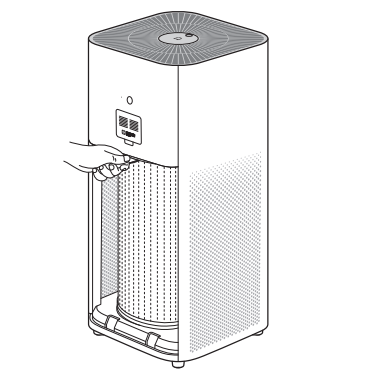
14. Q: How to replace the filter in the Mijia Smart Air Purifier 6?
A: To replace the filter in the Mijia Smart Air Purifier 6, open the filter compartment cover, grip the strip, and pull the old filter horizontally outward to remove it, then insert the new filter along the same path and close the filter compartment cover.
Install the new filter into the compartment with its strip on top, and close the cover securely.
15. Q: How is the filter lifespan of the Mijia Smart Air Purifier 6 calculated, and how often should it be replaced?
A: The Mijia Smart Air Purifier 6 calculates filter lifespan based on a weighted combination of air quality, purifier operating mode, fan speed, and runtime. In environments with poor air quality, the filter will wear out faster. In cleaner environments, it will last longer. On average, the filter lifespan is about 6–12 months. When the remaining filter life drops to ≤10%, the purifier will prompt you via the display and the Xiaomi Home App to replace the filter. The App also supports one-tap filter purchase. It is recommended to clean the outer pre-filter layer once a month.
Note:
Replacement recommendations are based on lab test conditions. Actual replacement timing varies depending on your usage environment and system reminders.
16. Q: After replacing the filter of the Mijia Smart Air Purifier 6, is it necessary to manually reset the filter lifespan?
A: No manual reset is needed. The Mijia Smart Air Purifier 6 is equipped with an RFID tag module, so when a new filter is installed, the purifier automatically recognizes it and resets the filter lifespan accordingly.
17. Q: Why does the Mijia Smart Air Purifier 6 show a higher indoor PM2.5 value than outdoors?
A: Activities such as using a humidifier, smoking, or cooking incovers can generate water mist or oil fumes, which affect how the Mijia Smart Air Purifier 6 detects and interprets air quality. Additionally, the outcover PM2.5 data shown in the App can differ from the actual local values due to data sourcing and coverage limitations.
18. Q: Why do the PM2.5 values change even when the Mijia Smart Air Purifier 6 is running without a filter?
A: When the Mijia Smart Air Purifier 6 runs without a filter, it functions as a fan that circulates incover air. This circulation causes areas with higher or lower PM2.5 concentrations to mix, resulting in fluctuating PM2.5 values detected by the sensor. Depending on the environment, the PM2.5 values can rise or fall randomly. After extended operation, the incover air becomes more evenly mixed, and the PM2.5 values will gradually stabilize.
19. Q: Will the filter life decrease if the Mijia Smart Air Purifier 6 is used without installing a filter?
A: No, the filter life of the Mijia Smart Air Purifier 6 will not decrease if the purifier is operated without a filter installed. The filter lifespan is calculated based on air quality, operating mode, and runtime, and the data is written into the RFID tag on the filter. If there is no filter in the purifier during operation, the filter usage value will not decrease.
20. Q: Will the room humidity decrease if the Mijia Smart Air Purifier 6 is used for a long time?
A: Yes. When the Mijia Smart Air Purifier 6 filters particulate matter from the air, it also removes moisture, which can lower the room’s humidity. This is a normal phenomenon. Water molecules adhere to the filter and activated carbon, causing the humidity drop. This moisture absorption can also affect the purifier’s performance and cause deviations in the displayed particulate matter values.
21. Q: Can the Mijia Smart Air Purifier 6 remove cooking fumes and other odors?
A: Yes, the Mijia Smart Air Purifier 6 can remove cooking fumes and other odors. However, depending on the environment, it usually requires a longer purification time to achieve noticeable results. The effectiveness also depends on the amount of activated carbon in the filter and how long the filter has been in use.
22. Q: Does the Mijia Smart Air Purifier 6 have an negative ion function?
A: Yes, the Mijia Smart Air Purifier 6 features a negative ion function. The negative ion function is enabled by default and can be turned on or off via the Xiaomi Home App after connecting the device to the network. When the ion function is enabled, the ion indicator icon lights up on the screen. During operation, the purifier periodically releases negative ions, which combine with oxygen to form negative oxygen ions that help remove airborne pollutants. Under normal conditions, most people can not noticeably feel the effect.
23. Q: Can the Mijia Smart Air Purifier 6 be modified for different use?
A: No, it cannot. Third-party accessories or modifications that change the original usage of the Mijia Smart Air Purifier 6, such as connecting outcover air to the filter via ducts or adding humidifiers to the air outlet, are not compatible and can not be used. Such modifications can affect the product’s performance, stability, and safety. Therefore, altering the original usage mode of the air purifier is strictly prohibited.
24. Q: Does the negative ion emitter of the Mijia Smart Air Purifier 6 require regular cleaning?
A: Yes, the negative ion emitter of the Mijia Smart Air Purifier 6 requires regular cleaning. After using the device for a period of time, open the top grille and gently brush the emitter head to clean it.
25. Q: Why does the Mijia Smart Air Purifier 6 make a hissing sound when the negative ion function is turned on?
A: During negative ion emission, a slight electrical noise and hissing sound can be heard. This sound is produced by the ion generator releasing negative ions and does not harm humans. The hissing can be more noticeable when the air humidity is high, which is normal. You can also disable the negative ion function via the Xiaomi Home App to eliminate this sound.
26. Q: What is the concentration of negative ions released by the Mijia Smart Air Purifier 6?
A: The Mijia Smart Air Purifier 6 releases negative ions at a concentration of one million ions per cubic centimeter.
27. Q: Does the Mijia Smart Air Purifier 6 have a UV sterilization function?
A: The Mijia Smart Air Purifier 6 has a UV (ultraviolet) sterilization function that is enabled by default. You can turn the UV sterilization on or off via the Xiaomi Home App. The UV LED helps to comprehensively sterilize bacteria and viruses on the filter and in the airflow path.
28. Q: What UV band does the UV sterilization lamp of the Mijia Smart Air Purifier 6 belong to?
A: The UV sterilization lamp of the Mijia Smart Air Purifier 6 belongs to the UV-C band.
29. Q: Can the UV sterilization lamp of the Mijia Smart Air Purifier 6 be visually confirmed as lit by the naked eye?
A: The UV sterilization lamp of the Mijia Smart Air Purifier 6 is installed inside the filter compartment at the top center. The UV sterilization function only activates when the purifier is operating normally. It is not possible to directly observe the lamp while in use. However, you can check the UV indicator on the display screen to confirm whether the UV lamp is working properly. Please avoid looking directly at the UV light, as prolonged exposure can cause irreversible eye damage.
30. Q: How does the Mijia Smart Air Purifier 6 perform disinfection and antibacterial functions?
A: Particles containing bacteria in the air move due to airflow inertia, random Brownian motion, or external forces. The high-efficiency filter captures these particles through interception, inertia, diffusion, and electrostatic effects, causing them to adhere to the fiber surfaces. Meanwhile, the antibacterial coating on the filter damages the bacterial cell walls, inactivating them. Additionally, UV light sterilizes and kills microorganisms, achieving disinfection and purification.
31. Q: What is the difference between the negative ion function of the Mijia Smart Air Purifier 6 and plasma or clean ions?
A: Plasma: Contains equal concentrations of positive and negative ions, also known as bipolar ions. The neutralization energy of these ions can actively kill bacteria.
Negative ions: Improve air freshness and eliminate static electricity.
Clean ions: A general term that can refer to either negative ions alone or a mixture of positive and negative ions.
32. Q: Does the negative ion function of the Mijia Smart Air Purifier 6 produce ozone?
A: The negative ion technology used in the Mijia Smart Air Purifier 6 has been continuously upgraded and improved in manufacturing processes, resulting in ozone emissions that are extremely low and almost undetectable. Our product complies with relevant national standards and is safe for human health. You can use it with confidence.
33. Q: How to clean and store the Mijia Smart Air Purifier 6?
A: When cleaning the Mijia Smart Air Purifier 6, please unplug the power cord before starting. Use a damp soft cloth to gently wipe the exterior surface. After prolonged use, open the filter compartment, remove the filter, and gently wipe the interior surfaces with a damp soft cloth. Air dry the filter in a well-ventilated area. The laser particle sensor compartment cover can be removed and rinsed with clean water, ensure it is completely dry before reinstalling.
If the purifier will not be used for a long time, it is recommended to store it sealed in its original packaging or a non-woven fabric bag from top to bottom.
34. Q: Why does the air feel dry after turning on the Mijia Smart Air Purifier 6?
A: The basic working principle of the Mijia Smart Air Purifier 6 is to circulate air through the filter to purify it. While filtering pollutants, it also removes moisture from the air, which lowers the humidity and can make the air feel dry.
35. Q: What is the principle behind formaldehyde removal by the Mijia Smart Air Purifier 6?
A: The Mijia Smart Air Purifier 6 removes formaldehyde primarily by passing air through the activated carbon layer of its composite filter, where formaldehyde and similar compounds are adsorbed, effectively reducing their presence in the air.
36. Q: Why is there a slight odor from the Mijia Smart Air Purifier 6 packaging?
A: The shock-absorbing foam inside the packaging has a slight natural material odor. Because the purifier is in contact with the foam for a long time, it can also absorb some of this smell. The odor will naturally dissipate after the packaging is opened for a while and poses no harm to the human body.
APP Related
1. Q: How to connect the Mijia Smart Air Purifier 6 to the Xiaomi Home App?
A: Use your phone to scan the QR code on the user manual or download the Xiaomi Home App from the App Mall/Play Store. Make sure you have logged in with your Xiaomi account and your home Wi-Fi is working properly. Connect your phone to the Wi-Fi, turn on the purifier, then open the Xiaomi Home App. The App will automatically search for nearby Xiaomi smart devices and prompt you to add them, or you can tap the plus icon in the top right corner to manually add the device. After adding the Mijia Smart Air Purifier 6, you can control power, switch operating modes, and view incover air quality, temperature, and humidity through the App.
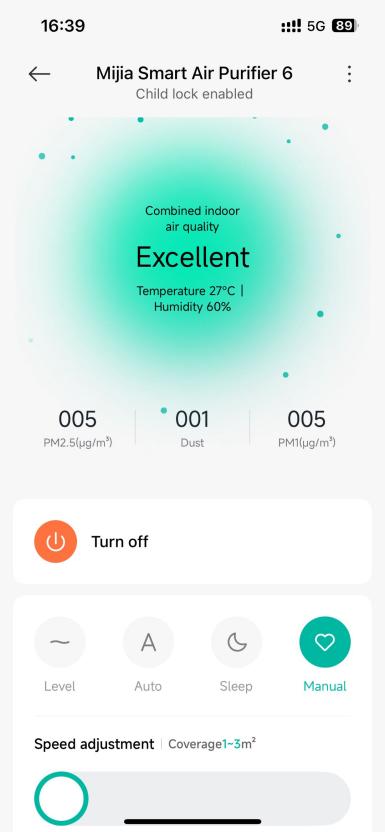
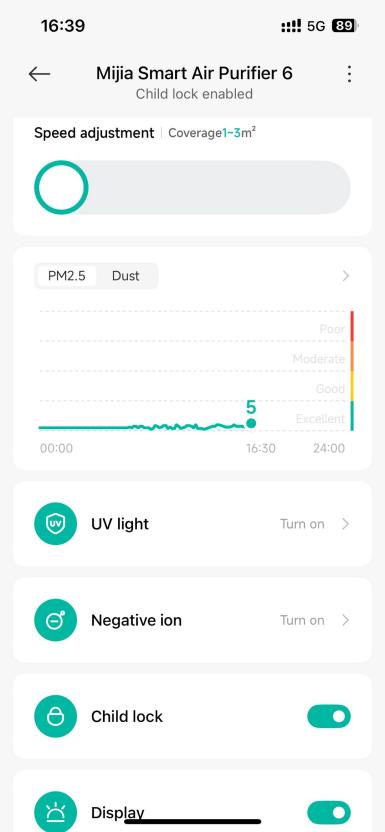
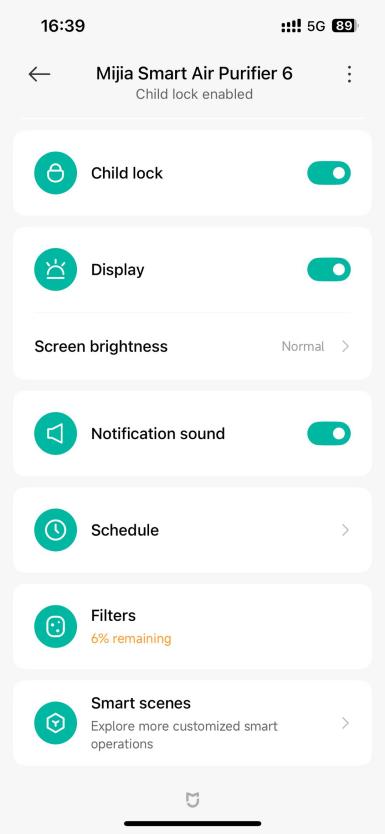
2. Q: What features are available on the App interface of the Mijia Smart Air Purifier 6?
A: On the Xiaomi Home App, you can remotely control the operating mode of the Mijia Smart Air Purifier 6, monitor changes in incover air quality, check the remaining filter life, and set up automation with other smart devices.
3. Q: What voice commands does the Mijia Smart Air Purifier 6 support?
A: The Mijia Smart Air Purifier 6 supports the following voice control commands:
4. Q: What to be aware of when connecting the Mijia Smart Air Purifier 6 to the internet?
A: The Mijia Smart Air Purifier 6 supports network control and is compatible with most personal routers on the market. Please note the following Wi-Fi requirements:
1. The Mijia Smart Air Purifier 6 can only connect to a 2.4GHz Wi-Fi network, 5GHz Wi-Fi is not supported;
2. The Wi-Fi encryption must be WPA or WPA2, WEP is not supported;
3. The router must have DHCP enabled. Static IP, web-based authentication, and enterprise 802.1X networks are not supported.
Note:
To control the Mijia Smart Air Purifier 6, please download the Xiaomi Home App.
5. Q: Does the Mijia Smart Air Purifier 6 support HomeKit?
A: Mijia Smart Air Purifier 6 does not support HomeKit.
Troubleshooting and FAQs
1. Q: What to do if the Mijia Smart Air Purifier 6 cannot be powered on?
A: If the Mijia Smart Air Purifier 6 cannot be powered on, please refer to the following steps:
1. First, make sure the power outlet is functioning and the power cord is securely connected;
2. Check whether the filter is correctly installed and properly seated;
3. Ensure the main unit, filter compartment cover and top grille are fully closed and flush with the surface;
4. If all components are correctly installed, the purifier will emit a beep and display the Mijia logo on the screen briefly after power is connected. Once this happens, press the on/standby button to turn on the device;
5. If you hear a beep and see a message indicating the compartment cover or top grille is not closed, this means the unit has power but those parts are not correctly secured. Please reinstall them;
6. If the device shows no response after pressing the on/standby button, please contact after-sales support for assistance.
2. Q: Why are there vertical lines on the display of the Mijia Smart Air Purifier 6?
A: If the issue persists after unplugging the Mijia Smart Air Purifier 6 for more than 10 seconds and then restarting it, the display panel is malfunctioning. Please contact after-sales support for assistance.
3. Q: What to do if the Mijia Smart Air Purifier 6 makes abnormal noises?
A: If the Mijia Smart Air Purifier 6 makes abnormal noises, please refer to the following steps:
1. Check whether the filter is properly installed and that the protective packaging has been removed;
2. Inspect the purifier for any foreign objects that have fallen inside. If found, open the filter compartment and remove the objects;
3. Check the laser particle sensor area for any debris.
4. Q: How to handle the screen message “Cover unclosed” or “Grille unclosed” on the Mijia Smart Air Purifier 6?
A: Check whether the filter compartment cover or top grille of the Mijia Smart Air Purifier 6 is properly and securely closed, then reinstall them if necessary. Unplug the purifier for 10 seconds and power it back on. If the issue persists, please contact after-sales support for inspection.
5. Q: How to handle the “Motor error” message on the Mijia Smart Air Purifier 6 display?
A: Check whether the filter is properly installed and its plastic packaging has been removed before reinstalling. Inspect the fan area for any foreign objects causing motor blockage or abnormal operation. Unplug the purifier for 10 seconds and then power it back on. If the problem persists, please contact after-sales support for inspection.
6. Q: Why does the Mijia Smart Air Purifier 6 have an odor?
A: If the Mijia Smart Air Purifier 6 has an odor, please refer to the following information:
New device odor:
The new device can emit some harmless odors due to the composite filter used. When first started, you can notice smells from the main materials and residual auxiliaries from the manufacturing process. These odors will gradually fade after some usage. This is normal and poses no harm to your health. To speed up odor removal, it is recommended to run the purifier at the highest fan speed in a well-ventilated area for some time. Please use it with confidence.
Odor after more than one month of use:
During usage, the filter absorbs pollutants, which can cause slight odors. Prolonged use and relatively humid environments can also contribute to odor generation. People sensitive to smells can notice this. It is recommended to run the purifier at the highest fan speed for a period, after which the odor will lessen. This odor is not harmful to the human body.
To avoid the risk of a sour smell caused by a damp filter, it is suggested that people in high-humidity areas keep the purifier running continuously and clean the bottom pre-filter approximately every two weeks.
7. Q: Does the Mijia Smart Air Purifier 6 filter come with packaging?
A: The filter included with the Mijia Smart Air Purifier 6 is sealed in plastic packaging at the factory to prevent contamination during storage and transportation. When first unsealed, the filter has a slight odor, which will diminish after some use. This is normal and does not pose any harm to your health.
8. Q: Why is the purification performance of the Mijia Smart Air Purifier 6 poor?
A: Please check whether the size of the usage environment matches the purifier’s applicable coverage area and selected fan speed. The room’s airtightness and ceiling height can also affect the purification effectiveness.
9. Q: What to do if the PM2.5 value displayed on the Mijia Smart Air Purifier 6 is abnormal or inaccurate?
A: If the PM2.5 value displayed on the Mijia Smart Air Purifier 6 is abnormal or inaccurate, please refer to the following information:
1. When encountering abnormal or inaccurate PM2.5 readings, first check whether the laser particle sensor compartment cover on the back of the purifier is dirty or blocked;
2. If so, carefully open the sensor compartment cover using a non-sharp tool. Use a blower or air gun (do not use hot air) to clean the mesh and sensor inside. You can also gently clean the sensor mesh with a used toothbrush dipped in water, then let it dry completely before reinstalling and testing again;
3. If cleaning does not resolve the issue, please contact after-sales support for professional assistance;
4. Note that different purifiers in the same environment can show varying values due to differences in sensor height and other environmental factors;
5. Testing with smoke at different levels and running in sleep mode can help identify if the sensor is faulty. If the error grows linearly, the sensor can be defective, if it stays within a certain range, the values are considered normal.
10. Q: Why is there a current noise when the Mijia Smart Air Purifier 6 is powered off?
A: This noise is caused by the inductors in the DC-DC circuit of the Mijia Smart Air Purifier 6. Since the circuit board and various functional modules require different working voltages, the circuit converts a constant voltage into different voltage levels to supply the load circuits. During this voltage conversion, the inductors switch at high frequency, continuously converting electrical energy into magnetic energy and back. This energy conversion causes a slight current noise from the inductors, which is a normal phenomenon.
11. Q: Why does the laser particle sensor fan sometimes stop running on the Mijia Smart Air Purifier 6?
A: When the Mijia Smart Air Purifier 6 is powered on and the screen is on, the sensor works continuously, displaying real-time values. When the display is off, to reduce sensor usage and extend its lifespan, the sensor activates once every 2 minutes and runs for 12–15 seconds. When the Xiaomi Home App is open, the sensor also operates continuously. If the app is closed and the screen is off for 5 minutes, the sensor will work intermittently.
12. Q: Why do the buttons on the Mijia Smart Air Purifier 6 become unresponsive?
A: The Mijia Smart Air Purifier 6 has a Child Lock feature in the Xiaomi Home App. When Child Lock is enabled, the buttons on the purifier will be disabled. To use the buttons again, you need to disable the Child Lock. This can be done by pressing and holding the mode switch button for 7 seconds or by turning the Child Lock on or off within the Xiaomi Home App.
13. Q: What to do if the Mijia Smart Air Purifier 6 always shows offline or cannot connect to Wi-Fi in the App?
A: If the Mijia Smart Air Purifier 6 always shows offline or cannot connect to Wi-Fi in the App, please refer to the following steps:
1. Confirm that the device is powered on and running normally;
2. Confirm that the Wi-Fi network is working properly;
3. Unplug the power cord, wait for 10 seconds to allow the device to discharge, then plug it back in;
4. Try resetting the Wi-Fi on the device and reconnect to the Wi-Fi network.
14. Q: What do the different colors of the air quality indicator on the Mijia Smart Air Purifier 6’s display mean? Why does the color sometimes change abruptly?
A: The air quality indicator on the Mijia Smart Air Purifier 6 visually reflects the PM2.5 concentration. The color changes correspond to changes in the air quality data. When the PM2.5 value crosses a threshold, the indicator color will change accordingly, which can cause abrupt color shifts.
15. Q: Why do multiple Mijia Smart Air Purifier 6 units show different PM2.5 values and have different air quality indicator colors when used in the same environment?
A: In real environments, dust moves with air flow, so even within the same small room, dust levels can vary from place to place. The Mijia Smart Air Purifier 6 sensors are highly sensitive, so such differences are expected. The PM2.5 reading difference between two purifiers (calculated as (average value - reading) ÷ average value) within 10% is considered normal.
Additionally, electronic components have tolerances that cause slight voltage differences in sensors, resulting in value variations. If two purifiers show large PM2.5 differences, the sensor compartment cover has accumulated dust and should be cleaned.
Regarding different air quality indicator colors, if the PM2.5 values detected by the two sensors are near a threshold, one is just above while the other is just below it, causing the indicators to show different colors. For PM10, an error margin of ±20% is considered normal.
16. Q: Why does the Mijia Smart Air Purifier 6 prompt “Please use official filter” after replacing the filter?
A: The Mijia Smart Air Purifier 6 is equipped with an RFID tag module. When a new official filter with an RFID tag is installed, the purifier can accurately recognize the filter’s lifespan without needing manual reset. If the prompt to “Please use official filter” still appears after installing a new genuine filter, please confirm that the filter is official, check whether the filter is properly installed, reinstall the filter, and unplug the purifier for 10 seconds before powering it on again. If the issue persists, please contact after-sales support for inspection.
17. Q: How to handle poor formaldehyde removal performance of the Mijia Smart Air Purifier 6?
A: Formaldehyde removal by the Mijia Smart Air Purifier 6 is a continuous process. Formaldehyde is a slowly releasing gaseous pollutant, not emitted all at once but gradually over several years. When incover temperature exceeds 19°C, formaldehyde volatilization accelerates, increasing with higher temperatures. Safe filtration of formaldehyde takes time. For example, if in a sealed room the formaldehyde concentration is 0.045 before purification and 0.05 after running the purifier overnight, it indicates that the sealed space has a very high concentration. Without purifier filtration overnight, the concentration could be even higher. Also, the accuracy of the formaldehyde detector used should be considered. Currently, the purifier can not show an obvious immediate effect.
If precise measurements confirm poor formaldehyde removal, it is likely that the sealed environment contains a continuous formaldehyde source. In this case, it is recommended to ventilate the room for an extended period.
18. Q: What to do if the sleep mode noise of the Mijia Smart Air Purifier 6 is loud?
A: The sleep mode of the Mijia Smart Air Purifier 6 is designed to ensure effective purification while reducing noise to 32dB(A), with a purification rate of 30m³/h. Please rest assured when using it.
19. Q: Why does the newly unpacked Mijia Smart Air Purifier 6 release black powder, and is it harmful to the human body?
A: During transportation, slight powder shedding from the filter due to vibration and friction is normal. If black powder is found on the filter surface after unpacking the unit or new filter, it is generally activated carbon powder. Please wipe it clean with a damp soft cloth before installing. After running the Mijia Smart Air Purifier 6, there will be no continuous powder shedding. Please rest assured when using it.
20. Q: What is the fan speed adjustment logic in auto mode for the Mijia Smart Air Purifier 6?
A: When the Mijia Smart Air Purifier 6 is set to auto mode, it will automatically adjust the fan speed based on the air quality detected by its sensors.
The air quality indicator colors correspond to the automatic mode fan speeds as follows:
Green: Sleep mode speed;
Yellow: Level 1 speed;
Orange: Between Level 1 and Level 2 speeds (two speeds);
Red: Between Level 2 and Manual mode speeds (two speeds).
21. Q: What does the dust level represent in the Mijia Smart Air Purifier 6?
A: The dust level, also called PM10, refers to particles detected by the purifier that have a diameter less than or equal to 10 micrometers. The dust level displayed on the Mijia Smart Air Purifier 6 represents levels, not exact values, ranging from 1 to 100, indicating the particle concentration from low to high.
22. Q: What are the common error messages on the Mijia Smart Air Purifier 6 and how to fix them?
A: Please refer to the following table for typical faults, display messages, and suggested solutions:
1. Q: What are the selling points of the Mijia Smart Air Purifier 6?
A: The selling points of the Mijia Smart Air Purifier 6 are as follows:
1. The Mijia Smart Air Purifier 6 features PM2.5 and PM1 level displays, a UV light for powerful sterilization, and negative ions to freshen the air;
2. It delivers strong performance suitable for small spaces, with a Particle CADR (Clean Air Delivery Rate) of 420 m³/h and a Formaldehyde CADR of 150 m³/h. Its cumulative purification capacity (CCM) reaches 12,000 mg for particles and 600 mg for formaldehyde, making it suitable for areas of 29–50 m²; 3. Despite its performance, the maximum operating noise is only 64 dB(A);
4. The device can display particle concentration, temperature, humidity, as well as the working status of UV and negative ion functions, along with the current operating mode.
2. Q: What are the differences between the Mijia Smart Air Purifier 6 and the Xiaomi Smart Air Purifier 4?
A: The Mijia Smart Air Purifier 6 has a higher Particle CADR of 420 m³/h compared to the Xiaomi Smart Air Purifier 4’s 400 m³/h, and it covers a slightly larger area of 29–50 m² versus 28–48 m², offering more efficient air purification for bigger rooms. Compared with the Xiaomi Smart Air Purifier 4, the Mijia Smart Air Purifier 6 has a longer filter replacement cycle. It also adds PM1 level display and UV sterilization capabilities.
Product Introduction and Usage
1. Q: What functions do the buttons on the Mijia Smart Air Purifier 6 have?
A: The buttons on the Mijia Smart Air Purifier 6 allow you to power the device on or off, switch between modes, reset the Wi-Fi, and adjust the screen brightness.
2. Q: What type of motor does the Mijia Smart Air Purifier 6 use, and how loud is it?
A: The Mijia Smart Air Purifier 6 uses a DC brushless motor that supports stepless speed adjustment. It offers low noise and long service life. The maximum noise level of the entire unit is ≤64 dB(A), and sleep mode can be activated at night for quieter operation.
3. Q: What is the component on the back of the Mijia Smart Air Purifier 6?
A: The component on the back of the Mijia Smart Air Purifier 6 is a laser particle sensor, which is primarily used to monitor the concentration of particulate matter in the surrounding air.
4. Q: Can the Mijia Smart Air Purifier 6 be placed horizontally?
A: No, the Mijia Smart Air Purifier 6 should not be placed horizontally. To ensure optimal air circulation and allow clean air to reach all corners of the room, the purifier must be placed upright. Additionally, maintain at least 20cm of clearance behind the unit (where the laser particle and formaldehyde sensors are located), and at least 20 cm of space around the sides to avoid blocking the air inlets.
5. Q: What settings will be lost after resetting the Wi-Fi on the Mijia Smart Air Purifier 6?
A: After resetting the Wi-Fi on the Mijia Smart Air Purifier 6, settings in the App, including scheduled power on/off times, will be cleared.
6. Q: Can multiple people control the same Mijia Smart Air Purifier 6 simultaneously?
A: Yes, the Mijia Smart Air Purifier 6 supports multi-people control. You can share the device with specific Xiaomi accounts through the Xiaomi Home App.
7. Q: After sharing the Mijia Smart Air Purifier 6 with others, can the shared people upgrade the firmware?
A: No, shared people are currently not allowed to perform firmware upgrades on the Mijia Smart Air Purifier 6.
8. Q: What is the Manual mode on the Mijia Smart Air Purifier 6?
A: The Manual mode allows you to customize the fan speed of the Mijia Smart Air Purifier 6 via the Xiaomi Home App. It supports stepless speed adjustment to suit your preferred purification effect for specific room size.
9. Q: Will a humidifier affect the PM2.5 values of the Mijia Smart Air Purifier 6?
A: Yes. Ultrasonic humidifiers atomize water into tiny water particles with high concentration. The highly sensitive sensor of the Mijia Smart Air Purifier 6 detects these fine water particles, causing the PM2.5 values to be higher than actual or even exceed normal levels. When the humidifier is turned off, the values will gradually return to normal. This is a normal phenomenon.
10. Q: Will a heater affect the PM2.5 values of the Mijia Smart Air Purifier 6?
A: Yes. Heaters promote air convection in the room and make the air relatively dry, which helps fine particles stay suspended and disperse more easily in the air. As a result, the particle sensor of the Mijia Smart Air Purifier 6 can detect higher PM2.5 values.
11. Q: How to turn off/on the display screen of the Mijia Smart Air Purifier 6, and how to adjust the screen brightness?
A: There is a screen brightness adjustment button on the back of the Mijia Smart Air Purifier 6. Each press cycles the screen through three modes: on, dim, and off. If connected to the Xiaomi Home App, open the device interface, tap the three dots in the top right corner for additional settings, then select [Light] to turn the display on or off.
Note:
When the screen is off, the display buttons do not completely power down, making it easier to control the purifier in dark environments.
12. Q: What type of filter does the Mijia Smart Air Purifier 6 come with?
A: The Mijia Smart Air Purifier 6 is equipped with a high-quality integrated filter combining antibacterial and antiviral composite filter media with activated carbon.
13. Q: What are the differences between the Mijia Smart Air Purifier 6 filter and filters of other Xiaomi Smart Air Purifier? Are they interchangeable?
A: The filter for the Mijia Smart Air Purifier 6 is compatible with the Xiaomi Smart Air Purifier 4, and both are cylindrical. Compared to earlier standard versions, these filters have the same height but are wider, so they cannot be installed in older models.
14. Q: How to replace the filter in the Mijia Smart Air Purifier 6?
A: To replace the filter in the Mijia Smart Air Purifier 6, open the filter compartment cover, grip the strip, and pull the old filter horizontally outward to remove it, then insert the new filter along the same path and close the filter compartment cover.
Install the new filter into the compartment with its strip on top, and close the cover securely.
15. Q: How is the filter lifespan of the Mijia Smart Air Purifier 6 calculated, and how often should it be replaced?
A: The Mijia Smart Air Purifier 6 calculates filter lifespan based on a weighted combination of air quality, purifier operating mode, fan speed, and runtime. In environments with poor air quality, the filter will wear out faster. In cleaner environments, it will last longer. On average, the filter lifespan is about 6–12 months. When the remaining filter life drops to ≤10%, the purifier will prompt you via the display and the Xiaomi Home App to replace the filter. The App also supports one-tap filter purchase. It is recommended to clean the outer pre-filter layer once a month.
Note:
Replacement recommendations are based on lab test conditions. Actual replacement timing varies depending on your usage environment and system reminders.
16. Q: After replacing the filter of the Mijia Smart Air Purifier 6, is it necessary to manually reset the filter lifespan?
A: No manual reset is needed. The Mijia Smart Air Purifier 6 is equipped with an RFID tag module, so when a new filter is installed, the purifier automatically recognizes it and resets the filter lifespan accordingly.
17. Q: Why does the Mijia Smart Air Purifier 6 show a higher indoor PM2.5 value than outdoors?
A: Activities such as using a humidifier, smoking, or cooking incovers can generate water mist or oil fumes, which affect how the Mijia Smart Air Purifier 6 detects and interprets air quality. Additionally, the outcover PM2.5 data shown in the App can differ from the actual local values due to data sourcing and coverage limitations.
18. Q: Why do the PM2.5 values change even when the Mijia Smart Air Purifier 6 is running without a filter?
A: When the Mijia Smart Air Purifier 6 runs without a filter, it functions as a fan that circulates incover air. This circulation causes areas with higher or lower PM2.5 concentrations to mix, resulting in fluctuating PM2.5 values detected by the sensor. Depending on the environment, the PM2.5 values can rise or fall randomly. After extended operation, the incover air becomes more evenly mixed, and the PM2.5 values will gradually stabilize.
19. Q: Will the filter life decrease if the Mijia Smart Air Purifier 6 is used without installing a filter?
A: No, the filter life of the Mijia Smart Air Purifier 6 will not decrease if the purifier is operated without a filter installed. The filter lifespan is calculated based on air quality, operating mode, and runtime, and the data is written into the RFID tag on the filter. If there is no filter in the purifier during operation, the filter usage value will not decrease.
20. Q: Will the room humidity decrease if the Mijia Smart Air Purifier 6 is used for a long time?
A: Yes. When the Mijia Smart Air Purifier 6 filters particulate matter from the air, it also removes moisture, which can lower the room’s humidity. This is a normal phenomenon. Water molecules adhere to the filter and activated carbon, causing the humidity drop. This moisture absorption can also affect the purifier’s performance and cause deviations in the displayed particulate matter values.
21. Q: Can the Mijia Smart Air Purifier 6 remove cooking fumes and other odors?
A: Yes, the Mijia Smart Air Purifier 6 can remove cooking fumes and other odors. However, depending on the environment, it usually requires a longer purification time to achieve noticeable results. The effectiveness also depends on the amount of activated carbon in the filter and how long the filter has been in use.
22. Q: Does the Mijia Smart Air Purifier 6 have an negative ion function?
A: Yes, the Mijia Smart Air Purifier 6 features a negative ion function. The negative ion function is enabled by default and can be turned on or off via the Xiaomi Home App after connecting the device to the network. When the ion function is enabled, the ion indicator icon lights up on the screen. During operation, the purifier periodically releases negative ions, which combine with oxygen to form negative oxygen ions that help remove airborne pollutants. Under normal conditions, most people can not noticeably feel the effect.
23. Q: Can the Mijia Smart Air Purifier 6 be modified for different use?
A: No, it cannot. Third-party accessories or modifications that change the original usage of the Mijia Smart Air Purifier 6, such as connecting outcover air to the filter via ducts or adding humidifiers to the air outlet, are not compatible and can not be used. Such modifications can affect the product’s performance, stability, and safety. Therefore, altering the original usage mode of the air purifier is strictly prohibited.
24. Q: Does the negative ion emitter of the Mijia Smart Air Purifier 6 require regular cleaning?
A: Yes, the negative ion emitter of the Mijia Smart Air Purifier 6 requires regular cleaning. After using the device for a period of time, open the top grille and gently brush the emitter head to clean it.
25. Q: Why does the Mijia Smart Air Purifier 6 make a hissing sound when the negative ion function is turned on?
A: During negative ion emission, a slight electrical noise and hissing sound can be heard. This sound is produced by the ion generator releasing negative ions and does not harm humans. The hissing can be more noticeable when the air humidity is high, which is normal. You can also disable the negative ion function via the Xiaomi Home App to eliminate this sound.
26. Q: What is the concentration of negative ions released by the Mijia Smart Air Purifier 6?
A: The Mijia Smart Air Purifier 6 releases negative ions at a concentration of one million ions per cubic centimeter.
27. Q: Does the Mijia Smart Air Purifier 6 have a UV sterilization function?
A: The Mijia Smart Air Purifier 6 has a UV (ultraviolet) sterilization function that is enabled by default. You can turn the UV sterilization on or off via the Xiaomi Home App. The UV LED helps to comprehensively sterilize bacteria and viruses on the filter and in the airflow path.
28. Q: What UV band does the UV sterilization lamp of the Mijia Smart Air Purifier 6 belong to?
A: The UV sterilization lamp of the Mijia Smart Air Purifier 6 belongs to the UV-C band.
29. Q: Can the UV sterilization lamp of the Mijia Smart Air Purifier 6 be visually confirmed as lit by the naked eye?
A: The UV sterilization lamp of the Mijia Smart Air Purifier 6 is installed inside the filter compartment at the top center. The UV sterilization function only activates when the purifier is operating normally. It is not possible to directly observe the lamp while in use. However, you can check the UV indicator on the display screen to confirm whether the UV lamp is working properly. Please avoid looking directly at the UV light, as prolonged exposure can cause irreversible eye damage.
30. Q: How does the Mijia Smart Air Purifier 6 perform disinfection and antibacterial functions?
A: Particles containing bacteria in the air move due to airflow inertia, random Brownian motion, or external forces. The high-efficiency filter captures these particles through interception, inertia, diffusion, and electrostatic effects, causing them to adhere to the fiber surfaces. Meanwhile, the antibacterial coating on the filter damages the bacterial cell walls, inactivating them. Additionally, UV light sterilizes and kills microorganisms, achieving disinfection and purification.
31. Q: What is the difference between the negative ion function of the Mijia Smart Air Purifier 6 and plasma or clean ions?
A: Plasma: Contains equal concentrations of positive and negative ions, also known as bipolar ions. The neutralization energy of these ions can actively kill bacteria.
Negative ions: Improve air freshness and eliminate static electricity.
Clean ions: A general term that can refer to either negative ions alone or a mixture of positive and negative ions.
32. Q: Does the negative ion function of the Mijia Smart Air Purifier 6 produce ozone?
A: The negative ion technology used in the Mijia Smart Air Purifier 6 has been continuously upgraded and improved in manufacturing processes, resulting in ozone emissions that are extremely low and almost undetectable. Our product complies with relevant national standards and is safe for human health. You can use it with confidence.
33. Q: How to clean and store the Mijia Smart Air Purifier 6?
A: When cleaning the Mijia Smart Air Purifier 6, please unplug the power cord before starting. Use a damp soft cloth to gently wipe the exterior surface. After prolonged use, open the filter compartment, remove the filter, and gently wipe the interior surfaces with a damp soft cloth. Air dry the filter in a well-ventilated area. The laser particle sensor compartment cover can be removed and rinsed with clean water, ensure it is completely dry before reinstalling.
If the purifier will not be used for a long time, it is recommended to store it sealed in its original packaging or a non-woven fabric bag from top to bottom.
34. Q: Why does the air feel dry after turning on the Mijia Smart Air Purifier 6?
A: The basic working principle of the Mijia Smart Air Purifier 6 is to circulate air through the filter to purify it. While filtering pollutants, it also removes moisture from the air, which lowers the humidity and can make the air feel dry.
35. Q: What is the principle behind formaldehyde removal by the Mijia Smart Air Purifier 6?
A: The Mijia Smart Air Purifier 6 removes formaldehyde primarily by passing air through the activated carbon layer of its composite filter, where formaldehyde and similar compounds are adsorbed, effectively reducing their presence in the air.
36. Q: Why is there a slight odor from the Mijia Smart Air Purifier 6 packaging?
A: The shock-absorbing foam inside the packaging has a slight natural material odor. Because the purifier is in contact with the foam for a long time, it can also absorb some of this smell. The odor will naturally dissipate after the packaging is opened for a while and poses no harm to the human body.
APP Related
1. Q: How to connect the Mijia Smart Air Purifier 6 to the Xiaomi Home App?
A: Use your phone to scan the QR code on the user manual or download the Xiaomi Home App from the App Mall/Play Store. Make sure you have logged in with your Xiaomi account and your home Wi-Fi is working properly. Connect your phone to the Wi-Fi, turn on the purifier, then open the Xiaomi Home App. The App will automatically search for nearby Xiaomi smart devices and prompt you to add them, or you can tap the plus icon in the top right corner to manually add the device. After adding the Mijia Smart Air Purifier 6, you can control power, switch operating modes, and view incover air quality, temperature, and humidity through the App.
2. Q: What features are available on the App interface of the Mijia Smart Air Purifier 6?
A: On the Xiaomi Home App, you can remotely control the operating mode of the Mijia Smart Air Purifier 6, monitor changes in incover air quality, check the remaining filter life, and set up automation with other smart devices.
3. Q: What voice commands does the Mijia Smart Air Purifier 6 support?
A: The Mijia Smart Air Purifier 6 supports the following voice control commands:
| No. | Voice Command |
| 1 | Turn on the air purifier |
| 2 | Turn off the air purifier |
| 3 | Set the air purifier to Manual mode |
| 4 | Set the air purifier to Auto mode |
| 5 | Set the air purifier to Sleep mode |
4. Q: What to be aware of when connecting the Mijia Smart Air Purifier 6 to the internet?
A: The Mijia Smart Air Purifier 6 supports network control and is compatible with most personal routers on the market. Please note the following Wi-Fi requirements:
1. The Mijia Smart Air Purifier 6 can only connect to a 2.4GHz Wi-Fi network, 5GHz Wi-Fi is not supported;
2. The Wi-Fi encryption must be WPA or WPA2, WEP is not supported;
3. The router must have DHCP enabled. Static IP, web-based authentication, and enterprise 802.1X networks are not supported.
Note:
To control the Mijia Smart Air Purifier 6, please download the Xiaomi Home App.
5. Q: Does the Mijia Smart Air Purifier 6 support HomeKit?
A: Mijia Smart Air Purifier 6 does not support HomeKit.
Troubleshooting and FAQs
1. Q: What to do if the Mijia Smart Air Purifier 6 cannot be powered on?
A: If the Mijia Smart Air Purifier 6 cannot be powered on, please refer to the following steps:
1. First, make sure the power outlet is functioning and the power cord is securely connected;
2. Check whether the filter is correctly installed and properly seated;
3. Ensure the main unit, filter compartment cover and top grille are fully closed and flush with the surface;
4. If all components are correctly installed, the purifier will emit a beep and display the Mijia logo on the screen briefly after power is connected. Once this happens, press the on/standby button to turn on the device;
5. If you hear a beep and see a message indicating the compartment cover or top grille is not closed, this means the unit has power but those parts are not correctly secured. Please reinstall them;
6. If the device shows no response after pressing the on/standby button, please contact after-sales support for assistance.
2. Q: Why are there vertical lines on the display of the Mijia Smart Air Purifier 6?
A: If the issue persists after unplugging the Mijia Smart Air Purifier 6 for more than 10 seconds and then restarting it, the display panel is malfunctioning. Please contact after-sales support for assistance.
3. Q: What to do if the Mijia Smart Air Purifier 6 makes abnormal noises?
A: If the Mijia Smart Air Purifier 6 makes abnormal noises, please refer to the following steps:
1. Check whether the filter is properly installed and that the protective packaging has been removed;
2. Inspect the purifier for any foreign objects that have fallen inside. If found, open the filter compartment and remove the objects;
3. Check the laser particle sensor area for any debris.
4. Q: How to handle the screen message “Cover unclosed” or “Grille unclosed” on the Mijia Smart Air Purifier 6?
A: Check whether the filter compartment cover or top grille of the Mijia Smart Air Purifier 6 is properly and securely closed, then reinstall them if necessary. Unplug the purifier for 10 seconds and power it back on. If the issue persists, please contact after-sales support for inspection.
5. Q: How to handle the “Motor error” message on the Mijia Smart Air Purifier 6 display?
A: Check whether the filter is properly installed and its plastic packaging has been removed before reinstalling. Inspect the fan area for any foreign objects causing motor blockage or abnormal operation. Unplug the purifier for 10 seconds and then power it back on. If the problem persists, please contact after-sales support for inspection.
6. Q: Why does the Mijia Smart Air Purifier 6 have an odor?
A: If the Mijia Smart Air Purifier 6 has an odor, please refer to the following information:
New device odor:
The new device can emit some harmless odors due to the composite filter used. When first started, you can notice smells from the main materials and residual auxiliaries from the manufacturing process. These odors will gradually fade after some usage. This is normal and poses no harm to your health. To speed up odor removal, it is recommended to run the purifier at the highest fan speed in a well-ventilated area for some time. Please use it with confidence.
Odor after more than one month of use:
During usage, the filter absorbs pollutants, which can cause slight odors. Prolonged use and relatively humid environments can also contribute to odor generation. People sensitive to smells can notice this. It is recommended to run the purifier at the highest fan speed for a period, after which the odor will lessen. This odor is not harmful to the human body.
To avoid the risk of a sour smell caused by a damp filter, it is suggested that people in high-humidity areas keep the purifier running continuously and clean the bottom pre-filter approximately every two weeks.
7. Q: Does the Mijia Smart Air Purifier 6 filter come with packaging?
A: The filter included with the Mijia Smart Air Purifier 6 is sealed in plastic packaging at the factory to prevent contamination during storage and transportation. When first unsealed, the filter has a slight odor, which will diminish after some use. This is normal and does not pose any harm to your health.
8. Q: Why is the purification performance of the Mijia Smart Air Purifier 6 poor?
A: Please check whether the size of the usage environment matches the purifier’s applicable coverage area and selected fan speed. The room’s airtightness and ceiling height can also affect the purification effectiveness.
9. Q: What to do if the PM2.5 value displayed on the Mijia Smart Air Purifier 6 is abnormal or inaccurate?
A: If the PM2.5 value displayed on the Mijia Smart Air Purifier 6 is abnormal or inaccurate, please refer to the following information:
1. When encountering abnormal or inaccurate PM2.5 readings, first check whether the laser particle sensor compartment cover on the back of the purifier is dirty or blocked;
2. If so, carefully open the sensor compartment cover using a non-sharp tool. Use a blower or air gun (do not use hot air) to clean the mesh and sensor inside. You can also gently clean the sensor mesh with a used toothbrush dipped in water, then let it dry completely before reinstalling and testing again;
3. If cleaning does not resolve the issue, please contact after-sales support for professional assistance;
4. Note that different purifiers in the same environment can show varying values due to differences in sensor height and other environmental factors;
5. Testing with smoke at different levels and running in sleep mode can help identify if the sensor is faulty. If the error grows linearly, the sensor can be defective, if it stays within a certain range, the values are considered normal.
10. Q: Why is there a current noise when the Mijia Smart Air Purifier 6 is powered off?
A: This noise is caused by the inductors in the DC-DC circuit of the Mijia Smart Air Purifier 6. Since the circuit board and various functional modules require different working voltages, the circuit converts a constant voltage into different voltage levels to supply the load circuits. During this voltage conversion, the inductors switch at high frequency, continuously converting electrical energy into magnetic energy and back. This energy conversion causes a slight current noise from the inductors, which is a normal phenomenon.
11. Q: Why does the laser particle sensor fan sometimes stop running on the Mijia Smart Air Purifier 6?
A: When the Mijia Smart Air Purifier 6 is powered on and the screen is on, the sensor works continuously, displaying real-time values. When the display is off, to reduce sensor usage and extend its lifespan, the sensor activates once every 2 minutes and runs for 12–15 seconds. When the Xiaomi Home App is open, the sensor also operates continuously. If the app is closed and the screen is off for 5 minutes, the sensor will work intermittently.
12. Q: Why do the buttons on the Mijia Smart Air Purifier 6 become unresponsive?
A: The Mijia Smart Air Purifier 6 has a Child Lock feature in the Xiaomi Home App. When Child Lock is enabled, the buttons on the purifier will be disabled. To use the buttons again, you need to disable the Child Lock. This can be done by pressing and holding the mode switch button for 7 seconds or by turning the Child Lock on or off within the Xiaomi Home App.
13. Q: What to do if the Mijia Smart Air Purifier 6 always shows offline or cannot connect to Wi-Fi in the App?
A: If the Mijia Smart Air Purifier 6 always shows offline or cannot connect to Wi-Fi in the App, please refer to the following steps:
1. Confirm that the device is powered on and running normally;
2. Confirm that the Wi-Fi network is working properly;
3. Unplug the power cord, wait for 10 seconds to allow the device to discharge, then plug it back in;
4. Try resetting the Wi-Fi on the device and reconnect to the Wi-Fi network.
14. Q: What do the different colors of the air quality indicator on the Mijia Smart Air Purifier 6’s display mean? Why does the color sometimes change abruptly?
A: The air quality indicator on the Mijia Smart Air Purifier 6 visually reflects the PM2.5 concentration. The color changes correspond to changes in the air quality data. When the PM2.5 value crosses a threshold, the indicator color will change accordingly, which can cause abrupt color shifts.
15. Q: Why do multiple Mijia Smart Air Purifier 6 units show different PM2.5 values and have different air quality indicator colors when used in the same environment?
A: In real environments, dust moves with air flow, so even within the same small room, dust levels can vary from place to place. The Mijia Smart Air Purifier 6 sensors are highly sensitive, so such differences are expected. The PM2.5 reading difference between two purifiers (calculated as (average value - reading) ÷ average value) within 10% is considered normal.
Additionally, electronic components have tolerances that cause slight voltage differences in sensors, resulting in value variations. If two purifiers show large PM2.5 differences, the sensor compartment cover has accumulated dust and should be cleaned.
Regarding different air quality indicator colors, if the PM2.5 values detected by the two sensors are near a threshold, one is just above while the other is just below it, causing the indicators to show different colors. For PM10, an error margin of ±20% is considered normal.
16. Q: Why does the Mijia Smart Air Purifier 6 prompt “Please use official filter” after replacing the filter?
A: The Mijia Smart Air Purifier 6 is equipped with an RFID tag module. When a new official filter with an RFID tag is installed, the purifier can accurately recognize the filter’s lifespan without needing manual reset. If the prompt to “Please use official filter” still appears after installing a new genuine filter, please confirm that the filter is official, check whether the filter is properly installed, reinstall the filter, and unplug the purifier for 10 seconds before powering it on again. If the issue persists, please contact after-sales support for inspection.
17. Q: How to handle poor formaldehyde removal performance of the Mijia Smart Air Purifier 6?
A: Formaldehyde removal by the Mijia Smart Air Purifier 6 is a continuous process. Formaldehyde is a slowly releasing gaseous pollutant, not emitted all at once but gradually over several years. When incover temperature exceeds 19°C, formaldehyde volatilization accelerates, increasing with higher temperatures. Safe filtration of formaldehyde takes time. For example, if in a sealed room the formaldehyde concentration is 0.045 before purification and 0.05 after running the purifier overnight, it indicates that the sealed space has a very high concentration. Without purifier filtration overnight, the concentration could be even higher. Also, the accuracy of the formaldehyde detector used should be considered. Currently, the purifier can not show an obvious immediate effect.
If precise measurements confirm poor formaldehyde removal, it is likely that the sealed environment contains a continuous formaldehyde source. In this case, it is recommended to ventilate the room for an extended period.
18. Q: What to do if the sleep mode noise of the Mijia Smart Air Purifier 6 is loud?
A: The sleep mode of the Mijia Smart Air Purifier 6 is designed to ensure effective purification while reducing noise to 32dB(A), with a purification rate of 30m³/h. Please rest assured when using it.
19. Q: Why does the newly unpacked Mijia Smart Air Purifier 6 release black powder, and is it harmful to the human body?
A: During transportation, slight powder shedding from the filter due to vibration and friction is normal. If black powder is found on the filter surface after unpacking the unit or new filter, it is generally activated carbon powder. Please wipe it clean with a damp soft cloth before installing. After running the Mijia Smart Air Purifier 6, there will be no continuous powder shedding. Please rest assured when using it.
20. Q: What is the fan speed adjustment logic in auto mode for the Mijia Smart Air Purifier 6?
A: When the Mijia Smart Air Purifier 6 is set to auto mode, it will automatically adjust the fan speed based on the air quality detected by its sensors.
The air quality indicator colors correspond to the automatic mode fan speeds as follows:
Green: Sleep mode speed;
Yellow: Level 1 speed;
Orange: Between Level 1 and Level 2 speeds (two speeds);
Red: Between Level 2 and Manual mode speeds (two speeds).
21. Q: What does the dust level represent in the Mijia Smart Air Purifier 6?
A: The dust level, also called PM10, refers to particles detected by the purifier that have a diameter less than or equal to 10 micrometers. The dust level displayed on the Mijia Smart Air Purifier 6 represents levels, not exact values, ranging from 1 to 100, indicating the particle concentration from low to high.
22. Q: What are the common error messages on the Mijia Smart Air Purifier 6 and how to fix them?
A: Please refer to the following table for typical faults, display messages, and suggested solutions:
| Fault Description | Display Message | Solution |
| Motor error | 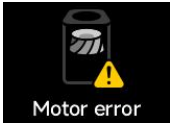 | Check if the filter is properly installed and the plastic packaging is removed; Check for foreign objects blocking or jamming the fan motor; Unplug the purifier for 10 seconds and restart; If problem persists, contact after-sales support. |
| Cover unclosed |  | Please close the filter compartment cover and restart the purifier; If the cover is already closed but the message remains, unplug for 10 seconds and restart; If unresolved, contact after-sales support. |
| Grille unclosed | 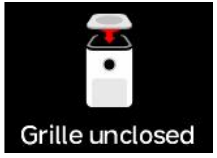 | Please close the grille and restart the purifier; If the grille is closed but the message persists, unplug for 10 seconds and restart; If unresolved, contact after-sales support. (Grille alert has higher priority than cover alert) |
| Filter life less than 5% warning | 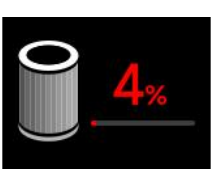 | Filter life is running low, please replace the filter in time. |
| Updating... Don’t power off | 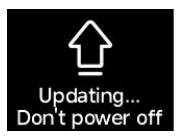 | The purifier is entering firmware upgrade mode, please wait patiently until upgrade is complete. After reboot, normal use can resume. |
| Filter installation warning | 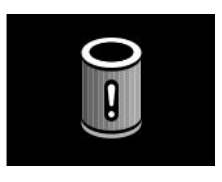 | Please scan the QR code on the screen to purchase official filters. If purchased from official Xiaomi channels but warning persists, contact after-sales support. |
Does it help?
Yes
No