

How to use the dry mode on the Mijia Air Conditioner Pro Eco Inverter 1.0 HP?
The Mijia Air Conditioner Pro Eco Inverter 1.0 HP supports setting the dry mode using both the remote control and the Xiaomi Home App.
To use the dry mode on the Mijia Air Conditioner Pro Eco Inverter 1.0 HP, please refer to the following methods:
Method 1:
Press the [Mode] button on the remote control to change the operating mode of the Mijia Air Conditioner Pro Eco Inverter 1.0 HP. Set it to [Dry Mode] and the dehumidification icon will appear.
Method 2:
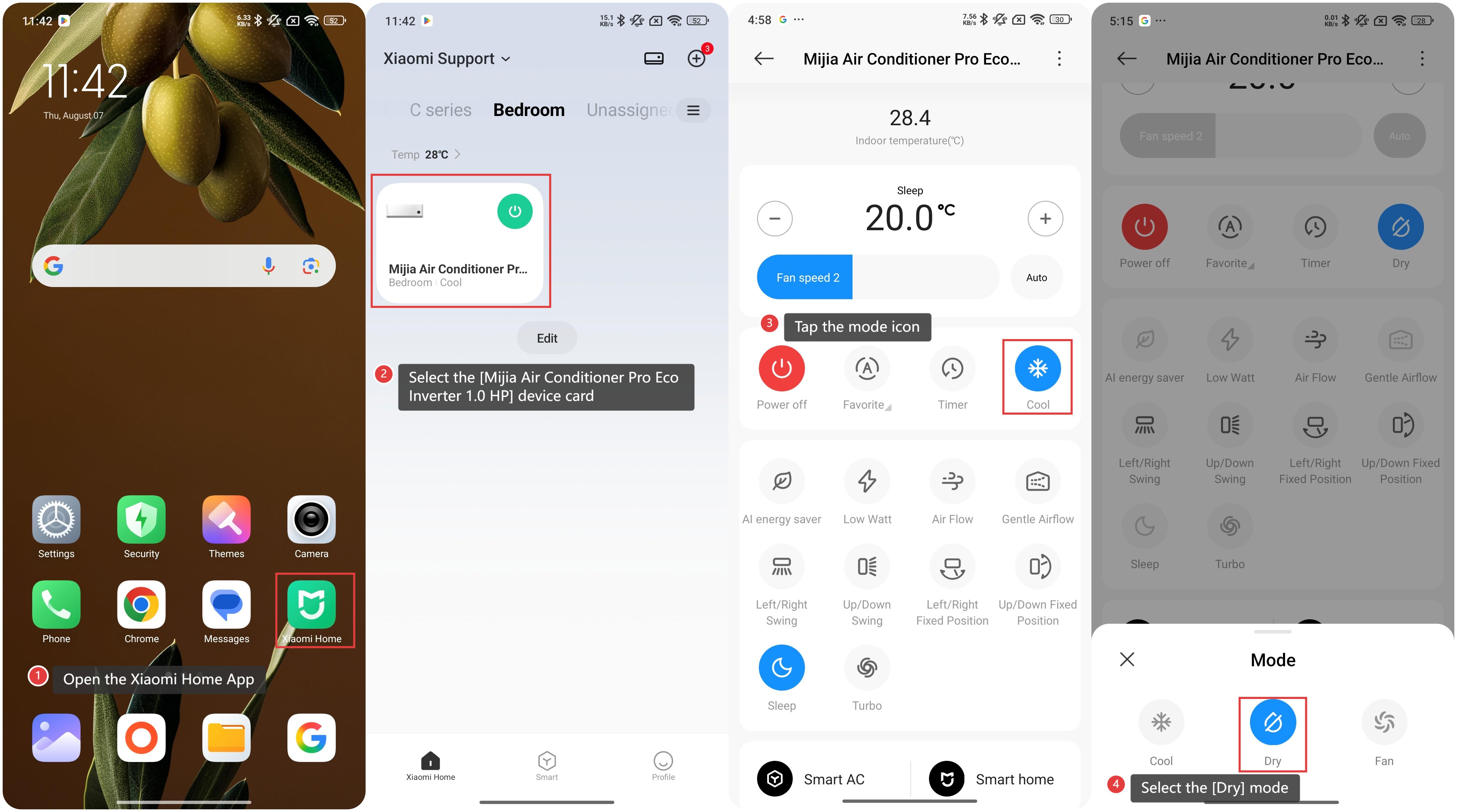
1. Open the Xiaomi Home App on your device;
2. Select the [Mijia Air Conditioner Pro Eco Inverter 1.0 HP] device card;
3. Tap the mode icon;
4. Select the [Dry] mode.
 Note:
Note:
The water removed from the air is expelled through the device’s drain outlet. Make sure the drainage system is properly connected to prevent leaks or overflow.
To use the dry mode on the Mijia Air Conditioner Pro Eco Inverter 1.0 HP, please refer to the following methods:
Method 1:
Press the [Mode] button on the remote control to change the operating mode of the Mijia Air Conditioner Pro Eco Inverter 1.0 HP. Set it to [Dry Mode] and the dehumidification icon will appear.
Method 2:
1. Open the Xiaomi Home App on your device;
2. Select the [Mijia Air Conditioner Pro Eco Inverter 1.0 HP] device card;
3. Tap the mode icon;
4. Select the [Dry] mode.
Note:The water removed from the air is expelled through the device’s drain outlet. Make sure the drainage system is properly connected to prevent leaks or overflow.
Does it help?
Yes
No