

How to enable the sleep mode on the Mijia Air Conditioner Pro Eco Inverter 1.5 HP?
The Mijia Air Conditioner Pro Eco Inverter 1.5 HP supports enabling sleep mode via both the remote control and the Xiaomi Home App.
To enable the sleep mode on the Mijia Air Conditioner Pro Eco Inverter 1.5 HP with the remote control, please refer to the following information:
1. Press the Sleep button to turn sleep mode on or off;
2. When sleep mode is activated, the sleep icon appears on the remote control display.
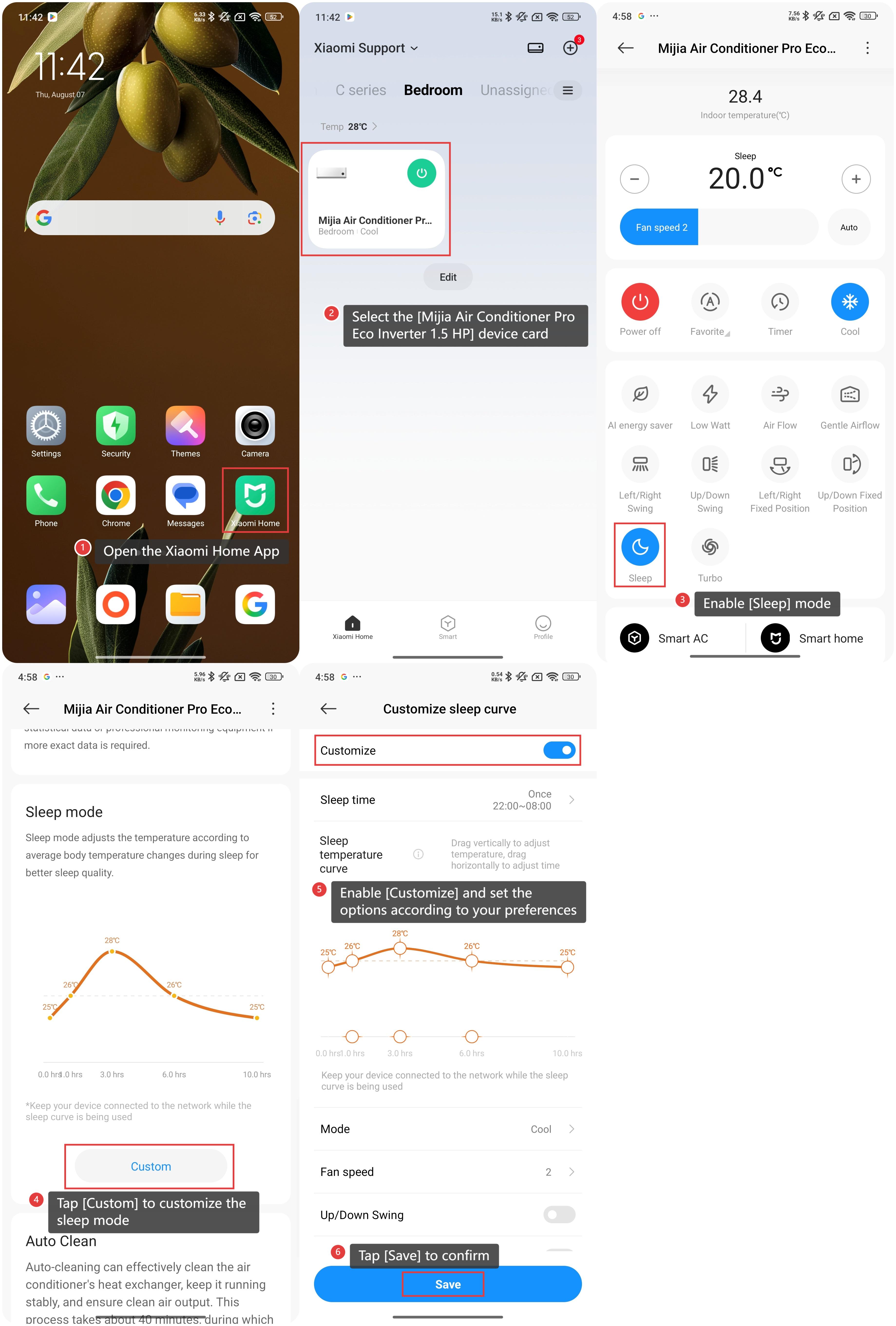
To enable the sleep mode on the Mijia Air Conditioner Pro Eco Inverter 1.5 HP via the Xiaomi Home App, please refer to the following information:
1. Open the Xiaomi Home App on your device;
2. Select the [Mijia Air Conditioner Pro Eco Inverter 1.5 HP] device card;
3. Enable [Sleep] mode;
4. Additionally, you can also scroll down and tap [Custom] to customize the sleep mode;
5. Enable [Customize] and set the options according to your preferences on this interface;
6. After finishing your settings, tap [Save] to confirm.
Note:
When sleep mode is activated, the air conditioner will automatically adjust the temperature based on a sleep curve.
To enable the sleep mode on the Mijia Air Conditioner Pro Eco Inverter 1.5 HP with the remote control, please refer to the following information:
1. Press the Sleep button to turn sleep mode on or off;
2. When sleep mode is activated, the sleep icon appears on the remote control display.
To enable the sleep mode on the Mijia Air Conditioner Pro Eco Inverter 1.5 HP via the Xiaomi Home App, please refer to the following information:
1. Open the Xiaomi Home App on your device;
2. Select the [Mijia Air Conditioner Pro Eco Inverter 1.5 HP] device card;
3. Enable [Sleep] mode;
4. Additionally, you can also scroll down and tap [Custom] to customize the sleep mode;
5. Enable [Customize] and set the options according to your preferences on this interface;
6. After finishing your settings, tap [Save] to confirm.
Note:
When sleep mode is activated, the air conditioner will automatically adjust the temperature based on a sleep curve.
Does it help?
Yes
No