

What to do if the password of the Xiaomi Smart Band 10 Ceramic Edition is forgotten?
The Xiaomi Smart Band 10 Ceramic Edition supports turning off password or changing password on the Mi Fitness APP if the password of the band is forgotten.
If the password of the band is forgotten, please refer to the following methods for troubleshooting:
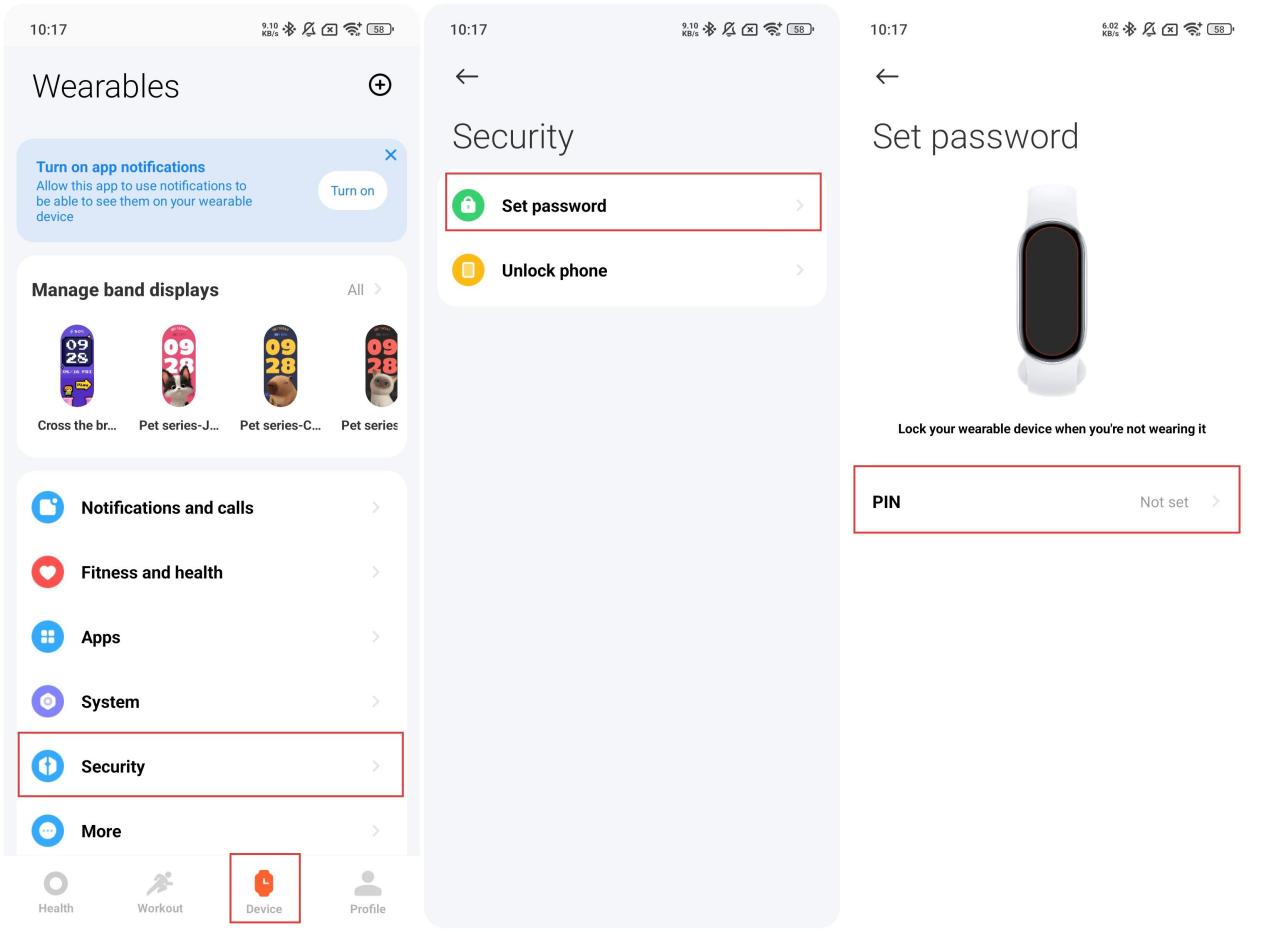
1. If your band is connected to the Mi Fitness APP, please go to the Mi Fitness APP >> [Device] >> [Security] >> [Set password] >> [Turn off PIN]/[Change PIN] >> you can turn off or change PIN password;
2. If the password is forgotten and the bind can’t be reconnected to the phone, please apply to the professional after-sales center.
If the password of the band is forgotten, please refer to the following methods for troubleshooting:
1. If your band is connected to the Mi Fitness APP, please go to the Mi Fitness APP >> [Device] >> [Security] >> [Set password] >> [Turn off PIN]/[Change PIN] >> you can turn off or change PIN password;
2. If the password is forgotten and the bind can’t be reconnected to the phone, please apply to the professional after-sales center.
Does it help?
Yes
No