

Xiaomi Monitor A24i FAQ
1. Q: What interfaces do common monitors have and how to choose?
A: Common monitor interfaces include VGA, DVI, HDMI, DP, and USB-C (USB Type-C).
1. VGA: Transmits analog signals without audio. Graphics cards and monitors both use digital signals. If you use a VGA interface, the analog signal and digital signal will be converted twice. Therefore, the VGA interface will lose some data when transmitting, and the display will be fuzzy;

2. DVI: The interface transmits digital signals without audio. DVI interfaces can also be divided into three types. DVI-I can transmit digital and analog signals, DVI-D can transmit digital signals, and DVI-A can only transmit analog signals. The most commonly used interface in the early days was DVI-I;

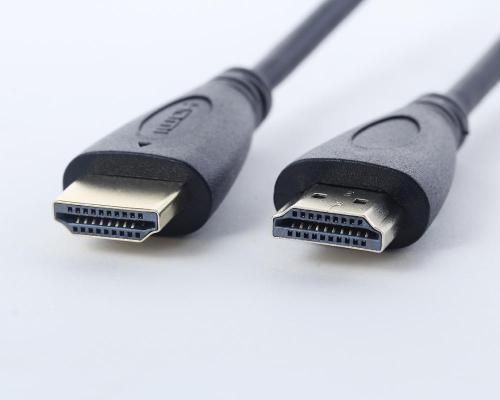
3. HDMI: High-Definition Multimedia Interface capable of transmitting both video and audio signals. It's widely adopted due to the interface is relatively small. Now most devices have this interface, and the transmission effect is similar to DVI;
4. DP (DisplayPort): The DP interface can also transmit video and audio signals, has strong anti-interference ability, and has a larger bandwidth than HDMI;

1. VGA: Transmits analog signals without audio. Graphics cards and monitors both use digital signals. If you use a VGA interface, the analog signal and digital signal will be converted twice. Therefore, the VGA interface will lose some data when transmitting, and the display will be fuzzy;
2. DVI: The interface transmits digital signals without audio. DVI interfaces can also be divided into three types. DVI-I can transmit digital and analog signals, DVI-D can transmit digital signals, and DVI-A can only transmit analog signals. The most commonly used interface in the early days was DVI-I;
3. HDMI: High-Definition Multimedia Interface capable of transmitting both video and audio signals. It's widely adopted due to the interface is relatively small. Now most devices have this interface, and the transmission effect is similar to DVI;
4. DP (DisplayPort): The DP interface can also transmit video and audio signals, has strong anti-interference ability, and has a larger bandwidth than HDMI;
2. Q: What are the differences in bandwidth between HDMI 1.4 and HDMI 2.0 interfaces of the Xiaomi Monitor A24i ?
A: HDMI 1.4 could already support 4K, however, due to bandwidth limitations, it maxed out at resolutions of 3840×2160 pixels and frame rates of 30fps. HDMI 2.0 expanded the bandwidth to 18Gbps, enabling support for resolutions of 3840×2160 pixels at 50fps or 60fps.
Other key improvements of the Xiaomi Monitor A24i are as follows:
1. Synchronous transmission of dual video streams to multiple users on the same screen;
2. Synchronous transmission of multiple audio streams to up to four users;
3. Support for 21:9 ultrawide aspect ratio displays;
4. Dynamic synchronization of video and audio streams;
5. CEC extension for better control of consumer electronics through a single control point.
HDMI 2.0 maintains the same cable shape and interface as HDMI 1.X, ensuring perfect backward compatibility. It also supports up to 32 audio channels and a maximum sampling rate of 1536kHz.
Other key improvements of the Xiaomi Monitor A24i are as follows:
1. Synchronous transmission of dual video streams to multiple users on the same screen;
2. Synchronous transmission of multiple audio streams to up to four users;
3. Support for 21:9 ultrawide aspect ratio displays;
4. Dynamic synchronization of video and audio streams;
5. CEC extension for better control of consumer electronics through a single control point.
HDMI 2.0 maintains the same cable shape and interface as HDMI 1.X, ensuring perfect backward compatibility. It also supports up to 32 audio channels and a maximum sampling rate of 1536kHz.
Color Depth | HDMI Version 1.4 | HDMI Version 2.0 |
24 | 4096×2160p 24Hz | 3840×2160p 60Hz |
30 | 3840×2160p 30Hz | 3840×2160p 60Hz |
36 | 3840×2160p 25Hz | 3840×2160p 50Hz |
48 | 3840×2160p 24Hz | 3840×2160p 30Hz |
3. Q: What is the difference between DP 1.2, HDMI 1.4, HDMI 2.0 and HDMI 2.1 interface bandwidth on the Xiaomi Monitor A24i?
A: The differences in interface bandwidth between DP 1.2, HDMI 1.4, HDMI 2.0, and HDMI 2.1 on the Xiaomi Monitor A24i are as follows:
1. DP 1.2 has an interface bandwidth of 21.6 Gbps;
2. DP 1.4 has an interface bandwidth of 32.4 Gbps;
3. HDMI 1.4 has an interface bandwidth of 10.2 Gbps;
4. HDMI 2.0 has an interface bandwidth of 18 Gbps;
5. HDMI 2.1 (supporting TMDS mode) has an interface bandwidth of 18 Gbps;
6. HDMI 2.1 (supporting FRL mode) has an interface bandwidth of 48 Gbps.
1. DP 1.2 has an interface bandwidth of 21.6 Gbps;
2. DP 1.4 has an interface bandwidth of 32.4 Gbps;
3. HDMI 1.4 has an interface bandwidth of 10.2 Gbps;
4. HDMI 2.0 has an interface bandwidth of 18 Gbps;
5. HDMI 2.1 (supporting TMDS mode) has an interface bandwidth of 18 Gbps;
6. HDMI 2.1 (supporting FRL mode) has an interface bandwidth of 48 Gbps.
Interface Type | Interface bandwidth |
DP 1.2 | 21.6Gbps |
DP 1.4 | 32.4Gbps |
HDMI 1.4 | 10.2Gbps |
HDMI 2.0 | 18Gbps |
HDMI2.1(support TMDS mode) | 18Gbps |
HDMI2.1 (supports FRL mode) | 48Gbps |
4. Q: What is the color depth and color gamut of the Xiaomi Monitor A24i?
A: The color depth of the Xiaomi Monitor A24i is 99% sRGB is 8-bit, and color gamut of the Xiaomi Monitor A24i is 99% sRGB.
And for more related information of the color depth and color gamut are as follows:
Color depth refers to how many colors can be used to describe each pixel at a certain resolution. It is a comprehensive color perception of an object's color that mainly depends on the brightness (lightness) of the object's color and is related to hue and chroma.

It is different from color gamut in that color gamut determines which colors can be represented (visible color range), and color depth determines how delicate the transition and change between colors are (the NTSC color gamut is larger than sRGB and has richer colors).
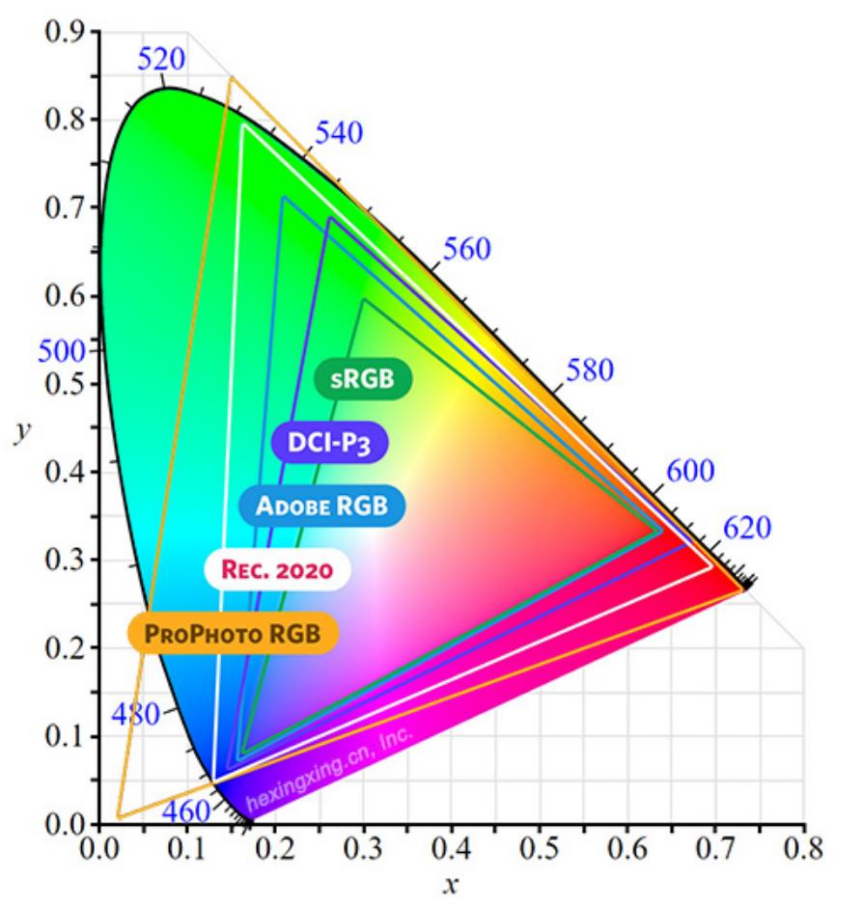
Common color gamut standards are as follows:
sRGB is one of the earliest color gamut standards customized by Microsoft and HP. It has low color reproduction and low green coverage.
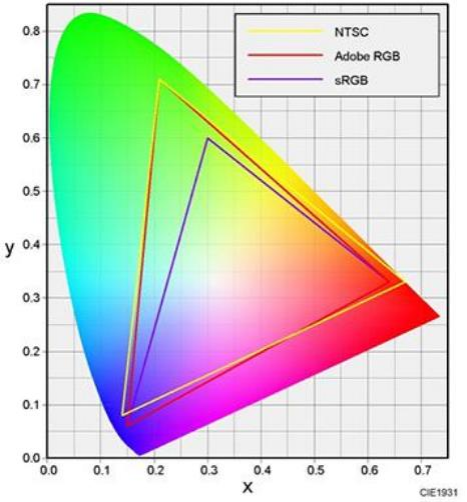
The NTSC color gamut is customized by the National Television Standards Committee of the United States. It is usually used to test the color range that a TV screen can cover. The sRGB color gamut is almost included in the NTSC color gamut and accounts for exactly 72% (NTSC does not completely incorporate sRGB).
DCI-P3 is a color gamut standard for the color film industry and is the shooting standard for Hollywood movies. A display that can cover this color gamut can perfectly and realistically present all the colors that are to be presented in the movie. If measured by the NTSC standard, 100% DCI-P3 is equivalent to 96% NTSC, and sRGB is equivalent to 71% NTSC.
5. Q: What is Color accuracy of the Xiaomi Monitor A24i?
A: The Color correction of the Xiaomi Monitor A24i is ΔE<2.
Color accuracy, or color precision, refers to the accuracy of the colors displayed by a device. It is generally represented by Delta E or ΔE. ΔE measures the deviation of the colors shown on the screen from the true colors, reflecting the accuracy of the display. Therefore, the smaller the value, the less color distortion there is. A lower ΔE indicates better color reproduction, while a higher ΔE suggests greater color distortion. A ΔE between 1.6 and 3.2 is generally considered indistinguishable to the human eyes from a certain distance, whereas non-professional displays usually have a ΔE between 3.2 and 6.5.
Color accuracy, or color precision, refers to the accuracy of the colors displayed by a device. It is generally represented by Delta E or ΔE. ΔE measures the deviation of the colors shown on the screen from the true colors, reflecting the accuracy of the display. Therefore, the smaller the value, the less color distortion there is. A lower ΔE indicates better color reproduction, while a higher ΔE suggests greater color distortion. A ΔE between 1.6 and 3.2 is generally considered indistinguishable to the human eyes from a certain distance, whereas non-professional displays usually have a ΔE between 3.2 and 6.5.
6. Q: How to experience the display effect after color correction on the Xiaomi Monitor A24i?
A: To experience the display effect after color correction, you need to turn on the sRGB mode. In the menu, select Smart Mode-sRGB Mode.
7. Q: How to avoid screen tearing of the Xiaomi Monitor A24i?
A: At high frame rates, the upper and lower parts of the picture may suddenly appear to be significantly misaligned. When each frame of the image is displayed, the pixels are refreshed from left to right (because the speed is so fast that it is invisible to the naked eye). When the generated frame rate is much lower than the monitor refresh rate, it will cause stuttering.
To avoid screen tearing of the Xiaomi Monitor A24i, please refer to the following:
1. Vertical synchronization forces the graphics card to use the monitor refresh rate as its own working frame rate, sacrificing some frames;
2. FreeSync/Adaptive-Sync monitors enable the graphics card and APU (accelerated processing unit) to directly and dynamically control the refresh rate of the monitor connected to it;
3. G-Sync has a chip built into the monitor that can communicate directly with GeForce hardware and synchronize data between the GPU (graphics processor).
The Xiaomi Monitor A24i 100 Hz version does not support G-Sync and Adaptive-Sync.
To avoid screen tearing of the Xiaomi Monitor A24i, please refer to the following:
1. Vertical synchronization forces the graphics card to use the monitor refresh rate as its own working frame rate, sacrificing some frames;
2. FreeSync/Adaptive-Sync monitors enable the graphics card and APU (accelerated processing unit) to directly and dynamically control the refresh rate of the monitor connected to it;
3. G-Sync has a chip built into the monitor that can communicate directly with GeForce hardware and synchronize data between the GPU (graphics processor).
The Xiaomi Monitor A24i 100 Hz version does not support G-Sync and Adaptive-Sync.
8. Q: What are the differences among FreeSync, Adaptive-Sync, FreeSync Premium and G-Sync?
A: G-Sync is hardware optimization primarily for NVIDIA graphics cards (NVIDIA GPUs).
FreeSync/Adaptive-Sync is primarily software optimization for AMD (Radeon GPUs).
FreeSync technology dynamically updates refresh rates via software display ports and is compatible with HDMI and DisplayPort connections.
Adaptive-Sync is an extension of FreeSync, requiring a DP1.2 cable and GTX10 series or higher graphics cards. Software requirements include Windows 10 and driver updates to version 417.71 or higher.
NVIDIA's gaming graphics cards are compatible with FreeSync/Adaptive-Sync, but the restrictions and requirements are the same as Adaptive Sync.
At CES 2020, AMD redefined its FreeSync certification levels, discontinuing the older FreeSync and FreeSync 2 HDR categories, and introducing new tiers: FreeSync, FreeSync Premium, and FreeSync Premium Pro.
FreeSync is the most entry-level certification, simply meaning the monitor/display supports anti-tearing when used with an A-card and a DisplayPort port.
FreeSync Premium certification has higher requirements, requiring the monitor/display to have at least a 120Hz refresh rate, 1080p resolution, and low frame rate compensation (LFC).
The highest level of certification is FreeSync Premium Pro, which is essentially FreeSync 2 HDR in a different way, requiring HDR support as a mandatory requirement.
Appearance and craftsmanship
1. Q: What are the features of the Xiaomi Monitor A24i?
A: The features of the Xiaomi Monitor A24i are as follows:
1. FHD full high definition image quality 1920×1080 (maximum resolution/recommended resolution), selected IPS screen;
2. 7.5mm ultra-thin body, narrow bezel, 90% screen-to-body ratio;
3. 100Hz, smooth and without lag.
4. 1000:1 contrast ratio;
5. 99% sRGB, 8-bit color depth, 16.7 million colors, richer color levels;
6. Support 100Hz refresh rate under HDMI and DP;
7. Equipped with HDMI2.0 and DP1.4 interfaces to meet daily needs of work and life;
8. Using global DC dimming technology, after turning on the low blue light mode, it can filter short-wave blue light;
9. Joystick control, supports pitch and wall mounting.
2. Q: The appearance introductions of the Xiaomi Monitor A24i
A: The appearance of the Xiaomi Monitor A24i are as follows:
1. A display screen, a stand, a base and an indicator light;
2. There is a power port, an HDMI port, a DP port, a product nameplate and a five-way button on the back.
Note:
1. Five-way button operation instructions

(1). Short press to the right of the Power button: when the menu is not displayed on the monitor, it opens the main menu; when the main menu is displayed, it acts as Enter/Select;
(2). Short press up or down of the Power button: when the menu is not displayed, it opens the brightness settings; when the main menu is displayed, it switches the menu or adjusts the values;
(3). Short press to the left of the Power button: when the menu is not displayed, it opens the signal source list; when the main menu is displayed, it acts as Return;
(4). Short press the middle of the Power button: when the menu is not displayed, it turns the monitor on or opens the shortcut menu; when the main menu is displayed, it acts as Enter;
(5). Press and hold the Power button for 3 seconds: it shuts down.
2. Indicator light status instructions
FreeSync/Adaptive-Sync is primarily software optimization for AMD (Radeon GPUs).
FreeSync technology dynamically updates refresh rates via software display ports and is compatible with HDMI and DisplayPort connections.
Adaptive-Sync is an extension of FreeSync, requiring a DP1.2 cable and GTX10 series or higher graphics cards. Software requirements include Windows 10 and driver updates to version 417.71 or higher.
NVIDIA's gaming graphics cards are compatible with FreeSync/Adaptive-Sync, but the restrictions and requirements are the same as Adaptive Sync.
At CES 2020, AMD redefined its FreeSync certification levels, discontinuing the older FreeSync and FreeSync 2 HDR categories, and introducing new tiers: FreeSync, FreeSync Premium, and FreeSync Premium Pro.
FreeSync is the most entry-level certification, simply meaning the monitor/display supports anti-tearing when used with an A-card and a DisplayPort port.
FreeSync Premium certification has higher requirements, requiring the monitor/display to have at least a 120Hz refresh rate, 1080p resolution, and low frame rate compensation (LFC).
The highest level of certification is FreeSync Premium Pro, which is essentially FreeSync 2 HDR in a different way, requiring HDR support as a mandatory requirement.
Appearance and craftsmanship
1. Q: What are the features of the Xiaomi Monitor A24i?
A: The features of the Xiaomi Monitor A24i are as follows:
1. FHD full high definition image quality 1920×1080 (maximum resolution/recommended resolution), selected IPS screen;
2. 7.5mm ultra-thin body, narrow bezel, 90% screen-to-body ratio;
3. 100Hz, smooth and without lag.
4. 1000:1 contrast ratio;
5. 99% sRGB, 8-bit color depth, 16.7 million colors, richer color levels;
6. Support 100Hz refresh rate under HDMI and DP;
7. Equipped with HDMI2.0 and DP1.4 interfaces to meet daily needs of work and life;
8. Using global DC dimming technology, after turning on the low blue light mode, it can filter short-wave blue light;
9. Joystick control, supports pitch and wall mounting.
2. Q: The appearance introductions of the Xiaomi Monitor A24i
A: The appearance of the Xiaomi Monitor A24i are as follows:
1. A display screen, a stand, a base and an indicator light;
2. There is a power port, an HDMI port, a DP port, a product nameplate and a five-way button on the back.
Note:
1. Five-way button operation instructions
(1). Short press to the right of the Power button: when the menu is not displayed on the monitor, it opens the main menu; when the main menu is displayed, it acts as Enter/Select;
(2). Short press up or down of the Power button: when the menu is not displayed, it opens the brightness settings; when the main menu is displayed, it switches the menu or adjusts the values;
(3). Short press to the left of the Power button: when the menu is not displayed, it opens the signal source list; when the main menu is displayed, it acts as Return;
(4). Short press the middle of the Power button: when the menu is not displayed, it turns the monitor on or opens the shortcut menu; when the main menu is displayed, it acts as Enter;
(5). Press and hold the Power button for 3 seconds: it shuts down.
2. Indicator light status instructions
Indicator light | Status instructions |
Off | Power on/off |
Flashes for 1 minute and then turns off | Standby |
Still on for 2 seconds and then turns off | Power on |
3. Q: What's in the Xiaomi Monitor A24i's packaging?
A: The standard package of the Xiaomi Monitor A24i includes Monitor display × 1, Base × 1, Bracket × 1, Bracket screws × 2, HDMI signal cable × 1, Power adapter × 1, Screwdriver × 1 and User manual.
4. Q: How to install the Xiaomi Monitor A24i?
A: To install the Xiaomi Monitor A24i, please refer to the method as follows:
1. Tighten the base and the lower end of the bracket with the base screws.
Note:
After the base rivet column is inserted into the lower end of the bracket, hold it with your hand to prevent the base from falling off, and then tighten the screws;

2. Install the assembled base bracket assembly into the bracket slot of the display. During the process, press down the bracket to deform the hook of the rear shell, and ensure that the iron sheet on the upper end of the bracket fits the plane of the slot and is inserted until a "click" sound is heard. At this time, the bottom of the upper end of the bracket is flush with the bottom of the machine head, and shake the bracket by hand to ensure that it is installed in place;
Note:
To ensure the stability of the whole machine, the installation process may require a little more force. Please be sure to install it in place, otherwise there may be dangers such as the display host falling.
3. After installation, you can adjust the forward or backward angle of the display host according to actual needs.
Note:
When adjusting the forward or backward tilt angle, it is recommended to hold the base with one hand and adjust the monitor with the other hand. If you adjust it with one hand, the monitor will easily fall over.
5. Q: How to wall-mount the Xiaomi Monitor A24i?
A: To wall-mount the Xiaomi Monitor A24i, please refe to the method as follows:
1. Lay the monitor flat with the back facing up, press the spring arm hook at the bracket, and pull it outward along the slot plane to remove the bracket;
Note:
When pulling out and removing the bracket, be careful not to squeeze or touch the fingers pressing the spring arm hook.
2. Refer to the instructions for use of the wall-mounted bracket (need to be purchased separately) to install the wall-mounted bracket on the embedded studs of the back shell. Fix the wall-mounted bracket in the position;
Note:
The installation hole distance of the wall-mounted bracket compatible with this product is 75x75mm.
3. Refer to the instructions for use of the wall mount bracket and hang the assembled machine on a hard wall. Do not press the screen stem directly with your hands when hanging the machine on the wall to prevent the screen from breaking.
Note:
1. To prevent the monitor from falling when wall-mounted, please install it properly and take safety precautions. Do not place or hang anything on the wall-mount bracket. The height of the wall-mount should be within 2 meters;
2. Wall mount bracket, to be purchased separately;
3. Swivel wall mount bracket, to be purchased separately.
6. Q: How to organize the connection cables of the Xiaomi Monitor A24i?
A: There is no cable management buckle, so you need to handle it yourself.
7. Q: Can the Xiaomi Monitor A24i be adjusted in height, elevation, portrait, and rotation?
A: The Xiaomi Monitor A24i can be adjusted to lean forward 5°±2° and lean back 15°±2°.
8. Q: What are the interfaces of the Xiaomi Monitor A24i?
A: The interfaces of the Xiaomi Monitor A24i are DP 1.4×1, HDMI 2.0×1, DC IN (12V⎓2A power input).
Note:
The maximum resolution supported by HDMI and DP is 1920x1080, and the maximum refresh rate is 100Hz.
Connection Instructions:
1. Connecting the HDMI signal cable
(1). Make sure that both the monitor and the computer are turned off;
(2). Connect one end of the HDMI signal cable to the HDMI interface of the computer and the other end to the HDMI interface of the monitor;
Note:
The maximum resolution supported by this product is 1920×1080, and the maximum refresh rate is 100Hz.
2. Connecting the DP signal cable (need to be purchased separately)
(1). Make sure that both the monitor and the computer are turned off;
(2). Connect one end of the DP signal cable to the DP interface of the computer and the other end to the DP interface of the monitor;
Note:
The maximum resolution output by the interface is 1920×1080, and the maximum refresh rate is 100Hz.
3. Plug the power cord of the computer and the adapter of the monitor into the power outlet.
Note:
If the adapter or signal cable is damaged, it must be replaced with a special cord or a special component purchased from its manufacturer or repair department.
9. Q: What devices can the Xiaomi Monitor A24i be connected?
A: It can be connected to a host or laptop, set-top box, PS4 and other output devices with HDMI or DP interface.
10. Q: How to operate the buttons of the Xiaomi Monitor A24i?
A: The button functions are as shown below:
1. A display screen, a stand, a base and an indicator light;
2. There is a power port, an HDMI port, a DP port, a product nameplate and a five-way button on the back.
Note:
For the Five-way button operation instructions, please refer to the following:
1. Short press to the right of the Power button: when the menu is not displayed on the monitor, it opens the main menu; when the main menu is displayed, it acts as Enter;
2. Short press up or down of the Power button: when the menu is not displayed, it opens the brightness settings; when the main menu is displayed, it switches the menu or adjusts the values;
3. Short press to the left of the Power button: when the menu is not displayed, it opens the signal source list; when the main menu is displayed, it acts as Return;
4. Short press the middle of the Power button: when the menu is not displayed, it turns the monitor on or opens the shortcut menu; when the main menu is displayed, it acts as Enter;
5. Press and hold the Power button for 3 seconds: it shuts down.
11. Q: What are the indicators show on the Xiaomi Monitor A24i?
A: The indicator light status of the Xiaomi Monitor A24i are as follows:
Indicator light | Status instructions |
Off | Power on/off |
Blinks for 1 minute and then turns off | Standby |
Still on for 2 seconds and then turns off | Power on |
12. Q: What is the weight of the Xiaomi Monitor A24i?
A: The net weight of the Xiaomi Monitor A24i is 2.98kg and the gross weight is 3.99kg.
13. Q: What is the brightness of the Xiaomi Monitor A24i?
A: The brightness of the Xiaomi Monitor A24i is 220–250 cd/m² (typical).
14. Q: What is the length of the power cable and HDMI cable of the Xiaomi Monitor A24i?
A: The power cable and HDMI cable of the Xiaomi Monitor A24i are both 1.5 meters in length.
15. Q: How to replace a damaged power cable or HDMI cable of Xiaomi Monitor A24i?
A: If the power cable or HDMI cable is damaged, it must be replaced with a dedicated cord or a dedicated component purchased from the local official channel or aftermarket.
16. Q: What is the border size of the Xiaomi Monitor A24i?
A: The border size of the Xiaomi Monitor A24i, please refer to the picture below for details.

Display Introduction
1. Q: What is the optimal resolution and color depth of the Xiaomi Monitor A24i?
A: The best resolution of the Xiaomi Monitor A24i is 1920×1080. The HDMI and DP interfaces can support up to 100Hz at 1920×1080 resolution.
1. The higher the resolution, the more pixels the monitor can display, the finer the picture, and the more information can be displayed in the same screen area;
2. The higher the refresh rate, the less flickering the image on the screen will be, the higher the stability will be, in other words, the better the protection for eyesight will be;
3. The color depth is 8bit, not native 8bit.
The implementation method of non-native 8-bit is 6-bit + FRC. That is, 6-bit simulates the effect of 8-bit through FRC technology. FRC (Frame Rate Control), for frame rate control, is a form of temporal jitter, which cycles between different color levels in each new frame to simulate an intermediate color level. This will result in 6-8 jitter.
2. Q: What is the maximum refresh rate of the Xiaomi Monitor A24i?
A: The maximum refresh rate of the Xiaomi Monitor A24i is 100Hz (needs output device support, such as PC graphics card).
3. Q: What is dynamic brightness?
A: Dynamic brightness changes the picture, making white whiter and black darker, making the picture brighter and more vivid, which can reduce eye strain.
Fatigue is caused by long-term exposure to images that are too bright or too dark.

4. Q: What is the contrast ratio of the Xiaomi Monitor A24i and the static contrast?
A: The static contrast ratio of Xiaomi Monitor A24i is 1000:1 (typical value), and the dynamic contrast ratio is in the millions.
1. Static contrast ratio
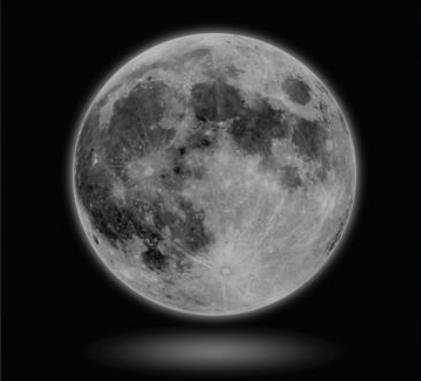
The contrast ratio is obtained by dividing the brightness of a white screen (brightest) by the brightness of a black screen (darkest);
The higher the contrast of the screen, the better the display effect (color and layering) as shown below:

2. Dynamic contrast ratio
It refers to the brightness ratio between the brightest and darkest parts of the screen under specific circumstances.
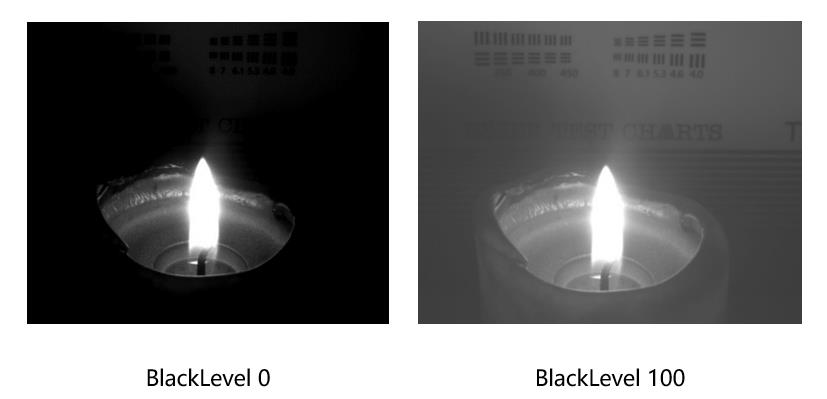
5. Q: What is the dark field intensity (BlackLevel)?
A: BlackLevel can improve the blur caused by insufficient contrast of black scene images, making the image in black scene clear. If there is too much black in an image, detail will be lost. Lack of black can result in a flat appearance.
6. Q: How to adjust the color temperature of Xiaomi Monitor A24i?
A: The Xiaomi Monitor A24i supports standard 6950K, cold 9300K, warm 5800K, and supports customization (self-adjustment of red, green and blue). Usually we call higher color temperature "cold" (blue), and lower color temperature "Warm" (yellowish). SRGB mode is 6500K.

Enter the menu options and select [Color temperature] to adjust.
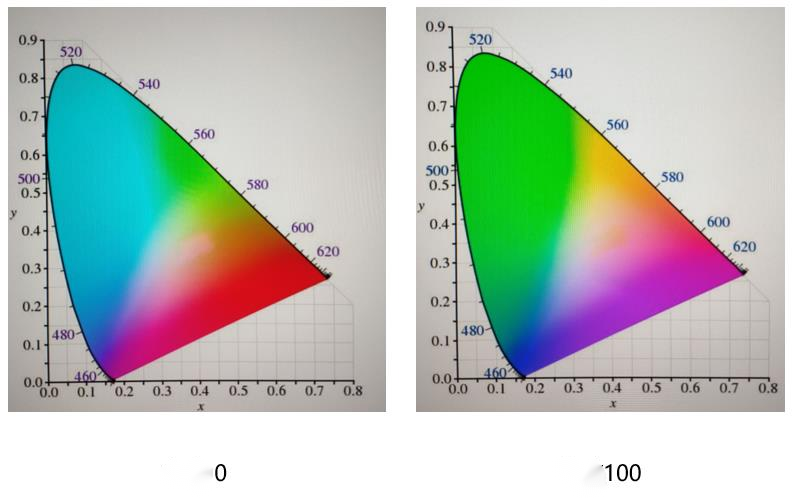
7. Q: What is chroma/hue?
A: Chroma reflects the color hue without brightness as shown in the figure below:
8. Q: What is saturation?
A: Saturation represents the purity of color. The higher the purity, the brighter the color. The lower the purity, the duller the color.

9. Q: What is the function of the gamma value adjustment of the Xiaomi Monitor A24i?
A: The gamma value is a curve optimization adjustment, which is an auxiliary function of brightness and contrast. It can make subtle light and dark levels of the picture. Adjust and control the contrast of the entire picture to make the picture more three-dimensional and vivid.
The Xiaomi Monitor A24i supports gamma value adjustment.
10. Q: How to adjust the screen ratio of Xiaomi Monitor A24i?
A: The Xiaomi Monitor A24i does not support adjusting the image aspect ratio by selecting it in the display menu.
11. Q: How to adjust the high-quality picture quality of Xiaomi Monitor A24i?
A: Due to individual differences, you can adjust the contrast ratio, brightness, and color temperature yourself, or you can choose your own preferences in the display smart mode.
12. Q: What is the gray-to-gray response (GTG) time?
A: It takes time for each point on the screen to transition from one color to the next.
We usually refer to response time. The images on the screen are the result of grayscale changes, so now we refer to response time It refers to the gray-scale response time.

13. Q: What is the response speed of the Xiaomi Monitor A24i?
A: The grayscale response time of Xiaomi Monitor A24i is about 6ms at the fastest, at 100Hz.
The response speed (Gray to Gray Response Time, GTG) varies at different refresh rates for optimal dynamic effects. This can be adjusted in the menu by selecting the corresponding gear (rapid, high speed, fast, or normal). The default state is normal.
Set different intensity values according to different refresh rate gears (the purpose is to reduce the response time caused by too fast at low frequencies). White smear problem)
At 100Hz:
Speed: about 6ms;
High speed: about 8ms;
Fast: about 10ms;
Normal: about 13ms.
14. Q: What is the effect of adjusting the clarity of the Xiaomi Monitor A24i?
A: One way to improve image quality at low resolution is to use pixels, which are the dots that make up an image. Imagine that an image is made up of countless dots of different colors, and each dot is a pixel. When the screen resolution is set to a lower value, the more pixels a unit size has, the higher the clarity.
15. Q: What are the color temperature, contrast, and brightness of the Xiaomi Monitor A24i in different smart modes?
A: The detailed parameters of different modes on the Xiaomi Monitor A24i are as follows:
Standard mode, color temperature = 6950K, contrast = 75, brightness = 100, manually setting;
Energy saving mode, color temperature = 6950K, contrast = manual setting value, brightness = 40, manually adjustable;
Movie mode, color temperature = 6950K, contrast = default value (75), brightness = 100, manually adjustable;
Low Blue Light Mode, Color Temperature = 5000K, Contrast = Default (75), Brightness = 40, manually adjustable.
Note:
Due to the different brightness specifications of different monitors, the actual screen brightness will also be different.
16. Q: How many output device images can the Xiaomi Monitor A24i display at the same time?
A: The Xiaomi Monitor A24i can connect to 2 display cables at the same time, and only supports one screen display, which can be switched in the settings.
17. Q: Can the Xiaomi Monitor A24i's settings menu switch between English and Chinese?
A: The Xiaomi Monitor A24i can select Chinese or English in the menu by selecting [Settings] >> [Language].
The Xiaomi Monitor A24i supports multiple languages, including English, Spanish, Russian, French, Italian, German, Polish, Arabic, Latin, Portuguese, Dutch, Indonesian, Hebrew, Traditional Chinese (Hong Kong), Traditional Chinese (Taiwan), Korean, Japanese.
18. Q: What is the OSD (screen menu adjustment method) of the Xiaomi Monitor A24i?
A: The OSD (screen menu adjustment method) of the Xiaomi Monitor A24i is Menu rotation.
19. Q: How to use the Xiaomi Monitor A24i after connecting headphones?
A: There is no headphone jack design on the Xiaomi Monitor A24i .
20. Q: How to restore the Xiaomi Monitor A24i to factory settings?
A: You can enter the [Settings] in the display menu and select restore factory settings.
21. Q: How to turn on the refresh rate display for the Xiaomi Monitor A24i?
A: You can turnon the refresh rate display for the Xiaomi Monitor A24i in the menu [System] >> [refresh rate]. After turning it on, the refresh rate will be displayed in the upper right corner.
Troubleshooting
1. Q: How to do if the Xiaomi Monitor A24i cannot be turned on?
A: If the Xiaomi Monitor A24i cannot be turned on, please check it as follows:
1. Remove the display signal cable directly and keep the display power on. If the display power-on logo appears, it proves that the display function is normal. The video cable has poor contact. Check the signal cable interface, signal cable and signal source;
2. Replace the host and test other HDMI and DP interfaces;
3. Replace the HDMI and DP interfaces and test;
4. Replace the HDMI and DP cables and test;
5. Replace the signal source and test, such as the host, laptop, TV box, etc;
6. If you use an adapter, you can remove it and try again.
2. Q: Why does the Xiaomi Monitor A24i screen leak light?
A: Regarding the light leakage issue with the Xiaomi Monitor A24i, after repeated testing and confirmation, we have the following findings and recommendations:
The advantages of wide-viewing angle LCD screens include excellent viewing angles (nearly 178° range), fast response times, high color accuracy, and a more detailed display. However, light leakage around the edges is also a common characteristic of these screens; therefore, few manufacturers currently offer 100% light leakage-free wide-viewing angle LCD screens.
The specific cause is that each sub-pixel experiences light leakage, which varies with screen size and becomes more pronounced on larger screens.
For this reason, in addition to strictly controlling screen materials, we also enforce even stricter controls on the entire device. Any device that exceeds these standards will not be shipped.
Regarding the light leakage issue mentioned earlier, we have the following recommendations:
1. The light leakage you describe is not a component quality issue or malfunction, so you can confidently use the device.
2. If you genuinely feel it affects your normal use, we can assist you with light leakage testing.
We apologize for the inconvenience caused!
3. Q: Why is there no image on the screen after the Xiaomi Monitor A24i is powered on?
A: When the power light of the Xiaomi Monitor A24i is on and there is no image, check whether the video cable connection is normal and whether the video output device is started. You can try to replace other output devices, or try to update the graphics card driver of the computer or notebook device for testing.
4. Q: Why is the screen color dark when using the Xiaomi Monitor A24i?
A: If the screen color dark when using the Xiaomi Monitor A24i, please refer to the following:
1. Adjust the screen brightness and increase the contrast;
2. Check the current display mode switching standard;
3. Restore the display to factory settings in the display menu bar.
5. Q: What certifications does the Xiaomi Monitor A24i have?
A: The Xiaomi Monitor A24i has the following certifications: RoHS, Energy Efficiency Class, WHQL (WIN10 64bits), HDMI. It complies with local energy efficiency requirements and has TÜV Low Blue Light Certification.
6. Q: Why does the image on the Xiaomi Monitor A24i display flicker or appear wavy during use?
A: If the image on the Xiaomi Monitor A24i display flicker or appear wavy during use, please adjust the usage position and keep away from electrical devices that may cause electronic interference.
7. Q: What is the problem when the screen displays "Out of range" when using the Xiaomi Monitor A24i?
A: The prompt "Out of range" is caused by incorrect resolution settings. You can adjust the recommended resolution on the computer or other video output device.
8. Q: Can the Xiaomi Monitor A24i be used for wireless screen projection?
A: The Xiaomi Monitor A24i does not support wireless screen projection.
9. Q: Why is the screen color is different after I changed to the Xiaomi Monitor A24i?
A: The screen color is different mainly due to different screen color temperature settings. The display color temperature can be modified in the menu settings.


10. Q: Does the image quality of the Xiaomi Monitor A24i affect the use of a video adapter?
A: In the video cable, DP and HDMI are digital signals; DVI is divided into data and analog signals, and VGA is an analog signal. The transmission loss between digital signals is low, and the image quality of analog to digital conversion will not be improved. If your VGA device does not support high-definition format, it cannot present the HDMI connection effect through the adapter. The converter only solves the problem of interface adaptation, and the display effect is the same as VGA. The connection effect of adapters of different qualities will also vary. It is recommended to choose a high-quality adapter.
Note:
The Xiaomi Monitor A24i does not have a VGA port.
11. Q: Is warm or cool display color better?
A: If the indoor light is strong, it is recommended to use cool colors, which can make the colors clearer and brighter. If the indoor light is weak, use warm colors, which will be softer.
12. Q: How to clean the screen of the Xiaomi Monitor A24i?
A: To clean the screen of the Xiaomi Monitor A24i, please follow the steps below:
1. Make sure the monitor is turned off;
2. Use a special screen cleaning fluid to spray evenly;
3. Choose a special screen cleaning cloth with good water absorption and good dust absorption ability and wipe it gently. Dust is easily absorbed by the cloth, and dust particles will not stick to the screen again during repeated wiping, nor will they scratch the LCD screen.
Note:
It is not recommended to use clean water, and it is strictly forbidden to wipe the screen with alkaline solutions or chemical solutions, otherwise it will cause a short circuit or corrosion to the device.
13. Q: What material does the Xiaomi Monitor A24i use for the display screen?
A: The Xiaomi Monitor A24i adopts an IPS screen. We will adhere to Xiaomi's high-quality materials and testing standards to select raw materials and their suppliers. Please rest assured to use it.
14. Q: What to do if the Xiaomi Monitor A24i does not play videos smoothly?
A: If the Xiaomi Monitor A24i playback is not smooth, you can confirm whether it is playing normally on other devices. You can try to change the video source. It is recommended to use the standard HDMI cable. If a video adapter is used, check whether the connection is firm and try to use a different adapter.
15. Q: What to do if the Xiaomi Monitor A24i has white spots and black spots on the screen?
A: If the white spots and black spots are not bright, please try entering the screen test (change different background colors) to determine whether it is a screen display problem.
If the screen spot is abnormal, please go to our local official after-sales center for inspection and further assistance.
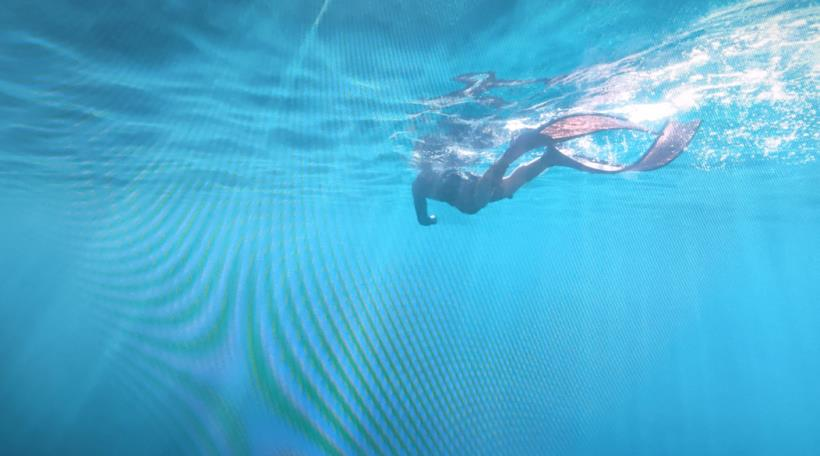
16. Q: Why does the Xiaomi Monitor A24i have color stripes when taking photos with a mobile phone/camera?
A: This is a normal physical phenomenon (called moiré fringes). Almost all devices will have stripes when shooting computer screens due to different refresh rates.
A video is composed of countless photos arranged in sequence and time points. When shooting, it is actually taking photos continuously, that is, the shutter has a fixed frequency, and ordinary videos are about 30 frames per second. Computer monitors also have a refresh rate, generally around 50Hz to 60Hz. The two frequencies are different, which ultimately leads to the screen being refreshed sequentially when shooting videos. You can change the camera device to match the screen's refresh rate.
17. Q: How to deal with the issue of screen freezing and tailing on the Xiaomi Monitor A24i?
A: If there’s an issue of screen freezing and tailing on the Xiaomi Monitor A24i, it is mainly caused by the computer graphics driver not being installed and the material of the adapter cable. You need to check the graphics driver in the PC device manager. If you use an adapter cable, you can test or replace it without the adapter. Adjust the refresh rate of the monitor to a maximum of 100Hz, and open it in the monitor menu: Adjust the GTG grayscale response time:
Rapid: about 6ms;
High speed: about 8ms;
Fast: about 10ms;
Normal: about 13ms.
18. Q: Why does the brightness of the Xiaomi Monitor A24i change automatically, sometimes bright and sometimes dark?
A: If the display screen is sometimes bright and sometimes dark, check whether the video signal cable is plugged in.
19. Q: Does the Xiaomi Monitor A24i support G-SYNC?
A: No, the Xiaomi Monitor A24i doesn’t support G-SYNC.
20. Q: Why can't the Xiaomi Monitor A24i MPRT be turned on?
A: The Xiaomi Monitor A24i doesn’t support MPRT.
21. Q: Why do I experience dizziness after prolonged use of the Xiaomi Monitor A24i?
A: The inconsistency between what the eyes see and what the body experiences in reality, the inconsistency between the organ responsible for balance in the inner ear and the information sent to the brain by vision, will cause symptoms of dizziness. The degree of dizziness will also be affected by the performance of the display.
The Xiaomi Monitor A24i has a resolution of 1920*1080 and a refresh rate of 100Hz with a low latency of 6 milliseconds GTG. If you experience dizziness, you need to rest and wait until the symptoms disappear before using it again.
22. Q: How to deal with the screen distortion of Xiaomi Monitor A24i?
A: The screen distortion of Xiaomi Monitor A24i can be solved as follows:
1. Check whether the product appearance is damaged;
2. It is recommended to use the official standard HDMI cable. If you use an adapter, try to replace it with a high-quality adapter;
3. Check whether the display driver is normal. In the device manager, check the display adapter update driver, or try to connect other output devices to see if the display is normal.
23. Q: How to deal with the black screen when using the Xiaomi Monitor A24i?
A: If a black screen appears on the Xiaomi Monitor A24i during use, you can check the monitor indicator light. The flashing indicator light means that the output signal is not received. You need to check whether the output device connection is normal. You need to re-plug the power cord and video cable to ensure stable contact.
If the monitor indicator light is always on, you need to check whether the graphics card or output device is faulty. You can try to replace the video output device. If you use an adapter, it is recommended to remove or replace it.
24. Q: Will the screen brightness of the Xiaomi Monitor A24i decrease after setting the dynamic contrast?
A: The dynamic contrast function controls the screen brightness through the brightness ratio of the input signal. The larger the screen brightness ratio, the brighter the screen, and the larger the screen darkness ratio, the darker the screen.
25. Q: Does the Xiaomi Monitor A24i have obvious vertical stripes under the 256 grayscale test?
A: If the monitor has obvious vertical stripes under the 256 grayscale test, you can follow the following solution:
1. First right-click the mouse and select Intel Graphics Settings;
2. Select the monitor;
3. Select [Monitor] >> [P24FBA-RAGL];
4. Select [Quantization Range] >> [Full Range]. After setting, check the grayscale screen and there will be no vertical stripes.
26. Q: Why are the text and images on the Xiaomi Monitor A24i blurry?
A: If the image and text on the Xiaomi Monitor A24i are not clear after screen expansion, you can operate the computer as follows:
1. Right click and select [Personalize];
2. Select the [Font];
3. Select the clearest text based on your personal preference and click [Next];
4. Select P24FBA-RAGLGL display and click [Next];
5. Based on your personal preference, select the clearest text. After selecting, click Next. You will need to test 4 times before the test setting is complete. If the image is not clear, you can change the resolution to 1920×1080 in Windows display settings.
Note:
If the font is blurry when the font is small, it is because of Windows font optimization. You can go to [Personalization Settings] >> [Fonts] >> Adjust [ClearType Text] >> deactivate [ClearType].
27. Q: How to switch the main screen when Xiaomi Monitor A24i selects extended mode (connecting 2 monitors at the same time)?
A: To switch the main screen when Xiaomi Monitor A24i connects 2 monitors at the same time, please refer to the following:
1. Right-click the mouse and select [Display Settings];
2. Select the P24FBA-RAGL monitor;
3. Make this my main display, and the bottom taskbar will be displayed under the P24FBA-RAGL monitor. If the desktop icons are not displayed on the P24FBA-RAGL, directly select all icons and drag them to the P24FBA-RAGL to display.
28. Q: Can the Xiaomi Monitor A24i be wall-mounted?
A: The Xiaomi Monitor A24i supports wall mounting. A of now, Xiaomi has not launched a monitor mount or mounting service. The mounting hole distance of the wall mount bracket compatible with this product is 75 ×75mm.
29. Q: How does the Xiaomi Monitor A24i speed up the response time (GTG grayscale time)?
A: The Xiaomi Monitor A24i speeds up the response time by accelerating the LCD drive through Overdrive (response time) to increase the LCD unit drive voltage and thus reduce the grayscale time. The voltage regulation of Overdrive (response time) is completely within the safe range and the life of the display will not be affected.
30. Q: What dimming method does the Xiaomi Monitor A24i use?
A: The dimming method of the Xiaomi Monitor A24i is DC dimming.
31. Q: Does the Xiaomi Monitor A24i have a screen film when it leaves the factory?
A: There is no screen film when it leaves the factory. The screen surface is a display polarizing film. The LCD display consists of three main components: backlight, liquid crystal, and polarizing film. The full name of the polarizer is polarizing film. All liquid crystals have two polarizing films in front and behind that are close to the liquid crystal glass. Without any polarizing film, the display cannot display the image.
32. Q: Can the red label on the lower right corner of the Xiaomi Monitor A24i be torn off? Can it be repaired after torn off?
A: The purpose of these two labels is to inform you that there is no protective film attached to the display screen to prevent you from accidentally removing the optical film, which could cause the display to stop working. If you confirm that the monitor is not defective after purchase, you can tear off the labels, and any quality issues with the product can be repaired.
33. Q: How do laptop users connect to the Xiaomi Monitor A24i?
A: A: If your laptop does not have HDMI, it is recommended to purchase a corresponding adapter such as a Type-C to HDMI interface. After the laptop is successfully connected to the monitor, please select the following path: [Cop] >> [Extend] >> [Second Screen Only].
34 . Q: What to do the Xiaomi Monitor A24i have ghosting on the screen?
A: If you encounter such a situation, you can confirm whether the refresh rate is low. The maximum supported resolution is 1920×1080 and the refresh rate is 100Hz. If there is ghosting at a high refresh rate, you can adjust it as follows:
Adjust the response time. The default grayscale response time of the monitor is normal. It can be set to rapid, high speed, fast, and normal. Confirm whether the ghosting is improved.
Does it help?
Yes
No