

Why does the Xiaomi Smart Band 10 display a disconnection status when connected to the phone?
Because the Mi Fitness APP was removed from the background, the Xiaomi Smart Band 10 will display a disconnection status. Please check if you have enabled all background running permissions for the APP.
If the band displays a disconnection status when connected to the phone, please refer to the following details for troubleshooting:
1. After the device and the Mi Fitness APP are first connected, go to the phone settings and let the Mi Fitness APP always run in the background;
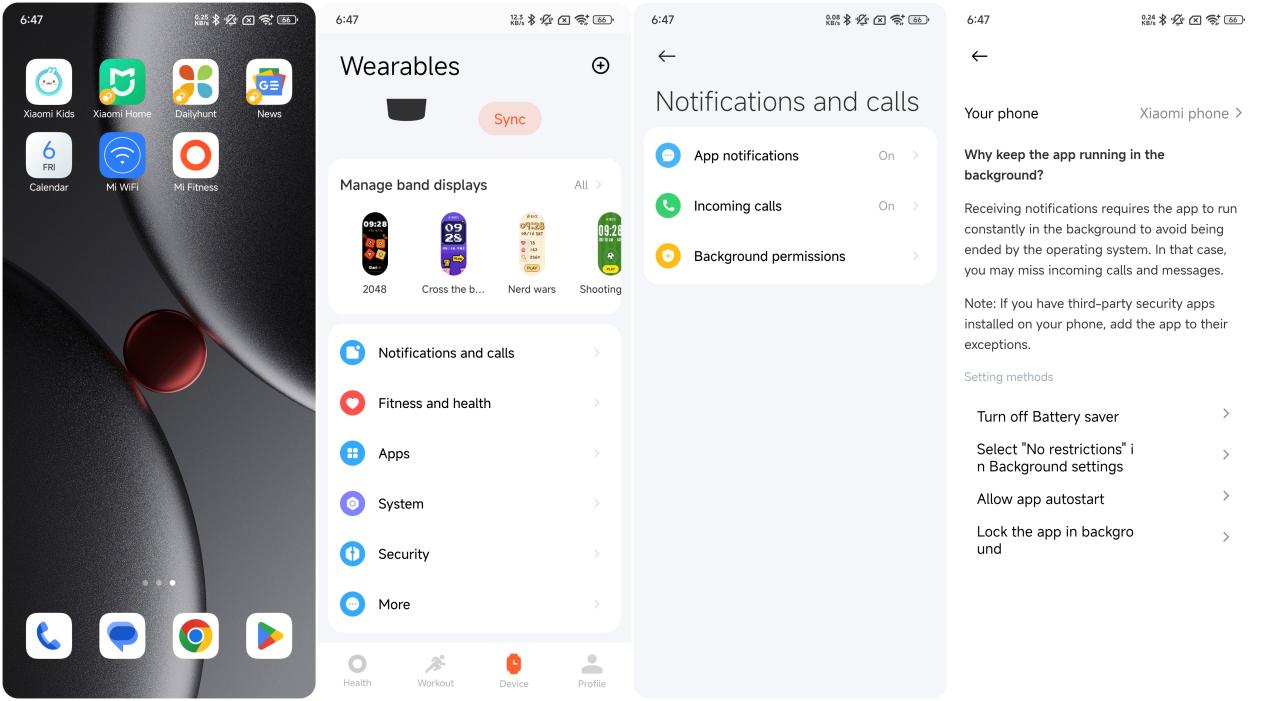
2. Open the Mi Fitness APP >> [Device] >> [Notifications and calls] >> [Background permissions] to set the permissions. Check whether the permissions of [Turn off Battery saver], [Select “No restrictions” in Background settings], [Allow app autostart], and [Lock the app in background] are all enabled.
If the band displays a disconnection status when connected to the phone, please refer to the following details for troubleshooting:
1. After the device and the Mi Fitness APP are first connected, go to the phone settings and let the Mi Fitness APP always run in the background;
2. Open the Mi Fitness APP >> [Device] >> [Notifications and calls] >> [Background permissions] to set the permissions. Check whether the permissions of [Turn off Battery saver], [Select “No restrictions” in Background settings], [Allow app autostart], and [Lock the app in background] are all enabled.
Does it help?
Yes
No