

Xiaomi Selfie Stick Tripod Mini FAQ
Overview
1. Q: What are the selling points of the Xiaomi Selfie Stick Tripod Mini?
A: The selling points of the Xiaomi Selfie Stick Tripod Mini are as follows:
1. The selfie stick features an integrated design with a built-in phone clip and tripod, giving it a more streamlined and unified appearance;
2. It comes with a detachable Bluetooth remote control, allowing you to control the phone camera from a distance when using the tripod mode;
3. Its compact and portable design with built-in phone clip and tripod makes it easy to store and convenient to carry when traveling.
2. Q: What are the use scenarios for the Xiaomi Selfie Stick Tripod Mini?
A: The use scenarios for the Xiaomi Selfie Stick Tripod Mini are as follows:
1. Suitable for travel selfies, live streaming, and situations where certain shooting angles cannot be achieved by holding the phone directly;
2. Ideal for livestreaming and short video shooting where a stable position is needed, and the tripod allows for fixed-angle shooting;
3. During gatherings or trips, when holding the phone at a close distance, it's difficult to capture a wider frame. The selfie stick extends the distance, making it easier to take wide-angle shots.
3. Q: What materials are used in the Xiaomi Selfie Stick Tripod Mini?
A: The Xiaomi Selfie Stick Tripod Mini is made of PC+ABS plastic, silicone, and anodized aluminum alloy for the extendable rod.
4. Q: What is included in the standard package of the Xiaomi Selfie Stick Tripod Mini?
A: The standard package of the Xiaomi Selfie Stick Tripod Mini includes one selfie stick and one user manual.
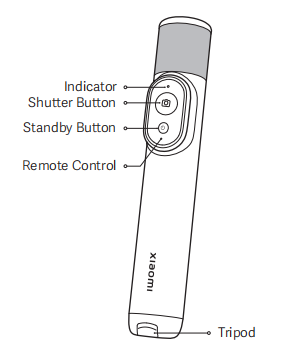
5. Q: What is the appearance of the Xiaomi Selfie Stick Tripod Mini?
A. The appearance of the Xiaomi Selfie Stick Tripod Mini are as follows:
The Xiaomi Selfie Stick Tripod Mini is a compact and multifunctional selfie stick. It features a remote control with an indicator to show status, a shutter button for taking photos or videos, and a standby button for powering the device on or off. The main body houses the remote control and includes a built-in tripod at the bottom for added stability during use.
Frequently Asked Questions
1. Q: Which phones are compatible with the Xiaomi Selfie Stick Tripod Mini?
A: The Xiaomi Selfie Stick Tripod Mini requires Xiaomi or Redmi phones running Android 10 and MIUI 12 or above, and iPhones with iOS 8.0 or above, all supporting the camera function.
2. Q: How to connect the Xiaomi Selfie Stick Tripod Mini to a phone?
A: To connect the Xiaomi Selfie Stick Tripod Mini to a phone, please refer to the following steps:
First-time connection:
Take out the remote control, pull out the electric separator from the battery compartment, then press and hold the remote’s power button for 3 seconds to turn it on. After powering on for the first time, the indicator will flash in blue, entering Bluetooth pairing mode. The remote will automatically search for Bluetooth devices. On your phone’s Bluetooth settings interface, select “XMZPG-M” from the list of available devices to connect.
Bluetooth reconnection:
If the remote control has connected to Bluetooth before, turning it on will automatically reconnect to the last paired phone. If reconnection fails, the remote will automatically enter Bluetooth search mode for you to pair again.
3. Q: What are the functions of the buttons on the Xiaomi Selfie Stick Tripod Mini?
A: The functions of the buttons on the Xiaomi Selfie Stick Tripod Mini are as follows:
Standby button:
Press and hold for 3 seconds to turn on/off.
Shutter button:
1. Press to take a photo or start/stop recording video;
2. Press and hold to record a short video or take burst photos.
Note:
The functions of pressing and holding the shutter button vary depending on the phone model or system version. Please refer to the actual behavior.
4. Q: What are the indicator statuses of the Xiaomi Selfie Stick Tripod Mini?
A: The indicator statuses of the Xiaomi Selfie Stick Tripod Mini are as follows:
Blinking in blue: Bluetooth waiting for connection;
Breathing in blue: Automatic Bluetooth reconnection in progress;
Keeping in white for 1 second: Button function triggered;
Keeping in white for 5 seconds: Bluetooth connected;
Blinking in white 3 times: Powering off;
Blinking in red: Low battery.
5. Q: How to connect the Xiaomi Selfie Stick Tripod Mini to a new phone?
A: To connect the Xiaomi Selfie Stick Tripod Mini to a new phone, please refer to the following methods:
Method 1:
On the previously paired phone, delete the Bluetooth device named “XMZPG-M.” The selfie stick will then enter Bluetooth search mode. At this time, use the new phone to add the “XMZPG-M” device to connect.
Method 2:
While the remote is powered on, press and hold both the shutter button and the standby button simultaneously for 3 seconds. The remote will enter Bluetooth pairing mode. Then, use the new phone to add the “XMZPG-M” device to connect.
6. Q: How to activate sleep and power off modes on the Xiaomi Selfie Stick Tripod Mini?
A: To activate sleep and power off modes on the Xiaomi Selfie Stick Tripod Mini, please refer to the following steps:
Sleep Mode:
1. When the remote control is turned on and connected to the Bluetooth of the phone, it will automatically enter the sleep mode after 5 minutes of inactivity;
2. When the remote control is disconnected from the Bluetooth of the phone, it will enter the sleep mode directly;
3. When the remote control is turned on and not connected to the Bluetooth of the phone, it will automatically enter the sleep mode after 3 minutes in the Bluetooth waiting for connection status;
4. Press any button to wake the remote control from the sleep mode.
Power Off:
1. Press and hold the standby button for 3 seconds, and the indicator will blink white 3 times and go out, after which the remote control will power off;
2. After 15 minutes in the sleep mode, the remote control will turn off automatically.
7. Q: What is the battery life of the Xiaomi Selfie Stick Tripod Mini?
A: The Xiaomi Selfie Stick Tripod Mini remote uses a coin cell battery and features a low-power Bluetooth design. When fully charged, the battery can support approximately 10,000 photo captures.
8. Q: What type of coin cell battery does the Xiaomi Selfie Stick Tripod Mini use, and how to replace it?
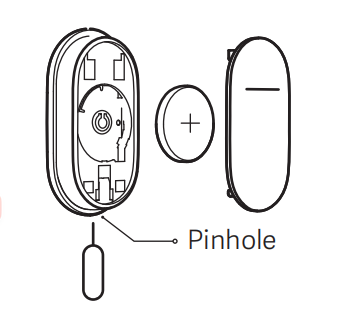
A: When the battery level of the Xiaomi Selfie Stick Tripod Mini remote is low, the indicator will blink in red. Please replace the coin cell battery (model: CR1620) promptly to ensure proper operation of the remote. Insert a retrieval pin or an appropriate tool into the pinhole on the bottom of the remote control, remove the battery cover, replace the battery, and then put the battery cover back.
1. Q: What are the selling points of the Xiaomi Selfie Stick Tripod Mini?
A: The selling points of the Xiaomi Selfie Stick Tripod Mini are as follows:
1. The selfie stick features an integrated design with a built-in phone clip and tripod, giving it a more streamlined and unified appearance;
2. It comes with a detachable Bluetooth remote control, allowing you to control the phone camera from a distance when using the tripod mode;
3. Its compact and portable design with built-in phone clip and tripod makes it easy to store and convenient to carry when traveling.
2. Q: What are the use scenarios for the Xiaomi Selfie Stick Tripod Mini?
A: The use scenarios for the Xiaomi Selfie Stick Tripod Mini are as follows:
1. Suitable for travel selfies, live streaming, and situations where certain shooting angles cannot be achieved by holding the phone directly;
2. Ideal for livestreaming and short video shooting where a stable position is needed, and the tripod allows for fixed-angle shooting;
3. During gatherings or trips, when holding the phone at a close distance, it's difficult to capture a wider frame. The selfie stick extends the distance, making it easier to take wide-angle shots.
3. Q: What materials are used in the Xiaomi Selfie Stick Tripod Mini?
A: The Xiaomi Selfie Stick Tripod Mini is made of PC+ABS plastic, silicone, and anodized aluminum alloy for the extendable rod.
4. Q: What is included in the standard package of the Xiaomi Selfie Stick Tripod Mini?
A: The standard package of the Xiaomi Selfie Stick Tripod Mini includes one selfie stick and one user manual.
5. Q: What is the appearance of the Xiaomi Selfie Stick Tripod Mini?
A. The appearance of the Xiaomi Selfie Stick Tripod Mini are as follows:
The Xiaomi Selfie Stick Tripod Mini is a compact and multifunctional selfie stick. It features a remote control with an indicator to show status, a shutter button for taking photos or videos, and a standby button for powering the device on or off. The main body houses the remote control and includes a built-in tripod at the bottom for added stability during use.
Frequently Asked Questions
1. Q: Which phones are compatible with the Xiaomi Selfie Stick Tripod Mini?
A: The Xiaomi Selfie Stick Tripod Mini requires Xiaomi or Redmi phones running Android 10 and MIUI 12 or above, and iPhones with iOS 8.0 or above, all supporting the camera function.
2. Q: How to connect the Xiaomi Selfie Stick Tripod Mini to a phone?
A: To connect the Xiaomi Selfie Stick Tripod Mini to a phone, please refer to the following steps:
First-time connection:
Take out the remote control, pull out the electric separator from the battery compartment, then press and hold the remote’s power button for 3 seconds to turn it on. After powering on for the first time, the indicator will flash in blue, entering Bluetooth pairing mode. The remote will automatically search for Bluetooth devices. On your phone’s Bluetooth settings interface, select “XMZPG-M” from the list of available devices to connect.
Bluetooth reconnection:
If the remote control has connected to Bluetooth before, turning it on will automatically reconnect to the last paired phone. If reconnection fails, the remote will automatically enter Bluetooth search mode for you to pair again.
3. Q: What are the functions of the buttons on the Xiaomi Selfie Stick Tripod Mini?
A: The functions of the buttons on the Xiaomi Selfie Stick Tripod Mini are as follows:
Standby button:
Press and hold for 3 seconds to turn on/off.
Shutter button:
1. Press to take a photo or start/stop recording video;
2. Press and hold to record a short video or take burst photos.
Note:
The functions of pressing and holding the shutter button vary depending on the phone model or system version. Please refer to the actual behavior.
4. Q: What are the indicator statuses of the Xiaomi Selfie Stick Tripod Mini?
A: The indicator statuses of the Xiaomi Selfie Stick Tripod Mini are as follows:
Blinking in blue: Bluetooth waiting for connection;
Breathing in blue: Automatic Bluetooth reconnection in progress;
Keeping in white for 1 second: Button function triggered;
Keeping in white for 5 seconds: Bluetooth connected;
Blinking in white 3 times: Powering off;
Blinking in red: Low battery.
5. Q: How to connect the Xiaomi Selfie Stick Tripod Mini to a new phone?
A: To connect the Xiaomi Selfie Stick Tripod Mini to a new phone, please refer to the following methods:
Method 1:
On the previously paired phone, delete the Bluetooth device named “XMZPG-M.” The selfie stick will then enter Bluetooth search mode. At this time, use the new phone to add the “XMZPG-M” device to connect.
Method 2:
While the remote is powered on, press and hold both the shutter button and the standby button simultaneously for 3 seconds. The remote will enter Bluetooth pairing mode. Then, use the new phone to add the “XMZPG-M” device to connect.
6. Q: How to activate sleep and power off modes on the Xiaomi Selfie Stick Tripod Mini?
A: To activate sleep and power off modes on the Xiaomi Selfie Stick Tripod Mini, please refer to the following steps:
Sleep Mode:
1. When the remote control is turned on and connected to the Bluetooth of the phone, it will automatically enter the sleep mode after 5 minutes of inactivity;
2. When the remote control is disconnected from the Bluetooth of the phone, it will enter the sleep mode directly;
3. When the remote control is turned on and not connected to the Bluetooth of the phone, it will automatically enter the sleep mode after 3 minutes in the Bluetooth waiting for connection status;
4. Press any button to wake the remote control from the sleep mode.
Power Off:
1. Press and hold the standby button for 3 seconds, and the indicator will blink white 3 times and go out, after which the remote control will power off;
2. After 15 minutes in the sleep mode, the remote control will turn off automatically.
7. Q: What is the battery life of the Xiaomi Selfie Stick Tripod Mini?
A: The Xiaomi Selfie Stick Tripod Mini remote uses a coin cell battery and features a low-power Bluetooth design. When fully charged, the battery can support approximately 10,000 photo captures.
8. Q: What type of coin cell battery does the Xiaomi Selfie Stick Tripod Mini use, and how to replace it?
A: When the battery level of the Xiaomi Selfie Stick Tripod Mini remote is low, the indicator will blink in red. Please replace the coin cell battery (model: CR1620) promptly to ensure proper operation of the remote. Insert a retrieval pin or an appropriate tool into the pinhole on the bottom of the remote control, remove the battery cover, replace the battery, and then put the battery cover back.
Note:
1. When installing the battery, please ensure that the positive pole is oriented outward;
2. The battery model is CR1620, please purchase the compatible batteries from a qualified brand yourself.
9. Q: What phones can fit in the clip of the Xiaomi Selfie Stick Tripod Mini?
A: The clip of the Xiaomi Selfie Stick Tripod Mini is suitable for phones with a width between 60mm and 90mm.
10. Q: How long can the telescopic rod of the Xiaomi Selfie Stick Tripod Mini extend?
A: The telescopic rod of the Xiaomi Selfie Stick Tripod Mini can extend from 173mm to 520mm.
11. Q: What is the weight and dimensions of the Xiaomi Selfie Stick Tripod Mini?
A: The weight and dimensions of the Xiaomi Selfie Stick Tripod Mini are as follows:
Net weight: approximately 155g;
Dimensions (when folded): 173 × 29 × 33.5 mm.
12. Q: How to take out and reattach the remote control of the Xiaomi Selfie Stick Tripod Mini?
A: To take out and reattach the remote control of the Xiaomi Selfie Stick Tripod Mini, please refer to the following steps:
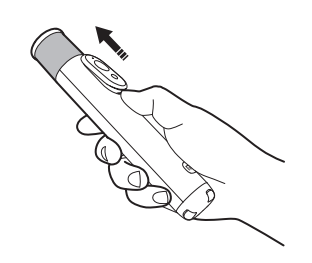
Take out the remote control:
As shown in the figure, push the remote control outward while sliding it upward.
Reattach the remote control:
First, align the small notch on the top of the remote control with the raised point inside the remote control slot on the selfie stick. Then place the tail end of the remote control into the back of the slot. Gently press down on the tail end of the remote control to snap it back into place.
13. Q: What is the remote control distance of the Xiaomi Selfie Stick Tripod Mini?
A: The remote control of the Xiaomi Selfie Stick Tripod Mini has a maximum transmission distance of up to 10 meters in an open, unobstructed straight line.
14. Q: Does the remote control of the Xiaomi Selfie Stick Tripod Mini have a reset function?
A: The remote control of the Xiaomi Selfie Stick Tripod Mini have a reset function. When powered on, press and hold both the shutter button and the standby button simultaneously for 3 seconds. The remote control will clear the Bluetooth list and re-enter Bluetooth pairing mode.
15. Q: How to open the phone clip and fasten the Phone on the Xiaomi Selfie Stick Tripod Mini?
A: To open the phone clip and fasten the phone on the Xiaomi Selfie Stick Tripod Mini, please refer to the following steps:
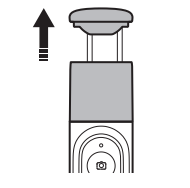
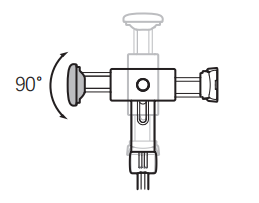
1. Pull out the phone clip: Pull out the phone clip along with the telescopic rod from the top of the selfie stick/tripod as shown in the figure;
2. Rotate the phone clip: The phone clip can be rotated 90° to the left or right as shown in the figure;
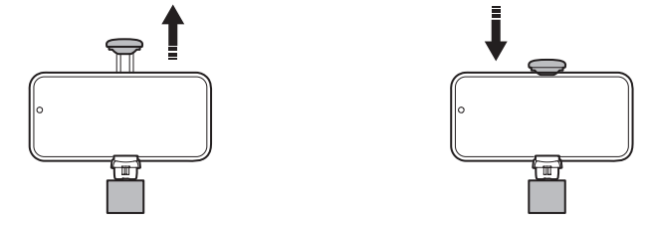
3. Fasten the phone: As shown in the figure, open the detent located beneath the phone clip, and insert the phone into the clip, ensuring that it does not obstruct any phone buttons. Secure the phone by pulling both the upper and lower detents of the clip and ensure that the back of the phone is firmly positioned against the clip.
Note:
1. The phone clip contains an internal spring that can generate resistance during operation. Please exercise caution to avoid the risk of pinching hands during use;
2. The phone clip is suitable for mobile phones with a width of 60-90 mm.
16. Q: How to unfold and fold the tripod of the Xiaomi Selfie Stick Tripod Mini?
A: To unfold and fold the tripod of the Xiaomi Selfie Stick Tripod Mini, please refer to the following steps:
1. Grasp the tripod groove and pull out each of the three tripod legs;
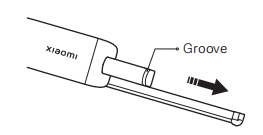
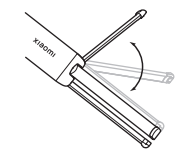
2. Unfold the tripod in place as shown in the figure.
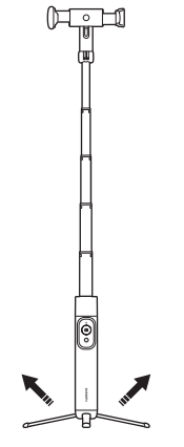
3. To fold the tripod, perform steps 2 and 1 in reverse order.
Note:
When using the tripod, please refrain from applying excessive pressure downward to avoid causing damage to the tripod and affecting its service life.
17. Q: Is the Xiaomi Selfie Stick Tripod Mini waterproof?
A: The Xiaomi Selfie Stick Tripod Mini is not designed to be waterproof and does not have water resistance.
18. Q: What to do if the Xiaomi Selfie Stick Tripod Mini cannot be powered on?
A: If the Xiaomi Selfie Stick Tripod Mini cannot be powered on, please refer to the following steps:
1. Check whether the electric separator has been removed before use;
2. Check if the coin cell battery inside the remote control is installed correctly (positive side facing outward);
3. Ensure the remote control’s battery cover is properly closed;
4. Remind to press and hold the standby button for 3 seconds to turn on the remote;
5. If the above steps do not work, please apply for after-sales inspection.
19. Q: What to do if the Bluetooth of the Xiaomi Selfie Stick Tripod Mini cannot connect to the phone?
A: If the Bluetooth of the Xiaomi Selfie Stick Tripod Mini cannot connect to the phone, please refer to the following steps:
1. Verify that the connection method is correct. The Bluetooth name for the Xiaomi Selfie Stick Tripod Mini is “XMZPG-M.” Also, ensure the connection distance does not exceed the Bluetooth coverage range, which is approximately 10 meters in an open, unobstructed environment;
2. Check if the remote control battery is sufficiently charged (see if the red indicator is on). If the red light is on, replace the coin cell battery;
3. Check if the selfie stick is already connected to another device. On the previously paired phone, delete the Bluetooth device named “XMZPG-M” to put the selfie stick into Bluetooth search mode, or reset Bluetooth by pressing and holding both the shutter button and standby button for 3 seconds while powered on. Then, use the new phone to add “XMZPG-M”;
4. Try connecting with another phone or mobile device;
5. Check if there are too many Bluetooth devices nearby and advise trying in a different environment;
6. Apply for after-sales inspection if the problem persists.
20. Q: What to do if the Xiaomi Selfie Stick Tripod Mini cannot take photos?
A: If the Xiaomi Selfie Stick Tripod Mini cannot take photos, please refer to the following steps:
1. Check whether the remote control of the selfie stick is powered on properly;
2. Check if the remote control is connected to the phone and whether they are within the effective connection range;
3. Make sure the phone meets the compatibility requirements: Xiaomi or Redmi phones with Android 10 and MIUI 12 or above, or iPhones with iOS 8.0 or above, and supports the photo-taking function;
4. Restart the phone;
5. Try using another phone or mobile device;
6. Apply for after-sales inspection if the issue persists.
21. Q: Does the Xiaomi Selfie Stick Tripod Mini support zoom functionality?
A: The Xiaomi Selfie Stick Tripod Mini does not support zoom.
Does it help?
Yes
No