

How to use the Smart program of the Mijia Front Load Washer Dryer 10.5kg?
The Mijia Front Load Washer Dryer 10.5kg features a Smart program designed to simplify and optimize your laundry experience. This intelligent mode automatically adjusts the washing parameters, such as temperature, spin speed, and rinse cycle.
To use the Smart program on the Mijia Front Load Washer Dryer 10.5kg, please refer to the following steps:
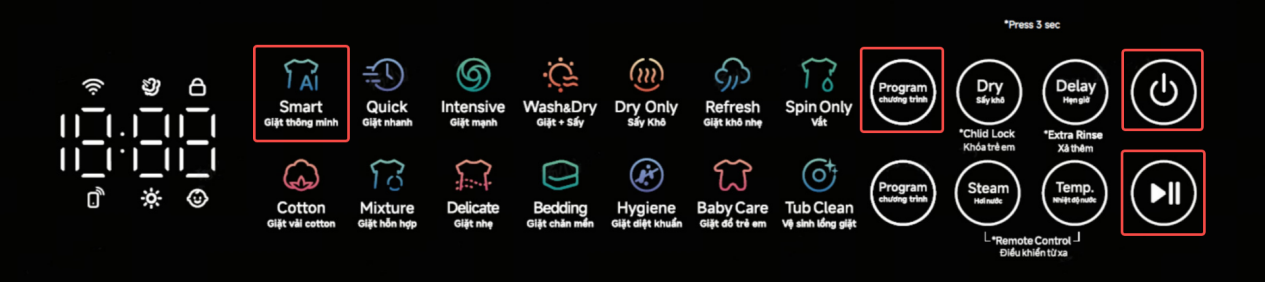
1. Press and hold the Power button to turn on;
2. Put the clothes into the drum and close the door;
3. Repeatedly press the Program button on the upper side of the device’s panel;
4. Select the Smart program;
5. Press the Start button to run the Smart program.
Note:
The Smart program is suitable for washing or drying mixed loads of cotton, linen, and synthetic fabrics for daily wear.
To use the Smart program on the Mijia Front Load Washer Dryer 10.5kg, please refer to the following steps:
1. Press and hold the Power button to turn on;
2. Put the clothes into the drum and close the door;
3. Repeatedly press the Program button on the upper side of the device’s panel;
4. Select the Smart program;
5. Press the Start button to run the Smart program.
Note:
The Smart program is suitable for washing or drying mixed loads of cotton, linen, and synthetic fabrics for daily wear.
Does it help?
Yes
No