

What do the icons on the Mijia Front Load Washer Dryer 10.5kg panel mean?
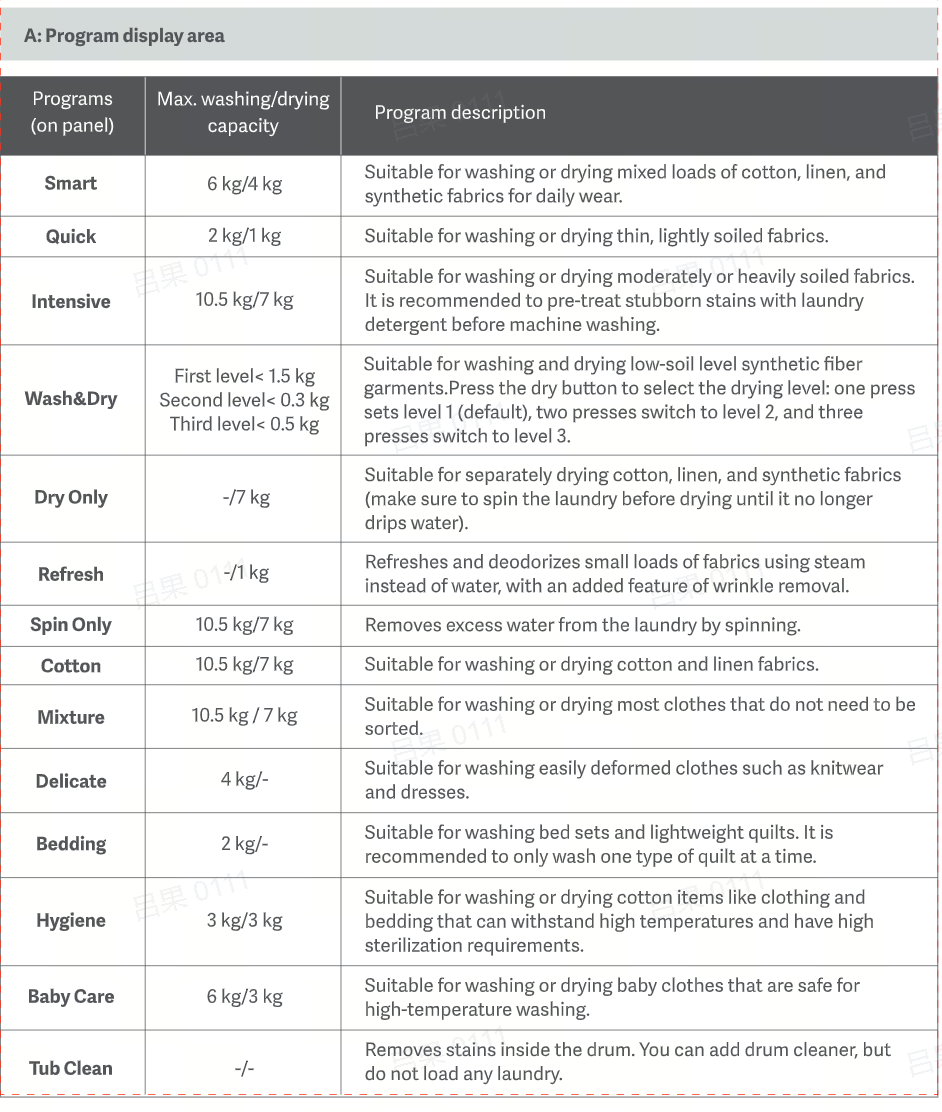
The meanings of the programs icon on the middle of the panel on the Mijia Front Load Washer Dryer 10.5kg are as follow:
1. The Smart icon means the program is suitable for washing or drying mixed loads of cotton linen and synthetic fabrics for daily wear;
2. The Quick icon means the program is suitable for washing or drying thin, lightly soiled fabrics;
3. The Intensive icon means the program is suitable for washing or drying moderately or heavily soiled fabrics. It is recommended to pre-treat stubborn stains with laundry detergent before machine washing;
4. The Wash & Dry icon means the program is suitable for washing and drying low-soil level synthetic fiber garments. Press the dry button to select the drying level: one press sets level 1(default ), two presses switch to level 2, and three presses switch to level 3;
5. The Dry Only icon means the program is suitable for separately drying cotton, linen, and synthetic fabrics (make sure to spin the laundry before drying until it no longer drips water);
6. The Refresh icon means the program refreshes and deodorizes small loads of fabrics using steam instead of water , with an added feature of wrinkle removal;
7. The Spin Only icon means the program removes excess water from the laundry by spinning;
8. The Cotton icon means the program is suitable for washing or drying cotton and linen fabrics;
9. The Mixture icon means the program is suitable for washing or drying most clothes that do not need to be sorted;
10. The Delicate icon means the program is suitable for washing easily deformed clothes such as knitwear and dresses;
11. The Bedding icon means the program is suitable for washing bed sets and lightweight quilts. It is recommended to only wash one type of quilt at a time;
12. The Hygiene icon means the program is suitable for washing or drying cotton items like clothing and bedding that can withstand high temperatures and have high sterilization requirements;
13. The Baby Care icon means the program is suitable for washing or drying baby clothes that are safe for high-temperature washing;
14. The Tub Clean icon means the program removes stains inside the drum. You can add drum cleaner , but do not load any laundry.
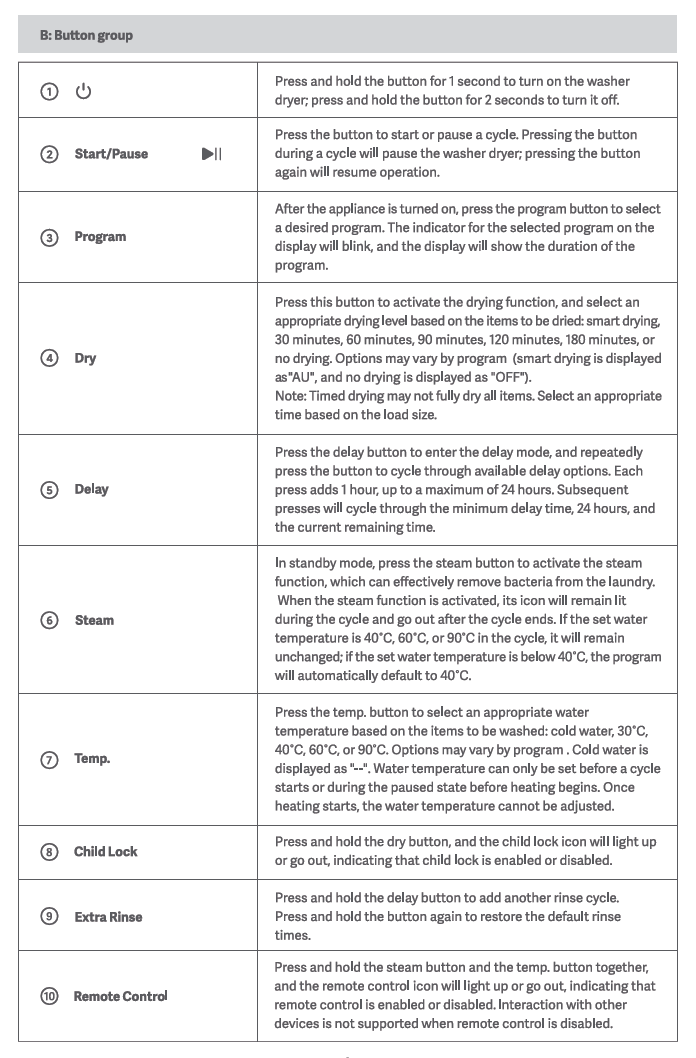
The meanings of buttons on the right side of the panel on the Mijia Front Load Washer Dryer 10.5kg are as follows:
1. The Power icon means that press and hold the button for 1 second to turn on the washer dryer; press and hold the button for 2 seconds to turn it off;
2. The Start/Pause icon means that press the button to start or pause a cycle, pressing the button during a cycle will pause the washer dryer, pressing the button again will resume operation;
3. The Program icon means that after the appliance is turned on, press the program button to select a desired program. The indicator for the selected program on the blink and the display will show the duration of the program;
4. The Dry icon means that press this button to activate the drying function , and select an appropriate drying level based on the items to be dried: smart drying, 30minutes, 60 minutes, 90 minutes, 120 minutes, 180 minutes, or no drying. Options will vary by program (smart drying is displayed as "AU", and no drying is displayed as "OFF");
Note:
Timed drying will not fully dry all items. Select an appropriate time based on the load size.
5. The Delay icon means that press the Delay button to enter the delay mode, and repeatedly press the button to cycle through available delay options. Each press adds 1 hour, up to a maximum of 24 hours. Subsequent presses will cycle through the minimum delay time, 24 hours, and the current remaining time;
6. The Steam icon means that in standby mode, press the steam button to activate the steam function, which can effectively remove bacteria from the laundry. When the steam function is activated, its icon will remain lit during the cycle and go out after the cycle ends. If the set water temperature is 40°C ,60°C, or 90°C in the cycle, it will remain unchanged; if the set water temperature is below 40°C, the program will automatically default to 40°C;
7. The Temp. icon means that press the Temp. Button to select an appropriate water temperature based on the items to be washed: cold water, 30°C, 40°C, 60°C, or 90°C. Options will vary by program. Cold water is displayed as "--". Water temperature can only be set before a cycle starts or during the paused state before heating begins. Once heating starts, the water temperature cannot be adjusted;
8. The Child Lock icon means that press and hold the dry button, and the Child Lock icon will light up or go out, indicating that Child Lock is enabled or disabled;
9. The Extra Rinse means that press and hold the delay button to add another rinse cycle;
10. The Remote Control means that press and hold the steam button and the temp. button together, and the Remote Control icon will light up or go out, indicating that remote control is enabled or disabled. Interaction with other devices is not supported when remote control is disabled.
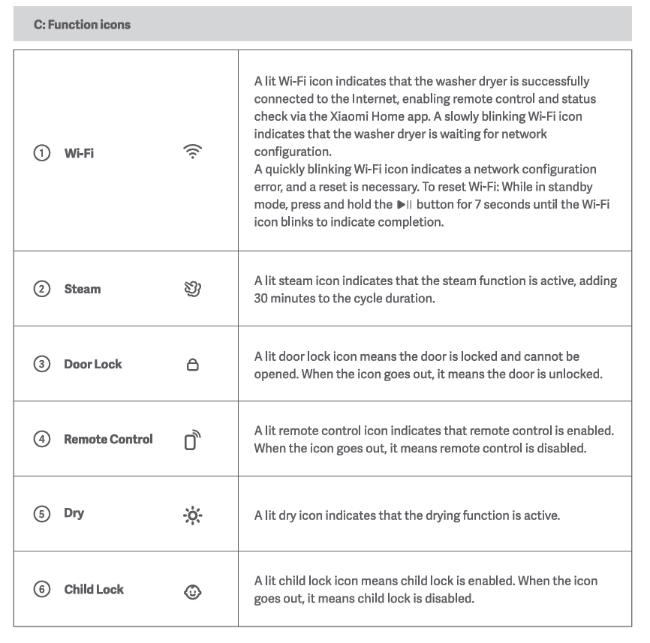
The meanings of function icons on the left side of the panel on the Mijia Front Load Washer Dryer 10.5kg are as follows:
1. A lit Wi-Fi icon indicates that the washer dryer is successfully connected to the Internet, enabling remote control and status check via the Mi Home/Xiaomi Home APP. A slowly blinking Wi-Fi icon indicates that the washer dryer is waiting for network configuration. A quickly blinking Wi-Fi icon indicates a network configuration error, and a reset is necessary. To reset Wi-Fi: While in standby mode, press and hold the button for 7 seconds until the Wi-Fi icon blinks to indicate completion;
2. A lit Steam icon indicates that the steam function is active, adding 30 minutes to the cycle duration;
3. A lit Door Lock icon means the door is locked and cannot be opened. When the icon goes out, it means the door is unlocked;
4. A lit Remote Control icon indicates that remote control is enabled. When the icon goes out, it means remote control is disabled;
5. A lit Dry icon indicates that the drying function is active;
6. A lit Child Lock icon means Child Lock is enabled. When the icon goes out, it means Child Lock is disabled.
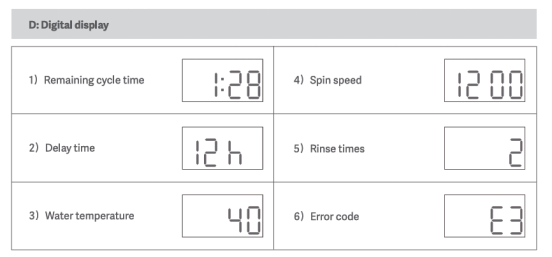
The meanings of digital display on the left side of the panel on the Mijia Front Load Washer Dryer 10.5kg are as follows:
1. Remaining cycle time is shown as the 1) in the figure;
2. Delay time is shown as the 2) in the figure;
3. Water temperature is shown as the 3) in the figure;
4. Spin speed is shown as the 4) in the figure;
5. Rinse times is shown as the 5) in the figure;
6. Error code is shown as the 6) in the figure.
1. The Smart icon means the program is suitable for washing or drying mixed loads of cotton linen and synthetic fabrics for daily wear;
2. The Quick icon means the program is suitable for washing or drying thin, lightly soiled fabrics;
3. The Intensive icon means the program is suitable for washing or drying moderately or heavily soiled fabrics. It is recommended to pre-treat stubborn stains with laundry detergent before machine washing;
4. The Wash & Dry icon means the program is suitable for washing and drying low-soil level synthetic fiber garments. Press the dry button to select the drying level: one press sets level 1(default ), two presses switch to level 2, and three presses switch to level 3;
5. The Dry Only icon means the program is suitable for separately drying cotton, linen, and synthetic fabrics (make sure to spin the laundry before drying until it no longer drips water);
6. The Refresh icon means the program refreshes and deodorizes small loads of fabrics using steam instead of water , with an added feature of wrinkle removal;
7. The Spin Only icon means the program removes excess water from the laundry by spinning;
8. The Cotton icon means the program is suitable for washing or drying cotton and linen fabrics;
9. The Mixture icon means the program is suitable for washing or drying most clothes that do not need to be sorted;
10. The Delicate icon means the program is suitable for washing easily deformed clothes such as knitwear and dresses;
11. The Bedding icon means the program is suitable for washing bed sets and lightweight quilts. It is recommended to only wash one type of quilt at a time;
12. The Hygiene icon means the program is suitable for washing or drying cotton items like clothing and bedding that can withstand high temperatures and have high sterilization requirements;
13. The Baby Care icon means the program is suitable for washing or drying baby clothes that are safe for high-temperature washing;
14. The Tub Clean icon means the program removes stains inside the drum. You can add drum cleaner , but do not load any laundry.
The meanings of buttons on the right side of the panel on the Mijia Front Load Washer Dryer 10.5kg are as follows:
1. The Power icon means that press and hold the button for 1 second to turn on the washer dryer; press and hold the button for 2 seconds to turn it off;
2. The Start/Pause icon means that press the button to start or pause a cycle, pressing the button during a cycle will pause the washer dryer, pressing the button again will resume operation;
3. The Program icon means that after the appliance is turned on, press the program button to select a desired program. The indicator for the selected program on the blink and the display will show the duration of the program;
4. The Dry icon means that press this button to activate the drying function , and select an appropriate drying level based on the items to be dried: smart drying, 30minutes, 60 minutes, 90 minutes, 120 minutes, 180 minutes, or no drying. Options will vary by program (smart drying is displayed as "AU", and no drying is displayed as "OFF");
Note:
Timed drying will not fully dry all items. Select an appropriate time based on the load size.
5. The Delay icon means that press the Delay button to enter the delay mode, and repeatedly press the button to cycle through available delay options. Each press adds 1 hour, up to a maximum of 24 hours. Subsequent presses will cycle through the minimum delay time, 24 hours, and the current remaining time;
6. The Steam icon means that in standby mode, press the steam button to activate the steam function, which can effectively remove bacteria from the laundry. When the steam function is activated, its icon will remain lit during the cycle and go out after the cycle ends. If the set water temperature is 40°C ,60°C, or 90°C in the cycle, it will remain unchanged; if the set water temperature is below 40°C, the program will automatically default to 40°C;
7. The Temp. icon means that press the Temp. Button to select an appropriate water temperature based on the items to be washed: cold water, 30°C, 40°C, 60°C, or 90°C. Options will vary by program. Cold water is displayed as "--". Water temperature can only be set before a cycle starts or during the paused state before heating begins. Once heating starts, the water temperature cannot be adjusted;
8. The Child Lock icon means that press and hold the dry button, and the Child Lock icon will light up or go out, indicating that Child Lock is enabled or disabled;
9. The Extra Rinse means that press and hold the delay button to add another rinse cycle;
10. The Remote Control means that press and hold the steam button and the temp. button together, and the Remote Control icon will light up or go out, indicating that remote control is enabled or disabled. Interaction with other devices is not supported when remote control is disabled.
The meanings of function icons on the left side of the panel on the Mijia Front Load Washer Dryer 10.5kg are as follows:
1. A lit Wi-Fi icon indicates that the washer dryer is successfully connected to the Internet, enabling remote control and status check via the Mi Home/Xiaomi Home APP. A slowly blinking Wi-Fi icon indicates that the washer dryer is waiting for network configuration. A quickly blinking Wi-Fi icon indicates a network configuration error, and a reset is necessary. To reset Wi-Fi: While in standby mode, press and hold the button for 7 seconds until the Wi-Fi icon blinks to indicate completion;
2. A lit Steam icon indicates that the steam function is active, adding 30 minutes to the cycle duration;
3. A lit Door Lock icon means the door is locked and cannot be opened. When the icon goes out, it means the door is unlocked;
4. A lit Remote Control icon indicates that remote control is enabled. When the icon goes out, it means remote control is disabled;
5. A lit Dry icon indicates that the drying function is active;
6. A lit Child Lock icon means Child Lock is enabled. When the icon goes out, it means Child Lock is disabled.
The meanings of digital display on the left side of the panel on the Mijia Front Load Washer Dryer 10.5kg are as follows:
1. Remaining cycle time is shown as the 1) in the figure;
2. Delay time is shown as the 2) in the figure;
3. Water temperature is shown as the 3) in the figure;
4. Spin speed is shown as the 4) in the figure;
5. Rinse times is shown as the 5) in the figure;
6. Error code is shown as the 6) in the figure.
Does it help?
Yes
No