

How to use the Hygiene program of the Mijia Front Load Washer Dryer 10.5kg?
The Mijia Front Load Washer Dryer 10.5kg features Hygiene program, which is designed to deliver a deeper, more sanitizing clean for items that need extra care. By targeting deep cleaning without harsh treatment, it ensures thorough hygiene while remaining gentle on fabrics.
To use the Hygiene program on the Mijia Front Load Washer Dryer 10.5kg, please refer to the following steps:
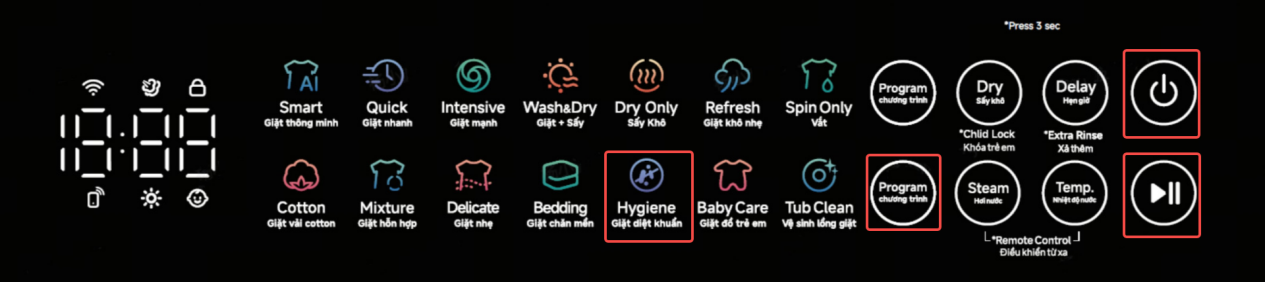
1. Please press and hold the Power button to turn on;
2. Put the clothes into the drum and close the door;
3. Repeatedly press the Program button on the upper side of the device’ panel;
4. Select the Hygiene program;
5. Press the Start button to run the Hygiene program.
Note:
The Hygiene program is suitable for washing or drying cotton items like clothing and bedding that can withstand high temperatures and have high sterilization requirements.
To use the Hygiene program on the Mijia Front Load Washer Dryer 10.5kg, please refer to the following steps:
1. Please press and hold the Power button to turn on;
2. Put the clothes into the drum and close the door;
3. Repeatedly press the Program button on the upper side of the device’ panel;
4. Select the Hygiene program;
5. Press the Start button to run the Hygiene program.
Note:
The Hygiene program is suitable for washing or drying cotton items like clothing and bedding that can withstand high temperatures and have high sterilization requirements.
Does it help?
Yes
No