

Xiaomi Robot Vacuum H40 FAQ
Summary
1. Q: What is the Xiaomi Robot Vacuum H40?
A: The Xiaomi Robot Vacuum H40 is an intelligent integrated robot that combines cleaning, sweeping, mopping, and dust collection functions. It can autonomously complete sweeping and mopping tasks at home. After cleaning, it returns to the charging base for recharging and can collect the swept debris into the dust compartment, significantly reducing the workload of cleaning the floor and handling of dust compartment.
2. Q: What are the features of the Xiaomi Robot Vacuum H40?
A: The following are the features of the Xiaomi Robot Vacuum H40:
1. The Xiaomi Robot Vacuum H40 features a 5200mAh large capacity battery;
2. It has a strong suction power of 10000Pa, and can be controlled through the Mi Home/Xiaomi Home APP. The strong suction power brings a deeper and more efficient cleaning experience;
3. It has a 4L large capacity disposable bag, up to 90 days of dust-free;
4. The Xiaomi Robot Vacuum H40 features a double anti-wrapping brush on both sides, ensuring no hair worries.
3. Q: How to use the power button of the Xiaomi Robot Vacuum H40?
A: Press and hold the power button of the Xiaomi Robot Vacuum H40 to turn it on or off. Press the power button of the Xiaomi Robot Vacuum H40 to start or pause it while turned on.
4. Q: How to use the recharge button of the Xiaomi Robot Vacuum H40?
A: To use the recharge button of the Xiaomi Robot Vacuum H40, please refer to the following methods:
1. Press to pause while running;
2. Press to start docking when it is paused;
3. Press to stop docking when it returns to the auto-empty station;
4. Press and hold for 3 seconds to enable or disable the child lock.
Note:
Press any button on the robot vacuum to pause during operation or returning to the auto-empty station.
5. Q: What does the indicators on the Xiaomi Robot Vacuum H40 mean?
A: For your reference, here are the indicator statuses on the main unit of the Xiaomi Robot Vacuum H40:
1. White: Working normally;
2. Breathing white: In charging (medium/high battery level);
3. Blinking in white: Positioning/Returning to the charging dock;
4. Orange: Wi-Fi disconnected;
5. Blinking in orange: Running (low battery)/Awaiting connection/Robot vacuum error;
6. Breathing orange: In charging (low battery level);
7. Blinking in blue: Connecting to Wi-Fi/Updating;
8. Blue: Wi-Fi connected;
9. Off: Shut down/In sleep.
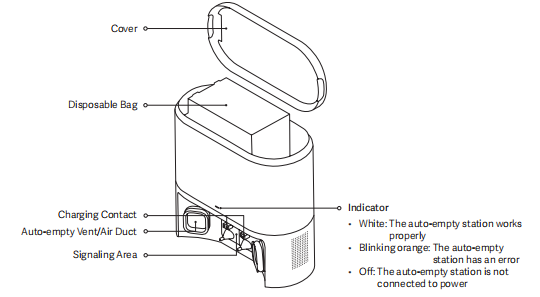
For your reference, here are the indicator statuses on the auto-empty station:
1. White: The auto-empty station works properly;
2. Blinking orange: The auto-empty station has an error;
3. Off: The auto-empty station is not connected to power.
Product Introduction
1. Q: What are the accessories of the Xiaomi Robot Vacuum H40?
A: The accessories installed of the Xiaomi Robot Vacuum H40 include: Brush, Brush Cover, Dust Compartment. Other accessories include Mop Pad and Water Tank Assembly (with mounted mop pad), Side Brush, Power Cord, Auto-empty Station.
After unpacking, it is recommended to check according to the instructions in the list of accessories in the manual. If there is any missing items, please fully unfold the lining inside the package to confirm whether it is missing and contact the after-sales service for consultation.
2. Q: What are the main functional components of the Xiaomi Robot Vacuum H40?
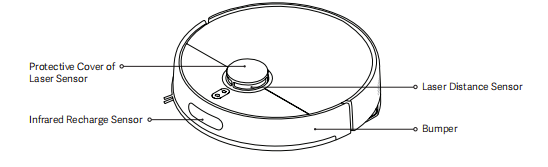
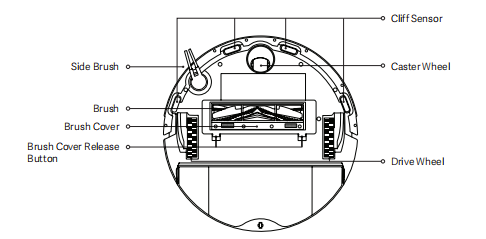
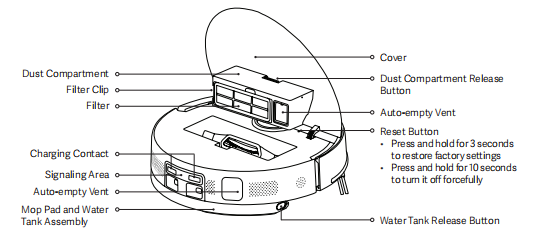
A: The following are the main functional components of the Xiaomi Robot Vacuum H40:
1. On the robot vacuum’s housing are the Protective Cover of Laser Sensor, Infrared Recharge Sensor, Laser Distance Sensor, and Bumper;
2. On the underside are the Side Brush, Cliff Sensors, Caster Wheel, Drive Wheels, Brush Cover Release Button, Brush Cover, and Brush;
3. Under the top cover are the dust compartment and reset button;
4. At the rear are the Mop Pad and Water Tank Assembly, along with the Water Tank Release Button;
5. On the auto-empty station are the Signaling Area, Charging Contacts, Auto-empty Vent/Air Duct, Indicator, Disposable Bag and Cover;
6. On the dust compartment are the Dust Compartment Release Button, Filter, Filter Clip and Auto-empty Vent;
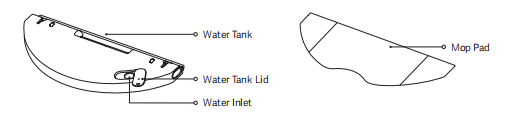
7. On the mop pad and water tank assembly are the Water Tank, Water Tank Lid, Water Inlet, and Mop Pad.
3. Q: How to check the SN on the Xiaomi Robot Vacuum H40?
A: You can check the SN of the Xiaomi Robot Vacuum H40 by looking at the label at the bottom of the main unit.
4. Q: Can the Xiaomi Robot Vacuum H40 be used directly after unpacking?
A: The Xiaomi Robot Vacuum H40 can be used directly. It is recommended to check whether there are missing parts after unpacking, then open the Xiaomi Robot Vacuum H40 and use it according to the instructions.
When used for the first time, please manually place the main unit on the auto-empty station and align it with the charging contacts. Let the Xiaomi Robot Vacuum H40 be fully charged before using it.
5. Q: Which mode is recommended for using the Xiaomi Robot Vacuum H40 for the first time?
A: The cleaning mode is priority when using the Xiaomi Robot Vacuum H40 for the first time. In a scene with a lot of dust and debris at home, it is recommended not to use the mopping function for the first time. Choose the vacuuming mode to complete the overall cleaning. After installing the mopping component, choose the vacuuming and mopping mode.
6. Q: Why does the Xiaomi Robot Vacuum H40 need to wipe its appearance regularly?
A: The Xiaomi Robot Vacuum H40 has cleaning functions such as vacuuming, mopping and collecting garbage. Regular dumping of garbage, cleaning the main brush and side brush can restore the cleaning ability of the robot vacuum.
It is equipped with various sensors. It needs to explore its surroundings and map the area. Therefore, when the device gets dirty, promptly clean the surrounding dust with a wrung-out damp cloth to remove foreign objects and restore its recognition capabilities. Do not use cleaning agents or detergents for spraying to clean.
7. Q: How does the Xiaomi Robot Vacuum H40 enter standby mode after completing a task?
A: After completing the task, it is recommended to return the Xiaomi Robot Vacuum H40 to the auto-empty station for charging and enter standby mode to ensure that the device's battery has sufficient power. If the device is not on the station, you can manually press the power button to turn off the device to conserve power. (It will automatically shut down when the device is in standby mode for a long time, which is normal).
8. Q: What to do if the side brush of the Xiaomi Robot Vacuum H40 is tangled together?
A: When the side brush of the Xiaomi Robot Vacuum H40 is entangled with the object, please clean the side brush in time and check whether the bristles of the side brush are fallen off or damaged. When cleaning again, you can first clean the items that are easy to entangle on the ground, such as wool and rope.
9. Q: What to do if the Xiaomi Robot Vacuum H40 can't be shut down on the auto-empty station?
A: The Xiaomi Robot Vacuum H40 is always in standby mode when charging on the auto-empty station. To turn off the device, you need to let the device leave the auto-empty station, press and hold the power button for 3 seconds to turn off the device.
10. Q: What types of living scenarios can the Xiaomi Robot Vacuum H40 be used in?
A: The Xiaomi Robot Vacuum H40 is only used for floor cleaning in a home environment. Do not use it outdoors, on non-floor surfaces, commercial or industrial environments. It can cause device failure, loss and other consequences.
11. Q: How to use the Do Not Disturb mode of the Xiaomi Robot Vacuum H40?
A: The Do Not Disturb mode of the Xiaomi Robot Vacuum H40 is enabled by default from 10:00 PM to 8:00 AM. You can disable the Do Not Disturb mode or adjust its duration through the Mi Home/Xiaomi Home APP.
During the Do Not Disturb mode, the robot vacuum will not automatically resume cleaning or actively broadcast the audio message, and the indicator will go out.
12. Q: How to use the scheduled cleanup of the Xiaomi Robot Vacuum H40?
A: The scheduled cleaning time of the Xiaomi Robot Vacuum H40 can be set in the Mi Home/Xiaomi Home APP.
Once a scheduled time is set, the robot vacuum will automatically start cleaning at the specified time and return to the auto-empty station for charging after cleaning.
13. Q: How to save a complete map on the Xiaomi Robot Vacuum H40?
A: To save the complete map on the Xiaomi Robot Vacuum H40, press the power button to start cleaning or tap [Start cleanup] in the Mi Home/Xiaomi Home APP. The main unit starts from the auto-empty station and it will save a temporary map before completing the cleaning. It will automatically return to the auto-empty station and create a complete map. (When cleaning, please open the door of the cleaning area to ensure the integrity of the map.)
14. Q: How does the Xiaomi Robot Vacuum H40 clean the whole house?
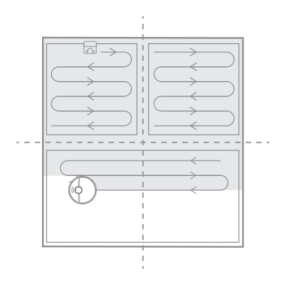
A: After the first start, the Xiaomi Robot Vacuum H40 first cleans in an arc shape according to the 4.5m × 4.5m area until all areas are covered.
After the map is created, the robot vacuum cleans the room according to the room. It first cleans along the edge and then cleans in an bow-shape to complete the room's cleaning. The room will be cleaned in sequence, orderly and efficiently, covering all areas without omission. After the cleaning is completed, the robot vacuum will automatically return to the auto-empty station.
15. Q: Can the Xiaomi Robot Vacuum H40 stay charged in all the time?
A: The Xiaomi Robot Vacuum H40 supports overcharge protection. It will automatically switch to low current charging once the battery is fully charged.
16. Q: Does the Xiaomi Robot Vacuum H40 have motor overload protection?
A: All motors on the Xiaomi Robot Vacuum H40 have overload protection function, including the brush motor, side brush motor and drive wheel motor. If foreign objects or severe blockage result in overload, the protection mechanism will automatically start.
17. Q: Does the Xiaomi Robot Vacuum H40 need to replace consumables regularly?
A: The consumables of the Xiaomi Robot Vacuum H40 include brush, side brush, brush cover, filter, mop, etc., which need to be replaced regularly to ensure the normal function and cleaning ability of the device.
Recommended maintenance guidelines are as follows:
18. Q: How to use the auto-empty station of the Xiaomi Robot Vacuum H40?
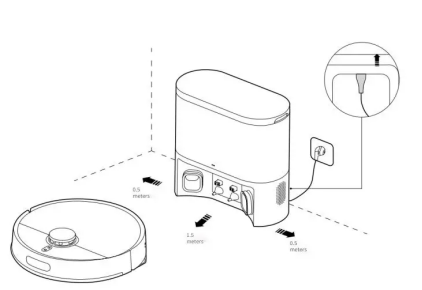
A: Place the auto-empty station of the Xiaomi Robot Vacuum H40 on the horizontal ground with the wall attached, ensure that the space on both sides of the auto-empty station is more than 0.5m, and connect the plug to the power socket. In order to get a better use experience, please place the auto-empty station within the Wi-Fi coverage range.
Please refer to the following steps and pictures:
1. Place the auto-empty station against the wall and connect it to the power supply;
2. Connect the power adapter to the auto-empty station.
Note:
1. Do not expose the auto-empty station to direct sunlight;
2. Do not use the auto-empty station on the carpet.
3. Do not place any objects within 0.5 meters on both sides of the auto-empty station and 1.5 meters in front;
4. Make sure the back of the auto-empty station is placed against the wall.
5. To ensure the battery’s optical performance, fully charge the battery for the first time before first.
19. Q: How to charge the Xiaomi Robot Vacuum H40?
A: Press and hold the Power button of the Xiaomi Robot Vacuum H40 until the indicator turns on, then place the robot vacuum on the auto-empty station for charging.
Note:
When the battery is low, the device can not be able to open. Place the robot vacuum directly on the auto-empty station.
20. Q: How to clean the mop pad of the Xiaomi Robot Vacuum H40?
A: To clean the mop pad of the Xiaomi Robot Vacuum H40, please refer to the following steps:
1. Press and hold two water tank release buttons to remove the mop pad and water tank assembly;
2. Remove the mop pad by peeling off the velcro straps;
3. Clean it and dry it thoroughly.
Note:
1. Make sure the mop pad is clean before use, as the mopping performance can be affected if the mop pad becomes too dirty;
2. For the best cleaning results, it is recommended to replace the mop pad every 3-6 months.
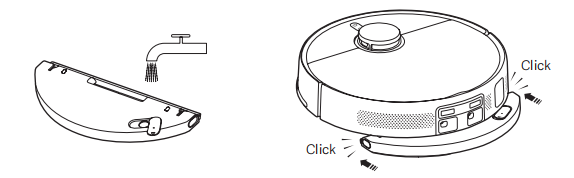
21. Q: How to fill the water tank of the Xiaomi Robot Vacuum H40?
A: To add water to the water tank of the Xiaomi Robot Vacuum H40, please refer to the following information:
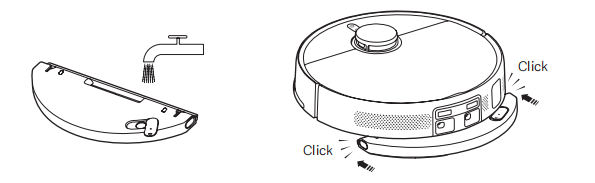
1. Press and hold two water tank release buttons to remove the mop pad and water tank assembly;
2. Open the water tank lid, add tap water, and cover the water tank lid;
3. Install the mop pad and water tank assembly in the direction shown in the figure. It is installed properly when you hear a "click" sound.
Note:
1. Do not add liquids such as hot water, detergent, or disinfectant into the water tank to prevent damaging the robot vacuum;
2. The functions of the robot vacuum are inspected before leaving the factory, so there can be some water residues in it. This is normal.
22. Q: How to start the cleaning function of the Xiaomi Robot Vacuum H40?
A: Press the power button of the Xiaomi Robot Vacuum H40 to start cleaning. Press any button to pause during cleaning.
Note:
1. Before cleaning, please fully charge and start the robot vacuum from the auto-empty station. During the cleaning process, do not move the auto-empty station at will;
2. If the battery of the device is insufficient, you cannot start cleaning. Please charge first and then start cleaning.
23. Q: How to return the Xiaomi Robot Vacuum H40 to the auto-empty station for charging?
A: After cleaning, the Xiaomi Robot Vacuum H40 will automatically return to the auto-empty station for charging. In the suspended state, press the recharge button to start recharging. During charging, the power button will pulse with a breathing light.
Note:
If the robot vacuum does not find the auto-empty station, it will automatically return to the starting point of cleaning. Please manually put it back into the auto-empty station for charging.
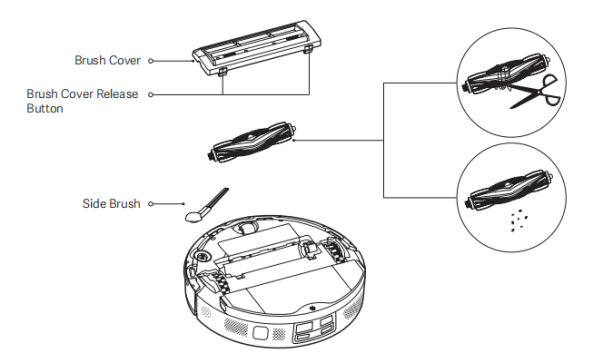
24. Q: How to maintain the brush and side brush of the Xiaomi Robot Vacuum H40?
A: To maintain the brush and side brush of the Xiaomi Robot Vacuum H40, please refer to the following steps:
1. Pull out the side brush upwards;
2. Press the brush cover release buttons to remove the brush cover and take out the brush;
3. Clean the side brush and the brush;
4. After cleaning, reinstall the brush, brush cover, and side brush in order.
25. Q: How to maintain the dust compartment and filter of the Xiaomi Robot Vacuum H40?
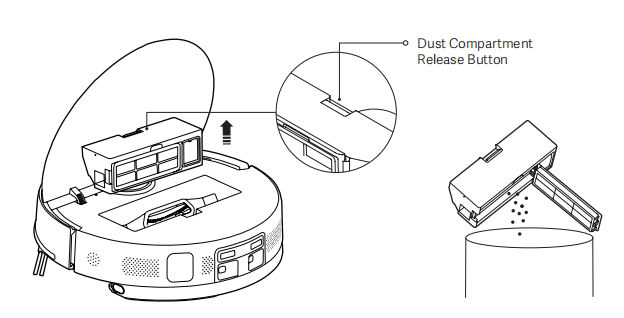
A: To empty the dust compartment the Xiaomi Robot Vacuum H40, please refer to the following information:
1. Open the cover of the robot vacuum, and press the dust compartment release button to remove the dust compartment upward from the robot vacuum;
2. Open the dust compartment cover and empty the debris.
Note:
Regularly clean the filter to prevent it from becoming clogged.
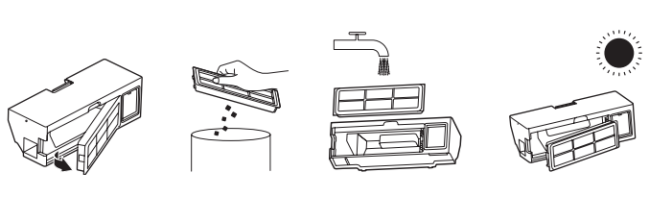
To clean the dust compartment and filter, please refer to the following information:
1. Release the filter clip to open the filter and remove it;
2. Rinse the filter and gently tap its edge repeatedly to remove any dirt until it is clean;
3. Open the dust compartment cover, fill the dust compartment with clean water, and clean the dust compartment;
4. Dry the dust compartment and the filter thoroughly before reinstalling them for use.
Note:
1. Do not attempt to clean the filter with a hard object, such as a brush or your fingers;
2. Only use clean water to clean the dust compartment and the filter. Do not use detergent;
3. Dry the dust compartment and the filter thoroughly before use.
26. Q: Will the yellowing of the charging contact of Xiaomi Robot Vacuum H40 affect its use?
A: The charging contact of the Xiaomi Robot Vacuum H40 is exposed to the environment. With the increase of use time, oxidation and yellowing can occur to varying degrees, which is a normal phenomenon. This will not affect the charging function, however, it is recommended to regularly wipe the electrodes with a dry cloth.
27. Q: How to maintain the battery of the Xiaomi Robot Vacuum H40?
A: The Xiaomi Robot Vacuum H40 has a set of built-in high-performance lithium-ion rechargeable batteries. To maintain the battery performance, please keep the robot vacuum charged during daily use.
Note:
If you have not used the device for a long time, please turn off the power. Charge the device at least once every three months to avoid battery damage due to over-discharge.
28. Q: Does the Xiaomi Robot Vacuum H40 support child lock?
A: The Xiaomi Robot Vacuum H40 supports child lock function. Press and hold the recharge button for 3 seconds to enable or disable the child lock.
29. Q: Does the Xiaomi Robot Vacuum H40 support ultraviolet light?
A: The Xiaomi Robot Vacuum H40 does not support ultraviolet light.
30. Q: Does the Xiaomi Robot Vacuum H40 support electrolysis of water?
A: The Xiaomi Robot Vacuum H40 does not support electrolysis of water.
31. Q: How to reset the Xiaomi Robot Vacuum H40?
A: You can press and hold the reset button on the Xiaomi Robot Vacuum H40 for 3 seconds to reset the device.
After hearing the voice prompt, the main unit will automatically restart. Scheduled cleanup, Wi-Fi, and other related settings will be restored to factory defaults.
32. Q: Does the Xiaomi Robot Vacuum H40 have water shortage reminder and dust compartment full reminder?
A: The Xiaomi Robot Vacuum H40 does not provide alerts for low water levels and a full dust compartment.
33. Q: Can the stickers be put on the Xiaomi Robot Vacuum H40?
A: It is recommended not to use stickers on the Xiaomi Robot Vacuum H40. When using stickers on the Xiaomi Robot Vacuum H40, they can cover the lidar above the device and the infrared sensor in front of the bumper, affecting the operation of the device.
34. Q: How to create a map on the Xiaomi Robot Vacuum H40?
A: Press the power button of the Xiaomi Robot Vacuum H40 to start cleaning, or tap [Start cleanup] on the Mi Home/Xiaomi Hone APP. The robot vacuum starts from the auto-empty station and saves a temporary map before completing the cleaning. It automatically returns to the auto-empty station and creates a complete map. (When cleaning, please open the door of the cleaning area to ensure the integrity of the map.)
35. Q: Does the Xiaomi Robot Vacuum H40 support direct rinsing with water when it gets dirty?
A: The Xiaomi Robot Vacuum H40 does not support direct rinsing with water. If you rinse it directly with water, the water will enter the device and damage its internal electronic components. It is recommended to remove accessories such as the brush cover, brush, side brush, dust compartment, and mop pad for individual cleaning. Make sure all parts are completely dry before reinstalling and using them.
36. Q: How to use the Xiaomi Robot Vacuum H40 to clean stubborn stains?
A: It is recommended to add water in advance to soften stubborn stains before using the Xiaomi Robot Vacuum H40.
37. Q: Does the Xiaomi Robot Vacuum H40 support small object recognition?
A: The Xiaomi Robot Vacuum H40 does not support small object recognition.
38. Q: What are the precautions when using using Xiaomi Robot Vacuum H40 for the first time?
A: The precautions when using the Xiaomi Robot Vacuum H40 for the first time are as follows:
1. The Xiaomi Robot Vacuum H40 is equipped with a 5200mah battery. The device has about 30% power before leaving the factory. It is recommended to fully charge after opening the box for use;
2. Fill the tank with water;
3. Connect the robot vacuum to the Mi Home/Xiaomi Home APP and Wi-Fi network, then place the robot vacuum on the auto-empty station to begin cleaning.
39. Q: Can the Xiaomi Robot Vacuum H40 go around leg tables and chairs while cleaning?
A: When the Xiaomi Robot Vacuum H40 encounters a table or chair leg, it will clean along the edge.
40. Q: How long does the Xiaomi Robot Vacuum H40 to clean a room?
A: In order to ensure the cleaning ability, the Xiaomi Robot Vacuum H40 moves at a speed of 0.3m/s. The cleaning time will fluctuate according to the complexity of the home environment.
41. Q: Why can't the Xiaomi Robot Vacuum H40 avoid bumping into a scale or building blocks?
A: The Xiaomi Robot Vacuum H40 navigates and avoids obstacles through mechanical bumper and LDS laser navigation. If the object is less than 3cm, it is recommended to put away items such as scale and socket before mopping the floor.
42. Q: Is it normal for the water tank to have water in in it when opening the Xiaomi Robot Vacuum H40 for the first time?
A: It is normal for the water tank to have water in it when opening the Xiaomi Robot Vacuum H40 for the first time.
The robot vacuum is inspected before leaving the factory, including a water tank inspection using clean water. After the inspection, the water is drained, but some residual moisture can remain inside the tank.
43. Q: Does the Xiaomi Robot Vacuum H40 support carpet recognition?
A: The Xiaomi Robot Vacuum H40 does not support carpet recognition.
44. Q: Can the Xiaomi Robot Vacuum H40 automatically clean the mop pad?
A: The Xiaomi Robot Vacuum H40 does not support automatic cleaning of the mop pad. The mop pad needs to be manually disassembled and cleaned. It is recommended to clean the mop pad after each task is completed.
45. Q: Can water be added during the Xiaomi Robot Vacuum H40’s cleaning process?
A: If you need to add water during the Xiaomi Robot Vacuum H40’s cleaning process, you can press any button to pause, take out the tank, refill it, then put back and press the Recharge button to continue working. The mop pad needs to be cleaned manually.
46. Q: Why does the Xiaomi Robot Vacuum H40 return to charge midway and then continue cleaning?
A: When the battery of the Xiaomi Robot Vacuum H40 is low during cleaning, the main unit will return to the auto-empty station for charging. When the device is fully charged, it will leave the auto-empty station and continue the unfinished task last time.
APP Related
1. Q: How to connect the Xiaomi Robot Vacuum H40 to the Mi Home/Xiaomi Home APP?
A: The Xiaomi Robot Vacuum H40 supports connecting to the Mi Home/Xiaomi Home APP and can be controlled through the APP.
To connect the Xiaomi Robot Vacuum H40, please refer to the following steps:
1. Download and install the Mi Home/Xiaomi Home APP. If you have installed the APP, it will take you directly to the device connection page. Alternatively, you can search for "Mi Home/Xiaomi Home" in the APP store to download and install it;
2. Open the home page of the Mi Home/Xiaomi Home APP, tap the [+] icon at the top right corner of the screen, and follow the on-screen instructions to add the Xiaomi Robot Vacuum H40.
Note:
1. Due to the update of Mi Home/Xiaomi Home APP, actual operations can differ slightly from the descriptions above. Please refer to the current instructions within the APP for accurate guidance;
2. Only 2.4GHz Wi-Fi networks are supported;
3. When the robot vacuum connects with the Mi Home/Xiaomi Home APP successfully, it connects with the network successfully. You can have a reset of Wi-Fi to disconnect it from the network.
2. Q: How to reset the Wi-Fi on Xiaomi Robot Vacuum H40?
A: When the Xiaomi Robot Vacuum H40 cannot connect to the router due to configuration modification, forgotten password or other reasons. Press and hold on both the Power button and the Recharge button for 7 seconds until you hear a voice prompt. Wait for the Wi-Fi indicator to start flashing again, indicating that the reset was successful.
3. Q: How to update the firmware of the Xiaomi Robot Vacuum H40?
A: You can update the firmware of the Xiaomi Robot Vacuum H40 via the Mi Home/Xiaomi Home APP. Before updating, make sure the robot vacuum is placed on the auto-empty station and has at least 15% battery.
4. Q: How to quickly create a map with the Xiaomi Robot Vacuum H40?
A: Press the Power button of the Xiaomi Robot Vacuum H40 to start cleaning, or tap [Start cleanup] in the Mi Home/Xiaomi Home APP. The robot vacuum will start from the auto-empty station and save a temporary map before completing the cleaning. Once cleaning is complete, it will return to the auto-empty station and generate a complete map. (When cleaning, please open the door of the cleaning area to ensure the integrity of the map.)
5. Q: What is the Do Not Disturb function of the Xiaomi Robot Vacuum H40?
A: During the Do Not Disturb mode, the Xiaomi Robot Vacuum H40 will not respond to continuous cleaning, scheduled cleanup or active voice broadcast. This mode is enabled by default at factory and the default time is from 10:00 PM to 8:00 AM. You can disable it in the Mi Home/Xiaomi Home APP.
6. Q: What is the memory map function of the Xiaomi Robot Vacuum H40?
A: For the first cleaning, the Xiaomi Robot Vacuum H40 starts from the auto-empty station. After the cleaning is complete, it will automatically return to the auto-empty station. The map will only be saved after a full cleaning cycle. If you manually terminate the cleaning process or move back to the auto-empty station, the map will not be saved. Once the map is successfully created, you can divide, merge areas, or customize room names in the Mi Home/Xiaomi Home APP.
7. Q: What is the scheduled cleanup feature of the Xiaomi Robot Vacuum H40?
A: You can set the scheduled cleaning time of the Xiaomi Robot Vacuum H40 through the Mi Home/Xiaomi Home APP. The main unit will automatically start cleaning at the specified time, and return to the auto-empty station after cleaning is completed.
8. Q: What is the virtual wall function of the Xiaomi Robot Vacuum H40?
A: You can set up a virtual wall for the Xiaomi Robot Vacuum H40 in the Mi Home/Xiaomi Home APP to prevent the main unit from entering areas that do not need to be cleaned.
9. Q: How to edit the area on the Xiaomi Robot Vacuum H40?
A: To merge the rooms on the Xiaomi Robot Vacuum H40, please refer to the following instructions:
Open the Mi Home/Xiaomi Home APP and choose [Xiaomi Robot Vacuum H40] >> tap the three dots icon in the upper right corner >> tap [Map management] >> choose [Area edit] >> select two adjacent areas >> select [Merge].
To divide the rooms, please refer to the following instructions:
Open the Mi Home/Xiaomi Home APP and choose [Xiaomi Robot Vacuum H40] >> select [Map management] >> tap [Area edit] >> select the area to be divided (when dividing, please pay attention to the two endpoints of the division point, which need to be on the boundary of the area to be divided) >> [Confirm] >> rename the area >> tap [√] to save.
10. Q: How to reset the map of the Xiaomi Robot Vacuum H40?
A: To reset the map on the Xiaomi Robot Vacuum H40, please refer to the following steps:
Open the [Mi Home/Xiaomi Home] APP >> choose the [Xiaomi Robot Vacuum H40] card >> tap the three dots icon at the upper right corner >> select [Map management] and tap the map you want to delete >> tap the delete icon at the upper right corner to remove the map. After confirming, the map will be deleted, and you will need to create a new one.
11. Q: How to rename the map on the Xiaomi Robot Vacuum H40?
A: To rename the map on the Xiaomi Robot Vacuum H40, please refer to the following steps:
Open the Mi Home/Xiaomi Home APP >> choose the [Xiaomi Robot Vacuum S40C] card >> tap the three dots icon at the upper right corner >> select [Map management] >> tap the map you want to rename to enter a new name.
FAQs
1. Q: What to do if the the Xiaomi Robot Vacuum H40 cannot connect to the network?
A: If the Xiaomi Robot Vacuum H40 fails to connect to the network, please refer to the following tips:
1. Confirm that the Wi-Fi password entered during connection is correct. The Wi-Fi names cannot contain Chinese characters, and passwords should avoid special characters such as @, $, or %. Try changing the name and password to alphanumeric characters and reconnect;
2. Check that the router's external network connection is working properly. You can try to open a web page from your phone or computer connected to Wi-Fi to see if it works smoothly;
3. Make sure the distance between the router and the device is too far (more than 5 meters or there is a room between them). You can try moving the device within 1 to 2 meters of the router and try reconnecting;
4. Try to connect to the phone's hotspot;
5. Check whether your router is overloaded with connected smart devices, which could slow the network or cause disconnection. Restart the router and try again;
6. For now, it doesn't support the company's EAP802.1x certified network, 5GHz networks, or public Wi-Fi networks requiring web authentication. Switch to a supported network and try again;
7. Ensure the Mi Home/Xiaomi Home APP has permission to access the network and location on your phone. Enable these permissions and try again;
8. Connectivity issues could also be phone model-specific. Try using a different phone to connect;
9. Re-enter pairing mode and try pairing again.
2. Q: What to do if the Xiaomi Robot Vacuum H40 cannot charge properly?
A: Please check whether there is dust on the charging port or charging contact of the Xiaomi Robot Vacuum H40. Please wipe it clean before use.
3. Q: What to do if the Xiaomi Robot Vacuum H40 doesn't drain water?
A: If the Xiaomi Robot Vacuum H40 is not dispensing water, please check the following:
1. Confirm that water is added to the tank to the lowest water level;
2. Confirm that the water tank is installed in place;
3. Confirm that the fault is not eliminated after restarting. If there is any damage, please contact the after-sales service center.
4. Q: What measures should be taken before using the Xiaomi Robot Vacuum H40?
A: Make sure the Xiaomi Robot Vacuum H40 is fully charged before starting cleaning. Before cleaning, please clean the home environment in advance, and remove fragile items and debris from the home floor.
5. Q: Will the Xiaomi Robot Vacuum H40 have lower efficiency in complex environments?
A: To ensure a clean coverage, the Xiaomi Robot Vacuum H40 will clean all the corners. In more complex environments, increased movement and adjustments can reduce cleaning efficiency slightly.
6. Q: Why does the Xiaomi Robot Vacuum H40 make more noise when cleaning?
A: If the Xiaomi Robot Vacuum H40 is producing more noise than usual, consider the following:
1. It is necessary to confirm whether the brush is entangled with foreign matter and whether abnormal noise is generated. The brush needs to be cleaned in time, otherwise it will be damaged;
2. To ensure the cleaning effect, the robot vacuum adopts a fan with strong suction, which has strong dust collection effect and relatively large sound. If you want to reduce the noise, you can reduce the suction gear or switch the mode to reduce the noise.
7. Q: Why does the Xiaomi Robot Vacuum H40 make an abnormal sound when cleaning?
A: When the Xiaomi Robot Vacuum H40 operates on smooth tile floors and wooden floors, there can be a slight sound as the scraper at the bottom rubs against the floor. As the device passes through the joints between tiles and the floor, it contacts and cleans these gaps, which can also produce a slight sound. The above sounds do not affect the normal operation of the device.
8. Q: What to do if the Xiaomi Robot Vacuum H40 gets stuck while cleaning?
A: The Xiaomi Robot Vacuum H40 can get stuck on items like slippers or plastic bags. Once the obstruction is cleared, place the robot vacuum back in a clean area to resume cleaning. Please tidy up clutter before cleaning to avoid this issue. Please clear the clutter in your home before cleaning to avoid getting stuck during cleaning.
9. Q: Why does the Xiaomi Robot Vacuum H40 bump into the wall when cleaning along edges?
A: When cleaning along the edge, the Xiaomi Robot Vacuum H40 will keep a certain distance from the wall and occasionally bumping is normal.
10. Q: What to do if the Xiaomi Robot Vacuum H40 can't start up?
A: The battery of the Xiaomi Robot Vacuum H40 is insufficient. Please charge it on the auto-empty station before use. If the ambient temperature is too low (below 0℃) or too high (above 40℃), please use it in the environment of 0-40℃.
11. Q: What to do if the Xiaomi Robot Vacuum H40 can't be charged?
A: If the Xiaomi Robot Vacuum H40 can't be charged, please confirm whether the power cord of the auto-empty station is inserted at both ends. If the contact is bad, please clean the auto-empty station spring and the charging contact of the main unit.
12. Q: Why cannot the Xiaomi Robot Vacuum H40 be recharged?
A: The Xiaomi Robot Vacuum H40 can be unable to charge due to the following reasons:
1. It can be because the auto-empty station is placed on the carpet, please put it on the floor to use;
2. Ensure that there is no dust or obstruction on the surface of the charging contact of the auto-empty station;
3. The power cable can not be securely plugged in on both ends;
4. Ensure that there is enough space around the auto-empty station.
13. Q: What to do if the Xiaomi Robot Vacuum H40 can't remove stubborn stains when mopping the floor?
A: When mopping the floor with the Xiaomi Robot Vacuum H40, some stubborn stains cannot be removed and need to be cleaned manually.
14. Q: What to do if the Xiaomi Robot Vacuum H40 becomes dirtier when mopping?
A: If the Xiaomi Robot Vacuum H40 gets dirtier while mopping, please regularly clean the brush and the mop pad to maintain cleaning performance.
15. Q: What to do if the Xiaomi Robot Vacuum H40 moves backward?
A: If the Xiaomi Robot Vacuum H40 moves backward, please check the following possible causes:
1. Check whether there is any foreign matter wrapped in the drive wheel;
2. Confirm whether the LDS is normal;
3. Check the rotating part of the LDS for foreign matter or hair that causes slow rotation or stagnation. If so, try to remove it;
4. Please check whether there are any uneven or twisted stickers or large objects on the impact plate and the machine surface;
5. Try to press the bumper to check if it rebounds properly;
6. Try to restart the device and test it again.
16. Q: What to do if the Xiaomi Robot Vacuum H40 has abnormal collisions?
A: If the Xiaomi Robot Vacuum H40 has abnormal collisions, please try the following steps:
1. Gently press the bumper to check if it rebounds properly;
2. Restart the device and try again.
17. Q: What to do if the side brush of the Xiaomi Robot Vacuum H40 reports an error?
A: If the side brush of the Xiaomi Robot Vacuum H40 reports an error, please refer to the following:
1. Remove the side brush and check whether any debris or hair is tangled in the brush or its parts;
2. Restart the device and try again.
18. Q: Does the Xiaomi Robot Vacuum H40 support multiple connections?
A: The Xiaomi Robot Vacuum H40 does not support simultaneous connections with multiple accounts.
However, the device can be shared with others. You can share the device with other Xiaomi Accounts in the Mi Home/Xiaomi Home APP. The shared Xiaomi Accounts can do such basic operations on the robot vacuum as Start, Pause, Stop cleanup, or adjusting the suction and water level.
19. Q: Why is the Xiaomi Robot Vacuum H40 offline?
A: If the Xiaomi Robot Vacuum H40 appears offline, please check the following:
1. The Wi-Fi signal can be weak. Ensure the robot vacuum is placed in an area with a strong Wi-Fi signal;
2. There can be a Wi-Fi connection issue. Please reset the Wi-Fi and reconnect using the latest version of the Mi Home/Xiaomi Home APP;
3. Make sure the robot vacuum is powered on. When turned off, it will automatically switch to offline mode.
20. Q: What to do if the drive wheel of the Xiaomi Robot Vacuum H40 is not working properly?
A: If the drive wheel of the Xiaomi Robot Vacuum H40 is not working properly, try the following:
1. Check whether there is any debris or tangled hair in or around the drive wheel and its components;
2. If the drive wheel is too dirty, it can affect traction. Use a brush to clean the drive wheel thoroughly;
3. Restart the device and test it again.
21. Q: How to replace the disposable bag of the the Xiaomi Robot Vacuum H40?
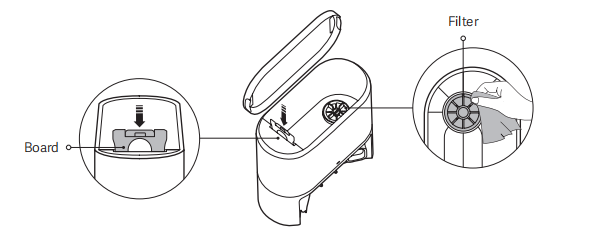
A: To replace the disposable bag of the Xiaomi Robot Vacuum H40, please refer to the steps:
1.Open the upper cover of the auto-empty station, pull the handle upwards, and take out the disposable bag to discard it;
Note:
Pulling the handle upwards will seal the disposable bag to effectively prevent dust or dirt from getting out.
2. Wipe the dust or dirt on the filter with a dry cloth.
3. Insert the board into the slot as illustrated to install it in place.
22. Q: What to do if the Xiaomi Robot Vacuum H40 returns to the auto-empty station without collecting dust?
A: Ensure that both ends of the power cable of the Xiaomi Robot Vacuum H40 are plugged in and the power supply is normal.
23. Q: Why does the dust collection time of the Xiaomi Robot Vacuum H40 is longer?
A: The reasons for the long dust collection time of the Xiaomi Robot Vacuum H40 are as follows:
1. When the auto-empty station detects that the dust collection port or air duct is not smooth, the dust collection time can be prolonged. Please clean the dust collection port or air duct in time;
2. After the auto-empty station has been used for a period of time, it can prolong the dust collection time to maintain stable operation, which is normal;
3. Dust collection or adjustment of dust collection frequency will also affect the automatic dust collection function;
4. Check whether the dust bag is not installed or not properly installed.
24. Q: What to do if hair gets tangled in the brush of the Xiaomi Robot Vacuum H40?
A: If hair gets tangled in the brush of the Xiaomi Robot Vacuum H40, please follow these steps:
1. If hair is wrapped around the brush end cover, pull out the end cover to remove the tangled hair;
2. After cleaning, reattach the brush end cover to the brush and reinstall the brush into the vacuum robot. Close the brush cover before using the robot vacuum again.
25. Q: What to do if there is hair on the floor after vacuuming or mopping with the Xiaomi Robot Vacuum H40?
A: If there is still hair on the floor after vacuuming or mopping with the Xiaomi Robot Vacuum H40, it is recommended to use the Vacuuming before mopping mode for better cleaning results.
26. Q: Why can’t the Xiaomi Robot Vacuum H40 reach the designated area?
A: If the Xiaomi Robot Vacuum H40 is assigned to clean a designated area and there are no obstacles in its path, but it still cannot reach the area, check the map list in the Mi Home/Xiaomi Home APP. If there are similar or duplicate maps, delete them to prevent the robot vacuum from switching to the wrong map due to re-localization.
27. Q: What to do if the Xiaomi Robot Vacuum H40 can't get over the slope?
A: Please check whether the slope angle is too large or the Xiaomi Robot Vacuum H40 slips. If this problem occurs, it is recommended to move the v to a flat scene for use, or improve the slope angle and smoothness of the slope and try again.
28. Q: What to do if the Xiaomi Robot Vacuum H40 cannot return to the auto-empty station properly?
A: If the Xiaomi Robot Vacuum H40 cannot return to the auto-empty station properly, check whether the power cable of the auto-empty station is securely plugged in. Also, inspect the charging springs on the dock. If they are dirty, wipe them clean before retrying.
29. Q: Why can't the Xiaomi Robot Vacuum H40 climb slopes that it used to climb?
A: Over time, the drive wheels of the Xiaomi Robot Vacuum H40 can accumulate dust and debris, which reduces traction and affects its ability to cross obstacles or climb slopes. It is recommended to clean the surface of the drive wheels with a brush once a week to maintain performance.
30. Q: What to do if the water tank of the Xiaomi Robot Vacuum H40 falls off?
A: If the water tank of the Xiaomi Robot Vacuum H40 falls off, it is due to improper installation. When installing the water tank, make sure it is securely in place.
Install the mop pad and water tank assembly in the direction shown in the figure. It is installed properly when you hear a "click" sound.
1. Q: What is the Xiaomi Robot Vacuum H40?
A: The Xiaomi Robot Vacuum H40 is an intelligent integrated robot that combines cleaning, sweeping, mopping, and dust collection functions. It can autonomously complete sweeping and mopping tasks at home. After cleaning, it returns to the charging base for recharging and can collect the swept debris into the dust compartment, significantly reducing the workload of cleaning the floor and handling of dust compartment.
2. Q: What are the features of the Xiaomi Robot Vacuum H40?
A: The following are the features of the Xiaomi Robot Vacuum H40:
1. The Xiaomi Robot Vacuum H40 features a 5200mAh large capacity battery;
2. It has a strong suction power of 10000Pa, and can be controlled through the Mi Home/Xiaomi Home APP. The strong suction power brings a deeper and more efficient cleaning experience;
3. It has a 4L large capacity disposable bag, up to 90 days of dust-free;
4. The Xiaomi Robot Vacuum H40 features a double anti-wrapping brush on both sides, ensuring no hair worries.
3. Q: How to use the power button of the Xiaomi Robot Vacuum H40?
A: Press and hold the power button of the Xiaomi Robot Vacuum H40 to turn it on or off. Press the power button of the Xiaomi Robot Vacuum H40 to start or pause it while turned on.
4. Q: How to use the recharge button of the Xiaomi Robot Vacuum H40?
A: To use the recharge button of the Xiaomi Robot Vacuum H40, please refer to the following methods:
1. Press to pause while running;
2. Press to start docking when it is paused;
3. Press to stop docking when it returns to the auto-empty station;
4. Press and hold for 3 seconds to enable or disable the child lock.
Note:
Press any button on the robot vacuum to pause during operation or returning to the auto-empty station.
5. Q: What does the indicators on the Xiaomi Robot Vacuum H40 mean?
A: For your reference, here are the indicator statuses on the main unit of the Xiaomi Robot Vacuum H40:
1. White: Working normally;
2. Breathing white: In charging (medium/high battery level);
3. Blinking in white: Positioning/Returning to the charging dock;
4. Orange: Wi-Fi disconnected;
5. Blinking in orange: Running (low battery)/Awaiting connection/Robot vacuum error;
6. Breathing orange: In charging (low battery level);
7. Blinking in blue: Connecting to Wi-Fi/Updating;
8. Blue: Wi-Fi connected;
9. Off: Shut down/In sleep.
For your reference, here are the indicator statuses on the auto-empty station:
1. White: The auto-empty station works properly;
2. Blinking orange: The auto-empty station has an error;
3. Off: The auto-empty station is not connected to power.
Product Introduction
1. Q: What are the accessories of the Xiaomi Robot Vacuum H40?
A: The accessories installed of the Xiaomi Robot Vacuum H40 include: Brush, Brush Cover, Dust Compartment. Other accessories include Mop Pad and Water Tank Assembly (with mounted mop pad), Side Brush, Power Cord, Auto-empty Station.
After unpacking, it is recommended to check according to the instructions in the list of accessories in the manual. If there is any missing items, please fully unfold the lining inside the package to confirm whether it is missing and contact the after-sales service for consultation.
2. Q: What are the main functional components of the Xiaomi Robot Vacuum H40?
A: The following are the main functional components of the Xiaomi Robot Vacuum H40:
1. On the robot vacuum’s housing are the Protective Cover of Laser Sensor, Infrared Recharge Sensor, Laser Distance Sensor, and Bumper;
2. On the underside are the Side Brush, Cliff Sensors, Caster Wheel, Drive Wheels, Brush Cover Release Button, Brush Cover, and Brush;
3. Under the top cover are the dust compartment and reset button;
4. At the rear are the Mop Pad and Water Tank Assembly, along with the Water Tank Release Button;
5. On the auto-empty station are the Signaling Area, Charging Contacts, Auto-empty Vent/Air Duct, Indicator, Disposable Bag and Cover;
6. On the dust compartment are the Dust Compartment Release Button, Filter, Filter Clip and Auto-empty Vent;
7. On the mop pad and water tank assembly are the Water Tank, Water Tank Lid, Water Inlet, and Mop Pad.
3. Q: How to check the SN on the Xiaomi Robot Vacuum H40?
A: You can check the SN of the Xiaomi Robot Vacuum H40 by looking at the label at the bottom of the main unit.
4. Q: Can the Xiaomi Robot Vacuum H40 be used directly after unpacking?
A: The Xiaomi Robot Vacuum H40 can be used directly. It is recommended to check whether there are missing parts after unpacking, then open the Xiaomi Robot Vacuum H40 and use it according to the instructions.
When used for the first time, please manually place the main unit on the auto-empty station and align it with the charging contacts. Let the Xiaomi Robot Vacuum H40 be fully charged before using it.
5. Q: Which mode is recommended for using the Xiaomi Robot Vacuum H40 for the first time?
A: The cleaning mode is priority when using the Xiaomi Robot Vacuum H40 for the first time. In a scene with a lot of dust and debris at home, it is recommended not to use the mopping function for the first time. Choose the vacuuming mode to complete the overall cleaning. After installing the mopping component, choose the vacuuming and mopping mode.
6. Q: Why does the Xiaomi Robot Vacuum H40 need to wipe its appearance regularly?
A: The Xiaomi Robot Vacuum H40 has cleaning functions such as vacuuming, mopping and collecting garbage. Regular dumping of garbage, cleaning the main brush and side brush can restore the cleaning ability of the robot vacuum.
It is equipped with various sensors. It needs to explore its surroundings and map the area. Therefore, when the device gets dirty, promptly clean the surrounding dust with a wrung-out damp cloth to remove foreign objects and restore its recognition capabilities. Do not use cleaning agents or detergents for spraying to clean.
7. Q: How does the Xiaomi Robot Vacuum H40 enter standby mode after completing a task?
A: After completing the task, it is recommended to return the Xiaomi Robot Vacuum H40 to the auto-empty station for charging and enter standby mode to ensure that the device's battery has sufficient power. If the device is not on the station, you can manually press the power button to turn off the device to conserve power. (It will automatically shut down when the device is in standby mode for a long time, which is normal).
8. Q: What to do if the side brush of the Xiaomi Robot Vacuum H40 is tangled together?
A: When the side brush of the Xiaomi Robot Vacuum H40 is entangled with the object, please clean the side brush in time and check whether the bristles of the side brush are fallen off or damaged. When cleaning again, you can first clean the items that are easy to entangle on the ground, such as wool and rope.
9. Q: What to do if the Xiaomi Robot Vacuum H40 can't be shut down on the auto-empty station?
A: The Xiaomi Robot Vacuum H40 is always in standby mode when charging on the auto-empty station. To turn off the device, you need to let the device leave the auto-empty station, press and hold the power button for 3 seconds to turn off the device.
10. Q: What types of living scenarios can the Xiaomi Robot Vacuum H40 be used in?
A: The Xiaomi Robot Vacuum H40 is only used for floor cleaning in a home environment. Do not use it outdoors, on non-floor surfaces, commercial or industrial environments. It can cause device failure, loss and other consequences.
11. Q: How to use the Do Not Disturb mode of the Xiaomi Robot Vacuum H40?
A: The Do Not Disturb mode of the Xiaomi Robot Vacuum H40 is enabled by default from 10:00 PM to 8:00 AM. You can disable the Do Not Disturb mode or adjust its duration through the Mi Home/Xiaomi Home APP.
During the Do Not Disturb mode, the robot vacuum will not automatically resume cleaning or actively broadcast the audio message, and the indicator will go out.
12. Q: How to use the scheduled cleanup of the Xiaomi Robot Vacuum H40?
A: The scheduled cleaning time of the Xiaomi Robot Vacuum H40 can be set in the Mi Home/Xiaomi Home APP.
Once a scheduled time is set, the robot vacuum will automatically start cleaning at the specified time and return to the auto-empty station for charging after cleaning.
13. Q: How to save a complete map on the Xiaomi Robot Vacuum H40?
A: To save the complete map on the Xiaomi Robot Vacuum H40, press the power button to start cleaning or tap [Start cleanup] in the Mi Home/Xiaomi Home APP. The main unit starts from the auto-empty station and it will save a temporary map before completing the cleaning. It will automatically return to the auto-empty station and create a complete map. (When cleaning, please open the door of the cleaning area to ensure the integrity of the map.)
14. Q: How does the Xiaomi Robot Vacuum H40 clean the whole house?
A: After the first start, the Xiaomi Robot Vacuum H40 first cleans in an arc shape according to the 4.5m × 4.5m area until all areas are covered.
After the map is created, the robot vacuum cleans the room according to the room. It first cleans along the edge and then cleans in an bow-shape to complete the room's cleaning. The room will be cleaned in sequence, orderly and efficiently, covering all areas without omission. After the cleaning is completed, the robot vacuum will automatically return to the auto-empty station.
15. Q: Can the Xiaomi Robot Vacuum H40 stay charged in all the time?
A: The Xiaomi Robot Vacuum H40 supports overcharge protection. It will automatically switch to low current charging once the battery is fully charged.
16. Q: Does the Xiaomi Robot Vacuum H40 have motor overload protection?
A: All motors on the Xiaomi Robot Vacuum H40 have overload protection function, including the brush motor, side brush motor and drive wheel motor. If foreign objects or severe blockage result in overload, the protection mechanism will automatically start.
17. Q: Does the Xiaomi Robot Vacuum H40 need to replace consumables regularly?
A: The consumables of the Xiaomi Robot Vacuum H40 include brush, side brush, brush cover, filter, mop, etc., which need to be replaced regularly to ensure the normal function and cleaning ability of the device.
Recommended maintenance guidelines are as follows:
| Parts | Cleaning Frequency | Replacement Frequency |
| Side Brush | Every 2 weeks | 3-6 months |
| Brush | Weekly | 6-12 months |
| Filter | Weekly | 3-6 months |
| Brush Cover | / | 3-6 months(or upon wear) |
| Mop Pad | After each use | 3-6 months(or upon wear) |
| Disposable Bag | / | 3 months (Replace in time if it is full) |
18. Q: How to use the auto-empty station of the Xiaomi Robot Vacuum H40?
A: Place the auto-empty station of the Xiaomi Robot Vacuum H40 on the horizontal ground with the wall attached, ensure that the space on both sides of the auto-empty station is more than 0.5m, and connect the plug to the power socket. In order to get a better use experience, please place the auto-empty station within the Wi-Fi coverage range.
Please refer to the following steps and pictures:
1. Place the auto-empty station against the wall and connect it to the power supply;
2. Connect the power adapter to the auto-empty station.
Note:
1. Do not expose the auto-empty station to direct sunlight;
2. Do not use the auto-empty station on the carpet.
3. Do not place any objects within 0.5 meters on both sides of the auto-empty station and 1.5 meters in front;
4. Make sure the back of the auto-empty station is placed against the wall.
5. To ensure the battery’s optical performance, fully charge the battery for the first time before first.
19. Q: How to charge the Xiaomi Robot Vacuum H40?
A: Press and hold the Power button of the Xiaomi Robot Vacuum H40 until the indicator turns on, then place the robot vacuum on the auto-empty station for charging.
Note:
When the battery is low, the device can not be able to open. Place the robot vacuum directly on the auto-empty station.
20. Q: How to clean the mop pad of the Xiaomi Robot Vacuum H40?
A: To clean the mop pad of the Xiaomi Robot Vacuum H40, please refer to the following steps:
1. Press and hold two water tank release buttons to remove the mop pad and water tank assembly;
2. Remove the mop pad by peeling off the velcro straps;
3. Clean it and dry it thoroughly.
Note:
1. Make sure the mop pad is clean before use, as the mopping performance can be affected if the mop pad becomes too dirty;
2. For the best cleaning results, it is recommended to replace the mop pad every 3-6 months.
21. Q: How to fill the water tank of the Xiaomi Robot Vacuum H40?
A: To add water to the water tank of the Xiaomi Robot Vacuum H40, please refer to the following information:
1. Press and hold two water tank release buttons to remove the mop pad and water tank assembly;
2. Open the water tank lid, add tap water, and cover the water tank lid;
3. Install the mop pad and water tank assembly in the direction shown in the figure. It is installed properly when you hear a "click" sound.
Note:
1. Do not add liquids such as hot water, detergent, or disinfectant into the water tank to prevent damaging the robot vacuum;
2. The functions of the robot vacuum are inspected before leaving the factory, so there can be some water residues in it. This is normal.
22. Q: How to start the cleaning function of the Xiaomi Robot Vacuum H40?
A: Press the power button of the Xiaomi Robot Vacuum H40 to start cleaning. Press any button to pause during cleaning.
Note:
1. Before cleaning, please fully charge and start the robot vacuum from the auto-empty station. During the cleaning process, do not move the auto-empty station at will;
2. If the battery of the device is insufficient, you cannot start cleaning. Please charge first and then start cleaning.
23. Q: How to return the Xiaomi Robot Vacuum H40 to the auto-empty station for charging?
A: After cleaning, the Xiaomi Robot Vacuum H40 will automatically return to the auto-empty station for charging. In the suspended state, press the recharge button to start recharging. During charging, the power button will pulse with a breathing light.
Note:
If the robot vacuum does not find the auto-empty station, it will automatically return to the starting point of cleaning. Please manually put it back into the auto-empty station for charging.
24. Q: How to maintain the brush and side brush of the Xiaomi Robot Vacuum H40?
A: To maintain the brush and side brush of the Xiaomi Robot Vacuum H40, please refer to the following steps:
1. Pull out the side brush upwards;
2. Press the brush cover release buttons to remove the brush cover and take out the brush;
3. Clean the side brush and the brush;
4. After cleaning, reinstall the brush, brush cover, and side brush in order.
25. Q: How to maintain the dust compartment and filter of the Xiaomi Robot Vacuum H40?
A: To empty the dust compartment the Xiaomi Robot Vacuum H40, please refer to the following information:
1. Open the cover of the robot vacuum, and press the dust compartment release button to remove the dust compartment upward from the robot vacuum;
2. Open the dust compartment cover and empty the debris.
Note:
Regularly clean the filter to prevent it from becoming clogged.
To clean the dust compartment and filter, please refer to the following information:
1. Release the filter clip to open the filter and remove it;
2. Rinse the filter and gently tap its edge repeatedly to remove any dirt until it is clean;
3. Open the dust compartment cover, fill the dust compartment with clean water, and clean the dust compartment;
4. Dry the dust compartment and the filter thoroughly before reinstalling them for use.
Note:
1. Do not attempt to clean the filter with a hard object, such as a brush or your fingers;
2. Only use clean water to clean the dust compartment and the filter. Do not use detergent;
3. Dry the dust compartment and the filter thoroughly before use.
26. Q: Will the yellowing of the charging contact of Xiaomi Robot Vacuum H40 affect its use?
A: The charging contact of the Xiaomi Robot Vacuum H40 is exposed to the environment. With the increase of use time, oxidation and yellowing can occur to varying degrees, which is a normal phenomenon. This will not affect the charging function, however, it is recommended to regularly wipe the electrodes with a dry cloth.
27. Q: How to maintain the battery of the Xiaomi Robot Vacuum H40?
A: The Xiaomi Robot Vacuum H40 has a set of built-in high-performance lithium-ion rechargeable batteries. To maintain the battery performance, please keep the robot vacuum charged during daily use.
Note:
If you have not used the device for a long time, please turn off the power. Charge the device at least once every three months to avoid battery damage due to over-discharge.
28. Q: Does the Xiaomi Robot Vacuum H40 support child lock?
A: The Xiaomi Robot Vacuum H40 supports child lock function. Press and hold the recharge button for 3 seconds to enable or disable the child lock.
29. Q: Does the Xiaomi Robot Vacuum H40 support ultraviolet light?
A: The Xiaomi Robot Vacuum H40 does not support ultraviolet light.
30. Q: Does the Xiaomi Robot Vacuum H40 support electrolysis of water?
A: The Xiaomi Robot Vacuum H40 does not support electrolysis of water.
31. Q: How to reset the Xiaomi Robot Vacuum H40?
A: You can press and hold the reset button on the Xiaomi Robot Vacuum H40 for 3 seconds to reset the device.
After hearing the voice prompt, the main unit will automatically restart. Scheduled cleanup, Wi-Fi, and other related settings will be restored to factory defaults.
32. Q: Does the Xiaomi Robot Vacuum H40 have water shortage reminder and dust compartment full reminder?
A: The Xiaomi Robot Vacuum H40 does not provide alerts for low water levels and a full dust compartment.
33. Q: Can the stickers be put on the Xiaomi Robot Vacuum H40?
A: It is recommended not to use stickers on the Xiaomi Robot Vacuum H40. When using stickers on the Xiaomi Robot Vacuum H40, they can cover the lidar above the device and the infrared sensor in front of the bumper, affecting the operation of the device.
34. Q: How to create a map on the Xiaomi Robot Vacuum H40?
A: Press the power button of the Xiaomi Robot Vacuum H40 to start cleaning, or tap [Start cleanup] on the Mi Home/Xiaomi Hone APP. The robot vacuum starts from the auto-empty station and saves a temporary map before completing the cleaning. It automatically returns to the auto-empty station and creates a complete map. (When cleaning, please open the door of the cleaning area to ensure the integrity of the map.)
35. Q: Does the Xiaomi Robot Vacuum H40 support direct rinsing with water when it gets dirty?
A: The Xiaomi Robot Vacuum H40 does not support direct rinsing with water. If you rinse it directly with water, the water will enter the device and damage its internal electronic components. It is recommended to remove accessories such as the brush cover, brush, side brush, dust compartment, and mop pad for individual cleaning. Make sure all parts are completely dry before reinstalling and using them.
36. Q: How to use the Xiaomi Robot Vacuum H40 to clean stubborn stains?
A: It is recommended to add water in advance to soften stubborn stains before using the Xiaomi Robot Vacuum H40.
37. Q: Does the Xiaomi Robot Vacuum H40 support small object recognition?
A: The Xiaomi Robot Vacuum H40 does not support small object recognition.
38. Q: What are the precautions when using using Xiaomi Robot Vacuum H40 for the first time?
A: The precautions when using the Xiaomi Robot Vacuum H40 for the first time are as follows:
1. The Xiaomi Robot Vacuum H40 is equipped with a 5200mah battery. The device has about 30% power before leaving the factory. It is recommended to fully charge after opening the box for use;
2. Fill the tank with water;
3. Connect the robot vacuum to the Mi Home/Xiaomi Home APP and Wi-Fi network, then place the robot vacuum on the auto-empty station to begin cleaning.
39. Q: Can the Xiaomi Robot Vacuum H40 go around leg tables and chairs while cleaning?
A: When the Xiaomi Robot Vacuum H40 encounters a table or chair leg, it will clean along the edge.
40. Q: How long does the Xiaomi Robot Vacuum H40 to clean a room?
A: In order to ensure the cleaning ability, the Xiaomi Robot Vacuum H40 moves at a speed of 0.3m/s. The cleaning time will fluctuate according to the complexity of the home environment.
41. Q: Why can't the Xiaomi Robot Vacuum H40 avoid bumping into a scale or building blocks?
A: The Xiaomi Robot Vacuum H40 navigates and avoids obstacles through mechanical bumper and LDS laser navigation. If the object is less than 3cm, it is recommended to put away items such as scale and socket before mopping the floor.
42. Q: Is it normal for the water tank to have water in in it when opening the Xiaomi Robot Vacuum H40 for the first time?
A: It is normal for the water tank to have water in it when opening the Xiaomi Robot Vacuum H40 for the first time.
The robot vacuum is inspected before leaving the factory, including a water tank inspection using clean water. After the inspection, the water is drained, but some residual moisture can remain inside the tank.
43. Q: Does the Xiaomi Robot Vacuum H40 support carpet recognition?
A: The Xiaomi Robot Vacuum H40 does not support carpet recognition.
44. Q: Can the Xiaomi Robot Vacuum H40 automatically clean the mop pad?
A: The Xiaomi Robot Vacuum H40 does not support automatic cleaning of the mop pad. The mop pad needs to be manually disassembled and cleaned. It is recommended to clean the mop pad after each task is completed.
45. Q: Can water be added during the Xiaomi Robot Vacuum H40’s cleaning process?
A: If you need to add water during the Xiaomi Robot Vacuum H40’s cleaning process, you can press any button to pause, take out the tank, refill it, then put back and press the Recharge button to continue working. The mop pad needs to be cleaned manually.
46. Q: Why does the Xiaomi Robot Vacuum H40 return to charge midway and then continue cleaning?
A: When the battery of the Xiaomi Robot Vacuum H40 is low during cleaning, the main unit will return to the auto-empty station for charging. When the device is fully charged, it will leave the auto-empty station and continue the unfinished task last time.
APP Related
1. Q: How to connect the Xiaomi Robot Vacuum H40 to the Mi Home/Xiaomi Home APP?
A: The Xiaomi Robot Vacuum H40 supports connecting to the Mi Home/Xiaomi Home APP and can be controlled through the APP.
To connect the Xiaomi Robot Vacuum H40, please refer to the following steps:
1. Download and install the Mi Home/Xiaomi Home APP. If you have installed the APP, it will take you directly to the device connection page. Alternatively, you can search for "Mi Home/Xiaomi Home" in the APP store to download and install it;
2. Open the home page of the Mi Home/Xiaomi Home APP, tap the [+] icon at the top right corner of the screen, and follow the on-screen instructions to add the Xiaomi Robot Vacuum H40.
Note:
1. Due to the update of Mi Home/Xiaomi Home APP, actual operations can differ slightly from the descriptions above. Please refer to the current instructions within the APP for accurate guidance;
2. Only 2.4GHz Wi-Fi networks are supported;
3. When the robot vacuum connects with the Mi Home/Xiaomi Home APP successfully, it connects with the network successfully. You can have a reset of Wi-Fi to disconnect it from the network.
2. Q: How to reset the Wi-Fi on Xiaomi Robot Vacuum H40?
A: When the Xiaomi Robot Vacuum H40 cannot connect to the router due to configuration modification, forgotten password or other reasons. Press and hold on both the Power button and the Recharge button for 7 seconds until you hear a voice prompt. Wait for the Wi-Fi indicator to start flashing again, indicating that the reset was successful.
3. Q: How to update the firmware of the Xiaomi Robot Vacuum H40?
A: You can update the firmware of the Xiaomi Robot Vacuum H40 via the Mi Home/Xiaomi Home APP. Before updating, make sure the robot vacuum is placed on the auto-empty station and has at least 15% battery.
4. Q: How to quickly create a map with the Xiaomi Robot Vacuum H40?
A: Press the Power button of the Xiaomi Robot Vacuum H40 to start cleaning, or tap [Start cleanup] in the Mi Home/Xiaomi Home APP. The robot vacuum will start from the auto-empty station and save a temporary map before completing the cleaning. Once cleaning is complete, it will return to the auto-empty station and generate a complete map. (When cleaning, please open the door of the cleaning area to ensure the integrity of the map.)
5. Q: What is the Do Not Disturb function of the Xiaomi Robot Vacuum H40?
A: During the Do Not Disturb mode, the Xiaomi Robot Vacuum H40 will not respond to continuous cleaning, scheduled cleanup or active voice broadcast. This mode is enabled by default at factory and the default time is from 10:00 PM to 8:00 AM. You can disable it in the Mi Home/Xiaomi Home APP.
6. Q: What is the memory map function of the Xiaomi Robot Vacuum H40?
A: For the first cleaning, the Xiaomi Robot Vacuum H40 starts from the auto-empty station. After the cleaning is complete, it will automatically return to the auto-empty station. The map will only be saved after a full cleaning cycle. If you manually terminate the cleaning process or move back to the auto-empty station, the map will not be saved. Once the map is successfully created, you can divide, merge areas, or customize room names in the Mi Home/Xiaomi Home APP.
7. Q: What is the scheduled cleanup feature of the Xiaomi Robot Vacuum H40?
A: You can set the scheduled cleaning time of the Xiaomi Robot Vacuum H40 through the Mi Home/Xiaomi Home APP. The main unit will automatically start cleaning at the specified time, and return to the auto-empty station after cleaning is completed.
8. Q: What is the virtual wall function of the Xiaomi Robot Vacuum H40?
A: You can set up a virtual wall for the Xiaomi Robot Vacuum H40 in the Mi Home/Xiaomi Home APP to prevent the main unit from entering areas that do not need to be cleaned.
9. Q: How to edit the area on the Xiaomi Robot Vacuum H40?
A: To merge the rooms on the Xiaomi Robot Vacuum H40, please refer to the following instructions:
Open the Mi Home/Xiaomi Home APP and choose [Xiaomi Robot Vacuum H40] >> tap the three dots icon in the upper right corner >> tap [Map management] >> choose [Area edit] >> select two adjacent areas >> select [Merge].
To divide the rooms, please refer to the following instructions:
Open the Mi Home/Xiaomi Home APP and choose [Xiaomi Robot Vacuum H40] >> select [Map management] >> tap [Area edit] >> select the area to be divided (when dividing, please pay attention to the two endpoints of the division point, which need to be on the boundary of the area to be divided) >> [Confirm] >> rename the area >> tap [√] to save.
10. Q: How to reset the map of the Xiaomi Robot Vacuum H40?
A: To reset the map on the Xiaomi Robot Vacuum H40, please refer to the following steps:
Open the [Mi Home/Xiaomi Home] APP >> choose the [Xiaomi Robot Vacuum H40] card >> tap the three dots icon at the upper right corner >> select [Map management] and tap the map you want to delete >> tap the delete icon at the upper right corner to remove the map. After confirming, the map will be deleted, and you will need to create a new one.
11. Q: How to rename the map on the Xiaomi Robot Vacuum H40?
A: To rename the map on the Xiaomi Robot Vacuum H40, please refer to the following steps:
Open the Mi Home/Xiaomi Home APP >> choose the [Xiaomi Robot Vacuum S40C] card >> tap the three dots icon at the upper right corner >> select [Map management] >> tap the map you want to rename to enter a new name.
FAQs
1. Q: What to do if the the Xiaomi Robot Vacuum H40 cannot connect to the network?
A: If the Xiaomi Robot Vacuum H40 fails to connect to the network, please refer to the following tips:
1. Confirm that the Wi-Fi password entered during connection is correct. The Wi-Fi names cannot contain Chinese characters, and passwords should avoid special characters such as @, $, or %. Try changing the name and password to alphanumeric characters and reconnect;
2. Check that the router's external network connection is working properly. You can try to open a web page from your phone or computer connected to Wi-Fi to see if it works smoothly;
3. Make sure the distance between the router and the device is too far (more than 5 meters or there is a room between them). You can try moving the device within 1 to 2 meters of the router and try reconnecting;
4. Try to connect to the phone's hotspot;
5. Check whether your router is overloaded with connected smart devices, which could slow the network or cause disconnection. Restart the router and try again;
6. For now, it doesn't support the company's EAP802.1x certified network, 5GHz networks, or public Wi-Fi networks requiring web authentication. Switch to a supported network and try again;
7. Ensure the Mi Home/Xiaomi Home APP has permission to access the network and location on your phone. Enable these permissions and try again;
8. Connectivity issues could also be phone model-specific. Try using a different phone to connect;
9. Re-enter pairing mode and try pairing again.
2. Q: What to do if the Xiaomi Robot Vacuum H40 cannot charge properly?
A: Please check whether there is dust on the charging port or charging contact of the Xiaomi Robot Vacuum H40. Please wipe it clean before use.
3. Q: What to do if the Xiaomi Robot Vacuum H40 doesn't drain water?
A: If the Xiaomi Robot Vacuum H40 is not dispensing water, please check the following:
1. Confirm that water is added to the tank to the lowest water level;
2. Confirm that the water tank is installed in place;
3. Confirm that the fault is not eliminated after restarting. If there is any damage, please contact the after-sales service center.
4. Q: What measures should be taken before using the Xiaomi Robot Vacuum H40?
A: Make sure the Xiaomi Robot Vacuum H40 is fully charged before starting cleaning. Before cleaning, please clean the home environment in advance, and remove fragile items and debris from the home floor.
5. Q: Will the Xiaomi Robot Vacuum H40 have lower efficiency in complex environments?
A: To ensure a clean coverage, the Xiaomi Robot Vacuum H40 will clean all the corners. In more complex environments, increased movement and adjustments can reduce cleaning efficiency slightly.
6. Q: Why does the Xiaomi Robot Vacuum H40 make more noise when cleaning?
A: If the Xiaomi Robot Vacuum H40 is producing more noise than usual, consider the following:
1. It is necessary to confirm whether the brush is entangled with foreign matter and whether abnormal noise is generated. The brush needs to be cleaned in time, otherwise it will be damaged;
2. To ensure the cleaning effect, the robot vacuum adopts a fan with strong suction, which has strong dust collection effect and relatively large sound. If you want to reduce the noise, you can reduce the suction gear or switch the mode to reduce the noise.
7. Q: Why does the Xiaomi Robot Vacuum H40 make an abnormal sound when cleaning?
A: When the Xiaomi Robot Vacuum H40 operates on smooth tile floors and wooden floors, there can be a slight sound as the scraper at the bottom rubs against the floor. As the device passes through the joints between tiles and the floor, it contacts and cleans these gaps, which can also produce a slight sound. The above sounds do not affect the normal operation of the device.
8. Q: What to do if the Xiaomi Robot Vacuum H40 gets stuck while cleaning?
A: The Xiaomi Robot Vacuum H40 can get stuck on items like slippers or plastic bags. Once the obstruction is cleared, place the robot vacuum back in a clean area to resume cleaning. Please tidy up clutter before cleaning to avoid this issue. Please clear the clutter in your home before cleaning to avoid getting stuck during cleaning.
9. Q: Why does the Xiaomi Robot Vacuum H40 bump into the wall when cleaning along edges?
A: When cleaning along the edge, the Xiaomi Robot Vacuum H40 will keep a certain distance from the wall and occasionally bumping is normal.
10. Q: What to do if the Xiaomi Robot Vacuum H40 can't start up?
A: The battery of the Xiaomi Robot Vacuum H40 is insufficient. Please charge it on the auto-empty station before use. If the ambient temperature is too low (below 0℃) or too high (above 40℃), please use it in the environment of 0-40℃.
11. Q: What to do if the Xiaomi Robot Vacuum H40 can't be charged?
A: If the Xiaomi Robot Vacuum H40 can't be charged, please confirm whether the power cord of the auto-empty station is inserted at both ends. If the contact is bad, please clean the auto-empty station spring and the charging contact of the main unit.
12. Q: Why cannot the Xiaomi Robot Vacuum H40 be recharged?
A: The Xiaomi Robot Vacuum H40 can be unable to charge due to the following reasons:
1. It can be because the auto-empty station is placed on the carpet, please put it on the floor to use;
2. Ensure that there is no dust or obstruction on the surface of the charging contact of the auto-empty station;
3. The power cable can not be securely plugged in on both ends;
4. Ensure that there is enough space around the auto-empty station.
13. Q: What to do if the Xiaomi Robot Vacuum H40 can't remove stubborn stains when mopping the floor?
A: When mopping the floor with the Xiaomi Robot Vacuum H40, some stubborn stains cannot be removed and need to be cleaned manually.
14. Q: What to do if the Xiaomi Robot Vacuum H40 becomes dirtier when mopping?
A: If the Xiaomi Robot Vacuum H40 gets dirtier while mopping, please regularly clean the brush and the mop pad to maintain cleaning performance.
15. Q: What to do if the Xiaomi Robot Vacuum H40 moves backward?
A: If the Xiaomi Robot Vacuum H40 moves backward, please check the following possible causes:
1. Check whether there is any foreign matter wrapped in the drive wheel;
2. Confirm whether the LDS is normal;
3. Check the rotating part of the LDS for foreign matter or hair that causes slow rotation or stagnation. If so, try to remove it;
4. Please check whether there are any uneven or twisted stickers or large objects on the impact plate and the machine surface;
5. Try to press the bumper to check if it rebounds properly;
6. Try to restart the device and test it again.
16. Q: What to do if the Xiaomi Robot Vacuum H40 has abnormal collisions?
A: If the Xiaomi Robot Vacuum H40 has abnormal collisions, please try the following steps:
1. Gently press the bumper to check if it rebounds properly;
2. Restart the device and try again.
17. Q: What to do if the side brush of the Xiaomi Robot Vacuum H40 reports an error?
A: If the side brush of the Xiaomi Robot Vacuum H40 reports an error, please refer to the following:
1. Remove the side brush and check whether any debris or hair is tangled in the brush or its parts;
2. Restart the device and try again.
18. Q: Does the Xiaomi Robot Vacuum H40 support multiple connections?
A: The Xiaomi Robot Vacuum H40 does not support simultaneous connections with multiple accounts.
However, the device can be shared with others. You can share the device with other Xiaomi Accounts in the Mi Home/Xiaomi Home APP. The shared Xiaomi Accounts can do such basic operations on the robot vacuum as Start, Pause, Stop cleanup, or adjusting the suction and water level.
19. Q: Why is the Xiaomi Robot Vacuum H40 offline?
A: If the Xiaomi Robot Vacuum H40 appears offline, please check the following:
1. The Wi-Fi signal can be weak. Ensure the robot vacuum is placed in an area with a strong Wi-Fi signal;
2. There can be a Wi-Fi connection issue. Please reset the Wi-Fi and reconnect using the latest version of the Mi Home/Xiaomi Home APP;
3. Make sure the robot vacuum is powered on. When turned off, it will automatically switch to offline mode.
20. Q: What to do if the drive wheel of the Xiaomi Robot Vacuum H40 is not working properly?
A: If the drive wheel of the Xiaomi Robot Vacuum H40 is not working properly, try the following:
1. Check whether there is any debris or tangled hair in or around the drive wheel and its components;
2. If the drive wheel is too dirty, it can affect traction. Use a brush to clean the drive wheel thoroughly;
3. Restart the device and test it again.
21. Q: How to replace the disposable bag of the the Xiaomi Robot Vacuum H40?
A: To replace the disposable bag of the Xiaomi Robot Vacuum H40, please refer to the steps:
1.Open the upper cover of the auto-empty station, pull the handle upwards, and take out the disposable bag to discard it;
Note:
Pulling the handle upwards will seal the disposable bag to effectively prevent dust or dirt from getting out.
2. Wipe the dust or dirt on the filter with a dry cloth.
3. Insert the board into the slot as illustrated to install it in place.
22. Q: What to do if the Xiaomi Robot Vacuum H40 returns to the auto-empty station without collecting dust?
A: Ensure that both ends of the power cable of the Xiaomi Robot Vacuum H40 are plugged in and the power supply is normal.
23. Q: Why does the dust collection time of the Xiaomi Robot Vacuum H40 is longer?
A: The reasons for the long dust collection time of the Xiaomi Robot Vacuum H40 are as follows:
1. When the auto-empty station detects that the dust collection port or air duct is not smooth, the dust collection time can be prolonged. Please clean the dust collection port or air duct in time;
2. After the auto-empty station has been used for a period of time, it can prolong the dust collection time to maintain stable operation, which is normal;
3. Dust collection or adjustment of dust collection frequency will also affect the automatic dust collection function;
4. Check whether the dust bag is not installed or not properly installed.
24. Q: What to do if hair gets tangled in the brush of the Xiaomi Robot Vacuum H40?
A: If hair gets tangled in the brush of the Xiaomi Robot Vacuum H40, please follow these steps:
1. If hair is wrapped around the brush end cover, pull out the end cover to remove the tangled hair;
2. After cleaning, reattach the brush end cover to the brush and reinstall the brush into the vacuum robot. Close the brush cover before using the robot vacuum again.
25. Q: What to do if there is hair on the floor after vacuuming or mopping with the Xiaomi Robot Vacuum H40?
A: If there is still hair on the floor after vacuuming or mopping with the Xiaomi Robot Vacuum H40, it is recommended to use the Vacuuming before mopping mode for better cleaning results.
26. Q: Why can’t the Xiaomi Robot Vacuum H40 reach the designated area?
A: If the Xiaomi Robot Vacuum H40 is assigned to clean a designated area and there are no obstacles in its path, but it still cannot reach the area, check the map list in the Mi Home/Xiaomi Home APP. If there are similar or duplicate maps, delete them to prevent the robot vacuum from switching to the wrong map due to re-localization.
27. Q: What to do if the Xiaomi Robot Vacuum H40 can't get over the slope?
A: Please check whether the slope angle is too large or the Xiaomi Robot Vacuum H40 slips. If this problem occurs, it is recommended to move the v to a flat scene for use, or improve the slope angle and smoothness of the slope and try again.
28. Q: What to do if the Xiaomi Robot Vacuum H40 cannot return to the auto-empty station properly?
A: If the Xiaomi Robot Vacuum H40 cannot return to the auto-empty station properly, check whether the power cable of the auto-empty station is securely plugged in. Also, inspect the charging springs on the dock. If they are dirty, wipe them clean before retrying.
29. Q: Why can't the Xiaomi Robot Vacuum H40 climb slopes that it used to climb?
A: Over time, the drive wheels of the Xiaomi Robot Vacuum H40 can accumulate dust and debris, which reduces traction and affects its ability to cross obstacles or climb slopes. It is recommended to clean the surface of the drive wheels with a brush once a week to maintain performance.
30. Q: What to do if the water tank of the Xiaomi Robot Vacuum H40 falls off?
A: If the water tank of the Xiaomi Robot Vacuum H40 falls off, it is due to improper installation. When installing the water tank, make sure it is securely in place.
Install the mop pad and water tank assembly in the direction shown in the figure. It is installed properly when you hear a "click" sound.
Does it help?
Yes
No